Yes! You can use AI to fill out Transamerica Life Insurance Company Beneficiary Designation Form
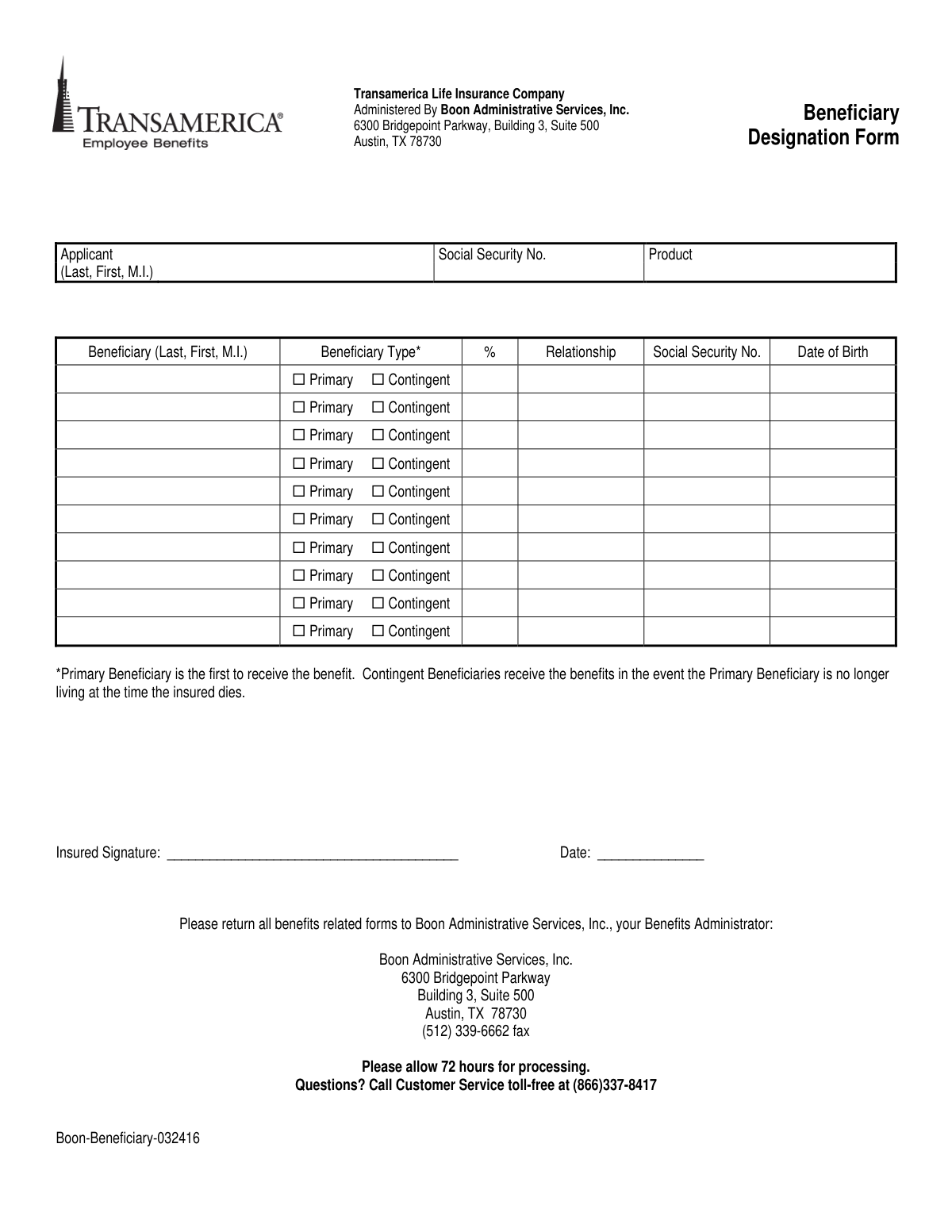
This form is a legal document that allows a policyholder to officially designate primary and contingent beneficiaries for their life insurance benefits. It is crucial for ensuring that assets are distributed according to the policyholder's wishes after their death. Today, this form can be filled out quickly and accurately using AI-powered services like Instafill.ai, which can also convert non-fillable PDF versions into interactive fillable forms.
Boon-Beneficiary-032416 is part of the
insurance forms, life insurance forms, Transamerica forms, beneficiary designation forms, company forms, insurance designation forms and insurance beneficiary forms categories on Instafill.
Rather not fill this in by hand? Instafill is an online form filler that completes PDF forms automatically — upload the blank form, answer a few questions, and the AI fills every field.
Form specifications
| Form name: | Transamerica Life Insurance Company Beneficiary Designation Form |
| Number of pages: | 1 |
| Language: | English |
Our AI automatically handles information lookup, data retrieval, formatting, and form filling.
It takes less than a minute to fill out Boon-Beneficiary-032416 using our AI form filling.
Securely upload your data. Information is encrypted in transit and deleted immediately after the form is filled out.
Instafill Demo: How to fill out PDF forms in seconds with AI
How to Fill Out Boon-Beneficiary-032416 Online for Free in 2026
Are you looking to fill out a BOON-BENEFICIARY-032416 form online quickly and accurately? Instafill.ai offers the #1 AI-powered PDF filling software of 2026, allowing you to complete your BOON-BENEFICIARY-032416 form in just 37 seconds or less.
Follow these steps to fill out your BOON-BENEFICIARY-032416 form online using Instafill.ai:
- 1 Navigate to Instafill.ai and upload the Beneficiary Designation Form or select it from their template library.
- 2 Provide your personal details in the 'Applicant' section, including your full name and Social Security Number.
- 3 Enter the full name, relationship, Social Security Number, date of birth, and benefit percentage for each Primary Beneficiary.
- 4 Optionally, add Contingent Beneficiaries who will receive benefits if the Primary Beneficiary is deceased at the time of claim.
- 5 Carefully review all the information you've entered for accuracy, ensuring names are spelled correctly and percentages total 100% for each beneficiary type.
- 6 Sign and date the form in the designated 'Insured Signature' field.
- 7 Download the completed form to print and mail or fax to Boon Administrative Services, Inc. at the address provided.
Our AI-powered system ensures each field is filled out correctly, reducing errors and saving you time.
Why Choose Instafill.ai for Your Fillable Boon-Beneficiary-032416 Form?
Speed
Complete your Boon-Beneficiary-032416 in as little as 37 seconds.
Up-to-Date
Always use the latest 2026 Boon-Beneficiary-032416 form version.
Cost-effective
No need to hire expensive lawyers.
Accuracy
Our AI performs 10 compliance checks to ensure your form is error-free.
Security
Your personal information is protected with bank-level encryption.
Frequently Asked Questions About Boon-Beneficiary-032416
This form is used to officially name the person or people who will receive the benefits from your Transamerica Life Insurance policy after your death. It ensures the proceeds are distributed according to your wishes.
The insured individual, whose life is covered by the policy, must complete and sign this form to designate their beneficiaries.
A Primary Beneficiary is the first person to receive the benefits. A Contingent Beneficiary will only receive the benefits if the Primary Beneficiary is no longer living when the insured person dies.
You need to provide each beneficiary's full name, their relationship to you, their Social Security Number, and their date of birth. You must also assign a percentage of the benefit they will receive.
Yes, the total percentage allocated to all your Primary Beneficiaries must equal 100%. If you name Contingent Beneficiaries, their allocated percentages must also total 100%.
Providing a Social Security Number is important for accurate identification and a smooth claims process. If you cannot obtain it, you should contact Customer Service at (866) 337-8417 for guidance on how to proceed.
You must return the signed form to Boon Administrative Services, Inc. You can mail it to the Austin, TX address or fax it to (512) 339-6662, both of which are listed on the form.
After you submit the form, you should allow 72 hours for it to be processed by the benefits administrator.
Yes, you can update your beneficiary designations at any time by submitting a new, completed form. The most recent form on file will replace any previous designations.
If you have any questions while completing the form, you can call the Customer Service line toll-free at (866) 337-8417.
In the 'Product' field, you should write the name of your specific insurance plan, such as 'Group Life Insurance'. If you are unsure, contact customer service for clarification.
Yes, services like Instafill.ai use AI to auto-fill form fields accurately and save time. This can help you complete the form quickly and reduce the chance of errors.
You can use a service like Instafill.ai to upload the PDF and fill it out on your computer. Once completed, you can print the form, sign it, and submit it as instructed.
If you have a non-fillable or 'flat' PDF, tools like Instafill.ai can convert it into an interactive form. This allows you to type your information directly into the fields before printing.
Compliance Boon-Beneficiary-032416
Validation Checks by Instafill.ai
1
Ensures Applicant Name is Provided
Checks that the 'Applicant (Last, First, M.I.)' field is not empty. This is critical for identifying the policyholder whose benefits are being designated. A submission without the applicant's name cannot be processed as it's impossible to link it to an existing policy.
2
Validates Applicant Social Security Number Format
Verifies that the 'Social Security No.' for the applicant is a 9-digit number, potentially in XXX-XX-XXXX format. The SSN is a primary unique identifier for the policyholder, essential for accurate record-keeping and preventing fraud. An invalid SSN will cause the record to be rejected.
3
Ensures At Least One Primary Beneficiary is Designated
This check confirms that at least one beneficiary row has the 'Primary' checkbox selected. Primary beneficiaries are first in line to receive benefits, and their absence makes the designation incomplete as there is no one to receive the initial payout. The form's purpose is unfulfilled without a primary beneficiary.
4
Validates Primary Beneficiary Percentages Sum to 100%
Calculates the sum of the '%' field for all beneficiaries marked as 'Primary'. This total must equal exactly 100% to ensure the entire benefit is allocated without ambiguity. If the sum is over or under 100%, the form is legally invalid and must be corrected by the applicant.
5
Validates Contingent Beneficiary Percentages Sum to 100%
Calculates the sum of the '%' field for all beneficiaries marked as 'Contingent'. This total must equal 100% to ensure a clear and complete distribution of benefits if no primary beneficiaries are able to receive them. An incorrect sum would create legal and administrative problems during a claim.
6
Verifies Completeness of Each Beneficiary Entry
For every row that has a beneficiary name entered, this check ensures that the beneficiary type (Primary/Contingent), percentage, and relationship are also filled out. Missing information for a listed beneficiary creates an incomplete and ambiguous record, preventing proper processing. It ensures that every intended beneficiary is fully defined.
7
Ensures Percentage is a Valid Number
This check verifies that the value entered in the '%' column for each beneficiary is a positive number greater than zero. Non-numeric characters, negative numbers, or a value of zero are invalid as they do not represent a valid share of the benefit. This prevents data entry errors and ensures proper allocation math.
8
Validates Beneficiary Date of Birth Format and Plausibility
Checks that the 'Date of Birth' for each beneficiary is in a valid format (e.g., MM/DD/YYYY) and is a realistic date (i.e., not in the future). This information is crucial for verifying the beneficiary's identity at the time of a claim and is especially important if the beneficiary is a minor. An invalid date can delay or complicate the payout process.
9
Ensures Beneficiary Type is Selected for Each Entry
For each row with a beneficiary's name, this validation confirms that either the 'Primary' or 'Contingent' checkbox is selected. Without this designation, the system cannot determine the order of payment, making the entry ambiguous and the form invalid. This check is fundamental to the logic of beneficiary succession.
10
Confirms Insured's Signature is Present
Validates that the 'Insured Signature' field is not blank. The applicant's signature is a legal requirement that attests to their intent and makes the beneficiary designation legally binding. A form without a signature is invalid and cannot be acted upon.
11
Validates Signature Date is Present and Valid
Ensures the 'Date' field next to the signature is filled in with a valid, non-future date. This date establishes the legal effective date of the beneficiary designation, which is critical as it supersedes any previous designations. A missing or invalid date makes the document's timing and validity questionable.
12
Requires Product Field to be Completed
Checks that the 'Product' field is not empty. This field is necessary to associate the beneficiary designation with a specific insurance policy or account. Without this information, the form cannot be correctly applied to the applicant's holdings.
Common Mistakes in Completing Boon-Beneficiary-032416
A frequent error is allocating percentages that do not sum to 100% for each beneficiary type. For example, the total percentage for all Primary Beneficiaries must equal 100%, and the total for all Contingent Beneficiaries must also equal 100%. This mistake can render the designation invalid or cause significant delays and disputes during the claims process. Always double-check your math before signing the form.
Applicants often confuse the roles of Primary and Contingent beneficiaries, sometimes listing everyone as Primary or not listing a Contingent at all. A Primary beneficiary is the first in line to receive the benefit, while a Contingent beneficiary only receives it if all Primary beneficiaries are deceased. Failing to designate a Contingent can result in the benefit going to your estate, causing probate delays.
Leaving fields like a beneficiary's Social Security Number or Date of Birth blank is a common oversight. While sometimes optional, this information is crucial for the administrator to quickly and accurately locate the beneficiary and verify their identity. Omitting these details can lead to significant delays in paying out the benefit. It's best to gather all required information before you start filling out the form.
This form is a non-fillable PDF, meaning it must be printed and completed by hand. Illegible handwriting can cause administrators to misinterpret names, social security numbers, or percentages, leading to critical data entry errors. To prevent this, write clearly in block letters or use a tool like Instafill.ai, which can convert the flat PDF into a digitally fillable version for clean, typed entries.
Applicants may list beneficiaries by a nickname (e.g., 'Mike' instead of 'Michael') or omit a middle initial or suffix (e.g., Jr., III). This creates ambiguity and can complicate the identity verification process for the claims administrator. Always use the beneficiary's full legal name as it appears on their government-issued identification to ensure there are no disputes.
An unsigned or undated beneficiary designation form is not legally valid. This simple oversight is one of the most common reasons for a form to be rejected, meaning your previous designation (or no designation) remains in effect. Always perform a final review to ensure you have signed and dated the document in the appropriate fields before submitting it.
A typographical error in the applicant's own Social Security Number is a critical mistake. This number is the primary identifier used by the administrator to link the form to the correct insurance policy or account. An incorrect SSN will cause the form to be rejected or misfiled, failing to update your beneficiaries as intended. AI-powered tools like Instafill.ai can help prevent this by validating number formats.
Naming a minor child directly as a beneficiary without establishing a custodian can create legal complications. Minors cannot legally receive insurance proceeds directly, which forces the court to appoint a guardian, a costly and time-consuming process. To avoid this, you should name an adult custodian for the minor under the Uniform Transfers to Minors Act (UTMA) or consult legal advice for setting up a trust.
The form includes a 'Product' field with no explanation, which can confuse applicants. People may leave it blank or guess, potentially causing administrative issues in identifying which specific insurance product this designation applies to. If you are unsure what to enter, contact your HR department or the benefits administrator listed on the form for clarification.
Saved over 80 hours a year
“I was never sure if my IRS forms like W-9 were filled correctly. Now, I can complete the forms accurately without any external help.”
Kevin Martin Green
Your data stays secure with advanced protection from Instafill and our subprocessors




Robust compliance program
Transparent business model
You’re not the product. You always know where your data is and what it is processed for.
ISO 27001, HIPAA, and GDPR
Our subprocesses adhere to multiple compliance standards, including but not limited to ISO 27001, HIPAA, and GDPR.
Security & privacy by design
We consider security and privacy from the initial design phase of any new service or functionality. It’s not an afterthought, it’s built-in, including support for two-factor authentication (2FA) to further protect your account.
Fill out Boon-Beneficiary-032416 with Instafill.ai
Worried about filling PDFs wrong? Instafill securely fills transamerica-life-insurance-company-beneficiary-designation-form forms, ensuring each field is accurate.
