Yes! You can use AI to fill out Transfer Initiation Form (TIF)
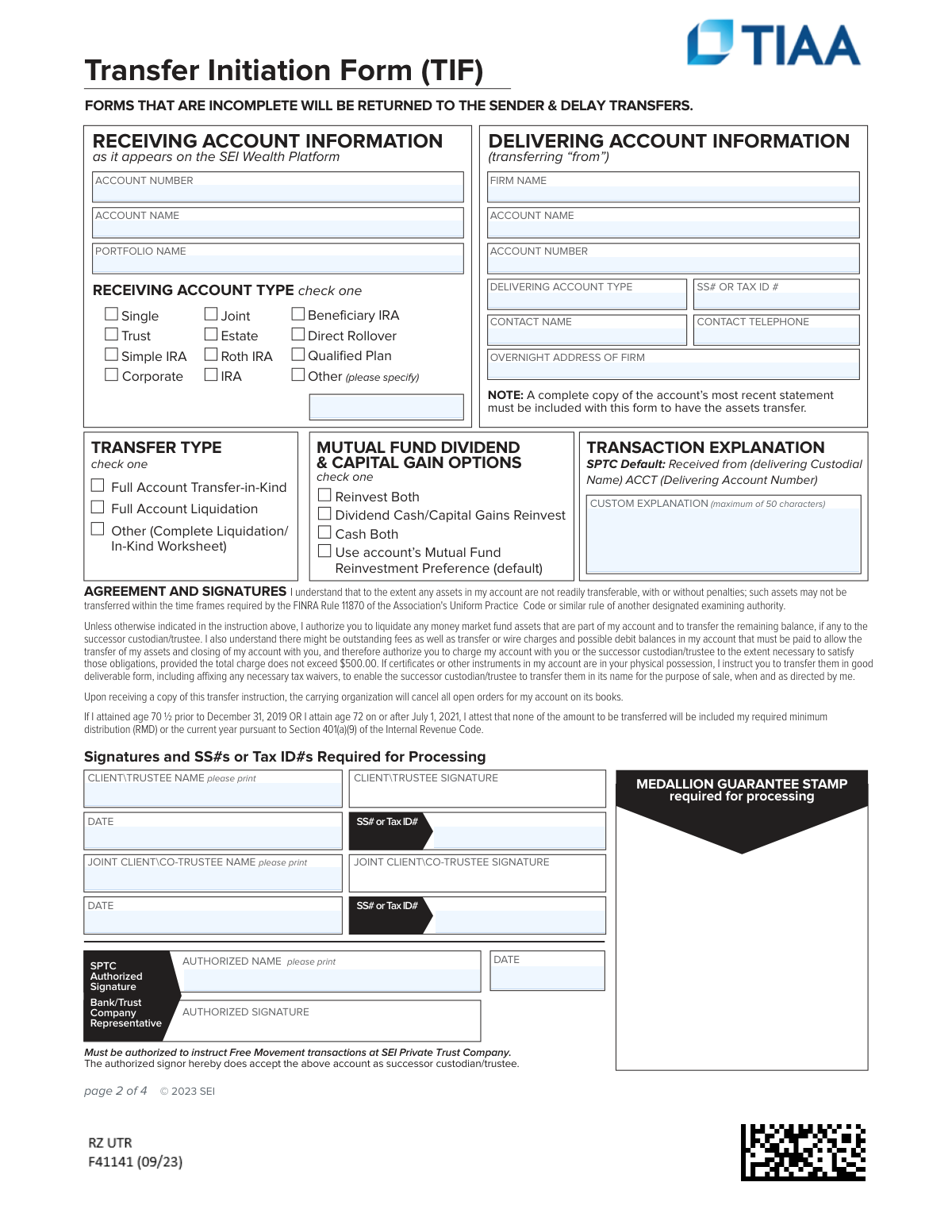
A Transfer Initiation Form (TIF) is a document used to formally authorize the movement of financial assets from one institution (the delivering firm) to another (the receiving custodian/trustee). It is critical for ensuring a smooth transfer process by providing all necessary account details, transfer instructions, and required authorizations to prevent delays. Today, this form can be filled out quickly and accurately using AI-powered services like Instafill.ai, which can also convert non-fillable PDF versions into interactive fillable forms.
Rather not fill this in by hand? Instafill is an online form filler that completes PDF forms automatically — upload the blank form, answer a few questions, and the AI fills every field.
Form specifications
| Form name: | Transfer Initiation Form (TIF) |
| Number of pages: | 1 |
| Language: | English |
Our AI automatically handles information lookup, data retrieval, formatting, and form filling.
It takes less than a minute to fill out TIF using our AI form filling.
Securely upload your data. Information is encrypted in transit and deleted immediately after the form is filled out.
Instafill Demo: How to fill out PDF forms in seconds with AI
How to Fill Out TIF Online for Free in 2026
Are you looking to fill out a TIF form online quickly and accurately? Instafill.ai offers the #1 AI-powered PDF filling software of 2026, allowing you to complete your TIF form in just 37 seconds or less.
Follow these steps to fill out your TIF form online using Instafill.ai:
- 1 Navigate to Instafill.ai and upload your Transfer Initiation Form (TIF) or select it from the platform's template library.
- 2 Use the AI assistant to automatically populate key details for both the delivering ('from') and receiving ('to') accounts, including firm names, account numbers, and contact information.
- 3 Clearly indicate the transfer type (e.g., Full Account Transfer, Full Account Liquidation) and select your preference for handling mutual fund dividends and capital gains.
- 4 If applicable, complete the 'Liquidation/In-kind Worksheet' for partial transfers, specifying which assets to liquidate or transfer as-is.
- 5 Review all entered information for accuracy, then securely provide all required signatures, dates, and Social Security/Tax ID numbers.
- 6 Ensure a Medallion Guarantee Stamp is affixed if required for your transfer type.
- 7 Download the completed form, attach a copy of your most recent account statement, and submit the package as instructed by the new custodian.
Our AI-powered system ensures each field is filled out correctly, reducing errors and saving you time.
Why Choose Instafill.ai for Your Fillable TIF Form?
Speed
Complete your TIF in as little as 37 seconds.
Up-to-Date
Always use the latest 2026 TIF form version.
Cost-effective
No need to hire expensive lawyers.
Accuracy
Our AI performs 10 compliance checks to ensure your form is error-free.
Security
Your personal information is protected with bank-level encryption.
Frequently Asked Questions About TIF
This form is used to authorize the transfer of your account assets from your current financial institution to a new custodian, SEI Private Trust Company.
Any individual or entity wishing to move their investment account assets to an account held at SEI Private Trust Company must complete this form to initiate the transfer.
You must include a complete copy of your most recent account statement from the firm you are transferring from. Failure to include this will result in processing delays.
A Medallion Guarantee Stamp is a special signature guarantee that protects against fraudulent securities transfers. It is required for processing and can be obtained from a participating financial institution like a bank or credit union.
A 'Transfer-in-Kind' moves your investments as they are, without selling them. A 'Full Account Liquidation' means all your assets will be sold first, and the resulting cash will be transferred to your new account.
To perform a partial transfer, you must use the 'Liquidation/In-kind Worksheet' on page 3. On this worksheet, you will list the specific assets and indicate whether to liquidate them or transfer them in-kind.
SEI Private Trust Company will process your request and coordinate with your current firm to transfer the assets. You can monitor the progress of your transfer through the SEI Wealth Platform.
Transfer times vary depending on the types of assets being moved and the delivering firm's processing speed. Incomplete forms or missing documents are the most common cause of delays.
You can get a recent status update on your transfer by accessing the 'Pending Transfer' screen within the SEI Wealth Platform.
Incomplete forms, including those missing required signatures, Social Security Numbers, or a Medallion Guarantee Stamp, will be returned to the sender. This will delay the transfer process.
Yes, services like Instafill.ai use AI to accurately auto-fill form fields with your saved information, which can save you time and help prevent errors.
Simply upload the PDF to Instafill.ai. The platform will make the form interactive, allowing you to type in your information and use AI-powered autofill to complete it quickly before downloading.
You can use a service like Instafill.ai, which can convert flat, non-fillable PDFs into interactive forms that you can easily complete on your computer.
Yes, by signing this form you attest that none of the funds being transferred are part of your current year's Required Minimum Distribution (RMD). You must satisfy your RMD before initiating the transfer.
No, SEI Private Trust Company does not accept money market funds in-kind. These funds must be liquidated by your current firm, and the cash proceeds will be transferred.
Compliance TIF
Validation Checks by Instafill.ai
1
SSN/TIN Format Validation
This check verifies that the Social Security Number or Taxpayer Identification Number fields ('Delivering – SS or Tax ID #', 'Client\Trustee Signature - SS#/Tax ID', etc.) adhere to the standard 9-digit format (XXX-XX-XXXX for SSN or XX-XXXXXXX for TIN). This is critical for proper tax reporting and identity verification as required by financial regulations. If the format is invalid, the form will be rejected as it fails a primary identification requirement.
2
Mandatory Client Signature Presence
Ensures that the 'CLIENT\TRUSTEE SIGNATURE' field on page 2 is not empty. This signature provides the legal authorization to initiate the asset transfer from the client's old account. Without this signature, the entire request is legally non-binding and cannot be processed, resulting in an immediate return of the form and significant delays.
3
Medallion Guarantee Stamp Confirmation
Validates that the Medallion Signature Guarantee stamp has been affixed to the form, as indicated by a corresponding check or data point. This stamp is a special guarantee required by financial institutions to protect against fraudulent transfers of securities. Failure to include this guarantee will cause the delivering firm to reject the transfer request outright.
4
Recent Account Statement Attachment Check
Verifies that a copy of the client's most recent account statement from the delivering firm is included with the submission. This statement is essential for the operations team to confirm the assets held in the account and ensure all are correctly transferred. Missing this document will halt the process, as the assets cannot be verified, and the form will be considered incomplete.
5
Exclusive Transfer Type Selection
This check ensures that exactly one option is selected in the 'TRANSFER TYPE' section on page 2. The selection dictates the entire transfer workflow (full, liquidation, or partial). An ambiguous selection (none or multiple checked) makes the client's intent unclear and prevents the processing team from taking any action, leading to rejection.
6
Conditional Worksheet Requirement
If the 'Transfer Type' selected is 'Other (Complete Liquidation/ In-Kind Worksheet)', this validation confirms that the 'Liquidation/In-kind Worksheet' on page 3 contains at least one asset entry. This ensures that the instruction for a partial transfer is accompanied by the specific details of which assets to move. If the worksheet is empty, the request is contradictory and incomplete.
7
Joint Account Signature Completeness
If the 'Receiving Account Type' is marked as 'Joint', this check validates that the 'JOINT CLIENT\CO-TRUSTEE' name, signature, and SSN/Tax ID fields are all completed. For joint accounts, legal and operational procedures require authorization from all account holders to process a transfer. Missing information from any joint owner will prevent the transfer from proceeding.
8
Delivering Account Information Completeness
Validates that the 'Delivering – Firm Name', 'Delivering – Account Name', and 'Delivering – Account Number' fields are all populated. This information is fundamental for locating the correct account at the delivering institution through the Automated Customer Account Transfer Service (ACATS). If any of this information is missing or incorrect, the transfer request will fail to locate the source account.
9
Receiving Account Information Completeness
Ensures the 'Receiving – Account Number' and 'Receiving – Account Name' fields are filled out correctly as they appear on the SEI Wealth Platform. This information is critical for crediting the transferred assets to the correct destination account. An error or omission here could lead to the assets being rejected or misrouted, causing significant reconciliation issues.
10
Custom Explanation Character Limit
Verifies that the text entered into the 'CUSTOM EXPLANATION' field does not exceed the 50-character maximum. This field is often used for transaction descriptions in downstream reporting and accounting systems that have strict data length limitations. Exceeding the limit could cause data truncation, leading to incomplete records or system errors.
11
Worksheet Row Action Validation
For each asset row entered on the 'Liquidation/In-kind Worksheet', this check ensures that either 'Liquidate' or 'Transfer In-Kind' is selected, but not both. A clear, unambiguous instruction is required for every asset being partially transferred. A missing or conflicting instruction for any single asset will put the transfer of that asset on hold until clarification is received.
12
Date Field Format and Presence
This validation checks that all date fields ('CLIENT\TRUSTEE SIGNATURE DATE', 'JOINT CLIENT\CO-TRUSTEE SIGNATURE DATE', etc.) are populated with a valid date in a standard format (e.g., MM/DD/YYYY). The signature date is a key piece of metadata for audit trails and establishing the legal timing of the authorization. An invalid or missing date can cause compliance and record-keeping failures.
13
Worksheet Signature Requirement for Partial Transfers
If the 'Liquidation/In-kind Worksheet' on page 3 is used for a partial transfer, this validates that the client signature and Medallion Guarantee stamp are present on that specific page. The form explicitly requires this separate authorization for the specific asset instructions. A missing signature or stamp on this page invalidates the partial transfer instructions, even if the main form is signed.
14
Contact Telephone Number Format
This check ensures the 'Delivering – Contact Telephone' number is in a valid and recognizable phone number format. This contact information is vital for the processing team to quickly resolve discrepancies or issues with the delivering firm's operations department. An invalid number hinders communication and can turn a simple query into a lengthy delay.
Common Mistakes in Completing TIF
Applicants often confuse this with a standard notary stamp or overlook it entirely. A Medallion Signature Guarantee is a special stamp used by financial institutions to guarantee the authenticity of a signature for transferring securities, and its absence will lead to immediate rejection of the form. To avoid this, you must visit your bank or brokerage firm to obtain the official stamp; it cannot be done by a public notary. This is a critical step that cannot be automated.
The form explicitly states multiple times that a complete copy of the most recent statement from the delivering account is required. People often forget to include this separate document, which is essential for the receiving institution to verify the assets being transferred. This omission is a primary cause of processing delays. Always double-check that the statement is included with your submission before sending.
Users frequently enter an incomplete firm name, an incorrect account number, or leave the contact information blank for the delivering ('from') institution. This happens when they don't have their old account statement handy while filling out the form. Inaccurate information will cause the automated transfer (ACATS) to fail, requiring manual intervention and causing significant delays. Using a tool like Instafill.ai can help by saving and accurately auto-filling this type of recurring information from previous documents.
The form requires signatures and Social Security or Tax ID Numbers from all account holders (e.g., Client/Trustee and Joint Client/Co-Trustee). It's common for one party to forget to sign or write their SSN/TIN, especially on joint accounts. Any missing signature or ID number will render the form incomplete and halt the transfer process until a properly executed version is received.
If a user wants to perform a partial transfer (i.e., not move the entire account), they must complete the detailed worksheet on page 3. Many people either check 'Other' on the first page and forget the worksheet, or they assume they can list the assets elsewhere. This results in the request being rejected for being unclear. If you are not transferring everything, you must use the worksheet and provide another signature and Medallion Guarantee stamp on that page.
Applicants may mistakenly select 'Full Account Liquidation' when they intend to transfer their securities 'In-Kind'. This critical error can lead to the unintended sale of all assets, potentially triggering significant capital gains taxes and transaction fees. It is vital to understand the difference: 'In-Kind' moves the actual securities, while 'Liquidation' sells them and moves the cash. Carefully review this selection before signing.
A frequent data entry error is transposing the information for the 'Delivering Account' (the old firm you are transferring from) and the 'Receiving Account' (the new SEI account). This simple mix-up can cause the entire transfer request to be misdirected and fail. To prevent this, carefully read the section headers and verify that the 'from' account details are in the 'Delivering' section and the 'to' account details are in the 'Receiving' section.
When completing the worksheet for a partial transfer, users often omit necessary details like the 'Asset ID' (CUSIP), 'Cost Basis', or 'Tax Acq. Date'. Furthermore, they may fail to clearly check either 'Liquidate' or 'Transfer In-Kind' for each specific asset listed. Incomplete or ambiguous instructions on this worksheet will cause the request to be returned for clarification, delaying the transfer of those specific assets.
A simple typo or transposed digit in either the delivering or receiving account number is a very common mistake that will cause an automatic transfer to fail. These numbers must be exact matches to the records at both institutions. To avoid this, copy the account numbers directly from your statements. AI-powered tools like Instafill.ai can help prevent this by validating number formats and accurately populating fields from saved data, reducing the risk of manual entry errors.
Within the signature block's fine print, the signer attests that the transfer does not contain their Required Minimum Distribution (RMD) for the current year. Many people sign without reading or understanding this clause, which can lead to complications and potential tax penalties with the IRS if an RMD is improperly rolled over. If you are of RMD age, you must ensure you have already taken your distribution for the year from the delivering account before initiating the transfer.
Saved over 80 hours a year
“I was never sure if my IRS forms like W-9 were filled correctly. Now, I can complete the forms accurately without any external help.”
Kevin Martin Green
Your data stays secure with advanced protection from Instafill and our subprocessors




Robust compliance program
Transparent business model
You’re not the product. You always know where your data is and what it is processed for.
ISO 27001, HIPAA, and GDPR
Our subprocesses adhere to multiple compliance standards, including but not limited to ISO 27001, HIPAA, and GDPR.
Security & privacy by design
We consider security and privacy from the initial design phase of any new service or functionality. It’s not an afterthought, it’s built-in, including support for two-factor authentication (2FA) to further protect your account.
Fill out TIF with Instafill.ai
Worried about filling PDFs wrong? Instafill securely fills transfer-initiation-form-tif forms, ensuring each field is accurate.
