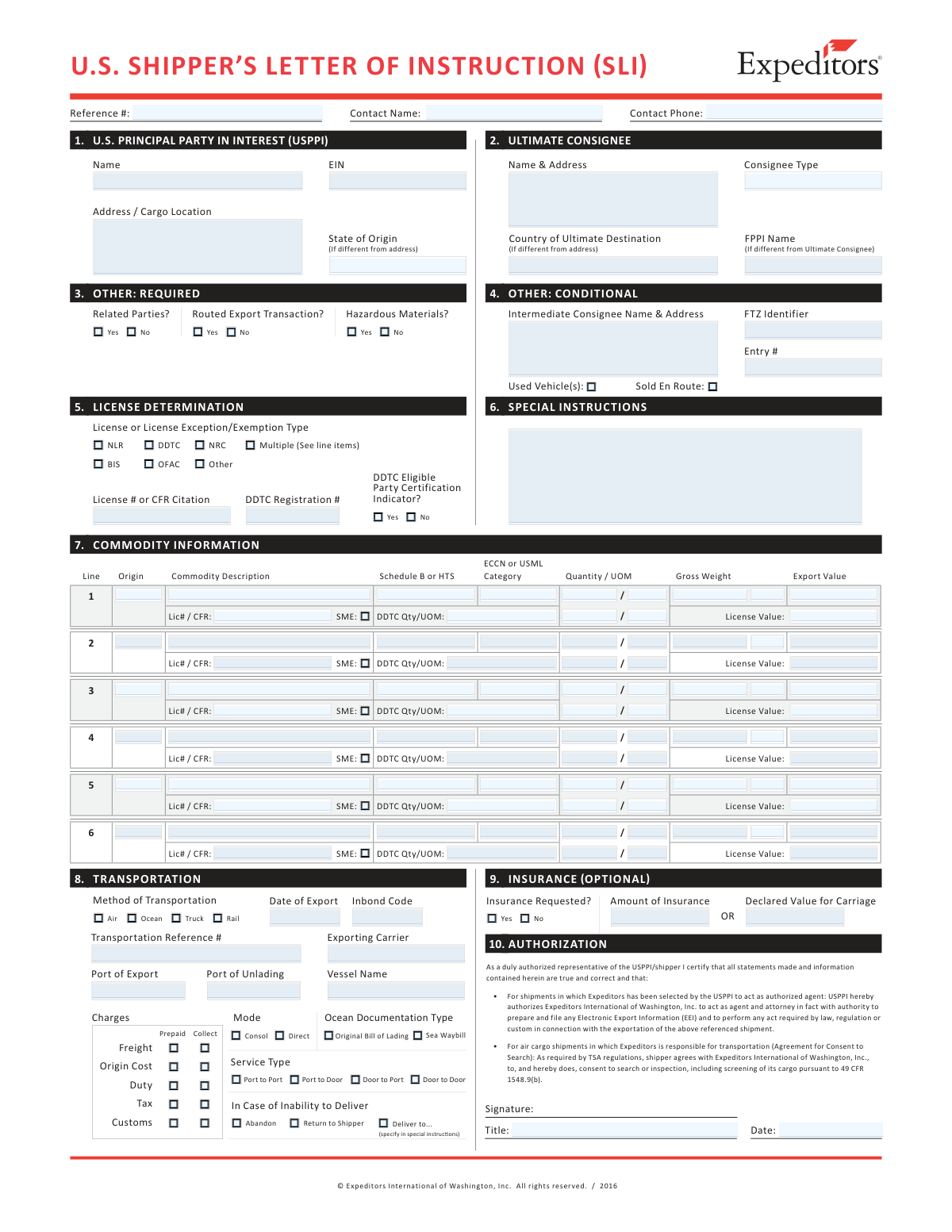
Yes! You can use AI to fill out U.S. Shipper’s Letter of Instruction (SLI)
A U.S. Shipper’s Letter of Instruction (SLI) is a shipper-provided instruction sheet used in international shipping to communicate key export and transportation details to a forwarder or agent. It captures the data elements commonly required to prepare export documentation and, when applicable, to transmit Electronic Export Information (EEI) in the Automated Export System (AES). The SLI can also include optional insurance and declared value instructions and may grant the forwarder authorization (and, for air cargo, consent to screening) when a separate power of attorney is not provided. Completing it accurately helps ensure export compliance, correct routing, and proper handling of liability/insurance choices.
Our AI automatically handles information lookup, data retrieval, formatting, and form filling.
It takes less than a minute to fill out SLI using our AI form filling.
Securely upload your data. Information is encrypted in transit and deleted immediately after the form is filled out.
Form specifications
| Form name: | U.S. Shipper’s Letter of Instruction (SLI) |
| Number of pages: | 3 |
| Filled form examples: | Form SLI Examples |
| Language: | English |
Instafill Demo: filling out a legal form in seconds
How to Fill Out SLI Online for Free in 2026
Are you looking to fill out a SLI form online quickly and accurately? Instafill.ai offers the #1 AI-powered PDF filling software of 2026, allowing you to complete your SLI form in just 37 seconds or less.
Follow these steps to fill out your SLI form online using Instafill.ai:
- 1 Enter shipment reference details and parties: USPPI/shipper information, ultimate consignee, intermediate consignee (if any), and contact name/title/phone.
- 2 Complete export compliance and transaction indicators: routed export transaction status, related parties, hazardous materials, used vehicle indicator, and any DDTC/OFAC/BIS-related certifications as applicable.
- 3 Provide license determination details: select NLR or specify license/license exception/exemption type, and enter license numbers/CFR citations, DDTC registration, and any required values/quantities.
- 4 Add commodity line items: commodity description, Schedule B/HTS, ECCN or USML category, quantity/UOM, gross weight, and export value for each line.
- 5 Fill transportation instructions: method/mode (air/ocean/truck/rail), service type (door/port options), ports (export/unlading), exporting carrier/vessel (if applicable), dates, in-bond/FTZ/entry details, and freight terms (prepaid/collect).
- 6 If needed, complete Section 9 options: request insurance (yes/no) and enter amount of insurance and/or declared value for carriage to increase carrier liability limits.
- 7 Review certifications/terms and sign/date as an authorized USPPI/shipper representative to authorize EEI filing and/or consent to air cargo screening when applicable.
Our AI-powered system ensures each field is filled out correctly, reducing errors and saving you time.
Why Choose Instafill.ai for Your Fillable SLI Form?
Speed
Complete your SLI in as little as 37 seconds.
Up-to-Date
Always use the latest 2026 SLI form version.
Cost-effective
No need to hire expensive lawyers.
Accuracy
Our AI performs 10 compliance checks to ensure your form is error-free.
Security
Your personal information is protected with bank-level encryption.
Frequently Asked Questions About Form SLI
The SLI provides shipment details and instructions to Expeditors, including the data needed to file Electronic Export Information (EEI) when required. It can also serve as shipping instructions when Expeditors is acting as the forwarding agent.
The USPPI/shipper (U.S. Principal Party in Interest) is responsible for providing accurate information, and an authorized representative must sign when authorizing Expeditors to prepare export documents/EEI or when required for air cargo screening consent.
Sections 1–7 should be reviewed and may be required depending on the shipment. Section 8 is conditional (transportation details/instructions), Section 9 is optional (insurance or higher declared value), and Section 10 is used for authorizations (EEI filing and/or TSA screening).
If a separate POA has been provided, you may not need to sign solely to authorize EEI filing/export documents. However, you still must sign if the shipment contains air cargo and Expeditors is responsible for transportation (to provide TSA-required consent to screening).
You’ll generally need names and addresses, contact name/title/phone, and identifiers such as the USPPI EIN. For the consignee, you may also need consignee type and destination details (including country of ultimate destination).
List each product on its own line with a clear commodity description, the correct Schedule B or HTS code, and the applicable ECCN or USML category if controlled. Provide quantity/UOM, gross weight, and export value for each line item.
This section indicates whether an export license is required and which authority applies. Common entries include NLR (No License Required) or a license/license exception/exemption type; if a license applies, include the license number or CFR citation as indicated on the form.
A routed export transaction generally means the foreign principal party in interest (FPPI) authorizes a U.S. agent to facilitate the export. If it is routed, you may need to provide FPPI name (if different from the ultimate consignee) and ensure responsibilities for EEI filing are clearly authorized.
Complete Section 8 if Expeditors is not responsible for transportation and you must provide transportation details for EEI filing, or if Expeditors is responsible and you need to provide shipping instructions (mode, service type, ports, carrier details, etc.).
Select the method of transportation (Air, Ocean, Truck, or Rail) and then choose the service type that matches your move (Port-to-Port, Door-to-Port, Port-to-Door, or Door-to-Door). Provide related routing details such as port of export and port of unlading when applicable.
Mark the “Hazardous Materials?” and/or “Used Vehicle(s)” indicators accordingly. You should also provide any required supporting details and documentation through your shipping process, since these shipments often have additional regulatory and carrier requirements.
To purchase insurance, check “Yes” under “Insurance Requested?” in Section 9 and enter the amount of insurance coverage you want. Insurance has an additional charge, and quotations/policy language are available upon request.
Declared Value for Carriage increases the carrier’s legal liability limit if you pay any required supplementary transportation charge, but it is not the same as all-risk cargo insurance. If you want broader financial protection, you should request insurance rather than relying only on declared value.
For air carriage, liability is commonly limited to about U.S. $9.07 per lb (U.S. $20 per kilogram) unless a higher value is declared and any required charges are paid. For ocean carriage, liability is often limited to U.S. $500 per package (or per customary freight unit for non-packaged goods) unless a higher value is declared and additional freight is paid.
The form states the shipper remains liable for collect freight charges if the shipment can’t be delivered as addressed or if the consignee refuses to accept delivery. A “Freight Collect” instruction alone typically does not remove the shipper’s responsibility for unpaid charges without a separate written agreement.
Compliance SLI
Validation Checks by Instafill.ai
1
USPPI Name and Full Address Completeness
Validates that the U.S. Principal Party in Interest (USPPI)/shipper name and full physical address are provided (street, city, state, postal code, country if applicable). This is required for EEI filing and to establish the legal exporting party. If any required address element is missing or appears to be a P.O. Box where a physical location is required, the submission should be rejected or routed for manual review.
2
USPPI EIN Format and Presence
Checks that the USPPI EIN is present and matches a valid EIN format (9 digits, optionally with a hyphen as XX-XXXXXXX). EIN is a core EEI data element and is used to identify the exporter in government filings. If the EIN is missing or malformed, the system should block EEI submission and prompt for correction.
3
Contact Name, Title, and Phone Number Validation
Ensures the USPPI contact name and title are populated and the contact phone number is in a valid format (E.164 or a consistent national format with country/area code). A reachable contact is critical for resolving export compliance, routing, and carrier questions. If the phone number fails validation or required contact fields are blank, the form should not be accepted as complete.
4
Signature and Signature Date Requirement Based on Authorization Conditions
Validates that the SLI is signed and dated by an authorized USPPI representative when authorization is being granted (e.g., no separate POA provided) and/or when air cargo screening consent is required for air shipments handled by Expeditors. The signature is the legal attestation enabling EEI filing and TSA screening consent where applicable. If the required signature/date is missing, the system should prevent processing and flag the shipment as unauthorized.
5
Routed Export Transaction Consistency (USPPI vs FPPI Fields)
If 'Routed Export Transaction' is marked Yes, validates that the Foreign Principal Party in Interest (FPPI) name is provided and that routed-transaction-related fields are not left blank. Routed transactions change who provides instructions and can affect EEI responsibilities and data sourcing. If routed is Yes but FPPI is missing (or routed is No but FPPI is filled in a way that implies routed), the submission should be flagged for correction.
6
Ultimate Consignee Name/Address and Consignee Type Validation
Checks that the ultimate consignee name and address are complete and that 'Consignee Type' is selected from allowed values (e.g., direct consumer, government, reseller, etc., as configured). Consignee identity and type are required for EEI and export compliance screening. If consignee details are incomplete or consignee type is missing/invalid, the form should fail validation.
7
Country of Ultimate Destination and State of Origin Format/Logic
Validates that the country of ultimate destination is provided using an approved country list/code set and that 'State of Origin' is a valid U.S. state/territory abbreviation when applicable. These fields are required for EEI and statistical reporting and must be standardized. If the destination country is missing/invalid or the state of origin is not a recognized code, the system should block submission.
8
Date of Export Format and Temporal Consistency
Ensures 'Date of Export' is present when required and follows a valid date format (e.g., MM/DD/YYYY) and represents a plausible calendar date. The export date drives filing timelines and compliance obligations. If the date is invalid, in the past beyond allowable thresholds, or missing when transportation details indicate an imminent export, the record should be rejected or escalated.
9
Transportation Method and Mode/Service Type Coherence
Validates that 'Method of Transportation' (Air/Ocean/Truck/Rail) is selected and that dependent fields (e.g., Ocean documentation type: Original Bill of Lading vs Sea Waybill; service type: Port-to-Port/Door-to-Door) are consistent with the chosen method. Correct transport mode is necessary for carrier documentation and regulatory filings. If an ocean-only field is selected for an air shipment (or vice versa), the system should require correction before acceptance.
10
Port of Export and Port of Unlading Required/Valid Values
Checks that Port of Export and Port of Unlading are provided when applicable and match valid port code/name lists (e.g., UN/LOCODE or internal standardized port master). Ports are required for routing, documentation, and EEI elements in many scenarios. If ports are missing, not recognized, or inconsistent with the selected mode, the submission should be flagged and prevented from downstream transmission.
11
Inbond Code and Entry Number Dependency Validation
If an Inbond Code is provided/required, validates that it is from an allowed set and that the related 'Entry #' is present and correctly formatted per the expected entry number rules. Inbond movements require accurate linkage to entry/inbond identifiers to avoid customs and transit issues. If an inbond code is selected without a valid entry number (or vice versa), the form should fail validation.
12
License Determination Completeness and License Identifier Rules
Validates that a license determination is selected (e.g., NLR, BIS, DDTC, OFAC, NRC, Other, or Multiple) and that when a licensable category is chosen, the corresponding 'License # or CFR Citation' and any required registration numbers (e.g., DDTC Registration #) are provided and properly formatted. Licensing data is critical to export legality and auditability. If a license-required selection is made without the required identifiers/citations, the system should block submission and mark it as compliance-incomplete.
13
Commodity Line Item Minimum Data and Line Number Integrity
Ensures at least one commodity line is present and that each line has required fields populated: origin, commodity description, Schedule B or HTS, quantity/UOM, gross weight, and export value. Line-level completeness is necessary for EEI, classification, and carrier documentation. If any required line field is missing or line numbering is duplicated/skipped in a way that suggests data loss, the submission should be rejected or sent for correction.
14
Schedule B/HTS and ECCN/USML Format Validation
Validates that Schedule B/HTS codes match expected numeric patterns/lengths (per configured rules) and that ECCN or USML category entries match recognized formats (e.g., ECCN like 5A992, USML like Category XI). Proper classification supports lawful export, screening, and accurate EEI reporting. If codes are malformed or contain free-text that cannot be validated, the system should require correction or trigger a classification review workflow.
15
Quantity/UOM and Weight Numeric Validation with Reasonableness Checks
Checks that quantity and gross weight are numeric, greater than zero, and paired with valid UOMs from an approved list; also applies reasonableness thresholds (e.g., weight not unrealistically high for the quantity/UOM). These values affect freight rating, carrier limits, and EEI statistics. If non-numeric values, negative/zero amounts, or invalid UOMs are detected, the submission should fail validation.
16
Insurance Requested and Amount/Declared Value Conditional Requirements
If 'Insurance Requested' is Yes, validates that 'Amount of Insurance' is provided, numeric, and greater than zero; if insurance is No, ensures the insurance amount is blank or zero per policy. Separately validates that 'Declared Value for Carriage' (if provided) is numeric and not contradictory to instructions (e.g., declared value present but special instructions indicate otherwise). If conditional monetary fields are missing or inconsistent with the Yes/No selection, the system should block submission and prompt for correction.
Common Mistakes in Completing SLI
Many filers skim the instructions and assume Sections 1–7 are optional, when the form states they may be required depending on shipment details. Missing USPPI, consignee, commodity, or license-related data can prevent EEI filing or cause the forwarder to stop the shipment to request corrections. Avoid this by reviewing each field in Sections 1–7 and completing every item that applies to your shipment scenario (especially parties, destination, commodity, and licensing).
A frequent error is mixing up the USPPI/shipper, Ultimate Consignee, Intermediate Consignee, and FPPI (when different), or copying the same name/address into multiple roles. This can lead to incorrect EEI party reporting, routed-transaction confusion, and compliance flags (e.g., sanctions screening or export control checks tied to the wrong entity). Avoid it by confirming who is the USPPI (U.S. seller/exporter), who is the actual end receiver (ultimate consignee), and only completing FPPI when it is different from the ultimate consignee.
People often enter a Social Security Number, a DUNS number, or an EIN with missing digits/hyphens in the EIN field. Invalid identifiers can cause EEI rejection or delays while the forwarder requests corrected tax/registration information. Avoid this by entering the USPPI EIN exactly as required (9 digits, typically formatted as XX-XXXXXXX) and verifying it matches the USPPI name on the form.
Filers commonly provide only a vague commodity description (e.g., “parts” or “samples”) and omit or guess the Schedule B/HTS code. Incorrect classification can result in EEI errors, misreported export statistics, licensing mistakes, and potential penalties if controlled items are misclassified. Avoid this by providing a clear, specific description and the correct Schedule B (for exports) or HTS as requested, aligned to each line item.
A common mistake is entering an ECCN in the USML field, listing “EAR99” as an ECCN, or selecting NLR without confirming whether the item is controlled. This can cause improper license determination, shipment holds, or serious compliance exposure if an ITAR-controlled item is treated as EAR/NLR. Avoid it by confirming whether the item is EAR-controlled (ECCN), ITAR-controlled (USML category), or truly NLR, and documenting the correct license exception/exemption or citation when applicable.
People often enter quantities without a unit of measure, use nonstandard UOMs, or provide gross weight that doesn’t reconcile with the number of packages/line items. These inconsistencies can trigger EEI validation issues, carrier documentation problems, and rating/billing disputes. Avoid it by using standard UOMs, ensuring each line has quantity and UOM, and checking that gross weight and totals align with packing lists and booking details.
Filers frequently enter the wrong “Export Value” by using the full commercial invoice total including freight/insurance, using a foreign currency amount without conversion, or leaving values blank for “no charge” shipments. Incorrect values can cause EEI rejection, inaccurate reporting, and customs/audit issues. Avoid it by entering the correct export value per line item (typically the selling price or cost if not sold), in the required currency, and consistent with the invoice and Incoterms.
Checkbox fields like Routed Export Transaction, Related Parties, and Sold En Route are often guessed or left inconsistent with the commercial terms. Wrong answers can change who is responsible for EEI filing, affect required data elements, and create compliance risk if the filing party is misidentified. Avoid it by confirming the Incoterms/contract terms and who controls the export movement, then answering these flags based on the actual transaction structure.
Many submissions select Air/Ocean/Truck/Rail incorrectly, choose Consol vs Direct inconsistently, or provide ports (Port of Export/Unlading) that don’t match the carrier routing. This leads to documentation rework, misrouted shipments, and EEI data mismatches. Avoid it by copying transportation details from the confirmed booking: correct mode, service type (Door-to-Door, Port-to-Port, etc.), exporting carrier/vessel (if known), and accurate ports.
A frequent misunderstanding is thinking that entering a Declared Value for Carriage purchases “all-risk” insurance, or checking “Insurance Requested” without entering an amount. This can leave the shipment underprotected and can also create billing disputes if a declared value triggers additional carrier charges. Avoid it by deciding explicitly: request insurance by checking “Yes” and entering the insurance amount, and only use Declared Value for Carriage to increase carrier liability limits (not as a substitute for insurance).
People often forget to sign/date the SLI or have someone sign who is not a duly authorized representative, especially when no separate POA is on file or when air cargo screening consent is required. This can stop EEI filing, delay tender to the airline, and create TSA compliance issues for passenger-aircraft cargo. Avoid it by confirming whether a POA exists, ensuring the correct authorization section is completed, and obtaining a valid signature, title, and date from an authorized USPPI/shipper representative.
Saved over 80 hours a year
“I was never sure if my IRS forms like W-9 were filled correctly. Now, I can complete the forms accurately without any external help.”
Kevin Martin Green
Your data stays secure with advanced protection from Instafill and our subprocessors
Robust compliance program
Transparent business model
You’re not the product. You always know where your data is and what it is processed for.
ISO 27001, HIPAA, and GDPR
Our subprocesses adhere to multiple compliance standards, including but not limited to ISO 27001, HIPAA, and GDPR.
Security & privacy by design
We consider security and privacy from the initial design phase of any new service or functionality. It’s not an afterthought, it’s built-in, including support for two-factor authentication (2FA) to further protect your account.
Fill out SLI with Instafill.ai
Worried about filling PDFs wrong? Instafill securely fills us-shippers-letter-of-instruction-sli forms, ensuring each field is accurate.