Yes! You can use AI to fill out VA Form 28-10286, Request for Retroactive Induction for a Period Previously Completed Under Chapter 33
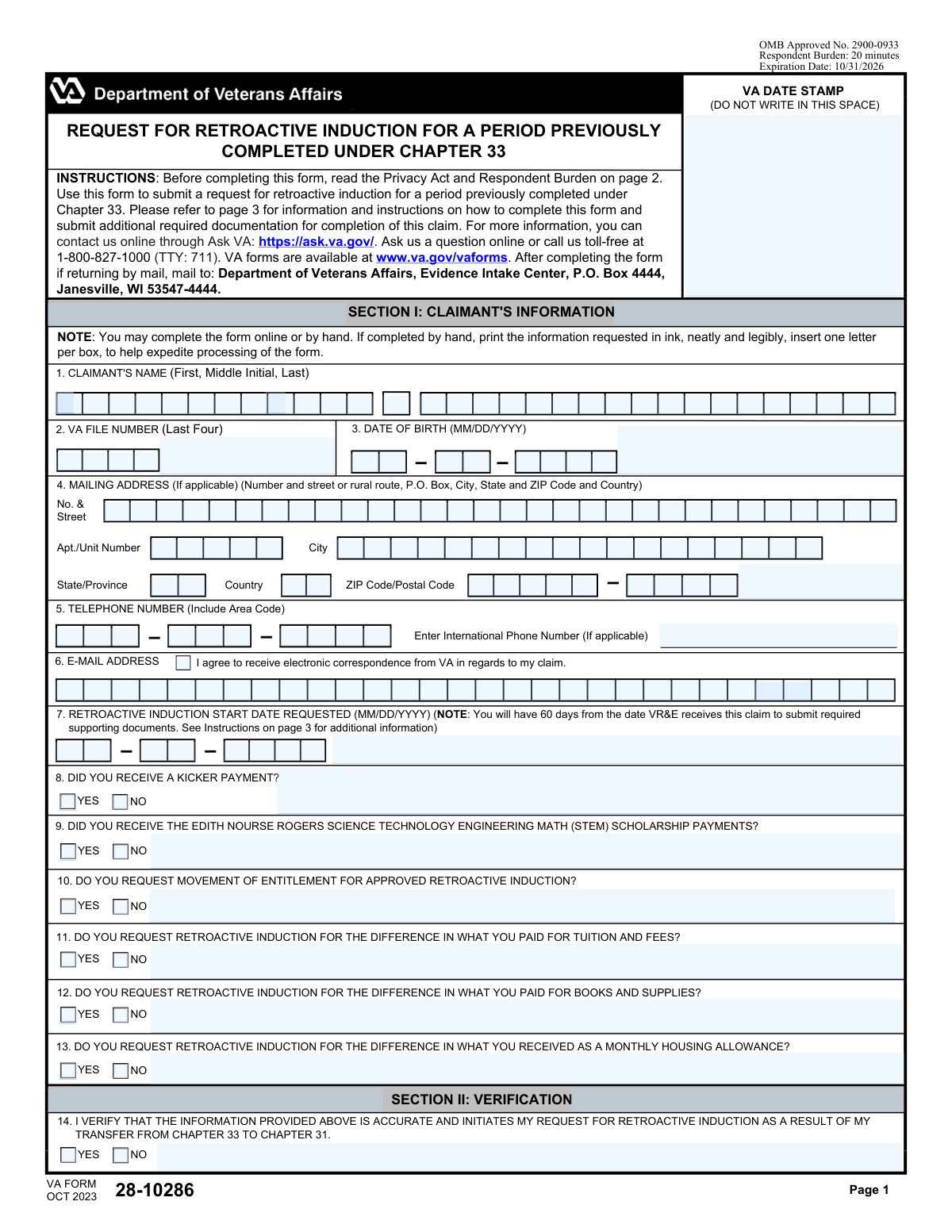
VA Form 28-10286 is a Department of Veterans Affairs document used by veterans who are entitled to Chapter 31 benefits to apply for a retroactive induction. This process allows them to reclassify a past educational period, originally paid for under Chapter 33, to Chapter 31 benefits, which may result in reimbursement for differences in tuition, fees, and allowances. Today, this form can be filled out quickly and accurately using AI-powered services like Instafill.ai, which can also convert non-fillable PDF versions into interactive fillable forms.
VA Form 28-10286 is part of the
VA forms, veterans benefits forms, Chapter 13 forms, education benefits forms and military education forms categories on Instafill.
Rather not fill this in by hand? Instafill is an online form filler that completes PDF forms automatically — upload the blank form, answer a few questions, and the AI fills every field.
Form specifications
| Form name: | VA Form 28-10286, Request for Retroactive Induction for a Period Previously Completed Under Chapter 33 |
| Number of pages: | 1 |
| Language: | English |
Our AI automatically handles information lookup, data retrieval, formatting, and form filling.
It takes less than a minute to fill out VA Form 28-10286 using our AI form filling.
Securely upload your data. Information is encrypted in transit and deleted immediately after the form is filled out.
Instafill Demo: How to fill out PDF forms in seconds with AI
How to Fill Out VA Form 28-10286 Online for Free in 2026
Are you looking to fill out a VA FORM 28-10286 form online quickly and accurately? Instafill.ai offers the #1 AI-powered PDF filling software of 2026, allowing you to complete your VA FORM 28-10286 form in just 37 seconds or less.
Follow these steps to fill out your VA FORM 28-10286 form online using Instafill.ai:
- 1 Navigate to Instafill.ai and upload or select VA Form 28-10286.
- 2 Use the AI assistant to accurately fill in your personal details in Section I, such as your name, VA file number, and contact information.
- 3 Enter the requested retroactive induction start date and answer the questions regarding Kicker payments and STEM scholarship benefits.
- 4 Indicate which specific retroactive benefits you are requesting by checking 'Yes' or 'No' for movement of entitlement, tuition, books, and housing allowance differences.
- 5 In Section II, verify your request and acknowledge the potential financial implications related to Kicker or STEM payments.
- 6 Proceed to Section III to certify the information by providing your digital signature and the date.
- 7 Review the entire form for accuracy, then download the completed document to mail or submit as per the VA's instructions, ensuring all required supporting documentation is attached.
Our AI-powered system ensures each field is filled out correctly, reducing errors and saving you time.
Why Choose Instafill.ai for Your Fillable VA Form 28-10286 Form?
Speed
Complete your VA Form 28-10286 in as little as 37 seconds.
Up-to-Date
Always use the latest 2026 VA Form 28-10286 form version.
Cost-effective
No need to hire expensive lawyers.
Accuracy
Our AI performs 10 compliance checks to ensure your form is error-free.
Security
Your personal information is protected with bank-level encryption.
Frequently Asked Questions About VA Form 28-10286
This form is used to request a retroactive induction, which reclassifies a past period of education you completed using Chapter 33 (Post-9/11 GI Bill) benefits to be covered under Chapter 31 (VR&E) benefits instead.
You should fill out this form if you have already been found entitled to Chapter 31 (Veteran Readiness and Employment) benefits and want to have a past training period, previously paid for by Chapter 33, re-categorized under Chapter 31.
In Section I, you must provide your personal details like name, VA file number, and contact information, and specify which retroactive benefits you are requesting, such as moving entitlement or reimbursement for tuition, books, or housing.
You may need to provide transcripts, a degree audit, and itemized receipts for tuition, fees, books, and supplies. You have 60 days from the date the VA receives your claim to submit all required supporting documents.
You must acknowledge that an overpayment or debt may be created if you received these payments during the retroactive period. The VA will seek to recover the total amount of Kicker payments, and STEM benefits may be deducted or result in a debt.
Yes, you can request reimbursement for tuition and fees you paid with your own money or student loans, but not for costs already covered by Chapter 33, grants, or other scholarships. You must provide proof of payment.
To request reimbursement, check 'Yes' for question 12 and submit VA Form 28-1905m, course syllabi, and itemized receipts showing you paid more than the book stipend you received under Chapter 33.
After completing the form, mail it to the Department of Veterans Affairs, Evidence Intake Center, P.O. Box 4444, Janesville, WI 53547-4444.
Yes, you can withdraw your claim by checking 'Yes' in Item 17 and signing the form. This request to withdraw can be made any time before the retroactive induction is officially processed.
Not always, because the two programs calculate the rate of pursuit differently. This can affect how much entitlement is used, so the transfer may not be a direct 1:1 exchange of months.
Yes, services like Instafill.ai use AI to accurately auto-fill your personal information onto the form, which can save you time and help prevent common errors.
You can use a service like Instafill.ai to easily complete the form on your computer or mobile device. The platform allows you to type your information directly into the fields and then download the completed PDF for submission.
If you have a non-fillable or 'flat' PDF, you can upload it to a service like Instafill.ai. It will convert the document into an interactive, fillable form that you can complete and sign online.
Compliance VA Form 28-10286
Validation Checks by Instafill.ai
1
Claimant Name Completeness
This check ensures that the 'First Name' and 'Last Name' fields in Item 1 are not empty. A full name is required for proper identification and to locate the claimant's records within the VA system. If either of these fields is left blank, the form submission will be rejected and the user will be prompted to provide the missing information.
2
VA File Number Format
This validation verifies that the 'VA FILE NUMBER (Last Four)' in Item 2 contains exactly four numeric digits. This number is often the last four of the SSN and is critical for uniquely identifying the claimant's file. An incorrect format could lead to processing delays or misidentification, so the submission will fail if the input is not four numbers.
3
Date of Birth Logical Validity
This check ensures the 'DATE OF BIRTH' in Item 3 is a valid, full date in MM/DD/YYYY format and that it is a date in the past. It also validates that the date represents a plausible age for a veteran, for example, being at least 17 years prior to the current date. An invalid or future date would be a data entry error and must be corrected before submission.
4
Email Address Format Validation
This validation ensures that the value entered in the 'E-MAIL ADDRESS' field (Item 6) conforms to the standard email format (e.g., '[email protected]'). This is important because the claimant can agree to receive electronic correspondence, and an invalid address would prevent communication. If the format is incorrect, the user will receive an error and must correct the address to proceed.
5
Retroactive Induction Start Date Logic
This check validates that the 'RETROACTIVE INDUCTION START DATE REQUESTED' in Item 7 is a valid date in the past. It also performs a logical check to ensure this date is after the claimant's date of birth (Item 3). Requesting a date before one's birth is impossible, and this check prevents logical inconsistencies that would halt claim processing.
6
Mandatory Yes/No Question Completion
This validation ensures that a 'Yes' or 'No' option has been selected for all applicable questions in Section I and II (Items 8 through 17). These questions are critical for determining the scope of the request and acknowledging financial implications. An incomplete form cannot be processed correctly, so the submission will be blocked until all required questions are answered.
7
Kicker Payment Acknowledgment Consistency
This check creates a logical link between Item 8 ('DID YOU RECEIVE A KICKER PAYMENT?') and Item 15 ('I ACKNOWLEDGE THAT AN OVERPAYMENT...WILL BE CREATED'). If the claimant answers 'Yes' to Item 8, they must also answer 'Yes' to Item 15. This ensures the claimant explicitly acknowledges the financial consequence of a potential debt before the claim is processed.
8
STEM Scholarship Acknowledgment Consistency
This validation enforces a rule between Item 9 ('DID YOU RECEIVE THE...STEM...SCHOLARSHIP PAYMENTS?') and Item 16 ('I ACKNOWLEDGE THAT THE TOTAL AMOUNT OF STEM MONTHS...MAY BE DEDUCTED'). If 'Yes' is selected for Item 9, the claimant must also select 'Yes' for Item 16. This is a critical check to confirm the claimant understands the potential for benefit deduction or debt creation.
9
Claim Verification Prerequisite
This check ensures that the claimant has answered 'Yes' to Item 14, which verifies the accuracy of the provided information. A 'No' answer or no answer at all indicates the claimant does not attest to the form's accuracy, making the claim invalid. The form submission should be blocked unless 'Yes' is selected, as this is a prerequisite for initiating the request.
10
Claim Withdrawal Contradiction
This validation checks for logical contradictions if the claimant chooses to withdraw the claim. If 'Yes' is selected for Item 17 ('I WISH TO WITHDRAW MY CLAIM...'), then Items 10, 11, 12, and 13 should not be 'Yes'. Submitting a withdrawal and a request for benefits simultaneously is contradictory and will result in a validation error prompting the user to clarify their intent.
11
Mandatory Signature Presence
This validation confirms that the 'CLAIMANT AUTHORIZED SIGNATURE' field (Item 18A) has been signed. A signature is a legal requirement to certify that the information is true and correct, and to authorize the VA to process the request. The form is considered incomplete and legally invalid without a signature, so submission will be prevented.
12
Signature Date Validity
This check ensures the 'DATE SIGNED' in Item 18B is a complete and valid date that is not in the future. The signature date authenticates when the certification was made and should be the current date or a date in the recent past. A future date is a logical impossibility and would invalidate the signature, so the form will not be accepted until a valid date is provided.
Common Mistakes in Completing VA Form 28-10286
Claimants often check 'Yes' to questions 10, 11, 12, or 13 without realizing they must also submit specific supporting documents like transcripts, degree audits, and itemized receipts within 60 days. This mistake happens because people focus on filling the form itself and miss the detailed instructions on page 3. Failure to provide this documentation will result in the denial of the requested benefits or an incomplete reimbursement, wasting the applicant's time. To avoid this, carefully read page 3 and gather all necessary documents before or immediately after submitting the form.
Forgetting to sign and date the form in fields 18A and 18B is one of the most common and easily avoidable errors. Applicants are often focused on the complex details of Section I and simply overlook the final certification step. An unsigned form is invalid and cannot be processed, leading to immediate rejection and significant delays until a properly signed version is received. Always double-check that you have physically or digitally signed and dated the form before submission.
Applicants who received Kicker or STEM payments (questions 8 and 9) may incorrectly answer 'No' on the acknowledgement questions (15 and 16) because they do not want to incur a debt. However, these questions are to verify understanding that a debt will be created if the retroactive induction is approved. Answering 'No' can create a contradiction that halts the claim, as acknowledging this financial consequence is a required part of the process. To avoid this, applicants must answer 'Yes' if they received these payments and wish to proceed with the claim, understanding it will result in an overpayment that needs to be resolved.
The form specifies an MM/DD/YYYY format for the Date of Birth (field 3), Retroactive Start Date (field 7), and Date Signed (field 18B). Applicants may use other formats like DD/MM/YYYY or write out the month, which can cause data entry errors and processing delays. This can lead to miscalculation of eligibility periods or rejection of the form for correction. To prevent this, strictly adhere to the two-digit month, two-digit day, and four-digit year format as requested.
Field 2 asks for the 'VA File Number' but the label below specifies 'Last Four'. This can be confusing, leading applicants to enter the last four digits of their Social Security Number instead of their VA File Number, or providing the full number when only four are needed. An incorrect identifier means the VA cannot locate the claimant's records, causing the claim to be delayed or rejected. Applicants should verify their correct VA File Number and enter the last four digits as instructed to ensure their form is matched to their file.
In field 7, claimants may mistakenly enter the current date or the start date of their most recent semester, rather than the specific historical start date for the period they want reviewed for retroactive benefits. This error leads the VA to evaluate the wrong timeframe, potentially causing the claimant to miss out on significant eligible benefits. Before filling, identify the exact start date of the earliest term you want considered for retroactive induction and enter it carefully.
Applicants may provide conflicting information, such as checking 'Yes' to withdrawing the claim (field 17) while also checking 'Yes' to requesting benefits (fields 10-13). Another common contradiction is stating they did not receive a Kicker payment (field 8) but then acknowledging the debt for it (field 15). These inconsistencies force the VA to halt processing and contact the claimant for clarification, causing major delays. Review the entire form before submitting to ensure your answers are logical and consistent with each other.
The form notes that if completed by hand, information should be printed neatly in ink. Many applicants submit forms with illegible handwriting, making it difficult for processors to accurately enter names, dates, and numbers. This can lead to critical data entry errors, returned mail, or complete rejection of the form. To avoid this, either fill the form out online or, if filling by hand, print slowly and clearly, using one letter per box as instructed. AI-powered tools like Instafill.ai can convert non-fillable PDFs into fillable versions, eliminating handwriting issues entirely.
Field 4 breaks the mailing address into specific components (Street, Apt/Unit, City, State, ZIP). Applicants sometimes rush and forget to include an apartment number or enter an incorrect ZIP code. An incomplete or inaccurate address can cause crucial correspondence from the VA, including decision letters or requests for more information, to be delayed or returned as undeliverable. Carefully fill out every part of the address field to ensure timely communication.
Question 17 gives the option to withdraw the claim, which can be confusing as it's placed within a series of 'Yes/No' verification questions. A claimant might misread it or check 'Yes' by mistake, effectively canceling the request they just filled out. This happens due to rushing or not reading each question carefully. This mistake completely nullifies the submission, and the claimant will not know until they follow up on their claim's status. To avoid this, only check 'Yes' on item 17 if you have reviewed the implications and have definitively decided not to proceed with the retroactive induction.
Saved over 80 hours a year
“I was never sure if my IRS forms like W-9 were filled correctly. Now, I can complete the forms accurately without any external help.”
Kevin Martin Green
Your data stays secure with advanced protection from Instafill and our subprocessors




Robust compliance program
Transparent business model
You’re not the product. You always know where your data is and what it is processed for.
ISO 27001, HIPAA, and GDPR
Our subprocesses adhere to multiple compliance standards, including but not limited to ISO 27001, HIPAA, and GDPR.
Security & privacy by design
We consider security and privacy from the initial design phase of any new service or functionality. It’s not an afterthought, it’s built-in, including support for two-factor authentication (2FA) to further protect your account.
Fill out VA Form 28-10286 with Instafill.ai
Worried about filling PDFs wrong? Instafill securely fills va-form-28-10286-request-for-retroactive-induction-for-a-period-previously-completed-under-chapter-33 forms, ensuring each field is accurate.
