Fill out Brotherhood Mutual forms
with AI.
Brotherhood Mutual forms are specialized documents designed to help churches and Christian ministries manage their unique insurance and risk management needs. These ministry forms are crucial for protecting the organization's assets, staff, and volunteers while ensuring compliance with insurance underwriting requirements. By documenting specific operational details, these forms allow ministries to focus on their core mission with the peace of mind that their liability and property risks are properly assessed and covered.
By continuing, you acknowledge Instafill's Privacy Policy and agree to get occasional product update and promotional emails.
About Brotherhood Mutual forms
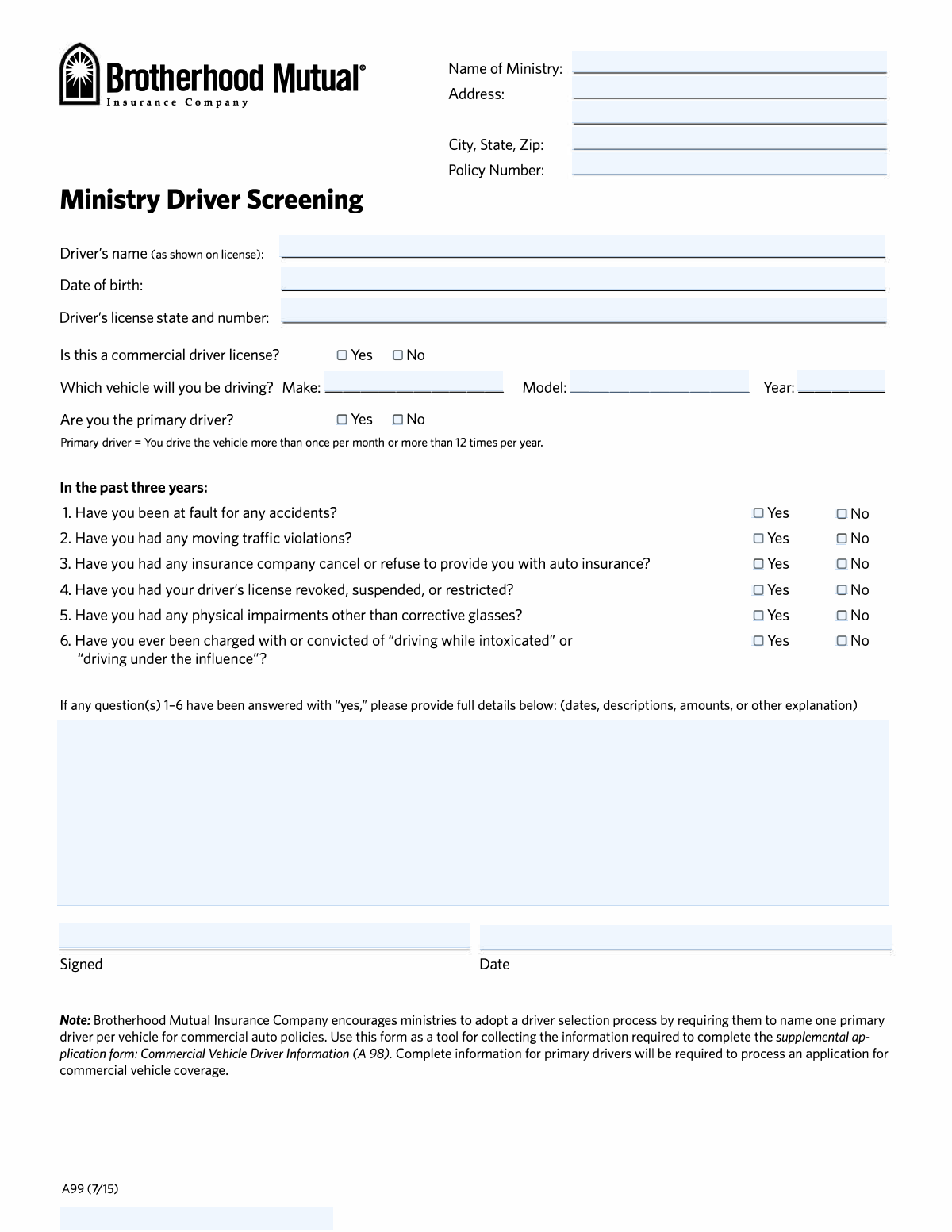
Typically, these forms are utilized by ministry leaders, administrative staff, and volunteer coordinators during routine operations or when preparing for special events. For instance, when a ministry needs to authorize staff or volunteers to operate organization-owned vehicles, documents like the Ministry Driver Screening Form (A99) become essential. These screenings help evaluate driver eligibility and history, ensuring that those behind the wheel meet safety standards. Whether you are managing a fleet of church vans or assessing liability for a youth retreat, these forms provide the necessary framework for thorough documentation.
Navigating insurance paperwork doesn't have to be a manual, time-consuming process. At Instafill.ai, all Brotherhood Mutual forms in this category can be filled out online quickly and accurately. Our AI-powered platform simplifies the data entry process, making it easy for ministry personnel to complete even complex risk-screening questionnaires from any device. By using Instafill.ai, you can ensure your ministry's records are professional, legible, and submitted on time, allowing you to get back to serving your community.
Every form on this page can be completed without typing. Instafill is form filling software that reads a PDF and fills it for you — including flat and scanned documents that carry no fillable fields at all.
Forms in This Category
The forms in this category have a median Form Complexity Index of 40/100 (Basic), measured across 1 forms by field count, input difficulty, length, conditional logic and structure. See how it is calculated.
| Form Name | Pages | FCI | |
|---|---|---|---|
| 1. | Brotherhood Mutual Insurance Company Ministry Driver Screening Form (A99) | 1 | Basic 40 |
- Enterprise-grade security & data encryption
- 99%+ accuracy powered by AI
- 1,000+ forms from all industries
- Complete forms in under 60 seconds
How to Choose the Right Form
Brotherhood Mutual specializes in providing insurance and risk management services specifically tailored for churches and Christian ministries. When navigating this category, you are looking for documentation that ensures your ministry's operations—especially those involving transportation—remain safe and compliant with insurance standards.
The Essential Driver Screening Tool
Currently, the primary form in this category is the Brotherhood Mutual Insurance Company Ministry Driver Screening Form (A99). This document is critical for any ministry that operates owned, leased, or borrowed vehicles.
You should select this form if you need to:
- Screen New Drivers: Before allowing a staff member or volunteer to get behind the wheel of a ministry vehicle, you must document their driving history to ensure safety.
- Evaluate Risk: The A99 helps identify potential red flags, such as recent accidents, moving violations, or license suspensions that could impact your liability.
- Support Insurance Applications: This form is often required as a prerequisite or supplement to the Commercial Vehicle Driver Information (A 98) application. It provides the specific data points underwriters need to determine eligibility and calculate premiums.
Who Should Use This Form?
This form is designed for ministry leaders, safety officers, and administrative staff responsible for fleet management. Whether you are managing a single church van for youth trips or a larger fleet of buses, the A99 ensures that your driver records are organized and transparent.
Key Information Required
To fill out the Ministry Driver Screening Form (A99) efficiently using Instafill.ai, ensure you have the following information ready for each driver:
- Full legal name and current driver's license details.
- Confirmation of whether they are a primary driver or an occasional volunteer.
- A detailed history of any incidents within the last few years, specifically focusing on accidents, license actions, or serious violations like DUI/DWI history.
By using this standardized screening form, your ministry demonstrates a commitment to safety and helps streamline the underwriting process for your commercial auto coverage.
Form Comparison
| Form | Primary Purpose | Information Required | When to File |
|---|---|---|---|
| Brotherhood Mutual Insurance Company Ministry Driver Screening Form (A99) | Evaluates driver eligibility and risk levels for ministry vehicle insurance policies. | Includes driving history, recent accidents, traffic violations, and license status details. | Used when adding new drivers or updating commercial auto supplemental applications. |
Tips for Brotherhood Mutual forms
Double-check all driver history for accidents, violations, or license suspensions within the specified timeframe. Inaccurate information can lead to coverage denials or significant delays in underwriting decisions for your ministry's commercial auto policy.
These forms contain sensitive information such as driver's license numbers and personal history. Store completed forms in a secure digital or physical location and ensure that only authorized personnel have access to the data to protect your volunteers' privacy.
The A99 form is often used in conjunction with the A98 Commercial Vehicle Driver Information form. Ensure that the data provided across both documents is consistent to avoid confusion during the insurance review process.
Before filling out the form, confirm that the driver’s license is currently valid and not expired. Providing current data ensures the ministry remains compliant with safety standards and insurance requirements for all active vehicles.
Instead of manually typing or handwriting data, use Instafill.ai to quickly populate the Brotherhood Mutual A99 form. Our AI tools can convert static PDFs into interactive fields, making it easier for your ministry staff to collect and organize driver information digitally.
One of the most common reasons for form rejection is a missing signature or date. Before finalizing the screening form, verify that all required fields are filled and that the driver has authorized the background check where necessary.
Ministry driver statuses can change frequently as new volunteers join or others step down. Establish a regular schedule to review and update these screening forms to ensure your insurance coverage reflects your current team of active drivers.
Frequently Asked Questions
Brotherhood Mutual forms are specialized documents designed for churches and Christian ministries to manage insurance risks and administrative requirements. They are most commonly used for screening volunteers, documenting property details, and ensuring that staff members meet the safety standards required for insurance coverage.
Any staff member or volunteer who intends to operate a vehicle owned, leased, or rented by a ministry should complete this form. This includes everyone from youth pastors taking students on trips to volunteers driving a church van for community outreach.
Ministries use these forms to maintain compliance with their insurance policies and to protect the organization from liability. By screening drivers and documenting safety information, the ministry ensures that they are following best practices for risk management as recommended by Brotherhood Mutual.
You can use Instafill.ai to quickly complete Brotherhood Mutual forms digitally. Our AI-powered platform helps you navigate the fields accurately and can even turn static PDF versions into interactive, fillable documents so you don't have to print and scan them manually.
Once finished, you should typically submit the forms to your ministry's administrative office, human resources department, or insurance coordinator. They will keep the records on file or forward them to their Brotherhood Mutual agent as required by their specific policy.
You will generally need your legal name, current driver's license number, and details regarding your driving history. Be prepared to disclose any accidents, traffic violations, or license suspensions that have occurred within the last several years.
Most ministries require these forms to be updated annually or whenever there is a significant change in a driver's status or license information. Regular updates help ensure that the ministry’s insurance coverage remains valid and that all records are current.
Not necessarily. While all violations must be disclosed, the ministry and the insurer evaluate the severity and frequency of incidents. Minor infractions may not affect eligibility, but the information is necessary for the insurance company to make an accurate underwriting decision.
Yes, Instafill.ai is specifically designed to handle non-fillable PDF forms. Our AI identifies the text fields and checkboxes on the document, allowing you to type your answers directly onto the digital form regardless of its original format.
While the A99 is a screening questionnaire for individual drivers, it is often used as a supplement to broader commercial vehicle applications like the A98. The A99 focuses specifically on the risk profile of the person behind the wheel to support the ministry's overall commercial auto coverage.
Glossary
- Form Complexity Index
- Instafill’s 0–100 measure of how much effort a form takes to complete, calculated deterministically from the form’s own structure rather than estimated. It combines the number of fillable fields (the largest factor), how difficult those fields are to complete based on their type, the number of pages that contain fields, the amount of conditional “fill-only-if” logic, and how many sections the form is divided into, then adds modifiers for tables and repeating lists, bundled instruction pages, and dense page layouts. A higher score means the form is harder to fill out by hand. The forms in this category have a median Form Complexity Index of 40/100 (Basic). See exactly how it is calculated.
- Ministry Driver Screening
- The formal process used by religious organizations to evaluate the safety record and eligibility of staff or volunteers who drive for ministry-related activities.
- Underwriting
- The process an insurance company uses to assess the risk of a potential driver to determine whether to provide coverage and at what cost.
- MVR (Motor Vehicle Record)
- A state-issued report of an individual's driving history, including traffic violations, accidents, and license suspensions, often required for insurance approval.
- A99 Form
- A specific Brotherhood Mutual questionnaire used to document driver details, accident history, and violations for ministry insurance purposes.
- Commercial Auto Supplemental
- Additional forms, such as the A98, that provide more granular data about drivers and vehicles than the standard insurance application.
- Non-Owned Auto Liability
- Coverage that protects the ministry from liability when a volunteer or employee uses their personal vehicle for church-sponsored business.
- DUI/DWI History
- A record of Driving Under the Influence or Driving While Intoxicated offenses, which are high-risk indicators used to determine insurance eligibility.
- Risk Management
- The practice of identifying and mitigating potential hazards, such as unsafe driving, to protect the ministry's mission and financial assets.