Fill out DSHS forms
with AI.
DSHS forms are essential documents used by the Washington State Department of Social and Health Services to administer a wide range of public assistance programs. These forms facilitate critical services, including food assistance, financial aid, and medical coverage for residents across the state. Because these documents directly impact a household's eligibility for support, ensuring that every field is completed accurately is vital for avoiding processing delays or benefit interruptions.
By continuing, you acknowledge Instafill's Privacy Policy and agree to get occasional product update and promotional emails.
About DSHS forms
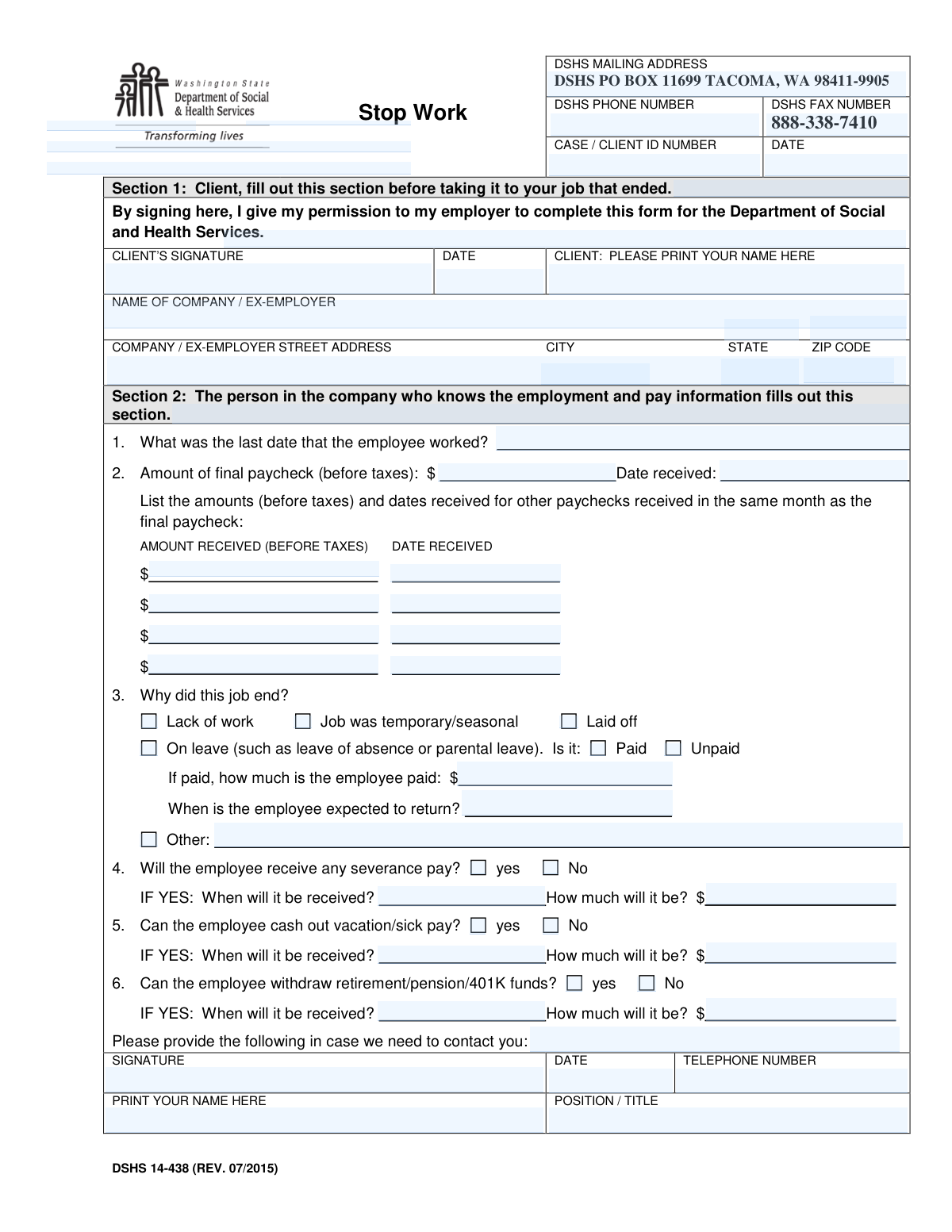
Typically, these forms are required by individuals applying for new benefits, reporting changes in their household circumstances, or verifying employment status. For example, documents like the Stop Work form are used to confirm when a client’s employment has ended, requiring coordination between the individual and their former employer to verify final pay and termination reasons. Whether you are navigating child support services or vocational rehabilitation, these forms serve as the official record for your interactions with state agencies and ensure that social services are distributed fairly based on current needs.
Managing government paperwork can be time-consuming, especially when dealing with complex eligibility requirements and strict deadlines. Tools like Instafill.ai use AI to fill these forms in under 30 seconds, handling your data accurately and securely to streamline the application process. This practical approach helps ensure that your information is correctly placed in the right fields, allowing you to focus on accessing the services you need rather than the mechanics of the paperwork.
Every form on this page can be completed without typing. Instafill is form filling software that reads a PDF and fills it for you — including flat and scanned documents that carry no fillable fields at all.
Forms in This Category
The forms in this category have a median Form Complexity Index of 61/100 (Moderate), measured across 1 forms by field count, input difficulty, length, conditional logic and structure. See how it is calculated.
| Form Name | Pages | FCI | |
|---|---|---|---|
| 1. | DSHS 14-438, Stop Work | 1 | Moderate 61 |
- Enterprise-grade security & data encryption
- 99%+ accuracy powered by AI
- 1,000+ forms from all industries
- Complete forms in under 60 seconds
How to Choose the Right Form
Navigating Washington State Social Services Forms
The Washington State Department of Social and Health Services (DSHS) manages a wide range of programs, including food assistance (SNAP), cash help (TANF), and medical coverage. To maintain eligibility for these programs, you must report changes in your financial situation promptly. This category focuses on documenting changes in employment status to ensure your benefits are calculated correctly based on your current income.
When to Use the Stop Work Form
If you have recently left a job or had your employment terminated, the primary document you will need is the DSHS 14-438, Stop Work form. This form is essential for several specific scenarios:
- Reporting Income Loss: You should choose this form if you are a DSHS client who needs to prove that a source of income has ended so that your benefit amount can be adjusted upward.
- New Applications: Use this form if you are applying for benefits for the first time and need to verify that a previous job is no longer providing income.
- Employer Verification: This form is the standard tool used by the state to gather necessary data from your former employer, such as your final pay date and the reason for your departure.
Completing the DSHS 14-438
Unlike many other self-reported forms, the DSHS 14-438 requires specific details that often must be verified by the company you worked for. When filling this out, ensure you have:
- The date of your last day of work.
- The date and gross amount of your final paycheck.
- A signature from your former employer or their HR representative.
Using Instafill.ai allows you to quickly prepare the DSHS 14-438 by converting the standard PDF into an interactive document, making it easier to share with a former employer for completion or to fill out your portion before printing and submitting it to your local Community Services Office (CSO).
Form Comparison
| Form | Purpose | Required Information | Impact on Benefits |
|---|---|---|---|
| DSHS 14-438, Stop Work | Verifies that a client's employment has ended to assess benefit eligibility. | Last day of work, final paycheck amounts, and reason for termination. | Determines if a client qualifies for continued or new social services. |
Tips for DSHS forms
Ensure the 'last day worked' matches your employer's records exactly. Discrepancies between your report and the employer's verification can lead to processing delays or requests for additional evidence during your benefits assessment.
Since DSHS forms often require information from payroll or HR departments, reach out to them as soon as your employment ends. Providing them with a pre-filled draft can speed up the signature process and ensure they include necessary details like final vacation pay or bonuses.
Managing multiple Washington State social services forms can be overwhelming. AI-powered tools like Instafill.ai can complete these forms in under 30 seconds with high accuracy, and your sensitive data stays secure throughout the entire process.
Always save a copy of the completed and signed DSHS 14-438 for your own records. Having a digital backup makes it easier to provide proof if the department asks for a resubmission or if you need to reference specific dates for future state applications.
Clearly detail why the employment ended, as this directly impacts eligibility for various DSHS programs. Ensure the reason provided matches the official status—such as a layoff, resignation, or medical leave—to prevent administrative flags or follow-up interviews.
Ensure that the gross amounts for the final paycheck and any accrued leave payouts are documented correctly before submission. DSHS uses this specific financial data to calculate your benefit window, so accuracy is vital to avoid potential overpayments.
Frequently Asked Questions
DSHS forms are used by the Washington State Department of Social and Health Services to manage public assistance programs like food, cash, and medical benefits. These documents allow residents to apply for services, report changes in circumstances, and verify eligibility requirements for various social programs.
Individuals and families residing in Washington who are seeking or currently receiving social services generally need to complete these forms. This includes those applying for programs like Basic Food (SNAP), Temporary Assistance for Needy Families (TANF), or long-term care services.
The correct form depends on whether you are applying for new benefits, renewing existing ones, or reporting a change like a new address or loss of employment. For example, if you have recently left a job, you would likely need the Stop Work form (14-438) to update your status and ensure your benefits are calculated correctly.
Yes, AI tools like Instafill.ai can be used to complete DSHS forms by accurately extracting data from your source documents and placing it into the correct fields. This technology helps ensure that complex information, such as employer details or income history, is entered correctly without manual typing errors.
While manual entry can be time-consuming, AI-powered services like Instafill.ai can fill these forms in under 30 seconds. This efficiency allows you to quickly prepare your documentation for submission to the state, reducing the time spent on administrative tasks.
Most completed forms can be submitted online through the Washington Connection portal, mailed to the DSHS Customer Service Center, or dropped off at a local Community Services Office (CSO). It is important to check the specific instructions on each individual form to ensure it reaches the correct department for processing.
For forms such as the Stop Work verification, you will typically need to provide the last day of employment, the date of the final paycheck, and the reason for termination. You may also need to provide your former employer’s contact information so DSHS can verify the details provided in the document.
Yes, many DSHS forms are translated into several languages, including Spanish, Russian, Vietnamese, and Somali, to accommodate Washington's diverse population. If a specific fillable version is only available in English, you can often request language assistance directly from a DSHS representative.
Providing inaccurate information can lead to delays in benefit processing or potential overpayments that may need to be paid back to the state. It is crucial to double-check all entries for accuracy before submission, which is why many users prefer using automated tools to transfer data directly from official source documents.
While many DSHS forms now accept electronic signatures through official state portals, some specific documents or third-party verifications may still require a handwritten signature. Always review the submission instructions on the specific form to determine if a digital or physical signature is required for it to be considered valid.
Glossary
- Form Complexity Index
- Instafill’s 0–100 measure of how much effort a form takes to complete, calculated deterministically from the form’s own structure rather than estimated. It combines the number of fillable fields (the largest factor), how difficult those fields are to complete based on their type, the number of pages that contain fields, the amount of conditional “fill-only-if” logic, and how many sections the form is divided into, then adds modifiers for tables and repeating lists, bundled instruction pages, and dense page layouts. A higher score means the form is harder to fill out by hand. The forms in this category have a median Form Complexity Index of 61/100 (Moderate). See exactly how it is calculated.
- DSHS
- The Washington State Department of Social and Health Services, the primary agency responsible for providing social assistance, financial aid, and health-related services.
- Client ID
- A unique identification number assigned to an individual by DSHS to manage their records and track benefit eligibility across different programs.
- ESA
- The Economic Services Administration, the branch of DSHS that oversees programs like cash assistance, food benefits, and child support enforcement.
- Basic Food
- Washington State's implementation of the federal Supplemental Nutrition Assistance Program (SNAP), which provides monthly benefits for purchasing groceries.
- TANF
- Temporary Assistance for Needy Families, a program that provides monthly cash grants to low-income families with children to help meet basic needs.
- Stop Work Form
- A specific DSHS document used to verify that a person's employment has ended, which is necessary to recalculate benefit amounts based on lost income.
- CSD
- The Community Services Division, the arm of DSHS that operates local offices where residents can apply for benefits and meet with case managers.
- EBT
- Electronic Benefit Transfer, the system used to deliver food and cash assistance to recipients via a plastic debit card.