Yes! You can use AI to fill out DSHS 14-438, Stop Work

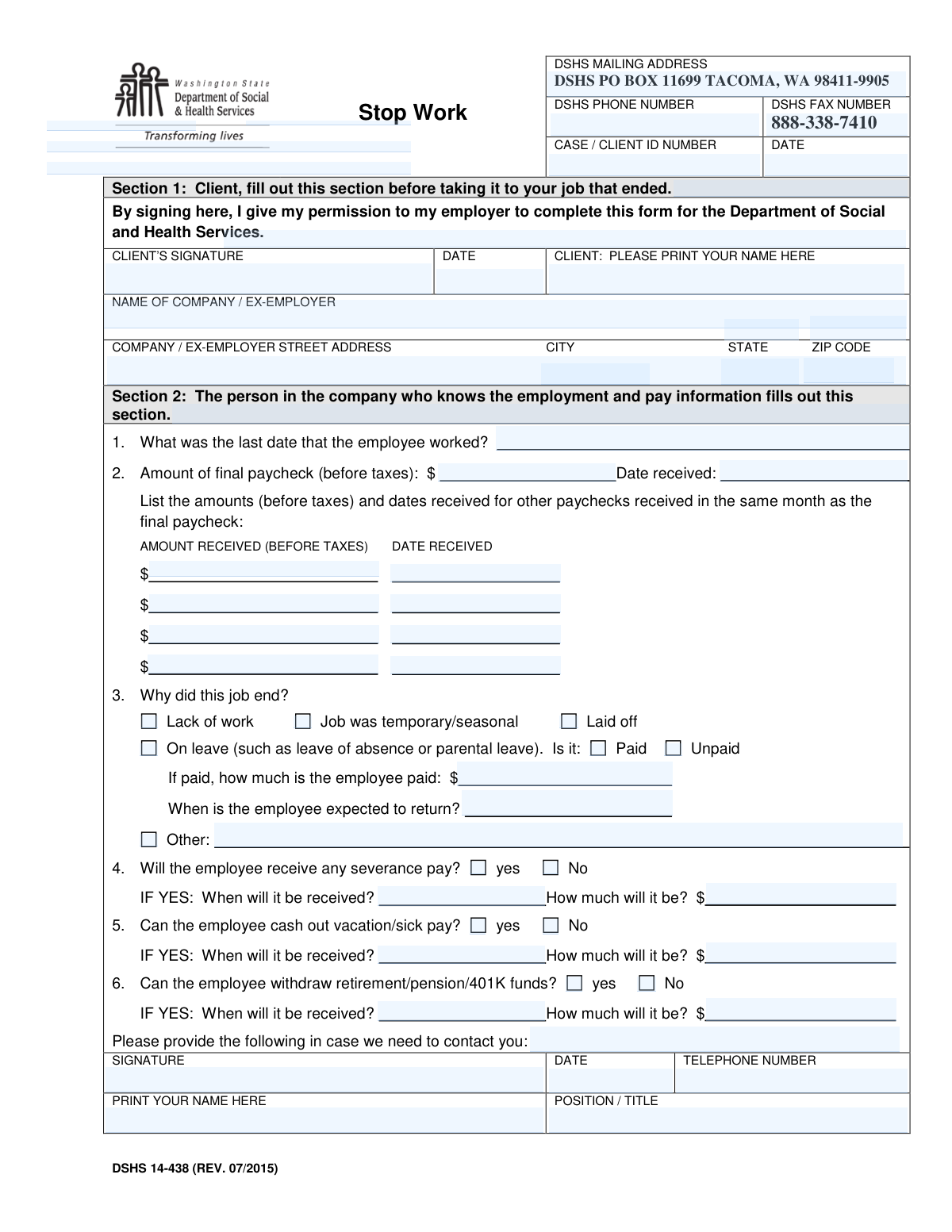
Form DSHS 14-438, also known as the Stop Work form, is a document used by the Washington State Department of Social and Health Services to confirm that a client's employment has ended. It requires the client's permission and detailed information from the former employer regarding the last day of work, final paychecks, and the reason for termination to accurately assess eligibility for benefits. Today, this form can be filled out quickly and accurately using AI-powered services like Instafill.ai, which can also convert non-fillable PDF versions into interactive fillable forms.
Our AI automatically handles information lookup, data retrieval, formatting, and form filling.
It takes less than a minute to fill out DSHS 14-438 using our AI form filling.
Securely upload your data. Information is encrypted in transit and deleted immediately after the form is filled out.

Form specifications

Form name: DSHS 14-438, Stop Work
Number of pages: 1
Filled form examples: Form DSHS 14-438 Examples
Language: English
main-image

Instafill Demo: How to fill out PDF forms in seconds with AI

How to Fill Out DSHS 14-438 Online for Free in 2026

Are you looking to fill out a DSHS 14-438 form online quickly and accurately? Instafill.ai offers the #1 AI-powered PDF filling software of 2026, allowing you to complete your DSHS 14-438 form in just 37 seconds or less.
Follow these steps to fill out your DSHS 14-438 form online using Instafill.ai:
  1. 1 Navigate to Instafill.ai and upload or select the DSHS 14-438 Stop Work form.
  2. 2 As the client, use the AI assistant to fill in your name and sign Section 1, granting your former employer permission to complete the form.
  3. 3 Securely share the form with your former employer to complete their section.
  4. 4 The employer then fills out Section 2, providing details on the last day worked, final paycheck amounts and dates, and the reason for employment termination.
  5. 5 The employer adds their signature, date, and contact information to certify the provided details.
  6. 6 Review all entered information across both sections for accuracy and completeness.
  7. 7 Submit the finalized form directly to the DSHS mailing address or fax number provided on the document.

Our AI-powered system ensures each field is filled out correctly, reducing errors and saving you time.

Why Choose Instafill.ai for Your Fillable DSHS 14-438 Form?

Speed

Complete your DSHS 14-438 in as little as 37 seconds.

Up-to-Date

Always use the latest 2026 DSHS 14-438 form version.

Cost-effective

No need to hire expensive lawyers.

Accuracy

Our AI performs 10 compliance checks to ensure your form is error-free.

Security

Your personal information is protected with bank-level encryption.

Frequently Asked Questions About Form DSHS 14-438

This form is used by the Department of Social and Health Services (DSHS) to verify that a client's employment has ended and to gather details about their final pay. This information helps DSHS determine a client's ongoing eligibility for benefits.

The form is completed in two parts. The client (the person whose job ended) must fill out and sign Section 1, and their former employer is responsible for completing all the employment and pay details in Section 2.

In Section 1, you must print your name, provide your Case/Client ID number, and sign and date the form. This gives your former employer permission to release your employment information to DSHS.

You need to provide the employee's last day of work, the gross amount and date of their final paycheck, and the reason the job ended. You must also report any upcoming severance, vacation/sick pay cash-outs, or retirement fund withdrawals.

This refers to the gross pay, which is the total amount of earnings before any deductions like taxes, Social Security, or insurance premiums are taken out. You should report the full, pre-tax amount.

The completed form should be mailed to DSHS at PO BOX 11699, TACOMA, WA 98411-9905. Alternatively, you can fax it to the number provided on the form, 888-338-7410.

Your Case or Client ID number is assigned by DSHS and can be found on other letters or notices you have received from them. If you cannot locate it, you may need to contact DSHS directly for assistance.

Your employer should check the 'On leave' box in Section 2, question 3. They will then need to specify if the leave is paid or unpaid and provide your expected return-to-work date.

Your employer should still enter the amount of the final paycheck and the date you are scheduled to receive it. This information is necessary for DSHS to accurately assess your income.

Yes, services like Instafill.ai use AI to auto-fill form fields accurately and save time. This can help ensure your information is entered correctly and reduce the time it takes to complete the form.

You can use a service like Instafill.ai to fill out the form online. Simply upload the form to the platform, and its AI will make the fields interactive so you can type your information, review it, and then download the completed PDF.

If you have a non-fillable PDF, you can use a tool like Instafill.ai to make it interactive. The service converts flat PDFs into fillable forms, allowing you to easily type your information into the correct fields.

Severance pay is compensation an employee receives when their job ends involuntarily. If your employer is providing a severance package, they must report the amount and the date you will receive it in Section 2.

Compliance DSHS 14-438
Validation Checks by Instafill.ai

1
Ensures Final Paycheck Date is Logically Sound
This validation checks that the 'Date received' for the final paycheck is on or after the 'Last date that the employee worked'. An employee cannot receive their final paycheck before their last day of work. This check prevents logical inconsistencies in the timeline of events, which is critical for determining eligibility periods. If the date is earlier, the form should be flagged for manual review or rejected.
2
Conditional Requirement for 'On Leave' Details
If the 'On leave' checkbox is selected as the reason the job ended, this validation ensures that a subsequent choice ('Paid' or 'Unpaid') is also selected and that the 'Expected return date' is provided. This is important because leave status directly impacts benefit calculations and eligibility. A failure to provide these details results in an incomplete submission that cannot be processed correctly.
3
Conditional Requirement for 'Paid Leave' Amount
This check verifies that if the 'On leave' and 'Paid' options are both selected, the 'how much is the employee paid' field must contain a valid, positive currency amount. This income information is essential for DSHS to accurately assess the client's financial situation. An empty or invalid amount would require follow-up and delay case processing.
4
Conditional Completion of Severance Pay Information
If the 'yes' option is selected for 'Will the employee receive any severance pay?', this validation ensures that both the 'When will it be received?' date and the 'How much will it be?' amount fields are filled out. Severance pay is a key financial resource that must be accounted for. Incomplete information would prevent a full assessment of the client's income.
5
Conditional Completion of Vacation/Sick Pay Information
This validation confirms that if 'yes' is selected for 'Can the employee cash out vacation/sick pay?', the corresponding 'When will it be received?' and 'How much will it be?' fields are completed. This information is crucial for understanding lump-sum payments that affect benefit eligibility. Failure to provide these details makes the section incomplete and requires correction.
6
Mandatory Explanation for 'Other' Job End Reason
This check ensures that if the 'Other' checkbox is selected for 'Why did this job end?', the adjacent text field must contain an explanation. An 'Other' selection without context is ambiguous and unusable for determination purposes. This validation forces the employer to provide the necessary details for DSHS to understand the circumstances of the job separation.
7
Completeness of Employer Contact and Signature
This validation verifies that all fields in the final section of the form (Signature, Date, Telephone Number, Printed Name, Position/Title) are completed by the employer. This information is essential for authenticating the form and allows DSHS to contact the employer for verification. An incomplete signature block would render the form invalid.
8
Validation of All Date Formats
This check ensures that all date fields throughout the form (e.g., 'Last date that the employee worked', 'Date received', 'Date signed') are entered in a valid and consistent format, such as MM/DD/YYYY. Incorrect or ambiguous date formats can lead to processing errors and incorrect eligibility calculations. The system should reject or prompt for correction of any non-standard date entries.
9
Validation of All Currency Field Formats
This check ensures that all monetary fields (e.g., 'Final paycheck amount', 'Severance pay amount') contain only positive numeric values, potentially with up to two decimal places. This prevents the entry of text, negative numbers, or special characters, which would cause calculation errors. This validation maintains data integrity for all financial information on the form.
10
Client Authorization Completeness in Section 1
This validation confirms that the client has provided their printed name, signature, and the date of signature in Section 1. This authorization is legally required for the employer to release the client's employment information to DSHS. A form lacking this client authorization is invalid and cannot be processed.
11
Logical Sequence of Signature Dates
This check verifies that the client's signature date in Section 1 is on or before the employer's signature date in Section 2. The client must grant permission before the employer fills out and signs the form. This validation ensures the correct procedural order was followed, which is important for the form's legal validity.
12
Consistency of 'Other Paychecks' Month
This validation ensures that the dates entered for any 'other paychecks' fall within the same calendar month as the 'Date received' for the 'final paycheck'. The form specifically requests this information to assess total income for that specific month. Dates outside this range would be considered invalid data and could skew financial assessments.
13
Prevention of Future Dates for Past Events
This check ensures that dates for events that have already occurred, such as 'Last date that the employee worked' and 'Date received' for paychecks, are not in the future. Allowing future dates for past events is a common data entry error that makes the information illogical. The system should flag any such dates for immediate correction.
14
Mutual Exclusivity of Job End Reasons
This validation ensures that only one checkbox is selected for the question 'Why did this job end?'. The reasons provided (e.g., 'Lack of work', 'Laid off', 'On leave') are mutually exclusive. Allowing multiple selections would create contradictory and unusable data for determining the cause of unemployment.

Common Mistakes in Completing DSHS 14-438

Missing or Incorrect Case / Client ID Number

Clients often forget to enter their Case or Client ID number at the top of the form. This number is the primary identifier DSHS uses to link the document to the correct benefits case. Without it, the form cannot be processed, leading to significant delays or rejection. To avoid this, locate the ID on previous letters or documents from DSHS and carefully transcribe it in the designated field.

Client Forgets to Sign and Date Section 1

The client's signature in Section 1 is a legal authorization for the employer to release confidential payroll information. Forgetting to sign and date this section before giving it to the employer means the employer may legally refuse to complete the form. This halts the entire process until the client can provide a signed copy. Always sign and date Section 1 before it leaves your hands.

Reporting Net Pay Instead of Gross Pay

Employers completing Section 2 frequently enter the employee's net (take-home) pay instead of the gross amount (before taxes), as explicitly requested. DSHS benefit calculations are based on gross income, so this error leads to incorrect eligibility assessments and potential under or overpayment of benefits. Always refer to the 'gross pay' line on the employee's pay stub to ensure accuracy.

Incomplete Answers for Conditional Questions

In Section 2, questions about severance, vacation pay, and retirement funds require follow-up information (amount and date) if the answer is 'Yes'. A common mistake is checking 'Yes' but leaving the amount and date fields blank. This creates incomplete data, forcing DSHS to contact the employer for clarification and delaying the client's case. If you check 'Yes', you must fill in all associated details.

Confusing Pay Period End Date with Paycheck Received Date

When listing paycheck information, employers sometimes enter the date the pay period ended rather than the date the employee actually received the payment. DSHS needs the exact date the income was received to determine eligibility for a specific time frame. The correct date is the check date or the direct deposit date, not the last day of work covered by that pay.

Using an Informal or Incorrect Employer Name

Clients may write a common name for their workplace (e.g., 'The Corner Deli') instead of the official legal business name found on pay stubs or W-2 forms. This can make it difficult for DSHS to verify the employment information with state records. To prevent verification issues, always use the full, legal name of the company.

Vague or Unspecified Reason for Job Ending

When the reason for job termination doesn't fit the standard checkboxes, employers may check 'Other' but fail to provide a clear, concise explanation. A vague entry like 'personal reasons' is insufficient for DSHS to determine eligibility. This requires follow-up and can delay a decision. If 'Other' is selected, provide a brief but specific explanation for the separation.

Employer Forgets to Sign and Provide Contact Information

The signature, printed name, title, and phone number of the employer representative in Section 2 are crucial for validating the form's authenticity. Omitting this information renders the document incomplete and unverifiable, and prevents DSHS from contacting the employer with questions. The person filling out Section 2 must complete all fields in the final contact block.

Incorrect Person Completing the Employer Section

The form is sometimes given to a direct supervisor or front-desk employee who doesn't have access to official payroll records. This can lead to guesswork and inaccurate financial data regarding final pay, vacation payouts, and severance. To ensure accuracy, the form should be directed to the Human Resources (HR) or Payroll department, as they have direct access to the required information.

Leaving Date Fields in an Ambiguous Format

Both clients and employers may write dates in non-standard formats like '4/5' or 'Feb 2024', which can be ambiguous (is it April 5th or May 4th?). This ambiguity can cause errors in processing. Always use a clear, full format like MM/DD/YYYY (e.g., 04/05/2024) to avoid misinterpretation. AI-powered tools like Instafill.ai can help by automatically standardizing date formats to prevent this error.
Saved over 80 hours a year

“I was never sure if my IRS forms like W-9 were filled correctly. Now, I can complete the forms accurately without any external help.”

Kevin Martin Green

Your data stays secure with advanced protection from Instafill and our subprocessors

Robust compliance program

Transparent business model

You’re not the product. You always know where your data is and what it is processed for.

ISO 27001, HIPAA, and GDPR

Our subprocesses adhere to multiple compliance standards, including but not limited to ISO 27001, HIPAA, and GDPR.

Security & privacy by design

We consider security and privacy from the initial design phase of any new service or functionality. It’s not an afterthought, it’s built-in, including support for two-factor authentication (2FA) to further protect your account.

Fill out DSHS 14-438 with Instafill.ai

Worried about filling PDFs wrong? Instafill securely fills dshs-14-438-stop-work forms, ensuring each field is accurate.