Yes! You can use AI to fill out 2026 Form 1040-ES, Estimated Tax for Individuals
Form 1040-ES (2026), Estimated Tax for Individuals, is an IRS form package that includes an estimated tax worksheet, tax rate schedules, and payment vouchers to help taxpayers compute and submit quarterly estimated tax payments for the 2026 tax year. Itâs important for people whose income isnât fully covered by withholding (for example, self-employed individuals and gig workers) to avoid underpayment penalties and stay current on tax obligations. The form also provides due dates and payment methods (online, phone, cash, or check/money order with vouchers) and explains special rules (such as for farming/fishing and higher-income taxpayers). Today, this form can be filled out quickly and accurately using AI-powered services like Instafill.ai, which can also convert non-fillable PDF versions into interactive fillable forms.
Our AI automatically handles information lookup, data retrieval, formatting, and form filling.
It takes less than a minute to fill out Form 1040-ES (2026) using our AI form filling.
Securely upload your data. Information is encrypted in transit and deleted immediately after the form is filled out.
Form specifications
| Form name: | 2026 Form 1040-ES, Estimated Tax for Individuals |
| Number of pages: | 15 |
| Language: | English |
| Categories: | tax forms, IRS forms, individual tax forms, estimated tax forms |
Instafill Demo: filling out a legal form in seconds
How to Fill Out Form 1040-ES (2026) Online for Free in 2026
Are you looking to fill out a FORM 1040-ES (2026) form online quickly and accurately? Instafill.ai offers the #1 AI-powered PDF filling software of 2026, allowing you to complete your FORM 1040-ES (2026) form in just 37 seconds or less.
Follow these steps to fill out your FORM 1040-ES (2026) form online using Instafill.ai:
- 1 Go to Instafill.ai and upload the Form 1040-ES (2026) PDF (or select it from the form library).
- 2 Enter or import your taxpayer details (name, SSN/ITIN, address, and filing status) and confirm whether you’re paying individually or with a spouse (if eligible).
- 3 Provide your 2026 income estimates (wages, self-employment/gig income, interest/dividends, rents, unemployment, Social Security taxable portion, and other income) and any expected adjustments to income.
- 4 Add your expected deductions and credits (standard vs. itemized, QBID if applicable, Schedule 1-A additional deduction, nonrefundable and refundable credits) and let the AI compute taxable income and estimated tax using the 2026 tax rate schedules.
- 5 Enter expected withholding for 2026 and any other taxes (self-employment tax, AMT if applicable, household employment taxes, NIIT/Additional Medicare Tax if applicable) to calculate the required annual payment and quarterly installment amounts.
- 6 Review the calculated installment schedule and payment due dates (Apr 15, 2026; Jun 15, 2026; Sept 15, 2026; Jan 15, 2027) and choose a payment method (IRS Direct Pay/EFTPS/card or print vouchers for check/money order).
- 7 Generate and download/print the completed worksheet and the correct payment voucher(s), then submit payments and save the payment record/confirmations for your tax files.
Our AI-powered system ensures each field is filled out correctly, reducing errors and saving you time.
Why Choose Instafill.ai for Your Fillable Form 1040-ES (2026) Form?
Speed
Complete your Form 1040-ES (2026) in as little as 37 seconds.
Up-to-Date
Always use the latest 2026 Form 1040-ES (2026) form version.
Cost-effective
No need to hire expensive lawyers.
Accuracy
Our AI performs 10 compliance checks to ensure your form is error-free.
Security
Your personal information is protected with bank-level encryption.
Frequently Asked Questions About Form Form 1040-ES (2026)
Form 1040-ES helps you estimate and pay your 2026 federal income tax on income that isnât subject to withholding (such as self-employment/gig work, interest, dividends, rent, and other taxable income). It includes a worksheet to calculate your estimated tax and payment vouchers if you pay by mail.
In most cases, you must pay estimated tax if you expect to owe at least $1,000 for 2026 after withholding and refundable credits, and your withholding/refundable credits will be less than the required threshold (generally 90% of 2026 tax or 100% of 2025 tax). The rules apply to U.S. citizens/resident aliens and certain U.S. territory residents; nonresident aliens generally use Form 1040-ES (NR).
Yes. You generally donât have to pay estimated tax for 2026 if you were a U.S. citizen or resident alien for all of 2025 and had no tax liability for the full 12-month 2025 tax year (total tax was zero or you didnât have to file).
For calendar-year taxpayers, payments are due April 15, 2026; June 15, 2026; September 15, 2026; and January 15, 2027. You can skip the January 15, 2027 payment if you file your 2026 return by February 1, 2027 and pay the full balance due with the return.
Yes. You can pay all of your 2026 estimated tax by April 15, 2026, or pay in four installments by the quarterly due dates.
Youâll typically need your 2025 tax return (as a guide), your expected 2026 income (including self-employment), expected deductions (standard or itemized), expected credits, and expected withholding. If you have self-employment income, you may also need to use the Self-Employment Tax and Deduction Worksheet to compute self-employment tax and the related deduction.
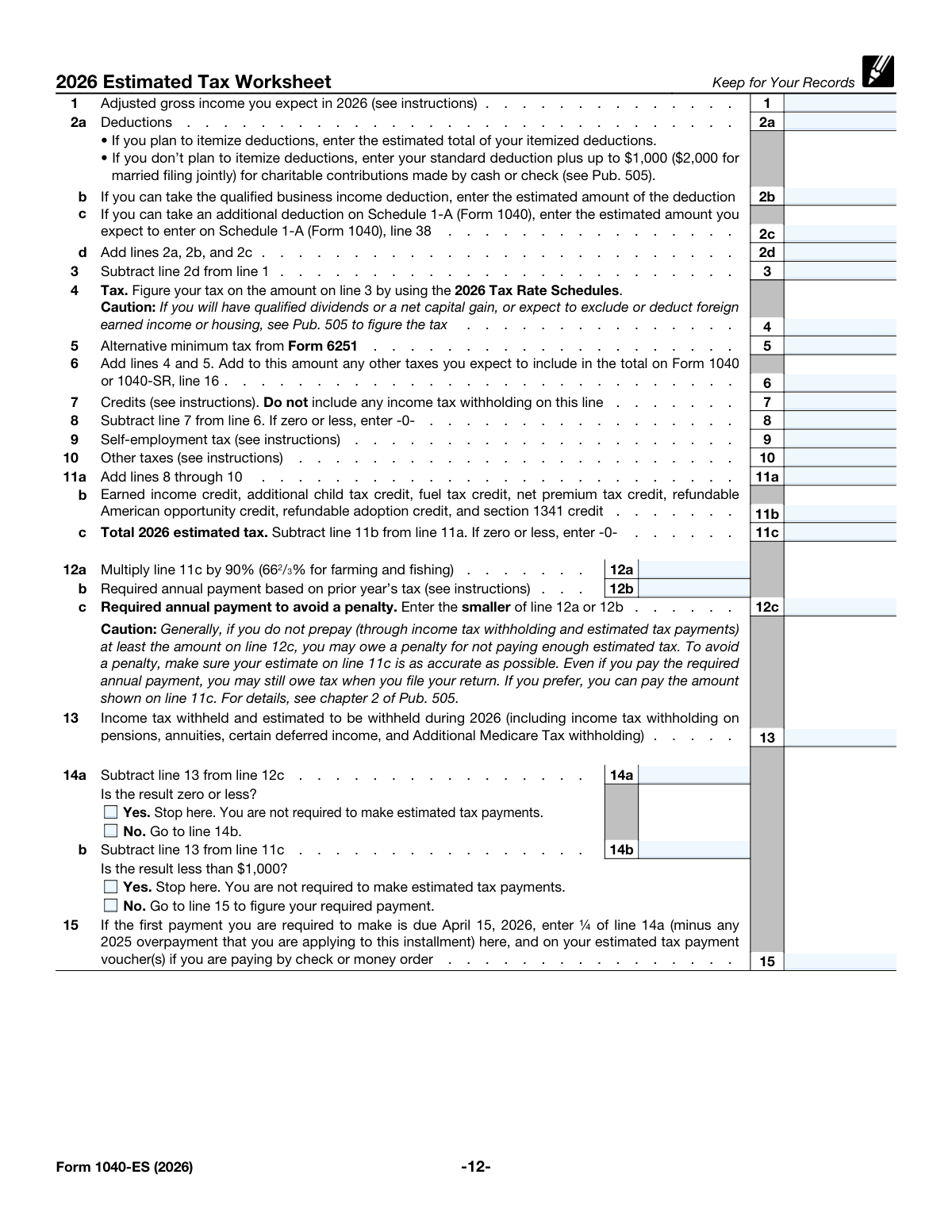
Line 1 is your expected 2026 adjusted gross income (AGI). On line 2a, enter either your estimated itemized deductions or your standard deduction (plus eligible cash charitable contributions for non-itemizers, if applicable), and use lines 2b and 2c for the qualified business income deduction (QBID) and any additional Schedule 1-A deduction you expect.
After entering withholding on line 13, the worksheet uses lines 14a and 14b to test whether you still owe enough to require estimated payments. If the result is less than $1,000 (or zero), you generally arenât required to make estimated tax payments.
If at least two-thirds of your gross income for 2025 or 2026 is from farming or fishing, you may use 66 2/3% instead of 90% when calculating the required annual payment. You may also be able to avoid quarterly payments by paying all estimated tax by January 15, 2027 or filing and paying in full by March 1, 2027.
You may need to use 110% of your 2025 tax (instead of 100%) when using the prior-year safe harbor calculation. This higher-income rule generally doesnât apply if at least two-thirds of your gross income is from farming or fishing.
Often, yes. You can increase withholding by submitting a new Form W-4 to your employer, or use Form W-4P for pensions/annuities, and certain other forms (like W-4V or W-4R) for specific payments, which may reduce or eliminate the need for estimated payments.
You can pay online through your IRS Online Account, IRS Direct Pay, debit/credit card or digital wallet (fees may apply), EFW through e-file, or EFTPS. If paying by mail, send a check or money order with the correct 1040-ES voucher for that due date to the IRS address listed for your state/region.
Mail the voucher and payment to the IRS address shown in the âWhere To Fileâ table for the place you live (for example, Charlotte, NC or Louisville, KY P.O. boxes depending on your state). If the address is a P.O. box, only USPS can deliverâprivate delivery services canât be used for those P.O. box addresses.
If a voucher is preprinted with incorrect name/SSN, correct it on the voucher (and cross out a deceased or divorced spouseâs name/SSN if applicable). For an address change, file Form 8822; for a name change, notify the Social Security Administration and attach a statement to your 2026 paper return listing payments made under the old name.
YesâAI tools can help organize your information and auto-fill form fields; services like Instafill.ai use AI to accurately populate fields and save time. To use Instafill.ai, upload the Form 1040-ES PDF, provide your tax details (income, deductions, credits, withholding, and payment amounts), review the filled entries for accuracy, and then download the completed form/vouchers for submission or recordkeeping.
If the PDF isnât fillable, you can still complete it by printing and writing, or use a tool that converts it into a fillable form. Instafill.ai can convert flat non-fillable PDFs into interactive fillable forms and then auto-fill the fields for you.
Compliance Form 1040-ES (2026)
Validation Checks by Instafill.ai
1
Validates taxpayer SSN/ITIN format and disallows invalid placeholders
Checks that the Taxpayer Social Security Number is exactly 9 digits (optionally formatted as XXX-XX-XXXX) or, if the system allows ITIN entry, that it matches ITIN formatting rules (9 digits, typically beginning with 9). Rejects obvious invalid values (all zeros, 123456789, 999999999) and non-numeric characters beyond allowed dashes. This is critical because the SSN/ITIN is the primary identifier used to apply payments and credits; failures should block submission and prompt correction.
2
Validates spouse SSN presence/format only when joint voucher fields are used
If any spouse name field is populated (or the submission indicates a joint payment), validates that the spouse SSN is present and correctly formatted as a 9-digit SSN/ITIN. If spouse fields are blank, ensures spouse SSN is also blank to prevent mismatched partial joint data. This prevents misapplication of payments and IRS matching errors; failures should require either completing all spouse fields or clearing them entirely.
3
Ensures taxpayer name fields are complete and consistent across vouchers
Validates that taxpayer first name and last name are present on any voucher being submitted and do not contain invalid characters (e.g., digits-only, excessive punctuation). If multiple vouchers are submitted in one package (Voucher 1â4), ensures the taxpayer name matches across all vouchers to avoid payment posting under different identities. If validation fails, the system should flag the inconsistent voucher(s) and require normalization before acceptance.
4
Validates U.S. address vs. foreign address mutual exclusivity and completeness
Checks that the submission contains either a complete U.S. address set (street, city, state, ZIP) or a complete foreign address set (foreign country plus province/county and postal code as applicable), but not both simultaneously. For U.S. addresses, state must be a valid two-letter abbreviation and ZIP must be 5 digits or ZIP+4. Failures should prevent submission because incomplete or mixed address data can cause mailing and payment processing issues.
5
Validates numeric currency fields are non-negative and within reasonable bounds
Ensures all money fields (AGI, deductions, taxes, credits, payment amounts, amounts due/paid/credited) are numeric, allow cents only where supported, and are not negative unless the form explicitly allows â-0-â behavior (which should be stored as 0). Also applies upper-bound reasonableness checks (e.g., disallow extremely large values that exceed system limits or appear to be entered in cents). If validation fails, the system should reject the entry and identify the specific field needing correction.
6
Cross-checks deduction total (Line 2d) equals sum of Lines 2a, 2b, and 2c
Validates that Deduction 2d equals Deduction 2a + Deduction 2b + Deduction 2c, using consistent rounding rules. This prevents downstream taxable income and tax computations from being incorrect due to arithmetic errors or transcription mistakes. If the check fails, the system should either auto-recalculate Line 2d or block submission until corrected, depending on product rules.
7
Cross-checks taxable income (Line 3) equals AGI (Line 1) minus total deductions (Line 2d)
Ensures Taxable Income Line 3 is exactly Line 1 minus Line 2d, and flags cases where the result would be negative (typically should be treated as 0 for tax computation contexts unless the form explicitly permits negative taxable income). This is important because Line 3 drives the tax calculation and required annual payment logic. Failures should trigger recalculation or a hard error requiring correction.
8
Validates tax after credits (Line 8) equals Total Tax Before Credits (Line 6) minus Total Credits (Line 7), floored at zero
Checks that Line 8 equals Line 6 minus Line 7, and if the result is less than or equal to zero, Line 8 must be recorded as 0 (the formâs â-0-â concept). This ensures nonrefundable credits are applied correctly and prevents negative tax after credits from propagating into estimated tax totals. If validation fails, the system should correct Line 8 or require the user to fix the inconsistent inputs.
9
Cross-checks total tax after credits (Line 11a) equals sum of Lines 8, 9, and 10
Validates that Line 11a equals Line 8 (tax after nonrefundable credits) plus Self-employment Tax (Line 9) plus Other Taxes (Line 10). This is a key arithmetic integrity check because Line 11a is the base for total estimated tax and required annual payment calculations. If it fails, the system should flag the mismatch and prevent submission or auto-recompute Line 11a.
10
Validates total 2026 estimated tax (Line 11c) equals Line 11a minus refundable credits (Line 11b), floored at zero
Ensures Line 11c is computed as Line 11a minus Refundable Credits and is not negative (store as 0 if negative). This matters because Line 11c is used in safe-harbor and payment requirement tests; an incorrect value can lead to underpayment penalties or overpayment. If validation fails, the system should recalculate Line 11c and require confirmation if user-entered values differ.
11
Validates required annual payment (Line 12c) is the smaller of Lines 12a and 12b
Checks that Required Annual Payment equals min(1st Calculated Annual Payment, 2nd Calculated Annual Payment) using consistent rounding. This is essential to correctly determine whether estimated payments are required to avoid penalties under the general rule/safe harbor. If the check fails, the system should block submission and prompt the user to correct the annual payment calculation inputs.
12
Validates payment requirement decision logic for Line 14a/14b checkboxes
Ensures the Yes/No checkbox selections align with the computed results: if Line 14a (12c - 13) is <= 0, the 'Line 14a Yes' must be selected and 'No' must not be selected; otherwise 'No' must be selected and Line 14b must be evaluated. Then validates that if Line 14b (11c - 13) is < 1000, the 'Line 14b Yes' is selected; otherwise 'No' is selected and Line 15 is required. Failures should force correction because inconsistent checkbox logic can cause incorrect payment instructions.
13
Validates first required installment (Line 15) equals one-quarter of Line 14a minus any applied 2025 overpayment credit
Checks that the First Required Payment amount equals 1/4 of the positive Line 14a amount, adjusted by subtracting any 2025 overpayment credit applied to that installment (and not dropping below zero). This ensures the voucher payment amount aligns with the worksheetâs required installment computation. If validation fails, the system should recalculate Line 15 and/or require the user to reconcile the overpayment credit allocation.
14
Validates payment record table arithmetic: total paid and credited equals amount paid plus overpayment credit
For each payment record line (1â4), validates that 'Total Amount Paid and Credited' equals 'Amount Paid' + '2025 Overpayment Credit Applied' and that the grand totals equal the sum of the respective columns. Also ensures convenience fees are not included in the 'Amount Paid' fields (i.e., paid amount should match the intended tax payment). If validation fails, the system should flag the specific row/column mismatch and prevent finalization until corrected.
15
Validates payment dates are valid, properly formatted, and logically consistent with due dates
Checks that each 'Date Paid' is a real calendar date in an acceptable format (e.g., MM/DD/YYYY) and is not outside a reasonable range for the 2026 estimated tax cycle (e.g., not before 01/01/2026 and not far beyond 02/01/2027 without explanation). Optionally flags late payments when 'Date Paid' is after the corresponding due date (4/15/2026, 6/15/2026, 9/15/2026, 1/15/2027) to support penalty warnings. If validation fails, the system should reject invalid dates and warn (not necessarily block) on late-but-valid dates depending on business rules.
Common Mistakes in Completing Form 1040-ES (2026)
People often copy figures from their 2025 return (tax brackets, standard deduction, credits) without updating for 2026 changes listed in the package. This can materially understate or overstate estimated tax and lead to underpayment penalties or a large balance due at filing. Avoid this by using the 2026 standard deduction table, 2026 tax rate schedules, and the 2026 âWhatâs Newâ items when projecting income, deductions, and credits. AI-powered tools like Instafill.ai can help by flagging year-mismatched values and applying the correct yearâs formatting and calculations.
A very common misunderstanding is treating federal income tax withholding like a credit and entering it on Line 7 (Credits). The worksheet explicitly says âDo not include any income tax withholding on this line,â and misplacing it can distort Line 8 through Line 15 and cause incorrect payment amounts. To avoid this, put nonrefundable credits on Line 7 and enter all withholding (wages, pensions, annuities, and Additional Medicare Tax withholding) on Line 13. Instafill.ai can prevent this by validating that withholding amounts only appear in the withholding field and not in the credits field.
Self-employed filers frequently estimate only income tax and forget self-employment tax (Line 9), or they compute it on the full net profit instead of 92.35% (0.9235) as required by the worksheet. This typically results in underpaying throughout the year and owing both tax and potential penalties at filing. Use the provided Self-Employment Tax and Deduction Worksheet and remember the 0.9235 adjustment and the Social Security wage base limit. Instafill.ai can auto-calculate and carry the correct SE tax and the 50% SE tax deduction into AGI to reduce math errors.
Filers often enter itemized deductions when they actually plan to take the standard deduction, or they forget the special rule allowing non-itemizers to add up to $1,000 ($2,000 MFJ) of eligible cash/check charitable contributions to the standard deduction. This changes taxable income (Line 3) and can cause incorrect estimated payments. Avoid this by deciding up front whether you will itemize and, if not, using the correct 2026 standard deduction for your filing status plus the allowed charitable add-on. Instafill.ai can help by prompting for filing status and automatically applying the correct standard deduction and allowable add-on.
Many people use 100% of prior-year tax even when the higher-income rule requires 110% (AGI over $150,000, or $75,000 if MFS), or they use the wrong definition of âprior-year taxâ (itâs not always the same as the total tax line without adjustments). This can lead to underpaying and triggering an estimated tax penalty even if payments seemed âclose.â Follow the instructions under âFiguring your 2025 taxâ and apply the 110% rule when applicable, noting the farming/fishing exception. Instafill.ai can reduce this risk by checking AGI thresholds and computing the safe-harbor amount from the correct prior-year components.
People often include credits that expired for 2026 (for example, clean vehicle credits and certain energy credits) because they claimed them in prior years or saw them in older tax software. Overstating credits reduces estimated payments and can create a surprise balance due and penalties. Avoid this by cross-checking the âExpiration of certain creditsâ section and only including credits allowed for 2026 on Line 7 and refundable credits on Line 11b. Instafill.ai can help by warning when a user tries to enter a credit type that the form instructions say is no longer available for 2026.
Taxpayers with uneven income often pay four equal installments even when most income arrives later, or they underpay early quarters without using the annualized income installment method. This can cause penalties for specific periods even if the total paid by year-end seems adequate. If income is lumpy, consider the annualized method and be prepared to file Form 2210 with Schedule AI when required. Instafill.ai can help by prompting for uneven income patterns and suggesting the annualized approach to align payments with actual income timing.
A frequent operational error is sending Voucher 1 with a later-quarter payment, missing the due date, or mailing the voucher/check to the Form 1040 filing address instead of the estimated payment address table. This can result in late payment treatment, misapplied payments, and penalty notices. Always use the voucher that matches the quarterâs due date (April 15, June 15, Sept. 15, Jan. 15) and mail to the correct IRS P.O. box for your state/territory; note that private delivery services canât deliver to P.O. boxes. Instafill.ai can help by generating the correct voucher for the selected payment period and validating the mailing address rules.
People sometimes enter an ITIN after receiving an SSN, swap spouse SSNs, or list names/SSNs in a different order than they will use on the joint return. This can cause payments to post to the wrong account or not match the eventual return, delaying credit and triggering notices. Follow the instructions: use your SSN once issued (stop using the ITIN), and on joint vouchers list names/SSNs in the same order as the joint return; if divorced or a spouse is deceased, cross out the incorrect spouse info on preprinted vouchers. Instafill.ai can help by enforcing consistent taxpayer/spouse identity mapping across vouchers and the worksheet.
When applying a 2025 overpayment to 2026 estimates, filers often add that credit into the âAmount of estimated tax you are paying by check or money orderâ box on the voucher. The instructions say to take the overpayment into account but not include it in that box; double counting can make records confusing and lead to mismatched totals in the payment record. To avoid this, enter only the new money youâre sending on the voucher and track the overpayment separately in the payment record columns for âoverpayment credit applied.â Instafill.ai can help by separating âpayment amountâ from âcredit appliedâ and preventing the same amount from being entered in both places.
Common payment processing issues include making the check payable to the wrong entity (not âUnited States Treasuryâ), forgetting to write â2026 Form 1040-ESâ and the SSN on the check, using prohibited amount formats (dashes/lines), or stapling the check to the voucher. These mistakes can delay posting, increase the chance of misapplication, or require IRS follow-up. Follow the voucher instructions exactly: correct payee, correct memo/SSN, proper numeric amount format, and enclose (donât staple) the payment with the voucher. Instafill.ai can help by producing a payment checklist and ensuring the voucher fields are complete and consistent before you mail anything.
Saved over 80 hours a year
âI was never sure if my IRS forms like W-9 were filled correctly. Now, I can complete the forms accurately without any external help.â
Kevin Martin Green
Your data stays secure with advanced protection from Instafill and our subprocessors

Robust compliance program
Transparent business model
Youâre not the product. You always know where your data is and what it is processed for.
ISO 27001, HIPAA, and GDPR
Our subprocesses adhere to multiple compliance standards, including but not limited to ISO 27001, HIPAA, and GDPR.
Security & privacy by design
We consider security and privacy from the initial design phase of any new service or functionality. Itâs not an afterthought, itâs built-in, including support for two-factor authentication (2FA) to further protect your account.
Fill out Form 1040-ES (2026) with Instafill.ai
Worried about filling PDFs wrong? Instafill securely fills 2026-form-1040-es-estimated-tax-for-individuals forms, ensuring each field is accurate.