
Yes! You can use AI to fill out Additional Investment Form - Principal Brand Asset System
Don't type 32 fields by hand. Tell our AI about yourself, or upload a document you already have, and it fills every field in seconds. You check it, then download, print or sign.
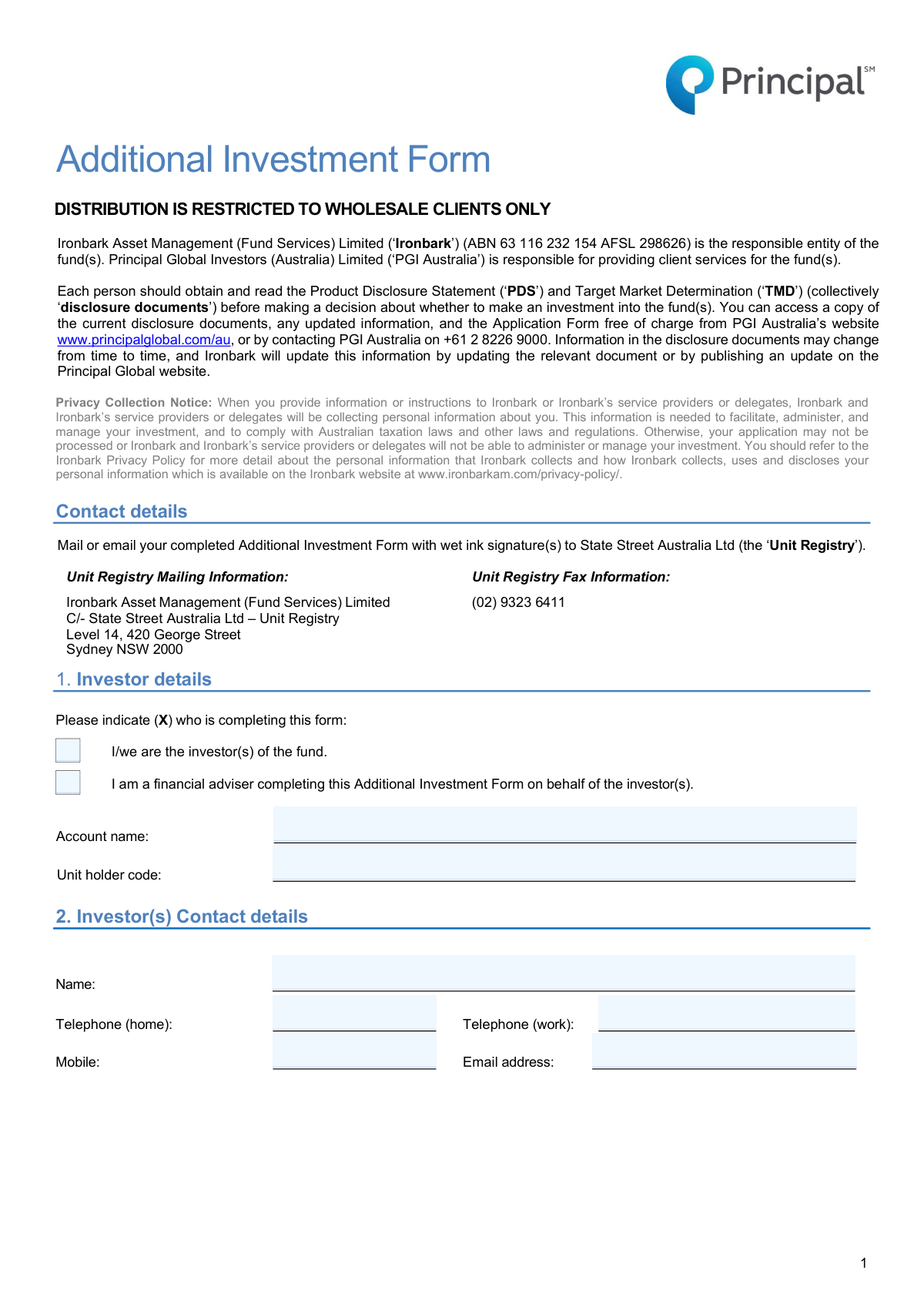
The AI does the filling. You just check it.
No typing into boxes, nothing to install.
What this form asks for
The AI fills all of it, from your answers or your documents.
The AI checks your answers before you download
14 checks built for this form, so a wrong date or a missing answer is caught before anyone else sees it.
Validates that the user has selected one of the two options in Section 1, indicating whether they are the investor or a financial adviser. This selection is crucial as it determines which subsequent sections of the form are required, such as the Financial Adviser details in Section 3. Failure to make a selection will prevent the form from being processed correctly.
Verifies that the 'Unit holder code' in Section 1 is not empty and conforms to a predefined format. This code is a primary key for identifying the existing investor account, so its accuracy is critical for associating the additional investment with the correct portfolio. An invalid or missing code will result in a processing failure as the system cannot locate the investor's account.
Ensures that if the user identifies as a 'financial adviser' in Section 1, then all mandatory fields within Section 3 are completed. This includes the adviser's name, firm name, and AFSL number, which are legally required for transactions mediated by an adviser. If this section is left blank after the user has identified as an adviser, the submission will be rejected for incompleteness.
Validates that the 'Adviser group AFSL number' in Section 3 is a valid, typically 6-digit, Australian Financial Services Licence number. This is a regulatory requirement to confirm the adviser is licensed to provide financial advice. An incorrect or improperly formatted AFSL number will cause the application to be flagged for manual review or rejected.
Verifies that the investor has provided at least one valid method of contact in Section 2, such as a mobile number or an email address. This is essential for the fund administrator to communicate with the investor regarding their application, send confirmations, or resolve any issues. A submission without any contact information may be rejected due to the inability to correspond with the applicant.
Checks that all entered email addresses in Sections 2 and 3 adhere to the standard '[email protected]' format. This ensures that electronic communications, such as transaction confirmations and statements, can be successfully delivered. An invalid email format will result in a validation error, preventing submission until corrected.
And 8 more checks
- Phone Number Format Validation
- Investment Amount Presence
- Minimum Investment Amount Check
- Investment Amount Numeric Format
- Signature Presence
- Signature Date Validity
- Signatory Capacity Selection
- Company Signature Logic
Let AI fill out your Additional Investment Form
No typing. Every field filled in seconds, checked, ready to sign.
How to Fill Out Additional Investment Form Online for Free in 2026
What the AI walks you through.
- Navigate to Instafill.ai and upload or select the Additional Investment Form.
- Use the AI assistant to automatically populate your investor details, such as account name, unit holder code, and contact information.
- If applicable, provide your financial adviser's details in the designated section.
- In the 'Investment details' section, specify the fund name and the exact amount you wish to invest.
- Review the pre-filled electronic funds transfer details and ensure you use your investor name as a reference when transferring funds.
- Carefully read the declaration, then use the digital signature tool to securely sign the form in the required fields.
- Download the completed form and submit it to the Unit Registry via mail or email as instructed, ensuring you also transfer the investment amount.
Common Mistakes in Completing Additional Investment Form
The ones the AI is built to catch.
Using an Incorrect EFT Reference
Failing to Provide a 'Wet Ink' Signature
Incorrectly Completing the Signatory Section
Missing or Inaccurate Unit Holder Code
Forgetting to Specify the Investment Amount
Mismatch Between Form Submission and Fund Transfer Timing
Providing an Incomplete or Vague Account Name
Submitting a Digitally Filled Form Without Printing
Financial Adviser Omitting AFSL or Dealer Group Details
Leaving Contact Details Outdated
Frequently Asked Questions About Additional Investment Form
Is it really free for 7 days?
Can I fill other forms too?
How do I cancel?
How does the AI fill out Additional Investment Form?
What happens to my information?
How complex is Additional Investment Form to fill out?
What is the purpose of the Additional Investment Form?
Who needs to fill out this form?
Where can I find my 'Unit holder code'?
What is the minimum amount I can invest using this form?
How do I submit the completed form?
How do I pay for my additional investment?
What does 'wet ink signature required' mean?
How should the form be signed for a company investment?
What might cause a delay in processing my investment?
Do I need to read the PDS and TMD documents again?
Can I use an AI tool to help fill out this form?
How can I use Instafill.ai to fill this form online?
The PDF I have isn't fillable. What can I do?
Get your Additional Investment Form filled out by AI
$0 today. Cancel before Nov 1 and you pay nothing.
Other forms like this one
investment forms: Form 3468, Investment Credit, Form 8960, Net Investment Income Tax, How to Transfer Assets from Morgan Stanley to Fidelity Investments (Fidelity Stock Plan Services Guide), Fidelity Investments Transfer/Rollover/Exchange Form, Fidelity Investments Standing Transfer Instructions Form, One-Time Withdrawal – IRA, Fidelity Investments, Fidelity Investments Transfer/Rollover Form, Special Tax Notice: Your Rollover Options - Fidelity Investments, Fidelity Investment-Only (Non-Prototype) Retirement Account Application, Fidelity Investments® Beneficiary Distribution Form, Fidelity Investments Distribution Form, One-Time Withdrawal – Investment-Only (Non-Prototype) Retirement Account, Fidelity Investments Withdrawal — One-Time, Fidelity Investments Withdrawals—529 College Savings Plan, Fidelity Investments Change of Account Ownership — Mutual Fund Only Accounts, Fidelity Investments 403(b) Beneficiary Designation, Fidelity Investments Qualified Plan Beneficiary Designation, Fidelity Investments 403(b)/401(a) Beneficiary Designation, Fidelity Investments Qualified Plan Beneficiary Designation, Fidelity Investments Earnings Automatic Withdrawal Plan — IRA
Principal forms: Beneficiary Designation/Change - Principal Life Insurance Company, Rollover Form (Principal Financial Group), Principal Life Insurance Company UCTIE INTERNATIONAL UNION 401(K) SAVINGS PLAN Enrollment Form, Principal Rollover Form, The Principal Pension Plan Summary Plan Description: Cash Balance Formula for Employees and Individual Field, Principal Pre-Migration Guide Defined Benefit, The Principal Pension Plan Summary Plan Description: Traditional and Cash Balance Formulas for Employees and Individual Field, Principal Life Insurance Company Death Notification Form, Principal Financial 401(k) Withdrawal Form, Principal Life Insurance Company Form PG4701, In-Plan Roth Conversion – No Spousal Consent Needed, Principal Life Insurance Company Administration Guide, Principal Group Disability Insurance Options (Forms GC 3000-2, GC 4000-2, GP53705-05), Principal Financial Group Pre-Approved Basic Savings Plan - Plus, Principal Financial Group Notice of Data Breach, Principal Life Insurance Company Small Amounts Benefit Election, Principal Retirement Plan Beneficiary Designation, Principal Financial Group Beneficiary Designation Form, Principal Beneficiary Designation Form (PT383B-06)
UK investment forms: Triple Point Venture VCT plc | Investor Application Form, Form 3468, Investment Credit, Form 8960, Net Investment Income Tax, How to Transfer Assets from Morgan Stanley to Fidelity Investments (Fidelity Stock Plan Services Guide), Fidelity Investments Transfer/Rollover/Exchange Form, Fidelity Investments Standing Transfer Instructions Form, One-Time Withdrawal – IRA, Fidelity Investments, Fidelity Investments Transfer/Rollover Form, Special Tax Notice: Your Rollover Options - Fidelity Investments, Fidelity Investment-Only (Non-Prototype) Retirement Account Application, Fidelity Investments® Beneficiary Distribution Form, Fidelity Investments Distribution Form, One-Time Withdrawal – Investment-Only (Non-Prototype) Retirement Account, Fidelity Investments Withdrawal — One-Time, Fidelity Investments Withdrawals—529 College Savings Plan, Fidelity Investments Change of Account Ownership — Mutual Fund Only Accounts, Fidelity Investments 403(b) Beneficiary Designation, Fidelity Investments Qualified Plan Beneficiary Designation, Fidelity Investments 403(b)/401(a) Beneficiary Designation, Fidelity Investments Qualified Plan Beneficiary Designation
Let AI fill out your Additional Investment Form
Your trial starts once a card is added. You pay nothing before Nov 1.
Our AI already knows this form, all 32 fields of it. Skip the typing: tell it about yourself, or upload what you have, and it fills the whole form in seconds.
- AI fills every field on all 3 pages, checkboxes included
- No typing into boxes: answer a few questions, or upload a document you already have, an old copy of this form, a photo of a document
- The AI checks the answers; you review and change anything before you download
- Download the finished PDF, print it, or sign it online
- Encrypted, and never used to train AI
Cancel before Nov 1 and you pay nothing.
A card is needed to start the trial. Cancel in two clicks from your account.
Terms · Privacy