
Yes! You can use AI to fill out Beneficiary Designation Form
Don't type 43 fields by hand. Tell our AI about yourself, or upload a document you already have, and it fills every field in seconds. You check it, then download, print or sign.
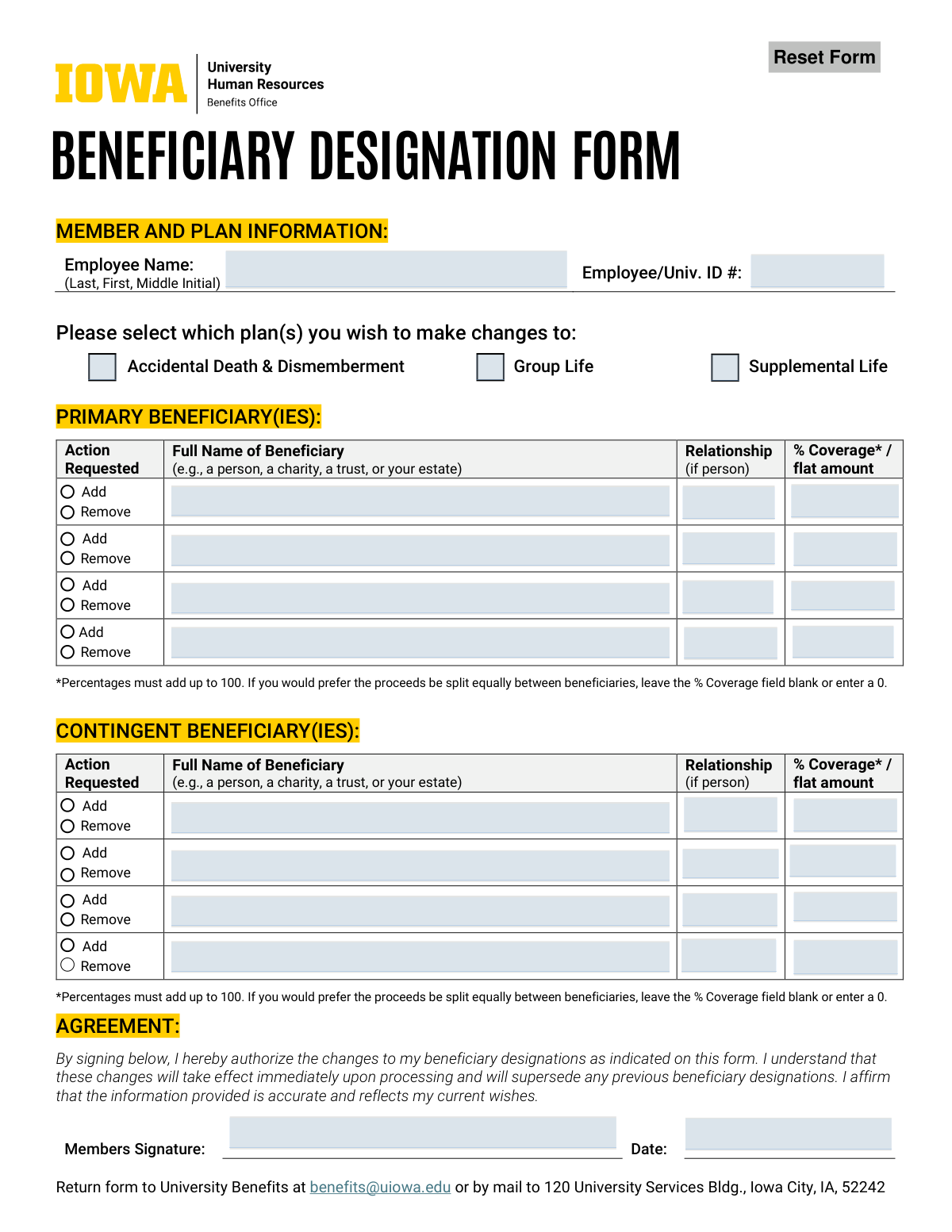
The AI does the filling. You just check it.
No typing into boxes, nothing to install.
What this form asks for
The AI fills all of it, from your answers or your documents.
The AI checks your answers before you download
12 checks built for this form, so a wrong date or a missing answer is caught before anyone else sees it.
This check verifies that the sum of all percentages assigned to primary beneficiaries equals exactly 100%. This is critical to ensure the full benefit is allocated without ambiguity. If the percentages do not sum to 100%, the form submission will be rejected, and the user will be prompted to correct the allocation.
Validates that the employee has selected at least one plan (Accidental Death & Dismemberment, Group Life, or Supplemental Life) to apply the beneficiary changes to. This ensures the designation is linked to a specific policy and prevents processing of an incomplete request. A failure results in an error message requiring the user to select a plan before submission.
Ensures that both the 'Employee Name' and 'Employee/Univ. ID #' fields are filled out. This information is essential for correctly identifying the employee's account and applying the changes. An incomplete submission would be rejected as the system cannot process a beneficiary change without knowing who the member is.
This validation confirms that both the 'Members Signature' and the 'Date' fields are completed. The signature provides legal authorization for the change, and the date establishes when the authorization was given. A missing signature or date invalidates the request, and the form will be returned for completion.
This check verifies that if percentages are used for contingent beneficiaries, their sum equals exactly 100%. This rule ensures that, in the event no primary beneficiaries are able to receive the proceeds, the benefit is fully and clearly allocated. A mismatch will cause a validation failure, requiring the user to adjust the percentages.
Verifies that within a single beneficiary group (either primary or contingent), the allocation method is consistent. Users must choose to allocate by either percentage for all, flat amounts for all, or leave all blank for equal distribution. Mixing percentages and flat amounts within the same group is not allowed as it creates ambiguity in distributing the remaining proceeds.
And 6 more checks
- Beneficiary Self-Designation Prohibition
- Signature Date Validity
- Beneficiary Role Uniqueness
- Action Specification for Beneficiary Rows
- Relationship Field Requirement for Persons
- Equal Distribution Ambiguity Check
Let AI fill out your Beneficiary Designation Form
No typing. Every field filled in seconds, checked, ready to sign.
How to Fill Out Beneficiary Designation Form Online for Free in 2026
What the AI walks you through.
- Navigate to Instafill.ai and upload your Beneficiary Designation Form or select it from the available templates.
- Provide your personal information, including your full name and employee or university ID number, letting the AI assist with placement.
- Check the boxes to indicate which plans you are updating, such as Accidental Death & Dismemberment, Group Life, or Supplemental Life.
- Enter the details for your Primary Beneficiary(ies), including their full name, relationship, and the percentage of coverage or flat amount they should receive.
- If desired, provide the same information for your Contingent Beneficiary(ies), who will receive the benefits if the primary beneficiaries cannot.
- Carefully review all the information entered on the form to confirm its accuracy and that it reflects your current wishes.
- Sign and date the form electronically, then download the completed PDF to submit to your university benefits office via email or mail.
Common Mistakes in Completing Beneficiary Designation Form
The ones the AI is built to catch.
Using Informal or Incomplete Beneficiary Names
Incorrect Percentage Allocation
Forgetting to Select Applicable Plans
Missing Signature or Date
Failing to Name Contingent Beneficiaries
Improper Designation for a Minor
Vague Group Designations like 'My Children'
Incomplete Information for a Trust
Using the Paper Form Unnecessarily
Forgetting to Indicate 'Add' or 'Remove'
Frequently Asked Questions About Beneficiary Designation Form
Is it really free for 7 days?
Can I fill other forms too?
How do I cancel?
How does the AI fill out Beneficiary Designation Form?
What happens to my information?
How complex is Beneficiary Designation Form to fill out?
What is the purpose of this Beneficiary Designation Form?
When should I use this paper form instead of the online Employee Self-Service portal?
What is the difference between a primary and a contingent beneficiary?
How do I indicate that I want the benefits split equally among my beneficiaries?
Can I name a minor as my beneficiary?
Who can I list as a beneficiary?
Where do I send the completed form?
When should I consider updating my beneficiaries?
Do these changes take effect immediately?
Do I have to assign a percentage to each beneficiary?
Can AI tools help me fill out this form?
How can I use Instafill.ai to complete this form online?
The PDF I downloaded isn't fillable. What can I do?
Get your Beneficiary Designation Form filled out by AI
$0 today. Cancel before Nov 3 and you pay nothing.
Other forms like this one
beneficiary forms: Form I-130A, Supplemental Info for Spouse Beneficiary, Affidavit and Representations Regarding Next of Kin (Preference Beneficiary Affidavit) (The Hartford) – Form LC-7086-17, VA Form 21-0788, Information Regarding Apportionment of Beneficiary's Award, California Schedule K-1 (541) (2025), Beneficiary’s Share of Income, Deductions, Credits, etc., Form I-130A, Supplemental Information for Spouse Beneficiary, Fidelity Investments® Beneficiary Distribution Form, Fidelity Investments 403(b) Beneficiary Designation, Fidelity Advisor IRA Beneficiary Designation, Fidelity Investments Qualified Plan Beneficiary Designation, Fidelity Investments 403(b)/401(a) Beneficiary Designation, The Church of the Nazarene 403(b) Retirement Savings Plan Beneficiary Designation Form, Fidelity Investments Qualified Plan Beneficiary Designation, IRA/HSA Beneficiary Designation, Fidelity IRA Beneficiary Distribution — Charity, Foundation, or a University, Designated Beneficiary Plan Agreement, Designated Beneficiary Plan Agreement, Beneficiary Designation Form For IRA and 403(b)(7) Accounts, Designated Beneficiary Plan Agreement, IRA Beneficiary Designation Form, Stock Power Form For transferring shares, changing names, or adding a beneficiary
VA forms: Ankle Conditions Disability Benefits Questionnaire, Shoulder and Arm Conditions Disability Benefits Questionnaire, VA Form 10-7959f-2, Foreign Medical Program (FMP) Claim Cover Sheet, VA Form 21-0781a, Statement in Support of Claim for Service Connection for Post-Traumatic Stress Disorder (PTSD) Secondary to Personal Assault, VA Form 21-0788, Information Regarding Apportionment of Beneficiary's Award, VA Form 21-4138, Statement in Support of Claim, Wrist Conditions Disability Benefits Questionnaire (DBQ), VA Form 21-0781, Statement in Support of Claimed Mental Health Disorder(s) Due to an In-Service Traumatic Event(s), VA Form 29-357, Claim for Disability Insurance Benefits (Government Life Insurance), VA Form 21-686c, Declaration of Status of Dependents, Form #170, Voluntary Account Withdrawal Request Form, Meritain Health Claim Form (Health Claim Form), Form 4852, Substitute for Form W-2 or 1099-R, Meritain Health Claim Form (Health Claim Form), PSA Form/K/II/052025 - Formulir Pembukaan Rekening / Account Opening Form, Form WH-347, Davis-Bacon and Related Acts Weekly Certified Payroll Form, Vanguard IRA Distribution Kit (including IRA Distribution Form RRDFT and Form W-4R), Davis-Bacon and Related Acts Weekly Certified Payroll Form (Form WH-347), Uniform Underwriting and Transmittal Summary (Fannie Mae Form 1008 / Freddie Mac Form 1077), Form 5385BSP, Behavioral Health Utilization Management Applied Behavioral Analysis (ABA) Initial Request Form
HR forms: U.S. Equal Employment Opportunity Commission (EEOC) Form 453, Recommendation for Recognition, U.S. Equal Employment Opportunity Commission (EEOC) Form 453, Recommendation for Recognition, EzB – Erklärung zum Beschäftigungsverhältnis (02/2024), New York State Employment Application Form, A Place for Mom 401(k) Plan Request for Rollover Contribution Form, ADP Compensation and Fee Disclosure Statement, ADP Leave Management Application for Leave of Absence, ADP Retirement Services Beneficiary Designation Form, ADP Year-End Seminar Handout Manual, AeroVironment Profit Sharing and Salary Deferral 401(k) Plan In-Service Withdrawal Form, Albany Medical Center 2024 Benefits Guide, Authorization Agreement for Direct Deposit, Beneficiary Designation 401(k) Plan, ENVIRONMENTAL MONITORING LABORATORY, LLC Employment Application, Earnings and Deductions Quick Reference, Employee Direct Deposit Banking Authorization Form (RUN Powered by ADP®), Employee’s Frequently Asked Questions: Leave of Absence, Form 2938, Hardship Withdrawal Request, Form I-9, Employment Eligibility Verification, Group Life Conversion FAQ Sheet
beneficiary designation forms: Beneficiary Designation for Seafarers International Union AGLIW 401(k) Plan, Fidelity Investments 403(b) Beneficiary Designation, Fidelity Advisor IRA Beneficiary Designation, Fidelity Investments Qualified Plan Beneficiary Designation, Fidelity Investments 403(b)/401(a) Beneficiary Designation, The Church of the Nazarene 403(b) Retirement Savings Plan Beneficiary Designation Form, Fidelity Investments Qualified Plan Beneficiary Designation, IRA/HSA Beneficiary Designation, Beneficiary Designation Form For IRA and 403(b)(7) Accounts, IRA Beneficiary Designation Form, Vanguard Retirement Plan Beneficiary Designation - Phillips 66 Savings Plan, Empower Beneficiary Designation Governmental 457(b) Plan, Beneficiary Designation 401(a) Plan, Form RS115, Beneficiary Designation, Beneficiary Designation 401(k) Plan, Empower Beneficiary Designation Form for WoodmenLife 401(k) Plan, Empower SRIP II Beneficiary Designation Form, Beneficiary Designation/Change - Principal Life Insurance Company, UTMA Beneficiary Designation (Uniform Transfers to Minor Act), Principal Retirement Plan Beneficiary Designation
Let AI fill out your Beneficiary Designation Form
Your trial starts once a card is added. You pay nothing before Nov 3.
Our AI already knows this form, all 43 fields of it. Skip the typing: tell it about yourself, or upload what you have, and it fills the whole form in seconds.
- AI fills every field on the form, checkboxes included
- No typing into boxes: answer a few questions, or upload a document you already have, an old copy of this form, a photo of a document
- The AI checks the answers; you review and change anything before you download
- Download the finished PDF, print it, or sign it online
- Encrypted, and never used to train AI
Cancel before Nov 3 and you pay nothing.
A card is needed to start the trial. Cancel in two clicks from your account.
Terms · Privacy