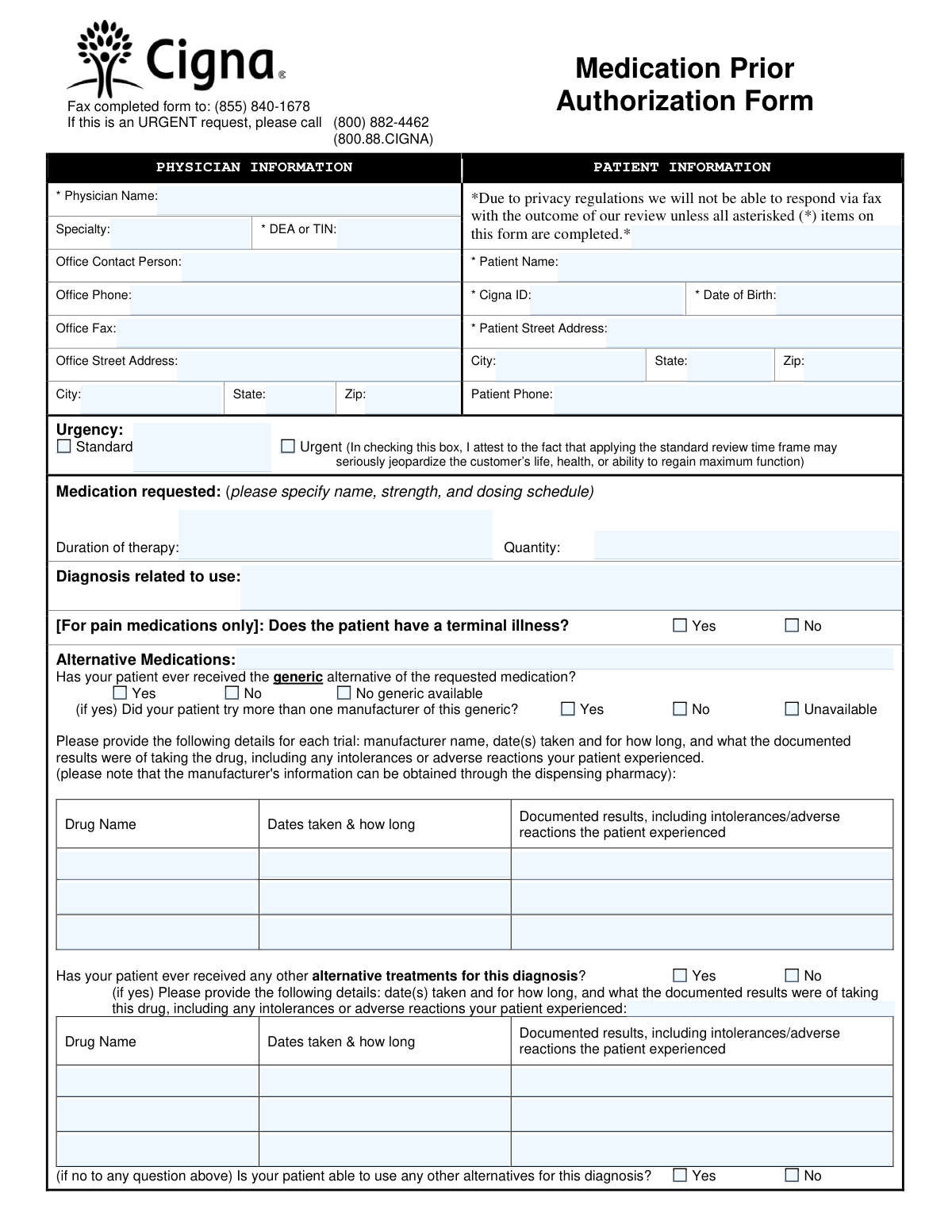
Yes! You can use AI to fill out Cigna Medication Prior Authorization Form
This form is a formal request submitted by a physician to Cigna to obtain pre-approval for a prescription drug that is not on the insurer's preferred list or requires pre-authorization. It is crucial for ensuring patients receive necessary medications by demonstrating medical necessity and documenting previous treatment attempts. Today, this form can be filled out quickly and accurately using AI-powered services like Instafill.ai, which can also convert non-fillable PDF versions into interactive fillable forms.
Our AI automatically handles information lookup, data retrieval, formatting, and form filling.
It takes less than a minute to fill out Cigna Prior Auth Form using our AI form filling.
Securely upload your data. Information is encrypted in transit and deleted immediately after the form is filled out.
Form specifications
| Form name: | Cigna Medication Prior Authorization Form |
| Number of pages: | 2 |
| Language: | English |
| Categories: | prior authorization forms, authorization forms |
Instafill Demo: How to fill out PDF forms in seconds with AI
How to Fill Out Cigna Prior Auth Form Online for Free in 2026
Are you looking to fill out a CIGNA PRIOR AUTH FORM form online quickly and accurately? Instafill.ai offers the #1 AI-powered PDF filling software of 2026, allowing you to complete your CIGNA PRIOR AUTH FORM form in just 37 seconds or less.
Follow these steps to fill out your CIGNA PRIOR AUTH FORM form online using Instafill.ai:
- 1 Navigate to Instafill.ai and upload or select the Cigna Medication Prior Authorization Form.
- 2 Provide the required Physician Information, including name, specialty, DEA/TIN, and office contact details.
- 3 Enter the complete Patient Information, such as name, Cigna ID, date of birth, and address.
- 4 Specify the medication being requested, including its name, strength, dosing schedule, quantity, duration, and the related diagnosis.
- 5 Detail the patient's history with alternative medications and treatments, including generics tried, dates, and outcomes.
- 6 Add any additional clinical information or justifications in the designated section to support the request.
- 7 Review all the information auto-filled by the AI for accuracy, then download the completed form to fax or submit it as per the instructions.
Our AI-powered system ensures each field is filled out correctly, reducing errors and saving you time.
Why Choose Instafill.ai for Your Fillable Cigna Prior Auth Form Form?
Speed
Complete your Cigna Prior Auth Form in as little as 37 seconds.
Up-to-Date
Always use the latest 2026 Cigna Prior Auth Form form version.
Cost-effective
No need to hire expensive lawyers.
Accuracy
Our AI performs 10 compliance checks to ensure your form is error-free.
Security
Your personal information is protected with bank-level encryption.
Frequently Asked Questions About Form Cigna Prior Auth Form
This form is used by a physician's office to request coverage approval from Cigna for a medication that is not on the patient's standard prescription drug list. It helps establish the medical necessity for the requested drug.
The patient's prescribing physician or their office staff must complete and submit this form. Patients cannot fill out or submit this form themselves.
All fields marked with an asterisk (*) must be completed to receive a response via fax due to privacy regulations. This includes the physician's DEA/TIN and the patient's name, Cigna ID, date of birth, and address.
You can submit the form online via CoverMyMeds or SureScripts, or you can fax the completed form to (855) 840-1678. For urgent requests, you must also call Cigna directly.
The standard response time for a prior authorization request is 5 business days. If the request is urgent, you must call (800) 882-4462 to expedite the review process.
You should only check the 'Urgent' box if applying the standard 5-day review time frame could seriously jeopardize the patient's life, health, or ability to regain maximum function. Remember to call Cigna after submitting an urgent request.
If the patient has not tried any alternatives, you must select 'No' and provide a detailed clinical reason why they are unable to use other available medications for their diagnosis. This justification is critical for the review.
The form notes that the manufacturer's information for a previously taken medication can be obtained by contacting the pharmacy that dispensed the drug.
Yes, services like Instafill.ai use AI to accurately auto-fill form fields from your records, which can save significant time and help prevent errors.
You can use a service like Instafill.ai to upload the form, and its AI will help you fill in the patient and physician information quickly. Alternatively, you can submit directly online through the CoverMyMeds portal mentioned on the form.
If you have a non-fillable PDF, you can upload it to a service like Instafill.ai. It can convert flat PDFs into interactive, fillable forms that you can complete and save digitally.
Use this section to provide any other clinical information that supports the request. This can include relevant lab values, diagnostic test results, or a more detailed summary of the patient's condition.
If the mandatory fields marked with an asterisk are not completed, Cigna will be unable to respond with the outcome of the review via fax due to privacy regulations. This will delay the decision and your patient's treatment.
Compliance Cigna Prior Auth Form
Validation Checks by Instafill.ai
1
Required Fields Completion Check
This validation ensures that all fields marked with an asterisk (*) are filled out. These fields include Physician Name, DEA or TIN, Patient Name, Cigna ID, Date of Birth, and Patient Street Address. The form explicitly states that a response cannot be provided unless these critical pieces of information are supplied, making this check essential for form processability.
2
Patient Date of Birth Validity
This check verifies that the 'Date of Birth' is a valid date in a recognized format (e.g., MM/DD/YYYY) and that the date is in the past. It also ensures the date corresponds to a realistic age for a patient, preventing future dates or dates from over 120 years ago. An invalid date would prevent proper patient identification and eligibility verification, leading to rejection of the form.
3
Cigna ID Format Validation
This validation confirms that the 'Cigna ID' field matches the expected format for a Cigna member identification number, which may include a specific length, prefix, or combination of letters and numbers. An incorrect ID prevents the system from locating the patient's policy and coverage details. If the format is invalid, the form submission should be blocked until a valid ID is entered.
4
Physician DEA or TIN Format
This check validates that the 'DEA or TIN' field contains a number that conforms to the standard format for either a Drug Enforcement Administration (DEA) number (2 letters followed by 7 digits) or a Taxpayer Identification Number (TIN) (9 digits). This number is required for regulatory compliance and to verify the prescriber's credentials. An invalid number will result in the rejection of the authorization request.
5
Exclusive Urgency Selection
This validation ensures that the user can only select one option for the urgency level, either 'Standard' or 'Urgent'. Allowing both to be selected would create ambiguity in processing priority. If a user attempts to select both, the system should default to one or prompt the user to make a single choice to ensure the request is triaged correctly.
6
Conditional Requirement for Generic Trial Details
This check enforces a logical rule: if the user selects 'Yes' for 'Has your patient ever received the generic alternative', then the details for at least one medication trial (Drug Name, Dates taken, Documented results) must be provided. This information is critical for the clinical review to understand why a brand-name drug is being requested over a generic. Failure to provide these details will result in an incomplete submission.
7
Conditional Requirement for Alternative Treatment Details
This validation ensures that if the user answers 'Yes' to 'Has your patient ever received any other alternative treatments for this diagnosis?', the corresponding details section must be filled out. This history is essential for the reviewer to assess the patient's treatment journey and medical necessity for the requested drug. If the details are missing, the form is considered incomplete and cannot be properly evaluated.
8
Conditional Requirement for Inability to Use Alternatives
This check verifies that if the user answers 'No' to 'Is your patient able to use any other alternatives for this diagnosis?', then the text field explaining the reason must be completed. This justification is a key component of the prior authorization review, as it explains why other covered options are not clinically appropriate. Without this reason, the request for the non-alternative drug is likely to be denied.
9
Medication Request Completeness
This validation ensures the 'Medication requested' field is not empty and contains sufficient detail, specifically the drug name, strength, and dosing schedule. This information is fundamental to the entire request, as the review is for a specific medication and dosage. An incomplete or vague entry would make it impossible to process the authorization, leading to an immediate rejection or request for more information.
10
Diagnosis Field Completion
This check confirms that the 'Diagnosis related to use' field has been filled out. The medical diagnosis provides the clinical context and justification for why the requested medication is necessary for the patient. Without a diagnosis, the insurance provider cannot determine if the drug is being used for an approved indication, making this a mandatory field for a successful review.
11
Phone and Fax Number Format
This validation verifies that the 'Office Phone', 'Office Fax', and 'Patient Phone' fields contain valid 10-digit phone numbers, potentially allowing for common formatting like parentheses or hyphens. Correct contact information is crucial for communication if there are questions about the request or for delivering the outcome. An invalid number could delay the review process or prevent communication entirely.
12
Zip Code Format Validation
This check ensures that the 'Patient Zip Code' and 'Office Zip Code' fields contain a valid 5-digit or 9-digit (ZIP+4) US postal code. Accurate address information is necessary for patient and provider identification, record-keeping, and any physical correspondence. An invalid zip code would cause data entry errors and could flag the address as invalid, halting the submission.
13
Conditional Requirement for Multiple Generic Manufacturer Details
This validation enforces that if 'Did your patient try more than one manufacturer of this generic?' is answered with 'Yes', then details for at least a second generic medication trial must be provided. This information helps demonstrate a thorough attempt to use generic options before resorting to a brand-name drug. Missing details for the second trial would weaken the justification for the request and may lead to a denial.
14
State Abbreviation Validation
This check ensures that the 'Patient State' and 'Office State' fields contain a valid two-letter US state abbreviation. Using standardized state codes is essential for database integrity, address verification, and preventing data entry errors. An invalid entry, such as a full state name or a typo, should be flagged for correction before submission.
Common Mistakes in Completing Cigna Prior Auth Form
The form explicitly states that a response cannot be provided unless all asterisked (*) items are completed. Staff often overlook a required field like the Cigna ID, Patient Name, or DEA/TIN, which leads to an automatic rejection and significant processing delays. To prevent this, always perform a final review to ensure every field marked with an asterisk is filled before faxing or submitting.
The 'Medication requested' field requires the drug's name, strength, and dosing schedule. A common mistake is to only write the drug name, which is insufficient for the insurer to evaluate medical necessity and dosage appropriateness. This ambiguity forces a follow-up or denial, delaying patient care. Always include full details, for example, 'Metformin 500mg, one tablet twice daily'.
When documenting trials of alternative drugs, submitters frequently provide vague descriptions like 'didn't work' or 'patient failed'. The form requires specific, documented results, including intolerances or adverse reactions. Without this detailed clinical evidence, the insurer is likely to deny the request for the non-preferred drug. It is crucial to pull this specific information from the patient's chart before completing the form.
A simple data entry error, such as transposing digits in the physician's DEA/TIN or the patient's Cigna ID, is a frequent mistake. An incorrect ID makes it impossible for the system to identify the provider or patient, resulting in an immediate processing failure. To avoid this, carefully double-check all identification numbers against source documents. AI-powered form filling tools like Instafill.ai can use validation rules to help catch formatting errors in these fields.
Staff may check the 'Urgent' box simply to expedite a request, without the patient's condition meeting the specified criteria. The form includes a legal attestation that urgency is reserved for cases that could 'seriously jeopardize the customer’s life, health, or ability to regain maximum function.' Misusing this can lead to the request being downgraded to standard review, causing delays and potentially flagging the provider for an audit.
If the form indicates a patient cannot use other alternatives, the subsequent field asking for the reason is mandatory for a successful review. Many submissions leave this field blank, which is equivalent to providing no justification and leads to denial. A clear, clinical rationale, such as 'Patient has a documented contraindication due to renal impairment,' must be provided.
The 'Diagnosis related to use' field is often filled with non-specific terms like 'chronic pain' or internal office abbreviations. Insurers require a clear, specific diagnosis (ideally with an ICD-10 code) to match the requested medication against their coverage policies. Using a precise diagnosis prevents delays caused by the insurer needing to request clarification.
The form specifically asks if a patient tried more than one manufacturer of a generic alternative, a detail that is often overlooked. Some patients experience different efficacy or side effects between manufacturers, and documenting these failed trials is crucial for justifying a brand-name drug. Failing to answer this question suggests an incomplete workup and weakens the prior authorization request.
As this form is often printed, filled by hand, and faxed, illegible handwriting is a primary cause of errors. A reviewer may misread a patient's ID number, date of birth, or medication details, leading to incorrect data entry and denials. To avoid this, it is best to use a fillable PDF or write in clear, block capital letters. Since this is a non-fillable PDF, a tool like Instafill.ai can convert it into a digital, fillable version to eliminate handwriting issues.
The form layout places physician and patient information side-by-side, with identical address fields in parallel columns. It is a common mistake for staff to inadvertently enter office information in the patient's address fields or vice-versa. This error can cause critical communications to be misdirected and creates data mismatches that delay the review process.
Saved over 80 hours a year
“I was never sure if my IRS forms like W-9 were filled correctly. Now, I can complete the forms accurately without any external help.”
Kevin Martin Green
Your data stays secure with advanced protection from Instafill and our subprocessors

Robust compliance program
Transparent business model
You’re not the product. You always know where your data is and what it is processed for.
ISO 27001, HIPAA, and GDPR
Our subprocesses adhere to multiple compliance standards, including but not limited to ISO 27001, HIPAA, and GDPR.
Security & privacy by design
We consider security and privacy from the initial design phase of any new service or functionality. It’s not an afterthought, it’s built-in, including support for two-factor authentication (2FA) to further protect your account.
Fill out Cigna Prior Auth Form with Instafill.ai
Worried about filling PDFs wrong? Instafill securely fills cigna-medication-prior-authorization-form forms, ensuring each field is accurate.