Yes! You can use AI to fill out Distribution Request Form - ISC MEP
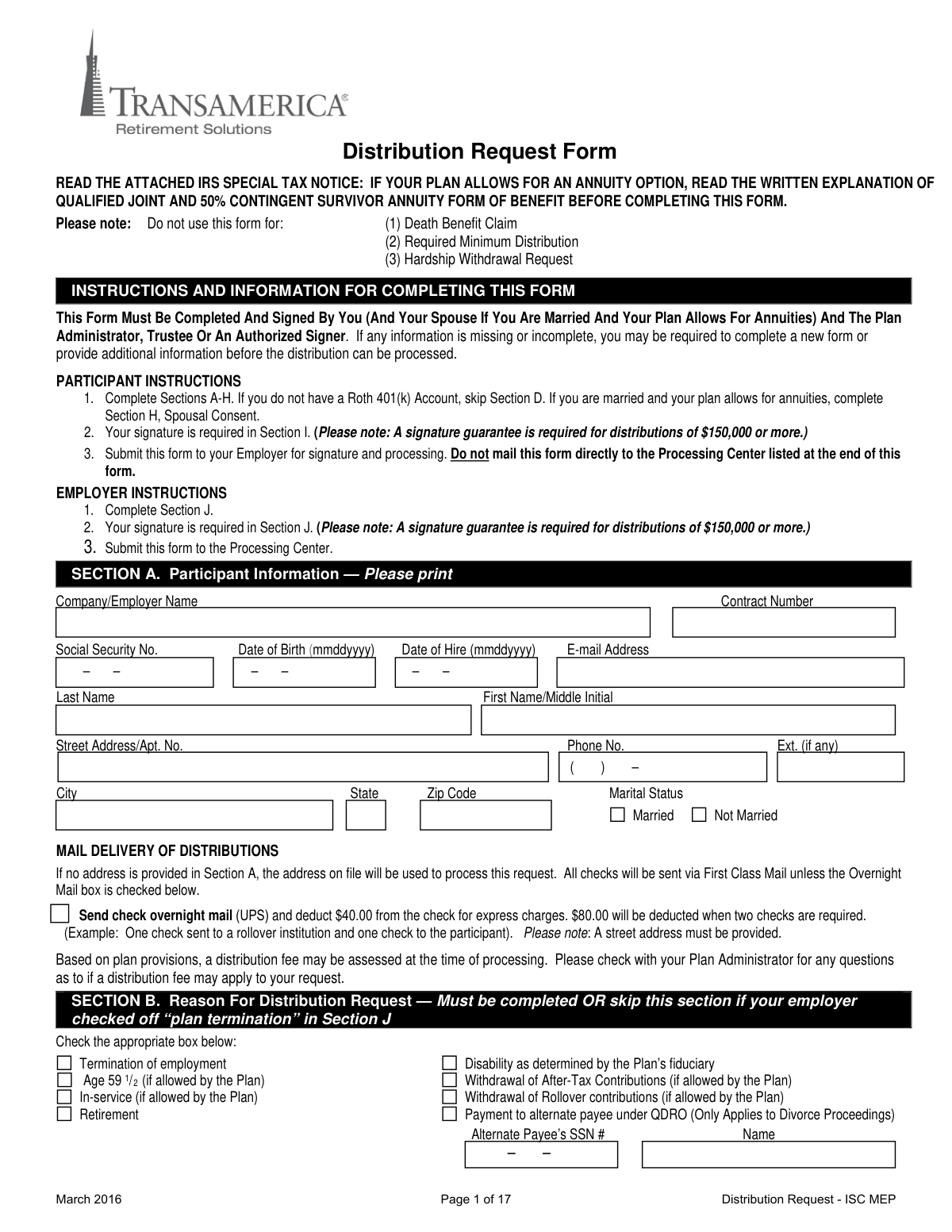
This Distribution Request Form is a document used by an employee or plan participant to request a distribution from their retirement savings plan. It allows the participant to specify the reason for the distribution (e.g., termination of employment, age 59 1/2) and the desired payment method, which can be a direct cash payment, a rollover to an IRA or another eligible plan, or a combination of both. Today, this form can be filled out quickly and accurately using AI-powered services like Instafill.ai, which can also convert non-fillable PDF versions into interactive fillable forms.
Distribution Request - ISC MEP is part of the
MEP forms, distribution forms and distribution request forms categories on Instafill.
Rather not fill this in by hand? Instafill is an online form filler that completes PDF forms automatically — upload the blank form, answer a few questions, and the AI fills every field.
Form specifications
| Form name: | Distribution Request Form - ISC MEP |
| Number of pages: | 1 |
| Language: | English |
Our AI automatically handles information lookup, data retrieval, formatting, and form filling.
It takes less than a minute to fill out Distribution Request - ISC MEP using our AI form filling.
Securely upload your data. Information is encrypted in transit and deleted immediately after the form is filled out.
Instafill Demo: How to fill out PDF forms in seconds with AI
How to Fill Out Distribution Request - ISC MEP Online for Free in 2026
Are you looking to fill out a DISTRIBUTION REQUEST - ISC MEP form online quickly and accurately? Instafill.ai offers the #1 AI-powered PDF filling software of 2026, allowing you to complete your DISTRIBUTION REQUEST - ISC MEP form in just 37 seconds or less.
Follow these steps to fill out your DISTRIBUTION REQUEST - ISC MEP form online using Instafill.ai:
- 1 Navigate to Instafill.ai and upload or select the Distribution Request Form.
- 2 Use the AI assistant to automatically fill in your personal details in Section A, such as your name, Social Security Number, and contact information.
- 3 In Section B, select the reason for your distribution, and in Sections C and D, choose your payment option (rollover, cash, or combination) for your Traditional and/or Roth 401(k) accounts.
- 4 Complete the income tax withholding elections in Section G and, if required by your plan, have your spouse complete and notarize the Spousal Consent in Section H.
- 5 Review all the information populated by the AI for accuracy, then electronically sign and date the form in Section I.
- 6 Download the completed form and submit it to your employer or Plan Administrator for their required signature and final processing.
Our AI-powered system ensures each field is filled out correctly, reducing errors and saving you time.
Why Choose Instafill.ai for Your Fillable Distribution Request - ISC MEP Form?
Speed
Complete your Distribution Request - ISC MEP in as little as 37 seconds.
Up-to-Date
Always use the latest 2026 Distribution Request - ISC MEP form version.
Cost-effective
No need to hire expensive lawyers.
Accuracy
Our AI performs 10 compliance checks to ensure your form is error-free.
Security
Your personal information is protected with bank-level encryption.
Frequently Asked Questions About Distribution Request - ISC MEP
This form is used by a plan participant to request a distribution from their employer's retirement plan. This is typically done due to events like termination of employment, retirement, or reaching age 59 1/2.
No, this form is specifically not for hardship withdrawals, Required Minimum Distributions (RMDs), or death benefit claims. You must use a different form for those types of requests.
You must submit the completed and signed form to your Employer or Plan Administrator for their signature and processing. Do not mail the form directly to the Transamerica Processing Center yourself.
You can choose a direct rollover to an IRA or another eligible plan, a full or partial cash distribution paid directly to you, or a combination of both. Be aware that cash distributions are subject to 20% mandatory federal tax withholding.
You only need to complete Section D if your plan allows for Roth contributions and you have a balance in a Roth 401(k) account. If you only have traditional pre-tax funds, you can skip Section D.
You must pay off your loan in full before submitting this Distribution Request Form. If the loan is not paid off prior to processing, it will be defaulted and become a taxable event for you.
Spousal consent in Section H is required if you are married, your vested account balance is over $5,000, and your plan provides for joint and survivor annuities. If required, the signature must be notarized or witnessed by a plan representative.
A medallion signature guarantee is required if your total distribution is $150,000 or more. This is a special stamp from a financial institution like a bank or broker-dealer, and a standard notary public seal is not an acceptable substitute.
Yes, the form specifies a minimum rollover amount of $20,000 to establish a Rollover IRA offered through Transamerica. You will also need to open the account and get an account number before the rollover can be processed.
Your plan may assess a distribution fee, so you should check with your Plan Administrator. Additionally, if you choose to have your check sent via overnight mail, a $40 fee will be deducted from your distribution amount.
Yes, services like Instafill.ai use AI to help you accurately auto-fill form fields with your personal information, which saves time and reduces the chance of errors.
Simply upload the PDF of the form to the Instafill.ai platform. It will become an interactive, fillable form that you can complete, sign electronically, and download for submission to your employer.
You can use a service like Instafill.ai, which can convert flat, non-fillable PDFs into interactive forms. This allows you to easily type your information directly into the fields on your computer.
Compliance Distribution Request - ISC MEP
Validation Checks by Instafill.ai
1
SSN Format and Completeness
This check verifies that the Social Security Number field in Section A is not empty and follows the standard XXX-XX-XXXX format. An accurate and correctly formatted SSN is critical for tax reporting (Form 1099-R) and correctly identifying the participant's account. If the SSN is missing or malformed, the form submission will be rejected to prevent processing errors and potential identity mismatches.
2
Age Verification for 'Age 59 1/2' Distribution
This validation cross-references the participant's 'Date of Birth' in Section A with the selection in Section B. If 'Age 59 1/2' is checked as the reason for distribution, the system must calculate the participant's current age to confirm they meet this requirement. This is crucial for compliance with IRS regulations, as failing to meet the age requirement can result in incorrect tax penalties. A mismatch will flag the form for review or rejection.
3
Mutually Exclusive Payment Election
This check ensures that the participant has provided instructions in only one of the primary payment sections: Section C (Traditional 401k), Section D (Roth 401k), or Section E (Annuity). The form explicitly states to skip Section E if C or D is used, and C and D are for different account types. Submitting multiple conflicting elections would make the request impossible to process, so the form is invalid if more than one of these sections is completed.
4
Combination Distribution Percentages Sum to 100%
If the participant selects 'Option 2 (Combination)' in either Section C or Section D, this check validates that the two percentage fields add up to exactly 100%. This ensures the full account balance is allocated between the cash payment and the direct rollover as intended. If the percentages do not sum to 100%, the request is ambiguous and must be rejected for correction by the participant.
5
Rollover Destination Account Information Completeness
When 'Option 1 (Rollover)' or 'Option 2 (Combination)' is selected in Section C or D, this validation ensures the 'NEW ACCOUNT INFORMATION' section is fully completed. It specifically checks for the presence of the receiving institution's name, address, and the 'Required' IRA/Plan Account Number. Missing this information would prevent the rollover check from being processed and sent to the correct destination, causing significant delays.
6
Spousal Consent for Married Participants
This check is triggered if the 'Marital Status' in Section A is 'Married' and the plan is subject to spousal consent rules. It verifies that Section H is fully completed, including the spouse's signature, date, and the required signature from a notary or plan representative. This is a critical legal requirement to protect spousal rights under ERISA, and failure to secure proper consent invalidates the distribution election.
7
Medallion Signature Guarantee for Large Distributions
This validation checks if the total distribution amount is $150,000 or more. If it is, the system must verify that a Medallion Signature Guarantee stamp is present in both Section I (Participant Signature) and Section J (Plan Administrator). This is a high-level security measure to protect against fraudulent large-value withdrawals. A missing stamp on a qualifying distribution will cause an immediate rejection of the form.
8
Participant Signature and Date Presence
This is a fundamental completeness check to ensure the participant's signature and the date of signature are present in Section I. The signature legally authorizes the transaction and acknowledges the participant has received all required notices. A missing signature or date renders the entire form invalid and unauthorized, and it cannot be processed under any circumstances.
9
Plan Administrator Authorization and Signature
This check confirms that Section J has been completed and signed by the Plan Administrator, Trustee, or Authorized Signer. This signature certifies that the request complies with plan provisions and authorizes Transamerica to process the distribution. Without this authorization, the request is incomplete and cannot be fulfilled, as it lacks the necessary employer approval.
10
Reason for Distribution Logic
This validation ensures that a reason for distribution is selected in Section B. However, it also checks for an exception: if the Plan Administrator has marked 'Yes' for 'Plan Termination' in Section J, Section B is not required. This logic prevents unnecessary rejections for plan termination scenarios while ensuring a valid reason is provided for all other distributions, which is necessary for compliance and determining eligibility.
11
QDRO Alternate Payee Information
If the reason for distribution in Section B is 'Payment to alternate payee under QDRO', this check verifies that the Alternate Payee's Social Security Number and Name have been filled in. A Qualified Domestic Relations Order (QDRO) is a legal document, and processing a payment requires the specific identification of the alternate payee. Failure to provide this information makes it impossible to process the QDRO payment correctly.
12
Logical Date Validation (Hire vs. Birth)
This check performs a logical comparison between the 'Date of Birth' and 'Date of Hire' fields in Section A. It ensures the date of hire is a plausible date that occurs after the date of birth (e.g., at least 14 years later). This helps catch significant data entry errors that could impact service calculations or eligibility. An illogical date relationship would flag the form for manual review.
13
Transamerica Rollover Minimum Amount
If the participant elects a direct rollover to 'AN IRA OFFERED THROUGH Transamerica' in Section C or D and specifies a dollar amount, this check verifies the amount is $20,000 or greater. The form explicitly states this minimum requirement. Flagging requests below this threshold prevents processing failures and allows for proactive communication with the participant about their options.
14
Overnight Mail Address Requirement
This validation is triggered if the 'Send check overnight mail' box is checked in Section A. It verifies that the participant's address is a physical street address, as overnight carriers like UPS cannot deliver to a P.O. Box. This check prevents delivery failures and additional costs by ensuring the provided address is compatible with the requested delivery method.
Common Mistakes in Completing Distribution Request - ISC MEP
Participants often mistakenly mail the form directly to the Transamerica processing center. The instructions clearly state the participant must complete their sections and submit the form to their Employer/Plan Administrator for completion of Section J and final submission. Sending it to the wrong place results in significant processing delays, as the form will be returned without the required employer authorization.
If the plan requires spousal consent (Section H), it is frequently missed or improperly executed. The spouse must sign, and that signature must be witnessed by a plan representative or a notary public. Forgetting this step, especially when waiving the standard annuity option for an account over $5,000, will cause an automatic rejection of the form, requiring the process to be started over.
For distributions of $150,000 or more, a Medallion Signature Guarantee is required in Section I, not a standard notary stamp. People often confuse the two, leading to rejection. A Medallion Guarantee is a special stamp from a financial institution (like a bank or broker) that guarantees the signature and the signer's authority, and failing to obtain one for a large distribution will halt the request until the original form is properly stamped and resubmitted.
When requesting a direct rollover in Section C or D, people often omit the new account number or list themselves as the payee. The check must be made payable to the new institution for the benefit of the participant (e.g., 'Financial Institution FBO John Doe'). Incorrect information will cause the rollover to fail, potentially resulting in a check being mailed to the participant with a mandatory 20% tax withholding. AI-powered tools like Instafill.ai can help by validating that these critical fields are filled out correctly.
The form explicitly instructs participants in Section F to pay off any outstanding loans in full *before* submitting the distribution request. Many people overlook this and submit the form anyway, which causes the outstanding loan balance to be defaulted. This loan default is treated as a taxable distribution, leading to an unexpected and often significant tax liability for the participant.
In Sections C and D, participants must choose only one of three payment options, but they sometimes select multiple (e.g., both 'Rollover' and 'Cash'). When choosing the 'Combination' option, the percentages must add up to exactly 100%, and math errors are common. These contradictions force the processor to return the form for correction, delaying the distribution.
The first page clearly states this form is not to be used for Death Benefit Claims, Required Minimum Distributions (RMDs), or Hardship Withdrawals. Applicants in a hurry may grab the wrong form for their specific situation. Using this form for an excluded purpose guarantees the request will be rejected, and the participant will have to start over with the correct paperwork.
When selecting a rollover to a new IRA, especially the Transamerica option mentioned in Sections C and D, an account number is required. Participants often submit the form assuming the account will be created as part of the process. However, the instructions state the participant must first contact the institution to establish the account, and failure to do so will put the entire distribution request on hold until an account number is provided.
A participant might incorrectly mark 'Not Married' in Section A to avoid the perceived hassle of getting spousal consent in Section H. This is a serious error that can lead to processing delays if records show otherwise and may have significant legal consequences regarding the spouse's rights to the benefits. It is critical to state the correct marital status and follow the corresponding spousal consent rules.
In Section G, participants may elect to not have state income tax withheld, not realizing their state has mandatory withholding rules that override their choice. Furthermore, many do not fully grasp from the tax notice that choosing a cash distribution (Option 3) automatically triggers a mandatory 20% federal income tax withholding. This can result in receiving a significantly smaller check than anticipated and potential confusion at tax time. Since this form is a non-fillable PDF, tools like Instafill.ai can convert it into a smart, fillable version with helpful tips to prevent such misunderstandings.
Saved over 80 hours a year
“I was never sure if my IRS forms like W-9 were filled correctly. Now, I can complete the forms accurately without any external help.”
Kevin Martin Green
Your data stays secure with advanced protection from Instafill and our subprocessors




Robust compliance program
Transparent business model
You’re not the product. You always know where your data is and what it is processed for.
ISO 27001, HIPAA, and GDPR
Our subprocesses adhere to multiple compliance standards, including but not limited to ISO 27001, HIPAA, and GDPR.
Security & privacy by design
We consider security and privacy from the initial design phase of any new service or functionality. It’s not an afterthought, it’s built-in, including support for two-factor authentication (2FA) to further protect your account.
Fill out Distribution Request - ISC MEP with Instafill.ai
Worried about filling PDFs wrong? Instafill securely fills distribution-request-form-isc-mep forms, ensuring each field is accurate.
