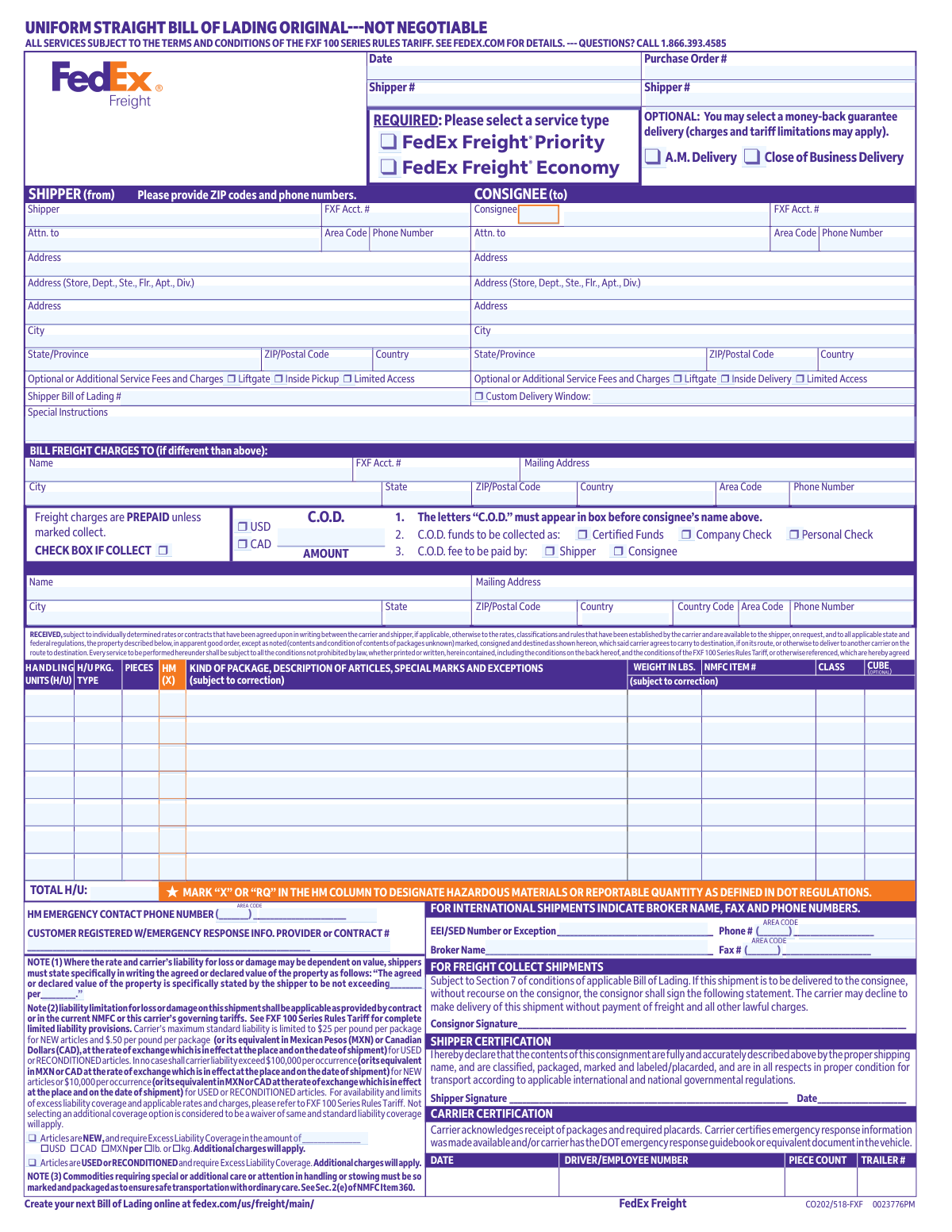
Yes! You can use AI to fill out FedEx Freight Uniform Straight Bill of Lading (Original—Not Negotiable)
This form is a Uniform Straight Bill of Lading for FedEx Freight shipments, used to identify the shipper and consignee, describe the freight (including NMFC class, weight, and hazardous materials), and specify billing terms such as prepaid/collect and C.O.D. It functions as a contract of carriage incorporating the FXF 100 Series Rules Tariff and applicable state/federal regulations. It is important because it drives rating, liability limits/declared value, delivery instructions, and compliance requirements (e.g., hazardous materials certification and emergency contact information). It also serves as the carrier’s receipt acknowledging the freight was tendered in apparent good order, subject to noted exceptions.
Our AI automatically handles information lookup, data retrieval, formatting, and form filling.
It takes less than a minute to fill out FedEx Freight BOL (FXF 100 Series) using our AI form filling.
Securely upload your data. Information is encrypted in transit and deleted immediately after the form is filled out.
Form specifications
| Form name: | FedEx Freight Uniform Straight Bill of Lading (Original—Not Negotiable) |
| Number of pages: | 1 |
| Filled form examples: | Form FedEx Freight BOL (FXF 100 Series) Examples |
| Language: | English |
Instafill Demo: filling out a legal form in seconds
How to Fill Out FedEx Freight BOL (FXF 100 Series) Online for Free in 2026
Are you looking to fill out a FEDEX FREIGHT BOL (FXF 100 SERIES) form online quickly and accurately? Instafill.ai offers the #1 AI-powered PDF filling software of 2026, allowing you to complete your FEDEX FREIGHT BOL (FXF 100 SERIES) form in just 37 seconds or less.
Follow these steps to fill out your FEDEX FREIGHT BOL (FXF 100 SERIES) form online using Instafill.ai:
- 1 Enter shipper (from) information: name, FXF account number (if any), full mailing address, city/state/ZIP (or postal code/country), and phone number.
- 2 Enter consignee (to) information: name/attention line, FXF account number (if any), delivery address details, city/state/ZIP (or postal code/country), and phone number; add any limited access or delivery window options if needed.
- 3 Describe the shipment line items: handling units, package type, number of pieces, kind of package/description of articles, special marks/exceptions, NMFC item number, freight class, cube (if required), and weight in pounds; mark the HM column with “X” or “RQ” for hazardous materials/reportable quantities.
- 4 Select billing and payment terms: mark freight charges as prepaid or check the collect box; if C.O.D. applies, enter the C.O.D. amount, indicate certified funds/company check/personal check, and specify whether the shipper or consignee pays the C.O.D. fee; complete “Bill Freight Charges To” and “Remit C.O.D. To” if different.
- 5 Complete compliance and liability sections: provide HM emergency contact phone number and emergency response provider/contract number (if applicable); state any agreed/declared value and select excess liability coverage options for new/used goods if desired.
- 6 Choose service type and options: select FedEx Freight Priority or Economy, add optional services (liftgate, inside pickup/delivery, limited access), and include special instructions, purchase order number, and shipper bill of lading number if applicable.
- 7 Sign and date required certifications: shipper signs the Shipper Certification (and the Section 7 non-recourse statement for collect shipments if applicable); ensure carrier/driver fields (date, trailer #, piece count) are completed at pickup.
Our AI-powered system ensures each field is filled out correctly, reducing errors and saving you time.
Why Choose Instafill.ai for Your Fillable FedEx Freight BOL (FXF 100 Series) Form?
Speed
Complete your FedEx Freight BOL (FXF 100 Series) in as little as 37 seconds.
Up-to-Date
Always use the latest 2026 FedEx Freight BOL (FXF 100 Series) form version.
Cost-effective
No need to hire expensive lawyers.
Accuracy
Our AI performs 10 compliance checks to ensure your form is error-free.
Security
Your personal information is protected with bank-level encryption.
Frequently Asked Questions About Form FedEx Freight BOL (FXF 100 Series)
This is a FedEx Freight Uniform Straight Bill of Lading (BOL) used to document and authorize an LTL freight shipment. It provides shipment details, service selections, and the legal terms for transporting the freight.
The shipper (the party sending the freight) typically completes the form, including shipment description, addresses, and service options. The carrier completes pickup-related fields (like trailer number and piece count) at the time of pickup.
You should provide full names, mailing addresses, city/state, ZIP/postal codes, country (if applicable), and phone numbers with area codes for both shipper (from) and consignee (to). Including attention lines (Attn.) and unit/suite details helps avoid delivery delays.
List the package type, number of pieces, and a clear description of the goods, along with weight, class, and cube if known. If applicable, include the NMFC item number and any special marks or handling instructions.
The NMFC item number is a National Motor Freight Classification code used to classify freight for rating and handling. It may be required for accurate pricing and to avoid reclassification; if you don’t know it, contact your freight representative or use your freight classification resources.
If you do nothing, the shipper pays the freight charges (prepaid). If the consignee should pay, check the 'Collect' box and ensure the billing details are correct.
Use C.O.D. when the carrier must collect payment from the consignee upon delivery. The form instructs that “C.O.D.” must appear in the box before the consignee’s name, and you must select the funds type (certified, company check, or personal check) and who pays the C.O.D. fee (shipper or consignee).
Complete this section if the freight charges should be billed to someone other than the shipper or consignee shown above (for example, a third-party payer). Provide the payer’s full contact and address information to prevent billing issues.
Mark “X” or “RQ” in the HM column for any hazardous materials or reportable quantities as defined by DOT regulations. You must also provide an HM emergency contact phone number and, if applicable, the emergency response information provider/contract number.
By signing, the shipper certifies the shipment is accurately described, properly classified, packaged, marked, and in proper condition for transport under applicable regulations. This is especially important for regulated or hazardous shipments.
These checkboxes request accessorial services such as liftgate service, inside pickup/delivery, limited access delivery, or a custom delivery window. Selecting these services may add charges and can affect scheduling.
These are the required service type selections that generally affect transit time and cost. Choose the option that matches your delivery speed needs; pricing and availability depend on lane and tariff rules.
If the rate or liability depends on value, you must state the agreed/declared value in writing in the format shown on the form. You can also check the excess liability coverage options (new vs. used/reconditioned) and enter the coverage amount and currency; additional charges apply.
The form states standard liability is generally limited to $25 per pound per package for new articles and $0.50 per pound per package for used or reconditioned articles, subject to tariff/contract terms. Not selecting additional coverage is treated as a waiver, and standard limits apply (with per-occurrence caps also listed on the form).
Provide the broker name and broker fax/phone numbers in the international section, and include any required export filing information such as the EEI/SED number or exception. Make sure shipper/consignee country details are complete to avoid customs and clearance delays.
Compliance FedEx Freight BOL (FXF 100 Series)
Validation Checks by Instafill.ai
1
Validates required Shipper (From) identity and address fields are complete
Checks that the shipper name, street address (including any suite/department if provided), city, state/province, ZIP/postal code, and country are present. This is essential for pickup, billing, and legal responsibility for the shipment. If any required shipper address element is missing, the submission should be rejected or routed to exception handling because the carrier may be unable to dispatch pickup or generate compliant documentation.
2
Validates required Consignee (To) identity and address fields are complete
Ensures consignee name, delivery address, city, state/province, ZIP/postal code, and country are provided. Delivery failures and misroutes commonly occur when any of these fields are incomplete or inconsistent. If validation fails, the form should not be accepted because the shipment cannot be reliably tendered for delivery.
3
Validates phone number formats and required presence for shipper/consignee
Verifies that phone numbers include a valid area code and subscriber number (and country code when country is not domestic), using an accepted numeric format and length. Phone contact is required for pickup/delivery coordination, accessorial scheduling, and exception resolution. If invalid or missing where required, the system should flag the record and prevent finalization until corrected.
4
Validates ZIP/Postal code format matches selected country
Checks that ZIP/postal codes conform to the expected pattern for the specified country (e.g., US 5-digit or ZIP+4, Canada A1A 1A1, etc.). Correct postal formatting improves address validation, rating, and routing. If the postal code does not match the country’s rules, the submission should be blocked or require user confirmation and correction.
5
Validates shipment date fields are present and logically valid
Ensures the Bill of Lading date and the Shipper Signature date (if signature is provided) are present and are valid calendar dates. Also checks that signature date is not after the shipment date (or other configured business rule) and not unreasonably far in the past/future. If dates are missing or inconsistent, the form should be rejected because it can affect contract applicability, liability, and regulatory compliance.
6
Validates Shipper Certification signature is present when required
Checks that the shipper signature field is completed when the form is being submitted as a final tender (not a draft). The certification attests to accurate description, classification, packaging, and regulatory compliance, which is legally significant. If missing, the system should prevent submission or mark the BOL as incomplete and non-tenderable.
7
Validates service type selection (Priority vs Economy) is exactly one
Ensures the required service type is selected and that only one option is chosen (FedEx Freight Priority or FedEx Freight Economy). Service type drives rating, transit commitments, and operational handling. If none or both are selected, the submission should fail validation because pricing and service commitments cannot be determined.
8
Validates Collect vs Prepaid logic and required Collect acknowledgements
Checks that if the 'Collect' checkbox is marked, the form includes the required consignor signature for freight collect shipments (Section 7 statement) and any other collect-specific fields configured by the carrier. This prevents disputes where delivery is attempted without payment authorization. If Collect is selected without the required signature/acknowledgement, the system should block submission or require correction.
9
Validates C.O.D. requirements when C.O.D. amount is provided or C.O.D. is indicated
If a C.O.D. amount is entered or C.O.D. is otherwise indicated, verifies that the 'C.O.D.' marking requirement is satisfied (e.g., a C.O.D. indicator present before consignee name per the form instruction), the funds type is selected (certified/company/personal check), and the fee payer is selected (shipper/consignee). C.O.D. shipments require precise instructions to avoid collection failures and financial exposure. If any required C.O.D. element is missing, the submission should be rejected or forced into an exception workflow.
10
Validates currency selection when monetary amounts are present
Ensures that when C.O.D. amount and/or excess liability coverage amounts are entered, a currency is selected (USD/CAD/MXN as applicable) and is consistent across related fields. Currency mismatches can cause incorrect billing and liability coverage. If currency is missing or inconsistent, the system should prevent finalization until corrected.
11
Validates line-item freight details: handling units, package type, pieces, weight, class, and cube
For each commodity line, checks that handling units (H/U), package type, pieces, and weight are present and are positive numbers; validates freight class is in an acceptable range/list; and cube (if provided/required) is numeric and non-negative. These fields drive rating, capacity planning, and safe handling. If any required line-item field is missing or invalid, the system should reject the submission or require correction before rating and tender.
12
Validates totals consistency (Total H/U and piece count vs line items)
Ensures that the 'TOTAL H/U' and any overall piece count fields equal the sum of the corresponding line-item values. This prevents dock discrepancies, claims issues, and billing disputes. If totals do not reconcile, the system should flag the discrepancy and require user confirmation/correction before acceptance.
13
Validates hazardous materials (HM) designation and emergency contact requirements
If any line is marked with 'X' or 'RQ' in the HM column, verifies that the HM emergency contact phone number is provided in a valid format and that the emergency response provider registration/contract number is present when required by policy. Hazmat shipments have strict regulatory requirements and missing emergency info can create safety and compliance violations. If HM is indicated without required emergency details, the submission must be blocked.
14
Validates NMFC item number format when provided/required
Checks that NMFC item numbers (if entered or required for rating/classification) follow an acceptable numeric/structured format and are not obviously invalid (e.g., non-numeric characters where not allowed). NMFC accuracy affects classification, pricing, and claims handling. If NMFC is required but missing/invalid, the system should reject the form or require correction prior to rating.
15
Validates excess liability coverage selection and amount/unit requirements
If the shipper selects excess liability coverage for NEW articles, verifies that the coverage amount is provided and that the unit basis is selected (per lb or per kg) and is consistent with the shipment’s weight unit conventions. If USED/RECONDITIONED coverage is selected, ensures the selection is explicit and any required supporting fields are completed per tariff rules. If coverage is selected but amount/unit is missing or invalid, the submission should fail because liability and charges cannot be correctly applied.
16
Validates accessorial/service fee selections and dependent fields (Custom Delivery Window, Liftgate, Inside, Limited Access)
Ensures that when 'Custom Delivery Window' is selected, the required phone number and any required scheduling details (if captured by the system) are present and valid. Also checks that pickup-related accessorials (e.g., Inside Pickup) are not incorrectly applied to delivery-only contexts and vice versa, based on the form section used. If dependent details are missing or accessorials are inconsistent, the system should flag the submission to prevent service failures and billing disputes.
Common Mistakes in Completing FedEx Freight BOL (FXF 100 Series)
People often fill in names and street addresses but skip ZIP/postal codes, area codes, or phone numbers even though the form explicitly requests them. Missing or incorrect contact details can delay pickup/delivery, prevent appointment scheduling, and make exception resolution (damage, shortage, refused freight) much harder. Always provide full address lines (including suite/department), city, state/province, ZIP/postal code, country, and a reachable phone number with area/country code for both shipper and consignee.
A common error is entering the pickup location in the consignee section or listing the receiving warehouse as the shipper, especially when a third party is arranging the shipment. This can cause misrouted freight, incorrect service options, and billing disputes if the wrong party is tied to the shipment. Double-check that “Shipper (from)” is the physical origin address and “Consignee (to)” is the final delivery address, and use the “Bill freight charges to” section for third-party billing.
The form states “REQUIRED: Please select a service type,” but many submissions leave both boxes blank. If the service type is missing, the carrier may default to a service you didn’t intend, leading to unexpected transit times or charges. Always check exactly one service type and confirm it matches your delivery expectations and any customer PO requirements.
Because the form says charges are prepaid unless marked collect, shippers sometimes assume “collect” is implied or forget to check the collect box. This can result in invoices going to the wrong party, delivery holds, or refusal if the consignee did not agree to pay. If the shipment is collect, explicitly check the “COLLECT” box and ensure the consignee is aware; if third-party billing applies, complete the “Bill freight charges to” section.
C.O.D. has multiple requirements on the form (C.O.D. must appear before the consignee name, funds type must be selected, and who pays the fee must be selected), and people often complete only the amount. Incorrect C.O.D. setup can lead to the driver not collecting funds, collection delays, or disputes over acceptable payment type. If using C.O.D., follow all three steps: mark “C.O.D.” in the required location, select the funds type, select who pays the fee, and complete the “Remit C.O.D. to” section if it differs from the shipper.
Many entries use generic terms like “parts,” “freight,” or “miscellaneous,” but the shipper certification requires a proper shipping name and accurate description. Poor descriptions can cause reclassification, billing adjustments, customs delays (international), and problems processing claims if damage occurs. Use specific descriptions (e.g., “steel machine brackets,” “plastic bottles, empty,” “printed paper brochures”), include material/type, and note any special handling needs in “Special Instructions” or “Special marks and exceptions.”
Shippers frequently leave NMFC and class blank or guess the class without verifying, especially for mixed commodities. This often triggers reweigh/reclass audits, resulting in higher charges, delayed invoicing resolution, and disputes. Confirm the correct NMFC item and class for each commodity (or work with your carrier/3PL to determine it) and ensure the class aligns with packaging, density, and handling characteristics.
A common mistake is entering total weight but not breaking it down by line item, or listing pieces that don’t match the number of pallets/handling units. Mismatches can cause pickup exceptions, incorrect rating, and claim complications if shortages occur because the piece count is unclear. Make sure each line item has consistent H/U (e.g., pallets), package type, pieces, and weight, and that totals (TOTAL H/U and total weight) match what is physically tendered.
People often forget to mark “X” or “RQ” in the HM column, or they omit the HM emergency contact phone number and the emergency response provider/contract number. This can lead to shipment refusal, regulatory violations, fines, and serious safety risks if an incident occurs. If any item is hazardous or reportable quantity, mark the HM column correctly, provide the required emergency contact details, and ensure packaging/labels/placards match the regulations referenced in the shipper certification.
Shippers frequently assume services like liftgate, inside pickup/delivery, or limited access are standard and don’t check the boxes. When not declared, the carrier may be unable to complete delivery as planned or will add accessorial charges after the fact, sometimes with delays while rescheduling. Select all applicable accessorials up front and use “Custom Delivery Window” only when you can provide a reachable phone number for scheduling.
Many shippers either leave the declared value statement empty or assume the carrier automatically covers full invoice value, despite the stated liability limits (e.g., $25/lb per package for new articles). This can significantly reduce recovery in the event of loss or damage and create disputes during claims. If the shipment value exceeds standard liability, explicitly state the agreed/declared value in the provided format and select the appropriate excess liability coverage option (including currency and per lb/kg basis).
It’s common to forget the shipper signature/date, especially when forms are prepared digitally or by someone other than the person tendering freight. Missing signatures can delay acceptance, complicate hazardous materials compliance attestations, and create enforceability issues for collect shipments requiring the Section 7 “without recourse” signature. Always sign and date the shipper certification, and if the shipment is freight collect without recourse, ensure the consignor signs the required statement as well.
Saved over 80 hours a year
“I was never sure if my IRS forms like W-9 were filled correctly. Now, I can complete the forms accurately without any external help.”
Kevin Martin Green
Your data stays secure with advanced protection from Instafill and our subprocessors
Robust compliance program
Transparent business model
You’re not the product. You always know where your data is and what it is processed for.
ISO 27001, HIPAA, and GDPR
Our subprocesses adhere to multiple compliance standards, including but not limited to ISO 27001, HIPAA, and GDPR.
Security & privacy by design
We consider security and privacy from the initial design phase of any new service or functionality. It’s not an afterthought, it’s built-in, including support for two-factor authentication (2FA) to further protect your account.
Fill out FedEx Freight BOL (FXF 100 Series) with Instafill.ai
Worried about filling PDFs wrong? Instafill securely fills fedex-freight-uniform-straight-bill-of-lading-orig forms, ensuring each field is accurate.