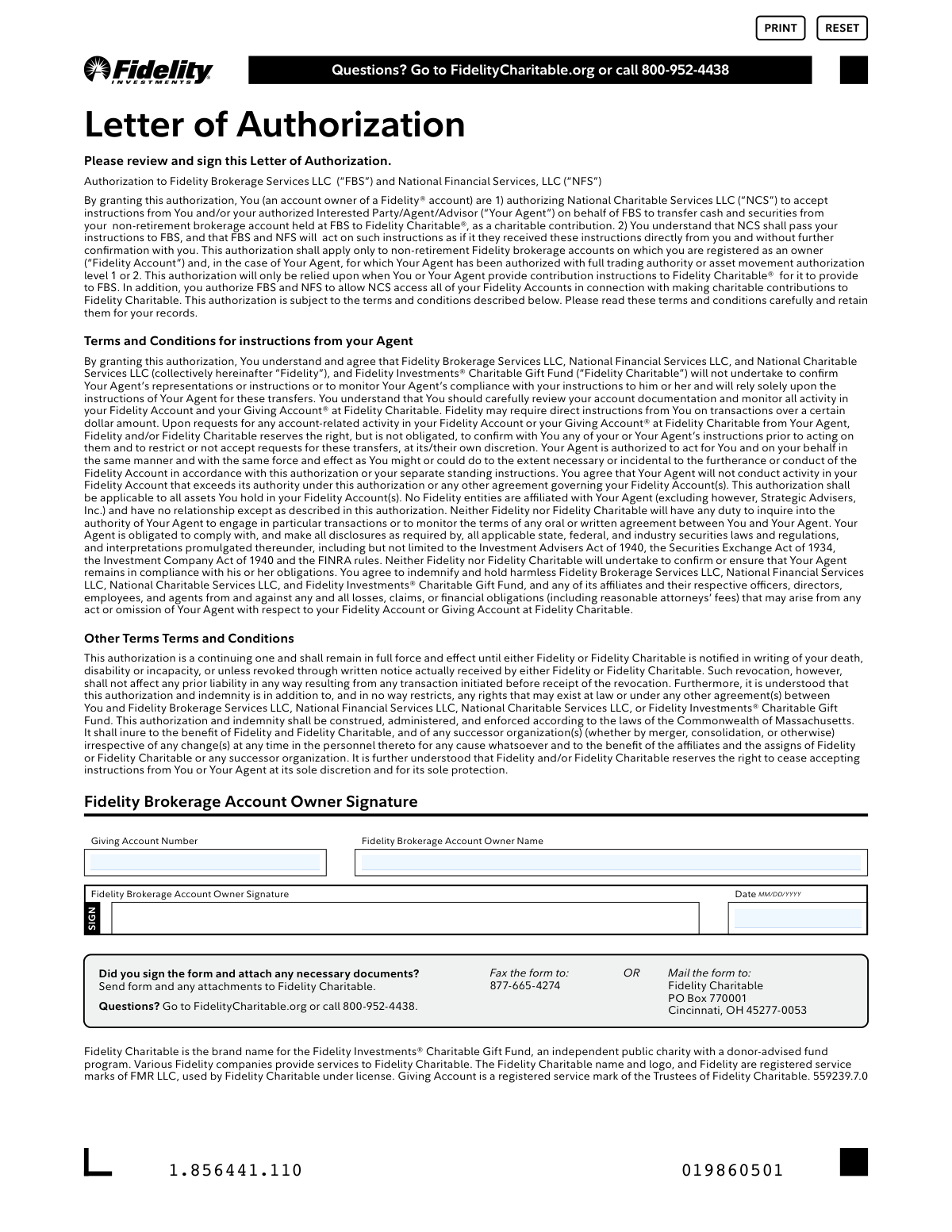
Yes! You can use AI to fill out Fidelity Charitable Letter of Authorization
This Letter of Authorization grants Fidelity Brokerage Services LLC (FBS) and National Financial Services, LLC (NFS) permission to act on instructions from you or your authorized agent to move assets from your brokerage account to your Fidelity Charitable Giving Account. It streamlines the process of making charitable contributions by allowing instructions to be passed through National Charitable Services LLC directly to FBS. Today, this form can be filled out quickly and accurately using AI-powered services like Instafill.ai, which can also convert non-fillable PDF versions into interactive fillable forms.
Our AI automatically handles information lookup, data retrieval, formatting, and form filling.
It takes less than a minute to fill out 559239.7.0 using our AI form filling.
Securely upload your data. Information is encrypted in transit and deleted immediately after the form is filled out.
Form specifications
| Form name: | Fidelity Charitable Letter of Authorization |
| Number of pages: | 1 |
| Filled form examples: | Form 559239.7.0 Examples |
| Language: | English |
Instafill Demo: How to fill out PDF forms in seconds with AI
How to Fill Out 559239.7.0 Online for Free in 2026
Are you looking to fill out a 559239.7.0 form online quickly and accurately? Instafill.ai offers the #1 AI-powered PDF filling software of 2026, allowing you to complete your 559239.7.0 form in just 37 seconds or less.
Follow these steps to fill out your 559239.7.0 form online using Instafill.ai:
- 1 Navigate to Instafill.ai and upload or select the Fidelity Charitable Letter of Authorization form.
- 2 Use the AI assistant to automatically populate your personal details, such as the Fidelity Brokerage Account Owner Name.
- 3 Enter your Giving Account Number in the designated field.
- 4 Carefully review the authorization terms and conditions to understand the permissions you are granting.
- 5 Digitally sign and date the form in the signature section.
- 6 Download the completed authorization letter.
- 7 Submit the signed form to Fidelity Charitable via the provided fax number or mailing address.
Our AI-powered system ensures each field is filled out correctly, reducing errors and saving you time.
Why Choose Instafill.ai for Your Fillable 559239.7.0 Form?
Speed
Complete your 559239.7.0 in as little as 37 seconds.
Up-to-Date
Always use the latest 2026 559239.7.0 form version.
Cost-effective
No need to hire expensive lawyers.
Accuracy
Our AI performs 10 compliance checks to ensure your form is error-free.
Security
Your personal information is protected with bank-level encryption.
Frequently Asked Questions About Form 559239.7.0
This form authorizes Fidelity Charitable to accept instructions from you or your authorized agent to transfer assets from your non-retirement Fidelity brokerage account to your Giving Account® for charitable contributions.
You should complete this form if you are a Fidelity brokerage account owner and want to enable yourself or your financial advisor to easily make contributions to your Fidelity Charitable Giving Account.
You will need your Fidelity Charitable Giving Account number and the full name of the Fidelity brokerage account owner. You must also provide a signature and the current date.
Your Giving Account number is located on your Fidelity Charitable statements or by logging into your account on FidelityCharitable.org. If you cannot find it, you can call customer support at 800-952-4438 for assistance.
This form authorizes your agent, provided they have the appropriate trading authority, to initiate transfers of cash and securities to your Fidelity Charitable account on your behalf. Fidelity will act on your agent's instructions as if they came directly from you.
No, this authorization only applies to your non-retirement Fidelity brokerage accounts. It does not cover retirement accounts such as an IRA or 401(k).
You can submit the signed form by faxing it to 877-665-4274 or by mailing it to Fidelity Charitable, PO Box 770001, Cincinnati, OH 45277-0053.
Yes, you can revoke this authorization at any time by providing written notice to Fidelity or Fidelity Charitable. Note that any transactions initiated before your revocation is received will still be processed.
By signing, you agree that Fidelity can rely on your agent's instructions without confirming with you and you agree to hold Fidelity harmless for their actions. It is important to monitor your account activity and only grant this authority to an agent you trust completely.
The form itself does not specify any required attachments for a standard submission. However, you should ensure your agent has the required trading authority on your brokerage account, which may have involved separate paperwork.
Yes, services like Instafill.ai use AI to accurately auto-fill form fields with your information, which can save you time and help prevent errors.
Simply upload the Letter of Authorization PDF to the Instafill.ai platform. The AI will identify the fields, allowing you to fill them out online, add your signature, and download the completed form for submission.
If you have a non-fillable PDF, you can use a service like Instafill.ai to convert it into an interactive, fillable form. This allows you to type your information directly into the fields before printing or saving.
Compliance 559239.7.0
Validation Checks by Instafill.ai
1
Ensures Giving Account Number is Provided
This validation confirms that the 'Giving Account Number' field is not empty. This number is essential for identifying the specific Fidelity Charitable account designated to receive the contributions. Without this number, the authorization is incomplete and funds cannot be directed to the intended charitable account, leading to processing failure.
2
Validates Giving Account Number Format
This check verifies that the entered 'Giving Account Number' conforms to the expected format, such as a specific number of digits or an alphanumeric pattern. This is important for data integrity and ensures the number can be correctly processed by backend systems. An incorrectly formatted number will be rejected to prevent lookup errors and misdirected funds.
3
Confirms Existence of the Giving Account
This validation cross-references the provided 'Giving Account Number' with Fidelity Charitable's database to confirm it is a valid, active account. This is a critical step to prevent attempted contributions to non-existent or closed accounts. If the account number is not found, the form submission will be flagged for review or rejected to prevent transaction failures.
4
Ensures Account Owner Name is Provided
This check ensures that the 'Fidelity Brokerage Account Owner Name' field has been filled out. The owner's name is a primary identifier required to locate the correct brokerage account and legally link the individual to this authorization. A missing name makes the authorization invalid and unenforceable, causing the form to be rejected.
5
Verifies Printed Name Matches Brokerage Account Owner
This validation confirms that the name printed on the form exactly matches the legal name registered to the owner of the Fidelity brokerage account. This is a crucial security measure to ensure the authorization is being granted by the actual account holder. A mismatch will result in the rejection of the form to prevent unauthorized asset transfers.
6
Confirms Presence of Account Owner's Signature
This check verifies that the 'Fidelity Brokerage Account Owner Signature' field has been signed. The signature is the legal confirmation of the account owner's consent to the terms of the authorization. A form without a signature is legally non-binding and will be immediately rejected as incomplete.
7
Ensures Signature Date is Provided
This validation confirms that the 'Date' field next to the signature is filled. The date establishes the exact time the authorization was granted, which is critical for legal and auditing purposes. A missing date makes the timing of the authorization ambiguous and will cause the form to be returned for completion.
8
Validates Signature Date is in MM/DD/YYYY Format
This check ensures the date entered by the user strictly follows the MM/DD/YYYY format as specified on the form. Consistent date formatting is essential for accurate data entry, automated processing, and record-keeping. Submissions with incorrectly formatted dates will be rejected to enforce data standards and prevent parsing errors.
9
Verifies the Signature Date is a Valid Calendar Date
This validation checks that the provided date is a real, possible date, for example, it rejects dates like '02/30/2023' or '13/01/2023'. This prevents data entry errors and ensures the integrity of the legal record. An invalid calendar date would render the authorization's effective date void, leading to rejection of the form.
10
Ensures Signature Date is Not in the Future
This check verifies that the signature date is not a future date. An authorization cannot be legally signed in the future, so such a date indicates a user error. This validation prevents logically impossible data from entering the system and ensures the authorization is effective from a valid point in time.
11
Validates Brokerage Account is a Non-Retirement Account
This check confirms that the Fidelity account from which funds will be transferred is a non-retirement brokerage account, as explicitly stated in the form's terms. Attempting to transfer assets from retirement accounts like an IRA or 401k using this form would have significant tax and legal implications. The system must block such authorizations to maintain compliance and protect the account owner.
12
Confirms Association Between Account Owner and Giving Account
This validation verifies that the 'Fidelity Brokerage Account Owner Name' is listed as an owner or authorized party on the specified 'Giving Account Number'. This ensures the person granting authorization has the right to direct funds into that specific charitable account. A mismatch could indicate an error or an attempt to contribute to an unrelated account, so the form would be flagged for manual review or rejected.
13
Holistic Check for All Required Fields
This is a final validation that runs before submission, ensuring that all mandatory fields (Giving Account Number, Owner Name, Signature, and Date) are completed. It serves as a catch-all to prevent the submission of a partially filled-out form. If any required field is missing, the user is prompted to complete it before the form can be processed.
14
Verifies Signature Corresponds to Printed Account Owner Name
This check ensures the signature legally represents the individual whose name is printed on the form. While automated systems may have limitations, this can involve flagging the form for manual review to compare the signature against one on file. This is a critical anti-fraud measure to confirm the identity of the person authorizing the asset movement.
Common Mistakes in Completing 559239.7.0
Users may confuse their Fidelity Charitable Giving Account number with their regular brokerage account number, or simply forget to fill it in. This error prevents the authorization from being linked to the correct donor-advised fund, leading to rejection of the form and significant delays in processing contributions. To avoid this, carefully locate the correct Giving Account number from your account statement or online portal and double-check it for typos before submission.
The printed name on the form must exactly match the legal name registered to the Fidelity Brokerage Account, including any middle names or initials. People often use nicknames, abbreviations, or omit a middle name, which causes a mismatch during verification and leads to the form being rejected. To prevent this, refer to a recent account statement to ensure the name is printed precisely as it appears on the account registration.
A missing signature is one of the most common and critical errors, as it completely invalidates this legal authorization. This often happens due to simple oversight when rushing to complete the paperwork. Without a valid signature, Fidelity cannot act on any instructions, and the form will be returned, halting any planned charitable contributions.
The form explicitly requests the date in MM/DD/YYYY format, but individuals frequently use other formats (e.g., DD/MM/YYYY) or write out the month. This can cause confusion and processing delays, as the date of signature is a key legal component of the document. To avoid this, strictly adhere to the specified format. AI-powered form filling tools like Instafill.ai can automatically format the date correctly, preventing this common mistake.
The form contains dense legal text authorizing an 'Agent' (like a financial advisor) to move assets from a brokerage account. A significant mistake is signing without fully understanding that this grants a third party the power to initiate transfers on the owner's behalf. This can lead to unintended transactions if the agent's authority is not clearly defined or monitored. It is crucial to read the 'Terms and Conditions' carefully before signing.
The form uses singular language like 'Account Owner,' which can be confusing for joint accounts where multiple owners are registered. Submitting the form with only one signature when the account requires all owners to authorize such actions can lead to its rejection. Before signing, owners of joint accounts should verify with Fidelity if signatures from all parties are required on the same or separate forms.
This authorization explicitly applies only to 'non-retirement Fidelity brokerage accounts.' A frequent error is attempting to use this form for an IRA, 401(k), or other tax-advantaged retirement account. Doing so is invalid and will be rejected, as transfers from such accounts have different tax implications and require specific forms and procedures.
When filling out a physical form, illegible handwriting for the account owner's name or account number can make it impossible to process the document correctly. This leads to data entry errors, delays, and potential rejection while the firm attempts to clarify the information. To prevent this, print all information clearly in block letters. Since this form is a non-fillable PDF, a tool like Instafill.ai can convert it into a fillable version, allowing you to type information for perfect legibility.
The form clearly specifies submission via fax or mail to a specific P.O. Box. People may mistakenly try to email the form or mail it to a general Fidelity address, which can result in the document being lost, delayed, or rejected for security reasons. Always use one of the approved submission methods listed on the form and double-check the fax number or mailing address before sending.
Saved over 80 hours a year
“I was never sure if my IRS forms like W-9 were filled correctly. Now, I can complete the forms accurately without any external help.”
Kevin Martin Green
Your data stays secure with advanced protection from Instafill and our subprocessors

Robust compliance program
Transparent business model
You’re not the product. You always know where your data is and what it is processed for.
ISO 27001, HIPAA, and GDPR
Our subprocesses adhere to multiple compliance standards, including but not limited to ISO 27001, HIPAA, and GDPR.
Security & privacy by design
We consider security and privacy from the initial design phase of any new service or functionality. It’s not an afterthought, it’s built-in, including support for two-factor authentication (2FA) to further protect your account.
Fill out 559239.7.0 with Instafill.ai
Worried about filling PDFs wrong? Instafill securely fills fidelity-charitable-letter-of-authorization-1 forms, ensuring each field is accurate.