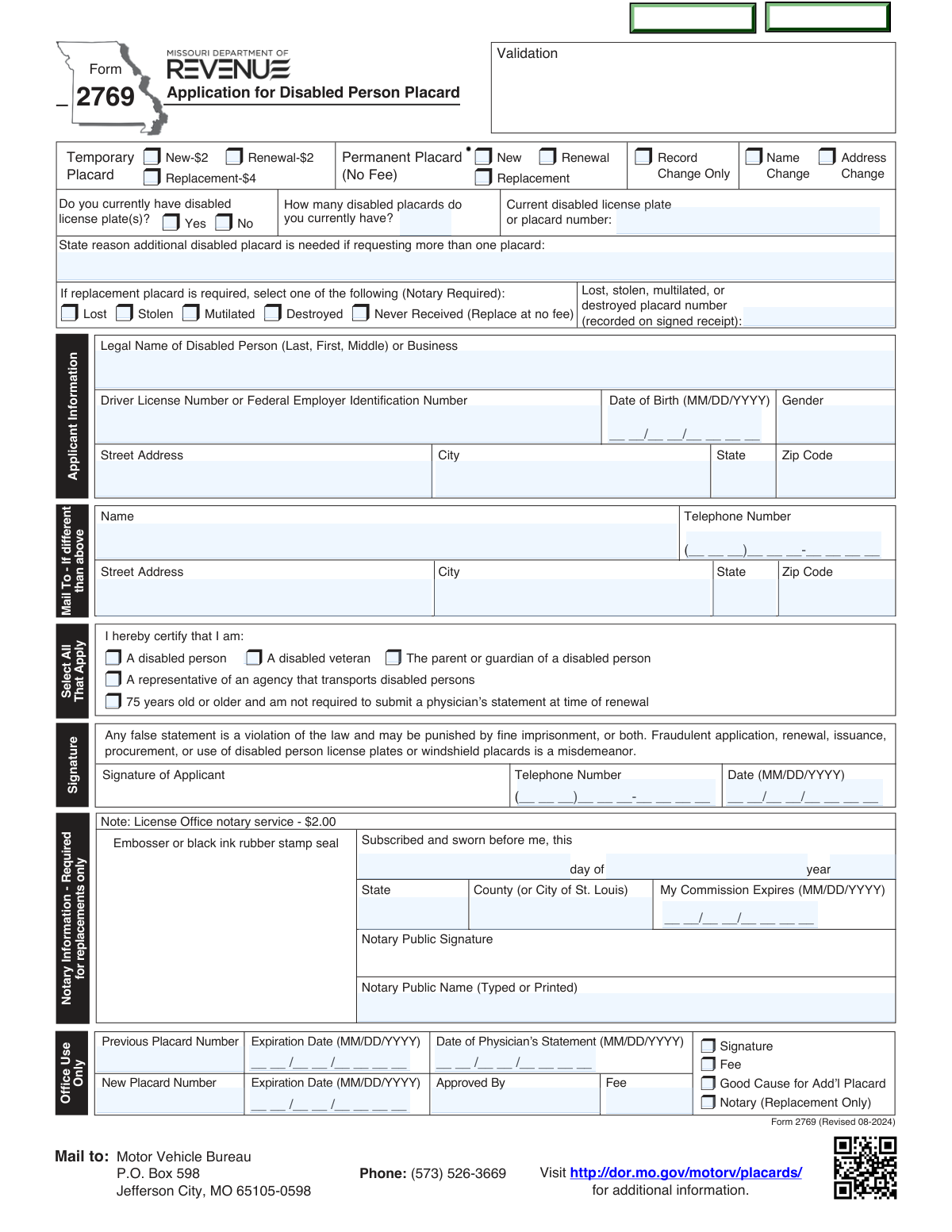
Yes! You can use AI to fill out Form 2769 (Revised 08-2024), Application for Disabled Person Placard
Missouri DOR Form 2769 is the official application to obtain or manage a disabled person windshield placard (permanent or temporary) that allows eligible individuals or qualifying organizations to use designated disabled parking spaces. The form is used for new issuance, renewal, replacement (lost/stolen/mutilated/destroyed/never received), and for updating records such as name or address changes. Depending on the request, applicants may need a separate medical certification (Physician’s Statement, Form 1776) or acceptable proof of disability (e.g., Veterans Administration statement). Accurate completion is important because misuse or fraudulent application/renewal is a misdemeanor and may carry fines or imprisonment.
Our AI automatically handles information lookup, data retrieval, formatting, and form filling.
It takes less than a minute to fill out MO DOR Form 2769 using our AI form filling.
Securely upload your data. Information is encrypted in transit and deleted immediately after the form is filled out.
Form specifications
| Form name: | Form 2769 (Revised 08-2024), Application for Disabled Person Placard |
| Number of pages: | 2 |
| Filled form examples: | Form MO DOR Form 2769 Examples |
| Language: | English |
Instafill Demo: filling out a legal form in seconds
How to Fill Out MO DOR Form 2769 Online for Free in 2026
Are you looking to fill out a MO DOR FORM 2769 form online quickly and accurately? Instafill.ai offers the #1 AI-powered PDF filling software of 2026, allowing you to complete your MO DOR FORM 2769 form in just 37 seconds or less.
Follow these steps to fill out your MO DOR FORM 2769 form online using Instafill.ai:
- 1 Select the placard request type(s): Temporary or Permanent, and indicate whether it is New, Renewal, Replacement, or Change Only (record/name/address).
- 2 Complete Applicant Information: legal name (or business), driver license number or FEIN, date of birth, gender, and current address; add a different mailing address if applicable.
- 3 Certify eligibility by checking the appropriate status (disabled person, disabled veteran, parent/guardian, agency representative, or age 75+ renewal exemption) and answer questions about existing disabled plates/placards and the number currently held; provide justification if requesting an additional placard.
- 4 If requesting a replacement, choose the reason (lost, stolen, mutilated, destroyed, or never received) and enter the relevant placard/plate numbers and dates; complete the required Notary section for replacements (as indicated on the form).
- 5 Obtain and attach supporting documentation as required: Physician’s Statement for Disabled License Plates or Placards (Form 1776) issued within 90 days for most new applications and required renewals (generally every eight years if under 75), or acceptable VA proof of permanent disability; note that replacements do not require a physician’s statement.
- 6 Sign and date the application (disabled person, parent/legal guardian, or qualifying agency representative) and include a contact telephone number; review the fraud/misuse warnings before submission.
- 7 Submit the completed packet and any required fee to a local license office (e.g., $2 per temporary placard or $4 per temporary replacement; no fee for new/renewal/replacement permanent placards) and keep the validated registration receipt once issued.
Our AI-powered system ensures each field is filled out correctly, reducing errors and saving you time.
Why Choose Instafill.ai for Your Fillable MO DOR Form 2769 Form?
Speed
Complete your MO DOR Form 2769 in as little as 37 seconds.
Up-to-Date
Always use the latest 2026 MO DOR Form 2769 form version.
Cost-effective
No need to hire expensive lawyers.
Accuracy
Our AI performs 10 compliance checks to ensure your form is error-free.
Security
Your personal information is protected with bank-level encryption.
Frequently Asked Questions About Form MO DOR Form 2769
Form 2769 is the Missouri Department of Revenue application for a Disabled Person Placard. It is used to request a new placard, renew an existing placard, request a replacement, or report changes (name/address) related to a placard.
A physically disabled person may apply, as well as a parent/guardian of a disabled person or a representative of an agency/not-for-profit organization that transports physically disabled persons. The applicant must certify which category applies on the form.
A permanent placard is for long-term disabilities and has no fee for new, renewal, or replacement. A temporary placard is for temporary disabilities and has a $2 fee for new/renewal and a $4 fee for temporary replacements.
Yes, for most new applications and renewals you must submit a completed and signed Physician’s Statement (Form 1776). The physician’s statement must be issued within 90 days of your application date.
A physician’s statement is not required to obtain a replacement placard. It is also not required at renewal if you are 75 years old or older, and it may be waived if you provide a U.S. Veterans Administration statement verifying permanent disability.
For renewal applicants under age 75, a physician’s statement is required every eight years. The form notes that the statement must be current (issued within 90 days) when you apply.
If the applicant is a not-for-profit group/organization (or other entity) transporting two or more physically disabled persons, it must submit a statement on business letterhead signed by an officer confirming it transports physically disabled persons. This is listed as an alternative to the physician’s statement for those entities.
Submit the completed Form 2769 and supporting items to your local Missouri license office. The form also lists a mailing address for the Motor Vehicle Bureau, but the instructions specifically say to submit the items to your local license office.
Temporary placards cost $2 each, and temporary replacement placards cost $4. There is no fee for new, renewal, or replacement permanent placards.
Notary information is required for replacements only. If you are requesting a replacement due to lost, stolen, mutilated, destroyed, or never received, the replacement section indicates a notary is required.
No. The replacement reason list includes “Never Received (Replace at no fee),” meaning you can request that type of replacement without a fee.
The form asks how many disabled placards you currently have and requires you to state a reason if requesting more than one placard. The office may review “good cause for add’l placard” as part of processing.
Enter the legal name of the business/organization and provide the Federal Employer Identification Number (FEIN) in the field that asks for “Driver License Number or Federal Employer Identification Number.” Use the organization’s address and contact information where requested.
The placard must be hung from the front rearview mirror only when the vehicle is parked, and it is unlawful to hang it while driving. It may only be displayed when the disabled person is an occupant (or being picked up/dropped off), and the placard cannot be loaned or transferred.
After approval, you will receive a new placard and a validated registration receipt. You should keep the validated receipt with you when using the placard, and be prepared to show it along with photo ID upon request by law enforcement.
Compliance MO DOR Form 2769
Validation Checks by Instafill.ai
1
Applicant Signature Presence and Date Format Validation
Validates that the applicant (disabled person, parent/guardian, or agency representative) has provided a signature and that the signature date is present and in MM/DD/YYYY format. This is critical because the application is not legally actionable without an attestation and a dated submission. If missing or malformed, the submission should be rejected and returned for completion.
2
Applicant Telephone Number Format Validation
Checks that the applicant telephone number is provided (when required by the workflow) and matches the expected U.S. format shown on the form, e.g., (###)###-####. A valid phone number is important for resolving issues such as missing documentation, fee discrepancies, or clarification of placard type. If the phone number is invalid, the system should flag the record for correction and prevent final acceptance until fixed (or route to manual review if phone is optional).
3
Mail-To (Alternate Address) Completeness and Consistency Check
If the 'Mail To - If different than above' section is used, validates that Name, Street Address, City, State, Zip Code, and Telephone Number are all completed and properly formatted. Partial alternate mailing information can cause placards/receipts to be mailed incorrectly or returned. If any required subfield is missing or invalid, the system should require completion or ignore the alternate address and default to the applicant address (per business rules) while flagging the submission.
4
Applicant Legal Name / Business Name Required Field Validation
Ensures the 'Legal Name of Disabled Person (Last, First, Middle) or Business' field is present and not obviously incomplete (e.g., only a first name, or placeholder text). Correct identification is essential for issuance, record matching, and fraud prevention. If the name is missing or fails basic completeness rules, the application should be rejected or routed to manual review.
5
Driver License Number vs FEIN Conditional Validation
Validates that either a Driver License Number (for an individual) or a Federal Employer Identification Number (for a business/entity) is provided, and that the provided identifier matches expected formatting rules (e.g., numeric FEIN length/structure). This prevents issuing placards without a traceable identity and supports accurate record linkage. If neither is provided, or the format is invalid, the submission should fail validation and require correction.
6
Date of Birth and Age-Based Physician Statement Requirement Check
Validates the Date of Birth is present (for individuals), is a real calendar date in MM/DD/YYYY format, and is not in the future. Then applies the rule that applicants under age 75 generally require a physician’s statement for renewal (every eight years), while applicants 75+ may renew without a physician’s statement when that certification box is selected. If DOB is invalid or the age-based requirement is not met, the system should block submission and request the missing documentation or corrected DOB.
7
Gender Field Allowed-Value Validation
Checks that the Gender field is completed when required and contains only allowed values supported by the form/system (e.g., M/F/X or a defined set). Standardized values are important for consistent recordkeeping and downstream system compatibility. If an unsupported value is provided, the system should prompt for correction or map to an allowed value only if policy permits.
8
Applicant Address Completeness and ZIP/State Format Validation
Ensures Street Address, City, State, and Zip Code are all present and that State is a valid two-letter code and Zip Code is 5 digits (or 9-digit ZIP+4 if allowed). Accurate address data is required for mailing the placard and validated receipt and for jurisdictional processing. If any component is missing or malformed, the application should be rejected or held until corrected.
9
Placard Type Selection and Mutual Exclusivity Validation
Validates that the applicant has selected a coherent set of options for placard type: Temporary vs Permanent, and action type (New/Renewal/Replacement/Record/Name/Address changes) according to the form’s structure. Conflicting selections (e.g., Temporary and Permanent both selected, or multiple action types that are not allowed together) can lead to incorrect fees and issuance. If conflicts exist, the system should require the applicant to correct selections before acceptance.
10
Replacement Reason Requires Notary and Prior Placard Details
If 'Replacement' is selected, validates that exactly one replacement reason is selected (Lost/Stolen/Mutilated/Destroyed/Never Received) and that the Notary Information section is completed (as indicated by the form: notary required for replacements only). It also checks that prior placard number and expiration date fields are provided when required by the replacement workflow. If the notary block or required prior details are missing, the submission should be rejected or routed to manual review per policy.
11
Notary Block Completeness and Commission Expiration Date Validation
When notary is required, validates that the notary date (day/year), State and County (or City of St. Louis), Notary Public signature, and Notary Public name (typed/printed) are present, and that the commission expiration date is in MM/DD/YYYY format and not expired on the notarization date. Notarization is a legal safeguard for replacement requests and helps deter fraud. If any notary element is missing or the commission is expired/invalid, the application should fail validation.
12
Physician Statement Date Within 90 Days of Application Date
Validates that the 'Date of Physician’s Statement' is present when a physician statement is required and that it is within 90 days of the application signature date (as stated in the requirements). This ensures medical certification is current and compliant with program rules. If the physician statement date is missing, invalid, or older than 90 days, the system should reject the submission and request an updated Form 1776 (or acceptable VA proof where applicable).
13
Physician Statement Not Required for Replacement (Conflict Check)
If the applicant is requesting a replacement placard, validates that the workflow does not incorrectly require a physician statement (the form states it is not required for replacement). This prevents unnecessary rejections and reduces applicant burden. If the system detects a replacement request being blocked due to missing physician statement, it should override that requirement and instead enforce the notary requirement.
14
Disabled License Plate Ownership Logic and Count Validation
Validates that the Yes/No response to 'Do you currently have disabled license plate(s)?' is provided, and that 'How many disabled placards do you currently have?' is a non-negative integer within a reasonable range. This information supports eligibility checks and helps determine whether an additional placard justification is needed. If the count is missing, non-numeric, or inconsistent with other fields (e.g., additional placard reason provided but count indicates none), the system should flag for correction or manual review.
15
Additional Placard Justification Required When Requesting More Than One
If the applicant indicates they currently have more than one placard or is requesting an additional placard beyond standard issuance, validates that the 'State reason additional disabled placard is needed' field is completed with meaningful text (not blank or placeholder). The form explicitly requires good cause for additional placards, and offices may need to document justification. If missing, the system should prevent submission or route to manual review with a deficiency notice.
16
Fee Calculation and Payment Requirement Validation
Validates that the fee field (office use or payment capture) matches the selected placard type/action: $2 for each temporary placard (new/renewal), $4 for each temporary replacement, and no fee for new/renewal/replacement permanent placards (with 'Never Received' replacement at no fee as indicated). Correct fee validation prevents under/over-collection and reduces processing delays. If the fee does not match selections, the system should block acceptance and prompt for corrected fee/payment details.
Common Mistakes in Completing MO DOR Form 2769
Applicants often miss that the Notary Information section is required for replacements only, especially when selecting “Lost/Stolen/Mutilated/Destroyed.” If the notary block is incomplete (date, county/city, commission expiration, signature, printed name, and seal), the license office may reject the replacement request or delay processing. To avoid this, only complete the notary section when “Replacement” is selected and ensure every notary field is filled in and stamped/sealed.
A common error is forgetting to include Form 1776 for new/renewal requests or submitting one that is older than 90 days from the application date. This happens because people assume a prior medical certification remains valid indefinitely or confuse replacement rules with renewal rules. The consequence is denial or a request for resubmission, which restarts the timeline; use a Form 1776 issued within 90 days and confirm whether you’re exempt (e.g., age 75+ at renewal or VA proof of permanent disability).
Applicants frequently check the wrong box among New, Renewal, Replacement, or Change Only (Record/Name/Address). This leads to incorrect requirements being applied (e.g., notary demanded for replacement, physician statement demanded for renewal) and can cause fees to be miscalculated. Avoid this by deciding the purpose first: replacement is for a missing/damaged placard; renewal is for an expiring placard; change-only is for updating information without requesting a new eligibility determination.
People often send $2 or $4 incorrectly because the fee rules differ by temporary vs permanent and by replacement type. Overpaying can slow processing due to refund handling, while underpaying can result in rejection or a request for additional payment. Double-check: temporary placard is $2; temporary replacement is $4; permanent new/renewal/replacement has no fee; “Never Received” replacement is no fee.
When applicants already have a placard and request an additional one, they often skip the required explanation of “good cause.” This omission commonly results from not realizing the form expects justification beyond simply wanting a second placard. The office may deny the additional placard or request more information; provide a clear, specific reason (e.g., multiple vehicles used to transport the disabled person, caregiver transport needs) and ensure it aligns with actual use rules.
Applicants frequently enter the wrong “current disabled license plate or placard number,” omit it, or confuse it with the “lost/stolen/mutilated/destroyed placard number.” This happens because people copy numbers from the wrong document or don’t have the validated receipt available. Incorrect numbers can prevent the bureau from locating the record and delay issuance; use the validated registration receipt or prior paperwork and carefully match each number to the correct field.
The form allows either a Driver License Number (individual) or a Federal Employer Identification Number (business/agency), and applicants sometimes enter the wrong one or leave it blank. This is common when an agency applies on behalf of a person or when a business name is used but an individual’s ID is provided inconsistently. Mismatched identifiers can cause record mismatches and processing delays; enter the disabled person’s driver license number for individual applicants, and use FEIN only when the applicant is a qualifying business/organization.
Applicants often write dates in the wrong format (not MM/DD/YYYY), leave out leading zeros, or create conflicts (e.g., physician statement date older than 90 days, or missing applicant signature date). These mistakes happen because people use their preferred local format or forget that multiple date fields exist across sections. Incorrect dates can invalidate the medical certification window or make the application incomplete; always use MM/DD/YYYY and verify the physician statement date is within 90 days of the application signing date.
A frequent rejection reason is a missing signature, an unsigned notary area when required, or a signature by someone not authorized (e.g., a friend instead of the disabled person, parent/guardian, or agency representative). This occurs because applicants assume anyone helping can sign or they overlook the signature line near “Office Use Only” checkboxes. An invalid signature can void the application and may raise fraud concerns; ensure the correct eligible party signs and dates the form, and include a phone number for follow-up.
Applicants often put their mailing address only in the “Mail To” section and leave the main street address incomplete, or they enter conflicting addresses without clarifying which is residential vs mailing. This leads to returned mail, misdirected placards/receipts, or delays if the office must verify identity/address. To avoid this, complete the Applicant Information address fully, and use the “Mail To” section only if you want the placard/receipt sent somewhere else—making sure both addresses are complete with city, state, and ZIP.
Saved over 80 hours a year
“I was never sure if my IRS forms like W-9 were filled correctly. Now, I can complete the forms accurately without any external help.”
Kevin Martin Green
Your data stays secure with advanced protection from Instafill and our subprocessors
Robust compliance program
Transparent business model
You’re not the product. You always know where your data is and what it is processed for.
ISO 27001, HIPAA, and GDPR
Our subprocesses adhere to multiple compliance standards, including but not limited to ISO 27001, HIPAA, and GDPR.
Security & privacy by design
We consider security and privacy from the initial design phase of any new service or functionality. It’s not an afterthought, it’s built-in, including support for two-factor authentication (2FA) to further protect your account.
Fill out MO DOR Form 2769 with Instafill.ai
Worried about filling PDFs wrong? Instafill securely fills form-2769-revised-08-2024-application-for-disabled forms, ensuring each field is accurate.