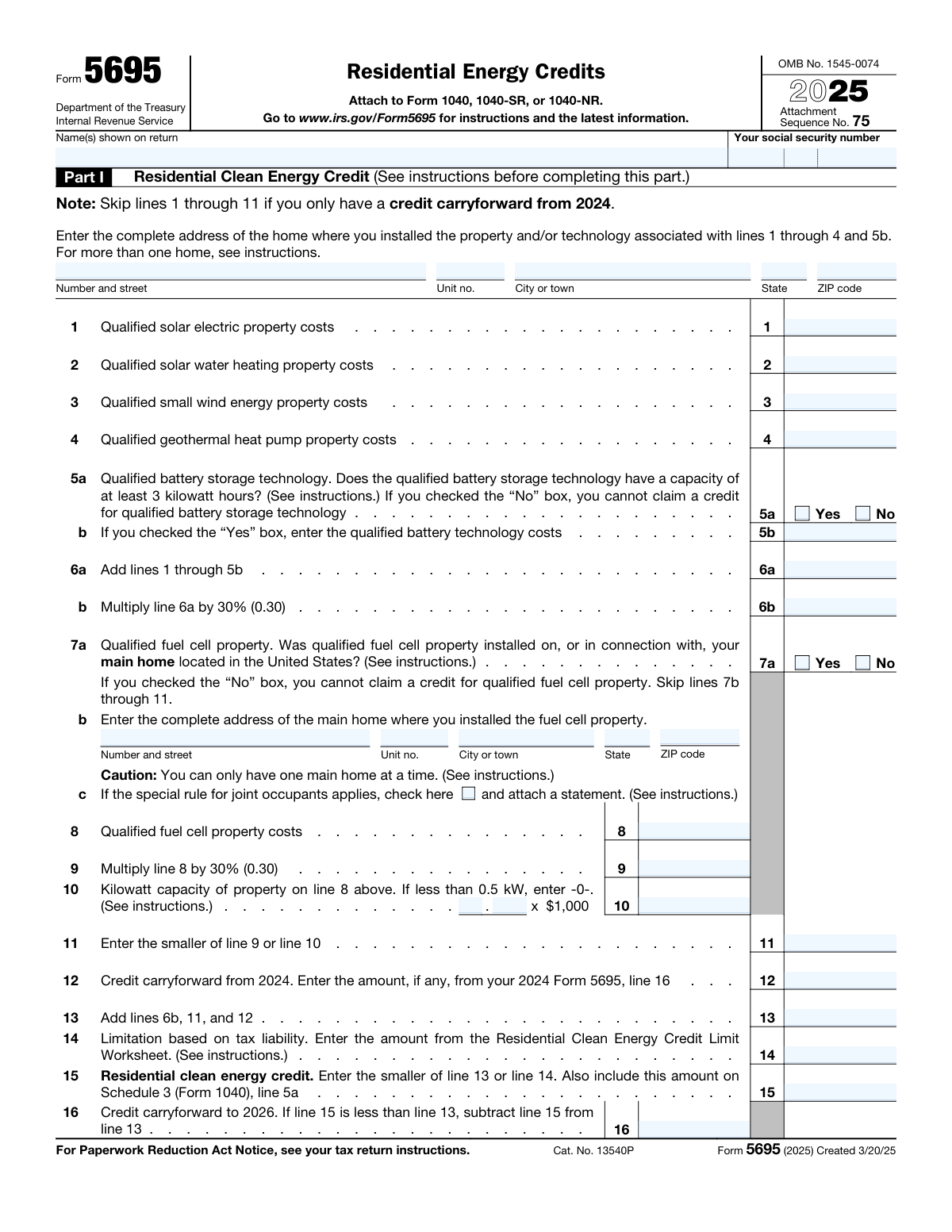
Yes! You can use AI to fill out Form 5695 (2025), Residential Energy Credits
IRS Form 5695, Residential Energy Credits, is an attachment to Form 1040, 1040-SR, or 1040-NR used to compute two main credits: the Residential Clean Energy Credit (Part I) and the Energy Efficient Home Improvement Credit (Part II). It captures qualified costs (and certain required details like installation addresses and manufacturer identification numbers) and applies percentage calculations, annual limits, and tax-liability limitations to determine the credit amount reported on Schedule 3 (Form 1040). The form is important because it substantiates and calculates credits that can directly reduce your federal income tax and may allow carryforwards when limited by tax liability. Today, this form can be filled out quickly and accurately using AI-powered services like Instafill.ai, which can also convert non-fillable PDF versions into interactive fillable forms.
Our AI automatically handles information lookup, data retrieval, formatting, and form filling.
It takes less than a minute to fill out Form 5695 using our AI form filling.
Securely upload your data. Information is encrypted in transit and deleted immediately after the form is filled out.
Form specifications
| Form name: | Form 5695 (2025), Residential Energy Credits |
| Number of pages: | 4 |
| Language: | English |
Instafill Demo: filling out a legal form in seconds
How to Fill Out Form 5695 Online for Free in 2026
Are you looking to fill out a FORM 5695 form online quickly and accurately? Instafill.ai offers the #1 AI-powered PDF filling software of 2026, allowing you to complete your FORM 5695 form in just 37 seconds or less.
Follow these steps to fill out your FORM 5695 form online using Instafill.ai:
- 1 Go to Instafill.ai and upload the Form 5695 (2025) PDF (or select it from the form library).
- 2 Enter or import your taxpayer details (name(s) shown on return and Social Security number) and confirm the tax year (2025).
- 3 Complete Part I by providing the installation address and entering qualified clean energy costs (solar, solar water heating, wind, geothermal, battery storage, and—if applicable—fuel cell details and address).
- 4 Let the AI calculate totals, the 30% credit amounts, apply the fuel cell capacity limit, and include any credit carryforward from 2024 to determine the Residential Clean Energy Credit and any carryforward to 2026.
- 5 Complete Part II by answering eligibility questions (main home, original user, expected 5-year use) and entering the main home address and qualifying improvement costs (insulation/air sealing, doors, windows/skylights) including required Qualified Manufacturer Identification Numbers.
- 6 Enter residential energy property expenditures and home energy audit costs (and heat pumps/biomass items if applicable), then have the AI apply per-item caps, annual limits, and the tax-liability limitation worksheets to compute the final credit.
- 7 Review the generated outputs (including amounts that flow to Schedule 3 (Form 1040), lines 5a and 5b), download the completed form, and attach/file it with your Form 1040/1040-SR/1040-NR as instructed.
Our AI-powered system ensures each field is filled out correctly, reducing errors and saving you time.
Why Choose Instafill.ai for Your Fillable Form 5695 Form?
Speed
Complete your Form 5695 in as little as 37 seconds.
Up-to-Date
Always use the latest 2026 Form 5695 form version.
Cost-effective
No need to hire expensive lawyers.
Accuracy
Our AI performs 10 compliance checks to ensure your form is error-free.
Security
Your personal information is protected with bank-level encryption.
Frequently Asked Questions About Form Form 5695
Form 5695 is used to claim residential energy tax credits for qualifying clean energy property (Part I) and energy-efficient home improvements (Part II). You attach it to your Form 1040, 1040-SR, or 1040-NR and report the final credit amounts on Schedule 3.
You generally file Form 5695 if you paid for and installed qualifying residential clean energy property (like solar, geothermal, battery storage, or fuel cells) or made qualifying energy-efficient improvements to a home you use as a residence. If you have a credit carryforward from a prior year (such as 2024), you may also need to file it to claim the carryforward.
Yes—Form 5695 is attached to Form 1040, 1040-SR, or 1040-NR. The Residential Clean Energy Credit from line 15 goes to Schedule 3 (Form 1040), line 5a, and the Energy Efficient Home Improvement Credit from line 32 goes to Schedule 3, line 5b.
Enter the complete address of the home where you installed the property or technology associated with lines 1–4 and 5b. If you installed qualifying property at more than one home, the form notes to see the IRS instructions for how to report multiple homes.
No. The form specifically says to skip lines 1 through 11 if you only have a credit carryforward from 2024, and then enter your carryforward on line 12.
To claim the battery storage credit, the battery must have a capacity of at least 3 kilowatt hours. If you check “No” on line 5a, you cannot claim a credit for battery storage and should not enter costs on line 5b.
No. Line 7a requires that the qualified fuel cell property be installed on, or in connection with, your main home located in the United States; if you check “No,” you cannot claim the fuel cell credit and you skip lines 7b through 11.
The fuel cell credit is limited by a capacity-based cap: you calculate a limit using the property’s kilowatt capacity multiplied by $1,000 on line 10. On line 11, you claim the smaller of the 30% cost-based amount (line 9) or the capacity-based limit (line 10).
These lines limit how much credit you can use based on your tax liability, using the IRS limit worksheets referenced in the instructions. If your calculated credit is larger than the limitation, you may only claim up to the limit (and for Part I you may carry forward the unused amount to a future year).
You’ll need to confirm the improvements were installed in/on your U.S. main home (line 17a), that you are the original user (line 17b), and that the components are expected to remain in use for at least 5 years (line 17c). You’ll also need the main home address and, for certain items like doors and windows, the Qualified Manufacturer Identification Number(s).
If you answer “Yes” on line 17e (construction-related), you can only claim the credit for qualifying improvements that were not related to the construction of the home. The form instructs you not to include expenses related to construction, even if the improvements were made after you moved in.
The QMID is typically provided by the manufacturer and may appear on product documentation, labels, or certification materials for qualifying Energy Star or other eligible products. You must enter the QMID on the specific lines that request it (for example, line 19b for doors and line 20a for windows/skylights).
Line 22 indicates you can include labor costs for onsite preparation, assembly, and original installation for residential energy property costs (see instructions). The form then applies a 30% calculation and item-specific caps (for example, several categories are capped at $600).
Yes, if the audit included an inspection of your U.S. main home and a written report prepared by a certified home energy auditor (line 26a). The credit is 30% of the audit cost, capped at $150 (line 26c).
Yes—AI tools can help organize your costs, pull required fields (like addresses and QMIDs), and auto-fill the PDF accurately; services like Instafill.ai use AI to auto-fill form fields and save time. To use Instafill.ai, upload the Form 5695 PDF, provide your project details (costs, addresses, QMIDs, and carryforward amounts), review the populated fields for accuracy, and then download the completed form to attach to your tax return.
If the PDF isn’t fillable, you can still complete it by printing and handwriting, or by using a tool that converts it into a fillable form. Instafill.ai can convert flat, non-fillable PDFs into interactive fillable forms and then auto-fill the fields for you.
Compliance Form 5695
Validation Checks by Instafill.ai
1
Validates taxpayer SSN format and presence
Checks that the SSN is present and is exactly 9 digits (allowing optional dashes in the input but storing/validating as 9 numeric digits). This is critical to match the Form 5695 to the correct taxpayer and to prevent downstream e-file rejection. If validation fails, block submission and prompt the user to correct the SSN format or provide the missing SSN.
2
Ensures taxpayer name(s) are provided and consistent across header occurrences
Verifies that the taxpayer name(s) field is not blank and that the name(s) shown on return are consistent wherever the form repeats the header (page 1 vs page 2). Consistency reduces identity mismatch issues when attaching to Form 1040/1040-SR/1040-NR. If the names differ or are missing, flag the submission and require correction before acceptance.
3
Validates U.S. address format for installation/main home addresses (street/city/state/ZIP)
Checks that required address components are present when an address is required: street, city, state, and ZIP; unit number is optional. State must be a valid two-letter U.S. state/territory abbreviation and ZIP must be 5-digit or ZIP+4 (e.g., 12345 or 12345-6789). If validation fails, prevent submission of the affected section and request corrected address details.
4
Battery storage eligibility gating (Line 5a vs Line 5b)
Ensures exactly one of Line 5a 'Yes' or 'No' is selected, and enforces the dependency that Line 5b (battery costs) can only be entered if Line 5a is 'Yes'. If Line 5a is 'No', Line 5b must be blank or zero because the credit is not allowed. If the gating rules are violated, reject the entry for battery costs and require the user to correct the selection or amounts.
5
Fuel cell eligibility gating and required fields (Line 7a through Line 11)
Validates that exactly one of Line 7a 'Yes' or 'No' is selected and applies skip logic: if 'No', then Lines 7b address, 8–11 must be blank/zero; if 'Yes', then the main home address (7b) and fuel cell cost/capacity fields must be completed as applicable. This prevents claiming a fuel cell credit when the property is not installed on a U.S. main home. If validation fails, block calculation of Lines 8–11 and require corrections.
6
Non-negative currency validation for all cost and credit amount fields
Checks that all monetary fields (e.g., Lines 1–4, 5b, 8, 12, 18a, 19a/19d/19e, 20 costs, 22–26 costs, 29 costs, and computed credit lines) are numeric currency values and are not negative. Negative costs/credits are not valid for these lines and often indicate data entry or OCR/sign errors. If a negative or non-numeric value is detected, the system should reject the field and request a corrected amount.
7
Computed line accuracy for Part I totals and percentages (Lines 6a, 6b, 13, 15, 16)
Recomputes Lines 6a (sum of Lines 1–5b) and 6b (30% of 6a), and verifies Lines 13 (6b + 11 + 12), 15 (min of 13 and 14), and 16 (carryforward = 13 − 15 when 15 < 13, else 0). This ensures arithmetic integrity and prevents incorrect credits from being claimed due to manual calculation errors. If mismatches occur beyond rounding tolerance, override with system-calculated values or require user confirmation/correction depending on policy.
8
Fuel cell credit limit logic (Lines 9–11) including capacity-based cap
Validates that Line 9 equals 30% of Line 8 and that Line 11 equals the smaller of Line 9 and Line 10 (capacity in kW × $1,000). Also checks that the kilowatt capacity input used for Line 10 is numeric and that if capacity is less than 0.5 kW the entered value follows the form instruction (enter 0). If the limit logic is violated, the system should recalculate and/or block submission until corrected to prevent overstated credits.
9
Part II Section A eligibility gating (Lines 17a–17c) and skip logic
Ensures exactly one selection for each of Lines 17a, 17b, and 17c, and enforces that if any are 'No' then Section A credit lines (18–20) must not be completed (must be blank/zero). This is important because the credit is disallowed unless the improvements are on a U.S. main home, the taxpayer is the original user, and components are expected to remain in use for 5 years. If validation fails, require the user to either change eligibility answers or clear the disallowed expense/credit entries.
10
Construction-related improvements restriction (Line 17e) enforcement
Validates that Line 17e is answered when Section A is being claimed and enforces the rule that if 17e is 'Yes', the user must exclude construction-related costs from Lines 18–20 (and ideally provide an attestation or separate allocation if the system supports it). This prevents ineligible costs from being included in the credit calculation. If 17e is 'Yes' and Section A costs are present without an allocation/attestation mechanism, flag for review or require the user to confirm that entered costs exclude construction-related amounts.
11
Per-line statutory cap enforcement for Section A and audit credit (Lines 18b, 19c/19h, 20d, 26c)
Checks that capped credit lines do not exceed their maximums: Line 18b ≤ 1,200; Line 19c ≤ 250; Line 19h ≤ 500; Line 20d ≤ 600; Line 26c ≤ 150. These caps are explicitly stated on the form and are a common source of over-claiming when users multiply without applying limits. If a cap is exceeded, the system should automatically reduce to the cap or reject the entry and prompt correction, depending on compliance requirements.
12
Manufacturer Identification Number (QMID) presence and format when costs are entered
Validates that when a line requires a Qualified Manufacturer Identification Number (e.g., doors on 19b/19d, windows on 20a rows, HVAC/water heater/furnace on 22a/23a/24a, enabling property on 25d, heat pumps/biomass on 29a/29c/29e), the corresponding QMID fields are populated and meet basic format rules (non-empty, alphanumeric, reasonable length, no illegal characters). This is important for substantiation and to reduce audit risk and processing errors. If a cost is entered without a QMID, fail validation and require the missing QMID or removal of the cost.
13
Section B eligibility gating (Lines 21a–21b) and skip logic for Lines 22–25 and 29
Ensures exactly one selection for Lines 21a and 21b and enforces that if either is 'No', then Lines 22–25 and Line 29 must be blank/zero and the user should proceed only with Line 26 (home energy audits) if applicable. This prevents claiming residential energy property credits when the property is not installed on a U.S. residence used by the taxpayer or not originally placed in service by the taxpayer. If validation fails, require clearing disallowed lines or correcting eligibility answers.
14
Enabling property dependency validation (Line 25a–25e)
Validates that if Line 25a is 'Yes', then enabled property code(s) (25b), enabling property cost (25c), and QMID(s) (25d) are provided, and that Line 25e equals 30% of 25c capped at $600. If Line 25a is 'No', then 25b–25e must be blank/zero. If dependencies or calculations are incorrect, block the enabling property credit and prompt the user to complete required fields or correct the Yes/No selection.
15
Overall Part II credit aggregation and annual limit logic (Lines 27–32)
Recomputes Line 27 as the sum of the component credits (18b, 19h, 20d, 22d, 23d, 24d, 25e, 26c), validates Line 28 as min(Line 27, 1,200), validates Line 29h as 30% of Line 29g capped at $2,000, and validates Line 30 as Line 28 + Line 29h. Then validates Line 32 as min(Line 30, Line 31). If any computed totals do not match, the system should correct the computed fields or require user correction to prevent overstated credits and downstream worksheet inconsistencies.
Common Mistakes in Completing Form 5695
People often enter a nickname, omit a spouse’s name on a joint return, or type the wrong SSN (or the spouse’s SSN) because they’re copying from memory instead of the filed Form 1040. A mismatch can delay processing, trigger IRS correspondence, or cause the credit to be associated with the wrong taxpayer. Always copy the name(s) exactly as shown on the Form 1040/1040-SR/1040-NR and enter the primary taxpayer’s SSN exactly (9 digits). AI-powered tools like Instafill.ai can reduce these errors by pulling identity fields consistently and validating SSN format.
Form 5695 requires the complete address of the home where property was installed (and separately, the main home address for certain sections), but filers frequently leave off unit numbers, use a mailing address instead of the installation address, or forget that fuel cell and Part II questions are tied to the “main home.” Incomplete or inconsistent addresses can create substantiation issues if the IRS requests documentation and can lead to confusion when multiple homes are involved. Use the physical address where the equipment was installed, include unit numbers when applicable, and use two-letter state abbreviations with a 5-digit or ZIP+4 ZIP code. Instafill.ai can standardize address formatting and catch missing components (city/state/ZIP) before submission.
A very common mistake is completing lines 1–11 even when the filer only has a credit carryforward from 2024, despite the form’s instruction to skip those lines. This can inflate totals, create contradictory entries, and increase the chance of an IRS notice or recalculation. If you only have a 2024 carryforward, enter it on line 12 and proceed with the totals/limitations as instructed. Instafill.ai-style guided filling can enforce conditional logic so you only see and complete the lines that apply.
Filers sometimes check “Yes” on line 5a without confirming the battery’s rated capacity, or they enter costs on line 5b even after checking “No.” If the battery is under 3 kWh, the credit is not allowed, and the IRS may disallow that portion, reducing the credit and potentially causing penalties/interest if it changes the return. Verify the battery’s capacity from manufacturer documentation and only complete line 5b when line 5a is “Yes.” Instafill.ai can help by prompting for capacity and preventing entry on 5b unless eligibility is met.
People often lump all invoice amounts together (permits, roof work, unrelated electrical upgrades, extended warranties, financing fees) or put costs in the wrong bucket (e.g., claiming a heat pump under geothermal, or putting windows under insulation). Misclassification can overstate the credit and increases audit risk because receipts won’t match the line item requirements. Use the instructions to separate qualified property costs by category and keep documentation that ties each cost to the correct line. Instafill.ai can help by mapping common invoice line items to the correct fields and flagging items that are typically nonqualified.
Fuel cell entries are frequently wrong because filers miss that it must be installed on/in connection with the main home in the U.S., forget to provide the main home address on line 7b, or misunderstand the line 10 limit (kilowatts × $1,000) and the “smaller of line 9 or line 10” rule. These mistakes can cause the credit to be overstated or fully disallowed. Confirm the property is tied to your main home, complete the address fields, and compute line 10 using the correct kW capacity (enter -0- if under 0.5 kW). A tool like Instafill.ai can validate the dependency chain (7a → 7b/8–11) and automatically compute the smaller-of limitation.
Many filers enter the full calculated credit on line 15 or 32 without completing the required limitation worksheets, assuming the credit is always fully usable. This can lead to an overstated credit, IRS adjustment, and a surprise balance due. Always compute the limitation using the appropriate worksheet in the instructions and then enter the smaller of the computed credit and the limitation. Instafill.ai can help by calculating the limitation from return data and preventing entries that exceed allowable amounts.
A frequent issue in Part II is leaving QMID fields blank (doors, windows/skylights, central AC, water heaters, furnaces/boilers, enabling property, heat pumps/biomass) or entering a model/serial number instead of the IRS-required manufacturer identification number. Missing or incorrect QMIDs can cause the IRS to question eligibility and disallow the credit if you can’t substantiate the product’s qualification. Pull the QMID exactly as provided by the manufacturer (often on a label, certificate, or documentation) and enter it in the correct line/row. Instafill.ai can enforce required-field completion and apply formatting checks so IDs aren’t truncated or placed in the wrong box segments.
People commonly calculate 30% correctly but forget the line-specific caps (e.g., doors limited per door and overall, windows/skylights capped, insulation capped, home energy audit capped at $150, heat pumps/biomass capped at $2,000, and the $1,200 overall limit on line 28). The result is an overstated credit that will be reduced by the IRS, sometimes after processing, which can change refunds. After multiplying by 30%, apply each line’s maximum and then apply the overall limits where required (line 28 and line 30). Instafill.ai can automatically apply caps and prevent entries above the allowed maximums.
Filers sometimes check “No” to an eligibility question (not main home, not original user, not expected 5-year use, not placed in service by you, no certified audit) but still fill in the cost/credit lines that the form says to skip. This creates internal contradictions and can lead to disallowance or delays while the IRS reconciles the entries. Read each Yes/No gate carefully and stop/skip exactly as instructed when any required answer is “No.” AI-assisted tools like Instafill.ai can lock out inapplicable sections based on your answers and reduce contradictory entries.
This form repeatedly instructs “If none, enter -0-” (e.g., other doors/windows, additional units, certain capacity rules), but many people leave fields blank or write “N/A.” Blank fields can break calculations, cause software import issues, or lead to incorrect totals on lines like 19f/20c/22c/23c/29g and the final credit lines. Use “0” (or “-0-” as the form specifies) for amounts when you have none, and ensure totals reflect those zeros. Instafill.ai can normalize blanks to zeros where appropriate and keep totals consistent.
Saved over 80 hours a year
“I was never sure if my IRS forms like W-9 were filled correctly. Now, I can complete the forms accurately without any external help.”
Kevin Martin Green
Your data stays secure with advanced protection from Instafill and our subprocessors

Robust compliance program
Transparent business model
You’re not the product. You always know where your data is and what it is processed for.
ISO 27001, HIPAA, and GDPR
Our subprocesses adhere to multiple compliance standards, including but not limited to ISO 27001, HIPAA, and GDPR.
Security & privacy by design
We consider security and privacy from the initial design phase of any new service or functionality. It’s not an afterthought, it’s built-in, including support for two-factor authentication (2FA) to further protect your account.
Fill out Form 5695 with Instafill.ai
Worried about filling PDFs wrong? Instafill securely fills form-5695-2025-residential-energy-credits forms, ensuring each field is accurate.