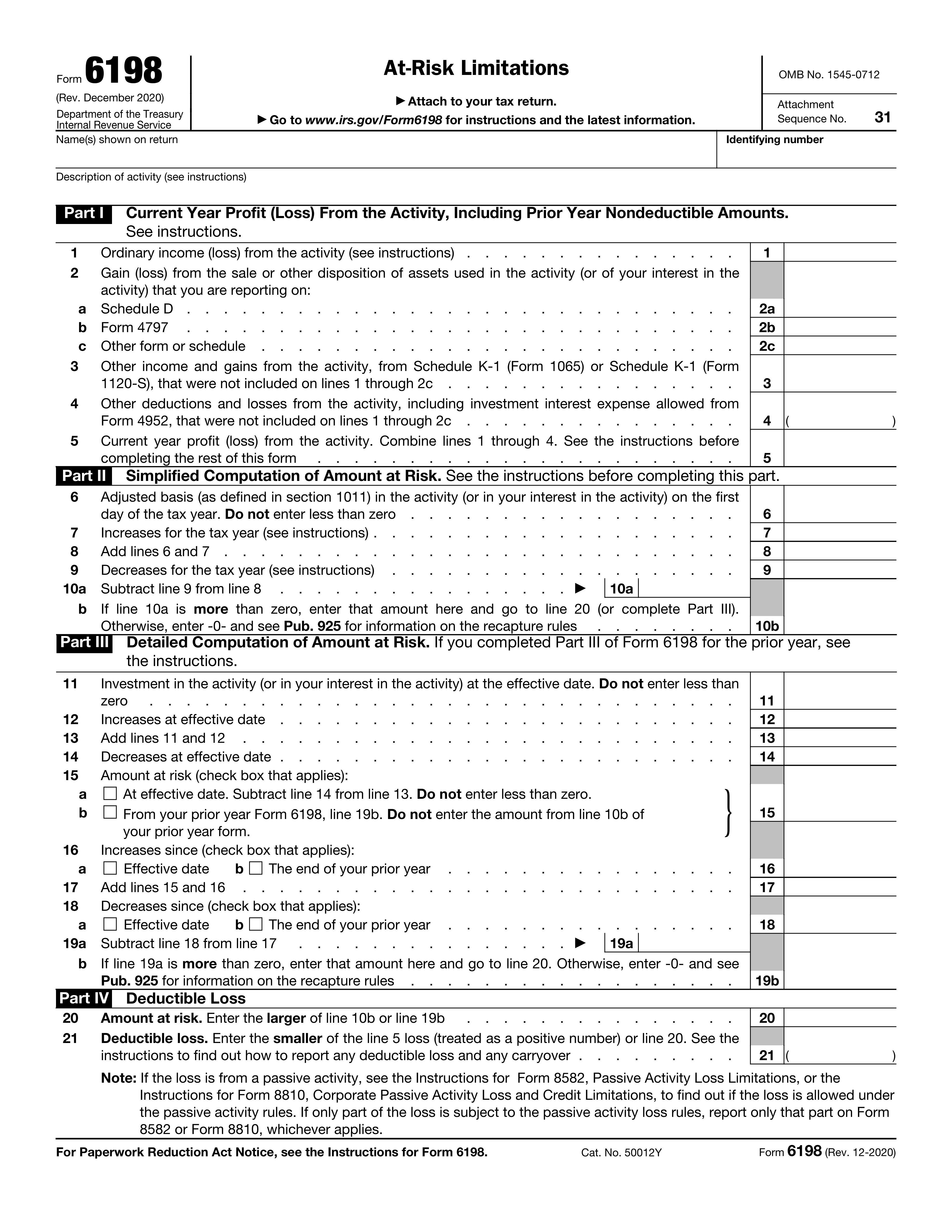
Yes! You can use AI to fill out Form 6198, At-Risk Limitations
Form 6198, At-Risk Limitations, is an IRS tax form used to calculate the maximum loss a taxpayer can claim on an investment or business activity. The 'at-risk' rules limit your deductible losses to the amount you personally stand to lose in the activity, preventing taxpayers from deducting more than their actual economic stake. Today, this form can be filled out quickly and accurately using AI-powered services like Instafill.ai, which can also convert non-fillable PDF versions into interactive fillable forms.
Our AI automatically handles information lookup, data retrieval, formatting, and form filling.
It takes less than a minute to fill out Form 6198 using our AI form filling.
Securely upload your data. Information is encrypted in transit and deleted immediately after the form is filled out.
Form specifications
| Form name: | Form 6198, At-Risk Limitations |
| Number of pages: | 1 |
| Language: | English |
Instafill Demo: How to fill out PDF forms in seconds with AI
How to Fill Out Form 6198 Online for Free in 2026
Are you looking to fill out a FORM 6198 form online quickly and accurately? Instafill.ai offers the #1 AI-powered PDF filling software of 2026, allowing you to complete your FORM 6198 form in just 37 seconds or less.
Follow these steps to fill out your FORM 6198 form online using Instafill.ai:
- 1 Navigate to Instafill.ai and upload your Form 6198, or select it from their library of templates.
- 2 Provide your taxpayer information, including your name and identifying number, and a description of the activity.
- 3 Use the AI assistant to accurately complete Part I, detailing the current year's profit or loss from the activity.
- 4 Complete either Part II (Simplified Computation) or Part III (Detailed Computation) to calculate your amount at risk, following the guided prompts.
- 5 Fill out Part IV to determine your deductible loss for the current year based on the previous calculations.
- 6 Review all entered information with the help of AI-powered validation checks to ensure accuracy and completeness before downloading or printing the final document.
Our AI-powered system ensures each field is filled out correctly, reducing errors and saving you time.
Why Choose Instafill.ai for Your Fillable Form 6198 Form?
Speed
Complete your Form 6198 in as little as 37 seconds.
Up-to-Date
Always use the latest 2026 Form 6198 form version.
Cost-effective
No need to hire expensive lawyers.
Accuracy
Our AI performs 10 compliance checks to ensure your form is error-free.
Security
Your personal information is protected with bank-level encryption.
Frequently Asked Questions About Form Form 6198
Form 6198, At-Risk Limitations, is used to determine if the amount of your loss from an activity is limited by the at-risk rules. It helps you calculate the maximum loss you are allowed to deduct on your tax return for a specific investment or business activity.
You must file this form if you have a loss from an activity and you have amounts invested in that activity for which you are not at risk. This often applies to investments involving nonrecourse loans, where you are not personally liable for repayment.
Enter the taxpayer identifying number associated with the return for this activity. This will be your Social Security Number (SSN) for an individual or an Employer Identification Number (EIN) for a business.
This information comes from the other tax forms where you report the activity's results, such as Schedule C, Schedule E, Form 4797, or a Schedule K-1 received from a partnership or S corporation.
Part II is a quicker method for calculating your at-risk amount if you know your adjusted basis in the activity. Part III is a more detailed, step-by-step calculation that tracks your at-risk amount from the activity's start or the prior year, and must be used if you don't use the simplified method.
Increases (line 7) typically include additional cash you contributed or your share of the activity's income. Decreases (line 9) include withdrawals, distributions you received, or loan repayments that reduce your personal liability.
The effective date refers to the date the at-risk rules first applied to your activity. This is generally the first day of the first tax year beginning after 1975 for most activities.
If you have a loss on line 5, you must complete the rest of the form to calculate your amount at risk. This calculation will determine how much of that loss is deductible in the current year.
Your deductible loss is limited to your amount at risk. It is generally the smaller of your total loss for the year (line 5) or your calculated amount at risk from either line 10b or line 19b.
If this is your first year filing Form 6198 for this activity, you will not have a prior year form. You must complete Part III to calculate your initial at-risk amount based on your investment at the effective date.
Yes, services like Instafill.ai use AI to auto-fill form fields accurately and save time. This can help you complete complex forms like Form 6198 more efficiently and with fewer errors.
You can use a service like Instafill.ai to complete your form online. Simply upload the PDF, and the platform will make it an interactive, fillable form that you can complete and download.
If your PDF is not fillable, you can use a tool like Instafill.ai to convert it into an interactive form. This allows you to type your information directly into the fields instead of printing and filling it out by hand.
Compliance Form 6198
Validation Checks by Instafill.ai
1
Validates Identifying Number Format
This check ensures the 'Identifying number' field is a valid 9-digit Social Security Number (SSN) or Employer Identification Number (EIN). It verifies the structure and format (e.g., NNN-NN-NNNN for SSN or NN-NNNNNNN for EIN). This is critical for correctly associating the form with the taxpayer's master file at the IRS, and failure to provide a valid number will result in processing rejection.
2
Ensures Core Taxpayer Information is Complete
This validation verifies that the 'Name(s) shown on return', 'Identifying number', and 'Description of activity' fields are not empty. These fields are fundamental for identifying the taxpayer and the specific economic activity being reported. An incomplete submission cannot be processed correctly and would be rejected for lacking essential information.
3
Verifies Calculation of Current Year Profit/Loss (Line 5)
This check confirms that the value in 'Current year profit (loss) from the activity — Total (Line 5)' is the correct sum of lines 1, 2a, 2b, 2c, and 3, minus line 4. This calculation is the cornerstone of Part I, summarizing the activity's performance for the year. An incorrect total leads to an erroneous starting point for the at-risk calculation and will cause the entire form to be inaccurate.
4
Ensures Adjusted Basis is Not Negative (Line 6)
This validation ensures that the amount entered for 'Adjusted basis (line 6)' is zero or greater. A taxpayer's basis in an activity cannot be less than zero according to tax law. Allowing a negative value would lead to incorrect at-risk calculations and potential non-compliance, so the system should flag or prevent negative entries.
5
Verifies Simplified At-Risk Summation (Line 8)
This check validates that the value on 'Add lines 6 and 7 (line 8)' is precisely the sum of 'Adjusted basis (line 6)' and 'Increases for the tax year (line 7)'. This is a key intermediate calculation in the Simplified Computation of Amount at Risk. A miscalculation here would invalidate all subsequent lines in Part II.
6
Validates Conditional Logic for Line 10b
This check enforces the rule that 'Amount to complete Part II (line 10b)' must equal the value of 'Subtract line 9 from line 8 (line 10a)' if line 10a is positive, and must be zero otherwise. This logic determines the final amount at risk under the simplified method. Failure to apply this condition correctly results in an incorrect at-risk amount being carried forward.
7
Ensures Investment at Effective Date is Not Negative (Line 11)
This validation confirms that the 'Investment at effective date (Lines 11-14)' is not a negative number. Similar to adjusted basis, the initial investment amount cannot be less than zero. This rule prevents fundamentally incorrect starting values for the detailed at-risk computation in Part III.
8
Verifies Investment Total Calculation (Line 13)
This check ensures that the 'Total (lines 11 + 12)' correctly equals the sum of 'Investment at effective date (line 11)' and 'Increases at effective date (line 12)'. This calculation establishes the total investment before decreases are considered. An error would corrupt the amount at risk computed for the effective date.
9
Enforces Mutually Exclusive Selection for Line 15
This validation ensures that a user can only check one box, either '15a At effective date' or '15b From your prior year Form 6198'. These two options represent alternative starting points for the amount at risk, and selecting both is a logical contradiction. The system should prevent both from being checked simultaneously to avoid ambiguity.
10
Enforces Mutually Exclusive Selection for Increases Period (Lines 16-17)
This check verifies that only one checkbox is selected to define the period for increases: either 'Effective date' or 'The end of your prior year'. These options determine the timeframe over which increases are measured, and they are mutually exclusive. Allowing both to be selected would make the calculation basis for line 16 unclear and invalid.
11
Validates Calculation and Floor for Line 19a
This check confirms that 'Line 19a — Subtraction Result' is calculated as line 17 minus line 18, with the additional rule that the result cannot be less than zero. If the subtraction yields a negative number, line 19a must be entered as zero. This is crucial as the at-risk amount cannot be negative, and this line directly impacts the final deductible loss.
12
Validates Conditional Logic for Line 19b
This validation enforces the rule that 'Line 19b — Follow-up Amount' must be equal to 'Line 19a — Subtraction Result' if line 19a is greater than zero, and must be zero otherwise. This ensures the correct amount is carried forward to line 20 for the final deductible loss calculation. An incorrect value here directly leads to an incorrect tax outcome.
13
Ensures All Monetary Fields are Numeric
This is a general validation that applies to all fields representing dollar amounts (e.g., lines 1-5, 6-14, 16-19). It checks that the input contains only valid numeric characters and formatting appropriate for currency. Non-numeric data would cause calculation errors and prevent the form from being processed.
14
Verifies Calculation of Part II Subtraction (Line 10a)
This check ensures the value on 'Subtract line 9 from line 8 (line 10a)' is the result of subtracting 'Decreases for the tax year (line 9)' from 'Add lines 6 and 7 (line 8)'. This calculation is the final step in determining the simplified at-risk amount before applying the zero-floor logic. An error here invalidates the result of the entire simplified computation.
Common Mistakes in Completing Form 6198
Filers often enter a name or identifying number (SSN/EIN) that does not exactly match the one on their main tax return, such as Form 1040 or 1120. This discrepancy can cause the IRS processing system to flag the form, leading to significant delays and correspondence to verify the taxpayer's identity. To avoid this, double-check that the name and number are identical to the primary return, character for character.
The 'Description of activity' field is frequently filled with overly generic terms like 'Business' or 'Investment,' which is insufficient for tax authorities. This lack of specificity can trigger an IRS review, as they need to understand the nature of the activity to verify the at-risk rules are applied correctly. Provide a clear, concise description such as 'Rental Property at 123 Main St' or 'Partnership in XYZ Films' to prevent unnecessary scrutiny.
Taxpayers often make errors when transferring figures for income, losses, and gains from other schedules like Schedule D, Form 4797, or Schedule K-1. They might pull from the wrong line, omit a relevant gain/loss, or use a summary number before specific deductions. This results in an incorrect 'Current year profit (loss)' on Line 5, invalidating all subsequent at-risk calculations.
This form requires multiple addition and subtraction steps, such as calculating the total profit/loss on Line 5 or the amount at risk on Line 10a. Manual calculation errors are extremely common and can have a cascading effect, making the final deductible loss incorrect. Using tax software or an AI-powered tool like Instafill.ai can prevent these mistakes by performing the calculations automatically and ensuring accuracy.
Calculating the 'Adjusted basis' is complex, and taxpayers often confuse it with the at-risk amount or make errors in the initial calculation. A common mistake is also entering a negative number, which is explicitly disallowed by the form instructions for this line. An incorrect starting basis on Line 6 invalidates the entire at-risk computation from the very beginning, likely leading to an incorrect loss deduction.
On lines 7 and 9, filers may struggle to correctly identify what qualifies as an increase (e.g., additional cash contributions) or a decrease (e.g., distributions, non-deductible expenses) to their amount at risk. It's common to either omit valid items or double-count amounts already factored into the profit/loss calculation on Part I. This leads to an inaccurate at-risk amount on Line 10a.
Several lines, such as 10b and 19a, instruct the filer to enter zero if the calculated result is a negative number. People often overlook this and carry the negative value forward, which is incorrect and complicates further calculations. This error shows a misunderstanding of the at-risk concept, as your amount at risk cannot be less than zero for deduction purposes.
In Part III, filers must choose a starting point for their detailed at-risk calculation on Line 15, either from the 'effective date' or the 'prior year Form 6198'. Many are unsure which box to check, leading them to use the wrong baseline amount. This fundamental error invalidates the entire detailed computation that follows, potentially leading to an audit or adjustment.
Lines 16 and 18 require selecting a time frame ('since effective date' or 'since the end of your prior year') for reporting increases and decreases. Choosing the wrong period means the adjustments are measured against an incorrect baseline date. This mistake leads to an inaccurate calculation of the current year's amount at risk on Line 19.
The form contains several fields that should only be filled out if a condition is met, such as entering an amount on Line 10b only if Line 10a is positive. Filers often miss these dependencies, either leaving a required field blank or filling in one that should be empty. AI-powered form fillers like Instafill.ai can help by automatically handling this conditional logic, and if the form is a non-fillable PDF, Instafill.ai can convert it to an interactive, intelligent version.
Saved over 80 hours a year
“I was never sure if my IRS forms like W-9 were filled correctly. Now, I can complete the forms accurately without any external help.”
Kevin Martin Green
Your data stays secure with advanced protection from Instafill and our subprocessors

Robust compliance program
Transparent business model
You’re not the product. You always know where your data is and what it is processed for.
ISO 27001, HIPAA, and GDPR
Our subprocesses adhere to multiple compliance standards, including but not limited to ISO 27001, HIPAA, and GDPR.
Security & privacy by design
We consider security and privacy from the initial design phase of any new service or functionality. It’s not an afterthought, it’s built-in, including support for two-factor authentication (2FA) to further protect your account.
Fill out Form 6198 with Instafill.ai
Worried about filling PDFs wrong? Instafill securely fills form-6198-at-risk-limitations forms, ensuring each field is accurate.