
Yes! You can use AI to fill out Form 843, Claim for Refund and Request for Abatement
Don't type 85 fields by hand. Tell our AI about yourself, or upload a document you already have, and it fills every field in seconds. You check it, then download, print or sign.
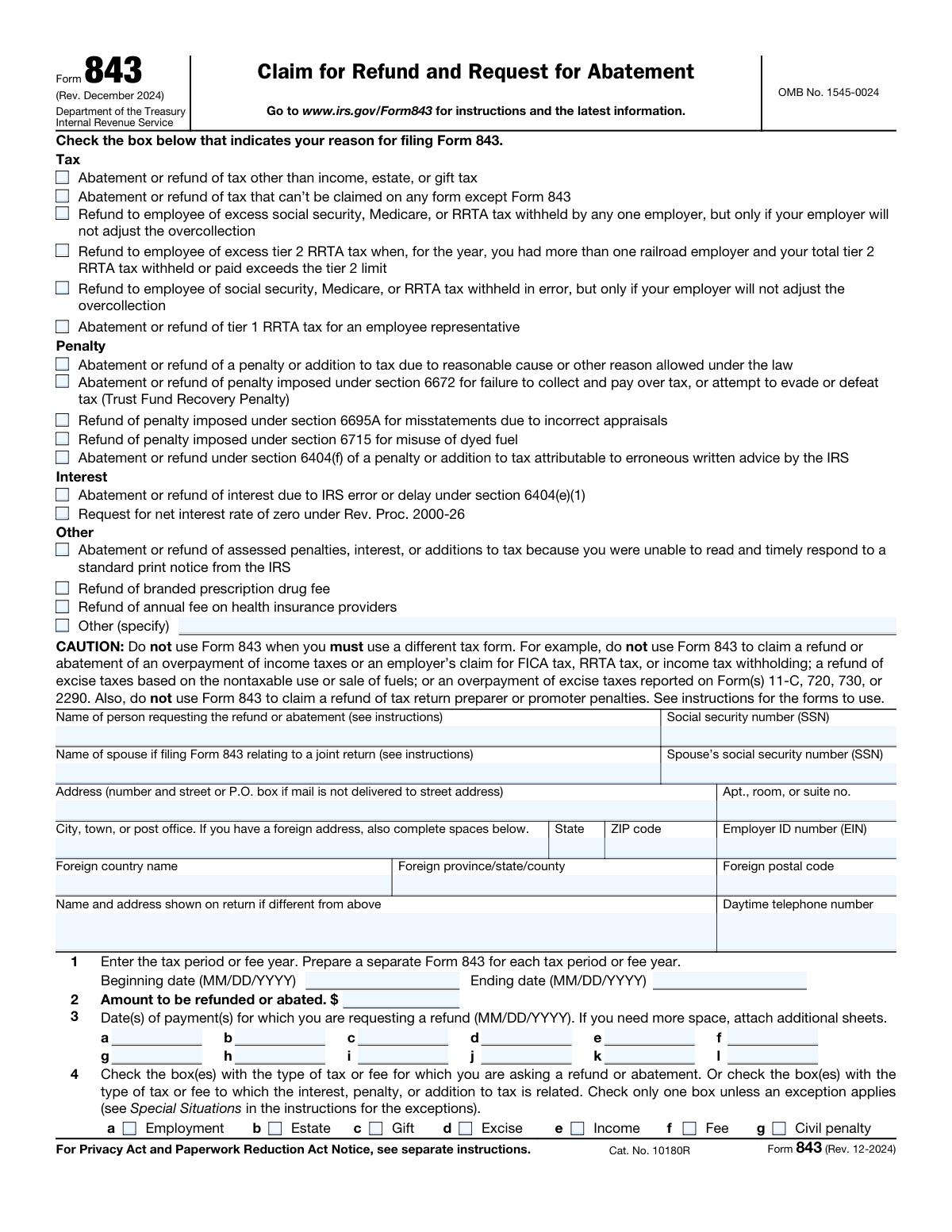
The AI does the filling. You just check it.
No typing into boxes, nothing to install.
What this form asks for
The AI fills all of it, from your answers or your documents.
The AI checks your answers before you download
14 checks built for this form, so a wrong date or a missing answer is caught before anyone else sees it.
This check ensures that the Social Security Numbers (SSN) for both the primary filer and spouse are entered in the standard nine-digit format (XXX-XX-XXXX). Correct formatting is crucial for the IRS to accurately identify the taxpayer and process the claim. An invalid format will lead to processing delays or rejection of the form.
This validation verifies that any Employer Identification Number (EIN) entered on the form, including the filer's and the paid preparer's firm's, follows the correct nine-digit format (XX-XXXXXXX). An accurate EIN is essential for identifying business entities involved in the claim. Failure to provide a correctly formatted EIN can cause processing errors and misattribution of the claim.
This check validates that the 'Ending date' for the tax period on line 1 is on or after the 'Beginning date.' A tax period cannot end before it begins, and this logical check prevents a common data entry error. An illogical date range would make the claim invalid and require correction before it can be processed.
This validation ensures that if the filer selects the 'Other (specify)' checkbox as their reason for filing, they must provide a written explanation in the associated text field. This is necessary for the IRS to understand the basis of the claim when it doesn't fit into a standard category. If the explanation is missing, the claim is incomplete and cannot be evaluated, leading to rejection.
This check confirms that the explanation field (line 8) is not left blank. This section is critical as it contains the filer's justification for the refund or abatement and the calculation of the amount claimed. Without a detailed explanation, the IRS has no basis to approve the request, and the form will be considered incomplete.
This validation rule checks that if a spouse's name is entered, their Social Security Number (SSN) is also provided, and vice versa. This applies to claims related to a joint return and is essential for correctly identifying both taxpayers. Incomplete spousal information can lead to processing delays while the IRS seeks to verify the identity of the second taxpayer on the joint account.
And 8 more checks
- Confirms Selection of a Filing Reason
- Validates Standard Date Format (MM/DD/YYYY)
- Correlates Penalty Claim with IRC Section
- Validates Refund or Abatement Amount
- Enforces Mutually Exclusive Address Information
- Conditional Requirement for 'Other' Return Type Specification
- Validates Preparer Tax Identification Number (PTIN) Format
- Enforces Single Tax/Fee Type Selection
Let AI fill out your Form 843
No typing. Every field filled in seconds, checked, ready to sign.
How to Fill Out Form 843 Online for Free in 2026
What the AI walks you through.
- Navigate to Instafill.ai and upload your Form 843 or select it from the template library.
- Provide your personal information, including your name, address, and Social Security Number (SSN) or Employer Identification Number (EIN).
- Enter the details of your claim, such as the tax period, the amount you are requesting to be refunded or abated, and the type of tax or fee.
- Select the appropriate boxes to indicate the reason for your claim, such as an IRS error, reasonable cause, or a specific penalty type.
- Write a clear and detailed explanation for your request in the designated section, including how you calculated the refund or abatement amount.
- Review the entire form after the AI has populated the fields to ensure all information is accurate and complete.
- Electronically sign the form, download the completed document, and submit it to the IRS as per their instructions.
Common Mistakes in Completing Form 843
The ones the AI is built to catch.
Using Form 843 for the Wrong Purpose
Combining Multiple Tax Periods on a Single Form
Providing an Insufficient or Vague Explanation on Line 8
Missing Spouse's Signature on a Joint Return Claim
Incorrectly Identifying the Tax Type or Return Form
Omitting the Internal Revenue Code (IRC) Section for Penalties
Forgetting to Enter the Identity Protection (IP) PIN
Mismatch Between Claimed Amount and Supporting Calculation
Leaving Payment Dates Blank or Vague on Line 3
Selecting an Inaccurate Reason for Filing
Frequently Asked Questions About Form 843
Is it really free for 7 days?
Can I fill other forms too?
How do I cancel?
How does the AI fill out Form 843?
What happens to my information?
How complex is Form 843 to fill out?
What is the main purpose of IRS Form 843?
Can I use Form 843 to get a refund for my personal income taxes?
Who should file Form 843?
My employer over-withheld Social Security tax and won't correct it. Can I use this form?
What information is required for the explanation on Line 8?
Do I need to file a separate form for each tax period?
What documents should I attach to my Form 843?
How do I request a penalty be removed due to 'reasonable cause'?
If my claim is for a joint return, does my spouse also need to sign?
Where do I mail the completed Form 843?
Can AI tools help me fill out Form 843?
How can I fill out Form 843 online?
The PDF of Form 843 I have is not fillable. What can I do?
Get your Form 843 filled out by AI
$0 today. Cancel before Nov 10 and you pay nothing.
Other forms like this one
VA claim forms: Form OWCP-915, Claim for Medical Reimbursement, Form 8862, Information To Claim Certain Credits, Form CA-7, Claim for Compensation, Form CA-5, Claim for Compensation, Form SC-100, Plaintiff's Claim and ORDER to Go to Small Claims Court, Form 20-0995, Decision Review Request: Supplemental Claim, Form 104, List of Creditors 20 Largest Unsecured Claims, Form 941-X (Rev. April 2023), Adjusted Employer’s QUARTERLY Federal Tax Return or Claim for Refund, Judicial Council of California Form SC-104, Proof of Service (Small Claims), Immigration and Refugee Board of Canada (IRB) – Refugee Protection Division (RPD) Basis of Claim Form (for persons claiming refugee protection in Canada) (RPD.02.01), SC-108, Request to Correct or Cancel Judgment and Answer (Small Claims), Judicial Council of California Form SC-105, Request for Court Order and Answer (Small Claims), SC-120, Defendant’s Claim and ORDER to Go to Small Claims Court (Small Claims), Judicial Council of California Form SC-104, Proof of Service (Small Claims), Continental American Insurance Company (CAIC) / Aflac Group Critical Illness Claim Form (with Attending Physician’s Statement, HIPAA Authorization to Obtain Information, and Electronic Funds Transaction Authorization), Judicial Council of California Form SC-108, Request to Correct or Cancel Judgment and Answer (Small Claims), SC-105, Request for Court Order and Answer (Small Claims), Judicial Council of California Form SC-120, Defendant’s Claim and ORDER to Go to Small Claims Court (Small Claims), Small Claim and Notice of Small Claim (ORS 46.425) (OJD Official) (Jan 2026), VA Form 21-4138, Statement in Support of Claim
ABA forms: Form BHVH, Outpatient Behavioral Health – ABA Treatment Request, ABA Authorization Request (Medi-Cal) – Initial and Concurrent Requests, MetroPlusHealth Applied Behavior Analysis (ABA) Universal ABA Request Form, Alabama Medicaid Agency ABA Therapy Assessment Form (6/20/19) — Behavior Assessment and Treatment Request (CPT 97151) for Applied Behavioral Analysis for Autism Spectrum Disorder, Applied Behavioral Analysis (ABA) Prior Authorization Request Form (Health Net Behavioral Health Autism Center), Applied Behavior Analysis (ABA) Initial Assessment Request, Applied Behavioral Analysis (ABA) Prior Authorization Request Form (Coordinated Care), Applied Behavioral Analysis (ABA) Prior Authorization Form (New Hampshire), Health Net Applied Behavioral Analysis (ABA) Recommendation and Referral Form (24-989), Applied Behavioral Analysis (ABA) Authorization Form, Louisiana Health Connect (BRO-DP-ABA FORM-0822), Applied Behavior Analysis (ABA) Therapy Request Form, Blue Shield of California Prior Authorization Request Form for Applied Behavioral Analysis (ABA) – Commercial Products, Form 5385BSP, Behavioral Health Utilization Management Applied Behavioral Analysis (ABA) Initial Request Form, Evernorth Applied Behavior Analysis (ABA) Prior Authorization Form, Outpatient Behavioral Health (BH) – ABA Treatment Request: Required Information for Precertification (GR-69017-4), Arkansas Medicaid Applied Behavioral Analysis (ABA) Authorization Request, Highmark Health Options Applied Behavioral Analysis (ABA) Prior Authorization Request Form, CareSource PASSE Applied Behavior Analysis (ABA) Prior Authorization Request Form, Applied Behavior Analysis (ABA) Initial Assessment Request and Clinical Service Request Form – Blue Cross and Blue Shield of Illinois (BCBSIL), 1199SEIU Benefit Funds Applied Behavior Analysis (ABA) Prior Authorization Form
Let AI fill out your Form 843
Your trial starts once a card is added. You pay nothing before Nov 10.
Our AI already knows this form, all 85 fields of it. Skip the typing: tell it about yourself, or upload what you have, and it fills the whole form in seconds.
- AI fills every field on both pages, tables and checkboxes included
- No typing into boxes: answer a few questions, or upload a document you already have, an old copy of this form, a photo of a document
- The AI checks the answers; you review and change anything before you download
- Download the finished PDF, print it, or sign it online
- Encrypted, and never used to train AI
Cancel before Nov 10 and you pay nothing.
A card is needed to start the trial. Cancel in two clicks from your account.
Terms · Privacy