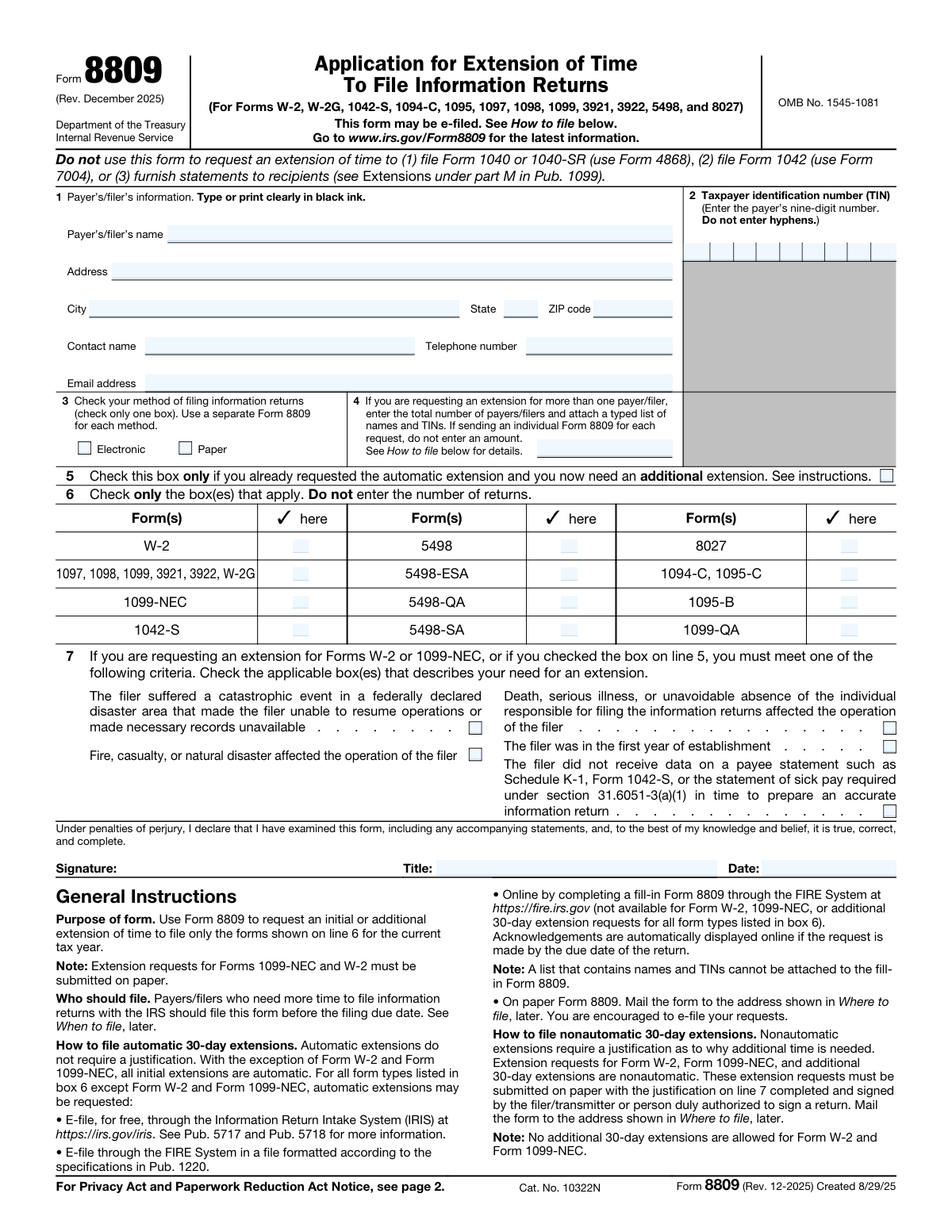
Yes! You can use AI to fill out Form 8809 (Rev. December 2025), Application for Extension of Time To File Information Returns

Form 8809 is an Internal Revenue Service application that allows a payer/filer (or transmitter) to request an initial automatic 30-day extension for many information returns, and in some cases an additional 30-day extension. It is important because filing information returns late without a valid extension can trigger IRS penalties. Certain requests—such as extensions for Forms W-2 and 1099-NEC and any additional 30-day extension requests—are nonautomatic, must be filed on paper, and generally require a justification and signature. The extension applies only to filing the returns with the IRS and does not extend the deadline for furnishing statements to recipients.
Our AI automatically handles information lookup, data retrieval, formatting, and form filling.
It takes less than a minute to fill out Form 8809 using our AI form filling.
Securely upload your data. Information is encrypted in transit and deleted immediately after the form is filled out.

Form specifications

Form name: Form 8809 (Rev. December 2025), Application for Extension of Time To File Information Returns
Number of pages: 2
Filled form examples: Form Form 8809 Examples
Language: English
main-image

Instafill Demo: filling out a legal form in seconds

How to Fill Out Form 8809 Online for Free in 2026

Are you looking to fill out a FORM 8809 form online quickly and accurately? Instafill.ai offers the #1 AI-powered PDF filling software of 2026, allowing you to complete your FORM 8809 form in just 37 seconds or less.
Follow these steps to fill out your FORM 8809 form online using Instafill.ai:
  1. 1 Confirm eligibility and deadlines: identify which information return(s) you need more time to file and ensure you are submitting Form 8809 by the original due date (and not before January 1 of the year the return is due).
  2. 2 Enter payer/filer details (Line 1): provide the legal payer/filer name, mailing address, city/state/ZIP, and a contact person’s name, phone number, and email address for IRS follow-up.
  3. 3 Provide the taxpayer identification number (Line 2): enter the payer’s 9-digit TIN (EIN or other applicable EIN type, or SSN if permitted) without hyphens.
  4. 4 Select filing method (Line 3): check either Electronic or Paper, and prepare a separate Form 8809 for each filing method used.
  5. 5 If filing for multiple payers/filers (Line 4): enter the total number of payers/filers and attach a typed list of names and TINs (as applicable for the chosen submission method).
  6. 6 Choose the extension type and forms (Lines 5–6): indicate whether this is an additional extension request (Line 5) and check the box(es) for the form series you are extending (Line 6), without entering the number of returns.
  7. 7 If required, provide justification and sign (Line 7 and signature block): for Forms W-2, 1099-NEC, or additional extensions, select the qualifying reason(s), sign and date the form, then submit by paper mail to the IRS address listed (or e-file where permitted for automatic requests).

Our AI-powered system ensures each field is filled out correctly, reducing errors and saving you time.

Why Choose Instafill.ai for Your Fillable Form 8809 Form?

Speed

Complete your Form 8809 in as little as 37 seconds.

Up-to-Date

Always use the latest 2026 Form 8809 form version.

Cost-effective

No need to hire expensive lawyers.

Accuracy

Our AI performs 10 compliance checks to ensure your form is error-free.

Security

Your personal information is protected with bank-level encryption.

Frequently Asked Questions About Form Form 8809

Form 8809 is used to request an extension of time to file certain information returns with the IRS (such as W-2, 1099 series, 1042-S, 1094/1095, 5498, and 8027). It only extends the IRS filing deadline for those information returns, not other tax returns.

Payers/filers who need more time to file eligible information returns with the IRS should file Form 8809. It must be filed by the due date of the information returns to be valid.

No. Form 8809 is not for extending individual income tax returns; use Form 4868 to request an extension for Form 1040 or 1040-SR.

No. An approved Form 8809 extension only extends the deadline to file information returns with the IRS, not the deadline to provide statements to recipients. For recipient statement extensions, see Pub. 1099 (Extensions under part M) and the relevant form instructions.

File as soon as you know you need an extension, but not before January 1 of the year the return is due, and no later than the original due date of the information returns. If you file after the due date, the extension cannot be granted.

For most forms, the initial extension is an automatic 30-day extension from the original due date, and you may request one additional 30-day extension if the first was granted and you apply before it expires. For Forms W-2 and 1099-NEC, only one 30-day extension is available and no additional extension is allowed.

Yes, many Form 8809 requests can be e-filed through IRIS, the FIRE System (file upload), or the FIRE fill-in Form 8809 option (where available). However, extension requests for Forms W-2 and 1099-NEC must be submitted on paper, and additional 30-day extension requests must also be submitted on paper.

Mail paper Form 8809 to: Department of the Treasury, Internal Revenue Service Center, Ogden, UT 84201-0209.

Check only one box to match how you will file the information returns with the IRS (electronic or paper). Use a separate Form 8809 for each method if you will file some returns electronically and others on paper.

Enter the payer’s nine-digit TIN (such as an EIN, QI-EIN, WP-EIN, WT-EIN, or SSN if you’re not required to have an EIN). Do not include hyphens.

Use the current legal name and TIN that match IRS records (the name used when you applied for the EIN, unless you’ve submitted a name change). The form warns not to use abbreviations and to ensure the legal name and TIN match exactly to avoid processing issues.

On line 4, enter the total number of payers/filers and attach a typed list of each payer/filer name and TIN. If you are sending an individual Form 8809 for each request, leave line 4 blank.

Line 5 is only for requesting an additional 30-day extension after you already received the automatic 30-day extension for the same year and same forms. If you check line 5, you must complete line 7, and the request must be submitted on paper.

You must complete line 7 if you are requesting an extension for Forms W-2 or 1099-NEC, or if you are requesting an additional 30-day extension (line 5). Line 7 requires you to check at least one qualifying reason (for example, disaster, serious illness, fire/casualty, first year of business, or missing required data).

A signature is not required for an automatic 30-day extension (which is not available for W-2 or 1099-NEC). A signature is required for W-2 and/or 1099-NEC extension requests and for any additional 30-day extension requests.

Compliance Form 8809
Validation Checks by Instafill.ai

1
Payer/Filer Name is present and appears to be the full legal name (no abbreviations)
Validate that the payer’s/filer’s name field is not blank and is entered as a full legal name rather than an abbreviated or informal name. This matters because the IRS requires the legal name to match the name associated with the TIN/EIN application (e.g., Form SS-4) for identity matching. If the name is missing or appears abbreviated (e.g., excessive acronyms, truncated words), the submission should be flagged for correction and may be rejected or delayed for mismatch.
2
Mailing Address completeness and structure validation
Ensure the address includes street (and unit/room/suite if provided), city, state, and ZIP code, with no required component missing. This is important because IRS correspondence about the extension is sent to this address, and incomplete addresses can prevent delivery and delay processing. If any required address component is missing or malformed, the form should fail validation and prompt the filer to complete the address.
3
State code and ZIP code format validation (US address)
Validate that the state is a valid 2-letter US state/territory abbreviation and the ZIP code is either 5 digits or ZIP+4 (9 digits with optional hyphen, depending on system rules). Correct formatting supports mail routing and reduces IRS correspondence failures. If the state/ZIP format is invalid, the submission should be rejected or routed to an exception queue for manual review.
4
Contact name required and plausibility check
Verify that a contact name is provided and is not a placeholder (e.g., 'N/A', 'Unknown', or a single character). The IRS may need to contact someone familiar with the request, so a real contact is operationally necessary. If missing or clearly invalid, the submission should fail validation and require a valid contact name.
5
Telephone number format validation
Validate that the telephone number is present and conforms to an acceptable format (e.g., 10 digits for US numbers, allowing common punctuation like parentheses and dashes if your system permits). A valid phone number is important for resolving issues quickly if the IRS needs clarification. If the phone number is missing or not parseable to a valid number, the form should be rejected or flagged for correction.
6
Email address format validation
Check that the email address, if required by your intake process, matches standard email syntax (local-part@domain) and does not contain spaces or invalid characters. A valid email supports faster communication and reduces processing delays. If the email is missing when required or fails format checks, the submission should be blocked until corrected (or flagged if email is optional in your workflow).
7
TIN is exactly 9 digits and contains no hyphens
Validate that the Taxpayer Identification Number entered on line 2 is exactly nine numeric digits and does not include hyphens or letters. The form explicitly instructs filers not to enter hyphens, and IRS matching relies on a clean 9-digit value. If the TIN is not 9 digits or includes non-numeric characters/hyphens, the submission should fail validation and require re-entry.
8
Method of filing selection is exclusive (exactly one of Electronic or Paper)
Ensure that exactly one method of filing is selected on line 3 (Electronic OR Paper), and that neither both nor neither are selected. This is critical because eligibility and due dates differ by method, and the IRS processing path depends on the selection. If the selection is ambiguous, the submission should be rejected and the filer prompted to choose one method.
9
Paper-only enforcement for W-2 and 1099-NEC extension requests
If the filer requests an extension for Forms W-2 and/or 1099-NEC (line 6), validate that the method of filing on line 3 is Paper, since the instructions state these extension requests must be submitted on paper. This prevents invalid e-file submissions that the IRS will not accept. If W-2/1099-NEC is selected with Electronic, the submission should fail validation and instruct the filer to file on paper.
10
At least one form type selected on line 6
Validate that the filer checked at least one box on line 6 indicating which information return(s) the extension applies to. Without a selected form type, the IRS cannot determine what is being extended, making the request incomplete. If no form type is selected, the submission should be rejected as incomplete.
11
Line 4 multi-payer indicator consistency (count and attachment requirement)
If line 4 contains a total number of payers/filers greater than 1, validate that an attachment/list of names and TINs is included (for channels that allow attachments) and that the count is a positive integer. This is important because the IRS needs the list to apply the extension to each payer/filer, and the form instructs filers to attach a typed list. If the count is provided without the required list (or the count is non-numeric/zero/negative), the submission should fail validation or be routed for exception handling.
12
Line 4 must be blank for single-payer submissions (no conflicting signals)
If the submission is intended as an individual request (single payer/filer), validate that line 4 is blank as instructed ('If sending an individual Form 8809 for each request, do not enter an amount'). This prevents confusion about whether the request covers multiple entities. If line 4 is populated but no list is attached or other fields indicate a single payer, flag the submission for correction.
13
Additional extension checkbox (line 5) triggers required conditions
If line 5 is checked (requesting an additional extension), validate that the method of filing is Paper and that line 7 includes at least one justification criterion checked, as required by the instructions. Additional extensions are nonautomatic and require justification and paper submission. If line 5 is checked but the submission is electronic or line 7 is blank, the submission should fail validation.
14
Line 7 justification required for W-2/1099-NEC requests and must have at least one criterion selected
If the filer requests an extension for Forms W-2 or 1099-NEC, validate that at least one justification box on line 7 is checked, since these are nonautomatic extensions requiring a stated reason. This ensures the request meets IRS criteria and reduces the chance of denial. If no line 7 criterion is selected when required, the submission should be rejected as noncompliant.
15
Signature, title, and date required for nonautomatic/additional extension requests
When the request is nonautomatic (W-2 and/or 1099-NEC selected, or line 5 checked for an additional extension), validate that the signature, title, and date fields are completed. The instructions specify that a signature is required for these cases to certify the request under penalties of perjury. If any of these fields are missing when required, the submission should fail validation and be returned for completion.
16
Signature date format and logical validity
Validate that the signature date is in a valid date format accepted by the system (e.g., MM/DD/YYYY) and represents a real calendar date. This matters for auditability and for determining whether the request was signed in a timely manner. If the date is malformed or impossible (e.g., 02/30/2026), the submission should be rejected or flagged for correction.

Common Mistakes in Completing Form 8809

Using Form 8809 for the wrong type of extension

People often assume Form 8809 extends any tax filing deadline, but it only applies to specific information returns listed on line 6. Using it to extend Form 1040/1040-SR, Form 1042, or to extend the deadline to furnish recipient statements leads to a denied/ineffective request and potential late-filing penalties. Avoid this by confirming the exact form you’re extending and using Form 4868 (1040/1040-SR), Form 7004 (1042), or the recipient-statement extension guidance in Pub. 1099 when applicable.

Mismatch between legal name and TIN (EIN/SSN) on lines 1–2

A very common error is entering a trade name, abbreviation, or outdated entity name that doesn’t match IRS records for the EIN/SSN. This can delay processing or cause the extension request to be rejected because the IRS can’t validate the filer identity. Use the exact legal name from the EIN application (Form SS-4/online EIN) and the correct nine-digit TIN, and update the IRS first if a name change was filed.

Entering hyphens or the wrong format in the TIN field

Line 2 explicitly says not to enter hyphens, but many filers type an EIN like “12-3456789” or include spaces/extra characters. This can cause data capture issues, mismatches, or processing delays. Enter exactly nine digits with no punctuation, and double-check that you used the payer’s TIN (not a preparer’s TIN).

Checking the wrong filing method (paper vs electronic) or checking both

Line 3 requires selecting only one method, yet filers sometimes check both boxes or choose the method they “prefer” rather than the method they will actually use. This can create confusion in IRS processing and may lead to an extension that doesn’t align with how the returns are filed. Use a separate Form 8809 for each method and check only the method you will use to file the information returns.

Attempting to e-file extension requests for W-2 or 1099-NEC

Many filers miss the note that extension requests for Forms W-2 and 1099-NEC must be submitted on paper. If you try to submit these through IRIS/FIRE or an online fill-in process, the request may not be accepted, leaving you without a valid extension. Avoid this by mailing a paper Form 8809 for W-2/1099-NEC and planning for mailing time before the January 31 deadline.

Missing or incorrect justification on line 7 when it is required

Line 7 is mandatory for W-2, 1099-NEC, and any additional extension request (line 5), but filers often leave it blank or check a reason that doesn’t actually apply. Without a valid checked criterion, the request is noncompliant and may be denied, exposing the filer to late-filing penalties. Only request these nonautomatic extensions when you truly meet one of the listed criteria and ensure at least one applicable box is checked.

Checking line 5 (additional extension) without having an approved initial extension

Filers sometimes check line 5 thinking it simply means “I need more time,” even if they never requested (or received) the initial automatic 30-day extension. This can result in denial because line 5 is only for an additional extension after the initial extension was granted for the same year and same forms. Only check line 5 if you already obtained the initial extension, and remember additional extensions must be filed on paper and require line 7 and a signature.

Failing to sign and date when a signature is required

Because automatic extensions generally don’t require a signature, filers often forget that nonautomatic requests (W-2/1099-NEC) and additional extensions do require a signed declaration under penalties of perjury. An unsigned form can be treated as incomplete and may not be processed as a valid extension. If you are filing for W-2, 1099-NEC, or checked line 5, ensure the authorized person signs, includes a title, and dates the form.

Requesting extensions for multiple payers/filers but not attaching the required list

When requesting an extension for more than one payer/filer, line 4 requires the total number of payers/filers and a typed list of names and TINs attached (for paper submissions). Filers often enter a number but forget the attachment, or they try to use the FIRE fill-in Form 8809 even though it cannot accept the list attachment. To avoid rejection or delays, include the typed list with the paper filing, or submit separate Form 8809 requests per payer/filer as appropriate.

Entering the number of returns on line 6 instead of checking the correct form boxes

Line 6 specifically says “Do not enter the number of returns,” but many people write counts next to the form types or in the margins. This can interfere with processing and may cause the IRS to misread what forms the extension applies to. Only check the box(es) for the form type(s) you need extended and keep counts out of line 6.

Filing Form 8809 after the due date or using the wrong due date when multiple forms are involved

A frequent mistake is assuming the extension can be filed anytime, or using the later due date for one form type when requesting multiple form types on one 8809. If the request is filed after the earliest applicable due date, the extension cannot be granted, which can trigger late-filing penalties. File as soon as you know you need it, and if you’re extending multiple form types with different deadlines, either file by the earliest deadline or submit separate Forms 8809 to match each due date.
Saved over 80 hours a year

“I was never sure if my IRS forms like W-9 were filled correctly. Now, I can complete the forms accurately without any external help.”

Kevin Martin Green

Your data stays secure with advanced protection from Instafill and our subprocessors

Robust compliance program

Transparent business model

You’re not the product. You always know where your data is and what it is processed for.

ISO 27001, HIPAA, and GDPR

Our subprocesses adhere to multiple compliance standards, including but not limited to ISO 27001, HIPAA, and GDPR.

Security & privacy by design

We consider security and privacy from the initial design phase of any new service or functionality. It’s not an afterthought, it’s built-in, including support for two-factor authentication (2FA) to further protect your account.

Fill out Form 8809 with Instafill.ai

Worried about filling PDFs wrong? Instafill securely fills form-8809-rev-december-2025-application-for-extens forms, ensuring each field is accurate.