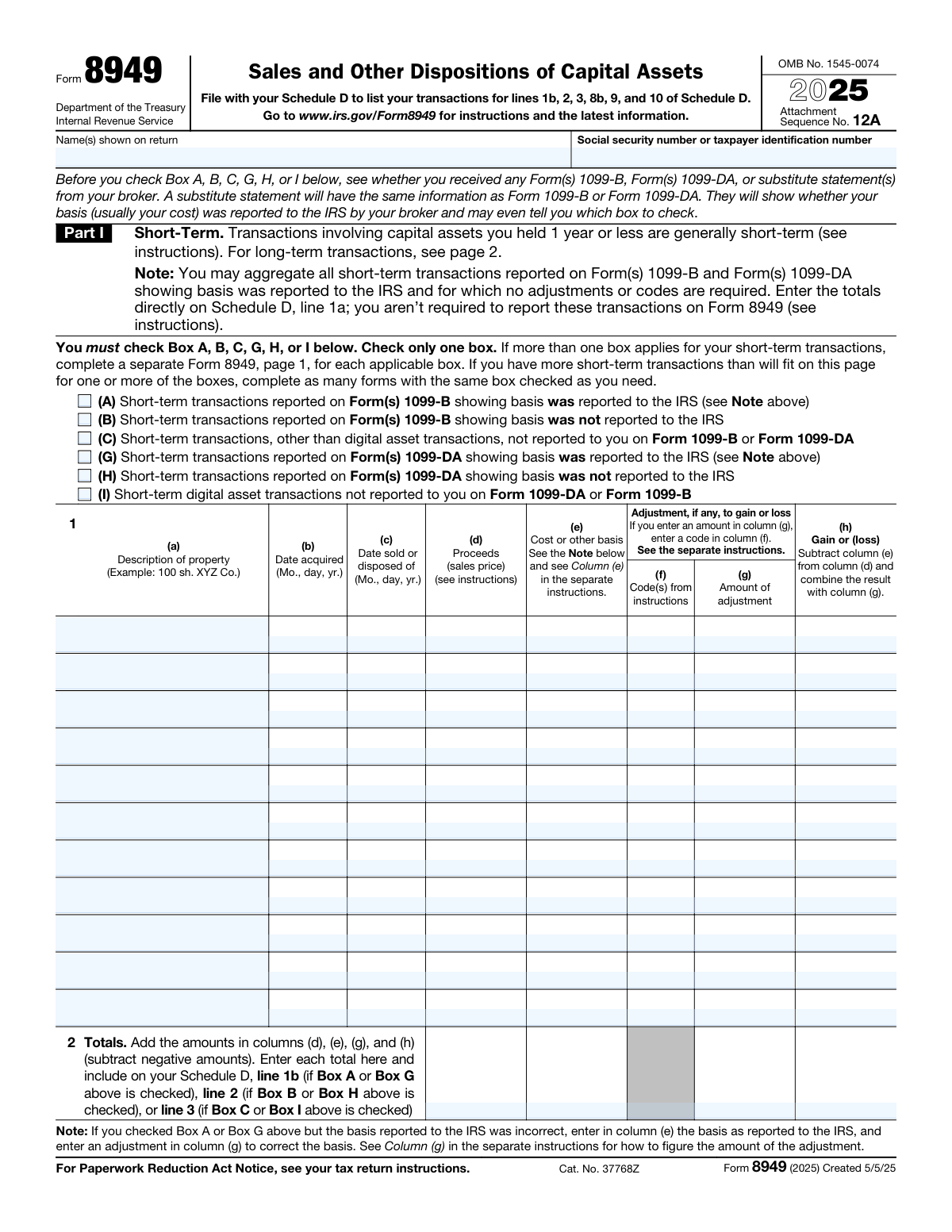
Yes! You can use AI to fill out Form 8949 (2025), Sales and Other Dispositions of Capital Assets

Form 8949 is an IRS tax form used to list each capital asset transaction you sold or otherwise disposed of during the tax year, separating short-term (held 1 year or less) and long-term (held more than 1 year) transactions. It captures key details such as description of property, acquisition and sale dates, proceeds, cost basis, and any adjustment codes/amounts that affect gain or loss. The totals from Form 8949 are carried to specific lines on Schedule D, which determines your overall capital gain or loss reported on your return. It is important because it supports the accuracy of your capital gains reporting, especially when basis was not reported to the IRS or when adjustments are required (including for digital asset transactions).
Our AI automatically handles information lookup, data retrieval, formatting, and form filling.
It takes less than a minute to fill out Form 8949 using our AI form filling.
Securely upload your data. Information is encrypted in transit and deleted immediately after the form is filled out.

Form specifications

Form name: Form 8949 (2025), Sales and Other Dispositions of Capital Assets
Number of pages: 2
Filled form examples: Form Form 8949 Examples
Language: English
main-image

Instafill Demo: filling out a legal form in seconds

How to Fill Out Form 8949 Online for Free in 2026

Are you looking to fill out a FORM 8949 form online quickly and accurately? Instafill.ai offers the #1 AI-powered PDF filling software of 2026, allowing you to complete your FORM 8949 form in just 37 seconds or less.
Follow these steps to fill out your FORM 8949 form online using Instafill.ai:
  1. 1 Gather your transaction records, including Forms 1099-B, 1099-DA, and any broker substitute statements, plus your own records for transactions not reported on those forms.
  2. 2 Decide whether each transaction is short-term (Part I) or long-term (Part II) based on holding period, and group transactions by the correct reporting category/box (A–C, G–I for short-term; D–F, J–L for long-term).
  3. 3 For each applicable box, start a separate Form 8949 page and enter your name/SSN (if required), then check only the one box that matches that group of transactions.
  4. 4 Enter each transaction on a line: description of property, date acquired, date sold/disposed, proceeds (sales price), and cost or other basis.
  5. 5 If an adjustment is needed, enter the appropriate adjustment code in column (f) and the adjustment amount in column (g) (for example, to correct basis when the broker-reported basis is incorrect).
  6. 6 Compute gain or loss for each line in column (h) and then complete the totals line by summing columns (d), (e), (g), and (h).
  7. 7 Transfer the totals to the correct Schedule D lines (1b/2/3 for Part I or 8b/9/10 for Part II, depending on the box checked) and file Form 8949 with Schedule D as part of your tax return.

Our AI-powered system ensures each field is filled out correctly, reducing errors and saving you time.

Why Choose Instafill.ai for Your Fillable Form 8949 Form?

Speed

Complete your Form 8949 in as little as 37 seconds.

Up-to-Date

Always use the latest 2026 Form 8949 form version.

Cost-effective

No need to hire expensive lawyers.

Accuracy

Our AI performs 10 compliance checks to ensure your form is error-free.

Security

Your personal information is protected with bank-level encryption.

Frequently Asked Questions About Form Form 8949

Form 8949 is used to list sales and other dispositions of capital assets (such as stocks, bonds, and digital assets). You file it with Schedule D to report the details behind the totals shown on certain Schedule D lines.

You generally need to file Form 8949 if you sold or disposed of capital assets and you must report the individual transactions (especially when adjustments or special reporting categories apply). Some transactions can be summarized directly on Schedule D instead of being listed on Form 8949.

No. If your broker reports basis to the IRS on Form 1099-B or Form 1099-DA and no adjustments or codes are needed, you may be able to aggregate those transactions and report totals directly on Schedule D (line 1a for short-term or line 8a for long-term).

Part I is for short-term transactions (assets held 1 year or less). Part II is for long-term transactions (assets held more than 1 year).

The box depends on whether the transaction was reported on Form 1099-B or Form 1099-DA, whether basis was reported to the IRS, and whether it involves digital assets. Your Form 1099-B/1099-DA (or substitute statement) often indicates whether basis was reported and can help you pick the correct box.

Report short-term transactions in Part I and long-term transactions in Part II. If different boxes apply within short-term or long-term categories, you must use separate Form 8949 pages for each box.

You must complete a separate Form 8949 page for each applicable box and check only one box per page. If you run out of space, you can attach additional pages with the same box checked.

For each transaction, you generally need a description of the property, date acquired, date sold/disposed, proceeds, and cost or other basis. If an adjustment applies, you also need the adjustment code and the adjustment amount.

Enter proceeds (sales price) in column (d) and cost or other basis in column (e). The gain or loss is calculated in column (h) using columns (d), (e), and any adjustment in column (g).

Column (f) is for adjustment codes from the Form 8949 instructions, and column (g) is for the dollar amount of the adjustment. Use them when you need to adjust gain/loss (for example, to correct basis or reflect other required adjustments).

If you checked a box where basis was reported (Box A/G for short-term or D/J for long-term) but the reported basis is wrong, enter the basis as reported to the IRS in column (e). Then enter an adjustment in column (g) (with the appropriate code in column (f)) to correct it.

Column (h) is generally proceeds (column (d)) minus cost or other basis (column (e)), combined with any adjustment amount in column (g). If column (g) is negative, it reduces the result; if positive, it increases it.

For short-term totals, you carry them to Schedule D line 1b (Box A or G), line 2 (Box B or H), or line 3 (Box C or I). For long-term totals, you carry them to Schedule D line 8b (Box D or J), line 9 (Box E or K), or line 10 (Box F or L).

Use Forms 1099-B and/or 1099-DA from your broker, or a substitute statement with the same information. You may also need your own records to determine dates acquired, cost basis, and any adjustments.

Form 8949 is filed as an attachment with your federal income tax return, along with Schedule D. It follows the same filing deadline as your tax return for the year.

Compliance Form 8949
Validation Checks by Instafill.ai

1
Taxpayer Identification Number (SSN/TIN) presence and format validation
Validates that the SSN or taxpayer identification number is provided when required (typically on page 1, and on page 2 if not already present on the other side) and matches an acceptable IRS TIN format (e.g., 9 digits, allowing standard hyphen formatting). This is critical for correctly associating the Form 8949 with the taxpayer’s return and preventing processing rejections. If the TIN is missing or malformed, the submission should be flagged as invalid and blocked from filing until corrected.
2
Taxpayer name(s) completeness and consistency across pages
Checks that the taxpayer name(s) shown on the return are present where required and consistent between page 1 and page 2 (or that page 2 correctly omits the name/TIN only when it is shown on the other side). This prevents mismatches that can cause the attachment to be separated from the return or misapplied. If names differ or required identifiers are missing, the system should require correction or explicit confirmation of multi-page attachment linkage.
3
Exactly one short-term box selection (A/B/C/G/H/I) per Form 8949 page 1
Ensures that exactly one of the short-term classification boxes (A, B, C, G, H, or I) is checked for the page 1 submission. The IRS instructions require only one box per page, and different box types must be reported on separate forms. If none or multiple boxes are selected, the form should fail validation and prompt the user to select one box or split transactions into separate Form 8949 pages.
4
Exactly one long-term box selection (D/E/F/J/K/L) per Form 8949 page 2
Ensures that exactly one of the long-term classification boxes (D, E, F, J, K, or L) is checked for the page 2 submission. This is required because the totals must flow to different Schedule D lines depending on the box selected. If the selection is missing or multiple boxes are checked, the system should block submission and require the user to correct the selection or create additional forms.
5
Transaction row required fields completeness (columns a–e and h derivation readiness)
Validates that each entered transaction row includes, at minimum, a description of property (a), date acquired (b), date sold/disposed (c), proceeds (d), and cost or other basis (e), unless the system explicitly supports IRS-allowed exceptions. These fields are necessary to compute gain/loss and to support auditability. If any required field is missing for a row, the row should be rejected or marked incomplete and excluded from totals until corrected.
6
Date format validation for acquisition and disposition dates
Checks that dates in columns (b) and (c) are valid calendar dates and conform to the expected format (month/day/year) for the tax year context. Correct date formatting is essential for determining holding period and ensuring the transaction is reported in the correct part (short-term vs long-term). If a date is invalid (e.g., 13/40/2025) or not parseable, the system should fail validation for that row and require correction.
7
Chronological consistency: date sold/disposed must be on or after date acquired
Ensures the disposition date (c) is not earlier than the acquisition date (b) for each transaction. A sale before acquisition is generally impossible and indicates data entry or import errors that can materially distort gains/losses. If violated, the system should flag the row as inconsistent and require correction or an explicit override with documentation (if the platform supports rare edge cases).
8
Holding period consistency with selected Part (short-term vs long-term)
Validates that transactions listed in Part I reflect a holding period of 1 year or less, and transactions in Part II reflect a holding period of more than 1 year, based on the provided acquisition and disposition dates. This is important because short-term and long-term gains are taxed differently and flow to different Schedule D sections. If a transaction’s holding period conflicts with the part used, the system should require moving the transaction to the correct part or splitting into a separate form.
9
Numeric and currency validation for proceeds, basis, and adjustments (columns d, e, g)
Checks that columns (d) proceeds, (e) cost/basis, and (g) adjustment amounts are valid numeric values, use an allowed precision (typically dollars and cents), and do not contain non-numeric characters. Accurate numeric formatting is required for correct totals and downstream Schedule D calculations. If values are non-numeric or exceed allowed precision, the system should reject the entry and prompt for correction.
10
Adjustment code requirement when an adjustment amount is present (columns f and g linkage)
Ensures that if an amount is entered in column (g), at least one corresponding adjustment code is entered in column (f), as required by the form instructions. The code explains why the adjustment exists (e.g., wash sale, basis correction) and is necessary for IRS interpretation. If (g) is non-zero and (f) is blank, validation should fail and require a code; if (f) is present but (g) is blank, the system should warn and require confirmation or correction.
11
Gain/Loss calculation validation for each transaction (column h)
Validates that column (h) equals proceeds (d) minus cost/basis (e) plus adjustment (g), with correct handling of negative values. This prevents arithmetic errors that can materially change taxable income and cause Schedule D mismatches. If the provided (h) does not match the computed value, the system should either auto-correct (if allowed) or block submission and require the user to reconcile the discrepancy.
12
Totals row accuracy and sign handling (columns d, e, g, h)
Checks that the totals in row 2 equal the sum of all included transaction rows for columns (d), (e), (g), and (h), and that negative amounts are handled according to the instruction to subtract negative amounts. Totals must be accurate because they are carried to Schedule D lines and drive tax computation. If totals do not match computed sums, the system should recalculate totals or fail validation and require correction before filing.
13
Schedule D line mapping consistency with selected box
Validates that the form’s totals are mapped to the correct Schedule D line based on the checked box (e.g., Part I: Box A/G -> line 1b, Box B/H -> line 2, Box C/I -> line 3; Part II: Box D/J -> line 8b, Box E/K -> line 9, Box F/L -> line 10). This is essential to ensure the IRS receives totals in the correct category (reported vs not reported basis; digital asset vs non-digital). If the mapping is inconsistent or missing, the system should block submission and require correction of the box selection or the destination line.
14
Digital asset box usage consistency with property description
Checks that transactions reported under digital asset boxes (G/H/I for short-term; J/K/L for long-term) appear to be digital assets based on the property description (e.g., cryptocurrency ticker/symbol, NFT identifier) and that non-digital assets are not placed in those categories. While description-based detection is heuristic, it helps catch common misclassification that affects reporting rules and broker statement alignment. If a likely non-digital asset is placed in a digital asset box (or vice versa), the system should warn and require user confirmation or reclassification.
15
Basis-reported box logic and basis correction requirement (A/G and D/J scenarios)
For boxes indicating basis was reported to the IRS (A, G, D, J), validates that any basis correction is represented as instructed: column (e) should reflect the basis as reported to the IRS, and column (g) should contain the adjustment to correct it. This ensures the IRS can reconcile broker-reported basis with taxpayer-corrected basis and reduces mismatch notices. If a basis correction is implied (e.g., user-entered “correct basis” differing from reported basis) but no adjustment code/amount is provided, the system should flag the entry and require proper (f)/(g) completion.

Common Mistakes in Completing Form 8949

Checking the wrong reporting box (A/B/C/G/H/I or D/E/F/J/K/L)

People often guess which box to check instead of using their Form 1099-B/1099-DA (or substitute statement) to confirm whether basis was reported to the IRS and whether the transaction is a digital asset transaction. Checking the wrong box can route totals to the wrong Schedule D line and may trigger IRS matching notices or require amended filings. To avoid this, match each group of transactions to the exact 1099 category (1099-B vs 1099-DA), confirm whether basis was reported, and separate “not reported to you” transactions into the correct “other/not reported” box.

Mixing short-term and long-term transactions on the same page

A common misunderstanding is treating “short-term vs long-term” as a preference rather than a holding-period rule (1 year or less vs more than 1 year). Mixing them causes incorrect tax treatment and can distort Schedule D netting and tax rates. Avoid this by determining holding period for each lot (based on acquisition and disposition dates) and reporting short-term on Part I (page 1) and long-term on Part II (page 2).

Using multiple boxes on one Form 8949 page instead of separate forms

Filers sometimes check more than one box because they have multiple types of transactions (e.g., some with basis reported and some without). The form requires only one box per page, and mixing categories makes totals and Schedule D line mapping unreliable. The fix is to prepare separate Form 8949 pages for each applicable box and keep each page’s transactions consistent with the checked box.

Incorrect or inconsistent taxpayer identification information across pages

Because page 2 notes that name/SSN may not be required if shown on the other side, people sometimes omit identifiers when filing electronically or when pages get separated, or they enter a different SSN/name format than the return. This can delay processing or cause the attachment to be mis-associated with the return. To avoid issues, ensure the name(s) shown on the return and SSN/TIN are present where required and consistent across all attached pages and any additional Form 8949 sheets.

Entering dates in the wrong format or using trade date vs settlement date inconsistently

The form expects dates in month/day/year format, but filers often use year-first formats, omit the day, or mix trade and settlement dates between acquired and sold fields. Date errors can flip a transaction from long-term to short-term or create IRS matching discrepancies with broker statements. Use the dates shown on the 1099-B/1099-DA (typically trade date), enter full Mo., day, yr., and apply the same convention consistently for all transactions.

Misstating proceeds in column (d) by netting fees or using the wrong figure

Many people enter net proceeds after commissions/fees, or they copy a “net cash received” number from an account history instead of the proceeds figure required by the form and broker statement. This can misstate gain/loss and cause mismatches with amounts reported to the IRS. To avoid this, use the proceeds amount as reported on the 1099-B/1099-DA (or substitute statement) and handle any necessary adjustments using the proper adjustment code/amount rather than silently netting.

Incorrect cost basis in column (e), especially for lots, wash sales, or digital assets

Filers frequently use an average cost when specific lots were sold, forget to include acquisition costs, or use wallet/app “cost” figures that don’t match tax basis rules (common with digital assets moved between platforms). Wrong basis directly changes gain/loss and can lead to underpayment, notices, or the need to amend. Avoid this by using the broker-reported basis when available, tracking lots and transfers carefully, and reconciling basis to your records before entering column (e).

Failing to use adjustment codes in column (f) when column (g) is used

A frequent mechanical error is entering an adjustment amount in column (g) without entering the required code in column (f), or using a vague description instead of the official code. Missing/incorrect codes make the adjustment unsupported and can lead to IRS questions or incorrect Schedule D results. Always consult the Form 8949 instructions for the correct code (e.g., for wash sales, basis corrections, etc.) and ensure every nonblank (g) has a corresponding (f).

Not following the special rule when basis was reported but is incorrect (Boxes A/G or D/J)

When basis was reported to the IRS but is wrong, people often overwrite column (e) with their corrected basis and skip the required adjustment entry. The form instructs you to enter the basis as reported to the IRS in column (e) and then correct it via an adjustment in column (g), which preserves IRS matching. To avoid mismatches, keep column (e) aligned to what was reported and use column (f)/(g) to document the correction.

Improper aggregation: reporting transactions on Form 8949 that can be summarized, or summarizing when adjustments are required

Some filers list every transaction even when the form allows aggregation of certain 1099-B/1099-DA transactions with basis reported and no adjustments, while others incorrectly aggregate transactions that do require codes/adjustments. Over-reporting increases errors and omissions; improper aggregation can hide required adjustments and produce incorrect totals. Follow the note: aggregate only eligible transactions directly on Schedule D (1a or 8a), and use Form 8949 for any transactions needing adjustments, different boxes, or not reported categories.

Totals and Schedule D line mapping errors (lines 1b/2/3 and 8b/9/10)

People often add totals incorrectly (especially with negative amounts), forget to carry totals to Schedule D, or send totals to the wrong line based on the checked box. This can change net capital gain/loss and may cause the return to be internally inconsistent. To avoid this, total columns (d), (e), (g), and (h) carefully (subtracting negative amounts as instructed) and transfer each page’s totals to the exact Schedule D line specified for that box.
Saved over 80 hours a year

“I was never sure if my IRS forms like W-9 were filled correctly. Now, I can complete the forms accurately without any external help.”

Kevin Martin Green

Your data stays secure with advanced protection from Instafill and our subprocessors

Robust compliance program

Transparent business model

You’re not the product. You always know where your data is and what it is processed for.

ISO 27001, HIPAA, and GDPR

Our subprocesses adhere to multiple compliance standards, including but not limited to ISO 27001, HIPAA, and GDPR.

Security & privacy by design

We consider security and privacy from the initial design phase of any new service or functionality. It’s not an afterthought, it’s built-in, including support for two-factor authentication (2FA) to further protect your account.

Fill out Form 8949 with Instafill.ai

Worried about filling PDFs wrong? Instafill securely fills form-8949-2025-sales-and-other-dispositions-of-cap forms, ensuring each field is accurate.