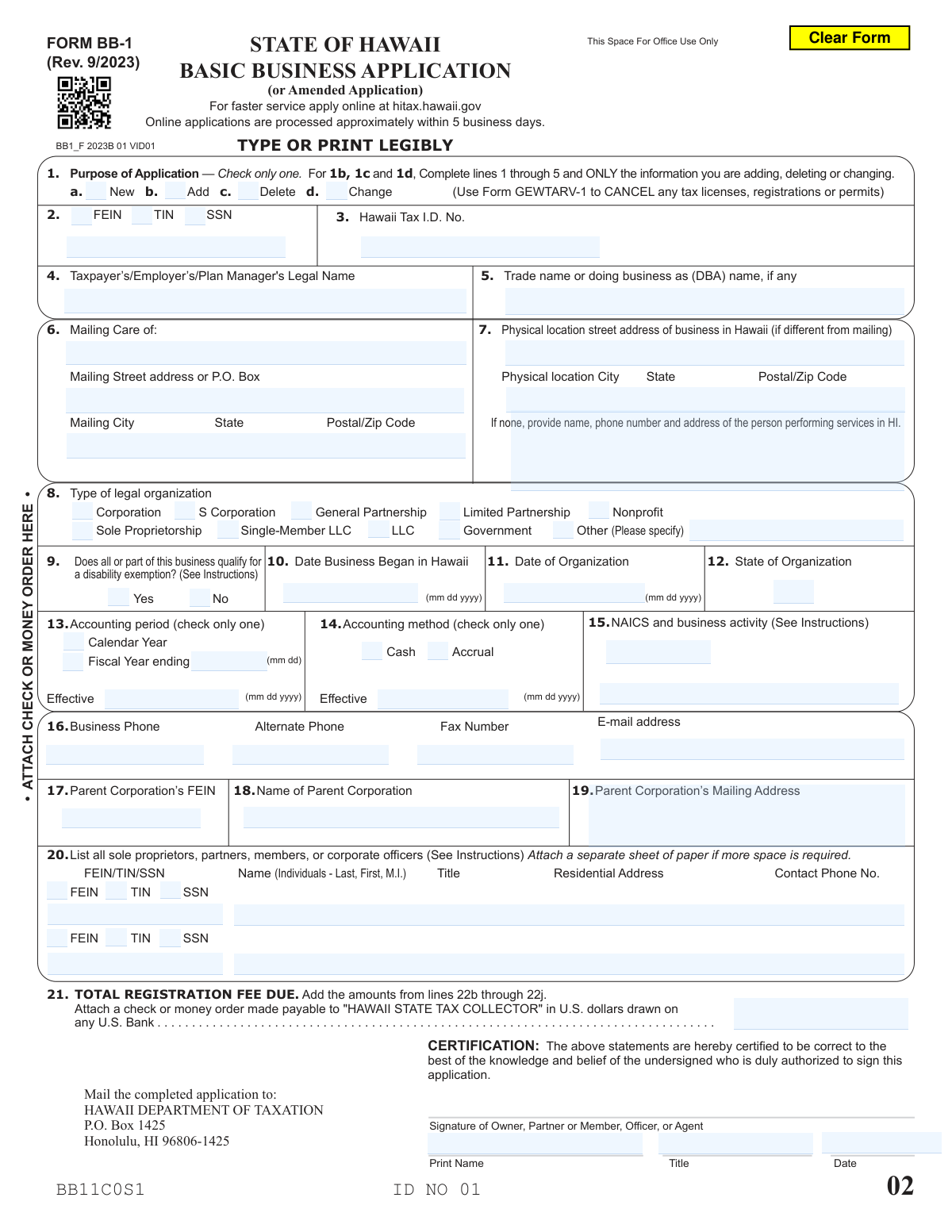
Yes! You can use AI to fill out Form BB-1, Basic Business Application

Form BB-1, the Basic Business Application, is the primary document used to register a business with the Hawaii Department of Taxation for various tax licenses, such as General Excise Tax (GET). Filing this form is a critical first step for any business operating in Hawaii to ensure compliance with state tax laws and to receive a Hawaii Tax ID Number. Today, this form can be filled out quickly and accurately using AI-powered services like Instafill.ai, which can also convert non-fillable PDF versions into interactive, fillable forms for your convenience.
Our AI automatically handles information lookup, data retrieval, formatting, and form filling.
It takes less than a minute to fill out Form BB-1 using our AI form filling.
Securely upload your data. Information is encrypted in transit and deleted immediately after the form is filled out.

Form specifications

Form name: Form BB-1, Basic Business Application
Number of fields: 204
Number of pages: 6
Language: English
Categories: business forms
main-image

Instafill Demo: How to fill out PDF forms in seconds with AI

How to Fill Out Form BB-1 Online for Free in 2026

Are you looking to fill out a FORM BB-1 form online quickly and accurately? Instafill.ai offers the #1 AI-powered PDF filling software of 2026, allowing you to complete your FORM BB-1 form in just 37 seconds or less.
Follow these steps to fill out your FORM BB-1 form online using Instafill.ai:
  1. 1 Navigate to Instafill.ai and upload your Form BB-1 document or select it from the template library.
  2. 2 Provide your business's legal name, trade name (DBA), and identification numbers like your FEIN or SSN. Instafill.ai's secure vault can store and autofill this information.
  3. 3 Specify your business's legal structure (e.g., Corporation, LLC, Sole Proprietorship), date of organization, and accounting method.
  4. 4 Enter your business contact information, physical location in Hawaii, and describe your primary business activity using the appropriate NAICS code.
  5. 5 Select the specific Hawaii tax licenses you are applying for, adding, or changing, and let the tool help calculate the total registration fees due.
  6. 6 Review all the information pre-filled by the AI for accuracy, making any final adjustments directly on the interactive form.
  7. 7 Electronically sign the application with your name and title, then download the completed form for submission to the Hawaii Department of Taxation.

Our AI-powered system ensures each field is filled out correctly, reducing errors and saving you time.

Why Choose Instafill.ai for Your Fillable Form BB-1 Form?

Speed

Complete your Form BB-1 in as little as 37 seconds.

Up-to-Date

Always use the latest 2026 Form BB-1 form version.

Cost-effective

No need to hire expensive lawyers.

Accuracy

Our AI performs 10 compliance checks to ensure your form is error-free.

Security

Your personal information is protected with bank-level encryption.

Frequently Asked Questions About Form Form BB-1

This form is used to apply for a new Hawaii tax license, add or delete specific tax licenses for an existing account, or change information registered with the Hawaii Department of Taxation.

Any business entity or individual planning to conduct business activities in Hawaii must complete this form to register for the appropriate state tax licenses, registrations, or permits.

Select 'New' for your very first application. Choose 'Add' to apply for additional licenses to an existing account, and select 'Change' to update information like your address or business name.

Businesses should use their Federal Employer Identification Number (FEIN). If you are a sole proprietor or do not have an FEIN, you may use your Social Security Number (SSN) or Taxpayer Identification Number (TIN).

If you are a new applicant, you can leave the 'Hawaii Tax I.D. Number' field blank. A number will be assigned to you after your application is successfully processed.

If you lack a physical street address in Hawaii, you must provide an explanation of your business activities in the state and list the name, phone number, and address of the person performing services there.

Your 'Legal Name' is the official name your business is registered under. The 'Trade Name or DBA' (Doing Business As) is the operating name the public sees, if it's different from the legal name.

A NAICS code is a six-digit number that classifies your primary business activity. You can find the correct code for your business by referring to the official NAICS instructions or website.

You must calculate the total fee due based on the licenses you select, and then attach a check or money order payable to the 'Hawaii State Tax Collector' with your submitted application.

If your legal organization type is not listed, check the 'Other' box in that section and write in the specific type, such as 'Joint Venture' or 'Professional Association'.

The form must be signed by an owner, partner, member, corporate officer, or another agent who is legally authorized to act on behalf of the business.

Yes, services like Instafill.ai use AI to accurately auto-fill form fields from your saved information, which can save you time and help prevent errors.

Simply upload the form to the Instafill.ai platform. Its AI will make the document fillable, allowing you to type in your information, sign electronically, and download the completed PDF.

You can use a service like Instafill.ai, which is designed to convert flat, non-fillable PDFs into interactive, fillable forms that you can easily complete on your computer.

Compliance Form BB-1
Validation Checks by Instafill.ai

1
Exclusive Purpose of Application Selection
This check ensures that only one option under 'Purpose of Application' (New, Add, Delete, or Change) is selected. Selecting multiple purposes creates ambiguity and can lead to incorrect processing of the application. If more than one option is checked, the form submission should be rejected with an error message prompting the user to select only one purpose.
2
Primary Federal Identification Number Requirement
This validation verifies that at least one primary federal identification number (FEIN, SSN, or TIN) has been provided. This number is critical for uniquely identifying the taxpayer for both federal and state tax purposes. Failure to provide at least one of these numbers would make it impossible to process the application, so the submission must be blocked until one is entered.
3
FEIN and SSN Format Validation
This check validates that the Federal Employer Identification Number (FEIN) and Social Security Number (SSN) fields adhere to their required formats. An FEIN must be a nine-digit number (e.g., 12-3456789 or 123456789), and an SSN must be a nine-digit number (e.g., 123-45-6789 or 123456789). Incorrectly formatted numbers can cause record-matching failures and processing delays, so submissions with invalid formats should be rejected.
4
Conditional Hawaii Tax ID Number Presence
This validation checks the 'Hawaii Tax Identification Number' field based on the 'Purpose of Application'. If the purpose is 'Add', 'Delete', or 'Change', this field must be populated with an existing Hawaii Tax ID. Conversely, if the purpose is 'New', this field should be blank, as an ID will be assigned upon processing. This logic prevents errors such as trying to modify a non-existent account or creating a duplicate account.
5
Conditional 'Other Legal Organization' Specification
This check ensures that if the 'Other' checkbox is selected for 'Legal Organization Type', the corresponding text field to specify the type is filled out. Without this specification, the Department of Taxation cannot accurately classify the business entity. If 'Other' is checked and the specification field is empty, the form should be considered incomplete and rejected.
6
Date Business Began in Hawaii Validity
This validation confirms that the 'Date Business Began in Hawaii' is a valid date in MM/DD/YYYY format and is not a future date. An invalid or future date is logically impossible and would lead to incorrect determination of tax liability periods. The system should reject any submission where this date is improperly formatted or set in the future.
7
Conditional Fiscal Year End Date Entry
This check verifies that if the applicant selects 'Fiscal Year' as their accounting period, the 'Fiscal Year Ending Date' field (MM/DD) is completed. This date is essential for establishing the correct tax reporting cycle for the business. If 'Fiscal Year' is chosen but the end date is missing, the submission is incomplete and must be flagged for correction.
8
NAICS Code Format and Requirement
This validation ensures the 'NAICS Code' field contains a six-digit number. The North American Industry Classification System (NAICS) code is used to classify business establishments for statistical and tax administration purposes. An invalid or missing code can lead to misclassification, so the system should verify the entry is exactly six digits long.
9
Parent Corporation Information Consistency
This check ensures that if the 'Parent Corporation Name' field is filled out, the 'Parent Corporation’s Federal Employer Identification Number (FEIN)' field must also be completed. Both pieces of information are required to correctly identify the parent entity in a corporate structure. A submission with one field filled but not the other should be rejected as incomplete.
10
Legal Name Completeness
This validation confirms that the 'Taxpayer’s/Employer’s/Plan Manager’s Legal Name' field is not empty. The legal name is the primary identifier for the business entity and is a mandatory requirement for creating or updating a tax account. The application cannot be processed without this fundamental information, so an empty field must result in a validation failure.
11
Signature Date Logical Consistency
This check verifies that the 'Date Signed' is a valid date and is not earlier than the 'Date Business Began in Hawaii' or the 'Date of Organization'. Signing an application before the business legally exists or began operations is illogical and could indicate an error in the data entry. Such inconsistencies should trigger a validation warning or error to prompt the user for review.
12
Physical Location and Explanation Logic
This validation ensures that if a business does not have a physical street address in Hawaii, the 'Explanation of Hawaii Business Presence' field is completed. The Department of Taxation requires either a physical address or a clear explanation of business activities to establish nexus within the state. If the physical address is blank or same as mailing, and the explanation is also blank, the form should be flagged as incomplete.
13
Email Address Format Validation
This check ensures that the value entered in the 'E-mail Address' field follows the standard format for an email address (e.g., [email protected]). An invalid email address prevents the Department of Taxation from sending important notifications and correspondence electronically. The system should reject submissions with improperly formatted email addresses to ensure a valid point of contact is on file.
14
Total Registration Fee Format
This validation verifies that the 'Total Registration Fee Due' field contains a valid numerical or currency value. Non-numeric characters or an empty field would prevent proper payment processing and reconciliation. This check ensures the amount is machine-readable and can be processed by the financial system, blocking submissions with invalid data in this critical field.

Common Mistakes in Completing Form BB-1

Saved over 80 hours a year

“I was never sure if my IRS forms like W-9 were filled correctly. Now, I can complete the forms accurately without any external help.”

Kevin Martin Green

Your data stays secure with advanced protection from Instafill and our subprocessors

Robust compliance program

Transparent business model

You’re not the product. You always know where your data is and what it is processed for.

ISO 27001, HIPAA, and GDPR

Our subprocesses adhere to multiple compliance standards, including but not limited to ISO 27001, HIPAA, and GDPR.

Security & privacy by design

We consider security and privacy from the initial design phase of any new service or functionality. It’s not an afterthought, it’s built-in, including support for two-factor authentication (2FA) to further protect your account.

Fill out Form BB-1 with Instafill.ai

Worried about filling PDFs wrong? Instafill securely fills form-bb-1-basic-business-application forms, ensuring each field is accurate.