Yes! You can use AI to fill out Form F11489, Request for Recurring Required Minimum Distributions From Your Retirement Investments
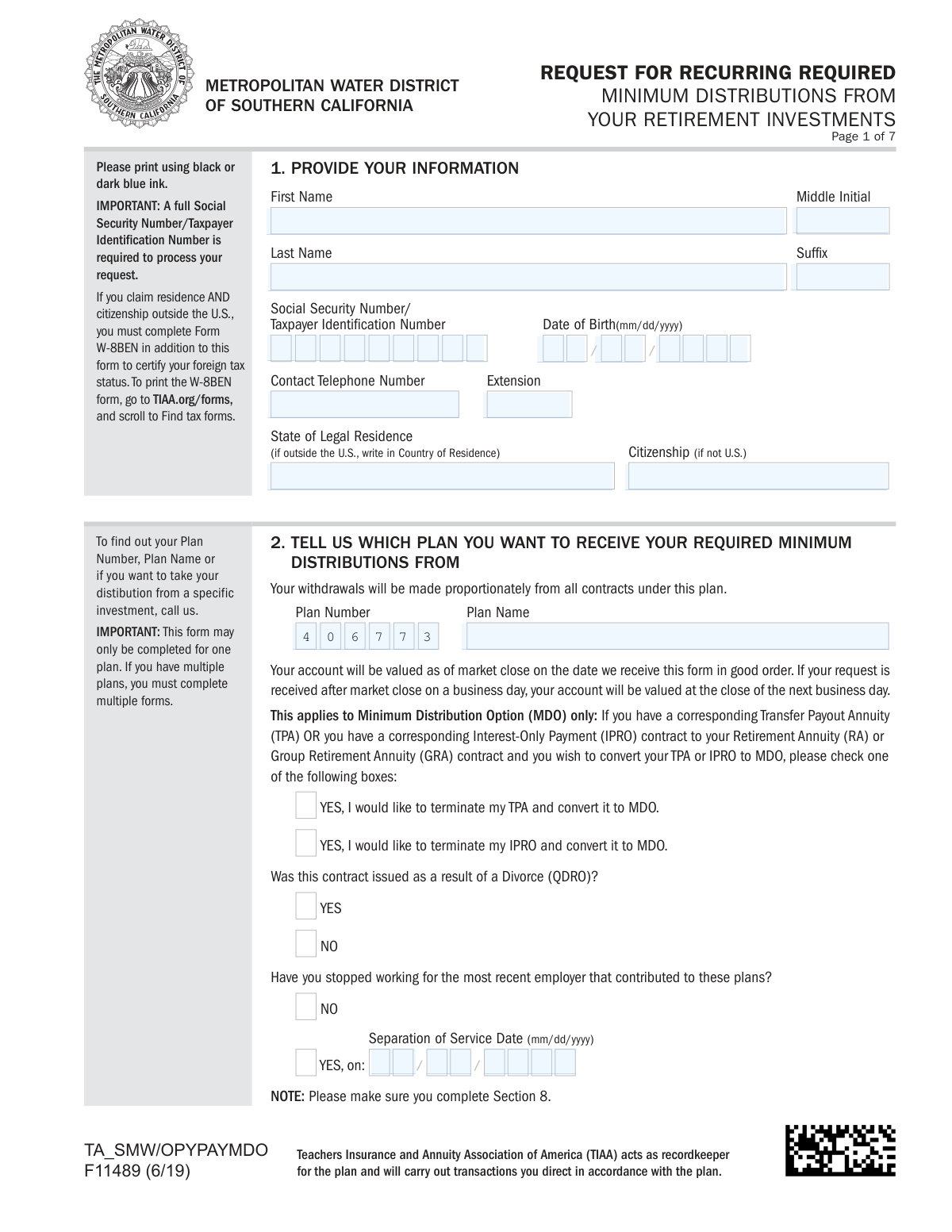
TIAA Form F11489, Request for Recurring Required Minimum Distributions, is used by retirement account holders to authorize TIAA to automatically calculate and pay out the minimum amount required by the IRS each year. This simplifies the process of meeting RMD obligations, helping individuals avoid potential tax penalties without needing to manually request withdrawals annually. Today, this form can be filled out quickly and accurately using AI-powered services like Instafill.ai, which can also convert non-fillable PDF versions into interactive fillable forms.
F11489 is part of the
investment forms, retirement distribution forms, distribution request forms, required minimum distribution forms and UK investment forms categories on Instafill.
Rather not fill this in by hand? Instafill is an online form filler that completes PDF forms automatically — upload the blank form, answer a few questions, and the AI fills every field.
Form specifications
| Form name: | Form F11489, Request for Recurring Required Minimum Distributions From Your Retirement Investments |
| Number of pages: | 1 |
| Language: | English |
Our AI automatically handles information lookup, data retrieval, formatting, and form filling.
It takes less than a minute to fill out F11489 using our AI form filling.
Securely upload your data. Information is encrypted in transit and deleted immediately after the form is filled out.
Instafill Demo: How to fill out PDF forms in seconds with AI
How to Fill Out F11489 Online for Free in 2026
Are you looking to fill out a F11489 form online quickly and accurately? Instafill.ai offers the #1 AI-powered PDF filling software of 2026, allowing you to complete your F11489 form in just 37 seconds or less.
Follow these steps to fill out your F11489 form online using Instafill.ai:
- 1 Navigate to Instafill.ai and upload or select TIAA Form F11489.
- 2 Use the AI assistant to fill in your personal information in Section 1, such as your name, Social Security Number, and date of birth.
- 3 Specify the plan number and name for the distributions in Section 2.
- 4 Choose your payment schedule and start date for the distributions in Section 3.
- 5 Complete the Federal and State Tax Withholding Elections in Section 5.
- 6 Provide your payment instructions in Section 7, choosing between direct deposit or a mailed check.
- 7 Review all entered information for accuracy, then sign and date the form in Section 8 before submitting it to TIAA as instructed.
Our AI-powered system ensures each field is filled out correctly, reducing errors and saving you time.
Why Choose Instafill.ai for Your Fillable F11489 Form?
Speed
Complete your F11489 in as little as 37 seconds.
Up-to-Date
Always use the latest 2026 F11489 form version.
Cost-effective
No need to hire expensive lawyers.
Accuracy
Our AI performs 10 compliance checks to ensure your form is error-free.
Security
Your personal information is protected with bank-level encryption.
Frequently Asked Questions About F11489
This form is used to request and set up recurring Required Minimum Distributions (RMDs) from your TIAA retirement accounts. It allows TIAA to automatically calculate and pay your IRS-mandated withdrawal each year so you don't have to request it manually.
You should complete this form if you are required to take RMDs from your TIAA retirement accounts, typically after reaching age 70½ or retiring. It automates the process to help you meet IRS requirements.
No, you must complete a separate form for each individual plan you wish to receive RMDs from. Section 2 of the form is designed to be completed for only one plan at a time.
In Section 3, you can select to receive your payments on a monthly, quarterly, semiannually, or annually basis. If you do not make a selection, the payment frequency will default to annually.
In Section 7, you can choose a bank account already on file or add a new one. For a new account, you must provide documentation such as an original voided check or a notarized letter from your bank.
You can upload your completed documents via the TIAA mobile app or TIAA.org for the fastest service. Alternatively, you can submit them by fax or by standard or overnight mail to the addresses listed on the form.
The default federal tax withholding is based on a status of 'Married claiming 3 allowances.' You can use Section 5 to change this by electing a different marital status, number of allowances, a specific additional amount, a percentage, or to opt out of withholding entirely.
If your spouse is your sole beneficiary and more than 10 years younger, TIAA can use the Joint Life Expectancy method, which may result in a smaller required distribution. You must provide your spouse's name and birth date in Section 4 to use this calculation method.
Yes, if you are a non-U.S. citizen, you must also complete and submit IRS Form W-8BEN to certify your foreign tax status. This form is necessary to determine the correct tax withholding rate, which may be reduced by a tax treaty.
You must sign your full legal name in Section 8 using black or dark blue ink. TIAA accepts wet signatures or their own digital signing experience but does not accept signatures made with third-party software like Adobe Acrobat.
Once your request is approved, direct deposits are typically received within two business days. If you choose to receive a check by mail, it may take up to 8-10 business days to arrive.
Yes, you can use services like Instafill.ai, which leverage AI to help you accurately auto-fill form fields. This can save time and reduce the chance of making errors on complex forms.
To fill this form out online, you can use a service like Instafill.ai. Simply upload the PDF, and the platform will make the fields interactive for you to complete and sign electronically.
If you have a non-fillable or 'flat' PDF, you can use a tool like Instafill.ai to convert it into an interactive form. This allows you to type your information directly into the fields before printing or submitting.
Compliance F11489
Validation Checks by Instafill.ai
1
SSN/TIN Format and Requirement
This check verifies that the Social Security Number or Taxpayer Identification Number in Section 1 is provided and follows the 9-digit format (XXX-XX-XXXX or XXXXXXXXX). This number is critical for identifying the user, locating their accounts, and for tax reporting purposes. If the number is missing or invalid, the entire request cannot be processed and will be rejected.
2
Date of Birth Logical Validity
This validation ensures the Date of Birth in Section 1 is a real date in MM/DD/YYYY format and is logically sound. It checks that the date is in the past and that the applicant is of a plausible age to have a retirement account (e.g., over 18). This is crucial for calculating age-related requirements like RMDs, and an invalid date would prevent accurate processing.
3
Separation of Service Date Conditional Requirement
This check validates that if the user answers 'YES' to having stopped working in Section 2, they must provide a 'Separation of Service Date'. This date is essential for determining eligibility for distributions under certain plan rules. Failure to provide this date when required will render the form incomplete and halt the processing of the request.
4
Payment Option Exclusivity
This validation ensures that in Section 3, the user selects only one payment start option (A, B, or C). Selecting multiple options creates ambiguity about the user's intent for when payments should begin. If more than one option is selected, the form should be flagged as an error, requiring the user to clarify their choice before submission.
5
Signature Date and Payment Start Date Consistency
This check enforces the rule that the signature date in Section 8 must be within 180 days prior to the payment start date selected in Section 3. This is a regulatory requirement to ensure the request is current and reflects the user's recent intent. A request with a signature date outside this window is considered stale and will be rejected.
6
Payment Day of Month Constraint
This validation verifies that any payment date selected in Section 3 has a day between the 1st and the 28th (or 5th and 28th for TPA plans). This rule is based on the system's processing schedule for disbursements. Selecting a day outside this range would cause payment failure, so the system must enforce this constraint upon entry.
7
Option B Initial Payment Date Window
This check specifically validates that for Option B in Section 3, the 'Start initial payment on' date falls between January 1st and March 28th of the selected year. This is a specific rule for deferring the first RMD to the following year. An incorrect date would violate the terms of this option and must be corrected before the form can be accepted.
8
Spouse Age Difference Calculation
This validation confirms that if the user answers 'Yes' in Section 4, the provided Spouse's Birth Date is indeed more than 10 years younger than the applicant's Date of Birth from Section 1. This is required to correctly apply the Joint Life Expectancy method for RMD calculation, which impacts the distribution amount. A mismatch would lead to incorrect calculations and potential tax penalties.
9
Spouse Information Completeness
This check ensures that if the user indicates their spouse is more than ten years younger in Section 4, the 'Spouse's Name' and 'Spouse's Birth Date' fields are mandatory. Without this information, the system cannot verify the age difference or apply the correct life expectancy table for calculations. The form would be considered incomplete if this information is missing.
10
Federal Tax Withholding Mutual Exclusivity
This validation ensures the user selects only one tax withholding method in Section 5: either specifying allowances, choosing a percentage, or electing not to have taxes withheld. Allowing multiple selections would create a conflict in how to calculate withholding. The form should return an error if more than one of these mutually exclusive options is chosen.
11
Payment Destination Singularity
This check verifies that the user has selected only one final destination for their funds across Sections 6 and 7. The user can choose to send funds to a TIAA account, a bank account via direct deposit, or receive a mailed check, but not a combination. This prevents ambiguity and ensures the payment is routed to a single, correct location.
12
Mailed Check Address Change Verification
This validation checks if the user's mailing address on file has been changed within the last 14 days if they select 'Mail a check' in Section 7. This is a security measure to prevent fraud and misdirection of funds immediately after an address change. If an address change is recent, the request may be delayed or require additional identity verification.
13
Plan Number and Ownership Verification
This check validates that the 'Plan Number' entered in Section 2 exists within the TIAA system and is associated with the applicant identified by the SSN in Section 1. This is a fundamental check to ensure the user is authorized to request distributions from the specified plan. If the plan number is invalid or does not belong to the user, the request will be rejected.
14
Foreign Status and W-8BEN Requirement
This validation checks if the 'Citizenship' field in Section 1 is a non-U.S. country. If so, the system must flag that a completed Form W-8BEN is also required for the submission to be considered in good order. This is necessary to comply with U.S. tax withholding laws for non-U.S. persons, and its absence will delay or prevent the distribution.
Common Mistakes in Completing F11489
Section 2 clearly states that a separate form is required for each retirement plan, but applicants often overlook this and list multiple plans. This error leads to the form's rejection and significant processing delays while new, correct forms are submitted. To avoid this, carefully identify each plan you wish to take distributions from and complete a distinct form for each one.
Section 3 has strict rules for payment start dates, such as being between the 1st and 28th of the month. Applicants often enter an invalid date (like the 31st) or a date in the past, which causes TIAA to default to a different date, potentially disrupting the applicant's financial planning. Double-check the date restrictions in the instructions for the option you select to ensure your payments start when expected.
When setting up a new direct deposit in Section 7, applicants frequently fail to provide the required documentation, such as an original voided check or a properly notarized bank letter. Submitting photocopies or incomplete bank forms will cause TIAA to default to mailing a paper check, delaying access to funds. To prevent this, carefully follow the specific documentation requirements listed for new bank accounts.
The signature block in Section 8 explicitly states that non-TIAA digital signatures, such as those from Adobe Acrobat, are not accepted. Many people now sign documents digitally by default and miss this crucial instruction, rendering their submission invalid and requiring them to resubmit. To ensure acceptance, you must provide a physical "wet" signature in ink or use TIAA's specific online digital signing portal.
Section 9 may require a signature from the employer's plan representative, but applicants often submit the form without it, assuming it's not needed. If authorization is required, TIAA cannot process the request until they obtain it, which can take weeks and delay the first payment. It is critical to verify with your former employer or TIAA if this signature is necessary before submitting the form.
In Section 5, individuals sometimes make contradictory choices, such as checking the box for "NOT to have taxes withheld" while also specifying a number of allowances. This ambiguity forces TIAA to either reject the form or apply a default withholding rate that may not match the applicant's intent, potentially leading to incorrect tax payments. Carefully select only one withholding option to provide clear instructions.
A note in Sections 3 and 8 specifies that the signature date must be within 180 days of the requested payment start date. Applicants may fill out a form but delay submitting it, causing the signature date to become "stale" and invalidating the request. Always sign and date the form close to the time of submission to ensure it falls within the 180-day window of your desired start date.
In Section 2, the question about stopping work for the employer who contributed to the plan can be confusing. Some retirees answer "NO" if they have a part-time job elsewhere, or they answer "YES" but forget to provide the mandatory separation date. An incorrect answer can lead to processing holds, as eligibility for distributions is often tied to employment status.
The form states in Section 1 that non-U.S. citizens must complete and attach Form W-8BEN to certify their foreign tax status. This is a common oversight that leads to processing freezes and potential tax complications, as TIAA cannot proceed without this certification. If you are not a U.S. citizen, you must download, complete, and submit the W-8BEN form along with this request to avoid delays.
In Section 3, applicants must choose how often they want to receive payments (Monthly, Quarterly, etc.) but sometimes overlook these checkboxes. The form states that if no frequency is selected, it will default to "Annual," which may not align with the applicant's income needs and can cause financial strain. Using a smart form-filling tool like Instafill.ai can help by highlighting required fields to ensure they aren't missed.
Section 4 asks if your spouse is more than ten years younger AND your sole beneficiary, which affects the RMD calculation method. People may answer "Yes" even if their spouse is a primary beneficiary but not the *sole* beneficiary, or they may forget to provide the spouse's date of birth. This error results in an incorrect RMD calculation and payment amount, so you should carefully verify your beneficiary designations before completing this section.
Saved over 80 hours a year
“I was never sure if my IRS forms like W-9 were filled correctly. Now, I can complete the forms accurately without any external help.”
Kevin Martin Green
Your data stays secure with advanced protection from Instafill and our subprocessors




Robust compliance program
Transparent business model
You’re not the product. You always know where your data is and what it is processed for.
ISO 27001, HIPAA, and GDPR
Our subprocesses adhere to multiple compliance standards, including but not limited to ISO 27001, HIPAA, and GDPR.
Security & privacy by design
We consider security and privacy from the initial design phase of any new service or functionality. It’s not an afterthought, it’s built-in, including support for two-factor authentication (2FA) to further protect your account.
Fill out F11489 with Instafill.ai
Worried about filling PDFs wrong? Instafill securely fills form-f11489-request-for-recurring-required-minimum-distributions-from-your-retirement-investments forms, ensuring each field is accurate.
