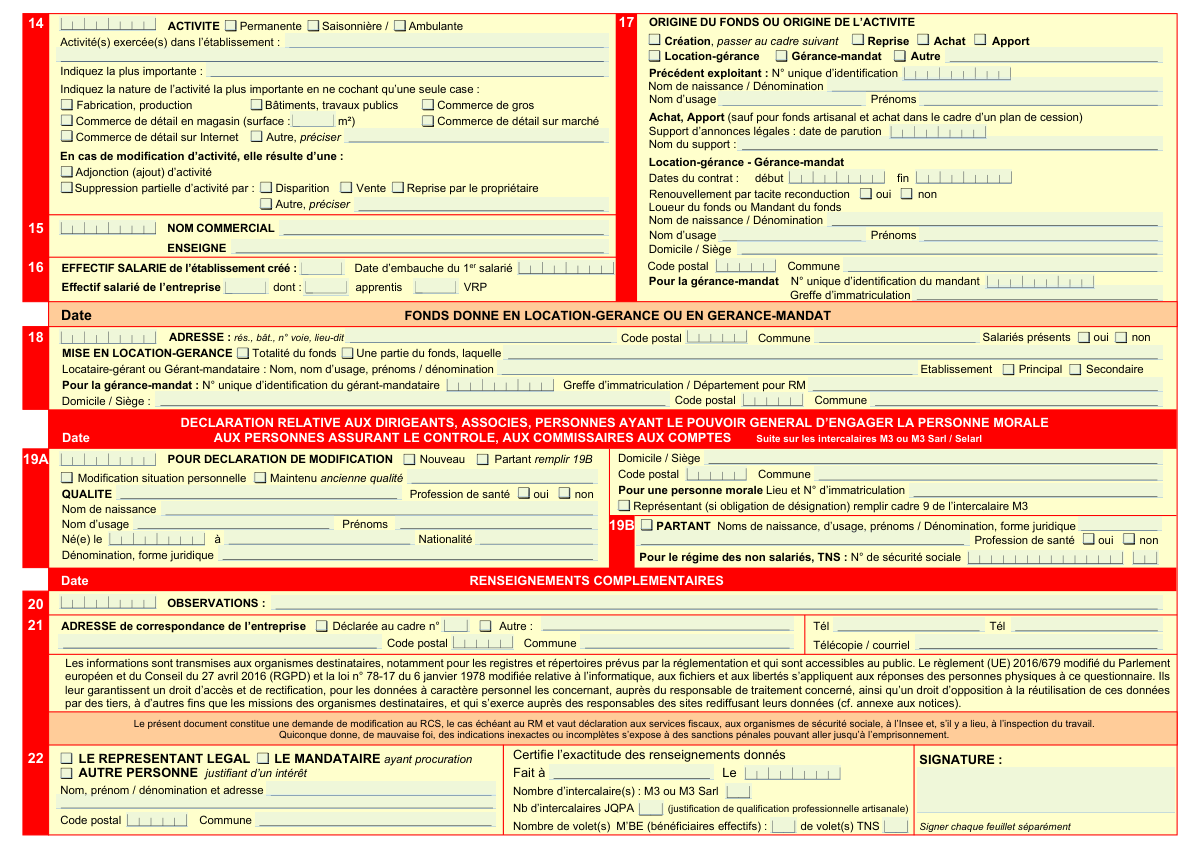
Yes! You can use AI to fill out Formulaire M2 - Déclaration de modification d'une personne morale (Cerfa 11682*07)

Form M2, or Cerfa 11682*07, is an official French declaration used by legal entities (like SAS, SARL, etc.) to report significant changes to the Registry of Commerce and Companies (RCS). This is crucial for maintaining legal compliance and ensuring public records are up-to-date regarding the company's status, including changes to its name, address, capital, management, or activity. Today, this form can be filled out quickly and accurately using AI-powered services like Instafill.ai, which can also convert non-fillable PDF versions into interactive fillable forms.
Our AI automatically handles information lookup, data retrieval, formatting, and form filling.
It takes less than a minute to fill out M2 (Cerfa 11682*07) using our AI form filling.
Securely upload your data. Information is encrypted in transit and deleted immediately after the form is filled out.

Form specifications

Form name: Formulaire M2 - Déclaration de modification d'une personne morale (Cerfa 11682*07)
Number of pages: 2
Language: English
main-image

Instafill Demo: How to fill out PDF forms in seconds with AI

How to Fill Out M2 (Cerfa 11682*07) Online for Free in 2026

Are you looking to fill out a M2 (CERFA 11682*07) form online quickly and accurately? Instafill.ai offers the #1 AI-powered PDF filling software of 2026, allowing you to complete your M2 (CERFA 11682*07) form in just 37 seconds or less.
Follow these steps to fill out your M2 (CERFA 11682*07) form online using Instafill.ai:
  1. 1 Navigate to Instafill.ai and upload or select the Form M2 (Cerfa 11682*07).
  2. 2 In Section 1, check the box corresponding to the type of modification being declared (e.g., transfer of seat, change in activity, dissolution).
  3. 3 Complete Section 2 with the company's identification details (SIREN number, current registration) as they exist before the modification.
  4. 4 Fill in the specific sections detailing the change, such as new address (Section 11), new activity details (Section 14), or information about the dissolution (Section 9).
  5. 5 Provide information on any changes to directors, partners, or authorized persons in Section 19.
  6. 6 Review all the information auto-filled by the AI for accuracy, complete the correspondence address in Section 21, and provide the date and place of signature in Section 22.
  7. 7 Securely sign the document and download the completed Form M2, ready for submission to the relevant Centre de Formalités des Entreprises (CFE) or Greffe.

Our AI-powered system ensures each field is filled out correctly, reducing errors and saving you time.

Why Choose Instafill.ai for Your Fillable M2 (Cerfa 11682*07) Form?

Speed

Complete your M2 (Cerfa 11682*07) in as little as 37 seconds.

Up-to-Date

Always use the latest 2026 M2 (Cerfa 11682*07) form version.

Cost-effective

No need to hire expensive lawyers.

Accuracy

Our AI performs 10 compliance checks to ensure your form is error-free.

Security

Your personal information is protected with bank-level encryption.

Frequently Asked Questions About Form M2 (Cerfa 11682*07)

The M2 form, 'Déclaration de modification d'une personne morale', is used to officially declare any changes to a registered legal entity in France, such as a change of name, address, capital, activity, or legal status.

The legal representative of any registered company (like a SARL, SAS, etc.) or other legal entity undergoing a modification must complete and submit this form to keep the official registers, like the RCS, up to date.

A 'mise en sommeil' (box 3) is a temporary cessation of all activities without closing the company, which can be resumed later. A 'dissolution' (box 7) is the definitive legal process of winding up and permanently closing the company.

For a head office transfer ('transfert de siĂšge'), you must check box 4, then complete cadre 12 with the old address and cadre 11 with the new address.

Yes, you must always fill out cadres 1 (type of modification), 2 (company identification), 21 (correspondence address), and 22 (signature), in addition to the specific sections related to your change.

Check the box for 'Déclaration relative à un établissement' in section 1 and 'OUVERTURE' in section 11. You must then provide the new establishment's address and details in cadre 11 and its activities in cadre 13.

An 'intercalaire M3' is a supplementary form used to declare details about directors, partners, or auditors. It is required when you appoint a new director or modify information about an existing one, as referenced in cadre 19.

This section requires you to state how the business activity was acquired. You must specify if it's a new creation, a purchase ('achat'), a takeover ('reprise'), or a lease management ('location-gérance'), and provide details of the previous operator if it's not a creation.

The form must be submitted to the appropriate Centre de Formalités des Entreprises (CFE). The CFE acts as a central point to distribute the information to all relevant administrative bodies, including the Greffe, tax authorities, and social security.

You must fill out cadre 19A for the new director and cadre 19B for the departing director. You will likely also need to attach a completed 'intercalaire M3' form with detailed information for each person concerned.

Yes, services like Instafill.ai use AI to auto-fill form fields accurately and save time. This can be particularly useful for complex administrative documents like the M2 form, helping to prevent common errors.

To fill the form online, simply upload the M2 PDF to the Instafill.ai platform. The AI will make all the fields interactive, allowing you to type in your information, save your progress, and download the completed document.

If you have a non-fillable or 'flat' PDF, you can use a service like Instafill.ai. Upload the file, and the tool will automatically convert it into an interactive, fillable form that you can complete easily on your computer.

Processing times can vary depending on the CFE and the complexity of the modification. After submission, you will typically receive an updated Kbis extract reflecting the changes within a few days to a few weeks.

Compliance M2 (Cerfa 11682*07)
Validation Checks by Instafill.ai

1
Mandatory Sections Completion Check
This validation ensures that sections (cadres) 1, 2, 21, and 22 are always filled out, as explicitly required by the form instructions. These sections contain essential information about the nature of the modification, the company's identification, correspondence address, and signature, which are fundamental for processing the declaration. If any of these sections are incomplete, the form submission will be rejected as invalid.
2
Valid French Postal Code and Commune Coherence
This check verifies that all 'Code postal' fields contain a valid 5-digit French postal code. It also cross-references the postal code with the 'Commune' (city/town) field to ensure they correspond to a real location. This is crucial for accurate mail delivery and correct registration with local authorities. A mismatch or invalid format will trigger an error, requiring the user to correct the address information.
3
Unique Identification Number (SIREN) Format Validation
This validation ensures that the 'N° unique d'identification' field contains a valid 9-digit SIREN number. The check includes verifying the number of digits and potentially the Luhn algorithm checksum for validity. An accurate SIREN is critical for uniquely identifying the legal entity in all government databases (tax, social security, commerce registry). An invalid number would prevent the modification from being linked to the correct company.
4
Conditional Logic for 'Autre' (Other) Fields
This check verifies that whenever an 'Autre' (Other) checkbox is selected in any section (e.g., Cadre 1 for nature of modification, Cadre 11 for establishment closure), the corresponding text field for providing details is not left empty. This rule prevents incomplete declarations where the user indicates a non-standard situation but fails to provide the necessary explanation. Failure to provide the detail will result in a validation error prompting the user for the required information.
5
Logical Consistency for Dissolution Declaration
If the 'Dissolution' box is checked in Cadre 1, this validation ensures that either 'avec poursuite d’activitĂ©' or 'sans poursuite d’activitĂ©' is also selected. Furthermore, it checks that liquidator details are provided in Cadre 19A, unless the 'Transmission universelle du patrimoine' box is checked, which is an exception. This ensures the declaration of dissolution is complete and legally coherent, preventing ambiguous or incomplete filings.
6
Conditional Requirement for Establishment Details
This validation enforces that details for an old establishment (Cadre 11) are only provided if 'FERMETURE' or 'TRANSFERT' is checked in Cadre 10. Similarly, details for a new or modified establishment (Cadre 12) are required if 'OUVERTURE', 'MODIFICATION', or 'TRANSFERT' is checked. This prevents irrelevant data entry and ensures that all necessary information for the declared operation is supplied. An error is shown if the conditions are not met.
7
Contract Date Chronology Validation
In the 'Location-gérance - Gérance-mandat' section (Cadre 17), this check ensures that the 'Date de fin du contrat' (contract end date) is not earlier than the 'Date de début du contrat' (contract start date). This maintains logical and chronological integrity of the data. A submission with an inverted date range would be rejected, as it represents an impossible scenario.
8
Variable Capital Minimum Amount Requirement
This validation rule applies to the capital information in Cadre 4. If the legal entity has a variable capital structure, the 'Montant minimum' (Minimum amount) field must be filled with a valid, positive numeric value. This is a legal requirement for companies with variable capital to declare their floor. The submission will fail if this field is empty or contains non-numeric data when variable capital is indicated.
9
Social Security Number Format Validation
This check verifies that the 'N° de sécurité sociale' field in Cadre 19B for a departing non-salaried individual (TNS) is a valid 15-digit French social security number. The validation includes checking the format, character types (digits only), and potentially the checksum. An incorrect number would prevent the proper update of the individual's status with social security organizations, so accuracy is paramount.
10
Exclusive Selection for Establishment Type
In sections describing an establishment's nature (e.g., Cadre 11 for an old establishment, Cadre 12 for a new one), a user can only select one type: 'SiĂšge', 'SiĂšge-Etablissement principal', 'Etablissement principal', or 'Secondaire'. This validation ensures that an establishment is not ambiguously classified. The system will return an error if more than one of these mutually exclusive options is checked for the same establishment.
11
Legal Announcement Details for Specific Operations
This check ensures that if the declaration involves a dissolution (Cadre 8) or a business transfer/takeover (Cadre 17), the fields for 'Nom du support d’annonces lĂ©gales' (Name of legal announcement publication) and 'Date de parution' (Publication date) are mandatory. These announcements are a legal requirement for such operations to be valid and public. The form is considered incomplete if these fields are missing for the relevant operations.
12
Director Status Coherence Check
In Cadre 19, this validation ensures that a person cannot be marked as both 'Nouveau' (New) and 'Partant' (Departing). It also enforces that if 'Partant' is checked for a person in 19A, their details must be completed in the corresponding 'Partant' section (19B). This maintains the logical integrity of personnel changes within the company. A conflict or omission will block the submission.
13
Correspondence Address Logic
In Cadre 21, this check validates the correspondence address logic. If the 'Déclarée au cadre n°' box is checked, the associated text field must contain a valid section number (e.g., '2', '12'). If the 'Autre' box is checked, the subsequent address fields (street, postal code, city) must be filled. This ensures a valid correspondence address is always provided, either by reference or by direct entry.
14
Retail Store Surface Area Requirement
This validation rule applies to the activity description in Cadre 14. If the 'Commerce de dĂ©tail en magasin' (Retail trade in store) checkbox is selected, the associated 'surface (mÂČ)' field must contain a positive numeric value. This information is often required for statistical or regulatory purposes. The form will be flagged as incomplete if the surface area is missing for a retail store.

Common Mistakes in Completing M2 (Cerfa 11682*07)

Incorrectly Selecting the Type of Modification in Cadre 1

Users often check the wrong box or fail to select all relevant boxes in Cadre 1, which defines the purpose of the declaration. For example, they might check 'Transfert de siÚge' but not 'Déclaration relative à un établissement'. This confusion leads to filling out incorrect subsequent sections and can cause the entire filing to be rejected for inconsistency, delaying the official registration of the changes. To avoid this, carefully read the statutes or the minutes of the general meeting that decided on the change to identify the exact legal nature of the modification before filling out the form.

Entering an Incorrect or Incomplete SIREN Number

The 'N° unique d'identification' (SIREN number) in Cadre 2 is the primary identifier for the company. A single-digit typo or omitting this number entirely is a frequent and critical error. This mistake can lead to the rejection of the form, or worse, the modification being incorrectly applied to another company's record. Always double-check the 9-digit SIREN number against an official company document like a Kbis extract before submission. AI-powered tools like Instafill.ai can help prevent this by validating the number's format and cross-referencing it with official databases.

Forgetting to Fill Out Mandatory Sections

The form explicitly instructs users to fill out Cadres 1, 2, 21, and 22 in all cases. People often get focused on the specific sections related to their change and overlook these mandatory fields for identification and contact. Omitting these sections results in an incomplete application and immediate rejection by the Greffe (Commercial Court Clerk). To prevent this, make it a habit to fill these four sections first before proceeding to the specific modifications.

Confusing Old and New Establishment Details During a Transfer

When declaring a transfer of a head office or establishment, users must complete both Cadre 11 ('ETABLISSEMENT TRANSFERE OU FERME') and Cadre 12 ('ETABLISSEMENT CREE OU MODIFIE'). A common mistake is to only fill in the new address in Cadre 12, neglecting to declare the old address and its status (e.g., 'Fermé') in Cadre 11. This omission creates ambiguity and can stall the update of the company's official address. Ensure both sections are filled with the correct dates and details to reflect the full transfer process.

Improper or Incomplete Address Formatting

Many fields require a structured address ('rés., bùt., n°, voie, lieu-dit'), but users often enter the address as a single, unstructured line. They may also forget to include the postal code or the full name of the commune. This leads to data entry errors in the national business directory (Répertoire SIRENE) and can cause official mail to be returned as undeliverable. To avoid this, break down the address into the specific components as requested by the form fields. Using a tool like Instafill.ai can automate this by correctly parsing and formatting address data.

Providing a Vague or Non-Standard Activity Description

In Cadre 13, when describing the company's activities, people often use overly generic terms like 'services' or 'consulting' without providing necessary specifics. The description is used by INSEE to assign an APE code, which determines the applicable collective bargaining agreement and other regulations. A vague description can lead to an incorrect APE code, causing compliance issues down the line. Be as precise as possible, describing the main activity in clear, unambiguous terms.

Incomplete Information for Company Dissolution

When filling out the dissolution section (Cadre 9), users frequently check 'Dissolution' but forget to specify if it's with or without continued activity. Furthermore, they often miss the instruction to name the liquidator in Cadre 19A. These procedural omissions are critical and will halt the dissolution process, as the clerk cannot register a dissolution without knowing its terms and who is legally responsible for the liquidation.

Failing to Declare Both Departing and New Directors

In Cadre 19, when a director or officer is replaced, it is crucial to declare both the 'Nouveau' (new) person and the 'Partant' (departing) person. A common error is to only fill out the details for the new appointee, which leaves the former director legally on record. This can create legal and administrative liabilities. Always complete a section for each individual involved in the change, clearly marking their status as 'Nouveau' or 'Partant'.

Missing Signature on Each Page of the Submission

The form's footer explicitly states 'Signer chaque feuillet séparément' (Sign each sheet separately), which also applies to any attached 'intercalaires' (supplementary forms like M3). Users often sign only the last page, assuming it covers the entire document. An unsigned page invalidates that part of the declaration, leading to the rejection of the entire file. It is essential to review every single page and sign where required before submission.

Omitting Details of the Previous Operator in a Business Takeover

When the activity originates from a 'Reprise', 'Achat', or 'Location-gérance' (Cadre 15), providing the previous operator's details (SIREN number, name) is mandatory. People often leave these fields blank because they don't have the information readily available. This omission prevents the authorities from correctly linking the transfer of the business, leading to rejection of the form until the information is supplied. This data is essential for tracking the continuity of the business fund.
Saved over 80 hours a year

“I was never sure if my IRS forms like W-9 were filled correctly. Now, I can complete the forms accurately without any external help.”

Kevin Martin Green

Your data stays secure with advanced protection from Instafill and our subprocessors

Robust compliance program

Transparent business model

You’re not the product. You always know where your data is and what it is processed for.

ISO 27001, HIPAA, and GDPR

Our subprocesses adhere to multiple compliance standards, including but not limited to ISO 27001, HIPAA, and GDPR.

Security & privacy by design

We consider security and privacy from the initial design phase of any new service or functionality. It’s not an afterthought, it’s built-in, including support for two-factor authentication (2FA) to further protect your account.

Fill out M2 (Cerfa 11682*07) with Instafill.ai

Worried about filling PDFs wrong? Instafill securely fills formulaire-m2-dclaration-de-modification-dune-personne-morale-cerfa-1168207 forms, ensuring each field is accurate.