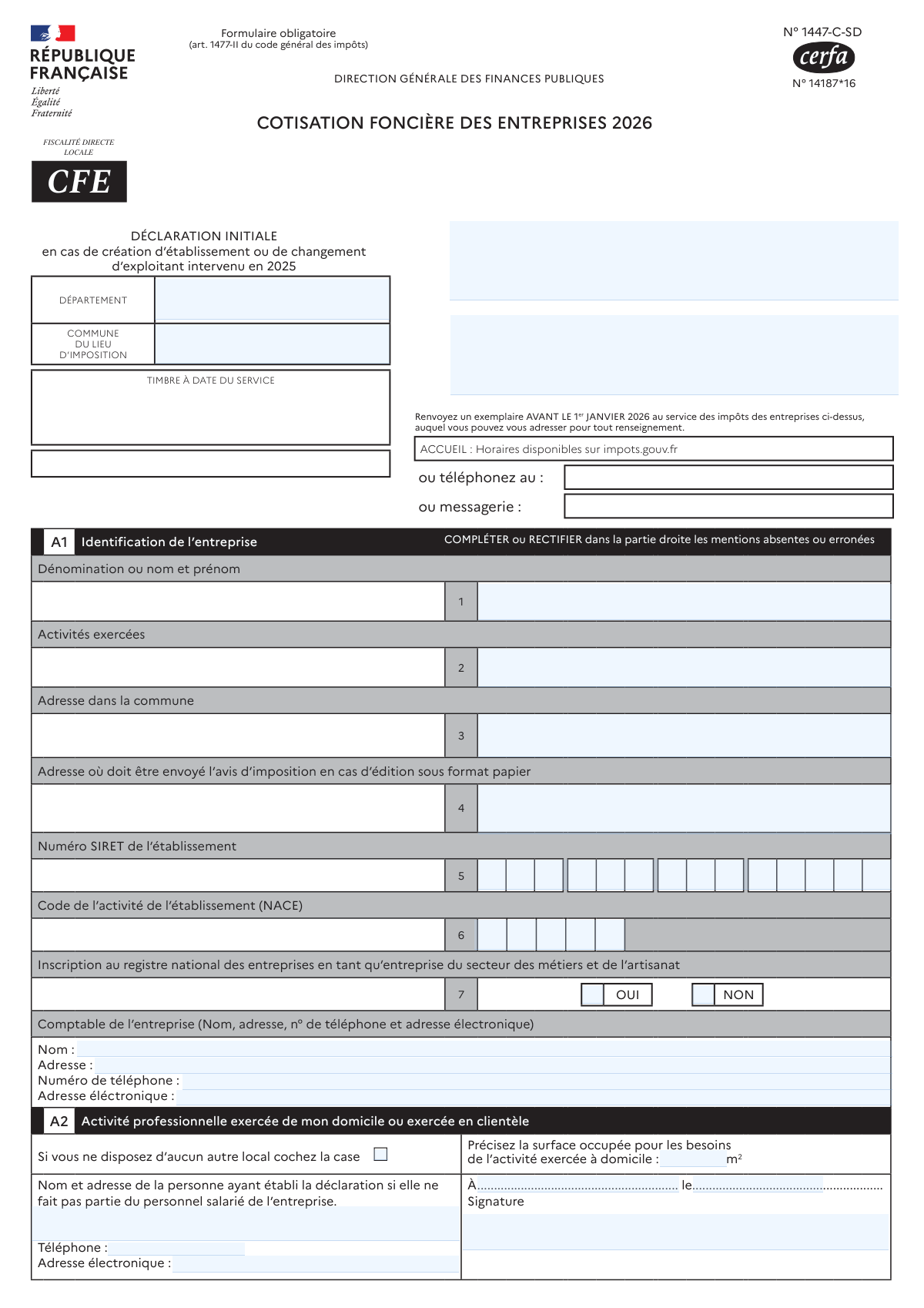
Yes! You can use AI to fill out Formulaire n° 1447-C-SD (Cerfa n° 14187*16) — Cotisation Foncière des Entreprises (CFE) 2026 — Déclaration initiale
Le formulaire 1447-C-SD (Cerfa 14187*16) est la déclaration initiale obligatoire de CFE prévue par l’article 1477-II du Code général des impôts. Il sert à identifier l’entreprise et l’établissement, décrire l’activité, déclarer les effectifs et le chiffre d’affaires de référence, et surtout à déclarer les locaux et biens passibles de taxe foncière utilisés par le nouvel établissement. Ces informations permettent à l’administration fiscale de calculer la base de CFE et d’appliquer, le cas échéant, des exonérations ou abattements. Il doit être transmis au service des impôts des entreprises (SIE) avant le 1er janvier 2026 pour les événements intervenus en 2025.
Our AI automatically handles information lookup, data retrieval, formatting, and form filling.
It takes less than a minute to fill out 1447-C-SD (CFE 2026) using our AI form filling.
Securely upload your data. Information is encrypted in transit and deleted immediately after the form is filled out.
Form specifications
| Form name: | Formulaire n° 1447-C-SD (Cerfa n° 14187*16) — Cotisation Foncière des Entreprises (CFE) 2026 — Déclaration initiale |
| Number of pages: | 4 |
| Filled form examples: | Form 1447-C-SD (CFE 2026) Examples |
| Language: | English |
Instafill Demo: filling out a legal form in seconds
How to Fill Out 1447-C-SD (CFE 2026) Online for Free in 2026
Are you looking to fill out a 1447-C-SD (CFE 2026) form online quickly and accurately? Instafill.ai offers the #1 AI-powered PDF filling software of 2026, allowing you to complete your 1447-C-SD (CFE 2026) form in just 37 seconds or less.
Follow these steps to fill out your 1447-C-SD (CFE 2026) form online using Instafill.ai:
- 1 Renseigner l’identification de l’entreprise (A1) : dénomination, activités exercées, adresses (dans la commune et d’envoi), SIRET, code NACE, inscription RNE (métiers/artisanat) et coordonnées du comptable.
- 2 Compléter la partie activité à domicile/chez le client (A2) : cocher si aucun autre local, indiquer la surface utilisée et, si applicable, les coordonnées du déclarant externe.
- 3 Indiquer l’origine de l’établissement (A3) et, en cas de reprise/changement, identifier l’ancien exploitant (A4).
- 4 Saisir les renseignements économiques et sociaux (B1 et B2) : dates de création, effectifs (salariés, apprentis, travailleurs handicapés, activité artisanale), chiffre d’affaires/recettes, caractère saisonnier, micro-entrepreneur, temps partiel, et informations spécifiques (éolienne/ouvrages hydrauliques si concerné).
- 5 Déclarer les biens et locaux du nouvel établissement (Cadre C) : adresse/parcelle, situation, occupant précédent, date d’occupation, superficies détaillées par usage, statut d’occupation (propriétaire/locataire/sous-locataire/domiciliation) et joindre les pièces requises (bail, contrats, plan, etc.).
- 6 Choisir et renseigner les exonérations éventuelles (Cadre D) : cocher l’option applicable, préciser les biens concernés et les pourcentages, et joindre les formulaires/annexes nécessaires (ex. 1465-SD, annexe 1447 E).
- 7 Vérifier les informations, corriger les mentions erronées, signer et dater, puis transmettre un exemplaire au SIE compétent avant la date limite (avant le 1er janvier 2026).
Our AI-powered system ensures each field is filled out correctly, reducing errors and saving you time.
Why Choose Instafill.ai for Your Fillable 1447-C-SD (CFE 2026) Form?
Speed
Complete your 1447-C-SD (CFE 2026) in as little as 37 seconds.
Up-to-Date
Always use the latest 2026 1447-C-SD (CFE 2026) form version.
Cost-effective
No need to hire expensive lawyers.
Accuracy
Our AI performs 10 compliance checks to ensure your form is error-free.
Security
Your personal information is protected with bank-level encryption.
Frequently Asked Questions About Form 1447-C-SD (CFE 2026)
Ce formulaire sert à déclarer les éléments nécessaires au calcul de la Cotisation Foncière des Entreprises (CFE) pour 2026. Il s’agit d’une déclaration initiale à déposer notamment en cas de création d’établissement ou de changement d’exploitant intervenu en 2025.
Toute entreprise qui crée un établissement en 2025, ou qui reprend un établissement (changement d’exploitant) en 2025, doit déposer cette déclaration. Elle permet à l’administration d’identifier l’entreprise, l’établissement et les locaux imposables.
Vous devez renvoyer un exemplaire avant le 1er janvier 2026 au service des impôts des entreprises (SIE) indiqué sur le formulaire. Respecter ce délai est important pour la prise en compte correcte de votre situation.
Le formulaire doit être envoyé au Service des Impôts des Entreprises (SIE) mentionné sur la déclaration (département/commune du lieu d’imposition). Pour des renseignements, vous pouvez consulter impots.gouv.fr ou contacter le SIE (téléphone/messagerie indiqués sur le document).
Vous devez renseigner notamment la dénomination (ou nom/prénom), les activités exercées, l’adresse dans la commune, le SIRET de l’établissement et le code d’activité (NACE). Vous pouvez aussi indiquer le comptable (coordonnées) et l’inscription au registre national des entreprises pour le secteur des métiers et de l’artisanat.
Indiquez l’adresse à laquelle l’administration doit envoyer l’avis d’imposition si celui-ci est édité au format papier. Si elle est différente de l’adresse de l’établissement, renseignez-la précisément pour éviter les retours de courrier.
Cochez la case indiquant que vous ne disposez d’aucun autre local, puis précisez la surface (en m²) occupée pour les besoins de l’activité à domicile. Si vous cochez cette case, vous êtes dispensé de remplir le cadre C sur les biens passibles de taxe foncière.
Cochez la case correspondant à votre situation : création, début d’activité, transfert, acquisition, apport, scission ou fusion. Ce choix permet d’expliquer comment l’établissement est apparu ou a changé de situation en 2025.
Vous remplissez le cadre A4 si l’établissement provient d’un changement d’exploitant (par exemple acquisition, apport, fusion, etc.). Indiquez la dénomination/nom-prénom et l’activité exercée par l’ancien exploitant.
Le cadre B1 demande des informations sur l’ensemble de l’entreprise avec une période de référence : année civile 2024 (ou exercice de 12 mois clos en 2024) et des éléments estimés pour 2025 si l’entreprise a été créée en 2025. Renseignez les effectifs (dont apprentis, personnes handicapées, activité artisanale) et le chiffre d’affaires/recettes HT.
Si vous bénéficiez du régime micro-social, cochez la case correspondante et indiquez la date d’entrée dans le statut de micro-entrepreneur. Vous devez aussi renseigner les informations de l’établissement (salariés, durée d’exploitation si saisonnier, etc.) selon votre situation.
Cochez la case relative aux activités saisonnières et indiquez la durée d’exploitation en semaines. Le formulaire demande la durée d’exploitation du nouvel établissement en 2025 et la durée normalement prévue en 2026.
Selon votre situation, vous devez joindre la copie du bail si vous êtes locataire, le contrat de sous-location si vous êtes sous-locataire, ou le contrat de domiciliation commerciale/gratuite si vous êtes domicilié. En copropriété, il peut être demandé de joindre un plan des locaux (notamment si un numéro de lot est indiqué).
Le formulaire rappelle qu’en vertu de l’article 1729 B.2 du CGI, les omissions ou inexactitudes peuvent entraîner une amende de 15 € par omission ou inexactitude. Le total des amendes applicables aux documents produits simultanément est encadré (minimum 60 €, maximum 10 000 €).
Dans le cadre D, cochez l’exonération pour laquelle vous souhaitez opter (une seule ligne de choix possible) et complétez les précisions demandées (adresse du bien, lot, pourcentage de surface concernée, etc.). Pour certaines exonérations, une déclaration spécifique n° 1465-SD ou l’annexe 1447 E peut être nécessaire.
Compliance 1447-C-SD (CFE 2026)
Validation Checks by Instafill.ai
1
Ensures the enterprise identification (A1.1) is provided and is a valid legal name format
Validates that “Dénomination ou nom et prénom” is not empty and contains a plausible legal entity name or a person’s full name (not just initials or a single character). This is essential to identify the taxpayer and match the declaration to the correct entity in tax systems. If missing or clearly invalid, the submission should be rejected or routed to manual review because the declaration cannot be reliably attributed.
2
Validates SIRET number (A1.5) format and checksum consistency
Checks that the SIRET is exactly 14 digits, contains only numeric characters, and passes the Luhn checksum (commonly used for SIREN/SIRET validation). This prevents mis-keyed establishment identifiers that would misroute the CFE record to the wrong establishment. If validation fails, the form should be blocked and the user prompted to correct the SIRET.
3
Validates NACE activity code (A1.6) format against expected pattern
Ensures the NACE code is present and matches the expected structure (typically 4 digits + 1 letter, e.g., “6201Z”), with no spaces or invalid characters. This code drives classification and may affect exemptions and reporting. If the code is missing or malformed, the submission should be flagged for correction or manual verification.
4
Checks completeness and structure of establishment address in the commune (A1.3)
Validates that the address in the commune includes minimum components (street number/name or lieu-dit, postal code, and commune) and is not identical to an empty placeholder. Correct address data is required to determine the commune of taxation and to link to property records. If incomplete, the system should request missing components or mark the record as incomplete for follow-up.
5
Validates mailing address for paper tax notice (A1.4) when provided and ensures deliverability
If a separate mailing address is entered, checks it contains required address elements and is not contradictory (e.g., missing postal code while commune is present). This is important to ensure the avis d’imposition reaches the taxpayer when paper issuance is used. If invalid, the system should either default to the commune address (if allowed) or require correction before acceptance.
6
Validates accountant contact details (A1.7) for required fields and formats
When an accountant is listed, checks that name and address are present, phone number matches a valid French/international format, and email matches a standard email pattern. Accurate contact details are needed for clarifications and audits. If any provided contact field is malformed (especially phone/email), the submission should be flagged and the user asked to correct it.
7
Validates declarant identity and contact details when declarant is external (A2)
If the person who established the declaration is not part of the salaried staff, validates that their name/address plus at least one reliable contact method (phone or email) is provided and correctly formatted. This ensures the administration can reach the preparer for missing information or inconsistencies. If missing or invalid, the form should be considered incomplete and not finalized.
8
Ensures A3 origin of establishment has exactly one selection and triggers dependent requirements
Validates that one and only one origin checkbox is selected (creation, début d’activité, transfert, acquisition, apport, scission, fusion). The selected origin determines whether prior-operator information is required and affects processing rules. If none or multiple are selected, the submission should be rejected and the user prompted to choose a single origin.
9
Requires former operator details (A4) when origin implies a predecessor
If A3 indicates acquisition, transfert, apport, scission, or fusion, checks that A4 (ancien exploitant: name and activity) is completed. This is necessary to establish continuity, changes of operator, and correct tax base transitions. If missing, the system should block submission or route to manual review with a clear error indicating predecessor details are required.
10
Validates creation date fields (B1.1 or B1.8) and enforces correct date format and plausibility
Checks that the creation date is in jj/mm/aaaa format, is a real calendar date, and is plausible relative to the declaration context (initial declaration for events in 2025). It also ensures only the relevant date field is filled depending on whether the enterprise is “créée en 2025” or “existante en 2024.” If the date is invalid or inconsistent, the submission should be rejected or flagged for correction.
11
Validates employee counts are numeric, non-negative, and internally consistent (B1 and B2)
Ensures all employee fields (total employees, apprentices, disabled employees, artisan-activity employees) are integers (or accepted numeric format), non-negative, and that sub-counts do not exceed the total for the same period. This prevents impossible workforce declarations that could affect exemptions or base calculations. If inconsistencies are found, the system should require correction and highlight which sub-count exceeds the total.
12
Validates turnover and receipts fields are numeric and consistent with period selection (B1.6/13 and B1.7/14)
Checks that turnover/receipts amounts are valid numbers (allowing decimals), non-negative, and that the correct year’s fields are used (estimated for 2025 vs actual for 2024/exercise closed in 2024). These values may be used for eligibility checks and statistical controls. If negative, non-numeric, or entered in the wrong period fields, the submission should be blocked or flagged for correction.
13
Validates micro-entrepreneur status logic and entry date format (B2.5)
If the micro-entrepreneur checkbox is selected, requires an entry date and validates it in jj/mm/aaaa format with a plausible range (not in the far future and consistent with the establishment timeline). This status can affect tax treatment and must be supported by a valid effective date. If the checkbox is selected without a valid date, the submission should be rejected as incomplete.
14
Validates energy installation fields: eolienne checkbox requires raccordement date (B2.7–8)
If the wind turbine (éolienne) checkbox is selected, requires the network connection date and validates it as a real date in jj/mm/aaaa format. These fields affect IFER/CFE-related processing for energy-producing installations. If the date is missing or invalid when the checkbox is selected, the submission should be blocked and the user prompted to provide the raccordement date.
15
Validates hydraulic prorata format and range (B2.9)
If a hydraulic work is declared, checks that the prorata is a percentage with two digits after the decimal separator and is between 0.00 and 100.00 inclusive. This ensures correct allocation of taxable base to the commune. If the value is out of range or incorrectly formatted, the system should reject the entry and request a corrected prorata.
16
Validates property (Cadre C) surface totals and usage breakdown consistency for each declared ‘Bien’
For each property line, checks that total superficie (C.7) is provided and equals (or is at least not less than) the sum of the declared allocations (professionnel/industriel/commercial/habitation) and that professional sub-uses (magasin/entrepĂ´t/bureaux/autres) do not exceed the professional area. This prevents contradictory area declarations that would distort the tax base. If sums do not reconcile within an allowed tolerance, the submission should be flagged and the user required to correct the surface breakdown.
Common Mistakes in Completing 1447-C-SD (CFE 2026)
Many filers enter the 9-digit SIREN instead of the 14-digit SIRET requested for the specific establishment, especially when the business has only one site. This can misidentify the taxable establishment and delay processing or lead to an incorrect CFE assessment in the wrong commune. Always provide the full 14-digit SIRET of the establishment concerned (and verify it matches the address in the commune).
People often write a description of the activity instead of the official NACE/APE code, or they copy an outdated code after a change of activity. An incorrect code can affect eligibility for certain regimes/exemptions and may trigger follow-up questions from the tax office. Use the official code shown on your INSEE registration (or Kbis/Sirene extract) and ensure it corresponds to the establishment’s current activity.
This section is frequently misunderstood because several options sound similar (début d’activité, création d’établissement, transfert, acquisition, apport, scission, fusion). Choosing the wrong origin can lead to incorrect start dates, wrong reference periods, or missed/incorrect relief rules. Review what actually happened in 2025 (new site, takeover, move, merger, etc.) and tick only the box that matches the legal/operational event.
Filers sometimes put a head-office address in the commune field, or they only fill the mailing address and forget the actual address in the commune where the establishment operates. This can result in the CFE being attributed to the wrong commune or the notice being sent to the wrong place. Enter the operating address in the commune in field 3, and separately complete the paper-notice mailing address in field 4 if it differs.
Home-based businesses often skip A2 details because they assume “no premises” means “nothing to declare,” or they provide an approximate surface without units. Missing the checkbox and the occupied surface can cause the administration to request clarifications or to assess bases incorrectly. If you work only from home, tick the box and state the surface actually used for the activity in square meters (m²), consistent with the areas later reported in section C if applicable.
A common error is mixing headcount with full-time equivalents, counting the wrong year (2024 vs 2025), or forgetting to break out apprentices/disabled workers/artisan-assigned staff. These figures can influence thresholds, exemptions, and the consistency checks performed by the tax office. Use the form’s requested period (calendar year) and provide consistent totals and sub-totals (the 'dont' lines must not exceed the total).
Because the form asks for amounts 'HT' (excluding VAT), filers often paste figures from accounting reports that are TTC (including VAT) or confuse turnover with gross receipts from specific activities (e.g., bare-property rentals). Wrong amounts can affect eligibility for certain relief measures and may prompt corrections or audits. Report amounts excluding VAT, use the correct year (estimated 2025 vs actual 2024), and separate general turnover from the specific rental receipts lines when applicable.
Section C is often left blank because it is long and technical, or because filers assume the administration already has the information. Omissions can lead to penalties (15€ per missing/inaccurate item, with minimum and maximum totals) and can delay the establishment of the correct CFE base. Unless you are explicitly exempt from filling it (e.g., information already provided via the welcome letter, or you qualify for the A2 home-only dispensation), complete all required property lines and attach an additional sheet if needed.
People frequently enter a total surface and then provide a breakdown that does not add up, or they confuse 'habitation' with 'bureaux' or 'autres' within professional use. Inconsistent surfaces can cause recalculations, requests for supporting documents, or an incorrect taxable base. Ensure the total m² equals the sum of the usage categories, and that the professional-use sub-breakdown (magasin/entrepôt/bureaux/autres) matches the professional m².
Filers often tick 'locataire' or 'domiciliation' without providing the owner’s identity/address, or they forget to attach the bail, sublease contract, or domiciliation agreement required by the form. Missing documents can block validation of the premises situation and delay the CFE assessment. Tick exactly one status that reflects the legal arrangement and attach the requested contract, including the owner’s details and (for domiciliation) the hosting company information.
In the exemptions section, applicants often tick an exemption line but omit the required details such as the exact address/lot of the property and the percentage of the premises used for the exempt activity. This can lead to refusal of the exemption or partial denial due to insufficient justification. When claiming an exemption, specify the exact premises concerned (address, lot number) and provide a realistic percentage of the local area devoted to the eligible activity, and attach any required specific forms (e.g., 1465-SD or annex 1447 E) when indicated.
Saved over 80 hours a year
“I was never sure if my IRS forms like W-9 were filled correctly. Now, I can complete the forms accurately without any external help.”
Kevin Martin Green
Your data stays secure with advanced protection from Instafill and our subprocessors
Robust compliance program
Transparent business model
You’re not the product. You always know where your data is and what it is processed for.
ISO 27001, HIPAA, and GDPR
Our subprocesses adhere to multiple compliance standards, including but not limited to ISO 27001, HIPAA, and GDPR.
Security & privacy by design
We consider security and privacy from the initial design phase of any new service or functionality. It’s not an afterthought, it’s built-in, including support for two-factor authentication (2FA) to further protect your account.
Fill out 1447-C-SD (CFE 2026) with Instafill.ai
Worried about filling PDFs wrong? Instafill securely fills formulaire-n-1447-c-sd-cerfa-n-1418716-cotisation forms, ensuring each field is accurate.