Yes! You can use AI to fill out In-Service Withdrawal Request 401(a) Plan
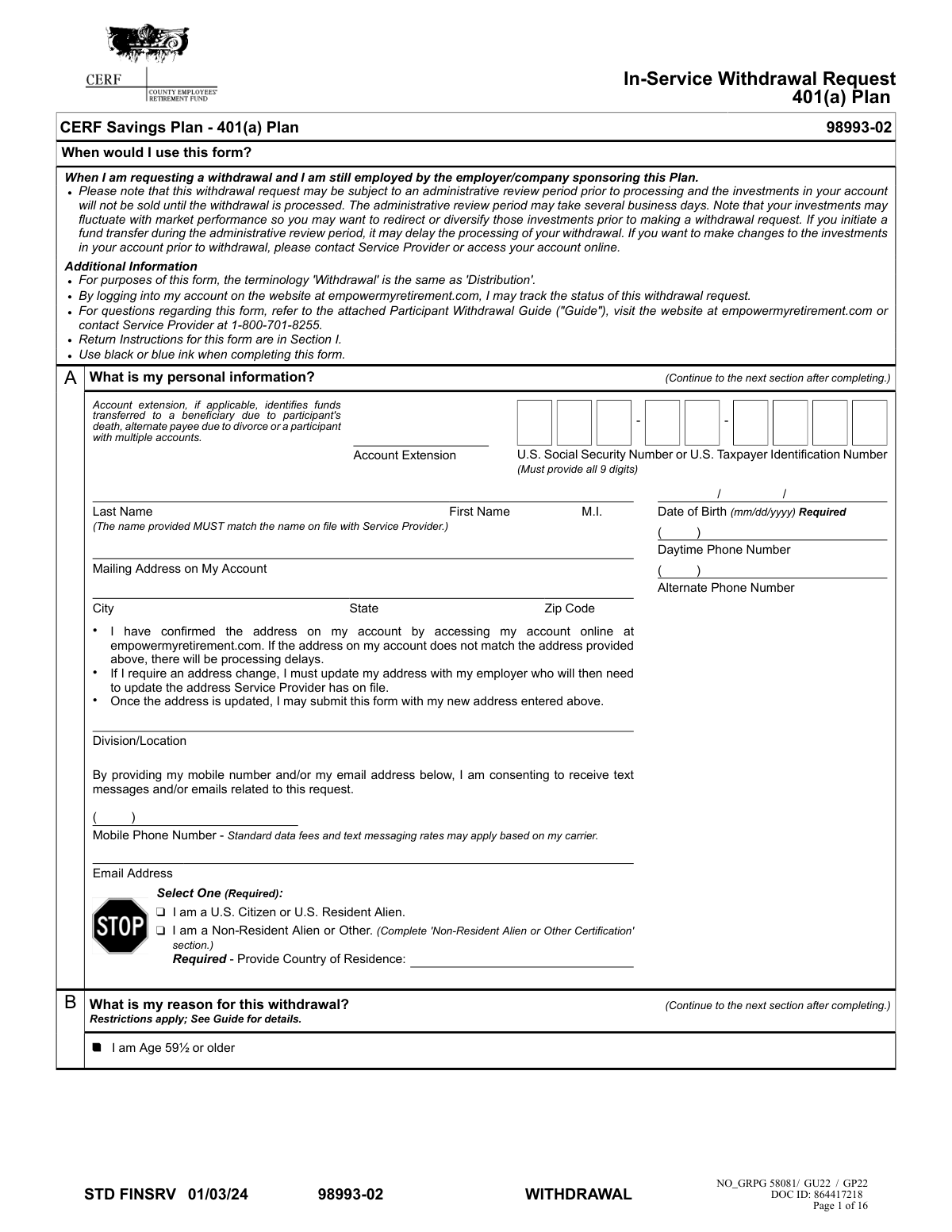
This form, officially titled 'In-Service Withdrawal Request 401(a) Plan', allows participants of the CERF Savings Plan to request a distribution from their account while they are still employed by the sponsoring company. It is important for accessing retirement funds for reasons permitted by the plan, such as reaching age 59½, without terminating employment. Today, this form can be filled out quickly and accurately using AI-powered services like Instafill.ai, which can also convert non-fillable PDF versions into interactive fillable forms.
Rather not fill this in by hand? Instafill is an online form filler that completes PDF forms automatically — upload the blank form, answer a few questions, and the AI fills every field.
Form specifications
| Form name: | In-Service Withdrawal Request 401(a) Plan |
| Number of pages: | 1 |
| Language: | English |
Our AI automatically handles information lookup, data retrieval, formatting, and form filling.
It takes less than a minute to fill out 98993-02 using our AI form filling.
Securely upload your data. Information is encrypted in transit and deleted immediately after the form is filled out.
Instafill Demo: How to fill out PDF forms in seconds with AI
How to Fill Out 98993-02 Online for Free in 2026
Are you looking to fill out a 98993-02 form online quickly and accurately? Instafill.ai offers the #1 AI-powered PDF filling software of 2026, allowing you to complete your 98993-02 form in just 37 seconds or less.
Follow these steps to fill out your 98993-02 form online using Instafill.ai:
- 1 Navigate to Instafill.ai and upload or select the In-Service Withdrawal Request 401(a) Plan form.
- 2 Use the AI assistant to accurately fill in your personal information in Section A, including your name, Social Security Number, and contact details.
- 3 In Section B, indicate your reason for the withdrawal, such as being age 59½ or older.
- 4 Specify the type and amount of your withdrawal in Section C, choosing from options like a one-time payment, rollover to an IRA, or periodic installments.
- 5 Select your preferred delivery method for the funds in Section E, such as a check by mail or an electronic deposit (ACH).
- 6 Complete Section G to designate your federal and state income tax withholding preferences for the distribution.
- 7 Review the completed form for accuracy, then download it to obtain the required handwritten signatures from yourself and the Plan Administrator before submitting it via upload, regular mail, or express mail as instructed.
Our AI-powered system ensures each field is filled out correctly, reducing errors and saving you time.
Why Choose Instafill.ai for Your Fillable 98993-02 Form?
Speed
Complete your 98993-02 in as little as 37 seconds.
Up-to-Date
Always use the latest 2026 98993-02 form version.
Cost-effective
No need to hire expensive lawyers.
Accuracy
Our AI performs 10 compliance checks to ensure your form is error-free.
Security
Your personal information is protected with bank-level encryption.
Frequently Asked Questions About 98993-02
This form is used to request a withdrawal from your CERF Savings Plan 401(a) account while you are still actively employed by the company sponsoring the plan.
This form is for current employees who are participants in the 401(a) plan and are eligible for an in-service withdrawal, for reasons such as being age 59½ or older. Beneficiaries or alternate payees must use different forms.
You must provide personal details, the reason for withdrawal, the amount, and delivery instructions. The form requires your handwritten signature and a handwritten signature from your Authorized Plan Administrator; electronic signatures are not accepted.
After obtaining all required signatures, you can upload the form online via your empowermyretirement.com account or send it by regular or express mail to the addresses provided in Section I.
The request is subject to an administrative review period that may take several business days. After processing, delivery time depends on your chosen method, ranging from 1-2 business days for express delivery to 2-3 days for ACH, and up to 5 business days for regular mail.
A 'Gross Amount' is the total withdrawal before taxes and fees are deducted, meaning you'll receive less than the requested amount. A 'Net Amount' is the exact amount you will receive after all taxes and fees have been taken out.
Yes, federal and state income taxes will be withheld from your payment unless you are processing a direct rollover to a traditional IRA or another eligible plan. The default federal withholding rate is 20% for rollover-eligible payments.
The rollover check will be made payable to your new financial institution but will be mailed to you at your address on file. You are responsible for forwarding the check to the new provider.
You must update your address with your employer, who will then update it with Empower. Submitting this form with an address that does not match their records will cause processing delays.
Once a withdrawal payment has been processed, the transaction is final and cannot be changed or reversed. It is critical to review all your selections carefully before signing and submitting the form.
Yes, while standard USPS mail is free, express delivery can cost up to $40.00 per transaction and an electronic (ACH) deposit can cost up to $15.00. These fees are deducted from your withdrawal.
Yes, services like Instafill.ai use AI to accurately auto-fill form fields with your information, which can save time and help prevent errors. You will still need to print the form to obtain the required handwritten signatures.
Simply upload the PDF to Instafill.ai, and its AI will identify the fields. You can then securely provide your information once, and the service will automatically populate the form for you to review, download, and print.
If your PDF is a flat, non-fillable image, you can use a service like Instafill.ai. It can convert the document into an interactive, fillable form that you can easily complete online before printing for signatures.
Compliance 98993-02
Validation Checks by Instafill.ai
1
SSN/TIN Format and Completeness
This check ensures the 'U.S. Social Security Number or U.S. Taxpayer Identification Number' field in Section A contains exactly 9 digits. It is a required field critical for tax reporting and participant identification. If the field is blank, incomplete, or contains non-numeric characters, the form submission will be rejected to prevent processing errors and ensure compliance with IRS regulations.
2
Participant Name Verification
Validates that the First Name and Last Name provided in Section A exactly match the name on file with the Service Provider. This is crucial for security and to prevent fraudulent withdrawal requests. A mismatch will cause processing delays and require the participant to correct their information before the request can proceed.
3
Date of Birth Format and Plausibility
This check verifies that the 'Date of Birth' in Section A is a valid, real date entered in the required 'mm/dd/yyyy' format. It also checks that the date is plausible for a retirement plan participant (e.g., not in the future and indicating the person is over 18). An invalid date format or an illogical date will halt processing as age is a key factor for determining withdrawal eligibility and penalties.
4
Age 59½ Eligibility Verification
This is a logical consistency check between Section A and Section B. If the participant checks the box 'I am Age 59½ or older' as their reason for withdrawal, the system must calculate their age based on the 'Date of Birth' provided in Section A to confirm they meet this requirement. If the participant is not at least 59.5 years old, the request is invalid for this reason and must be rejected or flagged for review.
5
Mutually Exclusive Withdrawal Type Selection
Ensures that in Section C, the participant has selected only one primary withdrawal type (e.g., 'Payable to Me', 'Rollover...', 'Periodic Installment Payments', 'Fixed Annuity Purchase'). Selecting multiple, conflicting withdrawal types makes the request ambiguous and impossible to process accurately. The submission should be rejected if more than one primary withdrawal option is chosen.
6
Withdrawal Amount Specification Logic
For any withdrawal type selected in Section C, this validates that either a percentage or a dollar amount is specified, but not both for the same request. It also ensures that if a partial withdrawal is intended, one of these fields is filled. Ambiguous or conflicting amount requests will lead to processing errors, so the form must be rejected if both fields are filled or if neither is filled when an amount is expected.
7
Future-Dated Withdrawal Effective Date Constraint
This check applies if the optional 'Effective Date' field in Section C is completed. It validates that the provided date is a valid future date and is not more than 180 days from the date of submission. This prevents stale-dated requests and ensures processing occurs within a reasonable and planned timeframe. A date that is in the past or beyond the 180-day limit will cause the request to be rejected.
8
Conditional Requirement for Rollover Account Number
This validation ensures that if the 'Rollover to an Empower Brokerage IRA' option is selected in Section C, the corresponding 'Account Number (Required)' field is not empty. The account number is essential for directing the funds to the correct destination. Failure to provide the required account number will prevent the rollover and cause the form to be returned as incomplete.
9
Periodic Installment Payment Completeness
If 'Periodic Installment Payments' is selected in Section C, this check verifies that all necessary sub-fields are completed, including 'First Payment Processing Date', 'Frequency', and 'Payment Type' (with its corresponding amount or period). Missing any of these details makes it impossible to set up the payment schedule as requested. The form must be considered incomplete if this section is chosen but not fully filled out.
10
Conditional Requirement for Rollover Payee Information
This check links Section C to Section D. If the participant selects 'Rollover to an IRA at Another Retirement Provider or an Eligible Retirement Plan' in Section C, the system must verify that the 'Name of Trustee/Custodian/Provider' field in Section D is completed. This information is required to make the rollover check payable to the correct institution. A missing payee name will result in rejection of the form.
11
ACH Delivery Eligibility
If 'Electronic Deposit (ACH)' is selected as a delivery method in Section E, this validation checks two conditions: that the participant has a verified bank account on file, and that the account has been on file for at least 15 days. This is a security measure to prevent fraud. If the conditions are not met, the system should default the delivery method to a paper check mailed to the address on file, as stated in the form instructions.
12
Conditional Completion of Non-Resident Alien Certification
This validation is triggered based on the selection in Section A. If the participant checks 'I am a Non-Resident Alien or Other', the system must ensure that all required fields within the 'Non-Resident Alien or Other Certification' in Section F are completed. This information is mandatory for correct tax withholding under U.S. law. An incomplete Section F will halt processing until the required information is provided.
13
Required Signatures and Dates
This check verifies the presence of handwritten signatures and corresponding dates in Section H for both the participant ('My Signature') and the 'Authorized Plan Administrator'. The form explicitly forbids electronic signatures. Missing either signature or date renders the consent and authorization invalid, and the form must be rejected until all required signatures are obtained.
14
Plan Administrator Vesting Percentage Completion
Validates that the Authorized Plan Administrator has filled in the vesting percentage for the 'ERB 1-CERF MATCH' money source in Section H. This percentage is critical for calculating the maximum amount available for withdrawal. If this field is left blank by the administrator, the withdrawal amount cannot be accurately determined, and the form must be returned for completion.
15
Fixed Annuity Documentation Requirement
If a life-contingent annuity option is selected in Section C (e.g., 'Fixed Life Annuity' or 'Joint Life'), this check flags that supporting documentation is required. The system should verify that a copy of the annuitant's (and joint annuitant's, if applicable) Birth Certificate or Driver's License has been attached. Failure to include this documentation will delay processing as age verification is mandatory for life annuity calculations.
Common Mistakes in Completing 98993-02
The form explicitly states in Section H that a handwritten signature is required and electronic signatures will not be accepted. This mistake often occurs out of convenience, but it causes the form to be immediately rejected by the service provider. This results in significant processing delays as the applicant must be notified and then print, physically sign, and resubmit the entire form.
Applicants frequently overlook the 'My Authorized Plan Administrator Signature' section (Section H), assuming only their own signature is needed. This section is critical as it provides plan-level approval and confirms the vesting percentage for withdrawal calculations. Submitting the form without this signature and information renders it incomplete, halting the process until the form is properly routed to the administrator and resubmitted.
Section G is complex, and applicants often make errors, such as attempting to withhold less than the mandatory 20% on a rollover-eligible distribution or failing to attach the required IRS Form W-4P/W-4R. This leads to the service provider applying default withholding rules, which can result in an unexpected tax bill or a smaller net payment than anticipated. It is crucial to consult the guide and a tax advisor for this section.
In Section C, applicants may accidentally enter both a percentage and a dollar amount, or check multiple withdrawal type boxes, creating a contradiction. The form defaults to 100% if left blank, which may not be the user's intent. These ambiguities force the processor to stop the request and seek clarification, significantly delaying access to funds. Using a tool like Instafill.ai can help prevent these errors by ensuring only one valid option is selected.
Section A requires the name and mailing address to exactly match the records on file with the service provider. Applicants often enter a new address or a common nickname (e.g., 'Mike' for 'Michael') directly on the form, which creates a data mismatch. As the form warns, this will cause processing delays until the applicant officially updates their information through their employer, as the provider cannot proceed with mismatched data.
When requesting a rollover to an Empower Brokerage IRA or another institution (Sections C and D), providing the destination account number is mandatory. Applicants frequently forget to look up and enter this crucial information, leaving the field blank. A missing account number makes it impossible to process the rollover, rendering the form incomplete and stopping the entire transaction.
In Section C, applicants must specify if their requested dollar amount is 'Gross' (before taxes/fees) or 'Net' (the final take-home amount). Many people don't understand the distinction and either leave it blank (which defaults to Gross) or choose incorrectly. This common misunderstanding can lead to receiving a check that is significantly smaller than expected after mandatory withholdings are deducted.
Certain complex withdrawal types, such as the 'Fixed Annuity Purchase' in Section C, require attaching copies of a driver's license, birth certificate, or specific IRS tax forms (e.g., W-4P). These requirements are detailed in the guide but are easily missed. Submitting the form without all necessary attachments makes the request incomplete and will halt processing until the missing documents are received.
The instructions specify that any changes or corrections must be made by crossing out the error and adding the applicant's initials. People often use correction fluid or simply cross out an entry without initialing. This invalidates the correction, forcing the processor to either reject the form or process the original, incorrect information, leading to delays or erroneous transactions.
The full form is 16 pages, but the instructions note that the Guide and 402(f) Notice pages should be excluded upon submission. Applicants may get confused and either send back all 16 pages or, more critically, forget to include one of the required pages (pages 1-6). An incomplete submission will be rejected, requiring the applicant to resend the full, correct set of pages. Since the form is a non-fillable PDF, tools like Instafill.ai can convert it to a fillable version and help ensure all necessary pages are completed and compiled correctly for submission.
Saved over 80 hours a year
“I was never sure if my IRS forms like W-9 were filled correctly. Now, I can complete the forms accurately without any external help.”
Kevin Martin Green
Your data stays secure with advanced protection from Instafill and our subprocessors




Robust compliance program
Transparent business model
You’re not the product. You always know where your data is and what it is processed for.
ISO 27001, HIPAA, and GDPR
Our subprocesses adhere to multiple compliance standards, including but not limited to ISO 27001, HIPAA, and GDPR.
Security & privacy by design
We consider security and privacy from the initial design phase of any new service or functionality. It’s not an afterthought, it’s built-in, including support for two-factor authentication (2FA) to further protect your account.
Fill out 98993-02 with Instafill.ai
Worried about filling PDFs wrong? Instafill securely fills in-service-withdrawal-request-401a-plan forms, ensuring each field is accurate.
