Yes! You can use AI to fill out Income Protection Claim Form (AIA New Zealand)
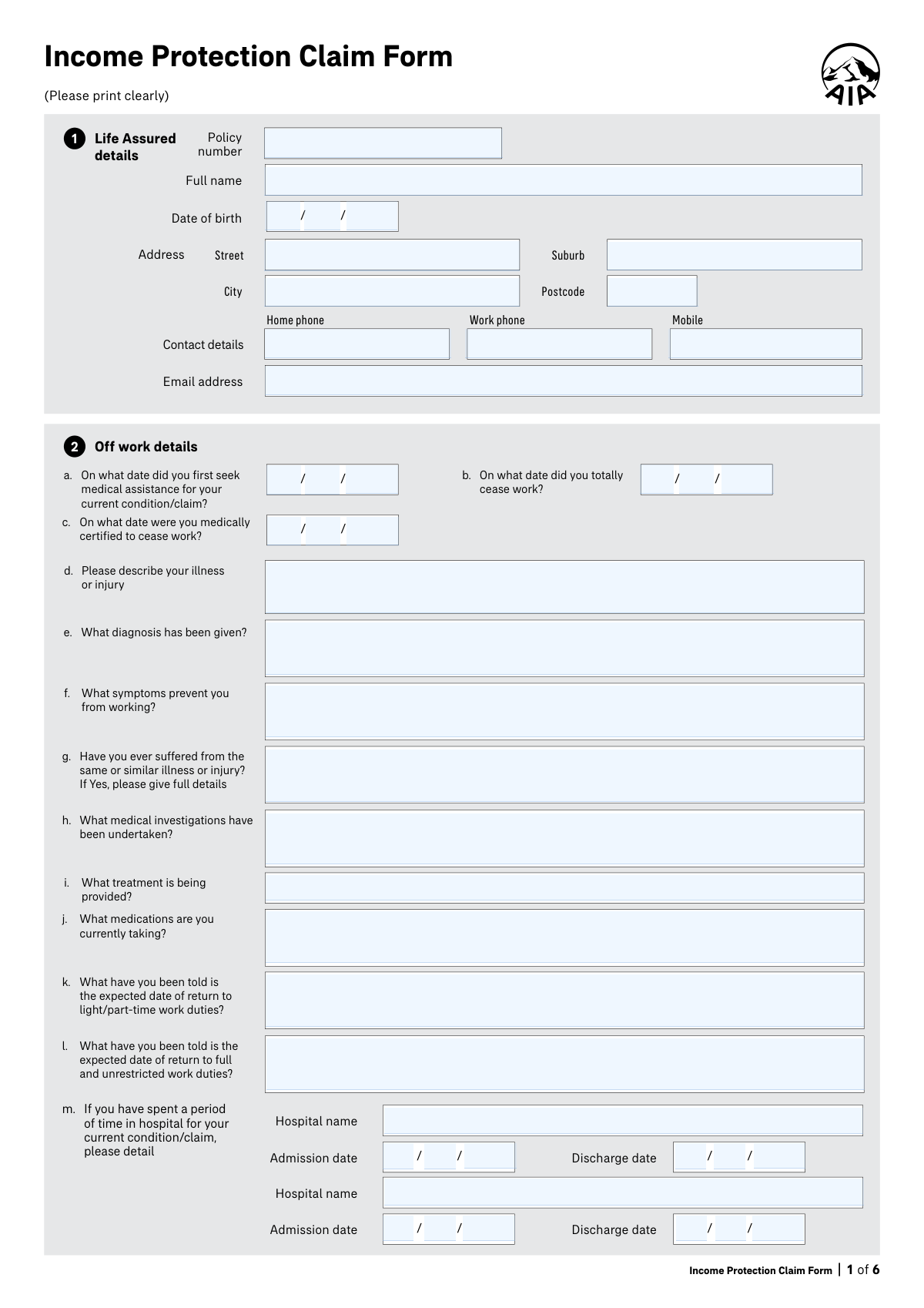
The Income Protection Claim Form is an insurer claim document (for AIA New Zealand, including ASB-distributed policies) that the Life Assured and Policy Owner(s) complete to request payment of income protection benefits after stopping work due to illness or injury. It collects key information such as diagnosis and treatment, dates you ceased work and were medically certified, job duties and capacity, other compensation (e.g., ACC, sick leave, WINZ), and bank details for benefit payments. It also includes consent/authority for AIA to obtain medical and financial information from providers and a declaration that the information supplied is complete and accurate, which is important for claim validity. Today, this form can be filled out quickly and accurately using AI-powered services like Instafill.ai, which can also convert non-fillable PDF versions into interactive fillable forms.
Our AI automatically handles information lookup, data retrieval, formatting, and form filling.
It takes less than a minute to fill out Income Protection Claim Form using our AI form filling.
Securely upload your data. Information is encrypted in transit and deleted immediately after the form is filled out.
Form specifications
| Form name: | Income Protection Claim Form (AIA New Zealand) |
| Number of pages: | 6 |
| Filled form examples: | Form Income Protection Claim Form Examples |
| Language: | English |
| Categories: | medical forms, VA claim forms, income forms |
Instafill Demo: filling out a legal form in seconds
How to Fill Out Income Protection Claim Form Online for Free in 2026
Are you looking to fill out a INCOME PROTECTION CLAIM FORM form online quickly and accurately? Instafill.ai offers the #1 AI-powered PDF filling software of 2026, allowing you to complete your INCOME PROTECTION CLAIM FORM form in just 37 seconds or less.
Follow these steps to fill out your INCOME PROTECTION CLAIM FORM form online using Instafill.ai:
- 1 Go to Instafill.ai and upload the Income Protection Claim Form PDF (or select it from the form library if available).
- 2 Enter the Life Assured’s personal and policy details (policy number, full name, date of birth, address, phone numbers, and email).
- 3 Provide off-work and medical information (dates of first medical assistance, total cessation of work, medical certification date, illness/injury description, diagnosis, symptoms, investigations, treatment, medications, hospital stays, and expected return-to-work dates).
- 4 Add ACC and provider details as applicable (ACC claim status/number and case manager; current GP and specialist contact details).
- 5 Complete job and financial sections (occupation, duties and time split, hours worked, duties you can/can’t do, employer/self-employment entities, loss of income details, and any other compensation or income sources).
- 6 Review and complete payment and retirement-related details (bank account for benefit payments, IRD number/KiwiSaver details if relevant), then complete consent and declarations with required names, dates, and signatures for the Life Assured and Policy Owner(s).
- 7 Use Instafill.ai’s validation to check for missing fields and inconsistencies, then download the completed form and submit it to AIA/ASB via the instructed email/post/fax channel.
Our AI-powered system ensures each field is filled out correctly, reducing errors and saving you time.
Why Choose Instafill.ai for Your Fillable Income Protection Claim Form Form?
Speed
Complete your Income Protection Claim Form in as little as 37 seconds.
Up-to-Date
Always use the latest 2026 Income Protection Claim Form form version.
Cost-effective
No need to hire expensive lawyers.
Accuracy
Our AI performs 10 compliance checks to ensure your form is error-free.
Security
Your personal information is protected with bank-level encryption.
Frequently Asked Questions About Form Income Protection Claim Form
This form is used to claim income protection benefits when you canât work due to an illness or injury. It provides AIA with the medical, work, and financial details needed to assess your claim and arrange payments if approved.
The Life Assured (the insured person) must complete the claim details, consent, and declaration sections. The Policy Owner(s) must also sign where requested, especially for benefit payment and the final declaration if they are different from the Life Assured.
Have your policy number, personal contact details, key dates (first medical visit, stopped work date, medical certification date), GP and specialist contact details, and your bank account details ready. Youâll also need information about your job duties and any other income/compensation (e.g., ACC, sick leave, WINZ).
Youâll typically provide (1) the date you first sought medical assistance, (2) the date you totally ceased work, and (3) the date you were medically certified to cease work. Use the dates from your medical certificate and employment records; if they differ, enter each date exactly as documented.
Describe the specific symptoms and how they stop you doing your actual work tasks (e.g., âcannot stand longer than 10 minutes,â âcannot concentrate for more than 20 minutes,â âlifting causes severe painâ). Linking symptoms to your duties helps the insurer understand functional impact.
Answer âYesâ and provide full details, such as when it happened, what treatment you received, and whether you fully recovered. Being complete is important because the declaration warns that missing relevant history may affect claim assessment.
Yesâlist any hospital admissions/discharges, tests (e.g., scans, blood tests), current treatment (e.g., physiotherapy, counselling), and all medications youâre taking. If you need more space, you can continue on a separate sheet as the form suggests.
ACC is New Zealandâs Accident Compensation Corporation, which may cover injuries. If your condition is an injury, indicate whether you are claiming ACC; if you are not, the form asks you to explain why.
Break your role into main tasks and estimate the percentage of time spent on each so the total is about 100%. Be specific (e.g., âdriving 40%, lifting/stocking 30%, admin 30%â) and then list which duties you can and cannot perform now.
In the job availability question, explain why the role isnât available (e.g., position filled, business closed, no suitable light duties). Include any relevant context from your employer if you have it.
You must indicate how you earn income (e.g., sole proprietor, contractor, shareholder employee) and list all entities youâre involved in. Include profit share entitlements and, if a spouse/family member receives profit share, describe their duties and hours to clarify business income arrangements.
Yesâtick whether you are receiving or will claim ACC, other insurance benefits, sick leave, WINZ payments, or other compensation, and provide amounts and dates. If you tick âYes,â youâll also need to provide the organisation and contact person details.
Enter the account name and the bank/branch/account number/suffix in the benefit payment section. Make sure the account can receive payments and matches the Policy Owner details if required by your policy setup.
You are authorising AIA to request and receive relevant medical, financial, and employment information from listed sources (e.g., doctors, employers, ACC, banks) to assess your claim. You are also declaring that the information you provided is true and complete, and acknowledging that non-disclosure may affect the claim.
Yesâtools like Instafill.ai can use AI to auto-fill form fields accurately from the information you provide, saving time and reducing missed fields. If your PDF is flat/non-fillable, Instafill.ai can convert it into an interactive fillable form and then help you complete it online.
Compliance Income Protection Claim Form
Validation Checks by Instafill.ai
1
Policy Number presence and allowed format
Validates that the Policy Number is provided and matches the insurerâs expected pattern (e.g., alphanumeric length, no illegal characters, no leading/trailing spaces). This is critical to correctly match the claim to the correct contract and avoid misrouting or delays. If validation fails, the submission should be blocked or routed to manual review with a clear error requesting a corrected policy number.
2
Life Assured full legal name completeness and character rules
Checks that the Life Assured Full Name is present, contains at least given name and surname, and uses reasonable characters (letters, spaces, hyphens, apostrophes) without numeric-only or placeholder values (e.g., 'N/A', 'Test'). Accurate identity details are required for policy matching and downstream medical/financial requests. If invalid, prompt the user to correct the name and prevent submission until fixed.
3
Date of birth is a valid calendar date and indicates eligible age
Validates that the day/month/year fields form a real date (including leap-year handling) and that the date is not in the future. It should also check the Life Assured is within plausible/allowed bounds (e.g., not under 16 and not over 110, or per product rules). If validation fails, the form should reject the DOB and request correction to prevent identity and eligibility errors.
4
Claim timeline dates are valid and logically ordered
Ensures the key claim dates (first medical assistance, totally ceased work, medically certified to cease work, expected return dates) are valid dates and follow a logical sequence. For example, first medical assistance should not be after the declaration date, and expected return to full duties should not be earlier than expected return to light/part-time duties (if both provided). If inconsistencies are found, flag the specific fields and require correction or an explanatory note before acceptance.
5
Required medical narrative fields are completed with sufficient detail
Checks that Description of Illness/Injury, Diagnosis Given, and Symptoms Preventing Work are not blank and are not trivial placeholders (e.g., 'see attached', 'unknown') unless attachments are explicitly supported. These fields are essential for triage, determining medical evidence needs, and assessing functional impairment. If validation fails, require the claimant to add meaningful detail or provide structured alternatives.
6
Previous similar illness/injury conditional details
Validates that if the claimant indicates they have suffered the same or similar illness/injury, the 'Previous Similar Illness or Injury Details' field is completed with substantive information (dates, nature, treatment, outcomes). This is important for assessing pre-existing conditions and continuity of symptoms. If the details are missing when required, block submission or route to manual follow-up.
7
Hospital stay entries are internally consistent
For each hospital stay row, validates that if a Hospital Name is provided then Admission and Discharge dates are present and valid, and Discharge is on/after Admission. It should also prevent partial date entry (e.g., day and month without year) and detect impossible durations (e.g., discharge far before admission). If validation fails, require correction of the specific row or allow the row to be cleared.
8
ACC claim selection is mutually exclusive and conditionally complete
Ensures the ACC Yes/No selection is not both checked and not left blank when the claim is described as an injury (or when ACC section is reached, per business rules). If 'Yes' is selected, ACC Claim Number and Case Manager contact details should be required (at minimum claim number), and if 'No' is selected, a reason must be provided. If validation fails, prevent submission and prompt for the missing ACC information.
9
GP contact details completeness and format validation
Validates that GP Name and Medical Practice are provided, and that GP phone/email (and fax if provided) follow valid formats (NZ phone patterns, email RFC-like pattern). GP address fields should be complete enough to locate the practice (street, city, postcode). If invalid, the system should request corrections because missing/incorrect GP details can prevent timely medical evidence collection.
10
Specialist details validation when provided
If any Specialist Name is entered, validates that Specialty and at least one reliable contact method (phone or email) is present, and that address/postcode fields are valid if supplied. This prevents unusable partial specialist records that delay evidence requests. If validation fails, prompt the user to complete the specialist block or remove it if not applicable.
11
Job duties and time percentage totals are valid
Checks that the duties list is not empty and that each 'Time Percentage' is numeric, within 0â100, and that the total across duties equals 100% (allowing a small tolerance if needed, e.g., 99â101). This is important for occupational assessment and determining functional impact relative to core duties. If validation fails, require the claimant to adjust percentages or add missing duties until the total is correct.
12
Usual weekly work hours are numeric and within plausible bounds
Validates that 'Usual Weekly Work Hours' is provided, numeric (allow decimals if allowed), and within a reasonable range (e.g., 0â168, with warnings for unusually high values). Work hours are used in benefit calculations and occupational analysis. If validation fails, block submission or show an error requiring a corrected value.
13
Job availability conditional explanation
If the claimant indicates the job is not available to return to, validates that 'Job Return Details' contains an explanation (e.g., role terminated, redundancy, business closed). This is important for rehabilitation planning and claim management decisions. If missing, require completion to avoid ambiguity and follow-up delays.
14
Loss of income fields are consistent and amounts are valid currency
Validates that 'Monthly Loss of Income' is numeric, non-negative, and within plausible limits, and enforces conditional narratives: if a loss amount is provided, 'Loss of Income Explanation' must be completed; if no loss is indicated, 'No Loss of Income Details' must be completed. This ensures financial impact is clearly documented for benefit assessment. If validation fails, prompt for the missing explanation or correct the amount formatting.
15
Other compensation rows: Yes/No exclusivity and required details when Yes
For each compensation type (ACC, other insurance, sick leave, WINZ, other), validates that Yes/No is mutually exclusive and that when 'Yes' is selected, Amount and Start Date are provided (and End Date if the payment has ended), with Start Date <= End Date. It should also require 'Specify' for the 'Other' compensation row when Yes is selected. If validation fails, the system should highlight the specific row and prevent submission until corrected.
16
Benefit payment bank account structure (NZ format) and required fields
Validates that Bank Code, Branch Number, Account Number, and Suffix are present and match NZ bank account digit lengths (commonly 2-4-7-2, depending on implementation rules) and are numeric-only. It should also ensure the 'Name of Account' and 'Full name of Policy Owner' are provided to reduce payment misdirection risk. If validation fails, block submission and request corrected bank details.
17
Declarations and signatures: required names and signature dates not in the future
Checks that the Declaration Name of Life Assured and signature date components form a valid date and are not in the future, and that required Policy Owner names/signature dates are present when a policy owner is claiming/authorizing payment. This is essential for legal consent, authority to collect information, and payment authorization. If validation fails, prevent submission and request completion of the missing declaration/signature fields.
Common Mistakes in Completing Income Protection Claim Form
People often mix up the three critical dates: first sought medical assistance, totally ceased work, and medically certified to cease work (or they enter them in the wrong order). This creates red flags for the insurer and can delay assessment while they reconcile timelines with medical certificates and employer records. To avoid this, confirm each date from your GP certificate, employer leave records, and appointment notes before writing them in (day/month/year). AI-powered form filling tools like Instafill.ai can help by validating date formats and flagging timeline inconsistencies before submission.
This form splits many dates into separate day, month, and year fields, which leads to common errors like swapping day and month, using two-digit years, or writing the full date in one box. Incorrect date formatting can cause data entry errors in the insurerâs system and trigger follow-up requests. Always enter numeric values in the correct boxes (e.g., 05 / 02 / 2026) and use four-digit years. Instafill.ai can automatically format and place date components into the correct fields.
Claimants often describe the illness/injury and diagnosis but donât clearly explain the symptoms that prevent them from doing their specific job duties. This makes it hard to assess disability against occupational requirements and can lead to delays or requests for additional medical evidence. Avoid this by linking symptoms to tasks (e.g., âcannot stand >10 minutes, cannot lift 5kg, cannot concentrate for more than 20 minutesâ) and matching them to your duty list. Instafill.ai can prompt for missing functional details and help ensure the narrative aligns with the job-duty section.
Many people either skip the âsame or similar illness/injuryâ details or under-disclose prior episodes because they think itâs irrelevant or fear it will harm the claim. Incomplete history can be treated as non-disclosure and may lead to delays, additional medical file requests, or claim disputes. If you answer âYes,â include dates, prior treatment providers, outcomes, and whether you fully recovered. Instafill.ai can help ensure you donât miss required follow-up details when a conditional question is triggered.
A common mistake is writing âblood tests,â âphysio,â or âpainkillersâ without dates, provider names, dosages, or frequency. This forces the insurer to chase clarifications from you or your clinicians, slowing the claim. Provide investigation types and approximate dates (e.g., MRI lumbar spine 12/01/2026), treatment frequency, and medication name + dose + how often taken. Instafill.ai can standardize medication entries and ensure key fields (dose/frequency) arenât omitted.
People often enter their clinic name but omit the GPâs name, specialty, email, or phone/fax, or they list an old GP rather than the current treating doctor. Missing or incorrect provider details can prevent the insurer from obtaining timely medical reports and can stall the claim. Use the providerâs official practice contact details (not personal numbers) and include specialty for specialists. Instafill.ai can auto-complete and validate address/contact formats and reduce typos in emails and phone numbers.
For injuries, claimants frequently tick ACC âYes/Noâ incorrectly, forget the ACC claim number, or fail to explain why ACC is not being claimed. This can create coverage coordination issues and lead to immediate follow-up questions. If itâs an injury, confirm whether an ACC claim exists and provide the claim number and case manager details; if not claiming, give a clear reason (e.g., not an accident, declined, outside scope). Instafill.ai can enforce conditional completeness so the ACC fields are filled when required.
In the job section, people often provide a generic duty list, omit key tasks, or enter percentages that donât total 100%. This weakens the link between medical restrictions and occupational incapacity and can lead to requests for employer verification. List duties as you actually performed them immediately prior to ceasing work and ensure the time percentages are realistic and total 100%. Instafill.ai can check that percentages sum correctly and help structure duties in a clear, consistent format.
Self-employed claimants commonly forget to tick the correct business type (contractor/sole proprietor/shareholder employee) or fail to list all entities (companies, partnerships, trusts) and profit share entitlements. Missing entity information can delay financial assessment and may require additional documentation (accounts, shareholder salary details, trust distributions). Avoid this by listing every entity youâre involved in, the legal names, and the exact profit share percentages, including any spouse/family member involvement and duties. Instafill.ai can guide entity entry consistently and reduce omissions across repeated âentity nameâ fields.
People often enter a monthly loss figure without explaining how the loss occurred, or they say there is no loss but donât justify why (e.g., sick leave, business still paying drawings). Inconsistencies can trigger reassessment, requests for payslips/accounts, or confusion about benefit offsets. Provide a clear monthly amount and a matching explanation (replacement staff costs, reduced billable hours, employer stopped paying) or explain why thereâs no loss (and what income continues). Instafill.ai can cross-check that the narrative aligns with the numeric fields and prompt for missing explanations.
Claimants frequently forget to tick âYesâ for sick leave, WINZ support, other insurance, or ACC payments, or they omit amounts and start/end dates. This can lead to overpayment issues, later recovery actions, or delays while the insurer verifies offsets. Carefully review each compensation row, tick accurately, and provide amounts plus start/end dates for anything received or expected. Instafill.ai can help by reminding you of common offset sources and validating that dates and amounts are provided when âYesâ is selected.
Saved over 80 hours a year
âI was never sure if my IRS forms like W-9 were filled correctly. Now, I can complete the forms accurately without any external help.â
Kevin Martin Green
Your data stays secure with advanced protection from Instafill and our subprocessors

Robust compliance program
Transparent business model
Youâre not the product. You always know where your data is and what it is processed for.
ISO 27001, HIPAA, and GDPR
Our subprocesses adhere to multiple compliance standards, including but not limited to ISO 27001, HIPAA, and GDPR.
Security & privacy by design
We consider security and privacy from the initial design phase of any new service or functionality. Itâs not an afterthought, itâs built-in, including support for two-factor authentication (2FA) to further protect your account.
Fill out Income Protection Claim Form with Instafill.ai
Worried about filling PDFs wrong? Instafill securely fills income-protection-claim-form-aia-new-zealand forms, ensuring each field is accurate.



