Yes! You can use AI to fill out Income Protection Claim Form (AIA New Zealand Limited)

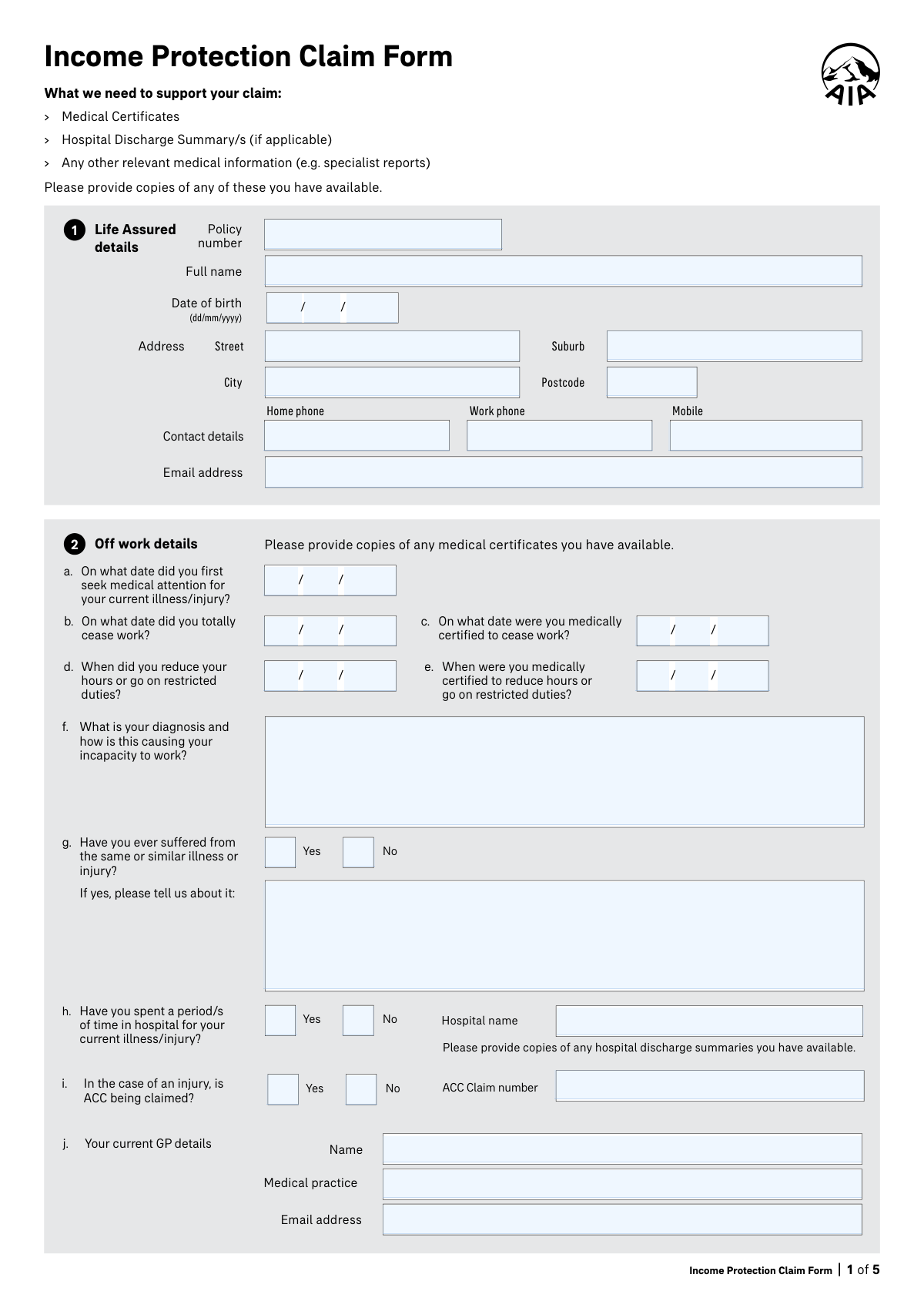
The Income Protection Claim Form is an insurer claim document (AIA New Zealand) that the Life Assured and (if applicable) the Policy Owner complete to request income protection benefit payments due to disability from illness or injury. It collects key information about your condition and work capacity (dates you sought treatment/ceased work, diagnosis, hospitalisation, ACC involvement), your job duties and hours, and your income sources and bank details for benefit payments. It also includes consent/authorisation for AIA to obtain medical and financial information from third parties, plus declarations confirming the accuracy and completeness of the information provided. Today, this form can be filled out quickly and accurately using AI-powered services like Instafill.ai, which can also convert non-fillable PDF versions into interactive fillable forms.
Our AI automatically handles information lookup, data retrieval, formatting, and form filling.
It takes less than a minute to fill out Income Protection Claim Form using our AI form filling.
Securely upload your data. Information is encrypted in transit and deleted immediately after the form is filled out.

Form specifications

Form name: Income Protection Claim Form (AIA New Zealand Limited)
Number of pages: 5
Filled form examples: Form Income Protection Claim Form Examples
Language: English
Categories: medical disability forms, VA claim forms, income forms
main-image

Instafill Demo: filling out a legal form in seconds

How to Fill Out Income Protection Claim Form Online for Free in 2026

Are you looking to fill out a INCOME PROTECTION CLAIM FORM form online quickly and accurately? Instafill.ai offers the #1 AI-powered PDF filling software of 2026, allowing you to complete your INCOME PROTECTION CLAIM FORM form in just 37 seconds or less.
Follow these steps to fill out your INCOME PROTECTION CLAIM FORM form online using Instafill.ai:
  1. 1 Go to Instafill.ai and upload the Income Protection Claim Form PDF (or select it from the form library if available).
  2. 2 Enter Life Assured details: policy number, full name, date of birth, address, phone numbers, and email.
  3. 3 Complete off-work and medical timeline details: first sought medical attention date, date totally ceased work, medical certification dates, reduced hours/restricted duties dates, and diagnosis/limitations; answer prior condition and hospitalisation questions and add ACC claim details if applicable.
  4. 4 Provide treating practitioner information: current GP name/practice/email and specialist names, specialties, and contact emails (attach extra sheet details if more than two specialists).
  5. 5 Fill in employment and job information: occupation prior to illness/injury, duties, usual weekly hours, and whether the job is available for return-to-work (with details if not).
  6. 6 Complete financial details: income source type(s) (salaried/self-employed), employer/entity details, other benefits/compensation (ACC, sick leave, other insurer, WINZ), and bank account details for benefit payments.
  7. 7 Review and sign required consent and declaration sections (including third-party disclosure authorisation if needed), then download and submit the completed form with supporting documents (medical certificates, hospital discharge summaries, specialist reports) to AIA via the provided contact channels.

Our AI-powered system ensures each field is filled out correctly, reducing errors and saving you time.

Why Choose Instafill.ai for Your Fillable Income Protection Claim Form Form?

Speed

Complete your Income Protection Claim Form in as little as 37 seconds.

Up-to-Date

Always use the latest 2026 Income Protection Claim Form form version.

Cost-effective

No need to hire expensive lawyers.

Accuracy

Our AI performs 10 compliance checks to ensure your form is error-free.

Security

Your personal information is protected with bank-level encryption.

Frequently Asked Questions About Form Income Protection Claim Form

This form is used to claim income protection benefits when you can’t work (or must reduce hours/restricted duties) due to an illness or injury. AIA uses the information to assess eligibility and manage your claim.

The Life Assured (the insured person) completes the medical, work, and consent sections and must sign the consent and declaration. The Policy Owner also signs where benefit payments are being claimed and where bank/payment details are confirmed (including any additional policy owner, if applicable).

Include copies of medical certificates, hospital discharge summaries (if you were admitted), and any other relevant medical information such as specialist reports. Providing what you already have can help AIA assess your claim faster.

You’ll need the date you first sought medical attention, the date you totally ceased work (if applicable), the date you were medically certified to cease work, and any dates you reduced hours/went on restricted duties and were medically certified to do so. Enter all dates in dd/mm/yyyy format.

State your diagnosis and briefly explain the symptoms or functional limits that prevent you from doing your job (e.g., lifting limits, inability to concentrate, restricted mobility). Include practical impacts on your work duties rather than only medical terms.

You can still complete the form—enter the date you reduced hours/went on restricted duties and the date you were medically certified to do so. Provide details that show how your condition changed your ability to work.

Yes—if you’ve had the same or a similar condition before, tick 'Yes' and provide details such as dates, treatment, and outcomes. Full disclosure is important because missing information can delay assessment or affect the claim decision.

Tick 'Yes' for the hospital question, provide the hospital name, and attach any discharge summaries you have. If you don’t have the summary, you can still submit the claim and AIA may request records later.

If ACC is being claimed, tick 'Yes' and include the ACC claim number. If ACC is not being claimed, tick 'No'—AIA uses this to understand other compensation sources related to the injury.

Provide your current GP’s name, medical practice, and email address, plus up to two specialists’ names, specialties, and email addresses (use a separate sheet if you have more than two). This helps AIA contact your providers for supporting information if needed.

List your occupation immediately prior to the illness/injury, describe your main duties, and state your usual weekly hours. Also indicate whether your job is available to return to and explain any barriers if it isn’t.

You must indicate how you earned income at the date of disability (e.g., salaried full-time/part-time/seasonal, or self-employed as contractor/sole proprietor/shareholder employee/company/partnership/trust). If you’re involved in entities, list the entity names and any profit share entitlements, including details if a spouse/family member receives profit share.

Yes—tick whether you are receiving or will claim any benefit/compensation such as ACC, sick leave, payments from another insurer, or WINZ/government support. This helps AIA coordinate benefits and avoid overpayment issues.

Enter the account holder name, bank, branch number, and account number in the payment section, or indicate if you want to use an existing premium direct debit account. Make sure the account can accept deposits in the policy owner’s name if required.

You authorize AIA to request and receive relevant medical, financial, and personal information from listed sources (e.g., doctors, employers, ACC, banks) to assess your claim. You also declare the information you provided is true and complete, and acknowledge that non-disclosure may lead to the claim being declined.

Yes—complete the 'Consent to disclose personal information to a third party' section with the person’s contact details and sign/date it. This allows AIA to discuss your claim and share relevant information with that named person.

The form lists AIA contact options including email ([email protected]), phone (0800 500 108 in NZ, +64 9 487 9963 international), and live chat (aia.co.nz/chat). If you’re unsure about submission method, contact AIA using these details for the correct process.

Yes—AI form-filling services like Instafill.ai can help auto-fill fields accurately from your information, reducing manual typing and errors. You should still review everything carefully and ensure medical and financial details are complete and correct before signing.

Upload the PDF to Instafill.ai, connect or paste your details (identity, dates, job, income, GP/specialists), and let the AI map your information into the correct fields. Then review, download the completed form, and sign/date where required before submitting to AIA.

If the PDF is flat/non-fillable, Instafill.ai can convert it into an interactive fillable form so you can type directly into the fields. After conversion, you can auto-fill and export a clean, completed version for signing and submission.

Compliance Income Protection Claim Form
Validation Checks by Instafill.ai

1
Policy Number Presence and Format Validation
Validates that the Policy number is provided and matches the insurer’s expected policy number pattern (e.g., correct length, allowed characters, no spaces or illegal symbols). This is critical to correctly identify the insured contract and route the claim to the right policy record. If validation fails, the submission should be blocked or routed to manual review with a clear error prompting the user to re-enter the policy number exactly as shown on policy documents.
2
Life Assured Full Legal Name Completeness
Checks that the Life Assured Full Name is not blank and contains at least a given name and surname (not initials only), and does not contain invalid characters (e.g., numbers or excessive punctuation). The legal name is required to match policy records and to support identity verification and medical information requests. If it fails, the form should require correction before submission or be flagged for identity mismatch risk.
3
Date of Birth (DOB) Valid Date and Plausibility Check
Validates that DOB day/month/year form a real calendar date in dd/mm/yyyy format (e.g., no 31/02/2020) and that the date is not in the future. Also checks plausibility (e.g., claimant age within a reasonable range such as 16–100) to catch data entry errors. If invalid, the system should reject the DOB and request correction; if implausible, it should warn and route to review.
4
Address Completeness and Postcode Format (NZ) Validation
Ensures Street, Suburb, City, and Postcode are completed, and validates Postcode format (typically 4 digits in New Zealand). A complete address is needed for correspondence, identity checks, and potential benefit/payment administration. If validation fails, the user should be prompted to complete missing components; invalid postcodes should be rejected or flagged for correction.
5
Contact Phone Number Format and Minimum Contact Requirement
Validates that phone numbers (home/work/mobile) contain only allowed characters and meet expected length rules (e.g., NZ numbers, optional +64, no alphabetic characters). Also enforces that at least one contact number is provided so the insurer can contact the claimant during assessment. If formatting fails, the field should be rejected; if no phone is provided, submission should be blocked until at least one valid number is entered.
6
Email Address Format Validation (Life Assured and Providers)
Checks that the Life Assured email, GP email, and specialist emails (if provided) follow a valid email structure (local@domain) and do not contain spaces or invalid characters. Correct emails are essential for timely communication and for requesting medical information. If invalid, the system should prompt correction; if provider email is missing where required, the claim should be flagged as potentially incomplete.
7
Medical Timeline Date Validity and Chronological Consistency
Validates that all entered medical/work dates are real dates and not in the future (First sought medical attention, reduced hours/restricted duties, totally ceased work, medically certified dates). Enforces logical order rules such as: first sought medical attention should be on/before medical certification dates, and reduced-hours date should be on/before or equal to totally ceased work date (if both provided). If chronology fails, the system should require correction or flag for manual review because benefit eligibility and waiting periods depend on accurate timelines.
8
Work Cessation vs Restricted Duties Conditional Completeness
Checks that if the claimant indicates they reduced hours/restricted duties (by providing a reduced-hours date), the corresponding 'medically certified to reduce hours/restricted duties' date is also provided (and vice versa). This ensures the claim has medical support for partial incapacity and aligns with policy definitions. If one is present without the other, the system should prompt for the missing date or require an explanation before allowing submission.
9
Diagnosis Narrative Required and Minimum Detail Quality Check
Ensures the 'Diagnosis and how it causes incapacity' field is not blank and meets a minimum content threshold (e.g., minimum character count and includes functional impact such as limitations on lifting, standing, concentration, etc.). This is important because the insurer must assess incapacity relative to occupational duties, not just a diagnosis label. If insufficient, the system should request more detail and may prevent submission until the narrative explains how the condition stops the claimant from working.
10
Same/Similar Illness or Injury Yes/No Exclusivity and Details Requirement
Validates that exactly one of the Same/Similar Illness/Injury options (Yes or No) is selected (not both, not neither). If 'Yes' is selected, the details field must be completed with at least basic information (e.g., prior dates/period, condition description, treatment). If the selection is inconsistent or details are missing, the system should block submission or flag for follow-up because prior history can affect underwriting and claim assessment.
11
Hospital Stay Yes/No Exclusivity and Hospital Name Conditional Requirement
Validates that only one hospital stay option (Yes/No) is selected and that Hospital name is provided when 'Yes' is selected. Hospitalization information supports severity assessment and helps request discharge summaries. If 'Yes' is selected without a hospital name, the system should prompt for the hospital name or require an explanation; if both boxes are selected, the submission should be rejected as ambiguous.
12
ACC Claim Conditional Validation (Injury Context)
Validates that if 'ACC being claimed' is marked Yes, an ACC Claim Number is provided and matches an expected ACC claim number format (length/allowed characters). This is important for coordinating benefits and avoiding duplicate compensation issues. If ACC is Yes but the number is missing/invalid, the system should require correction or flag the claim for coordination follow-up.
13
GP Details Completeness and Provider Identifiability
Ensures Current GP Name and Medical Practice are provided, and that at least one reliable contact method exists (preferably email, otherwise flag for alternative contact). GP details are essential for obtaining medical certificates and verifying certification dates. If missing, the claim should be considered incomplete and either blocked from submission or routed to a “missing medical provider details” work queue.
14
Specialist Details Pairing and Partial Entry Check
Validates that for each specialist section, if any of Name/Specialty/Email is entered, the Name and Specialty are required (and email is strongly recommended/validated if present). This prevents unusable partial specialist records that cannot be contacted or interpreted. If partial data is detected, the system should prompt the user to complete the missing fields or clear the specialist entry.
15
Job Information Completeness and Hours Worked Range Validation
Checks that Occupation prior to illness/injury and Duties are provided, and that 'Number of hours usually worked per week' is numeric and within a reasonable range (e.g., 1–80). Occupational duties and hours are required to assess incapacity and calculate benefits. If missing or out of range, the system should require correction or flag for manual review due to potential benefit calculation errors.
16
Payment Bank Account Fields Completeness and Numeric Format
Validates that if benefit payment bank details are provided/required, the Account holder name, bank/branch/account number fields are present and numeric where applicable (no letters in numeric segments, correct segment lengths per NZ bank account conventions if enforced). Correct bank details are essential to prevent misdirected payments and rework. If invalid or incomplete, the system should block payment setup and prompt for corrected bank details before processing benefits.

Common Mistakes in Completing Income Protection Claim Form

Using the wrong policy number or leaving digits off

People often copy a reference number from an email, use an old policy number, or omit leading zeros when transcribing the policy number. This can delay claim setup because the insurer may not be able to match the claim to the correct contract or life assured. Always copy the full policy number exactly as shown on the policy schedule (including any prefixes/suffixes) and double-check each character. AI-powered form filling tools like Instafill.ai can help by pulling the correct policy number from your documents and validating the expected format.

Name mismatch between the form and policy documents

Claimants frequently enter a preferred name, nickname, or a name after marriage that doesn’t match the policy record, or they omit middle names that appear on the policy. Even small differences can trigger identity verification follow-ups and slow down medical/provider requests. Enter the life assured’s full legal name exactly as it appears on the policy documents and ensure the policy owner names match where required. Instafill.ai can reduce these errors by auto-populating names consistently across all signature and declaration sections.

Incorrect date format (mm/dd vs dd/mm) or incomplete dates

This form requires dd/mm/yyyy, but many people enter dates in mm/dd/yyyy, use words (e.g., “Jan”), or leave out the year. Incorrect dates can create timeline inconsistencies (e.g., certification date appearing before first medical visit) and may lead to requests for clarification or reassessment of waiting periods. Always use two digits for day and month and four digits for year, and verify the sequence of events makes sense. Instafill.ai can automatically format dates to dd/mm/yyyy and flag impossible or inconsistent timelines.

Confusing ‘first sought medical attention’ with diagnosis or injury date

Applicants often put the date symptoms started, the accident date, or the diagnosis date instead of the first date they actually saw a medical professional for the current condition. This can affect how the insurer assesses onset, pre-existing conditions, and eligibility/waiting periods. Use the date of the first GP/clinic/hospital visit for this specific illness/injury episode, and keep supporting notes/certificates aligned to that date. Instafill.ai can prompt for the correct interpretation and cross-check it against uploaded medical certificates.

Inconsistent ‘ceased work’ vs ‘medically certified’ vs ‘reduced hours’ dates

People commonly enter the same date for all fields, leave one blank, or mix up “totally ceased work” with “reduced hours/restricted duties.” Inconsistencies can delay benefit calculations and may require employer verification or additional medical evidence to confirm incapacity periods. Enter each date based on what actually happened: when you stopped work, when a clinician certified it, when you reduced hours, and when that reduction was certified. Instafill.ai can validate that the dates follow a logical order and remind you to complete dependent fields.

Vague diagnosis and incapacity explanation (symptoms without functional impact)

Many claimants write a short label (e.g., “back pain” or “stress”) without explaining how it prevents them from performing their specific job duties. This often leads to follow-up questions or requests for specialist reports because the insurer needs functional limitations tied to occupational tasks. Provide the diagnosis (as given by your clinician) and clearly describe restrictions (e.g., lifting limits, sitting/standing tolerance, cognitive limitations) and how these stop you doing your listed duties. Instafill.ai can guide structured responses and ensure the incapacity narrative aligns with the job duties section.

Answering ‘same or similar illness/injury’ incorrectly or omitting details

Applicants sometimes tick “No” to avoid complications, or tick “Yes” but provide no dates/treatment history, especially for recurring conditions (e.g., prior back injuries, anxiety/depression). Missing history can be treated as non-disclosure and may slow assessment or create disputes if later discovered in medical records. If you have had prior episodes, list approximate dates, providers, treatments, and outcomes, even if it was years ago. Instafill.ai can help by prompting for the minimum detail set (dates, provider, treatment) when “Yes” is selected.

Hospital and ACC sections completed incorrectly (or left blank when applicable)

People often tick “Yes” for hospitalisation but forget to provide the hospital name or discharge summaries, or they claim an injury but leave ACC fields blank or enter an incorrect ACC claim number. This can delay coordination with ACC and slow evidence gathering, especially when hospital records are central to the claim. Only complete the hospital name and attach discharge summaries if hospitalisation occurred, and if ACC is being claimed, provide the exact ACC claim number from ACC correspondence. Instafill.ai can enforce conditional logic (only showing required fields when ‘Yes’ is selected) and validate the presence of supporting documents.

Missing or incorrect GP/specialist contact details (especially email)

A common issue is listing a clinic name without the GP’s full name, providing outdated practice details, or entering a personal email/incorrect provider email. If the insurer cannot contact providers quickly, medical evidence requests stall and the claim decision is delayed. Confirm the treating GP’s full name, practice name, and the correct practice/provider email, and list all relevant specialists (use an extra sheet if more than two). If the form is only available as a flat non-fillable PDF, Instafill.ai can convert it into a fillable version and help standardize provider details across pages.

Job duties and hours section too generic or inconsistent with incapacity

Claimants often write broad descriptions like “admin work” or “manual labour” and guess weekly hours, which makes it hard to assess whether the medical restrictions prevent the essential duties. This can lead to additional employer questionnaires or requests for a more detailed duty breakdown. Describe key tasks, physical/cognitive demands, and typical hours worked per week (including overtime if regular), and ensure it matches the incapacity explanation. Instafill.ai can help by prompting for duty categories and ensuring the duties align with the stated limitations.

Financial/income source section mis-ticked or entity/profit share fields mixed up

The financial section is easy to misunderstand: people tick multiple incompatible boxes, omit employer/entity names, or enter profit share percentages in the wrong place (especially for shareholder-employee/company/partnership/trust structures). Errors here can cause benefit miscalculation and trigger requests for additional financial documents or clarifications about business involvement. Tick only the boxes that reflect how you were paid at the date of disability, list all entities you are involved in, and provide accurate profit share entitlements where required. Instafill.ai can reduce mistakes by applying rules (e.g., requiring entity name when a structure is selected) and formatting percentages consistently.
Saved over 80 hours a year

“I was never sure if my IRS forms like W-9 were filled correctly. Now, I can complete the forms accurately without any external help.”

Kevin Martin Green

Your data stays secure with advanced protection from Instafill and our subprocessors

Robust compliance program

Transparent business model

You’re not the product. You always know where your data is and what it is processed for.

ISO 27001, HIPAA, and GDPR

Our subprocesses adhere to multiple compliance standards, including but not limited to ISO 27001, HIPAA, and GDPR.

Security & privacy by design

We consider security and privacy from the initial design phase of any new service or functionality. It’s not an afterthought, it’s built-in, including support for two-factor authentication (2FA) to further protect your account.

Fill out Income Protection Claim Form with Instafill.ai

Worried about filling PDFs wrong? Instafill securely fills income-protection-claim-form-aia-new-zealand-limited forms, ensuring each field is accurate.