Yes! You can use AI to fill out Incoming Direct Rollover Election
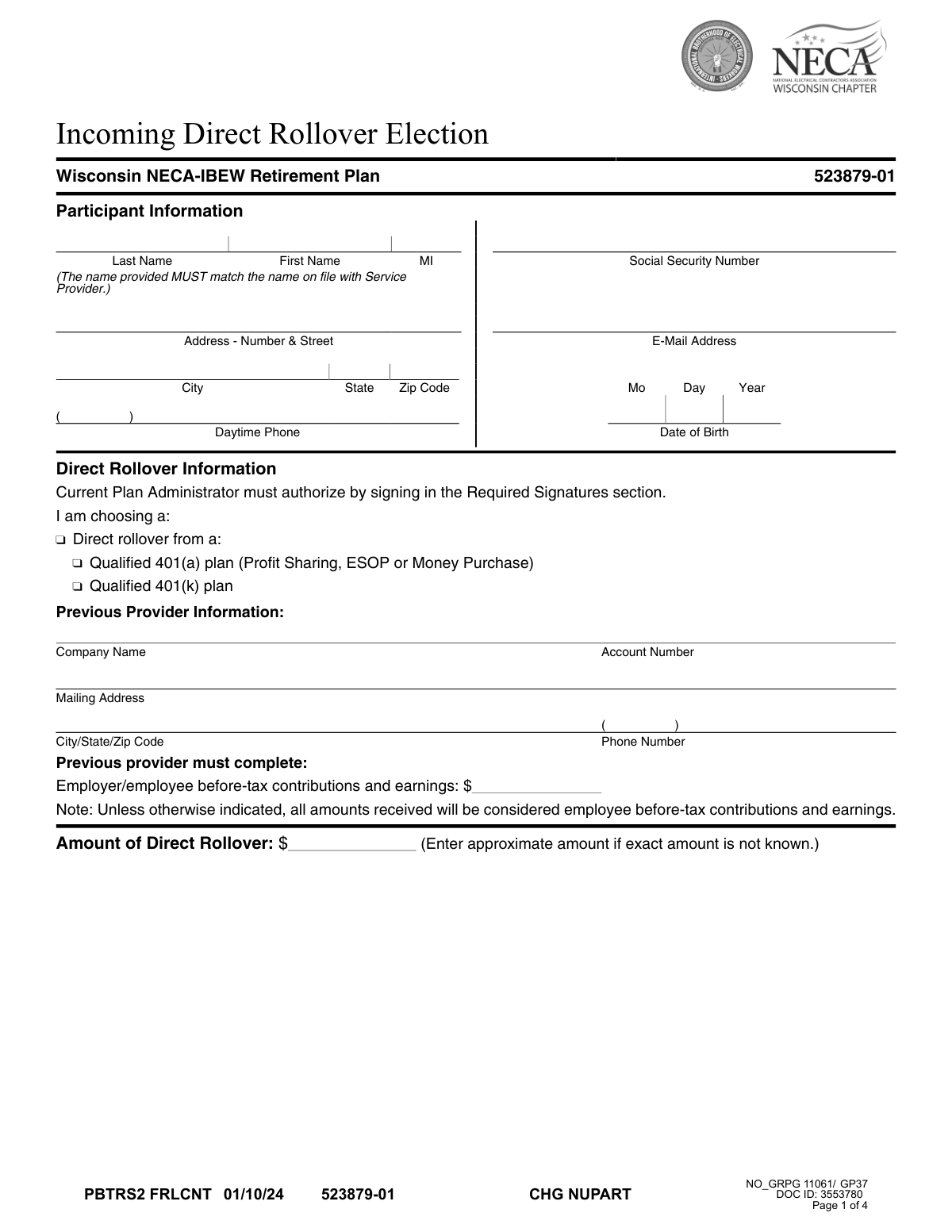
This form authorizes the direct rollover of assets from a previous retirement account, such as a 401(k) or 401(a) plan, into your current retirement plan, like the Wisconsin NECA-IBEW Retirement Plan. It is essential for consolidating retirement savings and requires details about the participant, the previous provider, the rollover amount, and investment allocation choices. Today, this form can be filled out quickly and accurately using AI-powered services like Instafill.ai, which can also convert non-fillable PDF versions into interactive fillable forms.
PBTRS2 FRLCNT is part of the
rollover forms category on Instafill.
Rather not fill this in by hand? Instafill is an online form filler that completes PDF forms automatically — upload the blank form, answer a few questions, and the AI fills every field.
Form specifications
| Form name: | Incoming Direct Rollover Election |
| Number of pages: | 1 |
| Language: | English |
Our AI automatically handles information lookup, data retrieval, formatting, and form filling.
It takes less than a minute to fill out PBTRS2 FRLCNT using our AI form filling.
Securely upload your data. Information is encrypted in transit and deleted immediately after the form is filled out.
Instafill Demo: How to fill out PDF forms in seconds with AI
How to Fill Out PBTRS2 FRLCNT Online for Free in 2026
Are you looking to fill out a PBTRS2 FRLCNT form online quickly and accurately? Instafill.ai offers the #1 AI-powered PDF filling software of 2026, allowing you to complete your PBTRS2 FRLCNT form in just 37 seconds or less.
Follow these steps to fill out your PBTRS2 FRLCNT form online using Instafill.ai:
- 1 Navigate to Instafill.ai and upload the Incoming Direct Rollover Election form or select it from their template library.
- 2 Use the AI assistant to automatically fill in your Participant Information, including your name, Social Security Number, and contact details.
- 3 Provide the Direct Rollover Information, specifying the previous provider's company name, account number, and the approximate amount to be rolled over.
- 4 Select your Investment Option Information, either by choosing to use existing allocations or by specifying new percentages for various funds.
- 5 Review the participant acknowledgements, payment instructions, and all entered information for accuracy.
- 6 Download the completed form for your handwritten signature, as required, and obtain the signature from the authorized Plan Administrator.
- 7 Submit the fully signed form and ensure the funds are transferred according to the payment instructions provided.
Our AI-powered system ensures each field is filled out correctly, reducing errors and saving you time.
Why Choose Instafill.ai for Your Fillable PBTRS2 FRLCNT Form?
Speed
Complete your PBTRS2 FRLCNT in as little as 37 seconds.
Up-to-Date
Always use the latest 2026 PBTRS2 FRLCNT form version.
Cost-effective
No need to hire expensive lawyers.
Accuracy
Our AI performs 10 compliance checks to ensure your form is error-free.
Security
Your personal information is protected with bank-level encryption.
Frequently Asked Questions About PBTRS2 FRLCNT
This form allows you to transfer funds from a previous retirement plan, like a 401(k), directly into your Wisconsin NECA-IBEW Retirement Plan account.
You should complete this form if you are a participant in the Wisconsin NECA-IBEW Retirement Plan and wish to consolidate funds from a former employer's qualified retirement plan.
That's okay; the form allows you to enter an approximate amount. Your previous plan administrator will provide the final, exact amount when they process the transfer.
You have two options: either allocate the rollover funds the same as your existing ongoing contributions or select your own investment mix from the list provided, ensuring your choices total 100%.
If the investment section is incomplete, the funds will be allocated according to your existing contribution elections. If you don't have an account established, they will go into the plan's default investment option.
No, an outstanding loan balance cannot be included in the rollover. You must either pay off the loan before submitting the request or roll over only the cash value of your account.
The form requires your handwritten signature as the participant, as well as the signature of the Authorized Plan Administrator for your current employer's plan.
No, a handwritten signature is required. The form explicitly states that electronic signatures will not be accepted and will result in a significant processing delay.
If you are only sending the form, you can upload it electronically at empowermyretirement.com. If sending the form with the rollover check, use the mailing addresses provided in the 'Payment Instructions' section.
The check must be made payable to 'Empower Trust Company, LLC'. You should also write your name, Social Security Number, and Plan Number on the check for proper identification.
Your name must exactly match the records on file with the service provider to prevent processing delays and ensure the funds are correctly credited to your account.
Yes, services like Instafill.ai use AI to accurately auto-fill your personal information and other fields on the form, which helps save time and reduce errors.
Simply upload the PDF to Instafill.ai, and its AI will populate the fields with your information. After reviewing for accuracy, you can download the completed form, print it for your required handwritten signature, and submit it.
You can use a service like Instafill.ai, which can convert flat, non-fillable PDFs into interactive forms you can type into directly. This makes it much easier to complete the form on your computer before printing.
Compliance PBTRS2 FRLCNT
Validation Checks by Instafill.ai
1
Social Security Number Format
This check verifies that the Social Security Number field contains exactly nine digits, optionally formatted as XXX-XX-XXXX. This is critical for uniquely identifying the participant for tax reporting and account matching purposes. If the format is invalid, the system cannot process the rollover, as the participant cannot be correctly identified.
2
Participant Name Completeness and Match
Ensures the Last Name and First Name fields are not empty. It also serves as a prerequisite for a system-level check to confirm the provided name matches the name on file with the service provider, as stated on the form. An incomplete or mismatched name will prevent account lookup and cause the transaction to be rejected for security and compliance reasons.
3
Date of Birth Validity
Validates that the Date of Birth is a real calendar date (e.g., not February 30th) and falls within a logical range, such as the participant being over 18 and under 120 years old. This check helps prevent data entry errors and fraudulent submissions. An invalid date would halt processing until corrected, as it is a key piece of personally identifiable information.
4
Mutually Exclusive Investment Allocation Choice
This check ensures the participant has selected either option (A) 'Existing Ongoing Allocations' or (B) 'Select Your Own Investment Options', but not both. Selecting both options creates an ambiguous instruction for how to invest the funds. If both or neither are selected, the form is considered incomplete and cannot be processed until a single, clear choice is made.
5
Investment Percentage Summation
If the participant chooses to select their own investment options (B), this validation confirms that the percentages entered for all chosen funds add up to exactly 100%. The form explicitly requires a 100% total allocation. Any other total would result in an unallocated portion of the rollover funds or an invalid instruction, causing the investment step to fail.
6
Investment Percentage Format
Verifies that all percentages entered in the investment options section are whole numbers, as specified by the instruction 'MUST INDICATE WHOLE PERCENTAGES'. The use of decimals or fractions would violate the form's rules and could cause calculation errors in the allocation system. The submission would be rejected pending correction to whole numbers.
7
Rollover Source Selection
Confirms that the participant has checked at least one box indicating the source of the rollover (e.g., 'Qualified 401(a) plan' or 'Qualified 401(k) plan'). This information is essential for determining the tax status and eligibility of the incoming funds. Without this selection, the receiving plan cannot properly categorize the assets, and the rollover will be rejected.
8
Rollover Amount Format
This check ensures that the 'Amount of Direct Rollover' field contains a valid, positive numeric currency value. This is the primary financial figure for the transaction. Any non-numeric characters or a negative value would make it impossible to process the financial transfer, thus invalidating the request.
9
Participant Signature Presence
Verifies that the participant's signature is present on the form. The form explicitly states a handwritten signature is required, making it a critical authorization step. A missing signature means the participant has not legally authorized the rollover, rendering the entire form invalid and unenforceable.
10
Participant Signature Date Logic
Ensures the date next to the participant's signature is a valid calendar date and is not set in the future. The signature date establishes when the authorization was given. An invalid or future date would call the legitimacy of the request into question and would cause the form to be rejected for correction.
11
Previous Provider Information Completeness
Checks that key fields in the 'Previous Provider Information' section, such as 'Company Name' and 'Account Number', are filled in. This information is necessary for the new provider to identify and contact the old provider to initiate the transfer of funds. Missing this data would make it impossible to execute the rollover.
12
Authorized Plan Administrator Signature Presence
This validation confirms that the signature of the 'Authorized Plan Administrator For Current Employer's Plan' is present. This signature signifies that the receiving plan approves and accepts the incoming rollover. Without this authorization, the funds cannot be accepted into the new plan, and the transaction is incomplete.
Common Mistakes in Completing PBTRS2 FRLCNT
The form explicitly states on pages 3 and 4 that a handwritten signature is required and electronic signatures will not be accepted. This mistake often occurs because people are accustomed to signing documents digitally. Submitting a form with an electronic or typed signature will lead to its immediate rejection and cause significant processing delays until a correctly signed physical copy is received.
Participants often sign their portion and send the form directly to Empower, missing the crucial second step. The form requires a signature from the Authorized Plan Administrator for the *current* employer's plan (page 4). This signature confirms the new plan's acceptance of the rollover, and without it, the transfer cannot be processed. To avoid this, participants must forward the completed form to their Plan Administrator before it is sent to Empower.
In the 'Select Your Own Investment Options' section, the percentages chosen must be whole numbers and must total exactly 100%. People frequently make simple math errors, use decimals, or have a total that is not 100%. An incorrect allocation will cause the form to be considered incomplete, and funds may be placed in a default investment option that doesn't align with the participant's strategy. Using a tool like Instafill.ai can help prevent this by validating the math as you enter the percentages.
The form specifies that the participant's name 'MUST match the name on file with Service Provider.' Individuals may use a nickname, a shortened version of their name, or forget to include a middle initial that is on their official account record. This discrepancy can cause a failure in identity verification, leading to the rejection of the rollover request until the name is corrected to match the official record exactly.
On page 1, the details of the previous provider, including the exact company name and account number, are critical for locating and transferring the funds. People often provide incomplete names (e.g., 'Vanguard' instead of the full legal entity name) or mistype the account number. These errors will prevent the new provider from initiating the rollover, causing significant delays while the correct information is tracked down.
When funds are sent via check, the payment instructions on page 3 are very specific. Common mistakes include making the check payable to the participant or their plan name instead of 'Empower Trust Company, LLC,' or omitting the required reference information (Participant Name, SSN, Plan Number) on the check. Such errors can result in the check being returned or funds being misapplied, delaying the investment for weeks.
This form is a flat, non-fillable PDF, meaning it must be printed and filled out by hand. Rushed or poor handwriting can make names, numbers, and addresses impossible to read, leading to data entry errors by the processing team. This can result in failed transfers, incorrect allocations, or returned mail. Using a service like Instafill.ai can convert the non-fillable PDF into a cleanly typed, fillable form to ensure all entries are perfectly legible.
Page 2 asks the participant to select either (A) 'Existing Ongoing Allocations' or (B) 'Select Your Own Investment Options.' A common error is to check box (A) and also fill out percentages in section (B), or to check neither box. This creates ambiguity for the processor, which typically results in the funds being allocated to the plan's default option, overriding any specific choices the participant intended to make.
On page 1, the field for 'Employer/employee before-tax contributions and earnings' is explicitly marked 'Previous provider must complete'. Participants sometimes attempt to fill this out themselves with an estimated amount. This can cause confusion and requires correction, as this value must be officially certified by the relinquishing institution to ensure proper tax treatment of the rolled-over funds.
Some individuals leave the 'Amount of Direct Rollover' field blank because they don't know the exact, to-the-penny value of their account. However, the form explicitly states to 'Enter approximate amount if exact amount is not known.' Leaving this field empty can cause processing delays as the service provider may need to follow up to get an expected value for their records before proceeding with the transfer.
Saved over 80 hours a year
“I was never sure if my IRS forms like W-9 were filled correctly. Now, I can complete the forms accurately without any external help.”
Kevin Martin Green
Your data stays secure with advanced protection from Instafill and our subprocessors




Robust compliance program
Transparent business model
You’re not the product. You always know where your data is and what it is processed for.
ISO 27001, HIPAA, and GDPR
Our subprocesses adhere to multiple compliance standards, including but not limited to ISO 27001, HIPAA, and GDPR.
Security & privacy by design
We consider security and privacy from the initial design phase of any new service or functionality. It’s not an afterthought, it’s built-in, including support for two-factor authentication (2FA) to further protect your account.
Fill out PBTRS2 FRLCNT with Instafill.ai
Worried about filling PDFs wrong? Instafill securely fills incoming-direct-rollover-election forms, ensuring each field is accurate.
