
Yes! You can use AI to fill out Individual Retirement Account (IRA) Distribution Request Form
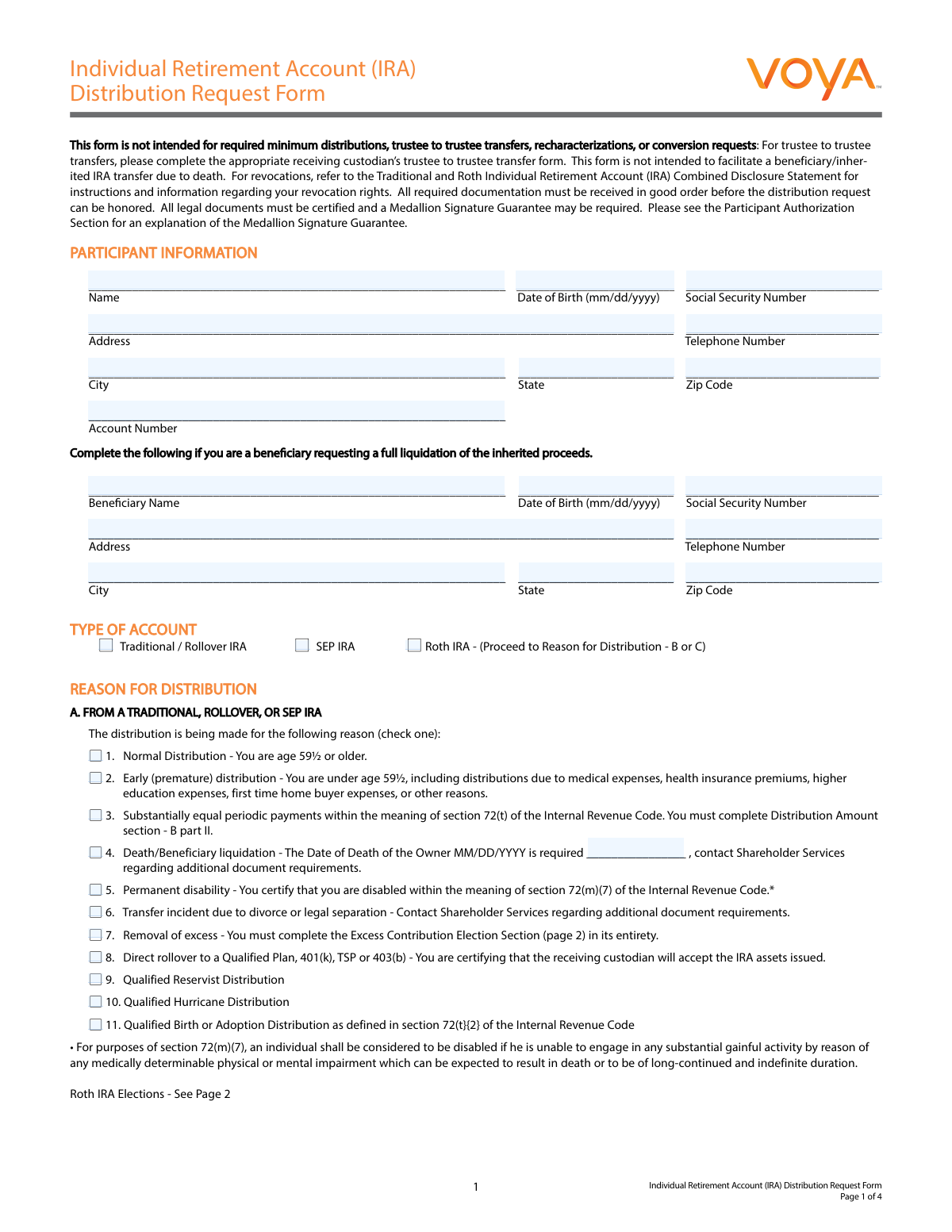
Don't type 118 fields by hand. Tell our AI about yourself, or upload a document you already have, and it fills every field in seconds. You check it, then download, print or sign.
The AI does the filling. You just check it.
No typing into boxes, nothing to install.
What this form asks for
The AI fills all of it, from your answers or your documents.
The AI checks your answers before you download
14 checks built for this form, so a wrong date or a missing answer is caught before anyone else sees it.
Verifies that all fields in the 'PARTICIPANT INFORMATION' section (Name, Date of Birth, Social Security Number, full Address, and Telephone Number) are filled out. This information is fundamental for identifying the account holder and processing the request correctly. A failure to provide any of this information will prevent the form from being processed, as the identity and contact details of the requestor cannot be confirmed.
Ensures the Social Security Number (SSN) is entered in a valid format, such as XXX-XX-XXXX or XXXXXXXXX, and contains only numeric digits. The SSN is a critical identifier for tax reporting and account verification. An invalid format will cause processing and tax reporting errors, leading to rejection of the form until a valid SSN is provided.
Checks if the participant's age, calculated from the 'Date of Birth', is 59½ or older when 'Normal Distribution - You are age 59½ or older' is selected as the reason for distribution. This is crucial for determining the tax implications and penalty status of the distribution. If the age does not meet the requirement, the request may be processed as an early distribution, potentially incurring penalties, and the form will be flagged for review.
Validates that the correct 'REASON FOR DISTRIBUTION' section is completed based on the 'TYPE OF ACCOUNT' selected. If 'Traditional / Rollover IRA' or 'SEP IRA' is chosen, Section A must be filled. If 'Roth IRA' is chosen, either Section B or C must be filled. This logic prevents incorrect processing, as distribution rules and tax consequences differ significantly between account types. An inconsistency will result in the form being rejected.
Verifies that the 'Date of Death' field is completed if the reason for distribution is 'Death/Beneficiary liquidation' in any section (A, B, or C). This date is legally required to process a beneficiary distribution and establish the correct timeline for tax purposes. Failure to provide this date will halt the processing of the beneficiary's request.
Ensures that the user selects a method in either 'A. One time redemption' or 'B. Systematic Distributions' under the 'DISTRIBUTION AMOUNT' section, but not both. These are mutually exclusive choices for how the funds should be paid out. Selecting both options creates ambiguity and will cause the form to be rejected for clarification.
And 8 more checks
- Partial Distribution Amount Entry
- Fund Allocation Percentage Sum
- New Bank Information Completeness
- ABA Routing Number Validation
- Direct Rollover Consistency Check
- Federal Tax Withholding Percentage Format
- Excess Contribution Section Trigger
- Participant Authorization and Signature
Let AI fill out your IRA Distribution Request Form
No typing. Every field filled in seconds, checked, ready to sign.
How to Fill Out IRA Distribution Request Form Online for Free in 2026
What the AI walks you through.
- Navigate to Instafill.ai and upload or select the IRA Distribution Request Form.
- Enter your personal details in the 'Participant Information' section, including your name, date of birth, Social Security number, and address.
- Select your IRA account type (Traditional, Roth, or SEP) and specify the reason for the distribution, such as a normal distribution, rollover, or early withdrawal.
- Indicate the distribution amount, choosing between a full liquidation or a partial/systematic withdrawal, and provide delivery instructions for the funds.
- Complete the 'Tax Withholding Election' section to specify your preferences for federal and state income tax withholding.
- Carefully review all the information you've provided, then sign and date the 'Participant Authorization' section to certify the request.
Common Mistakes in Completing IRA Distribution Request Form
The ones the AI is built to catch.
Using the Form for an Incorrect Purpose
Incorrectly Selecting the Reason for Distribution
Misunderstanding Roth IRA Qualification Rules
Confusing a Direct Rollover with a Trustee-to-Trustee Transfer
Incomplete or Inconsistent Distribution Amount Instructions
Submitting a Notary Stamp Instead of a Medallion Signature Guarantee
Making an Invalid State Tax Withholding Election
Forgetting Required Documentation for Special Situations
Errors in the Excess Contribution Election Section
Illegible Handwriting or Using a Non-Fillable PDF
Frequently Asked Questions About IRA Distribution Request Form
Is it really free for 7 days?
Can I fill other forms too?
How do I cancel?
How does the AI fill out IRA Distribution Request Form?
What happens to my information?
How complex is IRA Distribution Request Form to fill out?
What is the purpose of the Voya IRA Distribution Request Form?
When should I not use this form?
What information do I need to provide in the 'Participant Information' section?
I am a beneficiary of an IRA. Can I use this form?
How do I choose between a 'Qualified' and 'Non-Qualified' distribution for my Roth IRA?
How can I receive my distribution funds?
What happens if I don't make a selection for federal tax withholding?
What is a Medallion Signature Guarantee and when might I need one?
How do I correct an excess contribution I made to my IRA?
Where do I send the completed and signed form?
Can I set up recurring payments with this form?
Can an AI tool help me fill out this IRA distribution form?
How can I fill out this form online using Instafill.ai?
My copy of this PDF is not fillable. What can I do?
Get your IRA Distribution Request Form filled out by AI
$0 today. Cancel before Nov 3 and you pay nothing.
Other forms like this one
retirement forms: Form SSA-1-BK, Application for Retirement Benefits, Form 8880, Credit for Qualified Retirement Savings Contributions, Nationwide Retirement Solutions Participant Distribution Request Form (PNF-0875M9, TRAC Version, 01/2025), Nationwide Retirement Solutions Participant Distribution Request Form (PNF-0875M9, TRAC Version, 01/2025), Momentum Wealth Retirement Income Option Application (WIS060E), Fidelity Investment-Only (Non-Prototype) Retirement Account Application, One-Time Withdrawal — Defined Contribution Retirement Plan, Fidelity One-Time Withdrawal Form — Nonretirement, One-Time Withdrawal – Investment-Only (Non-Prototype) Retirement Account, Automatic Withdrawals—Defined Contribution Retirement Plan, Fidelity Automatic Withdrawals — Nonretirement, Beneficiaries — Nonretirement Transfer on Death, The Church of the Nazarene 403(b) Retirement Savings Plan Beneficiary Designation Form, Beneficiaries – Defined Contribution Retirement Plan, Transfer Shares as a Gift — Nonretirement, Schwab Personal Choice Retirement Account® (PCRA) Limited Power of Attorney (LPOA) Form For a Participant, Vanguard Asset Transfer Authorization Form for the Emory University Retirement Plan, Retirement Transfer Between Existing Vanguard Accounts, Gift of Nonretirement Assets to Existing Vanguard Account Form, Vanguard Taking a Loan from Your Retirement Plan
investment account forms: Fidelity Investment-Only (Non-Prototype) Retirement Account Application, One-Time Withdrawal – Investment-Only (Non-Prototype) Retirement Account, Fidelity Investments Change of Account Ownership — Mutual Fund Only Accounts, HSA Bank Investment Account Transfer Form, Fidelity Investment-Only (Non-Prototype) Retirement Account Application, Voya Investment Management Traditional, Roth, Rollover, and SEP Individual Retirement Account (IRA) Application and Adoption Agreement, Voya Investment Management Account Maintenance Form (Includes Substitute Form W-9), U.S. Bancorp Investments Account Transfer Form, Fidelity Investments Account Application/Enrollment Form and Beneficiary Designation, Fidelity Investments 403(b) Custodial Account Application, New York Life Investments Funds Individual Retirement Account Application and NYLIFE Securities LLC Investor Profile, 529 Plan Account Application, 529 Plan Account Transfer Form, Account Application for Merrill West Virginia Residents - The Hartford SMART529, Account Opening Form for Professional Clients (Institutions, Companies, Intermediaries and Eligible Counterparties), Action Required Letter of Authorization - Merrill Lynch, AwardChoice Limited Individual Investor Account Form, Beneficiary Designation Form - Merrill Lynch, BlackRock IRA Rollover Certification Form, BlackRock New Account Application For Non-Retirement Accounts
IRA forms: Form 5498, IRA Contribution Information, SIRA Allied health treatment request (Catalogue no. SIRA09191), Transfer Due to Divorce — IRA/HSA/529, One-Time Withdrawal – IRA, Fidelity Investments, Fidelity Advisor IRA Distribution Request for Automatic Rollover Accounts, Fidelity Beneficiaries — IRA /HSA, Fidelity Advisor IRA Beneficiary Designation, IRA/HSA Beneficiary Designation, Fidelity IRA Beneficiary Distribution — Charity, Foundation, or a University, Form 8606, Nondeductible IRAs, Fidelity Investments Earnings Automatic Withdrawal Plan — IRA, Inherited IRA Application for Individual Beneficiaries, SIMPLE IRA Contribution Transmittal Form, IRA Distribution Form, Open a Schwab IRA, New York State Deferred Compensation Plan Direct Rollover to a Roth IRA, Charles Schwab IRA Distribution Form, Sample IRA Distribution Letter for a Qualified Charitable Distribution (QCD), Beneficiary Designation Form For IRA and 403(b)(7) Accounts, IRA Beneficiary Designation Form
retirement account forms: Fidelity Investment-Only (Non-Prototype) Retirement Account Application, Fidelity Investment-Only (Non-Prototype) Retirement Account Application, One-Time Withdrawal – Investment-Only (Non-Prototype) Retirement Account, Schwab Personal Choice Retirement Account® (PCRA) Limited Power of Attorney (LPOA) Form For a Participant, Retirement Transfer Between Existing Vanguard Accounts, Gift of Nonretirement Assets to Existing Vanguard Account Form, Inherited Retirement Account Beneficiary Identification Form, Account Reduction Loan Application 401(a) Plan, Electrical Workers Local Union No. 369 Retirement Plan, 401(k) Retirement Account Conversion to Empower Frequently Asked Questions, Housing Agency Retirement Trust Form #190, Request to Withdraw a Rollover Account, ADP Retirement Services: Your retirement account and the C.A.R.E.S. Act, ADP IMPORTANT INFORMATION: Your retirement account and the C.A.R.E.S. Act, Request for a Qualified Charitable Distribution (QCD) from a Brokerage Individual Retirement Account (IRA), Request for qualified charitable distribution from individual retirement account, Request for a Charitable Distribution from an Individual Retirement Account (IRA), Voya Investment Management Traditional, Roth, Rollover, and SEP Individual Retirement Account (IRA) Application and Adoption Agreement, SIMPLE Individual Retirement Account (IRA) Distribution Request Form, Authorization to transfer funds from a bank retirement account, Qualified Retirement Plan and 403(b)(7) Custodial Account Distribution Request Form, Individual Retirement Account (IRA) — Qualified Charitable Distribution Form
distribution forms: Fischer Homes Request for In-Service Distribution, Form 1099-DIV, Dividends and Distributions, Form 1099-R, Distributions From Pensions etc., Form 1099-PATR, Taxable Distributions from Cooperatives, Form 1099-SA, Distributions from HSA/MSA, Nationwide Retirement Solutions Participant Distribution Request Form (PNF-0875M9, TRAC Version, 01/2025), Nationwide Retirement Solutions Participant Distribution Request Form (PNF-0875M9, TRAC Version, 01/2025), Fidelity Advisor 403(b) Distribution Request Form, Fidelity Advisor IRA Distribution Request for Automatic Rollover Accounts, Fidelity NetBenefits Distribution - Recurring Payments, Fidelity Investments® Beneficiary Distribution Form, Fidelity Investments Distribution Form, Fidelity IRA Beneficiary Distribution — Charity, Foundation, or a University, IRA Distribution Form, New York State Deferred Compensation Plan Benefit Distribution Request, Individual 401(k) Distribution Request Form, Fidelity Distribution—Rollover, Charles Schwab IRA Distribution Form, Sample IRA Distribution Letter for a Qualified Charitable Distribution (QCD), Vanguard IRA Distribution Kit (including IRA Distribution Form RRDFT and Form W-4R)
retirement distribution forms: 403(b) Distribution Form - Davis Funds, Nationwide Retirement Solutions Participant Distribution Request Form (PNF-0875M9, TRAC Version, 01/2025), Nationwide Retirement Solutions Participant Distribution Request Form (PNF-0875M9, TRAC Version, 01/2025), Vanguard 403(b)(7) ERISA Retirement Plan Distribution Request (Retirement / Severance from Employment / Disability), Transamerica Retirement Solutions Distribution Request Form, Transamerica Retirement Distribution Request Form and Special Tax Notice, The Housing Agency Retirement Trust 457(b) Deferred Compensation Plan Request For Distribution Form, Request for Recurring Required Minimum Distributions From Your Retirement Investments (Non-ERISA), Request for a Qualified Charitable Distribution (QCD) from a Brokerage Individual Retirement Account (IRA), Request for qualified charitable distribution from individual retirement account, Form F11489, Request for Recurring Required Minimum Distributions From Your Retirement Investments, Request for a Charitable Distribution from an Individual Retirement Account (IRA), SIMPLE Individual Retirement Account (IRA) Distribution Request Form, ABA Retirement Funds Program Distribution Request Form, Distribution Request Form Local No. 1 Retirement Savings Plan #241805, Merrill Lynch One-Time Non-Retirement Distribution Form, Qualified Retirement Plan and 403(b)(7) Custodial Account Distribution Request Form, Individual Retirement Account (IRA) — Qualified Charitable Distribution Form, Form F11489, Request for Recurring Required Minimum Distributions From Your Retirement Investments, Form ORP-RMD-1, State University System Optional Retirement Program (SUSORP) Application for a Required Minimum Distribution
distribution request forms: ABA Retirement Funds Program Distribution Request Form, Nationwide Retirement Solutions Participant Distribution Request Form (PNF-0875M9, TRAC Version, 01/2025), Nationwide Retirement Solutions Participant Distribution Request Form (PNF-0875M9, TRAC Version, 01/2025), Fidelity Advisor 403(b) Distribution Request Form, Fidelity Advisor IRA Distribution Request for Automatic Rollover Accounts, New York State Deferred Compensation Plan Benefit Distribution Request, Individual 401(k) Distribution Request Form, Fischer Homes Request for In-Service Distribution, Vanguard 403(b)(7) ERISA Retirement Plan Distribution Request (Retirement / Severance from Employment / Disability), Elevator Constructors Union Local No.1 Annuity and 401(k) Fund Distribution Request Due to Qualified Domestic Relations Order, Empower Hardship Distribution Request Form, Fidelity Distribution—Rollover Request Form, Fidelity Advisor 403(b) Distribution Request Form, Empower Corrective Distribution Request Form, Alternate Payee QDRO Distribution Request form, Empower Required Minimum Distribution Request Form, Distribution Request Form - ISC MEP, Transamerica Retirement Solutions Distribution Request Form, Transamerica Distribution Request (Distribution of Traditional 401(k) to Roth IRA), Minimum Distribution Request
IRA distribution forms: Fidelity Automatic Withdrawals — RMD/Life Expectancy, Fidelity Advisor IRA Distribution Request for Automatic Rollover Accounts, Fidelity IRA Beneficiary Distribution — Charity, Foundation, or a University, IRA Distribution Form, Charles Schwab IRA Distribution Form, Sample IRA Distribution Letter for a Qualified Charitable Distribution (QCD), Vanguard IRA Distribution Kit (including IRA Distribution Form RRDFT and Form W-4R), IRA Distribution to Charitable Beneficiary, IRA Distribution to Charitable Beneficiary, IRA Distribution Form, Transamerica Distribution Request (Distribution of Traditional 401(k) to Roth IRA), TIAA Brokerage IRA Distribution Request (Form F11025), TIAA-CREF Funds IRA Distribution Form (Retail Class Only), Request for a Qualified Charitable Distribution (QCD) from a Brokerage Individual Retirement Account (IRA), Request for a Charitable Distribution from an Individual Retirement Account (IRA), SIMPLE Individual Retirement Account (IRA) Distribution Request Form, Merrill IRA/IRRA®/Roth IRA/SEP/SRA One Time Distribution Form, IRA/IRRA®/Roth IRA/SEP/SRA Distribution Form For Standing Letters, IRA/IRRA®/ROTH IRA/SEP/SRA Beneficiary Distribution Form, Merrill IRA/IRRA®/SEP/SRA Substantially Equal Periodic Payment (72(t)) Distribution Form
IRA account forms: Fidelity Advisor IRA Distribution Request for Automatic Rollover Accounts, Beneficiary Designation Form For IRA and 403(b)(7) Accounts, Schwab IRA Account Application, Request for a Qualified Charitable Distribution (QCD) from a Brokerage Individual Retirement Account (IRA), Request for a Charitable Distribution from an Individual Retirement Account (IRA), Voya Investment Management Traditional, Roth, Rollover, and SEP Individual Retirement Account (IRA) Application and Adoption Agreement, SIMPLE Individual Retirement Account (IRA) Distribution Request Form, Individual Retirement Account (IRA) — Qualified Charitable Distribution Form, Fidelity Advisor IRA Application for Automatic Rollover Accounts, New Fidelity Account® — SIMPLE IRA, New Fidelity Account® — Inherited IRA for a Non-Spouse Individual, Charles Schwab IRA Account Application, Merrill Edge® Self-Directed SIMPLE IRA Retirement Account Application, Merrill Edge® Self-Directed SIMPLE IRA Retirement Account Application, Merrill Edge Self-Directed SIMPLE IRA Plan/Account Establishment Checklists, Charles Schwab IRA Account Application, IRA Account Application
Let AI fill out your IRA Distribution Request Form
Your trial starts once a card is added. You pay nothing before Nov 3.
Our AI already knows this form, all 118 fields of it. Skip the typing: tell it about yourself, or upload what you have, and it fills the whole form in seconds.
- AI fills every field on all 4 pages, checkboxes included
- No typing into boxes: answer a few questions, or upload a document you already have, an old copy of this form, a photo of a document
- The AI checks the answers; you review and change anything before you download
- Download the finished PDF, print it, or sign it online
- Encrypted, and never used to train AI
Cancel before Nov 3 and you pay nothing.
A card is needed to start the trial. Cancel in two clicks from your account.
Terms · Privacy