
Yes! You can use AI to fill out Minimum Distribution Request
Don't type 14 fields by hand. Tell our AI about yourself, or upload a document you already have, and it fills every field in seconds. You check it, then download, print or sign.
The AI does the filling. You just check it.
No typing into boxes, nothing to install.
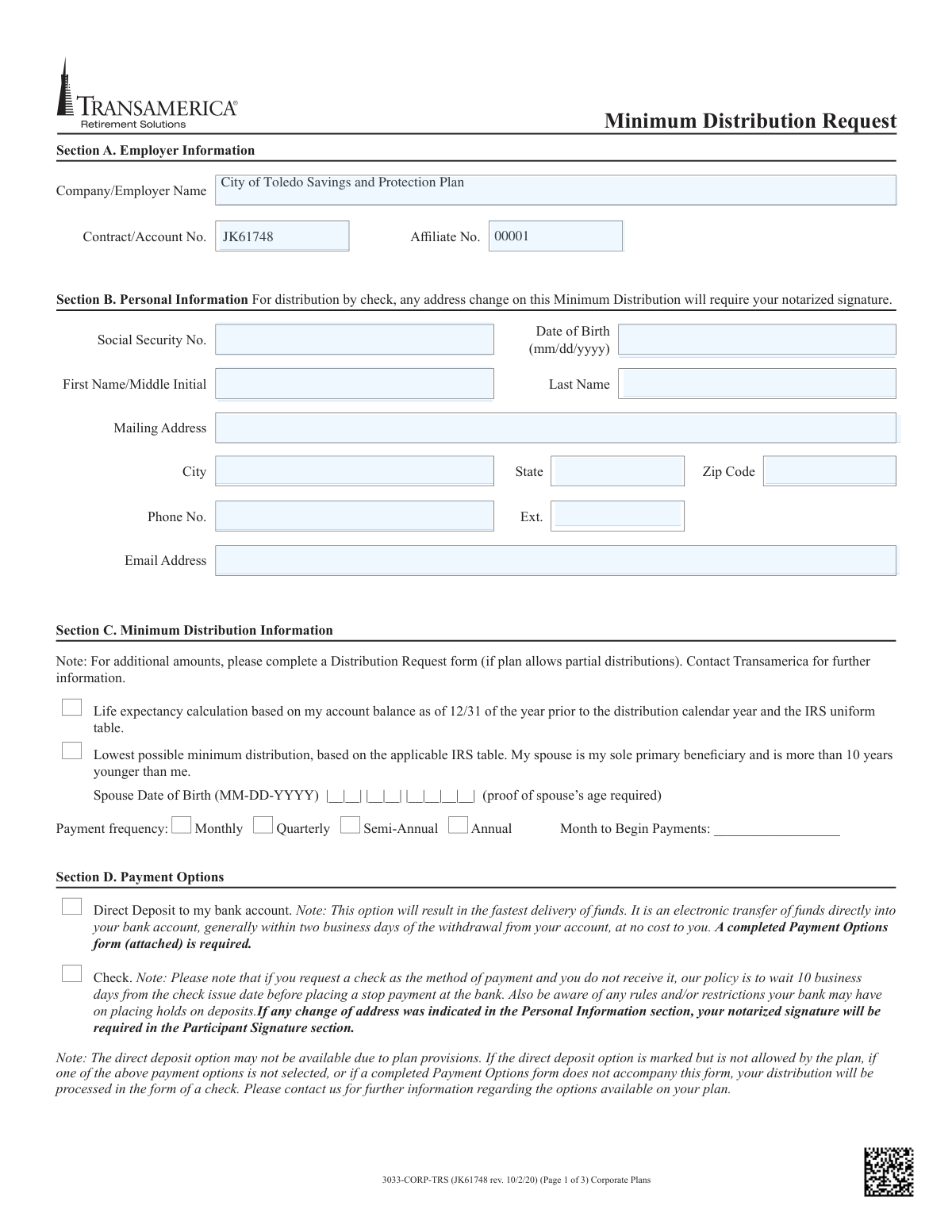
What this form asks for
The AI fills all of it, from your answers or your documents.
The AI checks your answers before you download
14 checks built for this form, so a wrong date or a missing answer is caught before anyone else sees it.
This check ensures the Social Security Number (SSN) in Section B is provided and follows the standard XXX-XX-XXXX format. It also cross-references the SSN provided in the Participant Signature section (Section F) and on the Payment Options form to ensure they all match. This is critical for correct participant identification and to prevent processing errors or fraud.
This validation verifies that the Date of Birth in Section B is a complete and valid date in MM/DD/YYYY format. It also checks that the calculated age is plausible for someone requesting a minimum distribution, typically over age 59 1/2, as per general plan rules. An invalid or illogical date would prevent accurate calculation of distribution amounts and eligibility.
This check is triggered if the participant selects the life expectancy calculation option indicating their spouse is their sole primary beneficiary and more than 10 years younger. If this box is checked, the 'Spouse Date of Birth' field in Section C becomes mandatory. Failure to provide the spouse's DOB would make it impossible to perform the requested calculation.
Following the conditional requirement, this validation calculates the age difference between the participant and their spouse using their respective dates of birth. It confirms that the spouse is, in fact, more than 10 years younger than the participant as claimed. If the age difference is 10 years or less, the submission is flagged for review as it contradicts the selected calculation method.
This check ensures that the participant has made a selection for 'Payment frequency' (Monthly, Quarterly, etc.) in Section C. It also verifies that the 'Month to Begin Payments' field is filled in with a valid month. Missing this information would leave the distribution schedule ambiguous and prevent processing.
In Section E, if the participant chooses to withhold a specific percentage for federal or state taxes, this validation ensures the corresponding text field is not empty. It also checks that the input is a valid numerical value, typically between 0 and 100. An invalid or missing percentage would require manual follow-up and delay the distribution.
And 8 more checks
- Confirms Participant Signature and Date
- Flags Notarization Requirement for Address Change
- Verifies Submission of Required Payment Options Form
- Confirms Attachment for Direct Deposit Details
- Ensures Bank Account Type is Selected for Direct Deposit
- Flags Notarization Requirement for Overnight Mail to Alternate Address
- Validates Spousal Consent Section when Applicable
- Verifies Plan Administrator Signature for Final Approval
Let AI fill out your 3033-CORP-TRS
No typing. Every field filled in seconds, checked, ready to sign.
How to Fill Out 3033-CORP-TRS Online for Free in 2026
What the AI walks you through.
- Navigate to Instafill.ai and upload or select the Minimum Distribution Request form.
- Use the AI assistant to automatically fill in your employer's information in Section A, including the company name and contract number.
- Provide your personal information in Section B, such as your name, address, Social Security Number, and date of birth.
- In Section C, select your desired minimum distribution calculation method and payment frequency (e.g., monthly, annually).
- Choose your payment option in Section D, either direct deposit or check, and complete the attached Payment Options form if necessary.
- Specify your federal and state tax withholding elections in Section E.
- Carefully review all entered information for accuracy, then electronically sign and date the form in Section F. The platform will guide you if a notarized signature is required.
Common Mistakes in Completing 3033-CORP-TRS
The ones the AI is built to catch.
Missing Required Notarization
Submitting Invalid Direct Deposit Documentation
Forgetting the Separate 'Payment Options' Form
Incorrect or Incomplete Tax Withholding Elections
Missing Spousal Consent or Proper Witness
Incomplete Life Expectancy Calculation Information
Using Illegible Handwriting on a Non-Fillable PDF
Forgetting to Specify Payment Frequency or Start Month
Mismatching Participant and Bank Account Names
Frequently Asked Questions About 3033-CORP-TRS
Is it really free for 7 days?
Can I fill other forms too?
How do I cancel?
How does the AI fill out 3033-CORP-TRS?
What happens to my information?
How complex is 3033-CORP-TRS to fill out?
What is the purpose of the Minimum Distribution Request form?
Who needs to fill out this form?
What are my options for receiving my distribution payment?
What documents are required if I choose the Direct Deposit option?
Can I use this form to withdraw more than the minimum required amount?
How are taxes withheld from my distribution?
When is a notarized signature required on this form?
Why do I need to provide my spouse's date of birth?
What is the 'Spousal Consent' section for?
How long will it take to receive my funds after submitting the form?
Where do I send the completed form?
Who signs the 'Plan Administrator Signature' section?
Can I use an AI tool to help me fill out this form?
How can I use Instafill.ai to complete this form online?
What should I do if my PDF copy of the form is not fillable?
Get your 3033-CORP-TRS filled out by AI
$0 today. Cancel before Nov 4 and you pay nothing.
Other forms like this one
distribution forms: Fischer Homes Request for In-Service Distribution, Form 1099-DIV, Dividends and Distributions, Form 1099-R, Distributions From Pensions etc., Form 1099-PATR, Taxable Distributions from Cooperatives, Form 1099-SA, Distributions from HSA/MSA, Nationwide Retirement Solutions Participant Distribution Request Form (PNF-0875M9, TRAC Version, 01/2025), Nationwide Retirement Solutions Participant Distribution Request Form (PNF-0875M9, TRAC Version, 01/2025), Fidelity Advisor 403(b) Distribution Request Form, Fidelity Advisor IRA Distribution Request for Automatic Rollover Accounts, Fidelity NetBenefits Distribution - Recurring Payments, Fidelity Investments® Beneficiary Distribution Form, Fidelity Investments Distribution Form, Fidelity IRA Beneficiary Distribution — Charity, Foundation, or a University, IRA Distribution Form, New York State Deferred Compensation Plan Benefit Distribution Request, Individual 401(k) Distribution Request Form, Fidelity Distribution—Rollover, Charles Schwab IRA Distribution Form, Sample IRA Distribution Letter for a Qualified Charitable Distribution (QCD), Vanguard IRA Distribution Kit (including IRA Distribution Form RRDFT and Form W-4R)
distribution request forms: ABA Retirement Funds Program Distribution Request Form, Nationwide Retirement Solutions Participant Distribution Request Form (PNF-0875M9, TRAC Version, 01/2025), Nationwide Retirement Solutions Participant Distribution Request Form (PNF-0875M9, TRAC Version, 01/2025), Fidelity Advisor 403(b) Distribution Request Form, Fidelity Advisor IRA Distribution Request for Automatic Rollover Accounts, New York State Deferred Compensation Plan Benefit Distribution Request, Individual 401(k) Distribution Request Form, Fischer Homes Request for In-Service Distribution, Vanguard 403(b)(7) ERISA Retirement Plan Distribution Request (Retirement / Severance from Employment / Disability), Elevator Constructors Union Local No.1 Annuity and 401(k) Fund Distribution Request Due to Qualified Domestic Relations Order, Empower Hardship Distribution Request Form, Fidelity Distribution—Rollover Request Form, Fidelity Advisor 403(b) Distribution Request Form, Empower Corrective Distribution Request Form, Alternate Payee QDRO Distribution Request form, Empower Required Minimum Distribution Request Form, Distribution Request Form - ISC MEP, Transamerica Retirement Solutions Distribution Request Form, Transamerica Distribution Request (Distribution of Traditional 401(k) to Roth IRA), Transamerica Retirement Distribution Request Form and Special Tax Notice
Let AI fill out your 3033-CORP-TRS
Your trial starts once a card is added. You pay nothing before Nov 4.
Our AI already knows this form, all 14 fields of it. Skip the typing: tell it about yourself, or upload what you have, and it fills the whole form in seconds.
- AI fills every field on the form, checkboxes included
- No typing into boxes: answer a few questions, or upload a document you already have, an old copy of this form, a photo of a document
- The AI checks the answers; you review and change anything before you download
- Download the finished PDF, print it, or sign it online
- Encrypted, and never used to train AI
Cancel before Nov 4 and you pay nothing.
A card is needed to start the trial. Cancel in two clicks from your account.
Terms · Privacy