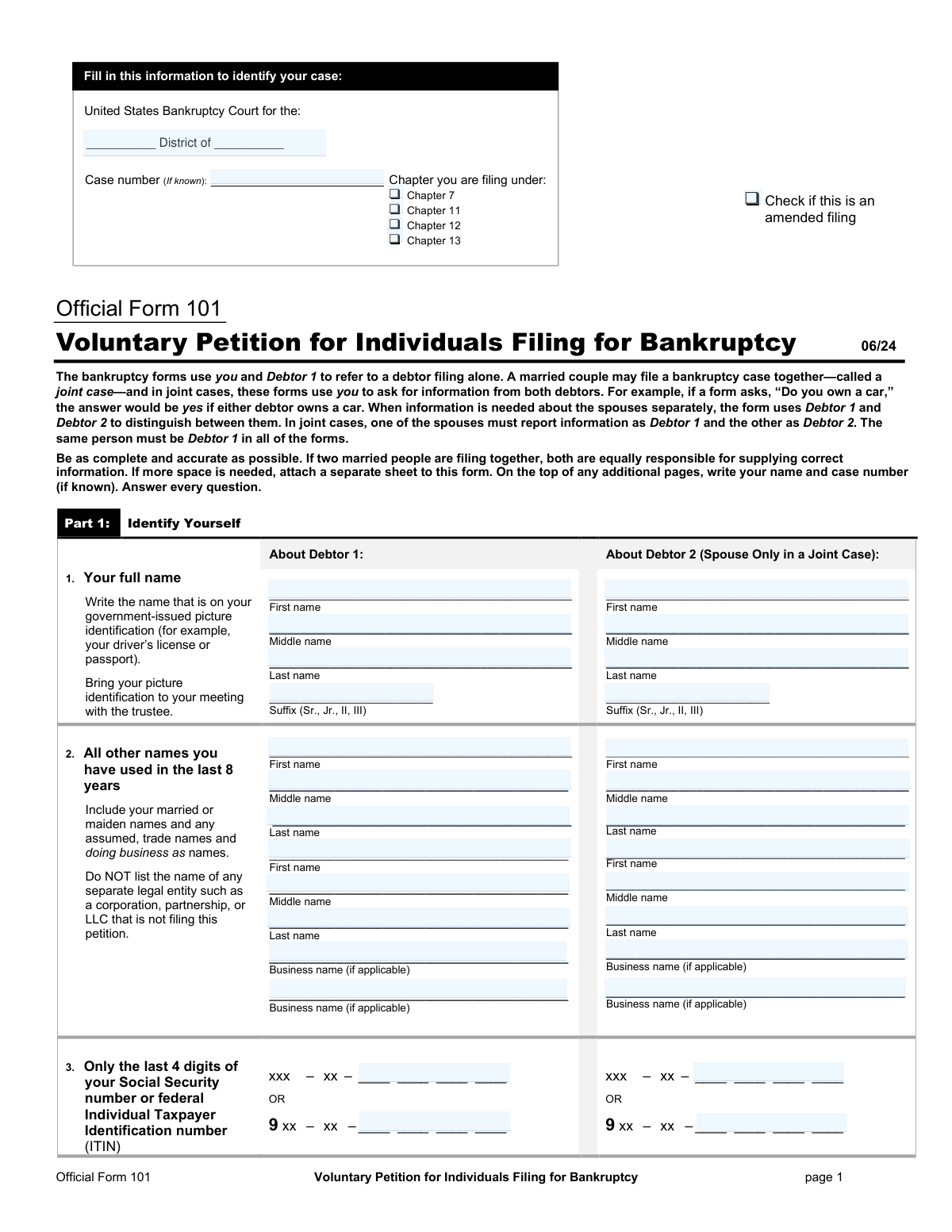
Yes! You can use AI to fill out Official Form 101, Voluntary Petition for Individuals Filing for Bankruptcy
Official Form 101 is the primary “opening” document that begins an individual (or joint) bankruptcy case in U.S. Bankruptcy Court. It collects identifying information for Debtor 1 (and Debtor 2 in a joint case), the chapter being filed, prior bankruptcy history, fee payment method, and required disclosures such as credit counseling status and eviction-judgment information (if applicable). Filing this petition triggers the bankruptcy case and, in most cases, the automatic stay, and it sets deadlines for submitting required schedules and statements. Because errors or omissions can lead to dismissal or other serious consequences, it is critical that the petition is complete, accurate, and consistent with the rest of the bankruptcy filing package.
Our AI automatically handles information lookup, data retrieval, formatting, and form filling.
It takes less than a minute to fill out Official Form 101 using our AI form filling.
Securely upload your data. Information is encrypted in transit and deleted immediately after the form is filled out.
Form specifications
| Form name: | Official Form 101, Voluntary Petition for Individuals Filing for Bankruptcy |
| Number of pages: | 117 |
| Filled form examples: | Form Official Form 101 Examples |
| Language: | English |
Instafill Demo: filling out a legal form in seconds
How to Fill Out Official Form 101 Online for Free in 2026
Are you looking to fill out a OFFICIAL FORM 101 form online quickly and accurately? Instafill.ai offers the #1 AI-powered PDF filling software of 2026, allowing you to complete your OFFICIAL FORM 101 form in just 37 seconds or less.
Follow these steps to fill out your OFFICIAL FORM 101 form online using Instafill.ai:
- 1 Select the bankruptcy chapter (7/11/12/13) and confirm eligibility; gather required information and documents (government-issued ID, creditor list, income/pay stubs, asset and debt records).
- 2 Enter debtor information for Debtor 1 (and Debtor 2 if filing jointly): legal name as shown on ID, any other names used in the last 8 years, and last 4 digits of SSN/ITIN (full SSN is provided separately on Official Form 121).
- 3 Provide case-filing details: correct bankruptcy district, residence and mailing address(es), county, and the reason you are filing in that district (venue basis).
- 4 Complete case questions: prior bankruptcy filings, any related pending cases (spouse/partner/affiliate), rental/eviction judgment status (and prepare Forms 101A/101B if required), and any sole proprietorship/business disclosures if applicable.
- 5 Choose how the filing fee will be paid (paid in full, installments with Official Form 103A, or Chapter 7 fee waiver request with Official Form 103B) and prepare payment per local court rules.
- 6 Answer the credit counseling section: indicate whether the briefing was completed within 180 days and attach the certificate (or prepare the required explanation/waiver motion if seeking a temporary waiver or exemption).
- 7 Review for accuracy and consistency with the schedules and statements, then sign under penalty of perjury (both debtors if joint) and submit the petition with required companion forms (including Official Form 121 and the creditor mailing list) through the online filing service for court submission.
Our AI-powered system ensures each field is filled out correctly, reducing errors and saving you time.
Why Choose Instafill.ai for Your Fillable Official Form 101 Form?
Speed
Complete your Official Form 101 in as little as 37 seconds.
Up-to-Date
Always use the latest 2026 Official Form 101 form version.
Cost-effective
No need to hire expensive lawyers.
Accuracy
Our AI performs 10 compliance checks to ensure your form is error-free.
Security
Your personal information is protected with bank-level encryption.
Frequently Asked Questions About Form Official Form 101
This packet explains the documents needed to start an individual Chapter 7 bankruptcy case in the U.S. Bankruptcy Court for the District of Arizona. A Chapter 7 case begins when you file the Voluntary Petition (Official Form 101) and is generally used to discharge eligible debts after required disclosures and trustee review.
Anyone starting an individual bankruptcy case must file Official Form 101. Married couples may file together as a joint case, and the same person must be listed as Debtor 1 on all forms.
The court’s checklist states you need: (1) Voluntary Petition (Form 101, and Forms 101A/101B if applicable), (2) a valid state-issued ID, and (3) Statement About Your Social Security Numbers (Form 121). A case starts when the petition is filed, but missing required items can lead to dismissal if not timely corrected.
No—most public filings use only the last 4 digits. Your full SSN/ITIN is provided on Official Form 121, which must be submitted separately and is not part of the public case file.
The Chapter 7 filing fee is $338. The Arizona court notice states payment is by cashier’s check or money order only.
Yes. On Form 101, you can indicate you will pay in installments and attach Official Form 103A, or (Chapter 7 only) request a waiver by filing Official Form 103B if you meet the income and inability-to-pay requirements.
If it is not filed with the petition, the typed mailing list of creditors must be filed within 7 days of the petition date, or the case could be dismissed. The mailing list must follow the court’s formatting rules (typed, all caps, proper spacing, complete addresses).
It must be typed (no handwriting), in black ink, in a straight left-column format using ALL CAPS, with no more than 40 characters per line and no more than 5 lines per creditor address. You must also include the debtor name and case number in the 1-inch top margin and submit the Mailing List Declaration page.
No. The Arizona Master Mailing List requirements say not to include the debtor, joint debtor, debtor’s attorney, the U.S. Trustee, or the case trustee because the court adds that information.
You generally must complete an approved credit counseling briefing within 180 days before filing and file the certificate (and any payment plan, if applicable). If the certificate was not filed with the petition, the Arizona checklist states it must be filed within 7 days, and Form 101 also warns the case can be dismissed if the requirement is not met.
If not filed with the petition, you must file the schedules (Forms 106A/B through 106J and related summary/declaration forms), the Statement of Financial Affairs (Form 107), the Statement of Intention (Form 108), the Chapter 7 Current Monthly Income/means test forms (Form 122A-1 and related forms), and required local declarations (such as evidence of employer payments within 60 days and the declaration for debtors without an attorney). Missing the 14-day deadline can result in dismissal.
This local form (Local Form 1007-2) is where you certify you are attaching pay stubs/payment advices from the 60 days before filing, or that you received none. If you attach pay documents, you must redact (black out) Social Security numbers, minors’ names, dates of birth, and financial account numbers.
If you rent and your landlord has obtained an eviction judgment against you, Form 101 instructs you to complete and file the Initial Statement About an Eviction Judgment Against You (Form 101A) as part of the petition. Additional steps may apply if you are trying to stay in the rental after filing.
If you are filing Chapter 7 and have secured debts (like a car loan) or unexpired personal property leases, you must file Form 108 stating whether you will surrender, redeem, reaffirm, or otherwise handle the collateral/lease. It must be filed within 30 days after filing the petition or by the date set for the meeting of creditors, whichever is earlier, and you must send copies to the listed creditors/lessors.
If you had one case dismissed within the prior year, the automatic stay may terminate 30 days after the new filing unless you file a motion to continue it and show good faith. If you had two or more cases dismissed within the prior year, no automatic stay goes into effect unless you file a motion within 30 days and show good faith; the court notice says to caption these as an “Emergency Motion.”
Yes, individuals in Chapter 7 (and certain other chapters) must complete an approved personal financial management course, and in a joint case each debtor must take it. If the provider does not notify the court, you must file the certificate; failing to complete/file it can result in the case closing without a discharge and may require a motion to reopen and a reopening fee.
Compliance Official Form 101
Validation Checks by Instafill.ai
1
Validates Debtor 1 and Debtor 2 full legal names match government-issued ID format requirements
Ensures each debtor’s name fields (first, middle, last, suffix) are completed when applicable and do not contain business/entity names, nicknames, or placeholders. This is important because the petition requires the name exactly as shown on government-issued photo identification, and mismatches can cause trustee meeting issues and notice problems. If validation fails, the submission should be rejected or flagged for correction before filing, requiring the filer to update the name fields to match ID.
2
Ensures consistency of debtor names across Form 101 and Form 121 (SSN Statement)
Checks that Debtor 1 and Debtor 2 names on Official Form 121 exactly match the corresponding debtor names on Official Form 101 (including spelling and suffix). This is critical because Form 121 is used to associate full SSN/ITIN with the correct debtor while keeping public filings limited to last four digits. If validation fails, the system should block submission and require reconciliation to prevent misidentification and privacy/notice errors.
3
Validates SSN/ITIN formats and mutual exclusivity rules (last-4 vs full number by form)
On Form 101, validates that only the last 4 digits are provided in the SSN/ITIN field and that they are exactly four numeric digits; on Form 121, validates that full SSN is 9 digits (or ITIN begins with '9' and is 9 digits) and that 'You do not have a SSN/ITIN' is not checked when a number is provided. This prevents privacy violations in public records and ensures the court can properly identify the debtor. If validation fails, the system should reject the filing and prompt the user to correct the number entry and/or the checkbox selections.
4
Validates EIN format and requires EIN only when business/sole proprietor information indicates applicability
Ensures any Employer Identification Number entered is exactly 9 digits in the standard XX-XXXXXXX format and is not confused with an SSN/ITIN. Also checks logical applicability: if the debtor indicates business ownership/operation (e.g., sole proprietor or business connections), an EIN may be expected; if no business activity is indicated, EIN should be blank unless clearly justified. If validation fails, the system should flag the EIN field for correction and optionally require an explanation when an EIN is provided without business context.
5
Validates address completeness and USPS formatting for residence and mailing addresses
Checks that the residence address includes street number/name (or valid PO Box where allowed), city, state (2-letter USPS code), ZIP code (5 digits or ZIP+4), and county where requested. This is essential because court notices are mailed to the provided mailing address and incomplete addresses can result in missed deadlines and returned mail. If validation fails, the system should prevent submission until all required address components are present and properly formatted.
6
Ensures district/venue selection is completed and 'another reason' includes an explanation
Validates that the filer selects exactly one venue basis option for each applicable debtor (lived in district longer than any other in last 180 days vs. another reason). If 'I have another reason' is selected, an explanation text must be provided and must not be blank or placeholder text. If validation fails, the system should block submission because venue defects can lead to transfer/dismissal and improper case administration.
7
Validates chapter selection consistency across petition header and Part 2 (Chapter you are filing under)
Ensures the chapter checkbox at the top of Form 101 matches the chapter selected in line 7 and that exactly one chapter is selected. This is important because chapter choice drives required schedules/forms, fee options, and eligibility rules (e.g., Chapter 7 means test forms). If validation fails, the system should reject the submission and require the filer to select a single, consistent chapter.
8
Validates filing fee payment method selection and required attachments for installments/waiver requests
Checks that exactly one fee payment option is selected (pay in full, installments, or waiver request) and enforces chapter constraints (fee waiver request allowed only for Chapter 7). If installments are selected, Official Form 103A must be attached; if waiver is selected, Official Form 103B must be attached. If validation fails, the system should block submission because missing fee applications can cause immediate deficiency notices and dismissal risk.
9
Validates prior bankruptcy filing disclosures (dates, districts, case numbers) when 'Yes' is selected
If the filer answers 'Yes' to prior filings within 8 years, validates that each listed prior case includes a district, a valid date in MM/DD/YYYY format, and a non-empty case number in an acceptable pattern (alphanumeric with separators as used by courts). This is important for stay limitations and eligibility considerations and to prevent incomplete disclosures. If validation fails, the system should require completion of all subfields or change the answer to 'No' if truly none.
10
Validates related-case disclosure for spouse/partner/affiliate cases when 'Yes' is selected
If the filer indicates other pending or being-filed cases by a non-filing spouse, business partner, or affiliate, validates that debtor name, relationship, district, and filing date are provided, and case number is provided if known (or explicitly marked unknown if the system supports it). This ensures the court can identify related cases for administration and potential joint/related proceedings. If validation fails, the system should block submission until the related-case details are complete.
11
Validates rental/eviction logic and required Form 101A attachment when eviction judgment is indicated
If the filer answers that they rent their residence and the landlord has obtained an eviction judgment, the system must require Official Form 101A to be included with the petition package. This is critical because special stay rules apply and the court needs the additional statement at filing. If validation fails, the system should prevent submission and prompt the filer to attach Form 101A (and any other required eviction-related forms as applicable).
12
Validates credit counseling eligibility selection and enforces required supporting documents and timing flags
Ensures each debtor checks exactly one credit counseling option and enforces dependencies: if a certificate is claimed received, a certificate attachment is required; if certificate not yet available, the system should mark it as a post-filing due item; if exigent circumstances waiver is claimed, an explanatory statement attachment is required; if incapacity/disability/active duty is selected, the system should require a waiver motion indicator/attachment per instructions. This is important because failure to meet credit counseling requirements can make the debtor ineligible and lead to dismissal. If validation fails, the system should block submission or generate a deficiency requiring immediate correction.
13
Validates required signatures and execution dates for debtors and attorney (as applicable)
Checks that Debtor 1 signature and execution date are present, and Debtor 2 signature/date are present for joint cases; validates dates are in MM/DD/YYYY format and are not in the future. If an attorney page is included, validates attorney signature, date, printed name, firm/address, phone, email, and bar number/state are completed. If validation fails, the system should reject submission because unsigned/undated petitions and declarations are defective and can be stricken or lead to dismissal.
14
Validates pro se (no-attorney) acknowledgments and petition preparer disclosures
If the filer indicates they are filing without an attorney, validates that the required awareness questions are answered and that the debtor(s) sign and date the pro se acknowledgment page. If the filer indicates they paid a non-attorney preparer, requires Official Form 119 attachment and validates the preparer name is provided; also cross-checks consistency with similar preparer questions on Official Form 106Dec and Form 107. If validation fails, the system should block submission to avoid noncompliance with preparer disclosure rules and potential sanctions.
15
Validates Master Mailing List (creditor matrix) formatting and declaration completeness per District of Arizona requirements
Enforces local formatting rules: typed (not handwritten), all caps, left-justified straight column, max 40 characters per line, each creditor address no more than 5 lines, city/state/ZIP on last line with USPS state abbreviations, and excludes debtor/attorney/trustee addresses. Requires the Mailing List Declaration (MML-3) to be completed with debtor name(s), case number (if known), page count, date, and appropriate signatures, and if amended/supplemental is checked, ensures only new/changed creditors are included. If validation fails, the system should reject the mailing list upload because improper matrices can prevent noticing and trigger deficiency notices or dismissal.
Common Mistakes in Completing Official Form 101
People often write a nickname, omit a middle name, or use a married/maiden name that differs from their driver’s license or passport, even though Form 101 specifically says to use the name on your government-issued picture ID. This can create identity verification problems at the 341 meeting and may trigger requests for amendments or additional proof. To avoid this, copy your name exactly as it appears on your current state-issued ID (including suffixes like Jr./Sr.) and keep it consistent across all forms.
In joint filings, couples sometimes switch who is “Debtor 1” and “Debtor 2” from one form to another, especially when each spouse is filling out different sections. This causes mismatched income, assets, signatures, and SSN/ITIN reporting, which can lead to clerk rejections, trustee confusion, and amendment requirements. Pick one spouse as Debtor 1 and keep that assignment identical on every form (101, 121, schedules, SOFA, means test, declarations).
A common privacy mistake is putting the full SSN on the petition, schedules, creditor list, or attachments, or accidentally e-filing Form 121 as a public document. This can expose sensitive information and may require corrective filings and redaction motions, and it can delay case processing. Only list the last 4 digits where requested (e.g., Form 101) and submit Form 121 separately following local procedures; also redact SSNs, minors’ names, DOBs, and account numbers on pay stubs and other exhibits.
Debtors frequently misunderstand the timing and think they can take credit counseling after filing, or they attach a “debt management plan” document instead of the required certificate from an approved provider. The petition warns that failure to properly certify counseling can make you ineligible and can result in dismissal and loss of the filing fee, with collections resuming. To avoid this, complete counseling with an approved agency within 180 days before filing, attach the certificate (and any payment plan if one was created), and if claiming exigent circumstances or waiver, include the required written explanation/motion.
Many filers open the case with only the petition and then miss the strict follow-up deadlines listed in the court’s instructions (e.g., mailing list and credit counseling certificate within 7 days if not filed with the petition; schedules/SOFA/means test and local declarations within 14 days). The form packet repeatedly warns that missing these deadlines can lead to dismissal, which can also affect the automatic stay and require refiling fees. Use a checklist and calendar all deadlines on the filing date, and file the complete set up front whenever possible.
The District of Arizona’s Master Mailing List requirements are very specific (typed, black ink, ALL CAPS, straight left column, 40 characters per line, max 5 lines per creditor, one blank line between creditors, and debtor/case number in the top margin). People often submit handwritten lists, mixed case, long lines, missing blank lines, or include the debtor/attorney/trustee—any of which can cause rejection or require resubmission and can delay noticing to creditors. Follow the MML rules exactly, verify every address includes street/PO box, city, state abbreviation, and ZIP, and include the required Mailing List Declaration page.
Even when the matrix format is correct, filers often provide partial addresses (missing suite numbers, PO boxes, city/state/ZIP, or using outdated collection addresses). This leads to returned/undeliverable notices, which can create due process issues, require you to re-mail notices yourself, and can complicate dischargeability disputes if a creditor claims they didn’t receive notice. Use the most current billing statement or creditor website for the bankruptcy/notice address, include attention lines when provided (e.g., “ATTN: BANKRUPTCY DEPT”), and double-check ZIP+4 when available.
The instructions state the Chapter 7 filing fee is $338 and specify payment by cashier’s check or money order only (per the local handout), but filers sometimes bring cash, personal checks, or the wrong fee amount. This can prevent the case from being opened when you expect, or force you to return with proper payment, risking missed deadlines or emergency stay needs. Confirm the exact accepted payment methods with the clerk for your division and bring the correct amount in an approved form of payment (or file Form 103A/103B if requesting installments/waiver).
People often copy Schedule I numbers into Form 122A-1 (or vice versa), not realizing they measure different time periods and definitions (Schedule I is income as of filing date; Form 122A-1 is the average over the prior 6 full months). This can produce an incorrect presumption-of-abuse result, trigger trustee objections, and require amended means test forms. Avoid this by calculating Form 122A-1 from the correct 6-month lookback period and completing Schedule I based on your present expected monthly income, even if the numbers differ.
A frequent error is listing the same asset in multiple categories (e.g., a vehicle both as a vehicle and as “other property”), or using purchase price instead of fair market value as of the filing date, or forgetting to report only the portion you own. These mistakes cascade into incorrect totals on Form 106Sum and can affect exemptions, trustee decisions, and potential asset liquidation. List each asset only once, use realistic fair market values (and be ready to explain your source), report your ownership percentage, and then copy totals carefully into Form 106Sum.
Debtors often check the wrong exemption system (state vs federal), omit the specific statutory citation, or claim “100% of fair market value” for an exemption that has a dollar cap without understanding the limitation. The consequence can be losing property that could have been protected, or facing trustee objections and forced amendments under time pressure. To avoid this, confirm which exemption scheme applies based on domicile rules, cite the exact statute for each item, and claim an amount that fits within the statutory limit (using “100% up to the applicable limit” only when appropriate).
Saved over 80 hours a year
“I was never sure if my IRS forms like W-9 were filled correctly. Now, I can complete the forms accurately without any external help.”
Kevin Martin Green
Your data stays secure with advanced protection from Instafill and our subprocessors
Robust compliance program
Transparent business model
You’re not the product. You always know where your data is and what it is processed for.
ISO 27001, HIPAA, and GDPR
Our subprocesses adhere to multiple compliance standards, including but not limited to ISO 27001, HIPAA, and GDPR.
Security & privacy by design
We consider security and privacy from the initial design phase of any new service or functionality. It’s not an afterthought, it’s built-in, including support for two-factor authentication (2FA) to further protect your account.
Fill out Official Form 101 with Instafill.ai
Worried about filling PDFs wrong? Instafill securely fills official-form-101-voluntary-petition-for-individua forms, ensuring each field is accurate.