Yes! You can use AI to fill out Plan-to-Plan Direct Rollover Form
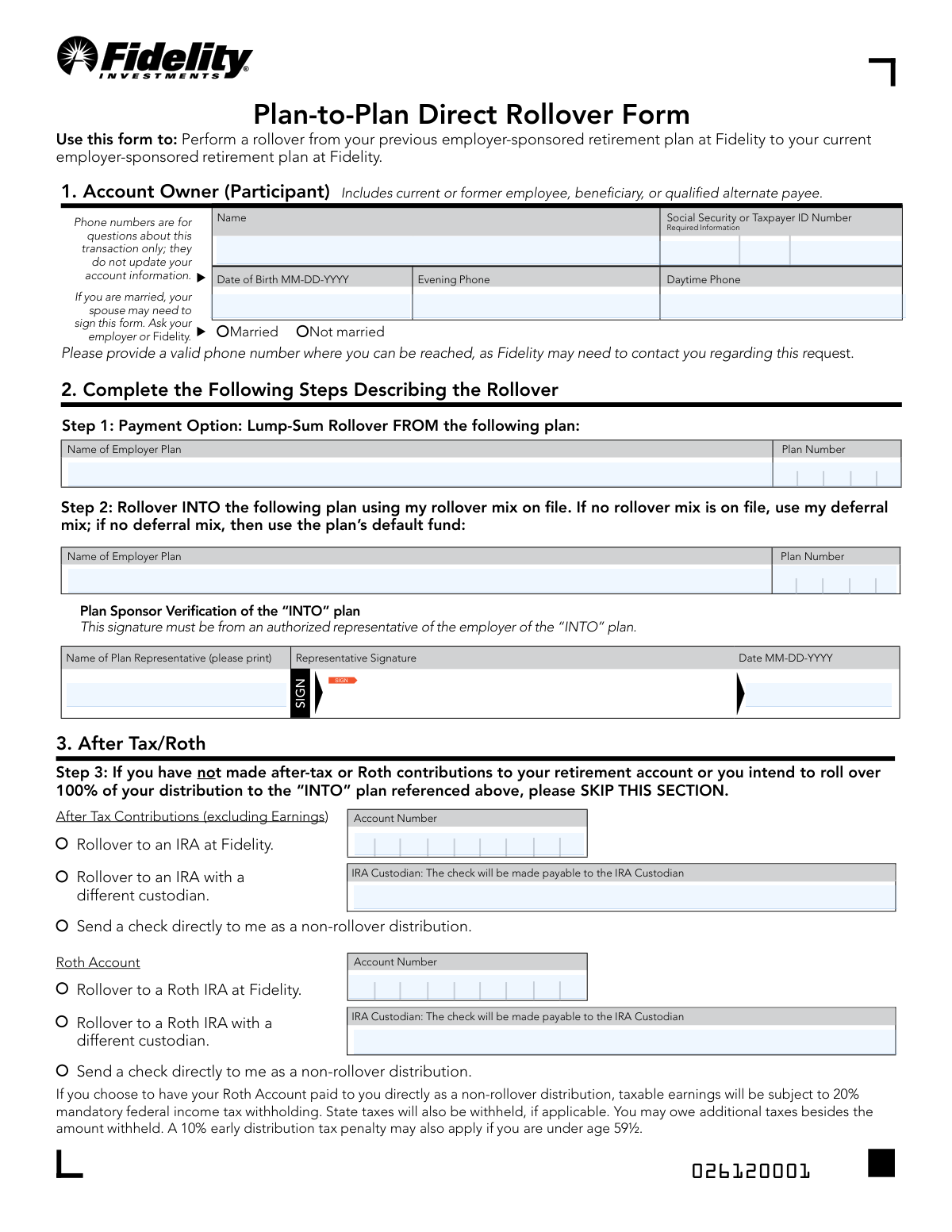
This form facilitates a direct rollover of assets from a previous employer-sponsored retirement plan at Fidelity to a current employer-sponsored retirement plan, also at Fidelity. It is crucial for consolidating retirement savings into a single account for easier management and tracking. Today, this form can be filled out quickly and accurately using AI-powered services like Instafill.ai, which can also convert non-fillable PDF versions into interactive fillable forms.
Our AI automatically handles information lookup, data retrieval, formatting, and form filling.
It takes less than a minute to fill out 577776.5.0 using our AI form filling.
Securely upload your data. Information is encrypted in transit and deleted immediately after the form is filled out.
Form specifications
| Form name: | Plan-to-Plan Direct Rollover Form |
| Number of pages: | 2 |
| Filled form examples: | Form 577776.5.0 Examples |
| Language: | English |
Instafill Demo: How to fill out PDF forms in seconds with AI
How to Fill Out 577776.5.0 Online for Free in 2026
Are you looking to fill out a 577776.5.0 form online quickly and accurately? Instafill.ai offers the #1 AI-powered PDF filling software of 2026, allowing you to complete your 577776.5.0 form in just 37 seconds or less.
Follow these steps to fill out your 577776.5.0 form online using Instafill.ai:
- 1 Navigate to Instafill.ai and upload or select the Fidelity Plan-to-Plan Direct Rollover Form.
- 2 Provide your personal information in Section 1, including your name, Social Security Number, date of birth, and contact details.
- 3 Complete Section 2 by identifying the plan you are rolling over FROM and the plan you are rolling over INTO, including plan names and numbers.
- 4 If you have after-tax or Roth contributions, specify your distribution choices in Section 3.
- 5 Obtain the required signatures: the plan sponsor verification for the 'INTO' plan (Section 2), your spouse's consent if applicable (Section 4), and your own signature (Section 5). Note that some signatures may require a notary.
- 6 Review all the information populated by the AI for accuracy and make any necessary corrections before finalizing.
- 7 Download the completed form and submit it to Fidelity following the instructions provided, either digitally via the NetBenefits app or by mail.
Our AI-powered system ensures each field is filled out correctly, reducing errors and saving you time.
Why Choose Instafill.ai for Your Fillable 577776.5.0 Form?
Speed
Complete your 577776.5.0 in as little as 37 seconds.
Up-to-Date
Always use the latest 2026 577776.5.0 form version.
Cost-effective
No need to hire expensive lawyers.
Accuracy
Our AI performs 10 compliance checks to ensure your form is error-free.
Security
Your personal information is protected with bank-level encryption.
Frequently Asked Questions About Form 577776.5.0
This form is used to move your retirement savings directly from a previous employer's plan to your current employer's plan, specifically when both plans are administered by Fidelity.
You should use this form if you are a current or former employee wanting to consolidate your retirement funds by rolling over an old Fidelity-managed plan into your new Fidelity-managed plan.
You will need your personal information (name, SSN, DOB), and the official plan names and plan numbers for both the old plan you are rolling FROM and the new plan you are rolling INTO.
Your plan numbers are typically located on your account statements or by logging into your Fidelity NetBenefits® account. You can also contact your employer's HR department for this information.
An authorized representative from your new employer (the 'INTO' plan) must sign this section to confirm their plan can accept your rollover. This is often someone in your HR or benefits department.
This section is for directing any after-tax or Roth contributions you may have. You can choose to roll them into an IRA or receive a direct payment, but you should review the potential tax consequences before making a choice.
You only need your spouse's signature in Section 4 if you are married AND your specific retirement plan requires spousal consent for distributions. Check your plan documents or ask your employer to confirm if this applies to you.
Yes, your spouse's signature must be witnessed by either a notary public or an authorized plan representative. A signature guarantee from a bank is not a valid substitute.
You can submit the form digitally via the NetBenefits® mobile app, or by sending it via regular or overnight mail to the Fidelity Investments address listed on the form.
If you skip Section 3, Fidelity will assume you intend to roll over 100% of your account balance, including any after-tax or Roth money, directly into the new employer plan.
Yes, services like Instafill.ai use AI to accurately auto-fill form fields from your saved profile, which can save you time and help reduce errors.
You can upload the PDF of the form to the Instafill.ai platform. The service will make the fields fillable online, allowing you to type your answers, auto-fill from a saved profile, and download the completed document.
You can use a service like Instafill.ai, which can convert flat, non-fillable PDFs into interactive forms that you can easily complete on your computer.
You, the account owner or participant, must sign and date Section 5. Your signature authorizes Fidelity to process the rollover as you've instructed on the form.
Compliance 577776.5.0
Validation Checks by Instafill.ai
1
SSN/TIN Format and Requirement
This check verifies that the Social Security or Taxpayer ID Number field is not empty and conforms to the standard 9-digit format (XXXXXXXXX or XXX-XX-XXXX). This number is critical for uniquely identifying the account owner for tax reporting and transaction processing. A missing or malformed ID will prevent the system from locating the correct accounts and will cause the entire transaction to fail.
2
Date of Birth Validity and Plausibility
Validates that the Date of Birth is a real date provided in MM-DD-YYYY format. The check also ensures the date is plausible, meaning it is not in the future and the individual is of a reasonable age (e.g., over 18 and under 120). This is essential for identity verification and for determining eligibility for certain distribution options, such as avoiding the 10% early distribution penalty for those over 59½.
3
Marital Status Selection Requirement
Ensures that the account owner has selected one of the two marital status options: 'Married' or 'Not married'. This information is legally required to determine if spousal consent is necessary for the distribution, as specified by the plan's rules. Failure to provide this information will halt the process, as the system cannot determine if Section 4 (Spouse's Consent) needs to be completed.
4
Distinct 'FROM' and 'INTO' Plans
This validation confirms that the 'Plan Number' entered in Step 1 (FROM plan) is different from the 'Plan Number' entered in Step 2 (INTO plan). A rollover, by definition, is a movement of assets between two separate plans. Attempting to roll over funds within the same plan is an invalid transaction and would be rejected.
5
Plan Number Existence and Association
Verifies that both the 'FROM' and 'INTO' plan numbers provided in Section 2 correspond to active, valid plans managed by Fidelity. The system must also confirm that the participant's Social Security Number is associated with both of these plans. If either plan number is invalid or not linked to the participant, the rollover cannot be executed.
6
Plan Sponsor Verification Completeness
This check ensures that the 'Plan Sponsor Verification' for the 'INTO' plan is fully completed, including the printed name, signature, and date. This signature confirms that the receiving plan is authorized to accept the rollover funds. An incomplete verification section will render the form invalid, as it lacks the necessary authorization from the new plan's sponsor.
7
Conditional After-Tax/Roth Account Information
If a checkbox is selected in Section 3 for rolling over After-Tax or Roth funds to a specific destination, this check ensures the corresponding details are provided. For example, if 'Rollover to an IRA at Fidelity' is checked, the 'Account Number' field becomes mandatory. Missing this dependent information would make it impossible to direct the funds to the correct destination, causing a processing failure.
8
Exclusive Selection in After-Tax/Roth Options
Validates that for each fund type in Section 3 (After Tax Contributions and Roth Account), only one distribution option is selected. A participant cannot simultaneously roll over funds to an IRA and also receive the same funds as a direct payment. Selecting multiple conflicting options for the same pool of money creates an ambiguous instruction that cannot be processed.
9
Conditional Spousal Consent Requirement
This check is triggered if the participant selected 'Married' in Section 1 and the 'FROM' plan's rules mandate spousal consent for distributions. If these conditions are met, the system verifies that Section 4, 'Spouse's Consent', is fully completed, including the spouse's signature and notarization. Failure to provide required spousal consent is a legal compliance failure and will prevent the distribution.
10
Spouse and Notary Date Consistency
If the 'Spouse's Consent' section is completed, this validation ensures the 'Spouse Signature Date' is on or before the 'Notary/Plan Representative Signature Date'. The notary or witness is attesting to the signature event, so they must sign on the same day or after the spouse signs, not before. An incorrect date sequence would invalidate the notarization and, by extension, the spousal consent.
11
Participant Signature and Date Mandate
Verifies that the account owner has provided a signature and date in Section 5. This signature is the participant's legal authorization for Fidelity to execute the rollover instructions on the form. A missing signature or date means the form is not legally actionable and the entire request will be rejected.
12
Participant Name Consistency Across Sections
This check compares the 'Print Participant Name' from Section 5 with the 'Name' provided in Section 1. The names must match to ensure the person signing the form is the same person identified as the account owner. A mismatch could indicate a potential error or fraudulent activity and would require further verification before processing.
13
Final Signature Date Chronology
Ensures the 'Participant Signature Date' in Section 5 is the latest or same date as all other signature dates on the form (e.g., Plan Sponsor Verification Date, Spouse's Consent Date). The participant's signature should be the final step, certifying all information provided is correct at the time of signing. A participant signature dated before other required signatures would invalidate the form's logical flow.
14
Contact Phone Number Presence
This validation checks that at least one phone number, either 'Daytime Phone' or 'Evening Phone', has been provided in Section 1. While not used to update account records, a contact number is crucial for the processing team to quickly resolve any questions or issues with the form. Missing contact information can lead to significant delays if the form is incomplete or requires clarification.
Common Mistakes in Completing 577776.5.0
Users often know their employer's name but not the specific plan number for either the source or destination plan. Leaving this field blank or guessing a number will cause the form to be rejected, as Fidelity cannot identify the correct accounts for the transfer. To avoid this, locate the plan number on a recent account statement or by logging into your online retirement portal before filling out the form.
People frequently overlook that Section 2 requires a signature from a representative of the 'INTO' plan (their new employer). This is not a signature for the account owner; it is an authorization from the new plan to accept the funds. Submitting the form without this signature will result in an automatic rejection and significant delays. You must contact your new employer's HR or benefits department to obtain the signature from an authorized person.
This section is complex and often misunderstood, leading users to either skip it when they have after-tax funds or fill it out incorrectly. This can lead to serious, unintended tax consequences, including paying unnecessary taxes and penalties on distributions. Before completing this section, carefully review your account details to confirm if you have after-tax or Roth balances and consult a financial advisor if you are unsure about the best option for your situation.
Married participants may not realize their specific plan requires their spouse's signature to authorize the rollover, causing them to skip Section 4. This is a legal requirement for certain plans, and its absence will render the form invalid and lead to its rejection. Always verify with your plan administrator or Fidelity whether spousal consent is mandatory for your account before submitting the form.
When spousal consent is required, the signature must be witnessed by either a plan representative or a notary public. Common mistakes include getting a signature guarantee instead of a notary seal, or having the notary forget to fill in all their details like the commission expiration date. An improperly executed witness or notary section will invalidate the consent, and the form will be returned, delaying the transaction.
It is surprisingly common for individuals to meticulously fill out the entire form but forget to sign and date it in Section 5. An unsigned or undated form is not legally binding and cannot be processed by Fidelity, leading to an immediate rejection. Always perform a final review of the completed form, paying special attention to all signature lines, before submitting it.
In a rush, it's easy to accidentally enter the previous employer's plan information in the 'INTO' section (Step 2) and the current employer's plan in the 'FROM' section (Step 1). This error makes the rollover request illogical and will cause it to be rejected immediately, forcing you to start over. To prevent this, carefully read the headings for each step and double-check that the source plan is in Step 1 and the destination plan is in Step 2.
Applicants often write their common nickname or an initial instead of their full legal name as it appears on their account and government ID. This name mismatch can cause verification to fail, leading to processing delays or rejection of the form. Always use your full, legal name in the 'Account Owner Name' field to ensure it matches the records on file.
When filling out a printed form by hand, poor or rushed handwriting can make critical information like a Social Security Number or plan number unreadable. This forces the processing agent to guess, which can lead to data entry errors, or reject the form outright. To avoid this, print clearly in block letters. If the form is a non-fillable PDF, an AI-powered tool like Instafill.ai can convert it into a fillable version, allowing you to type your answers for perfect clarity.
The simple 'Married' or 'Not married' checkbox in Section 1 is frequently overlooked. This information is critical because it determines whether the Spousal Consent in Section 4 might be required. Leaving it blank creates ambiguity and may cause Fidelity to return the form for clarification, delaying the rollover process. Ensure you check the box that accurately reflects your current marital status.
Saved over 80 hours a year
“I was never sure if my IRS forms like W-9 were filled correctly. Now, I can complete the forms accurately without any external help.”
Kevin Martin Green
Your data stays secure with advanced protection from Instafill and our subprocessors

Robust compliance program
Transparent business model
You’re not the product. You always know where your data is and what it is processed for.
ISO 27001, HIPAA, and GDPR
Our subprocesses adhere to multiple compliance standards, including but not limited to ISO 27001, HIPAA, and GDPR.
Security & privacy by design
We consider security and privacy from the initial design phase of any new service or functionality. It’s not an afterthought, it’s built-in, including support for two-factor authentication (2FA) to further protect your account.
Fill out 577776.5.0 with Instafill.ai
Worried about filling PDFs wrong? Instafill securely fills plan-to-plan-direct-rollover-form forms, ensuring each field is accurate.



