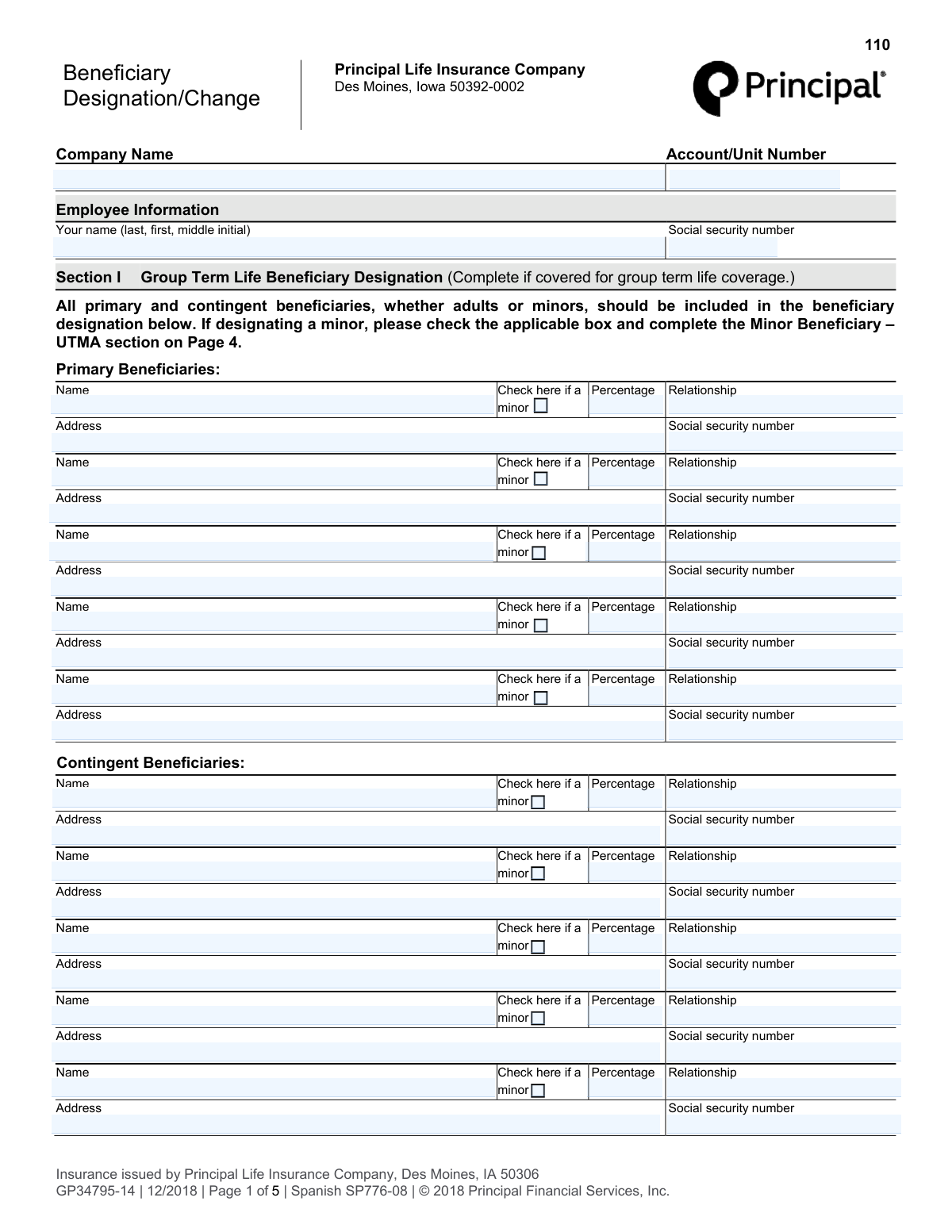
Yes! You can use AI to fill out Principal Life Insurance Company Beneficiary Designation/Change Form (GP34795-14)

The Principal Life Insurance Company Beneficiary Designation/Change Form (GP34795-14) is a legal document used by an employee to designate who will receive the proceeds from their group term life insurance policy. This form allows for the naming of primary and contingent beneficiaries and includes specific instructions for appointing a custodian for minor beneficiaries under the Uniform Transfers to Minors Act (UTMA). Today, this form can be filled out quickly and accurately using AI-powered services like Instafill.ai, which can also convert non-fillable PDF versions into interactive fillable forms.
Our AI automatically handles information lookup, data retrieval, formatting, and form filling.
It takes less than a minute to fill out GP34795-14 using our AI form filling.
Securely upload your data. Information is encrypted in transit and deleted immediately after the form is filled out.

Form specifications

Form name: Principal Life Insurance Company Beneficiary Designation/Change Form (GP34795-14)
Number of pages: 1
Language: English
main-image

Instafill Demo: How to fill out PDF forms in seconds with AI

How to Fill Out GP34795-14 Online for Free in 2026

Are you looking to fill out a GP34795-14 form online quickly and accurately? Instafill.ai offers the #1 AI-powered PDF filling software of 2026, allowing you to complete your GP34795-14 form in just 37 seconds or less.
Follow these steps to fill out your GP34795-14 form online using Instafill.ai:
  1. 1 Navigate to Instafill.ai and upload or select the Principal Beneficiary Designation/Change form.
  2. 2 Provide your personal employee information, such as your full name and Social Security number, in the designated fields.
  3. 3 In Section I, list your primary beneficiaries, including their names, relationship to you, and the percentage of the benefit they are to receive.
  4. 4 Enter the details for any contingent beneficiaries who will receive the proceeds if the primary beneficiaries are unable to.
  5. 5 If you are designating a minor, complete the 'Minor Beneficiary - UTMA' section, specifying a custodian to manage the funds.
  6. 6 Carefully review all entered information for accuracy, then proceed to Section III to electronically sign and date the document.
  7. 7 Download a copy of the completed form for your records and submit it to your employer's human resources department as instructed.

Our AI-powered system ensures each field is filled out correctly, reducing errors and saving you time.

Why Choose Instafill.ai for Your Fillable GP34795-14 Form?

Speed

Complete your GP34795-14 in as little as 37 seconds.

Up-to-Date

Always use the latest 2026 GP34795-14 form version.

Cost-effective

No need to hire expensive lawyers.

Accuracy

Our AI performs 10 compliance checks to ensure your form is error-free.

Security

Your personal information is protected with bank-level encryption.

Frequently Asked Questions About Form GP34795-14

This form is used to designate or change the beneficiaries for your Group Term Life insurance policy provided through Principal Life Insurance Company. A beneficiary is the person, trust, or estate you choose to receive the insurance benefit upon your death.

Any employee or retiree covered by the University's group term life insurance plan who wishes to name their beneficiaries for the first time or update their existing beneficiary information should complete this form.

Primary beneficiaries are the first people in line to receive your life insurance proceeds. Contingent beneficiaries will only receive the proceeds if all of your primary beneficiaries are no longer living at the time the benefit is paid.

Yes, the total percentage allocated to all your primary beneficiaries must equal 100%. Similarly, the total percentage for all your contingent beneficiaries must also equal 100%.

You will need to provide each beneficiary's full legal name, address, Social Security Number, and their relationship to you. Be sure to use their given name, like 'Mary M. Doe,' not 'Mrs. John Doe.'

If you name a beneficiary who is a minor, you must check the 'minor' box next to their name and complete the 'Minor Beneficiary - UTMA' section on Page 2. This involves appointing a custodian to manage the funds for the minor.

A UTMA custodian is an adult or a trust company you designate to manage the insurance proceeds for a minor beneficiary. It is recommended to name a custodian and at least one substitute in case the first person is unable to serve.

Page 3 of the form provides sample wording for designating a trust. You should list the trustees' names and the official name and date of the trust, for example, 'ABC Bank & Trust Company, Trustee under (Trust Name) established XX/XX/XXXX.'

Retirees should return the signed form to the University Human Resources Benefits Office at the address listed on Page 1. Active employees should confirm the correct submission process with their HR department.

Providing a beneficiary's Social Security Number is crucial for the insurance company to accurately identify them and expedite the payment process when a claim is made. It helps prevent delays and ensures the benefit reaches the correct person.

After signing and dating the form, you should make a copy for your personal records. Then, submit the original document to the appropriate office as instructed on the form.

Yes, services like Instafill.ai use AI to help you accurately auto-fill form fields with your saved information. This can save you time and help prevent common errors when completing the form.

You can upload the PDF to Instafill.ai, and its AI will identify the fields. You can then click to fill them from your saved profile or type in the information, then download the completed, ready-to-sign document.

If you have a non-fillable PDF, you can use a service like Instafill.ai. It can convert flat, non-interactive PDFs into fillable forms that you can easily complete on your computer.

Compliance GP34795-14
Validation Checks by Instafill.ai

1
Ensures Employee Social Security Number Format is Valid
This check verifies that the employee's Social Security Number in the 'Employee Information' section is entered in a valid format, such as XXX-XX-XXXX or XXXXXXXXX. This is critical for correctly identifying the employee's account and ensuring compliance with legal and financial regulations. A failure in this validation would prevent the form from being processed until a correctly formatted SSN is provided.
2
Validates Sum of Primary Beneficiary Percentages Equals 100%
This validation ensures that the sum of the percentages assigned to all designated primary beneficiaries equals exactly 100%. It is crucial for ensuring the entire life insurance benefit is allocated without ambiguity or shortfall. If the total is not 100%, the form will be rejected, and the user must adjust the percentages to properly distribute the full benefit.
3
Validates Sum of Contingent Beneficiary Percentages Equals 100%
This check confirms that the percentages assigned to all contingent beneficiaries sum to exactly 100%. This is important for defining a clear line of succession if none of the primary beneficiaries are able to receive the benefit. An incorrect total would create ambiguity in asset distribution, so the form will be flagged for correction if the sum is not 100%.
4
Requires at Least One Primary Beneficiary Designation
This validation ensures that at least one primary beneficiary is listed with a name and a percentage greater than zero. The primary purpose of the form is to designate who receives the benefits, so failing to name a primary beneficiary defeats its purpose. The submission will be considered incomplete and rejected if no primary beneficiary is specified.
5
Ensures Completeness of Beneficiary Information
For each beneficiary row (both primary and contingent) where a percentage is entered, this check verifies that the beneficiary's name, relationship, and address are also provided. Missing information can delay or prevent the payment of benefits when they become due. The form will be returned if any designated beneficiary with an assigned percentage is missing these key details.
6
Conditional Requirement for Minor Beneficiary (UTMA) Section
This check validates that if any beneficiary is marked as a minor by checking the corresponding box, the 'Minor Beneficiary - UTMA' section on Page 2 is completed. This section is legally necessary to appoint a custodian to manage the funds until the minor reaches the age of majority. If a minor is designated but the UTMA section is left blank, the submission will be invalid.
7
Validates UTMA Custodian Information is Complete
When the 'Minor Beneficiary - UTMA' section is required, this check ensures that the custodian's full name and address have been provided. This information is essential for legally transferring the assets to the correct individual responsible for the minor's funds. A submission will fail if this section is triggered but the custodian's details are missing.
8
Verifies Exclusive Selection of UTMA State Law
If the UTMA section is completed, this validation ensures that exactly one of the two state law options (either the Iowa UTMA or the beneficiary's state of residence UTMA) is selected. This choice determines the legal framework governing the custodianship and is a critical legal detail. The form will be considered incomplete if zero or both options are checked.
9
Validates California UTMA Termination Age
This check ensures that if an age is entered for a California custodianship, the value is an integer between 18 and 25, inclusive, as specified in the form instructions. An invalid age could render the designation legally unenforceable. The form will be rejected if the age is outside this specific range.
10
Validates Ohio UTMA Termination Age
This validation confirms that if an age is specified for an Ohio custodianship, the value is an integer between 18 and 21, inclusive, per the form's instructions. Using an age outside this range would conflict with the Ohio Uniform Transfers to Minors Act. The submission will be flagged for correction if the entered age is invalid.
11
Requires Employee Signature and Date
This check verifies that the employee has signed the form and provided the date of signature in Section III. The signature legally attests to the designations made, and the date establishes when the designation became effective. A form without a signature and date is not legally binding and will be rejected.
12
Ensures 'Date Signed' is a Valid Date
This validation confirms that the value entered in the 'Date signed' field is a real, correctly formatted date (e.g., MM/DD/YYYY). An invalid or nonsensical date can create legal challenges regarding the timing and validity of the beneficiary change. The system will prevent submission until a valid date is entered.
13
Checks for Proper Beneficiary Name Format
Based on the form's instructions to use given names like 'Mary M. Doe' instead of 'Mrs. John Doe', this check flags beneficiary names that may be improper. Using a full legal name is crucial for unambiguous identification and to avoid legal complications during payout. While this might be a warning rather than a hard failure, it helps ensure the designation is legally sound.
14
Ensures Employee Name is Provided
This validation confirms that the 'Your name' field in the Employee Information section is not empty. The employee's name is the primary identifier linking the individual to their insurance policy and the beneficiary designations. The form is fundamentally incomplete and cannot be processed without this information.

Common Mistakes in Completing GP34795-14

Incorrect Percentage Allocation

A frequent error is allocating percentages that do not sum to exactly 100% for each beneficiary group. The total for all primary beneficiaries must equal 100%, and the total for all contingent beneficiaries must also equal 100%, treated as two separate groups. This mistake often happens due to simple miscalculation and can cause the form to be rejected, delaying the update and leaving a previous or default designation in effect. To avoid this, double-check your math for each section before submitting. AI-powered tools like Instafill.ai can automatically validate these totals to ensure they are correct.

Incomplete Beneficiary Information

Users often leave critical fields like the beneficiary's Social Security Number (SSN) or full address blank. This information is vital for the insurance company to locate and positively identify the beneficiary without ambiguity, especially if they have a common name. Missing data can lead to significant delays in paying out the benefit, causing financial hardship and stress for your loved ones during a difficult time. Always gather and enter the complete, current information for every listed beneficiary.

Improper Naming of Beneficiaries

Designations like 'Mrs. John Doe' or vague group terms like 'My Children' are common but incorrect. The form requires the full legal name of each individual, such as 'Mary M. Doe'. Using informal or vague names can create legal disputes and require court intervention to determine the intended beneficiary, delaying the payout. Always use the person's full given name as it appears on their official identification to ensure your wishes are carried out precisely.

Mishandling Minor Beneficiary Designation

People often fail to properly handle designations for minors. A common mistake is checking the 'minor' box next to a beneficiary's name but then neglecting to complete the required 'Minor Beneficiary - UTMA' section on Page 2. This leaves the custodianship arrangement legally undefined. An incomplete designation for a minor can force the funds into a court-supervised guardianship, which is a costly and lengthy process. If you designate a minor, you must complete both steps.

Forgetting to Name Substitute Custodians

Even when filers correctly complete the UTMA section for a minor, they frequently name a primary custodian but fail to nominate one or more substitutes. If the named custodian is unable or unwilling to serve when the benefit becomes payable, the lack of a designated backup can result in court proceedings to appoint one. To prevent this, always name at least one, and preferably two, substitute custodians to ensure a smooth transfer of assets for the minor's benefit.

Confusing Primary and Contingent Beneficiaries

A misunderstanding of beneficiary tiers leads people to list the same individuals in both the primary and contingent sections, or to split the total 100% across both groups. Contingent beneficiaries only inherit if all primary beneficiaries have predeceased the employee. This error can render the contingent designation meaningless or create confusion about your intent. Ensure your primary beneficiaries total 100%, and then list a separate set of contingent beneficiaries who should only inherit in their absence.

Incorrectly Designating a Trust

When naming a trust as a beneficiary, filers often provide insufficient information, simply writing the trust's name. As per the form's instructions, you must include the full name of the trust, the full names of the trustee(s), and the date the trust was established. Omitting these details can cause significant processing delays as the insurance company must then work to verify the trust's existence and legal standing. Following the provided 'Sample Beneficiary Designations' is crucial for a valid trust designation.

Missing Signature or Date

Forgetting to sign and date the form in Section III is a simple but critical oversight that completely invalidates the entire document. An unsigned form is not legally binding, meaning your beneficiary designation will not be updated, and any prior designation (or the company's default rules) will remain in effect. This could result in the benefit being paid to an ex-spouse or another unintended party. Always perform a final review to ensure you have signed and dated the form before submission.

Illegible Handwriting on a Scanned Form

This form is often distributed as a non-fillable PDF, requiring it to be printed and filled out by hand. Illegible handwriting, especially for names, addresses, and percentages, can lead to critical data entry errors by the processing staff. A misspelled name or a '3' mistaken for an '8' can alter your intended distribution and create legal challenges. To avoid this, print clearly in block letters. Alternatively, tools like Instafill.ai can convert flat PDFs into fillable forms, allowing you to type directly and ensure perfect legibility.
Saved over 80 hours a year

“I was never sure if my IRS forms like W-9 were filled correctly. Now, I can complete the forms accurately without any external help.”

Kevin Martin Green

Your data stays secure with advanced protection from Instafill and our subprocessors

Robust compliance program

Transparent business model

You’re not the product. You always know where your data is and what it is processed for.

ISO 27001, HIPAA, and GDPR

Our subprocesses adhere to multiple compliance standards, including but not limited to ISO 27001, HIPAA, and GDPR.

Security & privacy by design

We consider security and privacy from the initial design phase of any new service or functionality. It’s not an afterthought, it’s built-in, including support for two-factor authentication (2FA) to further protect your account.

Fill out GP34795-14 with Instafill.ai

Worried about filling PDFs wrong? Instafill securely fills principal-life-insurance-company-beneficiary-designationchange-form-gp34795-14 forms, ensuring each field is accurate.