Yes! You can use AI to fill out Principal Life Insurance Company Small Amounts Benefit Election
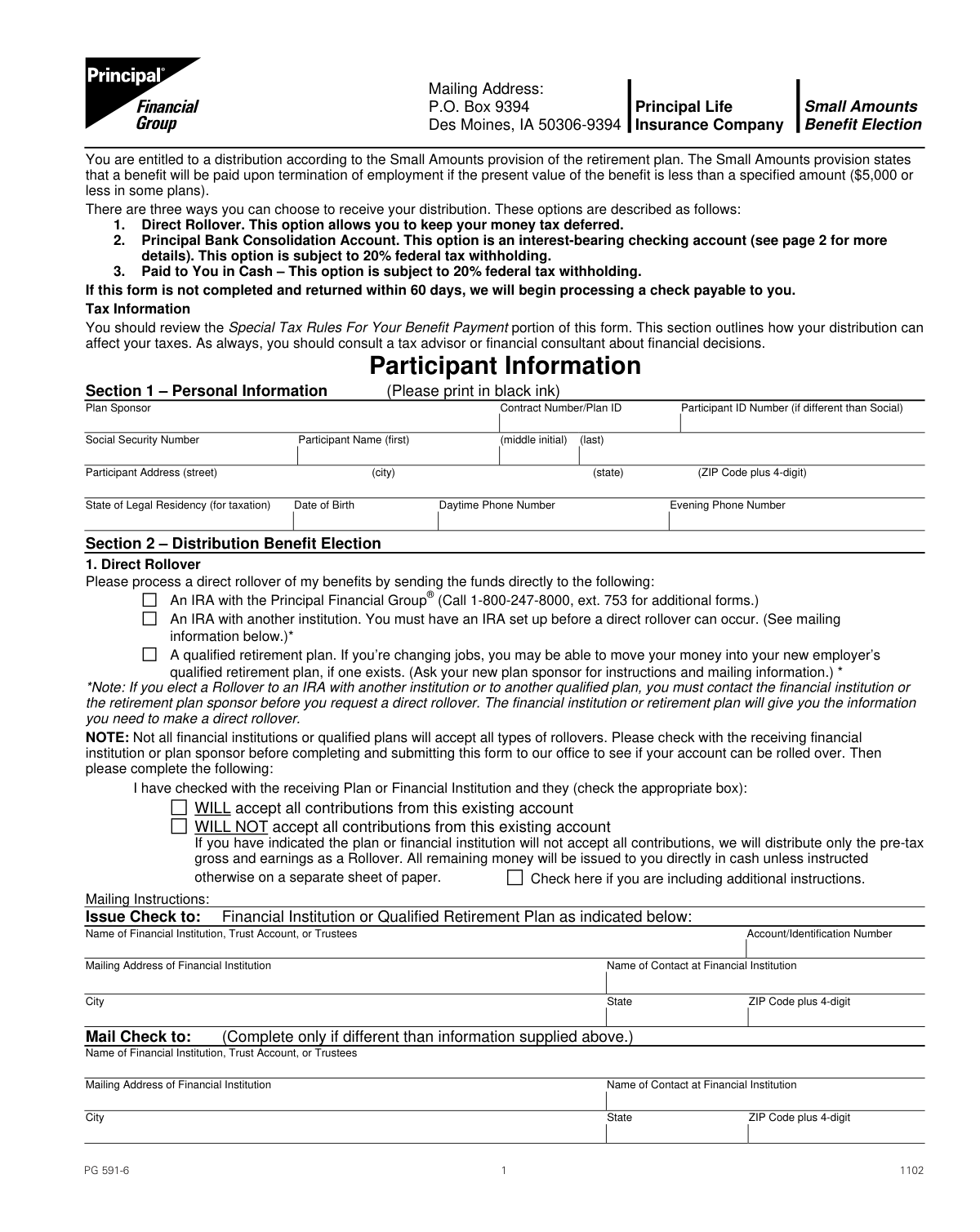
This form allows a participant in a retirement plan to elect how to receive their benefit distribution when it qualifies as a 'Small Amount' (often $5,000 or less). It provides three options: a tax-deferred Direct Rollover to an IRA or another qualified plan, a transfer to a Principal Bank Consolidation Account, or a direct cash payout, with the latter two being subject to tax withholding. Today, this form can be filled out quickly and accurately using AI-powered services like Instafill.ai, which can also convert non-fillable PDF versions into interactive fillable forms.
PG 591 is part of the
insurance forms, life insurance forms, Principal forms, company forms, Principal Life forms and benefit election forms categories on Instafill.
Rather not fill this in by hand? Instafill is an online form filler that completes PDF forms automatically — upload the blank form, answer a few questions, and the AI fills every field.
Form specifications
| Form name: | Principal Life Insurance Company Small Amounts Benefit Election |
| Number of pages: | 1 |
| Language: | English |
Our AI automatically handles information lookup, data retrieval, formatting, and form filling.
It takes less than a minute to fill out PG 591 using our AI form filling.
Securely upload your data. Information is encrypted in transit and deleted immediately after the form is filled out.
Instafill Demo: How to fill out PDF forms in seconds with AI
How to Fill Out PG 591 Online for Free in 2026
Are you looking to fill out a PG 591 form online quickly and accurately? Instafill.ai offers the #1 AI-powered PDF filling software of 2026, allowing you to complete your PG 591 form in just 37 seconds or less.
Follow these steps to fill out your PG 591 form online using Instafill.ai:
- 1 Navigate to Instafill.ai and upload or select the Small Amounts Benefit Election form (PG 591).
- 2 Use the AI assistant to fill in your personal details in Section 1, including your name, Social Security Number, address, and date of birth.
- 3 In Section 2, select your preferred distribution method: Direct Rollover, Principal Bank Consolidation Account, or a cash payout.
- 4 If you chose a Direct Rollover, provide the required information for the receiving financial institution or qualified retirement plan.
- 5 In Section 3, indicate if you want any additional federal taxes withheld from your distribution.
- 6 Carefully review all the information you've entered for accuracy, then proceed to Section 4 to electronically sign and date the form, certifying your election.
- 7 Download the completed, signed form and submit it to your plan sponsor or Principal Life Insurance Company as instructed.
Our AI-powered system ensures each field is filled out correctly, reducing errors and saving you time.
Why Choose Instafill.ai for Your Fillable PG 591 Form?
Speed
Complete your PG 591 in as little as 37 seconds.
Up-to-Date
Always use the latest 2026 PG 591 form version.
Cost-effective
No need to hire expensive lawyers.
Accuracy
Our AI performs 10 compliance checks to ensure your form is error-free.
Security
Your personal information is protected with bank-level encryption.
Frequently Asked Questions About PG 591
This form is for participants who have left their employer and are entitled to a small retirement benefit distribution, typically $5,000 or less. It allows you to officially choose how you want to receive these funds.
You have three main options: a tax-deferred Direct Rollover to an IRA or another qualified plan, a deposit into a Principal Bank Consolidation Account, or a cash payment via a check sent directly to you.
If you do not return the completed form within 60 days, the plan will automatically process a check payable to you for your benefit amount. This payment will be subject to a mandatory 20% federal tax withholding.
A Direct Rollover allows you to move your money to another retirement account, like an IRA, without it being taxed in the current year. This keeps your retirement savings tax-deferred and allows it to continue growing.
If you select the cash payment or the Principal Bank Consolidation Account, the plan is required by law to withhold 20% of the taxable amount for federal income tax before sending you the funds.
You must first contact the other financial institution to set up an IRA and confirm they will accept the rollover. You will need to obtain their mailing address and your new account number to complete the 'Direct Rollover' section of this form.
Yes, the 'Plan Sponsor Section' must be completed and signed by your former employer or plan administrator. They need to certify your information and authorize the distribution of your benefits.
Payment is typically processed between 30 and 90 days after you sign the form. By signing, you waive the initial 30-day waiting period, which can speed up the process.
Yes, Section 3 allows you to elect additional federal tax withholding. You can specify an extra percentage or a flat dollar amount to be withheld from your payment.
You will need your full name, Social Security Number, address, date of birth, and phone number. You will also need the Plan Sponsor name and your Contract/Plan ID number, which should be available from your plan documents.
Yes, services like Instafill.ai use AI to accurately auto-fill form fields with your personal information. This can save you time and help reduce errors when completing the form.
You can use a service like Instafill.ai to complete this form digitally. Simply upload the PDF to their platform, and it will become an interactive form you can type your information into.
Tools like Instafill.ai can convert flat, non-fillable PDFs into interactive forms. This allows you to easily type your answers directly into the fields before printing the completed form for signature.
The 'Plan Sponsor Section' is not for you to complete. It must be filled out and signed by your former employer or the administrator of the retirement plan.
Compliance PG 591
Validation Checks by Instafill.ai
1
Validates Social Security Number Format
This check ensures the Social Security Number in Section 1 is provided and follows the standard XXX-XX-XXXX format. The SSN is a critical identifier for tax reporting and account verification. If the format is incorrect or the field is empty, the form submission will be rejected to prevent identity mismatches and IRS reporting errors.
2
Ensures Exclusive Distribution Election
This validation verifies that the participant has selected exactly one of the three main distribution options in Section 2: Direct Rollover, Principal Bank Consolidation Account, or Paid to You in Cash. Selecting zero or multiple options creates an ambiguous instruction that cannot be processed. The form must be returned to the participant for clarification if this check fails.
3
Verifies Completeness of Direct Rollover Information
If the 'Direct Rollover' option is chosen for an external institution or another qualified plan, this check ensures all fields under 'Mailing Instructions' are completed, including the institution's name, account number, and full address. This information is essential for the correct and secure transfer of funds. An incomplete section will halt the rollover process until the missing details are provided.
4
Validates Date of Birth
This check confirms that the Date of Birth in Section 1 is a valid, logical date (e.g., not in the future) and that the participant meets any age-related eligibility requirements for distribution, such as the age 59 1/2 rule for avoiding certain tax penalties. An invalid or illogical date can cause compliance issues and incorrect tax calculations, requiring correction before processing.
5
Mandates Participant Signature and Date
This check ensures that the participant has signed and dated the form in Section 4. The signature legally authorizes the distribution election and waives the 30-day waiting period. A missing signature or date renders the form invalid and legally non-binding, preventing any distribution from being processed.
6
Confirms Plan Sponsor Authorization
This validation confirms that the 'Plan Sponsor Signature' and 'Date' fields in the Plan Sponsor Section are completed. This signature certifies the participant's information and authorizes the financial institution to make the distribution according to the plan's terms. Without this authorization, the funds cannot be released from the plan.
7
Validates Employment Termination Date
This check ensures the 'Date Employment Ended' in the Plan Sponsor Section is a valid date that occurs in the past. This date is the primary trigger for eligibility under the Small Amounts provision. An invalid or future date would call the participant's eligibility for this distribution into question and must be corrected by the plan sponsor.
8
Checks for Principal Bank Account Allocation
If the 'Principal Bank Consolidation Account' option is selected, this validation ensures that either a percentage or a dollar amount is specified, but not both. Ambiguous instructions with both fields filled would lead to processing errors. The form would be rejected for clarification if this rule is violated.
9
Verifies Substitute W-9 Completion for Bank Account Option
When the 'Principal Bank Consolidation Account' is chosen, this check confirms that the embedded Substitute Form W-9 is fully completed, including the SSN/TIN, U.S. person status, backup withholding status, and the required signature. This information is a federal tax law requirement for opening the account and for proper tax reporting. Incomplete W-9 information will prevent the account from being opened.
10
Ensures Logical Consistency of Withholding Election
This check verifies that the 'Additional Tax Withholding' options in Section 3 are only selected if a cash distribution is chosen (Option 2 or 3 in Section 2). Since a direct rollover is not a taxable event, selecting additional withholding for it is illogical. This validation prevents confusion and ensures withholding is applied correctly based on the distribution type.
11
Validates Rollover Acceptance Confirmation
If a direct rollover to an external institution is selected, this check ensures the participant has marked one of the two checkboxes indicating whether the receiving institution 'WILL' or 'WILL NOT' accept the contributions. The form explicitly requires this verification step. A failure to check either box indicates the participant has not completed a required prerequisite, and the form will be held pending confirmation.
12
Checks for Non-U.S. Person Status
In the Substitute W-9 section, if the participant checks 'I am not a U.S. person,' this validation flags the submission as requiring an accompanying IRS Form W-8. The form's instructions state this is a requirement for non-U.S. persons. Processing cannot proceed without the appropriate tax documentation to ensure compliance with international tax withholding rules.
Common Mistakes in Completing PG 591
Participants often select the 'Direct Rollover' option but fail to provide the complete and accurate details for the receiving financial institution. This happens when they have not yet opened the new account or do not have the information handy. This error prevents the rollover from being processed, causing significant delays and potentially forcing a default cash distribution with mandatory tax withholding.
The form requires participants to confirm with the new institution whether it will accept the rollover, yet many skip this step. They assume any IRA or 401(k) will accept the funds, which is not always true. This can lead to a rejected transaction after the check has been issued, creating delays and requiring extensive follow-up. To avoid this, always contact the new plan sponsor to confirm they accept direct rollovers from your specific plan type before submitting the form.
The form has multiple signature and date lines, including the W-9 certification in Section 2 and the final authorization in Section 4. Forgetting to sign or date any required field is a primary reason for rejection. This simple oversight invalidates the request and requires the form to be returned and resubmitted, delaying the entire distribution process. Carefully review each page for all fields marked with an 'X' before mailing.
When choosing the Principal Bank Consolidation Account, participants must complete an embedded W-9 form. Common errors include forgetting to re-enter their Social Security Number, failing to check their 'U.S. Person' status, or misinterpreting the 'Backup Withholding' certification. An incomplete W-9 can cause processing delays or lead to incorrect tax reporting and withholding by the financial institution.
Section 1 asks for both a mailing address and a 'State of Legal Residency' for taxation purposes. Participants who are temporarily living in a different state may incorrectly list their current location as their legal residence. This can lead to incorrect state tax withholding and create complications when filing annual tax returns. Ensure this field reflects your official state of residence as recognized for tax purposes.
Participants frequently choose a cash distribution without fully grasping the mandatory 20% federal tax withholding. They are often surprised to receive a check for only 80% of their account value, which can disrupt their financial plans. To avoid this, carefully read the 'Special Tax Rules' section to understand that only a 'Direct Rollover' to another retirement account avoids immediate taxation and withholding.
Section 4 requires the participant to enter the date they received the form, which is different from the signature date. Many people leave this blank or enter the current date, not realizing its purpose is to certify the federally mandated 30-day consideration period. Leaving this field blank can cause compliance questions and delay processing. Provide your best estimate of the date you received the form to prevent this issue.
Section 1 asks for 'Plan Sponsor,' 'Contract Number/Plan ID,' and 'Participant ID Number,' which participants may not have readily available. Submitting the form with this information missing forces the administrator to look up the account manually, significantly slowing down the request. This information can typically be found on an old account statement or by contacting the HR department of the former employer.
Participants sometimes get confused and write in the section at the end of the form clearly marked 'Plan Sponsor Section.' This area is exclusively for the former employer to complete and authorize the distribution. Writing in this section can cause confusion and may require a new, clean form to be submitted, restarting the entire process. Since this form is a non-fillable PDF, a tool like Instafill.ai can convert it to a smart, fillable version that clearly delineates which sections are for the participant.
Saved over 80 hours a year
“I was never sure if my IRS forms like W-9 were filled correctly. Now, I can complete the forms accurately without any external help.”
Kevin Martin Green
Your data stays secure with advanced protection from Instafill and our subprocessors




Robust compliance program
Transparent business model
You’re not the product. You always know where your data is and what it is processed for.
ISO 27001, HIPAA, and GDPR
Our subprocesses adhere to multiple compliance standards, including but not limited to ISO 27001, HIPAA, and GDPR.
Security & privacy by design
We consider security and privacy from the initial design phase of any new service or functionality. It’s not an afterthought, it’s built-in, including support for two-factor authentication (2FA) to further protect your account.
Fill out PG 591 with Instafill.ai
Worried about filling PDFs wrong? Instafill securely fills principal-life-insurance-company-small-amounts-benefit-election forms, ensuring each field is accurate.
