Yes! You can use AI to fill out Retrospective Review Request Form

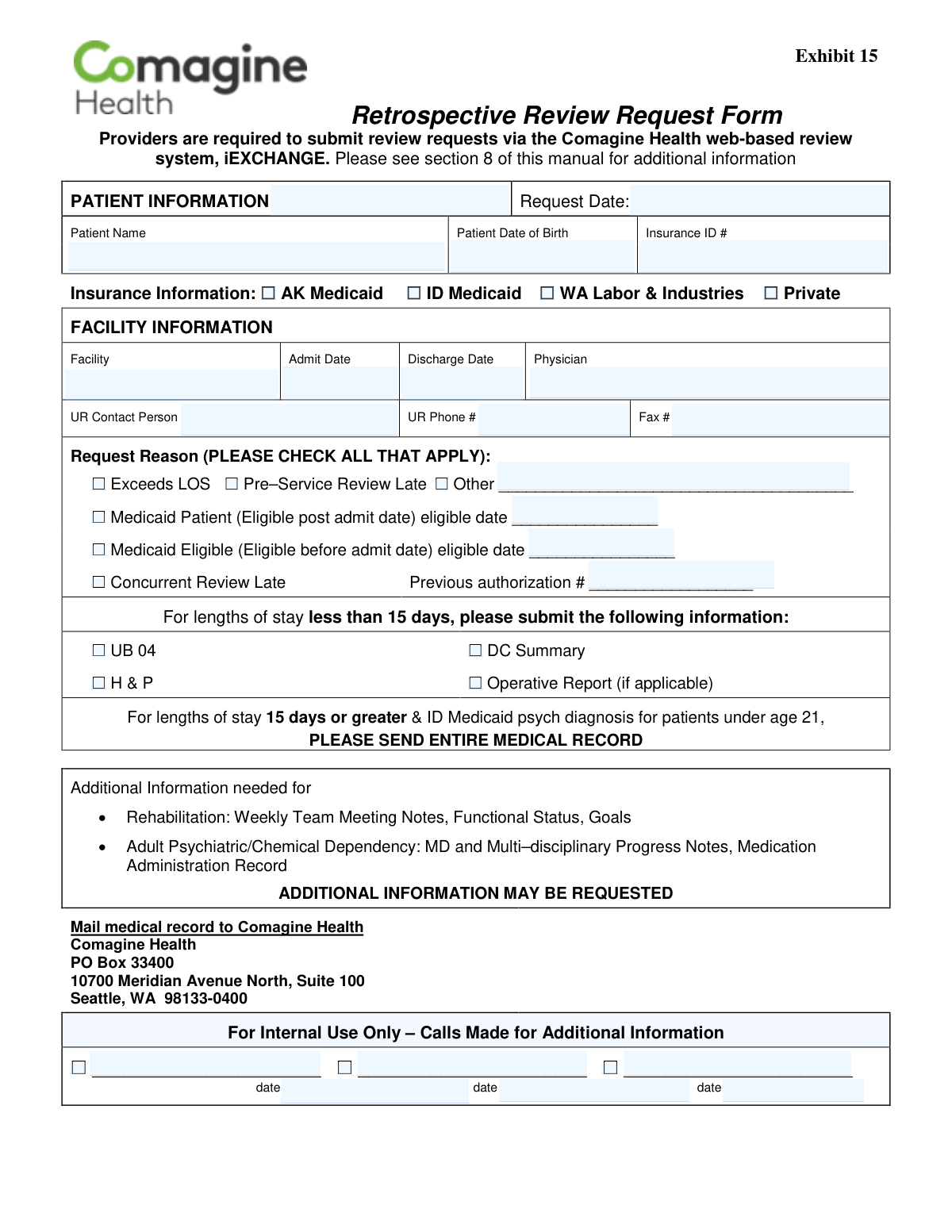
This form is a formal request submitted by healthcare providers to Comagine Health for a retrospective review of a patient's case. It is used when services were provided without pre-authorization or when other circumstances necessitate a review after the fact to determine medical necessity and secure payment. Today, this form can be filled out quickly and accurately using AI-powered services like Instafill.ai, which can also convert non-fillable PDF versions into interactive fillable forms.
Our AI automatically handles information lookup, data retrieval, formatting, and form filling.
It takes less than a minute to fill out Comagine Health Retrospective Review Request using our AI form filling.
Securely upload your data. Information is encrypted in transit and deleted immediately after the form is filled out.

Form specifications

Form name: Retrospective Review Request Form
Number of pages: 1
Language: English
main-image

Instafill Demo: How to fill out PDF forms in seconds with AI

How to Fill Out Comagine Health Retrospective Review Request Online for Free in 2026

Are you looking to fill out a COMAGINE HEALTH RETROSPECTIVE REVIEW REQUEST form online quickly and accurately? Instafill.ai offers the #1 AI-powered PDF filling software of 2026, allowing you to complete your COMAGINE HEALTH RETROSPECTIVE REVIEW REQUEST form in just 37 seconds or less.
Follow these steps to fill out your COMAGINE HEALTH RETROSPECTIVE REVIEW REQUEST form online using Instafill.ai:
  1. 1 Navigate to Instafill.ai and upload the Retrospective Review Request Form or select it from their template library.
  2. 2 Use the AI assistant to automatically populate the Patient Information section, including name, date of birth, and insurance details.
  3. 3 Enter the Facility Information, such as the facility name, physician, admit/discharge dates, and UR contact person.
  4. 4 Check the appropriate boxes for the Request Reason, such as 'Exceeds LOS' or 'Medicaid Patient', and fill in any associated dates or authorization numbers.
  5. 5 Indicate which supporting documents (e.g., UB 04, DC Summary, H & P) are being submitted based on the patient's length of stay.
  6. 6 Carefully review all AI-filled and manually entered data for completeness and accuracy before finalizing the form.
  7. 7 Download the completed form to print and mail with the required medical records to the Comagine Health address provided.

Our AI-powered system ensures each field is filled out correctly, reducing errors and saving you time.

Why Choose Instafill.ai for Your Fillable Comagine Health Retrospective Review Request Form?

Speed

Complete your Comagine Health Retrospective Review Request in as little as 37 seconds.

Up-to-Date

Always use the latest 2026 Comagine Health Retrospective Review Request form version.

Cost-effective

No need to hire expensive lawyers.

Accuracy

Our AI performs 10 compliance checks to ensure your form is error-free.

Security

Your personal information is protected with bank-level encryption.

Frequently Asked Questions About Form Comagine Health Retrospective Review Request

This form is used by healthcare providers to request a review for medical services that have already been provided, often when prior authorization was missed or a patient's length of stay exceeded the approved time.

Healthcare providers are required to complete and submit this form to Comagine Health for retrospective review of a patient's case.

Providers must submit the review request through the iEXCHANGE web system. All supporting medical records must be mailed separately to the Comagine Health address listed on the form.

For stays under 15 days, you must submit the UB-04, Discharge Summary, History & Physical (H&P), and the Operative Report if applicable.

For any length of stay that is 15 days or greater, you are required to mail the patient's entire medical record for review.

Check the box for 'Medicaid Patient (Eligible post admit date)' and write the date the patient's eligibility started in the space provided.

Yes, for rehabilitation, include weekly team notes and goals. For adult psychiatric or chemical dependency cases, provide MD/multi-disciplinary progress notes and the Medication Administration Record.

If your reason is not an option, check the box for 'Other' and write a brief explanation in the space provided.

If you check the 'Concurrent Review Late' box, you must also provide the previous authorization number associated with the patient's case.

The UR (Utilization Review) Contact Person is the individual at your facility who manages review requests and can answer questions from Comagine Health about the case.

Yes, services like Instafill.ai use AI to accurately auto-fill form fields from your records, which saves time and helps prevent errors.

You can use a service like Instafill.ai to fill out this form online. Simply upload the form to the platform to make it fillable, complete the fields, and then download or print it.

If your PDF is not interactive, you can use a tool like Instafill.ai to convert it into a fillable form. Upload the document, and the platform will automatically create editable fields for you.

Compliance Comagine Health Retrospective Review Request
Validation Checks by Instafill.ai

1
Admit and Discharge Date Chronology
Verifies that the 'Discharge Date' is on or after the 'Admit Date'. A patient's discharge cannot occur before they are admitted, so this check prevents logically impossible date entries. An error here indicates a significant data entry mistake that must be corrected before the length of stay can be accurately calculated and reviewed.
2
Retrospective Date Logic
Confirms that the 'Discharge Date' is on or before the 'Request Date'. As this is a retrospective review, the request must be for a service that has already been completed. This validation ensures the timeline is logical and prevents requests for future or ongoing stays from being submitted on this form, which would require a different process.
3
Patient Date of Birth Validity
Ensures the 'Patient Date of Birth' is a valid, properly formatted date that occurs before the 'Admit Date'. This check confirms the patient's identity and age, which is crucial for applying correct clinical guidelines, especially for age-specific rules like those for pediatric psychiatric patients. An invalid or illogical date will cause a processing error and require correction.
4
Insurance Type Selection Requirement
Validates that at least one insurance type checkbox (e.g., AK Medicaid, ID Medicaid, Private) has been selected. The insurance provider is fundamental for billing and determining the correct review process and criteria. If no insurance is selected, the system cannot determine the payer and the request will be considered incomplete and rejected.
5
Required Field Completeness
Checks that mandatory fields such as 'Patient Name', 'Insurance ID #', 'Facility', and 'Physician' are not empty. These fields contain the core identifying information for the patient, provider, and payer. A submission with any of these fields missing cannot be processed and will be rejected until the required information is provided.
6
UR Contact Phone Number Format
Validates that the 'UR Phone #' field contains a number in a standard phone number format (e.g., 10 digits with optional formatting). A correct phone number is essential for the review team to contact the facility's Utilization Review staff for additional information or clarification. An invalid format could significantly delay the review process if communication is needed.
7
Request Reason Selection
Ensures that at least one checkbox under 'Request Reason' has been selected. The reason for the retrospective review is required to properly categorize and route the request for processing. Submissions without a specified reason are ambiguous and will be rejected as incomplete.
8
Conditional 'Other' Reason Explanation
Verifies that if the 'Other' checkbox under 'Request Reason' is selected, the corresponding text field is filled out. This provides necessary context when a standard reason does not apply. A submission with 'Other' checked but no explanation will be flagged for missing information, delaying the review until clarification is received.
9
Conditional Previous Authorization Number
Checks that if the 'Concurrent Review Late' checkbox is selected, the 'Previous authorization #' field is populated. This number is required to link the late concurrent review to a prior authorization, providing a complete history for the reviewer. Failure to provide this number when required will result in an incomplete submission that cannot be processed.
10
Medicaid Post-Admit Eligibility Date Logic
Validates that if 'Medicaid Patient (Eligible post admit date)' is checked, the associated 'eligible date' field is filled and the date is after the 'Admit Date'. This confirms the specific scenario where eligibility began during the hospital stay, which has direct implications for billing and coverage. An illogical or missing date will cause a rejection and require correction.
11
Medicaid Pre-Admit Eligibility Date Logic
Validates that if 'Medicaid Eligible (Eligible before admit date)' is checked, the associated 'eligible date' field is filled and the date is on or before the 'Admit Date'. This check confirms that eligibility was established prior to the service, which is a standard requirement for coverage. An incorrect date would misrepresent the patient's eligibility status at the time of admission.
12
Request Date Validity
Ensures the 'Request Date' is a valid date and is not in the future. This field establishes the submission timestamp for the retrospective review. A future date is a logical error, and an invalid format would prevent proper record-keeping and SLA tracking, causing the submission to fail.

Common Mistakes in Completing Comagine Health Retrospective Review Request

Confusing Medicaid Eligibility Dates

Users often confuse the two Medicaid eligibility checkboxes or forget to enter the corresponding 'eligible date'. This happens because the distinction between eligibility 'post admit date' and 'before admit date' is subtle but critical for processing. An incorrect selection or missing date will delay the review, as the processor cannot verify coverage for the service dates and will have to request clarification. Always double-check the patient's eligibility records against their admission date before selecting the correct option and filling in the required date.

Missing Previous Authorization Number

When checking the box for 'Concurrent Review Late', it is mandatory to provide the 'Previous authorization #'. Staff members often check the box to indicate the reason for the retrospective request but forget to look up and enter the associated number. Without this number, the reviewer cannot link the late request to the original case, leading to an automatic rejection or a lengthy delay while they request the missing information. Ensure this number is entered whenever the 'Concurrent Review Late' box is checked.

Incorrect Document Submission for Length of Stay

The form has different documentation requirements based on the length of stay (LOS), which is a frequently missed detail. For stays under 15 days, specific documents like the UB-04 and DC Summary are needed, while for stays 15 days or longer, the 'ENTIRE MEDICAL RECORD' is required. Submitting the wrong set of documents results in an incomplete submission, halting the review process until the correct records are mailed. Carefully calculate the LOS and attach exactly what is requested for that duration.

Omitting Specialty-Specific Medical Records

The form explicitly requests additional records for Rehabilitation and Adult Psychiatric/Chemical Dependency cases, but this instruction is often overlooked. Forgetting to include Weekly Team Meeting Notes for rehab or Progress Notes for psych will lead to a request for more information, delaying the decision. To prevent this, create a checklist based on the patient's diagnosis to ensure all required specialty-specific documents are included with the initial submission.

Using an Incomplete or Incorrect Patient Name

Submitters may enter a nickname or an incomplete version of the patient's name instead of the full legal name as it appears on their insurance card. This mismatch makes it difficult for reviewers to locate the patient's policy and verify their identity, causing significant processing delays or even denial. Always use the patient's full first, middle (if applicable), and last name to ensure a perfect match with insurance records. AI-powered tools like Instafill.ai can help by cross-referencing and auto-filling correct patient data.

Entering an Invalid Insurance ID Number

The Insurance ID number is prone to data entry errors, such as transposed digits or missing prefixes and suffixes that are part of the full ID. An incorrect ID is one of the most common reasons for immediate rejection, as it makes it impossible to verify coverage. To avoid this, carefully proofread the number from the insurance card and include all characters. Using a form-filling tool like Instafill.ai can help prevent these errors by validating the format of the ID number as it's entered.

Leaving UR Contact Information Blank

The 'UR Contact Person' and 'UR Phone #' fields are sometimes left blank or filled with a generic front desk number. This occurs when the person filling the form doesn't know the direct contact or is in a hurry. When reviewers have questions, the lack of a direct contact leads to phone tag and significant delays in getting the information needed to approve the request. Always provide the name and direct phone number of the specific person responsible for utilization review.

Checking 'Other' Without Providing an Explanation

A frequent mistake is checking the 'Other' box under 'Request Reason' but failing to write a detailed explanation in the space provided. Reviewers have no context for the request and cannot proceed, forcing them to contact the facility for clarification, which delays the entire process. If 'Other' is the correct reason, you must provide a concise but complete explanation for the retrospective review request. This ensures the reviewer understands the circumstances immediately.

Using Inconsistent or Ambiguous Date Formats

When filling out fields like 'Request Date', 'Patient Date of Birth', and 'Admit Date', users may enter dates in ambiguous formats like '01-02-23'. This can be interpreted as either Jan 2, 2023 or Feb 1, 2023, depending on the region, leading to data entry errors and potential mismatches in the system. To prevent this, always use a clear and unambiguous format, such as MM/DD/YYYY (e.g., 01/02/2023). Smart tools like Instafill.ai can automatically format dates correctly to eliminate this ambiguity.

Ignoring the Primary Web-Based Submission Method

The form explicitly states that providers are required to submit requests via the 'iEXCHANGE' web-based system. Filling out and faxing or mailing this PDF form is likely a secondary, slower method. Using this form when web submission is possible can lead to significant delays as it requires manual data entry by the receiving party. Always use the primary web portal when available for the fastest processing; this PDF should only be used when web access is not an option. If the form is a non-fillable PDF, Instafill.ai can convert it into a fillable version to streamline completion.
Saved over 80 hours a year

“I was never sure if my IRS forms like W-9 were filled correctly. Now, I can complete the forms accurately without any external help.”

Kevin Martin Green

Your data stays secure with advanced protection from Instafill and our subprocessors

Robust compliance program

Transparent business model

You’re not the product. You always know where your data is and what it is processed for.

ISO 27001, HIPAA, and GDPR

Our subprocesses adhere to multiple compliance standards, including but not limited to ISO 27001, HIPAA, and GDPR.

Security & privacy by design

We consider security and privacy from the initial design phase of any new service or functionality. It’s not an afterthought, it’s built-in, including support for two-factor authentication (2FA) to further protect your account.

Fill out Comagine Health Retrospective Review Request with Instafill.ai

Worried about filling PDFs wrong? Instafill securely fills retrospective-review-request-form forms, ensuring each field is accurate.