Yes! You can use AI to fill out Rollover Valet™ Request Form
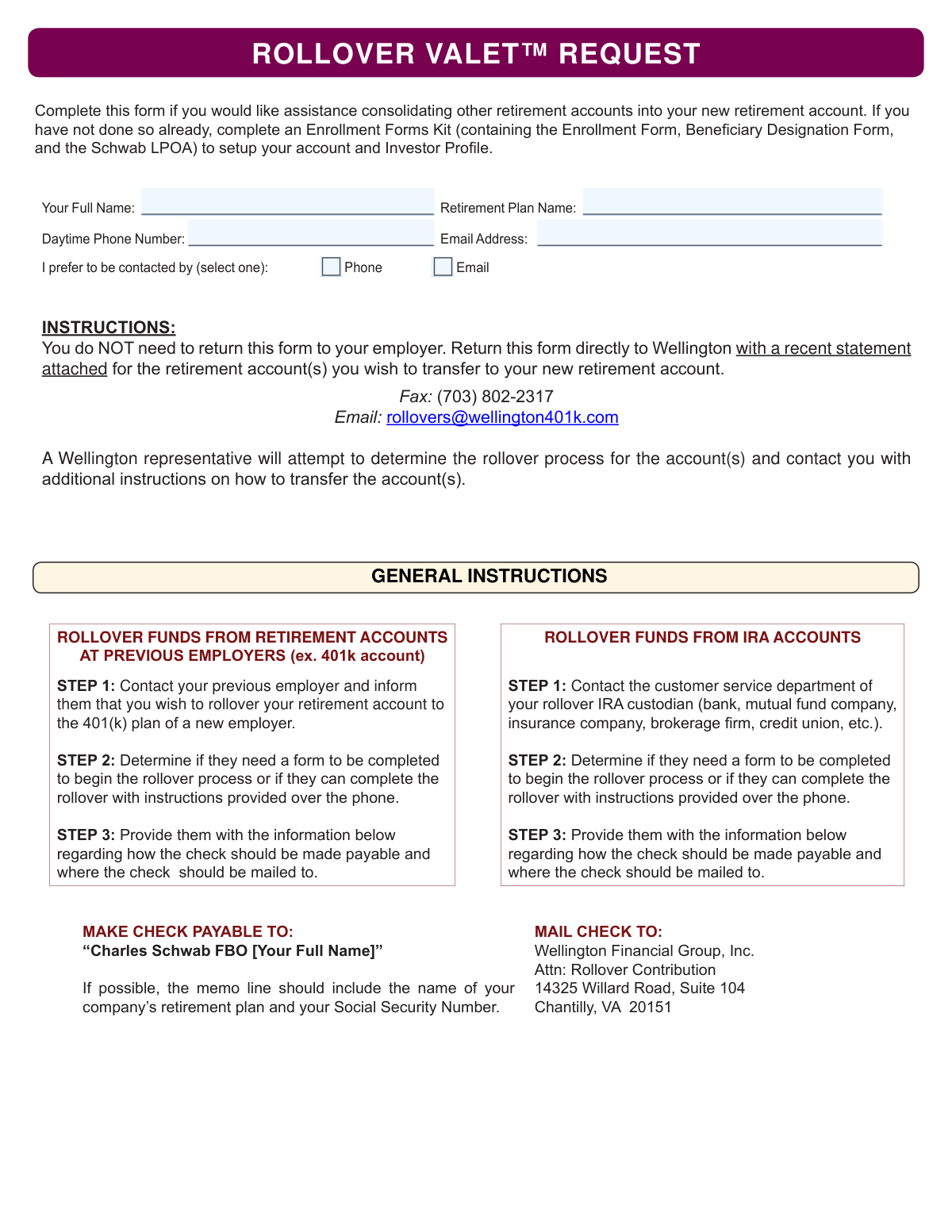
The Rollover Valet™ Request form is a document submitted to Wellington Financial Group to initiate the process of consolidating funds from previous retirement accounts, such as IRAs or 401(k)s, into a new plan. It allows a representative to research the transfer process on your behalf and provide you with specific instructions, simplifying the consolidation of your retirement savings. Today, this form can be filled out quickly and accurately using AI-powered services like Instafill.ai, which can also convert non-fillable PDF versions into interactive fillable forms.
WRS401k Rollover Valet Request is part of the
rollover forms category on Instafill.
Rather not fill this in by hand? Instafill is an online form filler that completes PDF forms automatically — upload the blank form, answer a few questions, and the AI fills every field.
Form specifications
| Form name: | Rollover Valet™ Request Form |
| Number of pages: | 1 |
| Language: | English |
Our AI automatically handles information lookup, data retrieval, formatting, and form filling.
It takes less than a minute to fill out WRS401k Rollover Valet Request using our AI form filling.
Securely upload your data. Information is encrypted in transit and deleted immediately after the form is filled out.
Instafill Demo: How to fill out PDF forms in seconds with AI
How to Fill Out WRS401k Rollover Valet Request Online for Free in 2026
Are you looking to fill out a WRS401K ROLLOVER VALET REQUEST form online quickly and accurately? Instafill.ai offers the #1 AI-powered PDF filling software of 2026, allowing you to complete your WRS401K ROLLOVER VALET REQUEST form in just 37 seconds or less.
Follow these steps to fill out your WRS401K ROLLOVER VALET REQUEST form online using Instafill.ai:
- 1 Navigate to Instafill.ai and upload or select the Rollover Valet™ Request form.
- 2 Use the AI-powered tool to automatically populate your personal information, including your full name, phone number, and email address.
- 3 Enter the name of your new retirement plan and select your preferred method of contact (phone or email).
- 4 Carefully review all the information filled in by the AI to ensure its accuracy and completeness.
- 5 Gather and attach recent statements for each of the retirement accounts you intend to transfer.
- 6 Securely download the completed form and submit it along with the attached statements to Wellington Financial Group via the fax number or email address provided.
Our AI-powered system ensures each field is filled out correctly, reducing errors and saving you time.
Why Choose Instafill.ai for Your Fillable WRS401k Rollover Valet Request Form?
Speed
Complete your WRS401k Rollover Valet Request in as little as 37 seconds.
Up-to-Date
Always use the latest 2026 WRS401k Rollover Valet Request form version.
Cost-effective
No need to hire expensive lawyers.
Accuracy
Our AI performs 10 compliance checks to ensure your form is error-free.
Security
Your personal information is protected with bank-level encryption.
Frequently Asked Questions About WRS401k Rollover Valet Request
This form is used to request assistance from Wellington Financial Group in consolidating your old retirement accounts, such as IRAs or previous employer 401(k)s, into your new retirement account.
You should complete this form if you have already set up a new retirement account with Wellington and want help transferring funds from other retirement accounts you hold elsewhere.
Yes, before submitting this request, you must have already completed an Enrollment Forms Kit, which includes the Enrollment Form, Beneficiary Designation Form, and the Schwab LPOA.
You must attach a recent statement for each of the retirement accounts you wish to transfer into your new account.
Send the form and your account statements directly to Wellington via fax at (703) 802-2317 or email at [email protected]. Do not give this form to your employer.
A Wellington representative will research the specific rollover process for your old accounts and then contact you with further instructions on how to complete the transfer.
You should contact your previous employer or the plan administrator for your old 401(k) to inform them you wish to initiate a rollover to your new plan.
The check should be made payable to "Charles Schwab FBO [Your Full Name]". If possible, include your new plan's name and your Social Security Number in the memo line.
The check should be mailed to Wellington Financial Group, Inc., Attn: Rollover Contribution, 14325 Willard Road, Suite 104, Chantilly, VA 20151.
The process is similar, but for an IRA you contact the custodian (like a bank or brokerage firm), while for an employer plan like a 401(k), you contact your previous employer.
Yes, services like Instafill.ai use AI to accurately auto-fill form fields from your saved profile, which can save you time and help prevent errors.
You can use Instafill.ai to easily fill out this form online. Simply upload the PDF, and the tool will allow you to type directly into the fields and complete the form digitally.
If your PDF is not interactive, you can use a service like Instafill.ai. It can convert flat, non-fillable PDFs into interactive forms that you can complete on your computer.
Compliance WRS401k Rollover Valet Request
Validation Checks by Instafill.ai
1
Ensures Full Name is Provided
This check verifies that the 'Your Full Name' field is not empty. This information is critical for identifying the account holder for the rollover process and for making the rollover check payable to the correct individual. If this field is left blank, the submission cannot be processed as the identity of the requester is unknown.
2
Validates Full Name Structure
This validation ensures the 'Your Full Name' field contains at least two words, suggesting both a first and last name have been entered. This is important because the rollover check must be made payable to the full legal name of the individual. A single-word entry would likely be incomplete and cause the rollover to be rejected by the financial institution.
3
Ensures Retirement Plan Name is Provided
This check confirms that the 'Retirement Plan Name' field has been completed. This name is essential for identifying the specific company retirement plan into which the funds are being transferred. Without this information, Wellington Financial Group cannot correctly process the rollover contribution or associate it with the correct account.
4
Validates Daytime Phone Number Format
This check verifies that the 'Daytime Phone Number' field, if filled, follows a standard North American phone number format (e.g., XXX-XXX-XXXX or (XXX) XXX-XXXX). Proper formatting ensures the number is valid and can be used by a Wellington representative to contact the individual. An invalid format could lead to communication delays or failure to complete the rollover instructions.
5
Validates Email Address Format
This validation ensures the 'Email Address' field contains a correctly formatted email address (e.g., [email protected]). A valid email is necessary for communication, especially if the user selects email as their preferred contact method. An incorrectly formatted email will result in bounced messages and prevent the user from receiving important rollover instructions.
6
Requires at Least One Contact Method
This check ensures that either the 'Daytime Phone Number' or 'Email Address' field is filled out. A Wellington representative needs a way to contact the individual to provide further instructions for the rollover. If both fields are empty, the request cannot be acted upon, and the form submission is effectively useless.
7
Requires Selection of a Contact Preference
This validation confirms that the user has selected one of the contact preference options, either 'Phone' or 'Email'. The form explicitly asks the user to select one, which guides the Wellington representative on how to best reach the individual. Failure to select a preference creates ambiguity and may delay the follow-up process.
8
Enforces Exclusive Contact Preference
This check ensures that only one contact preference ('Phone' or 'Email') is selected, as the form instructs to 'select one'. Selecting both options can create confusion for the representative attempting to make contact. The validation enforces a clear choice, streamlining the communication process.
9
Conditional Phone Number Requirement
This validation rule checks that if the 'Phone' contact preference is selected, the 'Daytime Phone Number' field must be populated. It is a logical check to ensure that a request for phone contact is accompanied by the necessary contact information. If this rule fails, the representative cannot fulfill the user's stated preference.
10
Conditional Email Address Requirement
This rule validates that if the 'Email' contact preference is selected, the 'Email Address' field must be filled out. This ensures that the user provides a valid email when they have explicitly requested to be contacted via email. A missing email address would make it impossible to follow the user's instructions, halting the rollover process.
11
Validates Name Field for Invalid Characters
This check scans the 'Your Full Name' field to ensure it only contains alphabetic characters, spaces, and common punctuation like hyphens or apostrophes. This prevents the entry of numbers, special symbols, or malicious code, which could corrupt data or cause processing errors. Maintaining clean name data is crucial for legal and financial documents.
12
Validates Phone Number for Correct Digit Count
This check strips all non-numeric characters from the 'Daytime Phone Number' field and verifies that exactly 10 digits remain. This is a more stringent check for US phone numbers, ensuring that the user has not entered an incomplete or overly long number. A correct digit count significantly increases the likelihood that the phone number is reachable.
Common Mistakes in Completing WRS401k Rollover Valet Request
The instructions explicitly state not to return the form to your employer, but to Wellington directly. People often default to submitting all work-related forms to their HR department, which will significantly delay the process as the employer would then have to forward it. To avoid this, carefully read the submission instructions and send the form and attachments directly to the email or fax number provided for Wellington.
The form requires a recent statement for each account you wish to transfer, but this is a commonly missed step. Without the statements, the Wellington representative has no information about the accounts and cannot begin the assistance process, leading to delays and follow-up requests. Always gather all necessary statements before submission and attach them to the email or include them with the fax.
Users may believe this form executes the rollover itself, when it is actually a request for assistance, or a 'valet service'. This misunderstanding leads them to submit the form and wait for the transfer to happen, instead of taking the next steps outlined. To prevent this, understand that after submitting this form, you must still work with the Wellington representative and your old custodian to complete the rollover.
The form notes that an Enrollment Forms Kit must be completed to set up the new account if it hasn't been done already. Submitting this valet request without an established destination account is premature and will be rejected or stalled until the new account is officially open. Ensure your new retirement account with Wellington/Schwab is fully set up before requesting to roll funds into it.
Applicants sometimes enter the name of the old plan they are rolling funds *from*, instead of the new plan they are rolling funds *to*. Wellington needs the name of your new plan to correctly associate the rollover request with your new account. Always enter the official name of your new retirement plan as provided in your enrollment materials.
When instructing their old institution, users might miscopy the payee line, for example by literally writing '[your Full Name]' instead of their own name. An incorrectly addressed check from the old custodian will be rejected by Charles Schwab, forcing the entire process to start over. Carefully provide the exact payee information: 'Charles Schwab FBO' followed by your own full name.
The form suggests that the memo line of the rollover check should include the plan name and your Social Security Number. While noted as 'if possible', omitting this information makes it harder for the receiving institution to match the funds to your account, potentially causing significant processing delays. Always request that your old custodian include this information on the check for faster and more accurate crediting.
A Wellington representative needs to contact you with instructions, but this is impossible if the phone number or email address provided is incorrect or rarely checked. This defeats the purpose of the valet service and brings the process to a halt. Double-check that your contact information is current, and be sure to monitor the email or phone line you provide. AI-powered tools like Instafill.ai can help by auto-filling and validating contact information formats.
The form asks the user to select whether they prefer to be contacted by phone or email, but this choice is sometimes overlooked. Leaving this blank forces the representative to guess your preference, which can lead to missed connections and communication delays. To ensure a smooth process, always tick one of the boxes to indicate your preferred method of contact.
Users might mistakenly believe they need to mail this request form to the Chantilly, VA address listed for check mailing. This address is exclusively for the rollover check that will be sent by your previous financial institution. Mailing your request form there will cause delays, as it's not the correct processing center for this form. This form should be emailed or faxed to Wellington, while the mailing address should only be given to your old IRA or 401(k) provider.
Saved over 80 hours a year
“I was never sure if my IRS forms like W-9 were filled correctly. Now, I can complete the forms accurately without any external help.”
Kevin Martin Green
Your data stays secure with advanced protection from Instafill and our subprocessors




Robust compliance program
Transparent business model
You’re not the product. You always know where your data is and what it is processed for.
ISO 27001, HIPAA, and GDPR
Our subprocesses adhere to multiple compliance standards, including but not limited to ISO 27001, HIPAA, and GDPR.
Security & privacy by design
We consider security and privacy from the initial design phase of any new service or functionality. It’s not an afterthought, it’s built-in, including support for two-factor authentication (2FA) to further protect your account.
Fill out WRS401k Rollover Valet Request with Instafill.ai
Worried about filling PDFs wrong? Instafill securely fills rollover-valet-request-form-1 forms, ensuring each field is accurate.
