Yes! You can use AI to fill out TIAA-CREF Transfer or Rollover Authorization
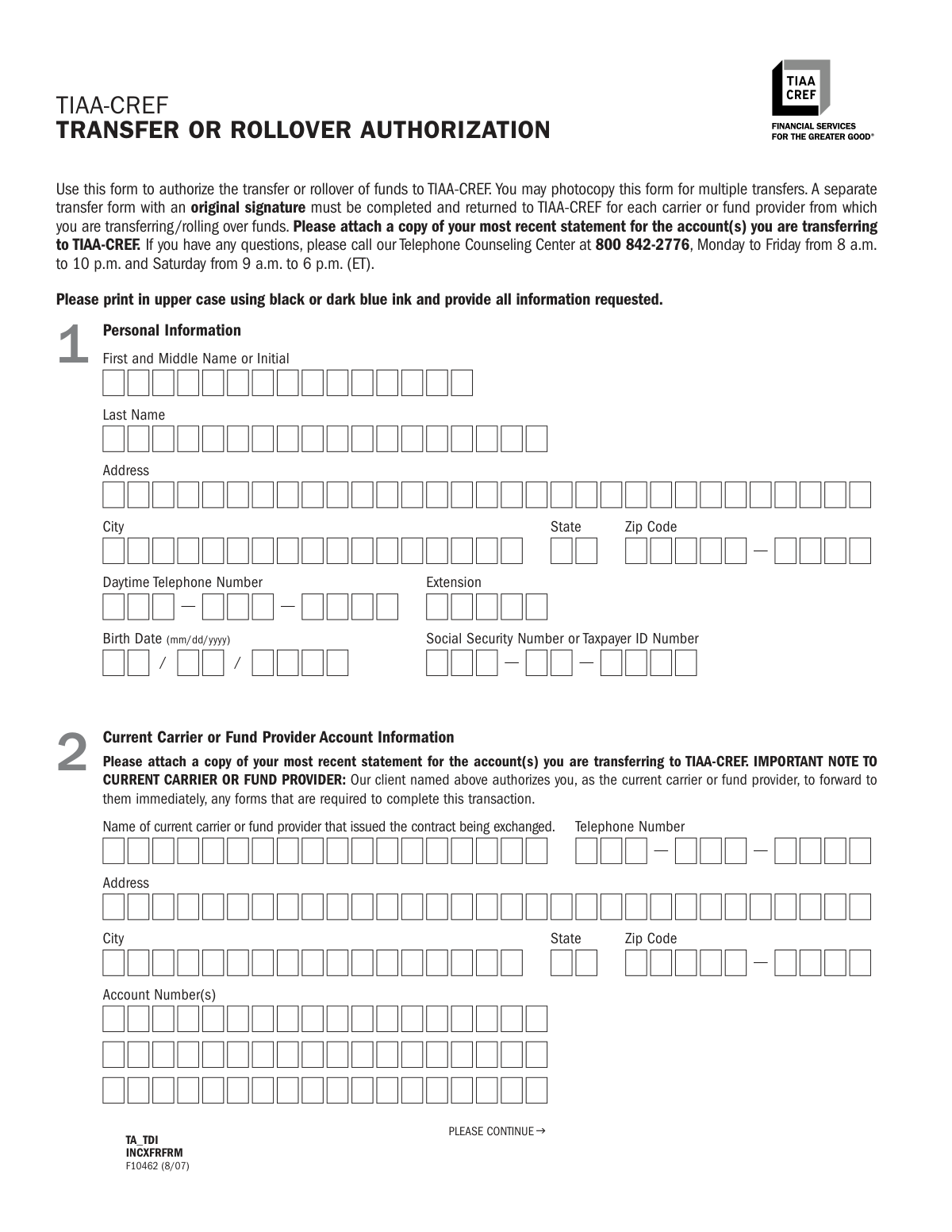
This form is a formal request to your current financial carrier or fund provider to transfer or roll over your investment or retirement funds to a TIAA-CREF account. It is essential for consolidating assets, managing retirement savings, and taking advantage of TIAA-CREF's investment options. Today, this form can be filled out quickly and accurately using AI-powered services like Instafill.ai, which can also convert non-fillable PDF versions into interactive fillable forms.
Rather not fill this in by hand? Instafill is an online form filler that completes PDF forms automatically — upload the blank form, answer a few questions, and the AI fills every field.
Form specifications
| Form name: | TIAA-CREF Transfer or Rollover Authorization |
| Number of pages: | 1 |
| Language: | English |
Our AI automatically handles information lookup, data retrieval, formatting, and form filling.
It takes less than a minute to fill out F10462 using our AI form filling.
Securely upload your data. Information is encrypted in transit and deleted immediately after the form is filled out.
Instafill Demo: How to fill out PDF forms in seconds with AI
How to Fill Out F10462 Online for Free in 2026
Are you looking to fill out a F10462 form online quickly and accurately? Instafill.ai offers the #1 AI-powered PDF filling software of 2026, allowing you to complete your F10462 form in just 37 seconds or less.
Follow these steps to fill out your F10462 form online using Instafill.ai:
- 1 Navigate to Instafill.ai and upload or select the TIAA-CREF Transfer or Rollover Authorization form.
- 2 Enter your personal information, including your full name, address, Social Security Number, and date of birth.
- 3 Provide details about your current carrier or fund provider, including their name, address, and the account number(s) you are transferring from.
- 4 Specify the amount and source of the funds you wish to transfer or roll over to TIAA-CREF.
- 5 Give clear instructions for liquidating your current investments, such as CDs or other account assets.
- 6 Indicate how you want the transferred funds to be allocated among the available TIAA-CREF accounts.
- 7 Carefully review all the information, sign the authorization section, and download the completed form to mail to TIAA-CREF.
Our AI-powered system ensures each field is filled out correctly, reducing errors and saving you time.
Why Choose Instafill.ai for Your Fillable F10462 Form?
Speed
Complete your F10462 in as little as 37 seconds.
Up-to-Date
Always use the latest 2026 F10462 form version.
Cost-effective
No need to hire expensive lawyers.
Accuracy
Our AI performs 10 compliance checks to ensure your form is error-free.
Security
Your personal information is protected with bank-level encryption.
Frequently Asked Questions About F10462
This form is used to authorize your current financial institution to transfer or roll over funds from a retirement account, like a 401(k) or IRA, directly to a new or existing TIAA-CREF account.
Anyone who wants to move their retirement funds from another company (the 'current carrier or fund provider') into an account managed by TIAA-CREF should complete this form.
You must attach a copy of your most recent account statement from the provider you are transferring funds from. If you are opening a new TIAA-CREF account, you may also need to include a completed enrollment application.
No, you must complete a separate form with an original signature for each carrier or fund provider you are transferring funds from. You can photocopy the blank form for this purpose.
In Section 3, you can either write in a specific dollar amount or check the box to transfer 100% of the funds from your account.
A Medallion Signature Guarantee is a special stamp from a bank or financial institution that verifies your identity and signature. You only need to get one if your current fund provider requires it to process the transfer.
Once TIAA-CREF receives your completed form, they will send you a letter of acknowledgement. They will then contact your current provider to initiate the transfer.
Mail the form and all required documents to TIAA-CREF, P.O. Box 1260, Charlotte, NC 28201-9911. The form also provides a separate address for overnight mail.
No, funds from an employer-sponsored plan cannot be rolled over directly to a Roth IRA. You must first roll them into a Traditional IRA and then perform a Roth conversion, which is a taxable event.
In Section 7, 'Allocate Your Funds,' you can either instruct TIAA-CREF to use your existing allocation on file or specify new allocation percentages for the available investment accounts.
You can use a service like Instafill.ai, which can convert flat, non-fillable PDFs into interactive forms. This allows you to type your information directly into the fields instead of printing and filling by hand.
Yes, services like Instafill.ai use AI to accurately auto-fill form fields with your personal information. This can save you significant time and help reduce the chance of errors.
Simply upload the TIAA-CREF Transfer Authorization PDF to the Instafill.ai platform. The AI will identify the fields, allowing you to type in your information or use its auto-fill capabilities to complete the form quickly and accurately.
Compliance F10462
Validation Checks by Instafill.ai
1
SSN/TIN Format Validation
This check verifies that the Social Security Number or Taxpayer ID Number in the Personal Information section is entered in a valid format (e.g., XXX-XX-XXXX for SSN or XX-XXXXXXX for TIN). This is crucial for correct tax reporting and unique identification of the individual. If the format is incorrect, the form processing will fail, and the user will be prompted to correct the number.
2
Date Field Format and Plausibility
Validates that all date fields, including Birth Date, CD Maturity Date, and Signature Date, are in the correct 'mm/dd/yyyy' format and represent a plausible date. For example, the Birth Date cannot be in the future, and the Signature Date should be current. This prevents data entry errors and ensures that time-sensitive actions, like CD liquidations, are based on accurate information.
3
Transfer Amount Exclusivity
In Section 3, this check ensures that the user has specified the transfer amount by either entering a specific dollar value OR selecting the '100% of the amount in my account(s)' checkbox, but not both. This prevents ambiguity in the transfer instruction, which could lead to incorrect fund movement. If both or neither are selected, the submission will be rejected with a request for clarification.
4
Fund Source Type Selection
This validation confirms that at least one checkbox indicating the 'type of funds' being transferred is selected in Section 3. This information is critical for determining the tax implications and regulatory rules governing the transfer (e.g., 401(k), Traditional IRA). Failure to provide this information will halt the process, as the receiving institution cannot correctly classify the incoming assets.
5
CD Liquidation Instruction Completeness
If a Certificate of Deposit (CD) account number is provided in Section 4, this check verifies that a corresponding liquidation instruction ('AT MATURITY' or 'IMMEDIATELY') has been selected. This is a required instruction for the current fund provider to act on the CD. An incomplete instruction will cause the transfer request for that CD to be rejected.
6
Partial vs. Full Liquidation Logic
For 'Other Accounts' in Section 4, this validation ensures that if the user selects 'I wish to liquidate only the following assets', they must also provide the asset description and quantity. Conversely, if 'I wish to liquidate and transfer my entire account' is chosen, the specific asset details should be left blank for that account. This prevents contradictory instructions and ensures the liquidation is performed as intended.
7
Destination Account Selection Logic
This check validates that in Section 6, the user has selected either 'Apply the funds to my new TIAA-CREF account' or 'Apply the funds to my existing account'. If 'existing account' is chosen, it further verifies that a TIAA or CREF account number has been provided. This ensures funds are not left in a pending state and are correctly routed to the intended destination account upon receipt.
8
Roth IRA Rollover Rule
Based on the note in Section 6, this check cross-references the source fund type (Section 3) and the destination account type (Section 6). If funds are coming from an employer-sponsored plan (e.g., 401(k), 403(b)) and the destination is a Roth IRA, the validation will fail or trigger a warning. This is because such a transaction must first be rolled into a Traditional IRA, and this check prevents an invalid direct rollover.
9
457(b) Private Plan Transfer Rule
This validation enforces the rule that funds from a 457(b) private plan can only be transferred to another 457(b) private plan. It checks the fund source in Section 3 and the destination account type in Section 6. If a user attempts to move 457(b) private funds to an incompatible account type like an IRA or 401(k), the transaction will be flagged as invalid.
10
Allocation Percentage Summation
If the user chooses to specify a new allocation in Section 7, this check verifies that the percentages entered for each account are whole numbers and that their sum is exactly 100%. This is a critical integrity check to ensure the entire transferred amount is allocated without any portion being left over or over-allocated. An incorrect sum will result in a validation error, requiring the user to correct the percentages.
11
Allocation Method Exclusivity
In Section 7, this validation ensures the user selects either 'Please use my current allocation on file' OR 'Please use the allocation indicated below', but not both. Selecting both creates conflicting instructions for how to invest the incoming funds. The system must enforce a single, clear choice to proceed with the investment allocation.
12
Signature and Date Presence
This is a critical completeness check to verify that the 'Your Signature' and 'Date' fields in Section 8 are filled out. The signature legally authorizes the transfer, and the date establishes when the authorization was given. A missing signature or date renders the entire form invalid and legally non-binding, and the transfer request cannot be processed.
13
Current Carrier Information Completeness
This check ensures that the full details for the 'Current Carrier or Fund Provider' in Section 2, including Name, Address, and at least one Account Number, are provided. Without this information, TIAA-CREF cannot identify the source institution or the specific account from which to request the funds. Incomplete information will lead to processing delays or outright rejection of the transfer request.
14
Conditional Employer Name for Non-IRA Rollovers
This validation checks if a non-IRA account type (e.g., 401(a), 403(b)) is selected as the destination in Section 6. If so, it verifies that the 'Name of Employer' is provided in the same section. This is necessary to associate the rollover funds with the correct employer-sponsored plan. Failure to provide the employer name will result in the funds being misapplied or held pending clarification.
Common Mistakes in Completing F10462
Applicants often forget to sign and date the form in Section 8, which immediately invalidates the request. A more complex error is failing to obtain a Medallion Signature Guarantee when the current carrier requires it for security. This leads to the sending institution rejecting the transfer request, causing significant delays. Always check with your current provider if a Medallion Guarantee is necessary before submitting the form.
The form explicitly requires a copy of the most recent statement for the account being transferred. People frequently overlook this instruction, assuming the account number alone is sufficient. Without the statement, TIAA-CREF cannot verify the account details and must halt the process to request the missing document, delaying the transfer by weeks.
A simple typo in the current carrier's account number (Section 2) or the destination TIAA-CREF account number (Section 6) is a critical error. This can lead to an immediate rejection, a lengthy matching process, or in a worst-case scenario, a failed transfer. To avoid this, carefully cross-reference the numbers with your account statements before submitting.
In Section 3, users must specify the type of funds being moved (e.g., 401(k), 403(b), Traditional IRA). Many people are unsure of the exact plan type and guess incorrectly. This mistake can lead to compliance issues, unintended tax consequences, or an outright rejection if the rollover is not permissible between the source and destination accounts.
When specifying a new fund allocation in Section 7, a common mistake is a simple math error where the percentages do not add up to exactly 100%. This ambiguity prevents TIAA-CREF from investing the transferred funds as directed. The funds will remain in a default or holding account until the applicant is contacted and provides corrected instructions, causing delays and potentially missing market gains.
In Section 6, if an applicant checks 'Apply the funds to my new TIAA-CREF account,' they must also submit a separate, completed enrollment application. It is common for this accompanying application to be forgotten. This renders the transfer request incomplete, and the entire process is put on hold until the new account is properly established.
The form contains critical footnotes, such as the one in Section 6 explaining that employer plan funds cannot be rolled directly into a Roth IRA. Applicants often miss this fine print and select an invalid transfer path. This results in a rejected transaction and requires the applicant to restart the process, first by rolling over to a Traditional IRA and then performing a separate conversion.
In Section 4, applicants may provide conflicting instructions, such as checking the box to 'liquidate and transfer my entire account' while also listing specific assets to liquidate. This ambiguity forces TIAA-CREF to contact the applicant for clarification, halting the process. To prevent this, you must clearly choose one path: either liquidate the entire account or specify the exact partial assets to be sold.
When filling out the 'Name of current carrier or fund provider' in Section 2, people often use informal names, abbreviations, or misspell the institution's name. This makes it difficult for TIAA-CREF to identify and contact the correct firm to initiate the transfer. Always use the full, official name of the financial institution as it appears on your account statement to ensure the request is routed correctly.
The instructions clearly state that a separate form with an original signature must be used for each carrier from which funds are being transferred. Some users try to consolidate transfers from multiple companies onto a single form, which is not permitted. This will result in only one transfer being processed or the entire form being rejected, requiring the user to resubmit everything on separate forms.
Saved over 80 hours a year
“I was never sure if my IRS forms like W-9 were filled correctly. Now, I can complete the forms accurately without any external help.”
Kevin Martin Green
Your data stays secure with advanced protection from Instafill and our subprocessors




Robust compliance program
Transparent business model
You’re not the product. You always know where your data is and what it is processed for.
ISO 27001, HIPAA, and GDPR
Our subprocesses adhere to multiple compliance standards, including but not limited to ISO 27001, HIPAA, and GDPR.
Security & privacy by design
We consider security and privacy from the initial design phase of any new service or functionality. It’s not an afterthought, it’s built-in, including support for two-factor authentication (2FA) to further protect your account.
Fill out F10462 with Instafill.ai
Worried about filling PDFs wrong? Instafill securely fills tiaa-cref-transfer-or-rollover-authorization forms, ensuring each field is accurate.
