Yes! You can use AI to fill out Transamerica Beneficiary Change Form
The Transamerica Beneficiary Change Form is a legal document used by policyholders to officially change the primary and contingent beneficiaries on their life insurance policy. Completing this form revokes all previous beneficiary designations, making it essential for ensuring your assets are distributed according to your most current wishes. Today, this form can be filled out quickly and accurately using AI-powered services like Instafill.ai, which can also convert non-fillable PDF versions into interactive fillable forms.
BEN-CCC 02/14 is part of the
beneficiary forms, VA forms, HR forms, Transamerica forms and beneficiary change forms categories on Instafill.
Rather not fill this in by hand? Instafill is an online form filler that completes PDF forms automatically — upload the blank form, answer a few questions, and the AI fills every field.
Form specifications
| Form name: | Transamerica Beneficiary Change Form |
| Number of pages: | 1 |
| Language: | English |
Our AI automatically handles information lookup, data retrieval, formatting, and form filling.
It takes less than a minute to fill out BEN-CCC 02/14 using our AI form filling.
Securely upload your data. Information is encrypted in transit and deleted immediately after the form is filled out.
Instafill Demo: How to fill out PDF forms in seconds with AI
How to Fill Out BEN-CCC 02/14 Online for Free in 2026
Are you looking to fill out a BEN-CCC 02/14 form online quickly and accurately? Instafill.ai offers the #1 AI-powered PDF filling software of 2026, allowing you to complete your BEN-CCC 02/14 form in just 37 seconds or less.
Follow these steps to fill out your BEN-CCC 02/14 form online using Instafill.ai:
- 1 Navigate to Instafill.ai and upload the Transamerica Beneficiary Change Form, or select it from the template library.
- 2 Provide the policy number(s), owner information, and insured's details in Section 1.
- 3 Complete Section 2 by entering the full name, relationship, contact information, and percentage share for each primary beneficiary. Ensure the percentages total 100%.
- 4 Fill out Section 3 to designate contingent beneficiaries, who will receive proceeds if no primary beneficiaries survive the insured. Their percentage shares must also total 100%.
- 5 Carefully review all entered information for accuracy before proceeding to the signature section.
- 6 In Section 4, the policy owner(s) and any irrevocable beneficiaries must sign and date the form.
- 7 Select your preferred method for receiving confirmation (email or fax) and submit the completed form to Transamerica.
Our AI-powered system ensures each field is filled out correctly, reducing errors and saving you time.
Why Choose Instafill.ai for Your Fillable BEN-CCC 02/14 Form?
Speed
Complete your BEN-CCC 02/14 in as little as 37 seconds.
Up-to-Date
Always use the latest 2026 BEN-CCC 02/14 form version.
Cost-effective
No need to hire expensive lawyers.
Accuracy
Our AI performs 10 compliance checks to ensure your form is error-free.
Security
Your personal information is protected with bank-level encryption.
Frequently Asked Questions About BEN-CCC 02/14
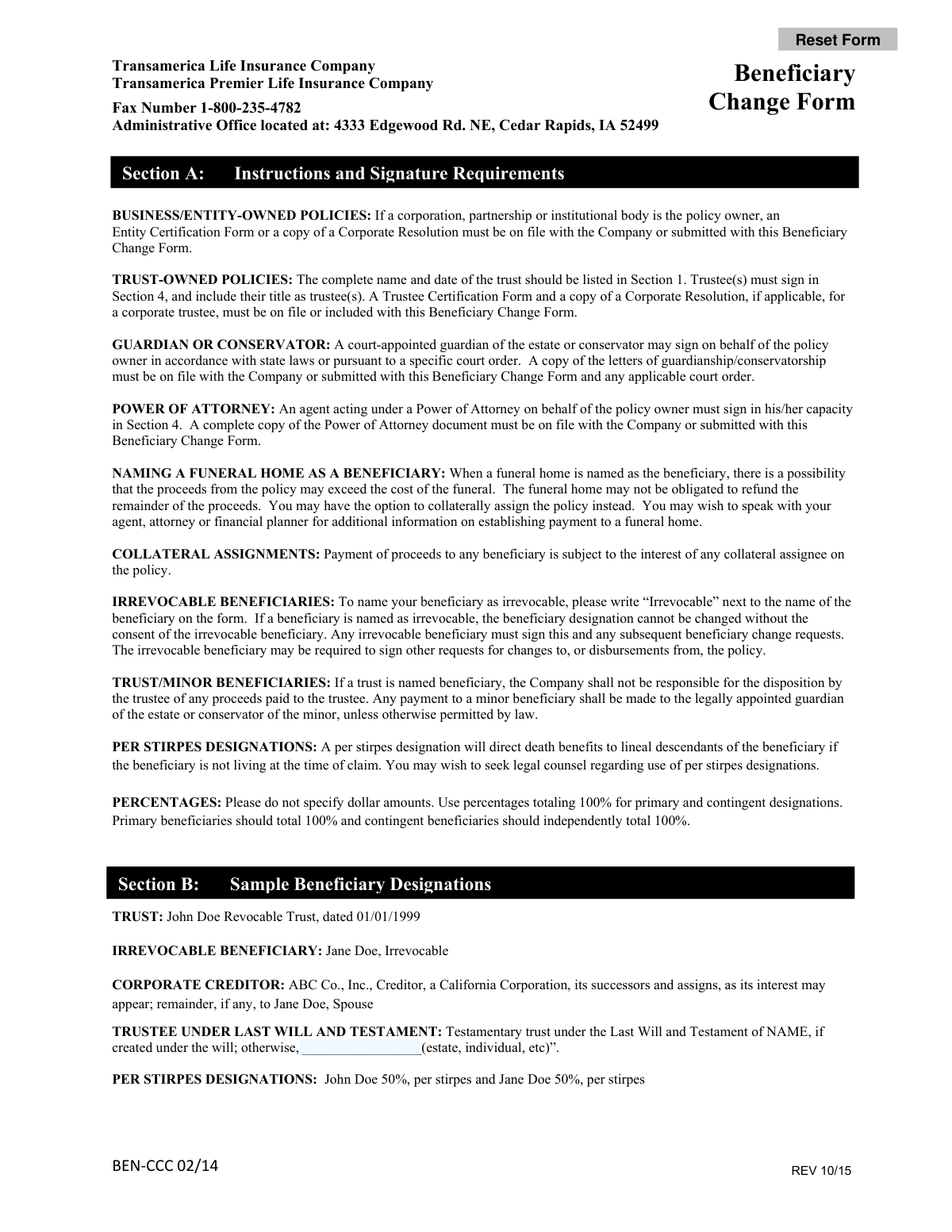
This form is used to update, add, or remove the beneficiaries for your Transamerica life insurance policy. Submitting this form will revoke all prior beneficiary designations you have on file.
All policy owners must sign the form in Section 4. If a beneficiary is designated as 'Irrevocable,' that beneficiary must also sign this form and any future change requests.
A primary beneficiary is the first in line to receive the policy proceeds. A contingent beneficiary only receives the proceeds if all primary beneficiaries have passed away before the insured.
You must use percentages, not specific dollar amounts, and the total for your primary beneficiaries must equal 100%. Separately, the total for your contingent beneficiaries must also equal 100%.
If you complete the primary beneficiary section but leave the contingent section blank, any current contingent beneficiaries on your policy will be revoked and removed.
Designating a beneficiary as irrevocable means you cannot change or remove them without their written consent and signature on the form. To do this, you must write 'Irrevocable' next to their name.
A 'per stirpes' designation directs that if one of your beneficiaries is deceased when the policy pays out, their share will automatically go to their direct descendants, such as their children.
Yes, the trustee must sign the form, and you must submit a Trustee Certification Form. The full name and date of the trust must also be listed in the beneficiary information section.
You can submit the signed form by faxing it to 1-800-235-4782. The form also lists the mailing address for the administrative office if you prefer to mail it.
A confirmation notice will be mailed to the policy owner's address on record. You can also choose in Section 4 to receive this confirmation via secure email or fax instead.
Yes, you can name a minor, but any proceeds will be paid to the minor's legally appointed guardian or conservator. You may wish to consult a legal advisor about setting up a trust for a minor beneficiary.
Yes, services like Instafill.ai use AI to auto-fill form fields accurately and save time. This can help you complete the form more efficiently and with fewer errors.
You can use a service like Instafill.ai to complete the form digitally. Simply upload the PDF to their platform to make it fillable, type in your information, and then print the completed form for signing.
If you have a non-fillable PDF, you can use a tool like Instafill.ai to convert it into an interactive, fillable form. This allows you to easily type your information directly onto the document.
Compliance BEN-CCC 02/14
Validation Checks by Instafill.ai
1
Primary Beneficiary Percentage Summation
This check verifies that if percentages are used for primary beneficiaries in Section 2, the sum of all entered percentages equals exactly 100%. This is critical for ensuring the entire death benefit is allocated without ambiguity. If the total is not 100%, the form is considered invalid and must be corrected by the policy owner to prevent legal and financial complications during claim processing.
2
Contingent Beneficiary Percentage Summation
This check validates that the percentages assigned to contingent beneficiaries in Section 3 independently sum to exactly 100%. Contingent beneficiaries only receive proceeds if all primary beneficiaries are deceased, and their allocation must also be complete. A failure to total 100% will result in form rejection, as it creates uncertainty in how the proceeds should be distributed.
3
SSN and Tax ID Number Format
This validation ensures that the Insured's Social Security Number and each beneficiary's SSN or Tax ID Number are entered in a valid format (e.g., XXX-XX-XXXX for SSN or XX-XXXXXXX for TIN). Correct identification numbers are legally required for tax reporting and to uniquely identify individuals for payment. An incorrectly formatted number will cause the submission to fail and require correction.
4
Distinct Primary and Contingent Beneficiaries
This check cross-references the names and SSN/TINs listed in the Primary Beneficiary section (Section 2) against those in the Contingent Beneficiary section (Section 3). The form explicitly states these cannot be the same. This validation prevents logical impossibilities in the payout order, as a person cannot be both a primary and a backup recipient. A match will trigger an error requiring the user to amend the designations.
5
Required Owner Signature
This validation confirms that the 'Owner Signature' field in Section 4 is not blank. The owner's signature is the legal authorization for the requested change, making it the most critical field on the form. Without a signature, the beneficiary change request is not valid and cannot be processed by the company.
6
Completeness of Policy Information
This check ensures all fields in Section 1, such as Policy Number, Owner Name, and Insured Name and SSN, are fully completed. This information is essential for correctly identifying the specific policy to which the changes should be applied. Incomplete information could lead to changes being applied to the wrong policy or the form being rejected outright.
7
Date Field Validity and Plausibility
This validation verifies that all date fields, including 'Insured Birth Date' and beneficiary 'Birth or Trust Date', are in a proper format (e.g., MM/DD/YYYY) and represent a plausible date that is not in the future. This ensures data integrity and is crucial for verifying the identity and eligibility of individuals. An invalid or future date will cause the form to be rejected for correction.
8
Conditional Irrevocable Beneficiary Signature
This check determines if the word 'Irrevocable' is written next to any beneficiary's name in Section 2 or 3. If it is, the system then verifies that the 'Signature of Irrevocable Beneficiary' field in Section 4 is signed. An irrevocable designation requires the beneficiary's consent for any changes, so a missing signature renders the change request invalid.
9
Completeness of Individual Beneficiary Data
This validation ensures that if a beneficiary's name is entered in Section 2 or 3, then all associated fields for that beneficiary (Relationship, Birth/Trust Date, Address, SSN/TIN) are also filled out. Incomplete information for a listed beneficiary can delay or prevent payment during a claim. The system will flag any beneficiary entry with missing data for completion.
10
Mutually Exclusive Share Allocation
For each beneficiary listed, this check ensures that either the 'share equally' box is checked OR a percentage is entered, but not both simultaneously. This prevents contradictory instructions for how to distribute the policy proceeds. If both are selected for the same person, the form will be flagged as ambiguous and require clarification from the owner.
11
Conditional Witness Signature for MA Residents
This validation checks the policy owner's address from Section 1. If the state is Massachusetts (MA), it then verifies that the 'Witness Signature' field in Section 4 has been signed. State-specific regulations require this witness signature for legal validity, and its absence for an MA-based policy owner will result in the form being rejected.
12
Confirmation Contact Information Presence
This check is triggered if the user selects the email or fax confirmation option at the end of Section 4. If the email box is checked, it validates that the 'Email Address' field contains a properly formatted email. If the fax box is checked, it ensures the 'Fax Number' field is not empty. This ensures the user's confirmation preference can be fulfilled.
13
Joint Owner Signature Requirement
This validation cross-references the provided policy number with the company's records to determine if it is a jointly owned policy. If the policy has a joint owner, the system verifies that the 'Joint Owner Signature' field in Section 4 is signed. Failure to obtain all required owner signatures will invalidate the beneficiary change request.
Common Mistakes in Completing BEN-CCC 02/14
Filers often make simple math errors, causing the percentages for primary or contingent beneficiaries not to total exactly 100%. This also occurs when checking both 'share equally' and entering a percentage. An incorrect total will lead to form rejection and processing delays, as the company cannot guess the policy owner's intent. To avoid this, carefully review your math for both the primary and contingent sections, ensuring each independently totals 100%. AI-powered tools like Instafill.ai can automatically calculate and validate these totals to prevent errors.
The form requires signatures from all policy owners and any named irrevocable beneficiaries. People frequently overlook the need for a joint owner's signature or forget that an existing irrevocable beneficiary must consent to the change. A missing signature is one of the most common reasons for immediate rejection, forcing you to resubmit the form. Always verify who the policy owners are and check if any beneficiaries are designated as irrevocable before signing.
Each beneficiary entry requires a full name, address, relationship, date of birth (or trust date), and SSN/TIN. It's common for filers to leave fields like SSN or a full address blank, especially if they don't have the information readily available. This missing data can significantly delay the claims process in the future, creating hardship for your beneficiaries. To prevent this, gather all necessary information for each beneficiary before you begin filling out the form.
The form states that leaving the Primary Beneficiary section blank keeps the current designation, but leaving the Contingent Beneficiary section blank *revokes* any existing contingent beneficiaries. This critical difference is often missed, leading people to unintentionally remove their secondary choices. To avoid this, you must re-list your desired contingent beneficiaries; otherwise, leaving the section blank will result in having no contingent beneficiaries on record.
When the policy is owned by a trust or corporation, or when signing via Power of Attorney, specific supporting documents are required (e.g., Trustee Certification, Corporate Resolution, copy of the POA). Filers often submit the change form alone, assuming the documents are already on file or not needed. This results in an incomplete submission and rejection. Always review the instructions on page one and attach all necessary legal documents with your form.
When naming a trust, it's not enough to write 'My Family Trust.' The form requires the complete, formal name of the trust and the date it was established, as shown in the example: 'John Doe Revocable Trust, dated 01/01/1999.' An incorrect or incomplete trust name can create legal ambiguities and significant delays during the payout process. To avoid this, copy the exact name and date from the official trust document.
In Section 1, the form asks for information on both the policy owner and the insured, who may not be the same person. People sometimes enter the insured's name in the owner field or vice-versa. Only the policy owner has the authority to make changes and sign the form, so this error can invalidate the request. Double-check your policy documents to confirm who the owner is and ensure their information is entered correctly and that they are the one signing in Section 4.
The instructions explicitly state not to use dollar amounts for beneficiary shares, yet people sometimes write in specific sums like '$50,000.' The policy's death benefit can change over time, making fixed dollar amounts problematic and leading to form rejection. All allocations must be in percentages totaling 100%. Using an intelligent form-filler like Instafill.ai can help by flagging non-percentage values in these fields.
To make a beneficiary irrevocable, you must write 'Irrevocable' next to their name and, crucially, that beneficiary must also sign the form in Section 4. People often write the word but forget to obtain the beneficiary's signature, which invalidates the request. This mistake can either fail to establish the irrevocable status or create unintended legal hurdles. Be certain of this decision and ensure all procedural steps are followed.
The form explicitly states that primary and contingent beneficiaries cannot be the same person. A contingent beneficiary only receives proceeds if all primary beneficiaries are deceased, so listing the same individual in both roles is redundant and logically inconsistent. This error can cause confusion and may lead to the form being returned for correction. Ensure your contingent beneficiaries are different individuals from your primary beneficiaries.
Saved over 80 hours a year
“I was never sure if my IRS forms like W-9 were filled correctly. Now, I can complete the forms accurately without any external help.”
Kevin Martin Green
Your data stays secure with advanced protection from Instafill and our subprocessors




Robust compliance program
Transparent business model
You’re not the product. You always know where your data is and what it is processed for.
ISO 27001, HIPAA, and GDPR
Our subprocesses adhere to multiple compliance standards, including but not limited to ISO 27001, HIPAA, and GDPR.
Security & privacy by design
We consider security and privacy from the initial design phase of any new service or functionality. It’s not an afterthought, it’s built-in, including support for two-factor authentication (2FA) to further protect your account.
Fill out BEN-CCC 02/14 with Instafill.ai
Worried about filling PDFs wrong? Instafill securely fills transamerica-beneficiary-change-form forms, ensuring each field is accurate.
