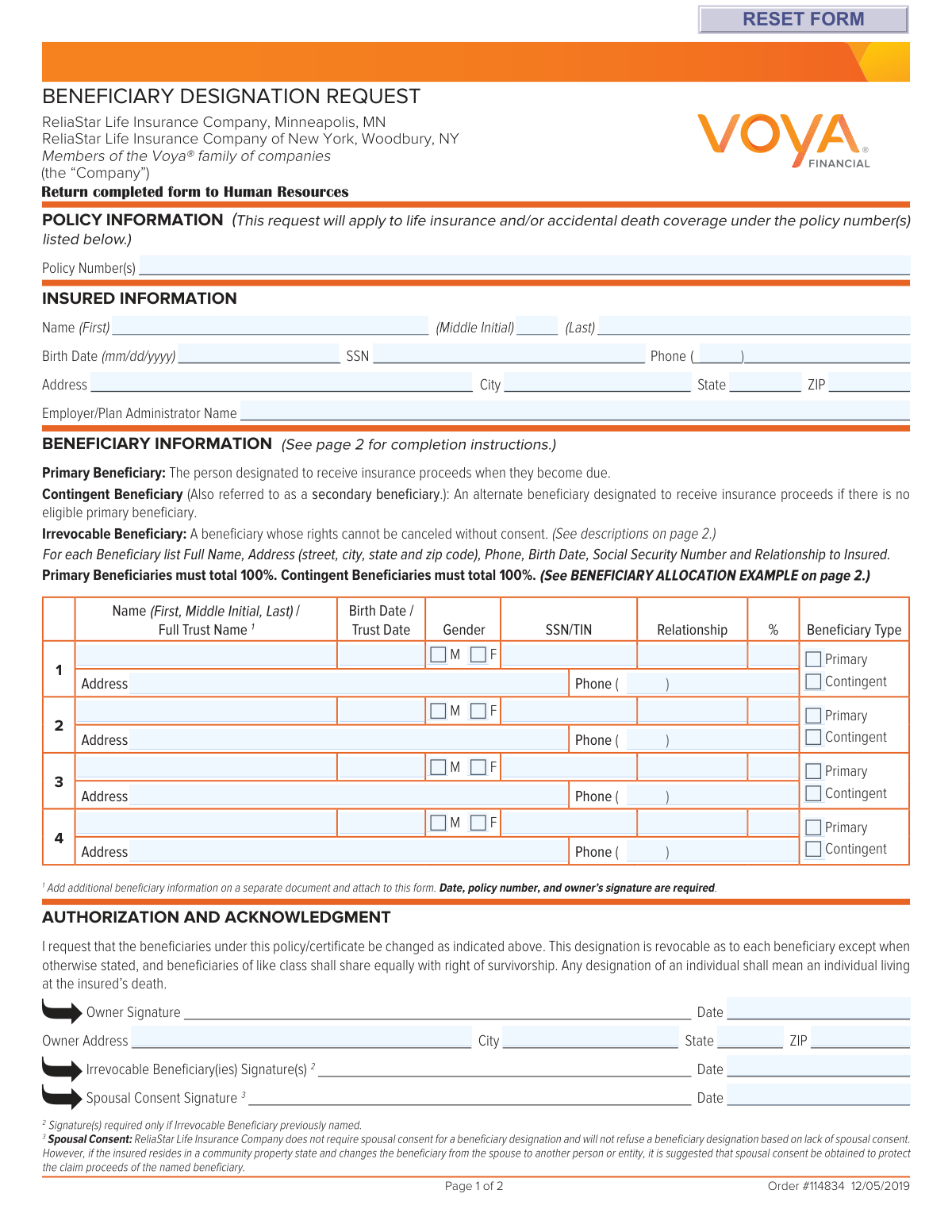
Yes! You can use AI to fill out Voya Beneficiary Designation Request Form

The Voya Beneficiary Designation Request Form is a legal document used by individuals with life insurance policies through ReliaStar Life Insurance Company (a Voya company) to officially name their beneficiaries. This form allows the policyholder to specify primary and contingent beneficiaries, ensuring that insurance proceeds are distributed to the correct people or entities after the insured's death. Properly completing this form is crucial for estate planning and avoiding potential legal complications for your loved ones. Today, this form can be filled out quickly and accurately using AI-powered services like Instafill.ai, which can also convert non-fillable PDF versions into interactive fillable forms.
Our AI automatically handles information lookup, data retrieval, formatting, and form filling.
It takes less than a minute to fill out Voya Beneficiary Designation Form using our AI form filling.
Securely upload your data. Information is encrypted in transit and deleted immediately after the form is filled out.

Form specifications

Form name: Voya Beneficiary Designation Request Form
Number of pages: 1
Language: English
Categories: beneficiary forms, beneficiary designation forms
main-image

Instafill Demo: How to fill out PDF forms in seconds with AI

How to Fill Out Voya Beneficiary Designation Form Online for Free in 2026

Are you looking to fill out a VOYA BENEFICIARY DESIGNATION FORM form online quickly and accurately? Instafill.ai offers the #1 AI-powered PDF filling software of 2026, allowing you to complete your VOYA BENEFICIARY DESIGNATION FORM form in just 37 seconds or less.
Follow these steps to fill out your VOYA BENEFICIARY DESIGNATION FORM form online using Instafill.ai:
  1. 1 Navigate to Instafill.ai and upload the Voya Beneficiary Designation Form or select it from the template library.
  2. 2 Use the AI assistant to accurately fill in the Policy Information and Insured Information sections with your name, address, and policy number(s).
  3. 3 Enter the full details for each Primary Beneficiary, including their name, SSN, relationship, and the percentage of proceeds they should receive, ensuring the total equals 100%.
  4. 4 Provide the same detailed information for your Contingent Beneficiaries, who will receive proceeds if the primary beneficiaries are not eligible. Ensure their total percentage also equals 100%.
  5. 5 Carefully review all entered information, especially the beneficiary allocations and personal details, for accuracy.
  6. 6 Electronically sign and date the form in the Authorization and Acknowledgment section. If required, obtain signatures for irrevocable beneficiaries or spousal consent.
  7. 7 Download the completed, signed form and submit it to your Human Resources department or plan administrator as instructed on the form.

Our AI-powered system ensures each field is filled out correctly, reducing errors and saving you time.

Why Choose Instafill.ai for Your Fillable Voya Beneficiary Designation Form Form?

Speed

Complete your Voya Beneficiary Designation Form in as little as 37 seconds.

Up-to-Date

Always use the latest 2026 Voya Beneficiary Designation Form form version.

Cost-effective

No need to hire expensive lawyers.

Accuracy

Our AI performs 10 compliance checks to ensure your form is error-free.

Security

Your personal information is protected with bank-level encryption.

Frequently Asked Questions About Form Voya Beneficiary Designation Form

This form is used to designate or change the beneficiaries for your life insurance and/or accidental death coverage policy with ReliaStar Life Insurance Company, a member of the Voya family of companies.

A primary beneficiary is the person or entity you designate to receive the insurance proceeds first. A contingent beneficiary only receives the proceeds if there are no living or eligible primary beneficiaries at the time of your death.

You must provide the beneficiary's full name, complete address, phone number, date of birth, Social Security Number (SSN), and their relationship to you.

The total percentage for all your primary beneficiaries must add up to exactly 100%. Likewise, the total percentage for all your contingent beneficiaries must also add up to 100%.

If you need to list additional beneficiaries, you can attach a separate document with their information. Ensure this document includes the policy number, the date, and your signature.

An irrevocable beneficiary is a person whose designation cannot be changed or removed without their signed consent. If you are changing a previous irrevocable designation, that person must sign this form.

Voya does not require spousal consent, but it is highly recommended if you live in a community property state and are changing the beneficiary from your spouse to someone else to protect the new beneficiary's claim.

After you have filled out, signed, and dated the form, you should return the completed original to your Human Resources department or Plan Administrator.

You should name an adult as a custodian for the minor under the Uniform Transfer to Minors Act (UTMA). For example, write 'Jane Smith as custodian for William Smith under the applicable UTMA'.

Yes, services like Instafill.ai use AI to help you accurately auto-fill form fields with your personal and beneficiary information, which can save time and help prevent errors.

To fill this form out online, you can upload the PDF to a platform like Instafill.ai. The service will make the document interactive, allowing you to type your information directly into the fields and sign it electronically.

You can use a service like Instafill.ai, which can convert flat, non-fillable PDFs into interactive forms. Simply upload your document, and the platform will allow you to fill it out on your computer.

Compliance Voya Beneficiary Designation Form
Validation Checks by Instafill.ai

1
Primary Beneficiary Allocation Totals 100%
This check verifies that the sum of the percentages assigned to all beneficiaries marked as 'Primary' equals exactly 100%. This is crucial for ensuring the full policy benefit is distributed according to the owner's wishes without ambiguity. If the total is not 100%, the form is considered incomplete and will be rejected, preventing the designation from being processed.
2
Contingent Beneficiary Allocation Totals 100%
This validation ensures that the percentages allocated to all beneficiaries marked as 'Contingent' sum to exactly 100%. Contingent beneficiaries only receive proceeds if no primary beneficiaries are eligible, and a 100% total is required for a clear and complete distribution in that scenario. Failure to meet this requirement will result in the form being returned for correction.
3
Ensures All Required Beneficiary Details are Provided
This check confirms that if a percentage is allocated to a beneficiary, all associated personal information fields (Full Name, Address, Phone, Birth Date/Trust Date, SSN/TIN, and Relationship) are completed. This information is legally required to locate and verify the beneficiary when the policy becomes payable. An incomplete beneficiary entry will cause the form to be rejected to prevent future complications in claim processing.
4
Validates Social Security Number (SSN) / Taxpayer ID Number (TIN) Format
This validation ensures that all Social Security Number (SSN) or Taxpayer Identification Number (TIN) fields for the insured and all beneficiaries adhere to a standard 9-digit format (e.g., XXX-XX-XXXX). A valid tax identifier is essential for identity verification and for tax reporting purposes when benefits are paid. An incorrectly formatted number will halt processing until it is corrected.
5
Validates Date Format (MM/DD/YYYY)
This check verifies that all date fields, including birth dates, trust dates, and signature dates, are entered in the required MM/DD/YYYY format and constitute a valid calendar date. Consistent and correct date formatting is critical for record-keeping, age verification, and establishing the legal date of a signature. Invalid dates will cause a validation error and require correction.
6
Confirms Owner Signature and Date are Present
This validation confirms that the owner has signed the form and provided a signature date in the 'Authorization and Acknowledgment' section. The owner's signature and date are legally required to authorize the beneficiary change, making it a binding instruction. Without a signature and date, the designation is invalid and cannot be processed.
7
Requires Beneficiary Type (Primary/Contingent) Selection
This check ensures that for every listed beneficiary with an allocated percentage, a type—either 'Primary' or 'Contingent'—has been explicitly selected. This designation is fundamental as it defines the order of payment and is the basis for the 100% allocation rule for each group. Failure to specify the beneficiary type creates ambiguity and will result in the form being rejected.
8
Validates Phone Number Format
This check ensures that all provided phone numbers for the insured and beneficiaries contain 10 digits, which can be formatted with an area code and number. Accurate contact information is vital for the insurance company to communicate with beneficiaries during the claims process. An invalid or incomplete phone number can cause significant delays and will trigger a validation failure.
9
Ensures All Required Insured Information is Complete
This validation verifies that all fields in the 'Insured Information' section, including full name, complete address, SSN, and birth date, are filled out. This information is essential for correctly identifying the policyholder to whom the beneficiary designation applies. Missing insured information would make it impossible to link the form to the correct policy, leading to immediate rejection.
10
Validates ZIP Code Format
This check ensures that all ZIP code fields contain either a 5-digit or 9-digit (ZIP+4) numeric value. A valid ZIP code is critical for mail delivery and address verification systems. An incorrect format can lead to returned mail and communication failures, so the form will be flagged for correction.
11
Logical Check for Birth Date vs. Signature Date
This validation performs a logical check to ensure the owner's signature date is not earlier than the insured's birth date. While seemingly obvious, this check prevents data entry errors, such as transposing year numbers. Such an error would invalidate the legal standing of the document, so it must be corrected before processing.
12
Validates Beneficiary Percentage Value
This check ensures that any percentage entered for a beneficiary is a numeric value greater than 0 and no more than 100. Assigning a zero or negative percentage is illogical and would complicate the distribution of proceeds. This rule ensures that only meaningful allocations are made, preventing processing errors.
13
Ensures Trust Date is Provided for Trust Beneficiaries
This validation checks if a beneficiary is designated as a trust (e.g., by containing the word 'Trust' in the name field). If so, it requires the 'Birth Date / Trust Date' field to be completed. The trust date is a key identifier for the legal trust document, and its absence would make it difficult to verify and pay the correct entity.
14
Policy Number Presence
This check verifies that at least one policy number is provided in the 'Policy Information' section. The policy number is the primary identifier used to locate the specific insurance contract in the company's system. Without a policy number, the beneficiary designation cannot be applied to any account and the form is invalid.

Common Mistakes in Completing Voya Beneficiary Designation Form

Incorrect Beneficiary Percentage Allocation

This error occurs when the percentages assigned to beneficiaries do not add up correctly. The form requires that the total percentage for all Primary Beneficiaries must equal exactly 100%, and the total for all Contingent Beneficiaries must also equal 100%. Miscalculations or misunderstandings can lead to the form being rejected, causing processing delays and leaving the distribution of assets unclear. Always double-check your math to ensure each beneficiary group (Primary and Contingent) totals 100%.

Missing or Incomplete Beneficiary Information

Applicants often leave critical fields blank, such as a beneficiary's Social Security Number, full address, or date of birth. This information is vital for the insurance company to locate and verify the identity of the beneficiary when a claim is made. Missing data can result in significant delays or complications in paying out the policy proceeds. To avoid this, gather all required information for each beneficiary before you begin filling out the form.

Using Nicknames or Partial Names

The form requires the full legal name for each beneficiary, but people sometimes use informal names, nicknames, or initials (e.g., 'Mike' instead of 'Michael'). This can create legal ambiguity and hurdles during the claims process, as the name on the form may not match the beneficiary's legal identification documents. Always use the complete, official first, middle, and last name as it appears on government-issued ID to ensure a smooth payout.

Forgetting to Sign and Date the Form

An unsigned or undated form is legally invalid and will be rejected immediately. This simple oversight is one of the most common reasons for processing failure, requiring the applicant to resubmit the entire form. Ensure the 'Owner Signature' and 'Date' fields are completed. If you are changing a previously named 'Irrevocable Beneficiary', their signature is also required.

Improperly Designating a Minor Child

Simply listing a minor's name as a beneficiary can create legal complications, potentially requiring court intervention to appoint a guardian to manage the funds. The form instructions suggest a specific legal format, such as naming an adult 'as custodian for [Minor's Name] under the [State] Uniform Transfer to Minors Act.' Failing to use this proper designation can delay the child's access to the funds and incur legal fees.

Confusing Primary and Contingent Beneficiaries

Users may not understand the distinction, listing all beneficiaries as 'Primary' or failing to name a 'Contingent' (secondary) beneficiary altogether. A Primary beneficiary is the first in line to receive the proceeds, while a Contingent beneficiary only receives them if all Primary beneficiaries are no longer eligible. Not having a contingent plan can result in the proceeds going to the insured's estate, which can be a lengthy and costly probate process.

Missing or Incorrect Policy Number

The beneficiary designation is meaningless if it is not linked to the correct insurance policy. Applicants may forget to enter the policy number or write it down incorrectly. This error will cause the form to be rejected, as the company cannot apply the changes without knowing which policy to update. Carefully copy the full policy number from your insurance documents onto the form.

Illegible Handwriting on a Printed Form

This form is often printed and filled out by hand, and illegible handwriting can lead to critical data entry errors by the plan administrator. A misspelled name or an incorrect digit in an SSN or address can cause major issues down the line. To prevent this, print clearly in block letters or use a tool like Instafill.ai, which can convert flat PDFs into digitally fillable forms, ensuring all entries are perfectly legible.

Incorrectly Naming a Trust or Estate

When designating a trust, people often write a generic name like 'My Family Trust' instead of the required full legal name and date of the trust agreement. This ambiguity can lead to legal challenges and disputes over the intended recipient. The form provides specific examples for naming trusts and estates; follow them precisely to ensure your designation is legally sound and unambiguous.

Failing to Obtain Spousal Consent When Suggested

While the company does not mandate spousal consent, the form explicitly suggests obtaining it if the insured lives in a community property state and is changing the beneficiary from their spouse to someone else. Overlooking this recommendation can expose the named beneficiary to legal challenges from the surviving spouse, potentially tying up the proceeds in litigation. It is a crucial step to protect the interests of your chosen beneficiary.

Incorrect Data Formatting for Dates and SSNs

The form specifies a 'mm/dd/yyyy' format for dates, but users may enter it differently, causing data entry failures. Similarly, an incomplete or incorrectly formatted Social Security Number can lead to rejection. These formatting errors slow down processing and require correction. AI-powered tools like Instafill.ai can automatically format data correctly as you type, preventing these kinds of validation errors.
Saved over 80 hours a year

“I was never sure if my IRS forms like W-9 were filled correctly. Now, I can complete the forms accurately without any external help.”

Kevin Martin Green

Your data stays secure with advanced protection from Instafill and our subprocessors

Robust compliance program

Transparent business model

You’re not the product. You always know where your data is and what it is processed for.

ISO 27001, HIPAA, and GDPR

Our subprocesses adhere to multiple compliance standards, including but not limited to ISO 27001, HIPAA, and GDPR.

Security & privacy by design

We consider security and privacy from the initial design phase of any new service or functionality. It’s not an afterthought, it’s built-in, including support for two-factor authentication (2FA) to further protect your account.

Fill out Voya Beneficiary Designation Form with Instafill.ai

Worried about filling PDFs wrong? Instafill securely fills voya-beneficiary-designation-request-form forms, ensuring each field is accurate.