Yes! You can use AI to fill out Worker Report of Injury or Occupational Disease (WCB-Alberta Form C060)
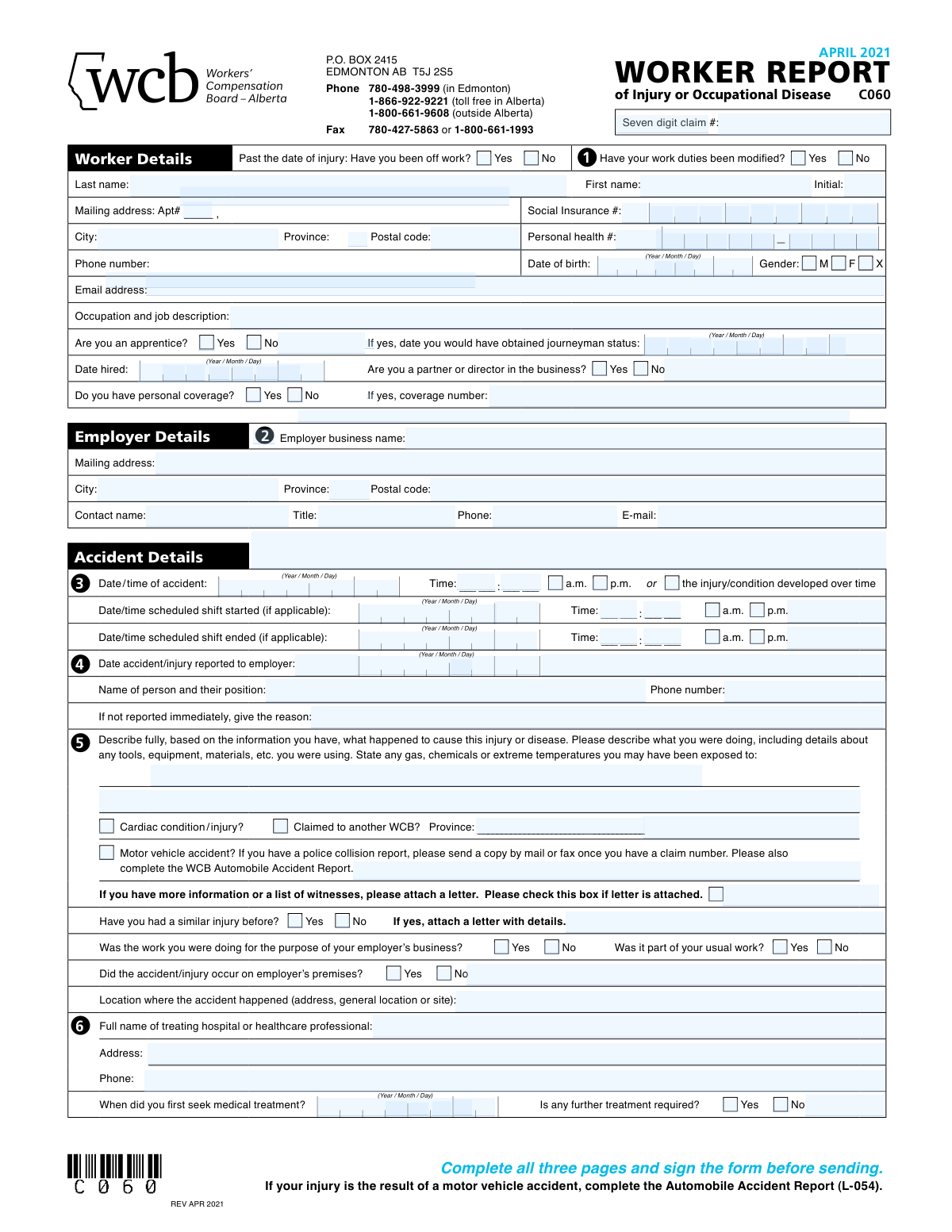
The WCB-Alberta Worker Report of Injury or Occupational Disease (Form C060) is an official three-page form required by the Workers' Compensation Board of Alberta for workers to report a work-related injury, illness, or occupational disease and initiate a compensation claim. It captures essential details including worker and employer information, accident circumstances, injury description, medical treatment, employment type, earnings, and return-to-work status. Accurate and complete submission of this form is critical to ensuring timely processing of benefits and entitlements under the Workers' Compensation Act. Today, workers can fill out this form quickly and accurately using AI-powered services like Instafill.ai, which can also convert non-fillable PDF versions into interactive fillable forms.
Our AI automatically handles information lookup, data retrieval, formatting, and form filling.
It takes less than a minute to fill out WCB-Alberta C060 using our AI form filling.
Securely upload your data. Information is encrypted in transit and deleted immediately after the form is filled out.
Form specifications
| Form name: | Worker Report of Injury or Occupational Disease (WCB-Alberta Form C060) |
| Number of pages: | 5 |
| Language: | English |
| Categories: | WCB Alberta forms, workers compensation forms |
Instafill Demo: filling out a legal form in seconds
How to Fill Out WCB-Alberta C060 Online for Free in 2026
Are you looking to fill out a WCB-ALBERTA C060 form online quickly and accurately? Instafill.ai offers the #1 AI-powered PDF filling software of 2026, allowing you to complete your WCB-ALBERTA C060 form in just 37 seconds or less.
Follow these steps to fill out your WCB-ALBERTA C060 form online using Instafill.ai:
- 1 Go to Instafill.ai and search for or upload the WCB-Alberta Worker Report of Injury or Occupational Disease (Form C060) to begin filling it out online.
- 2 Complete the Worker Details section by entering your personal information including name, mailing address, Social Insurance Number, personal health number, date of birth, gender, email, occupation, apprentice status, and personal coverage details.
- 3 Fill in the Employer Details section with your employer's business name, mailing address, and contact information (name, title, phone, and email).
- 4 Complete the Accident Details section by providing the date and time of the accident, your scheduled shift times, the date and details of when you reported the injury to your employer, a full description of what happened, the accident location, and relevant checkboxes (cardiac condition, motor vehicle accident, prior similar injury, etc.).
- 5 Enter your Medical Treatment details, including the name and address of the treating hospital or healthcare professional, the date you first sought treatment, and whether further treatment is required.
- 6 On pages 2 and 3, complete the Injury Details (body part and type of injury), Return-to-Work Details, Employment Type Details (A, B, or C), Earnings Details (rate of pay, additional benefits, second job), and Hours of Work Details.
- 7 Review all three pages for completeness and accuracy, then sign and date the Declaration and Consent section before submitting the form to WCB-Alberta by mail or fax.
Our AI-powered system ensures each field is filled out correctly, reducing errors and saving you time.
Why Choose Instafill.ai for Your Fillable WCB-Alberta C060 Form?
Speed
Complete your WCB-Alberta C060 in as little as 37 seconds.
Up-to-Date
Always use the latest 2026 WCB-Alberta C060 form version.
Cost-effective
No need to hire expensive lawyers.
Accuracy
Our AI performs 10 compliance checks to ensure your form is error-free.
Security
Your personal information is protected with bank-level encryption.
Frequently Asked Questions About Form WCB-Alberta C060
This form is used by workers in Alberta to report a work-related injury or occupational disease to the Workers' Compensation Board (WCB-Alberta). Any worker who has been injured on the job or developed an occupational disease due to their work duties should complete and submit this form to initiate a compensation claim.
If your injury developed over a period of time (such as a repetitive strain injury), you should indicate either the date of your first medical treatment or the date you first reported it to your employer, and check the box that says 'the injury/condition developed over time.' For repetitive strain injuries or occupational diseases, it is also recommended that you call the Claims Contact Centre at 780-498-3999 or 1-866-922-9221.
You should describe in your own words exactly what you were doing, including any tools, equipment, or materials you were using, any gases, chemicals, or extreme temperatures you were exposed to, and the sequence of events leading to the injury. For repetitive strain injuries, include your typical actions and how often you repeat them; if lifting was involved, state the weight. If you need more space, you can attach a separate letter.
If your injury resulted from a motor vehicle accident, you must also complete the WCB Automobile Accident Report (Form L-054) in addition to this Worker Report. Send a copy of the police collision report by mail or fax once you have a claim number, and make sure to include the direction of travel when describing the accident location.
Your duties have been modified if your employer made changes to your regular job as a result of your injury — this includes changes to tasks or functions, workload (such as hours or work schedules), work environment or area, or equipment used. Check 'Yes' if any such changes were made, or 'No' if you are continuing your regular pre-injury duties.
Select Option A if you work 12 months per year with the same employer (full-time, part-time, or irregular/casual). Select Option B if you work only part of the year due to seasonal or lack-of-work layoffs (seasonal worker, summer student, or temporary position). Select Option C if you are self-employed, a sub-contractor, do piecework, or work on commission — and note that you must also submit a detailed income and expense statement if you select Option C.
Yes, if you have a second job, you should provide the employer's name and phone number in Section 9c. If your injury causes you to miss earnings from that second job, WCB-Alberta will consider those earnings when setting your compensation rate, and your second employer may be contacted.
You should still report the injury as soon as possible and provide the date and name of the person you reported it to. If there was a delay in reporting, you must provide a reason for the delay in the designated field on the form. Providing an accurate date and the name and contact information of the person notified is important for processing your claim.
You will need your full name, mailing address, Social Insurance Number (SIN), personal health number, date of birth, phone number, email address, occupation and job description, and date of hire. You will also need your employer's business name, mailing address, and contact details, as well as information about your earnings, work schedule, and any medical treatment received.
Yes, you must sign the Declaration and Consent section on Page 3 before submitting the form. By signing, you declare that all information provided is true and correct, and you consent to WCB-Alberta collecting relevant information from physicians, employers, and other sources to determine your benefit entitlement. You also acknowledge your obligation to inform WCB-Alberta of any changes in your employment or work status while receiving benefits.
You can mail the completed form to WCB-Alberta at P.O. Box 2415, Edmonton, AB T5J 2S5, or fax it to 780-427-5863 or 1-800-661-1993. For questions, you can call the Claims Contact Centre at 780-498-3999 (Edmonton), 1-866-922-9221 (toll-free in Alberta), or 1-800-661-9608 (outside Alberta).
Yes — services like Instafill.ai use AI to auto-fill form fields accurately, saving you time and reducing errors. You can upload the Worker Report form to Instafill.ai, answer a few questions, and the AI will populate the relevant fields for you, making the process faster and more straightforward.
If the PDF version of the Worker Report is a flat, non-fillable document, you can use Instafill.ai to convert it into an interactive fillable form. Simply upload the PDF to Instafill.ai, and the platform will allow you to type directly into the form fields, check boxes, and complete the form digitally before printing or submitting it.
Check 'Yes' for the question 'Have you had a similar injury before?' and attach a separate letter with details about the prior injury, including dates, what happened, and any treatment received. This information helps WCB-Alberta assess your current claim accurately.
Yes, you must complete all three pages and sign the form before sending it. The form also reminds you to write your name, Social Insurance Number, and date of birth at the top of each page in case the pages get separated during processing.
Compliance WCB-Alberta C060
Validation Checks by Instafill.ai
1
Social Insurance Number (SIN) Format and Completeness
Validates that the Social Insurance Number contains exactly 9 digits, contains only numeric characters, and all digit boxes are filled. The SIN is a critical identifier used by WCB-Alberta for reporting to Canada Revenue Agency and for correctly linking the claim to the worker's record. If the SIN is missing, incomplete, or contains non-numeric characters, the claim cannot be properly processed or reported to CRA, potentially delaying benefit entitlement.
2
Accident Date Must Not Be in the Future and Must Precede Report Date
Validates that the date of accident is a valid calendar date, is not in the future relative to the submission date, and is on or before the date the accident was reported to the employer. An accident cannot logically be reported before it occurred, and a future accident date would indicate a data entry error. If this check fails, the claim timeline is inconsistent and the form must be corrected before processing can begin.
3
Date Accident Reported to Employer Must Be On or After Accident Date
Validates that the date the accident or injury was reported to the employer is equal to or later than the date of the accident itself. Reporting cannot precede the occurrence of the injury, and any discrepancy suggests a data entry error or potential fraud. If this logical consistency check fails, the form should be flagged for review and the worker should be asked to clarify or correct the dates.
4
Apprentice Journeyman Status Date Required When Apprentice Is Indicated
Validates that if the worker has checked 'Yes' for apprentice status, the field for the date they would have obtained journeyman status is also completed with a valid date. This date is necessary for WCB-Alberta to accurately calculate compensation rates and benefit entitlements specific to apprentices. If the apprentice box is checked but the journeyman date is left blank or contains an invalid date, the earnings calculation cannot be completed correctly.
5
Personal Coverage Number Required When Personal Coverage Is Indicated
Validates that if the worker has selected 'Yes' for having personal coverage, the coverage number field is populated with a non-empty value. The coverage number is required so WCB-Alberta can coordinate benefits with the worker's private insurer and avoid duplicate payments. If personal coverage is indicated but no coverage number is provided, the claim file will be incomplete and coordination of benefits will be delayed.
6
Date of Birth Is a Valid Date and Worker Is of Working Age
Validates that the date of birth is a properly formatted calendar date (Year/Month/Day), is not in the future, and results in a worker age that is consistent with legal working age (typically 14 or older) and not implausibly old (e.g., over 100 years). An invalid or implausible date of birth prevents correct identification of the worker and may affect benefit calculations tied to age. If this check fails, the worker's identity cannot be confirmed and the claim may be held pending correction.
7
Accident Time Must Have a Valid AM/PM Selection
Validates that when a specific accident time is entered (i.e., the 'injury/condition developed over time' box is not checked), exactly one of the AM or PM checkboxes is selected alongside the time entry. Without a clear AM/PM designation, the recorded time of accident is ambiguous and could affect the determination of whether the injury occurred during the worker's scheduled shift. If neither or both AM/PM options are selected, the form should be flagged as incomplete.
8
Scheduled Shift End Time Must Be After Scheduled Shift Start Time
Validates that when both scheduled shift start and end dates and times are provided, the shift end date/time is logically after the shift start date/time (accounting for overnight shifts that cross midnight). An end time that precedes the start time indicates a data entry error that could misrepresent the worker's shift context at the time of injury. If this check fails, the shift information should be reviewed and corrected to ensure accurate claim assessment.
9
Accident Time Falls Within or Near Scheduled Shift Hours
Validates that the recorded time of the accident is consistent with the scheduled shift start and end times provided, allowing for reasonable variance such as pre-shift preparation or post-shift activities. If the accident time falls significantly outside the scheduled shift window without explanation, this may indicate a data entry error or require additional justification. A flag should be raised for adjudicator review when the accident time is more than one hour outside the recorded shift boundaries.
10
Employer Contact Phone Number Format Validation
Validates that the employer contact phone number and the phone number of the person notified of the injury each contain a valid North American telephone number format, including a 10-digit number with area code (e.g., 780-498-3999). Phone numbers are essential for WCB-Alberta to contact the employer and the notified person to verify claim details. If a phone number is missing, too short, or contains non-numeric characters (excluding standard separators), the form should be flagged as incomplete.
11
Postal Code Format Validation for Worker and Employer Addresses
Validates that both the worker's and employer's postal codes conform to the Canadian postal code format (letter-digit-letter digit-letter-digit, e.g., T5J 2S5), with no invalid characters. A correctly formatted postal code ensures that correspondence and benefit payments are directed to the right location and that address data can be used for geographic analysis. If either postal code is missing or does not match the expected format, the relevant address section should be flagged for correction.
12
Date First Sought Medical Treatment Must Be On or After Accident Date
Validates that the date the worker first sought medical treatment is equal to or later than the date of the accident or injury. It is not possible to seek treatment for an injury before it occurs, and any discrepancy suggests a data entry error. If this check fails, the medical treatment timeline is inconsistent with the accident record and the form must be corrected or the discrepancy explained before the claim can proceed.
13
Similar Prior Injury Requires Attached Letter with Details
Validates that if the worker has checked 'Yes' for having had a similar injury before, the letter-attached checkbox is also checked or the details field is populated, indicating that additional information about the prior injury has been provided. Prior injury history is relevant to determining the extent to which the current injury is work-related and may affect benefit calculations. If a prior similar injury is indicated but no details or attached letter are noted, the claim file is incomplete and adjudication may be delayed.
14
Motor Vehicle Accident Requires Automobile Accident Report Completion
Validates that if the 'Motor vehicle accident?' checkbox is selected, the worker has acknowledged the requirement to complete the WCB Automobile Accident Report (L-054) and, where available, submit a copy of the police collision report. Motor vehicle accident claims require additional documentation to coordinate with auto insurance and to properly assess liability. If the motor vehicle accident box is checked but no reference to the supplementary report is indicated, the claim should be flagged as incomplete.
15
Employment Type Section Requires Exactly One Category Selected (A, B, or C)
Validates that the worker has selected exactly one employment type category — either A (permanent, 12 months per year), B (non-permanent, part of the year), or C (special employment circumstance such as self-employed or subcontractor) — and has not left all three blank or selected more than one. The employment type directly determines how WCB-Alberta calculates the worker's compensation rate and benefit entitlement. If no category is selected or multiple categories are selected, the earnings calculation cannot proceed and the form must be returned for clarification.
16
Date Hired Must Be On or Before Accident Date
Validates that the date the worker was hired by the employer is on or before the date of the accident, ensuring the worker was employed at the time of the injury. A hire date after the accident date is logically impossible and indicates a data entry error that could affect the validity of the claim. If this check fails, the employment relationship at the time of injury cannot be confirmed and the claim should be held pending correction of the hire or accident date.
Common Mistakes in Completing WCB-Alberta C060
The form requires all dates to be entered in Year/Month/Day format, but many people habitually write dates as Day/Month/Year or Month/Day/Year. This can cause WCB-Alberta to record incorrect accident dates, birth dates, or hire dates, potentially delaying or invalidating your claim. Always double-check that you are entering dates in the YYYY/MM/DD order as specified on every date field throughout all three pages. Tools like Instafill.ai can automatically format dates correctly to match the form's required format.
Workers with repetitive strain injuries, occupational diseases, or conditions that developed gradually often enter a single accident date without checking the 'the injury/condition developed over time' checkbox. This omission makes it appear as though a sudden incident occurred, which can lead to incorrect claim processing or denial. If your condition developed gradually, check this box and use either the date of first medical treatment or the date you first reported it to your employer as the reference date. Additionally, for these injury types, you should call the Claims Contact Centre before submitting.
Many claimants write only a brief sentence like 'I hurt my back at work,' omitting critical details such as the sequence of events, tools or equipment involved, weights lifted, chemicals or temperatures encountered, and specific body movements. An incomplete description can result in delays while WCB requests more information, or in a reduced or denied claim. Follow the form's example and describe exactly what you were doing, what you were using, the physical actions involved (twisting, lifting, pushing), and any environmental factors. If space runs out, attach a separate letter and check the letter-attached box.
Question 4 requires not just the date the injury was reported to the employer, but also the full name, job title, and phone number of the specific person who was informed. Workers frequently leave these fields blank or only provide the date, which makes it difficult for WCB to verify the report and can raise questions about whether the injury was properly reported. Ensure you record the supervisor's or manager's full name, their position (e.g., 'Site Supervisor'), and their direct phone number. If you could not report immediately, also provide a written reason in the designated field.
The SIN must be entered digit by digit across individual boxes, and people often skip digits, transpose numbers, or leave boxes blank. Since the SIN is used to identify your record and report to Canada Revenue Agency, any error can cause your claim to be linked to the wrong person or fail identity verification. Carefully enter all nine digits of your SIN one per box, and double-check against your SIN card or official document before submitting. Instafill.ai can help auto-populate and validate your SIN to prevent transcription errors.
Section 8 requires workers to select exactly one employment type — permanent year-round (A), seasonal/part-year (B), or special circumstances such as self-employed or subcontractor (C) — but many people either skip this section or select the wrong category. Choosing the wrong type directly affects how WCB calculates your compensation rate, potentially resulting in underpayment. Read each option carefully: if you work all 12 months for the same employer, choose A; if your work is seasonal or temporary, choose B; if you are self-employed, a subcontractor, or do piecework, choose C and submit a detailed income and expense statement.
Workers who hold a second job at the time of injury often forget to disclose it in Section 9c, not realizing that WCB-Alberta can factor those lost earnings into the compensation rate. Omitting this information means you may receive a lower benefit than you are entitled to. If the injury caused you to miss time from a second job, check 'Yes,' provide the second employer's name and phone number, and attach earnings and time-missed details. Be aware that WCB may contact your second employer to verify the information.
Section 9b asks workers to specify whether vacation pay is taken as time off with pay or paid as an additional percentage on each paycheque, and many people either leave this blank or select the wrong option. Similarly, shift premiums and overtime fields are often left incomplete even when the worker regularly receives them. These figures are used to calculate your pre-accident earnings and therefore your compensation rate, so errors or omissions can significantly reduce your benefit. Gather your pay stubs or ask your employer for gross earnings details covering the year prior to the injury date before completing this section.
The Worker Report spans three pages, and many claimants submit only the first one or two pages, or forget to sign the Declaration and Consent on page 3. An unsigned or incomplete form cannot be processed by WCB-Alberta, causing significant delays in claim adjudication. The form explicitly reminds you at the top of each page to 'complete all three pages and sign the form before sending.' Review all three pages carefully before submission and ensure your signature, printed name, and the date are on the declaration section of page 3.
Pages 2 and 3 each have fields at the top for the worker's last name, first name, initial, Social Insurance Number, and date of birth. Workers frequently leave these blank because they assume the information from page 1 is sufficient. If the pages become separated during processing, WCB will be unable to match them to the correct claim, causing delays or loss of information. Always fill in the identifying information at the top of every page, as the form explicitly instructs.
Section 6 requires a specific street address or detailed location description of where the accident occurred, but workers often write only 'at work' or 'on the job site.' For off-site accidents, motor vehicle accidents, or remote locations, this is especially problematic because WCB needs to determine jurisdiction and circumstances. Provide a full street address if possible, or a precise description such as a highway number and kilometre marker, the name of the worksite, or — for vehicle accidents — the direction of travel. Instafill.ai can help prompt you to enter complete location details before submission.
The form asks whether you have had a similar injury before, and many workers either leave this blank or check 'No' to avoid complications, even when a prior injury exists. Failing to disclose a prior similar injury is considered providing false information and can result in claim denial or even criminal prosecution as noted in the Declaration. If you have had a prior similar injury, check 'Yes' and attach a letter with full details including dates, treatment received, and the outcome, so WCB can properly assess any pre-existing condition and its relationship to your current claim.
Saved over 80 hours a year
“I was never sure if my IRS forms like W-9 were filled correctly. Now, I can complete the forms accurately without any external help.”
Kevin Martin Green
Your data stays secure with advanced protection from Instafill and our subprocessors

Robust compliance program
Transparent business model
You’re not the product. You always know where your data is and what it is processed for.
ISO 27001, HIPAA, and GDPR
Our subprocesses adhere to multiple compliance standards, including but not limited to ISO 27001, HIPAA, and GDPR.
Security & privacy by design
We consider security and privacy from the initial design phase of any new service or functionality. It’s not an afterthought, it’s built-in, including support for two-factor authentication (2FA) to further protect your account.
Fill out WCB-Alberta C060 with Instafill.ai
Worried about filling PDFs wrong? Instafill securely fills worker-report-of-injury-or-occupational-disease-wcb-alberta-form-c060 forms, ensuring each field is accurate.