
Yes! You can use AI to fill out Alternative Investment Request for Transaction Letter of Instruction (LOI)
Don't type 19 fields by hand. Tell our AI about yourself, or upload a document you already have, and it fills every field in seconds. You check it, then download, print or sign.
The AI does the filling. You just check it.
No typing into boxes, nothing to install.
What this form asks for
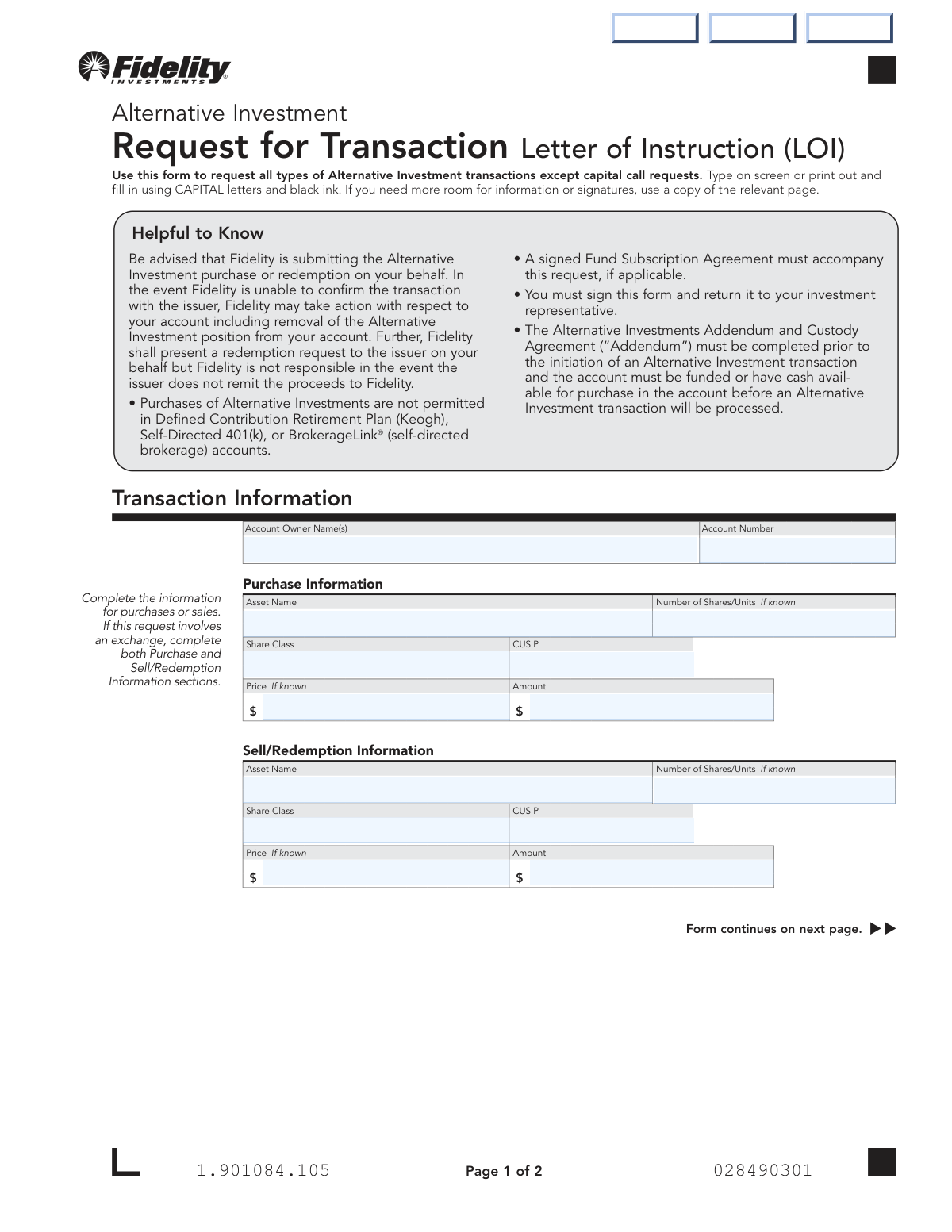
The AI fills all of it, from your answers or your documents.
The AI checks your answers before you download
14 checks built for this form, so a wrong date or a missing answer is caught before anyone else sees it.
This check verifies that the 'Account Number' field is not empty and conforms to the expected format for a Fidelity account number. It also cross-references the number against Fidelity's database to ensure it represents a valid, active account. This is critical for routing the transaction to the correct account and preventing processing errors. If the number is invalid or not found, the form submission will be rejected with an error message prompting the user to correct the entry.
This validation ensures that the form is not submitted with both the 'Purchase Information' and 'Sell/Redemption Information' sections completely blank. At least one of these sections must be filled out to define the transaction type. This prevents the submission of empty or ambiguous instructions. If both sections are empty, the system will prompt the user to complete the details for either a purchase, a sale, or both for an exchange.
Validates that the 'Primary Account Owner Signature' and its corresponding 'Date' field on page 2 are not empty. A signature and date are legally required to authorize Fidelity to act on the instructions provided. This check ensures the form is legally binding and properly authorized. A missing signature or date will halt processing and require the user to complete the fields before the form can be accepted.
This check ensures that all date fields on the form are entered in the specified 'MM DD YYYY' format and represent a valid calendar date. It also verifies that the date is not in the future. This maintains data consistency and ensures the transaction is recorded with an accurate, legally sound execution date. An invalid format or a future date will trigger an error, requiring the user to correct the entry.
This validation confirms that the 'CUSIP' field in both the purchase and sell sections, if filled, adheres to the standard 9-character alphanumeric format. The CUSIP is a critical, unique identifier for securities. Ensuring its format is correct reduces the risk of misidentifying the asset and executing an incorrect transaction. If the format is invalid, the user will be notified to review and correct the CUSIP.
If any field in the 'Purchase Information' section is filled, this check mandates that at least the 'Asset Name' and 'Amount' fields are completed. These fields are the minimum information required to attempt a purchase transaction. This prevents incomplete purchase requests from being submitted, which would otherwise fail during processing. The system will return an error if these core fields are missing from a purchase request.
And 8 more checks
- Sell/Redemption Information Completeness
- Joint Account Signature Requirement
- Account Owner Name Consistency
- Sufficient Funds for Purchase
- Asset Ownership for Sale
- Purchase Calculation Consistency
- Account Type Eligibility Check
- Numeric Field Type Validation
Let AI fill out your Alternative Investment LOI
No typing. Every field filled in seconds, checked, ready to sign.
How to Fill Out Alternative Investment LOI Online for Free in 2026
What the AI walks you through.
- Navigate to Instafill.ai and upload or select the Alternative Investment LOI form.
- Provide your account information, including the account owner's name and account number, letting the AI populate the fields.
- Specify the transaction type by filling out the 'Purchase Information' for a buy, 'Sell/Redemption Information' for a sell, or both for an exchange.
- Enter the specific details for the asset, such as its name, CUSIP, number of shares/units, and the total transaction amount.
- Carefully review the authorizations and acknowledgements to understand your responsibilities and the terms of the transaction.
- Electronically sign and date the form. The AI will place your signature and the date in the correct fields for all required account owners.
- Download the completed, signed form and submit it to Fidelity via mail or as instructed by your representative.
Common Mistakes in Completing Alternative Investment LOI
The ones the AI is built to catch.
Forgetting to Sign or Date the Form
Missing Signature for Joint Account Holder
Entering an Incorrect Asset Name or CUSIP
Omitting the Share Class
Providing Ambiguous Purchase or Sell Instructions
Improperly Filling Out an Exchange Transaction
Failing to Include the Required Fund Subscription Agreement
Requesting a Purchase with Insufficient Funds
Mismatching Account Owner Name and Account Number
Not Using Capital Letters and Black Ink as Instructed
Frequently Asked Questions About Alternative Investment LOI
Is it really free for 7 days?
Can I fill other forms too?
How do I cancel?
How does the AI fill out Alternative Investment LOI?
What happens to my information?
How complex is Alternative Investment LOI to fill out?
What is the purpose of this Alternative Investment Request form?
Who needs to fill out this form?
What other documents do I need to provide with this form?
How do I request an exchange of one investment for another?
What if I don't know the CUSIP, price, or number of shares?
Can I purchase Alternative Investments in my 401(k) account?
Can I use margin to purchase an Alternative Investment?
Where do I send the completed form?
Who is required to sign the form?
What is Fidelity's responsibility in processing this transaction?
Can I use an AI tool to help fill out this form?
How can I fill out this form online if it's a PDF?
My copy of the form is a non-fillable PDF. What should I do?
Do I need to have funds in my account before submitting a purchase request?
Get your Alternative Investment LOI filled out by AI
$0 today. Cancel before Nov 2 and you pay nothing.
Other forms like this one
investment forms: Form 3468, Investment Credit, Form 8960, Net Investment Income Tax, How to Transfer Assets from Morgan Stanley to Fidelity Investments (Fidelity Stock Plan Services Guide), Fidelity Investments Transfer/Rollover/Exchange Form, Fidelity Investments Standing Transfer Instructions Form, One-Time Withdrawal – IRA, Fidelity Investments, Fidelity Investments Transfer/Rollover Form, Special Tax Notice: Your Rollover Options - Fidelity Investments, Fidelity Investment-Only (Non-Prototype) Retirement Account Application, Fidelity Investments® Beneficiary Distribution Form, Fidelity Investments Distribution Form, One-Time Withdrawal – Investment-Only (Non-Prototype) Retirement Account, Fidelity Investments Withdrawal — One-Time, Fidelity Investments Withdrawals—529 College Savings Plan, Fidelity Investments Change of Account Ownership — Mutual Fund Only Accounts, Fidelity Investments 403(b) Beneficiary Designation, Fidelity Investments Qualified Plan Beneficiary Designation, Fidelity Investments 403(b)/401(a) Beneficiary Designation, Fidelity Investments Qualified Plan Beneficiary Designation, Fidelity Investments Earnings Automatic Withdrawal Plan — IRA
alternative investment forms: Alternative Investment Letter of Authorization, Computershare Alternative Investment Product Transfer Request, Alpine SPRIM™ Private Markets Fund Subscription Agreement and Power of Attorney, BlackRock Private Investments Fund Subscription Agreement and Application, Pomona Investment Fund Investor Subsequent Application (Class A & Class I Shares), Protea International Hedge Fund Subscription Form (Individual), The Entrust Group - Private Equity Buy Direction Letter
Fidelity forms: Fidelity Funds Account Transfer of Assets Form, Fidelity Stock Plan Services (SPS) Transfer Request Form, How to Transfer Assets from Morgan Stanley to Fidelity Investments (Fidelity Stock Plan Services Guide), Fidelity Investments Transfer/Rollover/Exchange Form, Fidelity Investments Standing Transfer Instructions Form, Fidelity Charitable 144/145 Contribution Form, One-Time Withdrawal – IRA, Fidelity Investments, Fidelity Investments Transfer/Rollover Form, Fidelity Advisor 403(b) Distribution Request Form, Fidelity Advisor IRA Distribution Request for Automatic Rollover Accounts, Special Tax Notice: Your Rollover Options - Fidelity Investments, Fidelity Charitable Letter of Authorization, Fidelity Advisor Trading Authorization and Indemnification, Fidelity Investment-Only (Non-Prototype) Retirement Account Application, Fidelity NetBenefits Send a Document Form, Fidelity NetBenefits Auditor's Guide: An Overview of Fidelity's 2024 Plan Year Reporting Package, Fidelity NetBenefits Distribution - Recurring Payments, Fidelity Investments® Beneficiary Distribution Form, Fidelity Investments Distribution Form, Fidelity One-Time Withdrawal Form — Nonretirement
UK investment forms: Triple Point Venture VCT plc | Investor Application Form, Form 3468, Investment Credit, Form 8960, Net Investment Income Tax, How to Transfer Assets from Morgan Stanley to Fidelity Investments (Fidelity Stock Plan Services Guide), Fidelity Investments Transfer/Rollover/Exchange Form, Fidelity Investments Standing Transfer Instructions Form, One-Time Withdrawal – IRA, Fidelity Investments, Fidelity Investments Transfer/Rollover Form, Special Tax Notice: Your Rollover Options - Fidelity Investments, Fidelity Investment-Only (Non-Prototype) Retirement Account Application, Fidelity Investments® Beneficiary Distribution Form, Fidelity Investments Distribution Form, One-Time Withdrawal – Investment-Only (Non-Prototype) Retirement Account, Fidelity Investments Withdrawal — One-Time, Fidelity Investments Withdrawals—529 College Savings Plan, Fidelity Investments Change of Account Ownership — Mutual Fund Only Accounts, Fidelity Investments 403(b) Beneficiary Designation, Fidelity Investments Qualified Plan Beneficiary Designation, Fidelity Investments 403(b)/401(a) Beneficiary Designation, Fidelity Investments Qualified Plan Beneficiary Designation
Let AI fill out your Alternative Investment LOI
Your trial starts once a card is added. You pay nothing before Nov 2.
Our AI already knows this form, all 19 fields of it. Skip the typing: tell it about yourself, or upload what you have, and it fills the whole form in seconds.
- AI fills every field on both pages, checkboxes included
- No typing into boxes: answer a few questions, or upload a document you already have, an old copy of this form, a photo of a document
- The AI checks the answers; you review and change anything before you download
- Download the finished PDF, print it, or sign it online
- Encrypted, and never used to train AI
Cancel before Nov 2 and you pay nothing.
A card is needed to start the trial. Cancel in two clicks from your account.
Terms · Privacy