Yes! You can use AI to fill out Carbon Monoxide Detector Notice (C.A.R. Form CMD, 4/12)
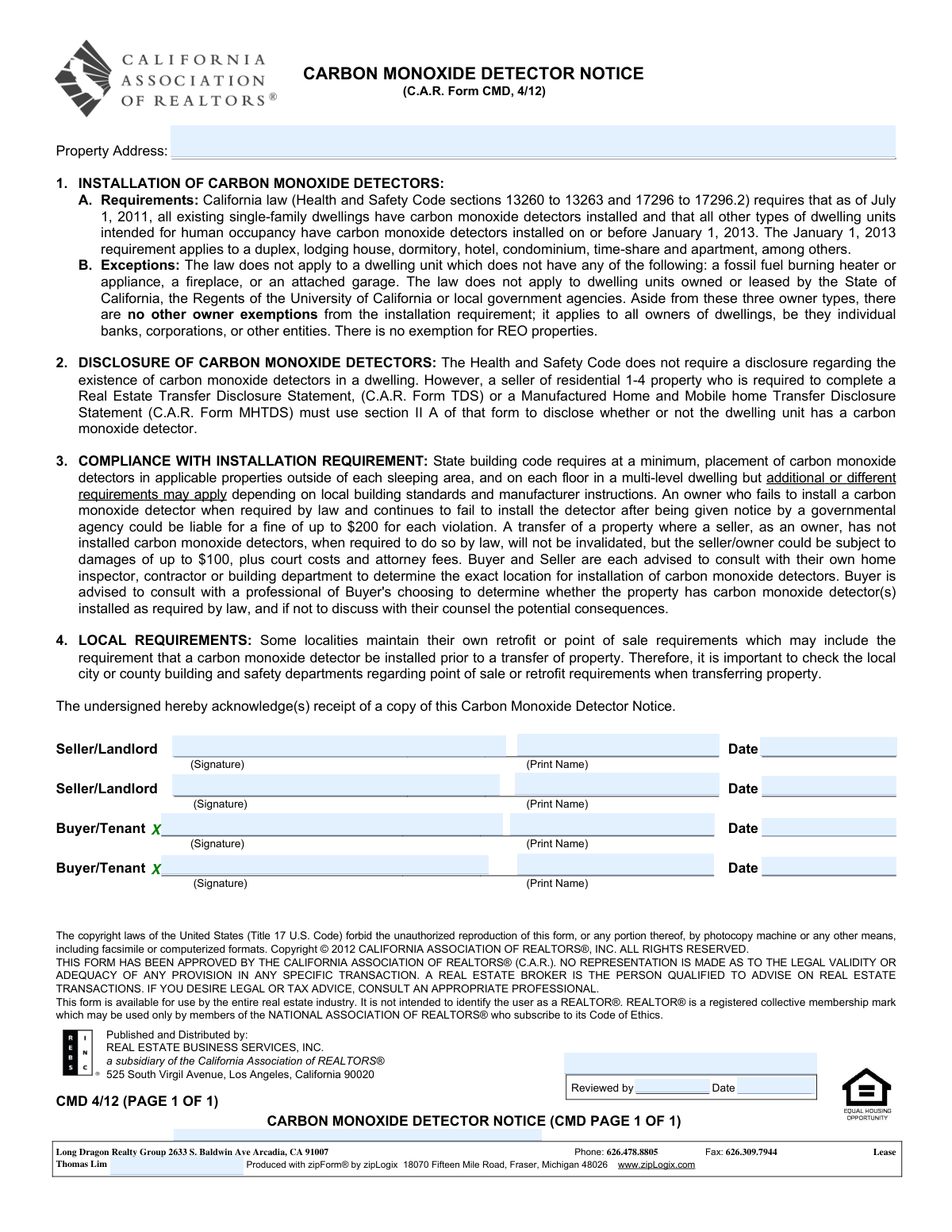
The Carbon Monoxide Detector Notice (C.A.R. Form CMD) is a real estate notice used in California to provide parties with information about state and possible local requirements to install carbon monoxide detectors in residential dwellings. It summarizes when detectors are required, key exceptions, and potential fines or damages for noncompliance. The form is typically acknowledged by signature to document that the buyer/tenant and seller/landlord received the notice, helping reduce disputes and clarify responsibilities during a sale or lease.
Our AI automatically handles information lookup, data retrieval, formatting, and form filling.
It takes less than a minute to fill out C.A.R. CMD using our AI form filling.
Securely upload your data. Information is encrypted in transit and deleted immediately after the form is filled out.
Form specifications
| Form name: | Carbon Monoxide Detector Notice (C.A.R. Form CMD, 4/12) |
| Number of pages: | 1 |
| Filled form examples: | Form C.A.R. CMD Examples |
| Language: | English |
| Categories: | CAR forms, California real estate forms |
Instafill Demo: filling out a legal form in seconds
How to Fill Out C.A.R. CMD Online for Free in 2026
Are you looking to fill out a C.A.R. CMD form online quickly and accurately? Instafill.ai offers the #1 AI-powered PDF filling software of 2026, allowing you to complete your C.A.R. CMD form in just 37 seconds or less.
Follow these steps to fill out your C.A.R. CMD form online using Instafill.ai:
- 1 Enter the property address for the dwelling covered by the notice.
- 2 Review the installation requirements section to understand when carbon monoxide detectors are required and the general placement standards.
- 3 Review the exceptions section to determine whether the property may be exempt based on fuel-burning appliances, fireplaces, attached garage, or government ownership/lease.
- 4 Review the disclosure and compliance sections, including potential penalties and the recommendation to consult inspectors/contractors or local building departments.
- 5 Check local city/county point-of-sale or retrofit requirements that may apply to the property transfer or lease.
- 6 Collect signatures, printed names, and dates from all applicable parties (seller/landlord and buyer/tenant, including additional signature lines if needed) to acknowledge receipt.
Our AI-powered system ensures each field is filled out correctly, reducing errors and saving you time.
Why Choose Instafill.ai for Your Fillable C.A.R. CMD Form?
Speed
Complete your C.A.R. CMD in as little as 37 seconds.
Up-to-Date
Always use the latest 2026 C.A.R. CMD form version.
Cost-effective
No need to hire expensive lawyers.
Accuracy
Our AI performs 10 compliance checks to ensure your form is error-free.
Security
Your personal information is protected with bank-level encryption.
Frequently Asked Questions About Form C.A.R. CMD
It is a written notice that explains Californiaās carbon monoxide (CO) detector installation requirements and confirms the parties received the notice. It is commonly provided in real estate sales and leases.
The form includes signature lines for the Seller/Landlord and the Buyer/Tenant. Each person signing is acknowledging receipt of the notice.
No. The form is primarily a notice and receipt acknowledgment; it does not certify that detectors are installed or properly placed.
As of July 1, 2011, existing single-family dwellings must have CO detectors, and by January 1, 2013, most other dwelling units intended for human occupancy (e.g., apartments, condos, hotels, dorms) must have them. The requirement applies broadly to owners of dwellings.
Yes. The law does not apply if the dwelling unit has none of the following: a fossil-fuel-burning heater/appliance, a fireplace, or an attached garage. It also does not apply to units owned or leased by certain government entities listed in the notice.
No. The notice states there is no exemption for REO properties, and the installation requirement applies to all owners (individuals, banks, corporations, and other entities).
At a minimum, state building code requires placement outside of each sleeping area and on each floor in a multi-level dwelling. Additional or different requirements may apply based on local standards and the manufacturerās instructions.
The notice states the Health and Safety Code does not require a separate disclosure about the existence of CO detectors. However, sellers of residential 1ā4 property who complete a Transfer Disclosure Statement (TDS) (or MHTDS for manufactured/mobile homes) must disclose in that form whether the dwelling has a CO detector.
If an owner continues to fail to install detectors after notice by a governmental agency, they could be fined up to $200 per violation. The notice also states a seller/owner could be subject to damages up to $100 plus court costs and attorney fees.
No. The notice states the transfer will not be invalidated, but the seller/owner may still face potential damages and other consequences described in the form.
Yes. The notice warns that some localities have their own retrofit or point-of-sale requirements that may require installation before a property transfer, so parties should check with the local building and safety department.
The notice advises buyers to consult a professional of their choosing (such as a home inspector, contractor, or building department) to confirm whether detectors are installed as required and to determine proper placement.
Typically, the property address and the names, signatures, and dates for the Seller/Landlord and Buyer/Tenant are completed. The form itself provides the legal notice language; it is not a checklist of detector locations.
This form is generally provided as part of a real estate transaction or lease paperwork and kept in the transaction file. It is not described as something you submit to a state agency; it serves as documentation that the notice was received.
Compliance C.A.R. CMD
Validation Checks by Instafill.ai
1
Property Address is present and sufficiently complete
Validate that the Property Address field is not blank and contains enough components to identify the property (e.g., street number, street name, city, state, and ZIP when applicable). This is critical because the notice must be tied to a specific dwelling unit for compliance and recordkeeping. If the address is missing or too vague (e.g., only a city), the submission should be rejected or routed for correction.
2
Property Address format and character validation
Check that the address uses valid characters (letters, numbers, spaces, and common punctuation like commas, periods, and hyphens) and does not contain corrupted OCR artifacts or random symbols. This reduces downstream issues in indexing, matching, and audit trails. If invalid characters or obvious OCR noise is detected, flag the record for manual review and request a corrected entry.
3
Seller/Landlord signature presence (Party 1)
Ensure the first Seller/Landlord signature field is completed (e-signature captured or wet signature indicator present). The notice requires acknowledgment of receipt, and missing signatures undermine enforceability and compliance documentation. If absent, the system should block completion or mark the form as incomplete.
4
Seller/Landlord printed name presence and consistency (Party 1)
Validate that the printed name for Seller/Landlord (Party 1) is present and appears to be a person or entity name (not a phone number, address, or stray text). This is important for identifying who acknowledged receipt and for later dispute resolution. If missing or clearly not a name, the submission should fail validation and require correction.
5
Seller/Landlord date format and validity (Party 1)
Verify that the Seller/Landlord date is provided and matches an accepted date format (e.g., MM/DD/YYYY) and is a real calendar date. Dates are essential to establish when the notice was acknowledged and to support transaction timelines. If the date is missing, malformed, or impossible (e.g., 13/40/2026), the form should be rejected or flagged for correction.
6
Buyer/Tenant signature presence (Party 1)
Ensure the first Buyer/Tenant signature field is completed. The form states the undersigned acknowledge receipt, and buyer/tenant acknowledgment is a core purpose of the notice. If the signature is missing, the system should prevent finalization or mark the document as non-compliant.
7
Buyer/Tenant printed name presence and consistency (Party 1)
Validate that the printed name for Buyer/Tenant (Party 1) is present and resembles a name rather than unrelated text. This ensures the acknowledgment can be attributed to the correct party and supports auditability. If missing or invalid, require correction before acceptance.
8
Buyer/Tenant date format and validity (Party 1)
Check that the Buyer/Tenant date is present, uses an approved format, and is a valid calendar date. This date is needed to confirm when the buyer/tenant received the notice and to align with transaction milestones. If invalid or missing, the submission should be flagged and not treated as complete.
9
Second Seller/Landlord block completeness (if any field is populated)
If any of the second Seller/Landlord fields (signature, print name, or date) contain data, require all three to be completed. This prevents partial party records that create ambiguity about who signed and when. If partially filled, the system should prompt the user to either complete the block or clear it entirely.
10
Second Buyer/Tenant block completeness (if any field is populated)
If any of the second Buyer/Tenant fields (signature, print name, or date) contain data, require all three to be completed. This ensures consistent party acknowledgment when there are multiple buyers/tenants. If incomplete, the form should be flagged as incomplete and returned for correction.
11
Signature-date logical consistency per signer
Validate that each signerās date is not earlier than a reasonable threshold (e.g., not before the formās publication date 04/2012) and not in the far future relative to submission time. This helps detect data entry errors and prevents invalid acknowledgments. If the date is outside allowed bounds, the system should require correction or manual review.
12
Cross-party date consistency (acknowledgment timing)
Check that buyer/tenant acknowledgment dates are not unreasonably earlier than seller/landlord dates when both are present, unless the workflow explicitly allows it. While parties can sign on different days, extreme inconsistencies often indicate swapped fields or entry mistakes. If inconsistent beyond a configured tolerance, flag for review and request confirmation.
13
Broker/Company information field validation (if captured)
If brokerage/company details are included (e.g., 'Long Dragon Realty Group' and address), validate that the company name is not blank and the address appears complete (street, city, state, ZIP). This supports transaction file completeness and contactability. If present but incomplete or malformed, flag for correction rather than silently accepting partial data.
14
Phone and fax number format validation (if provided)
If phone/fax fields are populated, validate they match expected formats (e.g., 10-digit US numbers with optional separators) and are not concatenated with other fields. The sample content shows numbers running together, which can break downstream dialing/contact workflows. If invalid, the system should either parse into separate fields when possible or require user correction.
15
Document type and version identification check (CMD 4/12)
Confirm the form is identified as 'CARBON MONOXIDE DETECTOR NOTICE' and the version marker 'CMD 4/12 (PAGE 1 OF 1)' is present/recognized. Correct form identification ensures the right compliance document is being stored and prevents mixing with other disclosures. If the type/version cannot be confirmed, route to manual classification or reject as an unrecognized form.
16
Reviewed-by and reviewed date dependency validation (if used)
If a 'Reviewed by' name is provided, require a corresponding reviewed date in a valid format, and vice versa. This prevents incomplete review attestations that can create audit gaps in brokerage compliance processes. If one is present without the other, flag the submission and require completion or removal of the review entry.
Common Mistakes in Completing C.A.R. CMD
People often forget to fill in the property address because the form reads like a notice rather than an input-heavy document. An incomplete address (missing unit number, city, or ZIP) can make the acknowledgment hard to tie to the correct transaction or dwelling unit. Always enter the full street address, unit/apartment number (if any), city, state, and ZIP exactly as shown on the purchase/lease agreement.
This form is used for both sales and rentals, so signers sometimes choose the wrong signature line or assume only one side must sign. If the wrong role signs (e.g., a tenant signs on a buyer line), the acknowledgment may be questioned or rejected by a broker/transaction coordinator. Confirm whether the transaction is a sale or a lease and have each person sign on the correct labeled line for their role.
Signers frequently add signatures but skip the date fields, especially when signing electronically or in a hurry. Undated acknowledgments can create compliance gaps in the file and may trigger follow-up requests during escrow or property management onboarding. Date every signature with the actual signing date (month/day/year) and ensure it matches the timeline of the transaction documents.
Because there is a separate āPrint Nameā line, people often assume the signature alone is enough or they write something illegible. Illegible or missing printed names can make it unclear who acknowledged receipt, especially when multiple parties have similar signatures. Always print the full legal name clearly (first, middle/initial if used, last) exactly as it appears on the contract.
The form provides two lines for each side, but transactions can involve more than two sellers, buyers, or tenants. When not everyone signs, the file may be incomplete and a party can later claim they never received the notice. Ensure every adult party on title/contract (or every tenant required by the lease) signs; if more lines are needed, attach an addendum or additional signature page referencing the property address and form name.
A common misunderstanding is thinking this notice confirms whether detectors are installed, when it mainly explains legal requirements and acknowledges receipt. This can lead sellers/landlords to skip the actual disclosure required on the TDS/MHTDS (Section II A) for 1ā4 residential sales. Use this form as an acknowledgment only, and separately complete the required disclosure forms to state whether carbon monoxide detectors are present.
People often read the exceptions quickly and assume they are exempt without verifying whether the property has a fossil-fuel appliance, fireplace, or attached garage. Incorrectly claiming an exemption can lead to noncompliance, potential fines after notice, and disputes after transfer. Verify the property features (heater type, appliances, fireplace, garage attachment) and, when unsure, confirm with a home inspector or local building department.
Because the form mentions statewide rules and also warns about local requirements, signers sometimes assume state law is the only standard. This can cause last-minute delays if a city/county requires installation before transfer or has stricter placement rules. Check the specific city/county building and safety department requirements early and document compliance before closing or move-in.
Owners sometimes believe that having a single detector anywhere in the home satisfies the requirement, overlooking minimum placement rules (outside each sleeping area and on each floor in multi-level dwellings). Improper placement can still be treated as noncompliance and may be flagged by inspectors or local enforcement. Follow the state building code minimums, manufacturer instructions, and any stricter local standards; when in doubt, have a qualified professional confirm placement.
In some transaction software, company details (broker name, address, phone/fax) can auto-populate into open spaces, while required fields like the property address or party names remain incomplete. This creates a form that looks āfilled outā but lacks the key identifiers and acknowledgments needed for the transaction file. Review the final PDF for required fields (property address, signatures, printed names, dates) and do not rely on auto-fill blocks to satisfy form requirements.
Saved over 80 hours a year
āI was never sure if my IRS forms like W-9 were filled correctly. Now, I can complete the forms accurately without any external help.ā
Kevin Martin Green
Your data stays secure with advanced protection from Instafill and our subprocessors

Robust compliance program
Transparent business model
Youāre not the product. You always know where your data is and what it is processed for.
ISO 27001, HIPAA, and GDPR
Our subprocesses adhere to multiple compliance standards, including but not limited to ISO 27001, HIPAA, and GDPR.
Security & privacy by design
We consider security and privacy from the initial design phase of any new service or functionality. Itās not an afterthought, itās built-in, including support for two-factor authentication (2FA) to further protect your account.
Fill out C.A.R. CMD with Instafill.ai
Worried about filling PDFs wrong? Instafill securely fills carbon-monoxide-detector-notice-car-form-cmd-412 forms, ensuring each field is accurate.



