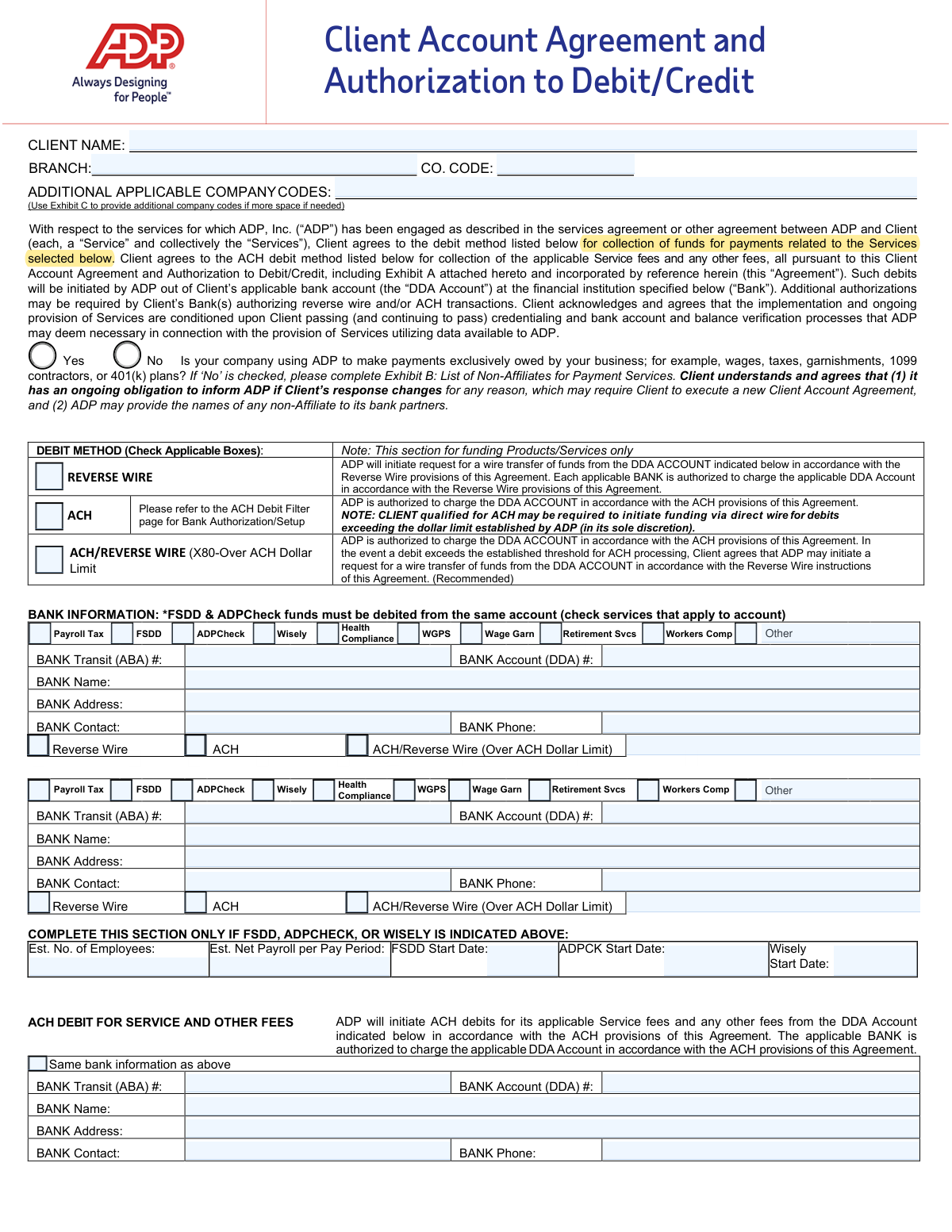
Yes! You can use AI to fill out Client Account Agreement and Authorization to Debit/Credit
This form is a legal agreement between a client company and ADP, Inc. that authorizes ADP to initiate debits from the client's designated bank account for services rendered, such as payroll processing, tax payments, and retirement services. It specifies the debit method (ACH or Reverse Wire) and outlines the terms, conditions, and responsibilities for both parties regarding these financial transactions. Today, this form can be filled out quickly and accurately using AI-powered services like Instafill.ai, which can also convert non-fillable PDF versions into interactive fillable forms.
Our AI automatically handles information lookup, data retrieval, formatting, and form filling.
It takes less than a minute to fill out RW-ACH-RWX-CAA using our AI form filling.
Securely upload your data. Information is encrypted in transit and deleted immediately after the form is filled out.
Form specifications
| Form name: | Client Account Agreement and Authorization to Debit/Credit |
| Number of pages: | 1 |
| Language: | English |
Instafill Demo: How to fill out PDF forms in seconds with AI
How to Fill Out RW-ACH-RWX-CAA Online for Free in 2026
Are you looking to fill out a RW-ACH-RWX-CAA form online quickly and accurately? Instafill.ai offers the #1 AI-powered PDF filling software of 2026, allowing you to complete your RW-ACH-RWX-CAA form in just 37 seconds or less.
Follow these steps to fill out your RW-ACH-RWX-CAA form online using Instafill.ai:
- 1 Navigate to Instafill.ai and upload or select the ADP Client Account Agreement form.
- 2 Use the AI assistant to automatically fill in your Client Name, company codes, and contact information.
- 3 Select the applicable debit method (Reverse Wire, ACH, or a combination) for funding products and services.
- 4 Provide the required bank information, including the Bank Name, Transit (ABA) number, and Account (DDA) number for the designated accounts.
- 5 Complete any necessary exhibits, such as Exhibit B if you are making payments on behalf of non-affiliated entities.
- 6 Carefully review all the information pre-filled by the AI for accuracy, including account numbers and service selections.
- 7 Electronically sign and date the agreement in the designated signature block to finalize the authorization.
Our AI-powered system ensures each field is filled out correctly, reducing errors and saving you time.
Why Choose Instafill.ai for Your Fillable RW-ACH-RWX-CAA Form?
Speed
Complete your RW-ACH-RWX-CAA in as little as 37 seconds.
Up-to-Date
Always use the latest 2026 RW-ACH-RWX-CAA form version.
Cost-effective
No need to hire expensive lawyers.
Accuracy
Our AI performs 10 compliance checks to ensure your form is error-free.
Security
Your personal information is protected with bank-level encryption.
Frequently Asked Questions About Form RW-ACH-RWX-CAA
This form authorizes ADP to debit your company's bank account for funds related to the ADP services you use, such as payroll, taxes, and service fees. It establishes the legal agreement for ADP to collect these payments via ACH or Reverse Wire transfers.
The form must be signed by an authorized signatory on the bank accounts listed in the agreement. This is typically a person with financial authority in your company, like a CFO, owner, or controller.
ACH is a standard electronic debit from your account, while a Reverse Wire is a request for your bank to initiate a wire transfer to ADP. The combined option uses ACH for regular debits but automatically switches to a Reverse Wire if the amount exceeds ADP's established ACH threshold, which is the recommended method.
You must complete Exhibit B if you use ADP to make payments to individuals or companies that are not part of your business, such as paying another company's vendors on their behalf. If you only pay your own employees, taxes, and contractors, you do not need to fill it out.
You must provide your bank's name, address, contact information, the bank transit (ABA) number, and your DDA (checking) account number. You also need to check the boxes to indicate which ADP services will be funded from that specific account.
If sufficient funds are not available, ADP may immediately terminate your services, and you will become solely responsible for all payments, penalties, and interest. ADP will not be obligated to make tax deposits or other third-party payments on your behalf.
List your primary company code at the top of the form. If you have additional company codes that this agreement should apply to, you must list them in Exhibit C, 'List Additional Applicable Company Codes'.
Yes, the form allows you to specify different bank accounts for different services or fees. However, the form notes that funds for FSDD (Full Service Direct Deposit) and ADPCheck must be debited from the same account.
To revoke this authorization, an authorized representative of your company must send a written notice to both ADP and your bank. The change will take effect after both parties have had a reasonable amount of time to act on the notice.
Before initiating any International ACH Transactions (IAT), you must notify ADP in writing using their specific form for this purpose. Failure to do so may result in processing delays or failures for which ADP is not liable.
Yes, you can use AI-powered services like Instafill.ai to accurately auto-fill form fields with your information. This can help save time and reduce the chance of errors.
You can upload the form's PDF to a service like Instafill.ai, which allows you to fill in all the required fields digitally. After completing the form, you can download it to print for your signature and records.
If you have a non-fillable or 'flat' PDF, you can use a tool like Instafill.ai to convert it into an interactive, fillable form. This allows you to type your information directly into the fields before printing.
Compliance RW-ACH-RWX-CAA
Validation Checks by Instafill.ai
1
Validates Bank Transit (ABA) Number Format and Checksum
This check ensures that any entered 'BANK Transit (ABA) #' is exactly 9 digits long and conforms to the ABA routing number checksum algorithm. This is critical for ensuring that funds are routed to the correct financial institution. A failure in this validation would prevent the form submission, as an incorrect ABA number guarantees transaction failure.
2
Ensures Signature and Date Fields are Completed
This validation confirms that the 'CLIENT Signature' and 'Date' fields are not empty. The signature and date are required to make the agreement legally binding and effective. If either field is missing, the authorization is incomplete, and the form cannot be processed.
3
Conditional Requirement for Exhibit B
This check enforces a logical rule: if the 'No' checkbox is selected for the non-affiliate payments question, then at least one complete non-affiliate entry must be provided in Exhibit B. This is crucial for compliance and risk assessment, as ADP needs to know about third-party payments. Failure to complete Exhibit B when required will block submission until the information is provided.
4
Exclusive Selection for Non-Affiliate Question
This validation ensures that exactly one option ('Yes' or 'No') is selected for the question 'Is your company using ADP to make payments exclusively owed by your business?'. Answering this question is a mandatory declaration. The form cannot be submitted if the question is unanswered or if both options are selected, as it creates ambiguity.
5
Validates Federal Employer Identification Number (FEIN) Format
For each non-affiliate listed in Exhibit B, this check verifies that the 'FEIN' field is a 9-digit number, often formatted as XX-XXXXXXX. A valid FEIN is essential for correctly identifying the non-affiliate entity for regulatory and reporting purposes. An invalid format will trigger an error, requiring the user to correct the number before proceeding.
6
Links Bank Account to at Least One Service
This validation ensures that for each bank account information block that is filled out, at least one corresponding service checkbox (e.g., 'Payroll Tax', 'FSDD', 'ADPCheck') is selected. This prevents the submission of bank account details without a specified purpose. If a bank account is provided without a linked service, the user will be prompted to select one.
7
Requires Debit Method Selection for Each Account
For each bank account provided, this check confirms that at least one debit method ('REVERSE WIRE', 'ACH', or 'ACH/REVERSE WIRE') is selected. This information is fundamental for ADP's collection process. Without a selected debit method, ADP would not know how to pull funds, so submission is blocked until a method is chosen.
8
Conditional Start Date for Specific Services
This check verifies that if 'FSDD', 'ADPCheck', or 'Wisely' is selected as a service, the corresponding start date field ('FSDD Start Date', 'ADPCK Start Date', 'Wisely Start Date') is populated with a valid date. This ensures that activation timelines are captured for these specific services. If a service is chosen without a start date, the user will be required to enter one.
9
Ensures Client Legal Name is Provided
This validation confirms that the 'CLIENT NAME' field is not empty. The client's full legal name is required for the agreement to be valid and to correctly identify the entity in all subsequent transactions and communications. The form cannot be submitted without this primary identifier.
10
Validates Logic for Service Fee Account Information
This check enforces the rule for the 'ACH DEBIT FOR SERVICE AND OTHER FEES' section. If the 'Same bank information as above' checkbox is unchecked, the bank transit and account number fields in that section become mandatory. This ensures a valid payment source for fees is always provided, whether it's the same as the primary account or a different one.
11
Verifies Numeric Fields Contain Positive Numbers
This validation ensures that fields like 'Est. No. of Employees', 'Est. Net Payroll per Pay Period', and 'Starting Check Number' contain only positive numerical data. This prevents data entry errors with non-numeric characters or negative values. Incorrect data in these fields could lead to processing errors or incorrect service configuration.
12
Requires Client Representative Name and Title
This check ensures the 'CLIENT Representative Name & Title' field is completed. The form requires this information to identify the individual who is signing on behalf of the client and attesting to their authority. Missing this information creates an accountability gap and will prevent form submission.
13
Enforces Row Completeness in Exhibit B
This validation checks that if any field within a single non-affiliate row in Exhibit B is filled, all other fields in that same row are also completed, as per the 'ALL FIELDS MUST BE COMPLETED' instruction. This prevents the submission of partial, unusable data for non-affiliates. The system will flag incomplete rows and require the user to finish them or clear them entirely.
14
Validates Phone Number Format
This check ensures that all phone number fields ('BANK Phone', 'Client Phone') adhere to a standard format (e.g., 10 digits, possibly with parentheses and hyphens). This improves data quality and ensures that the contact information is valid and usable. An invalid format would prompt the user for correction.
Common Mistakes in Completing RW-ACH-RWX-CAA
This common data entry error, often a simple transposition of digits, is one of the most critical and occurs due to manually keying long numeric strings. The direct consequence is the complete failure of all payment and debit transactions, leading to missed payrolls, unpaid taxes, and significant service disruptions. To avoid this, meticulously double-check the numbers against a voided check or official bank document. AI-powered form filling tools like Instafill.ai can help prevent these errors by validating number formats and checksums to catch mistakes before submission.
The form is often signed by a manager or HR representative who may not be an official signatory on the company's bank account. The agreement explicitly requires the signer to be an authorized party on the DDA account listed. An unauthorized signature can render the entire debit authorization invalid, leading to legal and financial complications and preventing ADP from processing any funds. Always verify that the person signing the agreement has the legal authority to authorize debits from the specified corporate bank account.
Clients often misunderstand what constitutes a 'non-affiliate' payment and incorrectly check 'Yes', believing they only pay their own business expenses. This question is for compliance and risk assessment; an incorrect answer can lead to account holds or termination if ADP later discovers payments being made on behalf of other entities. Carefully read the examples provided in Exhibit B and if there is any doubt, check 'No' and complete the exhibit to ensure full transparency and avoid compliance issues.
When a client correctly indicates they make payments for non-affiliates by checking 'No' on the first page, they often fail to complete all required fields in Exhibit B, such as the FEIN or NAIC code. This happens because the information may not be readily available. Incomplete information will delay account setup as ADP's compliance team cannot approve the agreement without these details. Before filling the form, gather all legal names, addresses, and FEINs for any non-affiliated entities you will be paying.
Businesses often operate under a trade name (DBA), but this legal agreement requires the official entity name that is tied to the bank account and tax ID. Using a DBA can cause a mismatch during the bank account verification and credentialing processes, leading to rejection of the agreement and significant delays. Ensure the 'CLIENT NAME' field matches the legal name on your business registration documents and bank statements.
Companies with multiple subsidiaries or locations, each with a unique ADP company code, may forget to list all of them in the 'ADDITIONAL APPLICABLE COMPANY CODES' field or on Exhibit C. This oversight results in the debit authorization only applying to the listed codes, preventing ADP from processing payroll or other services for the omitted entities. To prevent this, compile a complete list of all company codes that will be funded from the specified bank account before starting the form.
In the rush to complete paperwork, it's surprisingly common for the signature or date field to be left blank. An unsigned agreement is legally non-binding and cannot be processed, immediately halting the entire onboarding process, while an undated signature creates ambiguity. Since this form is a non-fillable PDF, using a tool like Instafill.ai can convert it into an interactive version, making it easier to spot and complete all required fields, including the crucial signature and date.
The form requires clients to check which services (e.g., Payroll Tax, FSDD, ADPCheck) are funded by a specific bank account. A client with multiple accounts for different purposes might accidentally link a service to the wrong account. This can cause debits to fail due to insufficient funds or authorization issues, leading to missed payments and potential penalties. Carefully review the checkboxes next to each bank account section to ensure each service is correctly mapped to its designated funding source.
The form has several sections for bank details, and users sometimes enter conflicting information or forget to fill out a section entirely. For instance, they might fill out the first bank section but neglect the 'ACH DEBIT FOR SERVICE AND OTHER FEES' section without checking the 'Same bank information as above' box. This ambiguity forces ADP to halt processing and seek clarification, delaying service activation. Carefully review each bank information block to ensure consistency or use the provided checkbox where applicable.
Clients may not understand the operational differences between ACH, Reverse Wire, and the combined option, or they may select a method their bank is not set up to handle. For example, selecting 'Reverse Wire' requires a specific setup with the bank that may not be in place, which would cause funding to fail. It is crucial to consult with your bank to confirm which debit methods are supported and configured for your account before making a selection on this form.
Saved over 80 hours a year
“I was never sure if my IRS forms like W-9 were filled correctly. Now, I can complete the forms accurately without any external help.”
Kevin Martin Green
Your data stays secure with advanced protection from Instafill and our subprocessors

Robust compliance program
Transparent business model
You’re not the product. You always know where your data is and what it is processed for.
ISO 27001, HIPAA, and GDPR
Our subprocesses adhere to multiple compliance standards, including but not limited to ISO 27001, HIPAA, and GDPR.
Security & privacy by design
We consider security and privacy from the initial design phase of any new service or functionality. It’s not an afterthought, it’s built-in, including support for two-factor authentication (2FA) to further protect your account.
Fill out RW-ACH-RWX-CAA with Instafill.ai
Worried about filling PDFs wrong? Instafill securely fills client-account-agreement-and-authorization-to-debitcredit forms, ensuring each field is accurate.