Yes! You can use AI to fill out Empower Hardship Distribution Request Form
The Empower Hardship Distribution Request form is a document that allows a retirement plan participant to request funds from their account when facing an immediate and heavy financial need, as defined by their plan's rules. This form is crucial for accessing savings for emergencies like medical expenses, preventing eviction, or covering tuition costs. Today, this form can be filled out quickly and accurately using AI-powered services like Instafill.ai, which can also convert non-fillable PDF versions into interactive fillable forms.
Hardship Distribution Request is part of the
Empower forms, hardship forms, distribution forms and distribution request forms categories on Instafill.
Rather not fill this in by hand? Instafill is an online form filler that completes PDF forms automatically — upload the blank form, answer a few questions, and the AI fills every field.
Form specifications
| Form name: | Empower Hardship Distribution Request Form |
| Number of pages: | 1 |
| Language: | English |
Our AI automatically handles information lookup, data retrieval, formatting, and form filling.
It takes less than a minute to fill out Hardship Distribution Request using our AI form filling.
Securely upload your data. Information is encrypted in transit and deleted immediately after the form is filled out.
Instafill Demo: How to fill out PDF forms in seconds with AI
How to Fill Out Hardship Distribution Request Online for Free in 2026
Are you looking to fill out a HARDSHIP DISTRIBUTION REQUEST form online quickly and accurately? Instafill.ai offers the #1 AI-powered PDF filling software of 2026, allowing you to complete your HARDSHIP DISTRIBUTION REQUEST form in just 37 seconds or less.
Follow these steps to fill out your HARDSHIP DISTRIBUTION REQUEST form online using Instafill.ai:
- 1 Navigate to Instafill.ai and upload your Hardship Distribution Request form or select it from their template library.
- 2 Provide your personal details, including your name, address, and retirement plan account information.
- 3 Select the specific reason for your hardship request, such as medical expenses, purchase of a principal residence, or prevention of foreclosure.
- 4 Enter the total amount you are requesting to withdraw, ensuring it does not exceed the amount needed to satisfy the financial need.
- 5 Follow the AI assistant's prompts to attach necessary supporting documentation, such as invoices, purchase agreements, or eviction notices.
- 6 Carefully review all the information you've entered for accuracy, then electronically sign and date the form.
- 7 Download the completed and signed form to submit to Empower or your Plan Administrator as instructed.
Our AI-powered system ensures each field is filled out correctly, reducing errors and saving you time.
Why Choose Instafill.ai for Your Fillable Hardship Distribution Request Form?
Speed
Complete your Hardship Distribution Request in as little as 37 seconds.
Up-to-Date
Always use the latest 2026 Hardship Distribution Request form version.
Cost-effective
No need to hire expensive lawyers.
Accuracy
Our AI performs 10 compliance checks to ensure your form is error-free.
Security
Your personal information is protected with bank-level encryption.
Frequently Asked Questions About Hardship Distribution Request
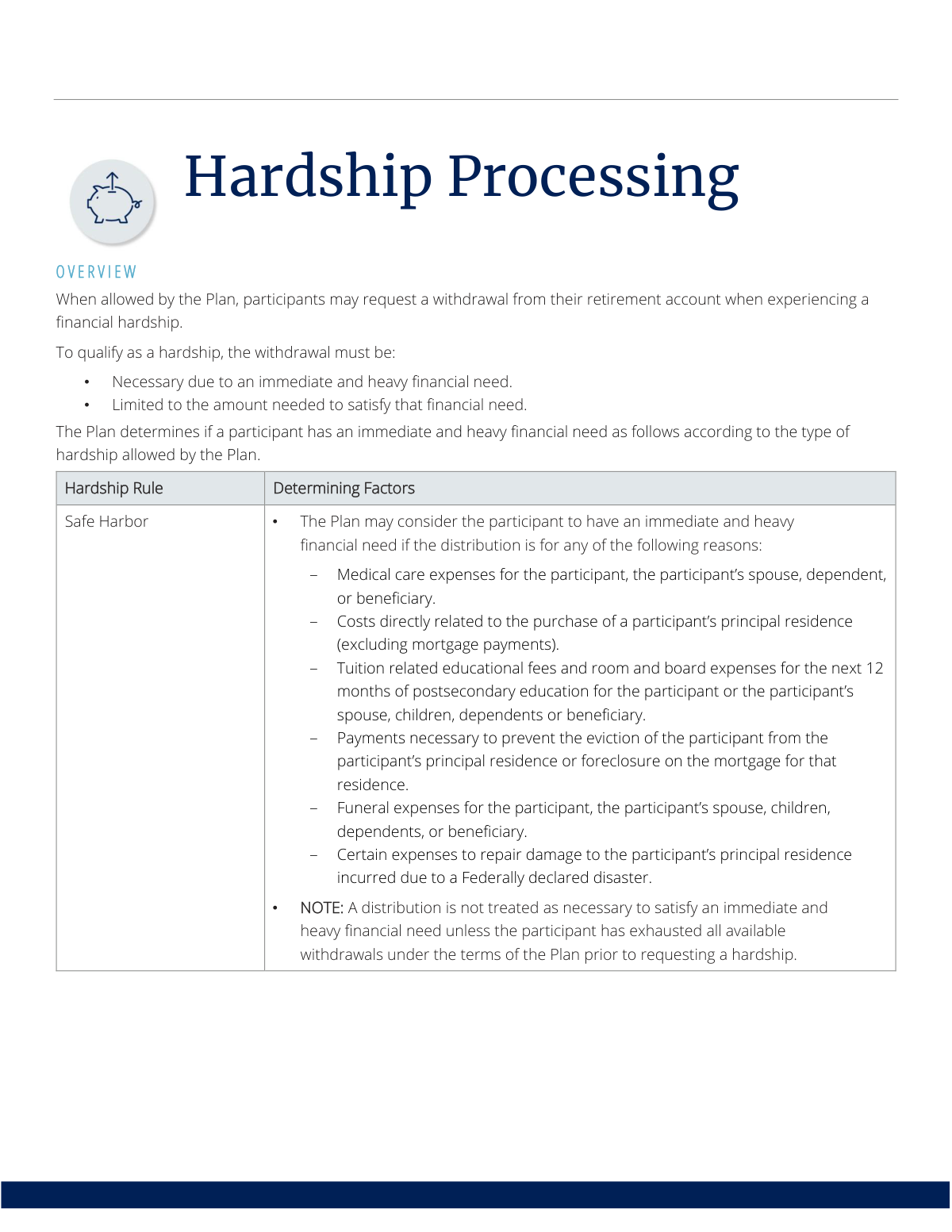
A hardship withdrawal is a distribution from your retirement account that you can request when experiencing an immediate and heavy financial need. It is only allowed if your plan permits it and the amount is limited to what is necessary to satisfy the need.
Participants in a retirement plan that allows for hardship withdrawals may be eligible to apply. You must be experiencing a qualifying financial hardship as defined by your specific plan's rules.
Commonly accepted reasons include medical care expenses, costs to purchase a principal residence, tuition fees, and payments to prevent eviction or foreclosure. Your plan document will specify the exact reasons that qualify as a hardship.
To begin, you need to complete a Hardship Distribution Request form. This form is available on the Plan Service Center (PSC), online, or by contacting an Empower Representative.
The required documentation varies by your plan's rules and the submission method. You may need to provide copies of medical bills, purchase agreements, or eviction notices, or you might simply self-certify that you have them.
With the Self-Certify method, you attest that you have a valid hardship and supporting documents but do not submit them. With the Source method, you are required to submit copies of your supporting documents along with your request form for review.
Yes, but the requirements may become stricter. For example, after two self-certified hardships, you may be required to submit full documentation for any subsequent requests within the same year.
Empower may process a partial withdrawal for the amount substantiated by your documents. You may then be given a 30-day 'continuation' period to provide additional documentation for the remaining amount.
Empower reviews the request to ensure it is in good order, but final approval may come from Empower or your Plan Administrator, depending on your plan's setup. The Plan Administrator is the final arbitrator on all requests.
Yes, your withdrawal is limited to the amount necessary to satisfy the financial need. You must also have exhausted other available withdrawal and loan options under your plan before requesting a hardship.
Empower provides a dedicated Hardship Support Services Team to assist with questions, status inquiries, and issue resolution throughout the process.
Yes, services like Instafill.ai use AI to help you accurately auto-fill form fields. This can save you time and help reduce errors, which is especially useful during a stressful financial situation.
Simply upload your Hardship Distribution Request form to the Instafill.ai platform. The AI will make the form fillable, and you can provide your information to have it completed automatically and accurately.
If you have a non-fillable or 'flat' PDF, you can use a service like Instafill.ai. It can convert the static document into an interactive, fillable form that you can easily complete on your computer.
Compliance Hardship Distribution Request
Validation Checks by Instafill.ai
1
Participant Identifier Format Validation
Verifies that the participant's unique identifier, such as a Social Security Number or account number, is provided and matches the expected format (e.g., XXX-XX-XXXX). This is the primary key for locating the correct participant account and preventing processing errors. An invalid or missing identifier will cause the request to be rejected until corrected.
2
Mandatory Field Completion Check
Ensures that all fields marked as required on the Hardship Distribution Request form are filled out, including participant details, requested amount, and the reason for the hardship. This check confirms the request is 'in good order' and can be adjudicated without needing to contact the participant for missing information. Incomplete forms will be returned for correction, delaying the process.
3
Valid Hardship Reason Selection
Confirms that the participant has selected a single, valid hardship reason from the list of options permitted by their plan (e.g., Safe Harbor, Unforeseeable Emergency). This is a fundamental requirement for determining eligibility and the type of supporting documentation needed. A missing, multiple, or invalid selection will halt processing until the participant clarifies the specific reason for their request.
4
Requested Amount Numeric Validation
Validates that the withdrawal amount entered by the participant is a positive numeric value. This prevents data entry errors and ensures the financial transaction can be processed correctly by the system. Any non-numeric characters or a zero/negative value will result in a validation failure, requiring the participant to correct the amount.
5
Annual Hardship Frequency Limit
Checks the participant's account history to ensure they have not exceeded the allowable number of hardship requests within the plan year (e.g., two for self-certified methods). This rule is in place to manage plan administration and ensure compliance. If the limit is exceeded, the validation will fail and force the participant to use a more stringent submission method, like the Source Method with full documentation.
6
Exhaustion of Available Plan Loans and Withdrawals
Performs a system-level check to verify that the participant has exhausted all other available withdrawal and loan options under the plan before requesting a hardship distribution. This ensures the hardship withdrawal is a true last resort, as required by regulations. If other funds are available, the hardship request will be denied, and the participant will be instructed to utilize those options first.
7
Supporting Documentation Presence for Source Method
Verifies that supporting documentation has been submitted when the request requires it (e.g., Source Method, Unforeseeable Emergency, or the third request in a year). This documentation is essential for substantiating the financial need. Failure to provide the required documents will result in the request being deemed not in good order and either denied or placed in a 'continuation' status.
8
Requested Amount vs. Substantiated Documentation Amount
Compares the dollar amount requested by the participant against the total financial need proven by the submitted supporting documentation. The requested amount cannot be greater than the substantiated need. If the requested amount is higher, the system will only process the substantiated portion and may trigger the 'continuation' process for the remainder, giving the participant 30 days to provide more proof.
9
Self-Certification Eligibility for QJSA Plans
Checks if the participant's plan includes a Qualified Joint and Survivor Annuity (QJSA) option before allowing a 'Self-Certify' hardship request. The rules explicitly prohibit self-certification for plans with a QJSA. If this validation fails, the participant will be blocked from this method and must submit their request via a method that requires documentation.
10
Educational Expense Timeframe Validation
When the hardship reason is for education, this check confirms that the supporting documentation (e.g., tuition bill) is for the next 12 months of postsecondary education. This rule prevents using hardship funds for past-due tuition or for education far in the future. A request for expenses outside this 12-month window will be denied.
11
Principal Residence Purchase Expense Type
If the hardship reason is the 'purchase of a principal residence,' this validation ensures the requested funds are for costs directly related to the purchase (like a down payment) and not for mortgage payments. This is a specific requirement of the Safe Harbor rules. Documentation will be reviewed to confirm the funds are not for mortgage payments, which are explicitly excluded.
12
Minimum Hardship Request Amount Check
Verifies that the requested withdrawal amount meets the plan's specified minimum threshold (e.g., $500). This rule is designed to avoid the administrative cost of processing very small distributions. A request for an amount below the plan's minimum will be rejected, and the participant will be notified of the requirement.
13
Plan Administrator Signature Verification
For plans that require administrator approval, this check confirms that the submitted form has been properly signed by the authorized Plan Administrator. The signature is a critical authorization step that confirms the employer's review and consent. A form lacking the required signature will be sent back via the To Do List, halting the process until it is signed and returned.
14
Single Continuation Limit Per Request
Ensures that a participant is only offered one 30-day 'continuation' period to provide additional documentation for a single hardship request. This rule prevents indefinite processing delays and ensures a final decision is made in a timely manner. If a participant has already used their one continuation for a request, any remaining unsubstantiated amount will be denied.
Common Mistakes in Completing Hardship Distribution Request
Participants often request a rounded-up number or an amount that exceeds what their supporting documents, like invoices or repair estimates, actually show. This happens when trying to cover related but ineligible costs. The consequence is that only the substantiated amount is processed, and the rest of the request is suspended for 30 days under a 'continuation,' delaying access to full funds and requiring additional follow-up. To avoid this, carefully calculate the exact amount needed based on your bills or quotes and ensure the requested figure precisely matches the proof provided.
For requests requiring the 'Source Method' or for 'Unforeseeable Emergency' withdrawals, participants must submit proof like medical bills or eviction notices. People often forget to include these documents or provide incomplete versions, which renders the request 'not in good order.' This causes significant processing delays as Empower must contact the participant for the missing information. To prevent this, create a checklist based on the form's requirements for your specific hardship reason and double-check that all required documents are included with your submission.
The plan rules dictate whether a participant can self-certify, use the summary method, or must submit full source documentation. A common error is submitting documentation for a self-certify request (where it's not reviewed) or failing to submit it for a source method request. This confusion leads to processing errors and delays. Before starting, verify your plan's specific rules on the Plan Service Center (PSC) or with an Empower representative to ensure you follow the correct procedure.
Participants sometimes apply for hardships that don't fit the strict, IRS-defined categories, such as paying off general credit card debt or buying a car. This occurs from a misunderstanding of the limited, specific reasons allowed (e.g., primary home purchase, preventing eviction, specific medical expenses). Such applications are automatically denied, wasting time and effort. To avoid this, carefully review the 'Safe Harbor' or 'Unforeseeable Emergency' reasons listed in the plan documents before submitting the form.
The rules state that a hardship distribution is a last resort and is not considered necessary unless the participant has already taken all other available withdrawals and loans under the plan. Many applicants are unaware of this prerequisite and apply for a hardship prematurely. This can lead to the request being denied until other options, like a plan loan, are utilized. Before applying, log into your account to confirm if you have any outstanding loan or withdrawal options available and use them first.
When using the 'Self-Certify' or 'Summary' methods, participants are not required to submit proof upfront but must agree to keep it indefinitely. People mistakenly believe that since they didn't have to submit the documents, they don't need to keep them. If the Plan Administrator or IRS conducts an audit and the participant cannot produce the proof, it can lead to significant penalties. To avoid this, create a dedicated physical or digital folder for all supporting documents and store it securely.
Simple data entry errors like a missing signature, leaving required fields blank, or entering an incorrect Social Security Number are very common. These mistakes render the form 'not in good order,' halting the process until corrections are made. To avoid this, carefully review every field before submission. AI-powered tools like Instafill.ai can convert non-fillable PDFs into easy-to-use forms and help prevent these errors by validating data formats to ensure all required information is present and correct.
The rules for 'Self-Certify' and 'Summary' methods explicitly limit participants to two such requests per plan year. A participant who has already made two requests may attempt a third using the same simplified method. This third request will be rejected, and the participant will be instructed to resubmit using the 'Source Method,' which requires full documentation and causes delays. It's crucial to track your hardship requests throughout the year and know that subsequent requests have stricter requirements.
The 'Safe Harbor' rules allow a hardship for costs 'directly related to the purchase' of a principal residence but explicitly exclude mortgage payments. Participants often misinterpret this and apply for a hardship to cover their regular monthly mortgage payments. This application will be denied because it's not a qualifying event. This reason is for one-time costs like a down payment or closing costs on a new home purchase, not for ongoing mortgage obligations.
If initial documentation only supports a portion of the requested amount, Empower initiates a 30-day 'continuation' period for the participant to submit more proof. People often miss this deadline due to oversight or difficulty gathering documents quickly. If the deadline is missed, the request for the remaining amount lapses, and the participant must start a completely new hardship application. To avoid this, act immediately upon receiving a continuation notice and submit additional documentation well before the 30-day window closes.
Saved over 80 hours a year
“I was never sure if my IRS forms like W-9 were filled correctly. Now, I can complete the forms accurately without any external help.”
Kevin Martin Green
Your data stays secure with advanced protection from Instafill and our subprocessors




Robust compliance program
Transparent business model
You’re not the product. You always know where your data is and what it is processed for.
ISO 27001, HIPAA, and GDPR
Our subprocesses adhere to multiple compliance standards, including but not limited to ISO 27001, HIPAA, and GDPR.
Security & privacy by design
We consider security and privacy from the initial design phase of any new service or functionality. It’s not an afterthought, it’s built-in, including support for two-factor authentication (2FA) to further protect your account.
Fill out Hardship Distribution Request with Instafill.ai
Worried about filling PDFs wrong? Instafill securely fills empower-hardship-distribution-request-form forms, ensuring each field is accurate.
