Yes! You can use AI to fill out Empower Loan Administration Form
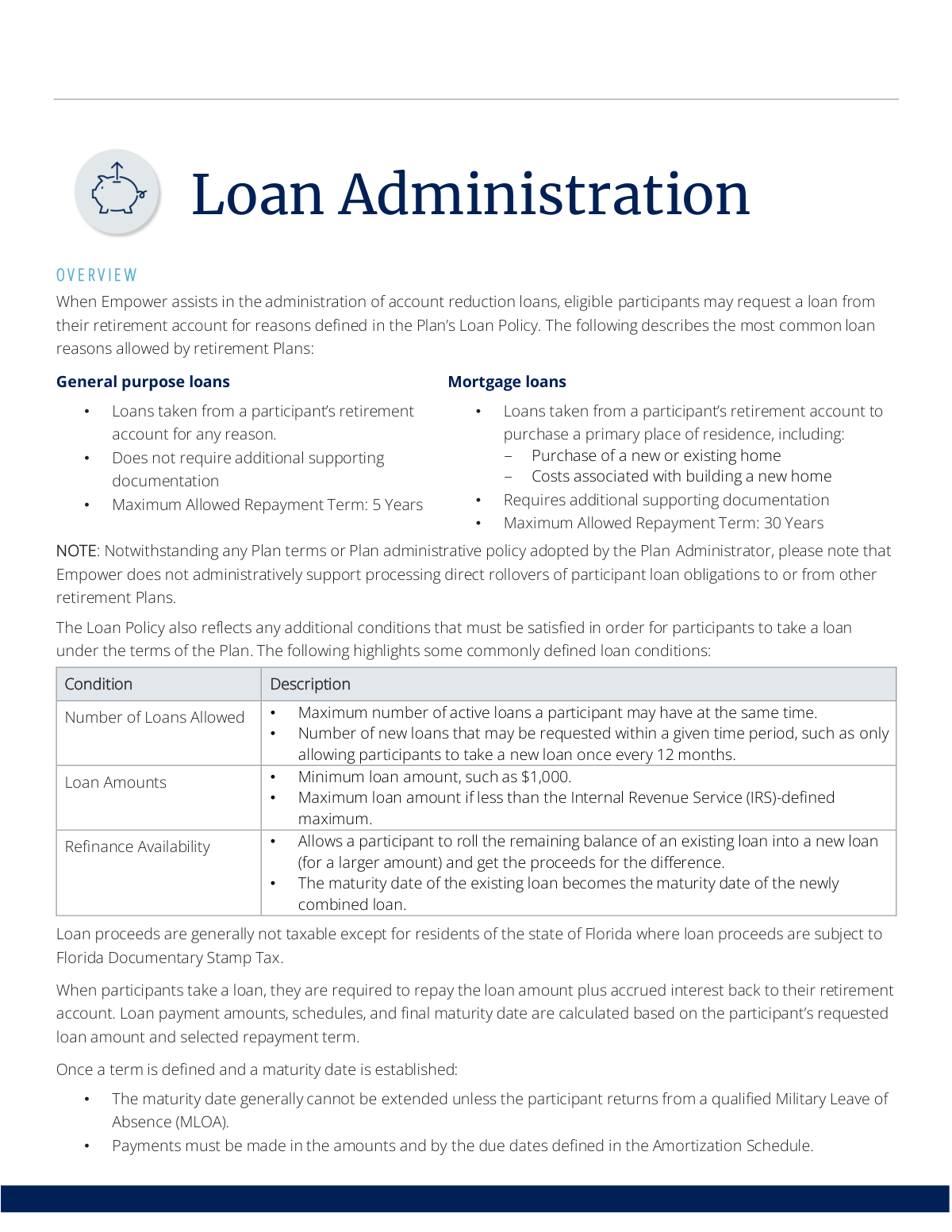
The Empower Loan Administration form is the official document used by participants to request a loan from their retirement savings plan administered by Empower. This form is crucial as it initiates the process for accessing funds for significant life events, such as purchasing a home or other general needs, detailing the loan amount, purpose, and repayment terms. Today, this form can be filled out quickly and accurately using AI-powered services like Instafill.ai, which can also convert non-fillable PDF versions into interactive fillable forms. Properly completing this application ensures the request is processed efficiently and in accordance with the plan's specific policies.
Empower Loan Application is part of the
VA forms, HR forms, Empower forms and loan forms categories on Instafill.
Rather not fill this in by hand? Instafill is an online form filler that completes PDF forms automatically — upload the blank form, answer a few questions, and the AI fills every field.
Form specifications
| Form name: | Empower Loan Administration Form |
| Number of pages: | 1 |
| Language: | English |
Our AI automatically handles information lookup, data retrieval, formatting, and form filling.
It takes less than a minute to fill out Empower Loan Application using our AI form filling.
Securely upload your data. Information is encrypted in transit and deleted immediately after the form is filled out.
Instafill Demo: How to fill out PDF forms in seconds with AI
How to Fill Out Empower Loan Application Online for Free in 2026
Are you looking to fill out a EMPOWER LOAN APPLICATION form online quickly and accurately? Instafill.ai offers the #1 AI-powered PDF filling software of 2026, allowing you to complete your EMPOWER LOAN APPLICATION form in just 37 seconds or less.
Follow these steps to fill out your EMPOWER LOAN APPLICATION form online using Instafill.ai:
- 1 Navigate to Instafill.ai and upload the Empower Loan Application form, or select it from their library of templates.
- 2 Use the AI assistant to automatically fill in your personal details, such as your name, address, and retirement plan information.
- 3 Indicate the type of loan you are requesting (e.g., general purpose or mortgage) and the desired loan amount.
- 4 Choose your preferred repayment term, keeping in mind the maximum terms allowed for your loan type (e.g., 5 years for general purpose, 30 years for mortgage).
- 5 If applying for a mortgage loan, securely upload the necessary supporting documentation, such as a purchase agreement or construction permit, as prompted by the system.
- 6 Carefully review all the information pre-filled by the AI for accuracy, make any necessary corrections, and then e-sign the document to complete your application.
- 7 Download the completed and signed form and submit it to Empower as per your plan's instructions.
Our AI-powered system ensures each field is filled out correctly, reducing errors and saving you time.
Why Choose Instafill.ai for Your Fillable Empower Loan Application Form?
Speed
Complete your Empower Loan Application in as little as 37 seconds.
Up-to-Date
Always use the latest 2026 Empower Loan Application form version.
Cost-effective
No need to hire expensive lawyers.
Accuracy
Our AI performs 10 compliance checks to ensure your form is error-free.
Security
Your personal information is protected with bank-level encryption.
Frequently Asked Questions About Empower Loan Application
It allows eligible participants to borrow money from their own retirement account for various reasons, such as general expenses or purchasing a primary residence. You must repay the loan with interest back into your account.
Eligibility is determined by your specific retirement plan's Loan Policy. You must be a participant in a plan where Empower assists with loan administration and meet any conditions defined by your plan, such as limits on the number of active loans.
There are two common types: general purpose loans, which can be used for any reason and have a 5-year maximum repayment term, and mortgage loans for purchasing a primary residence, which have a 30-year maximum term.
For a general purpose loan, no supporting documentation is required. For a mortgage loan to purchase or build a primary residence, you must provide documents like a purchase agreement, closing documents, or construction permits.
You can typically apply online or through an Empower Representative. A paper Loan Application form is generally only required if you are applying for a mortgage loan or if your plan requires spousal consent.
If your plan requires it, your spouse must formally agree to the loan. This is done by providing a notarized spousal signature on the Loan Application form before the loan can be processed.
You can choose to receive the funds via a paper check mailed to you or through a direct electronic deposit (ACH) to your bank account. For an ACH deposit, your banking information must be on file with Empower before you request the loan.
Loan payments are typically made through automatic deductions from your regular payroll. You may also be able to make one-time payments online via ACH to catch up on missed payments or pay the loan off early.
Any payment you make will first be applied to the oldest missed payment. You can make up for missed payments by submitting a one-time ACH payment online to avoid a potential loan default.
Yes, if your plan allows it. You must first generate a loan payoff quote online or via an Empower Representative and then submit the final amount via a one-time ACH payment or by mailing a certified check.
Yes, your plan may charge a one-time loan initiation fee and/or an ongoing loan maintenance fee. These fees will be outlined in your plan's Fee Disclosure notices.
If your plan allows it, you can roll the balance of an existing loan into a new, larger loan and receive the difference in cash. The original loan's maturity date will apply to the new combined loan.
Yes, services like Instafill.ai use AI to accurately auto-fill form fields with your information, which can save you time and help prevent errors on your application.
Simply upload the Loan Application PDF to the Instafill.ai platform. The AI will identify the fields, allowing you to fill them out, sign electronically, and download the completed form.
You can use a service like Instafill.ai, which can convert flat, non-fillable PDFs into interactive, fillable forms. This allows you to easily type your information directly into the document online without needing to print it.
Compliance Empower Loan Application
Validation Checks by Instafill.ai
1
Validates Loan Repayment Term Against Loan Type
This check ensures the requested repayment term complies with the maximum allowed for the selected loan type, such as 5 years for a general purpose loan or 30 years for a mortgage loan. This is critical for maintaining compliance with plan rules and federal regulations. If the term is invalid, the application will be rejected, and the participant will be asked to correct the repayment term.
2
Ensures Required Documentation for Mortgage Loans
This validation verifies that any loan application for a mortgage or primary residence purchase includes the necessary supporting documentation, such as a purchase agreement or construction contract. This documentation is required by Empower to substantiate the loan's purpose. Without the required documents, the loan request will be considered 'not in good order' and will be returned to the participant for completion.
3
Verifies Loan Request Meets Minimum Amount
This check confirms that the requested loan amount is equal to or greater than the minimum threshold defined by the plan, such as $1,000. This rule prevents the administrative overhead of processing very small, inefficient loans. Applications for amounts below the minimum will be rejected, and the participant will be notified of the plan's minimum loan requirement.
4
Validates Against Maximum Number of Active Loans
This rule checks the participant's account to ensure that processing a new loan will not cause them to exceed the maximum number of concurrent loans permitted by their retirement plan. This is important for managing participant debt and adhering to plan-specific limitations. If the participant already has the maximum number of loans, the new application will be denied until an existing loan is paid off.
5
Enforces Plan-Specific Loan Frequency Cooldown Period
This validation checks the date of the participant's last loan initiation against plan rules that may limit how often a new loan can be taken, for example, only one new loan per 12-month period. This prevents participants from repeatedly taking out new loans in a short time frame. An application submitted within the cooldown period will be rejected, with a message indicating when the participant will be eligible to apply again.
6
Confirms Notarized Spousal Consent When Required
For plans that require spousal consent, this check verifies that a married participant has submitted a properly notarized spousal consent form with their loan application. This is a critical legal requirement to protect spousal rights under certain retirement plans. If consent is required but is missing or not notarized, the loan application will be halted until the correct form is provided.
7
Validates Pre-existing Banking Information for ACH Payout
This check ensures that a participant requesting an ACH (direct deposit) payout has their banking information on file prior to submitting the loan request. This is a security and fraud prevention measure to ensure funds are sent to a verified account. If banking information was added after the request, the ACH option will be disabled, and the participant will be prompted to select a paper check payout instead.
8
Ensures Refinanced Loan Term Exceeds Minimum
When a participant refinances a loan, this validation confirms that the term of the new, combined loan exceeds the minimum term defined by the loan policy. This rule ensures that refinanced loans are structured as legitimate new loans rather than simple extensions. A refinance request with a term that is too short will be rejected, requiring the participant to select a longer repayment period.
9
Identifies Florida Residents for Documentary Stamp Tax
This validation checks the participant's address of record to determine if they are a resident of Florida. This is crucial because loan proceeds for Florida residents are subject to the Florida Documentary Stamp Tax, which must be calculated and withheld. Failure to correctly identify a Florida resident would lead to tax compliance issues, so a positive match will trigger the necessary tax calculation process.
10
Blocks Unauthorized Loan Maturity Date Extensions
This check enforces the rule that a loan's maturity date generally cannot be extended. The system will block any request to change the maturity date unless the participant provides documentation for a qualified Military Leave of Absence (MLOA). This ensures the loan is repaid within its original amortization schedule as required, and unauthorized requests will be automatically denied.
11
Verifies Existence of a Payoff Quote for Loan Payoffs
This validation ensures that before a participant can submit a final loan payoff amount, they have first generated an official loan payoff quote. The quote provides the exact amount needed, including accrued interest up to a specific date, preventing underpayments or overpayments. If no quote is found, the system will prevent the payoff transaction and direct the participant to generate one first.
12
Assesses Completeness of Submitted Mortgage Documents
Beyond just checking for the presence of mortgage documentation, this validation inspects the documents for required elements like signatures on a purchase agreement or an itemized list on a letter of instruction for construction. This ensures the provided documents are legally sufficient and 'in good order' for processing. Incomplete or unsigned documents will cause the application to be rejected pending submission of corrected paperwork.
13
Validates Loan Initiation Channel for ACH Payout
This check confirms that a loan request with an ACH payout option was initiated through an approved channel, specifically online or via an Empower Representative. This rule is in place for security and process integrity, as other channels like paper forms may not meet the requirements for electronic fund transfers. If the request came from an invalid channel, the ACH option will be denied, and the participant will be defaulted to a paper check.
14
Validates New Loan Amount for Refinancing
This check ensures that when a participant refinances an existing loan, the requested new loan amount is greater than the outstanding balance of the old loan. The purpose of a refinance is typically to borrow a larger amount and receive the difference in proceeds. A request where the new amount is less than or equal to the existing balance is illogical and will be flagged for correction or clarification.
Common Mistakes in Completing Empower Loan Application
Married participants in plans requiring spousal consent often forget to obtain their spouse's signature or fail to have the signature properly notarized. This happens due to overlooking the instructions on the loan application form. An application with missing or un-notarized consent is considered not in good order and will be immediately rejected, causing significant processing delays. To avoid this, carefully review the spousal consent section and ensure a valid notary public witnesses and signs the form before submission.
When applying for a mortgage loan to purchase or build a primary residence, applicants frequently submit incomplete documentation. For example, they might provide an unsigned purchase agreement or forget to include a required construction permit notice along with a letter of instruction. This halts the loan process until the correct documents are received. Before applying, gather all required paperwork, such as fully executed agreements and permits, to ensure the application is complete. Using a tool like Instafill.ai can help manage and attach the correct digital documents to the application.
Applicants may incorrectly select 'General Purpose' for a loan that is actually for a primary residence, often to avoid the hassle of providing supporting documentation. This is a critical error because a general purpose loan has a much shorter maximum repayment term (e.g., 5 years) compared to a mortgage loan (e.g., 30 years), resulting in significantly higher monthly payments. Always select the correct loan type that matches its true purpose to ensure you receive the appropriate repayment terms.
Participants sometimes request a loan amount that is either below the plan's minimum (e.g., $1,000) or above the maximum allowed by the IRS and the specific plan (the lesser of $50,000 or 50% of the vested account balance). This happens when they are unaware of their plan's specific rules. Such requests are automatically rejected or adjusted, delaying access to funds. Always check your plan's loan policy for minimum and maximum amounts before filling out the application.
For faster access to funds, many applicants select the Automated Clearing House (ACH) direct deposit option. However, the policy requires that banking information be on file *prior* to the loan request. If bank details are not pre-registered, the payout method defaults to a paper check sent via regular mail, significantly delaying receipt of the money. To avoid this, log into your account and add your bank information well before you plan to request a loan.
To pay off a loan early, a participant might simply send a check for the remaining principal balance shown on their last statement. This amount is incorrect because it doesn't include interest that has accrued since the last payment. This results in a small balance remaining, preventing the loan from being closed and potentially leading to a default. Always generate an official loan payoff quote online or through a representative to get the exact amount due on a specific date.
When refinancing an existing loan for a larger amount, participants may mistakenly believe this will also extend their repayment timeline. However, the policy states the maturity date of the original loan is applied to the new, larger refinanced loan. This misunderstanding leads to unexpectedly high repayment amounts that the participant may not be prepared for. Carefully read the refinancing rules to understand how the new payment schedule is calculated before proceeding.
Applicants often request a loan for a very specific amount needed for a purchase or payment, forgetting that a one-time loan initiation fee may be deducted from the proceeds. This results in them receiving less cash than anticipated, which can cause a financial shortfall. Review the plan's fee disclosure to understand all applicable costs and consider adding the fee amount to your loan request to ensure you receive the net amount you need.
Participants may apply for a new loan without realizing their plan limits the number of active loans they can have at one time or requires a waiting period (e.g., 12 months) since the last loan was taken. This often happens when they don't review the plan's specific Loan Policy. The application will be denied, wasting time and effort. Always confirm your eligibility regarding the number of loans and timing rules before starting an application.
When setting up banking information for an ACH payout, a simple typo in the bank account or routing number is a frequent error. This mistake will cause the direct deposit to fail, and the funds will be returned, leading to major delays in receiving the money. To prevent this, meticulously double-check the numbers entered against your bank information. AI-powered tools like Instafill.ai can help by validating number formats and saving correct information for future use, reducing the risk of manual entry errors.
If an applicant has recently moved but has not updated their 'address of record' with Empower, selecting a paper check payout will cause the check to be mailed to their old address. This can lead to significant delays, lost mail, and the risk of fraud. Before submitting a loan request, always verify that your personal contact information, especially your mailing address, is current in your retirement account profile.
Saved over 80 hours a year
“I was never sure if my IRS forms like W-9 were filled correctly. Now, I can complete the forms accurately without any external help.”
Kevin Martin Green
Your data stays secure with advanced protection from Instafill and our subprocessors




Robust compliance program
Transparent business model
You’re not the product. You always know where your data is and what it is processed for.
ISO 27001, HIPAA, and GDPR
Our subprocesses adhere to multiple compliance standards, including but not limited to ISO 27001, HIPAA, and GDPR.
Security & privacy by design
We consider security and privacy from the initial design phase of any new service or functionality. It’s not an afterthought, it’s built-in, including support for two-factor authentication (2FA) to further protect your account.
Fill out Empower Loan Application with Instafill.ai
Worried about filling PDFs wrong? Instafill securely fills empower-loan-administration-form forms, ensuring each field is accurate.
