Yes! You can use AI to fill out Empower Required Minimum Distribution Request Form
This form allows participants, beneficiaries, and alternate payees of retirement plans managed by Empower to initiate their Required Minimum Distribution (RMD). It is a crucial document for complying with IRS regulations that mandate annual withdrawals from qualified retirement accounts after reaching a certain age. Today, this form can be filled out quickly and accurately using AI-powered services like Instafill.ai, which can also convert non-fillable PDF versions into interactive fillable forms.
Empower RMD Request is part of the
Empower forms, distribution forms, distribution request forms and required minimum distribution forms categories on Instafill.
Rather not fill this in by hand? Instafill is an online form filler that completes PDF forms automatically — upload the blank form, answer a few questions, and the AI fills every field.
Form specifications
| Form name: | Empower Required Minimum Distribution Request Form |
| Number of pages: | 1 |
| Language: | English |
Our AI automatically handles information lookup, data retrieval, formatting, and form filling.
It takes less than a minute to fill out Empower RMD Request using our AI form filling.
Securely upload your data. Information is encrypted in transit and deleted immediately after the form is filled out.
Instafill Demo: How to fill out PDF forms in seconds with AI
How to Fill Out Empower RMD Request Online for Free in 2026
Are you looking to fill out a EMPOWER RMD REQUEST form online quickly and accurately? Instafill.ai offers the #1 AI-powered PDF filling software of 2026, allowing you to complete your EMPOWER RMD REQUEST form in just 37 seconds or less.
Follow these steps to fill out your EMPOWER RMD REQUEST form online using Instafill.ai:
- 1 Navigate to Instafill.ai and upload the Empower RMD Request Form or select it from their template library.
- 2 Provide your personal and account information, such as your name, account number, and date of birth.
- 3 Specify the distribution details, including whether you are taking the full RMD amount or a partial withdrawal.
- 4 Indicate your federal and state tax withholding preferences as detailed in the form instructions.
- 5 Select your preferred payment method for receiving the funds, such as direct deposit or a physical check.
- 6 Carefully review all the information you've entered for accuracy, then electronically sign and date the form.
- 7 Submit the completed form directly to Empower through the platform or download it for manual submission.
Our AI-powered system ensures each field is filled out correctly, reducing errors and saving you time.
Why Choose Instafill.ai for Your Fillable Empower RMD Request Form?
Speed
Complete your Empower RMD Request in as little as 37 seconds.
Up-to-Date
Always use the latest 2026 Empower RMD Request form version.
Cost-effective
No need to hire expensive lawyers.
Accuracy
Our AI performs 10 compliance checks to ensure your form is error-free.
Security
Your personal information is protected with bank-level encryption.
Frequently Asked Questions About Empower RMD Request
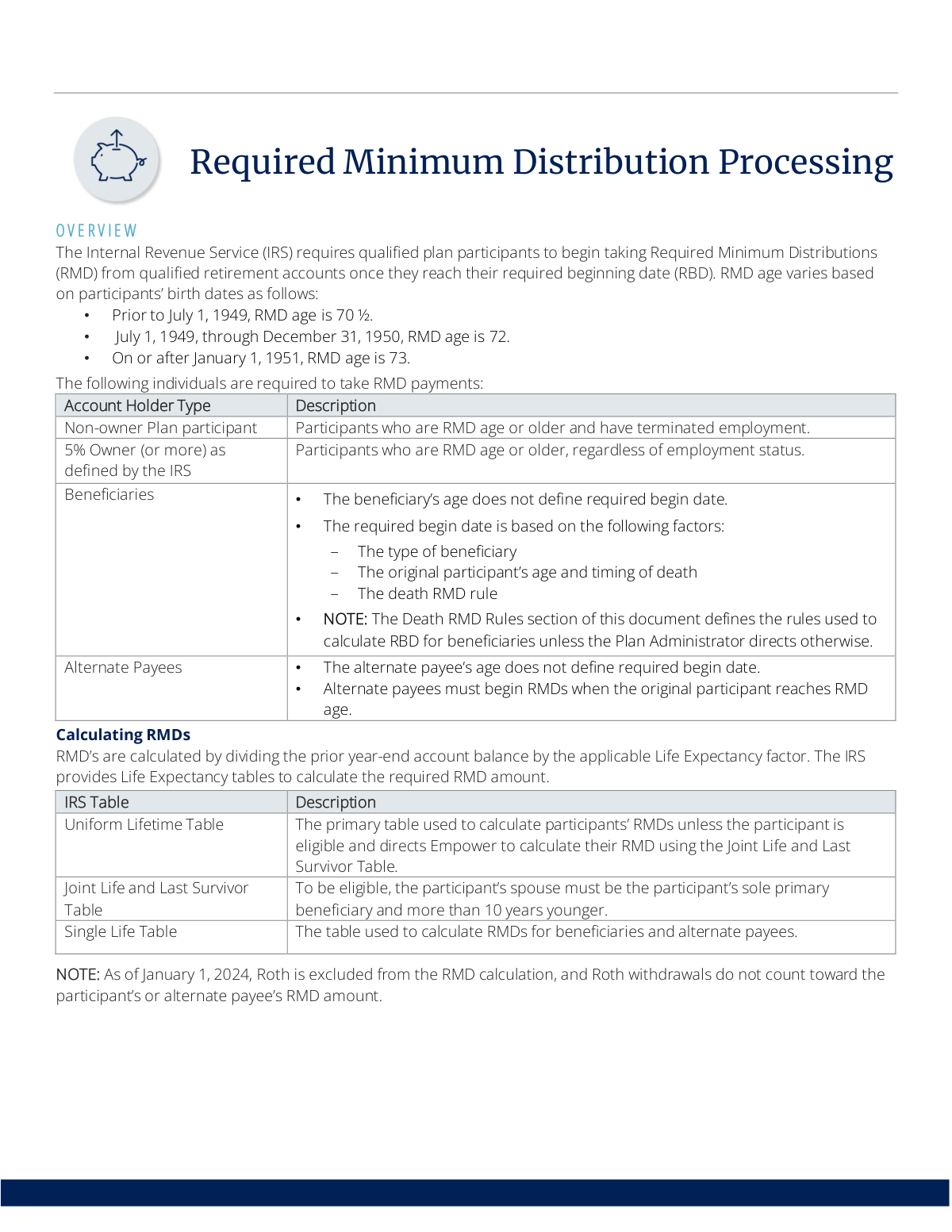
An RMD is the minimum amount the IRS requires you to withdraw from your retirement account annually once you reach a certain age. You must take an RMD if you are at RMD age (73, 72, or 70.5 depending on your birth date) and have stopped working, or if you are a beneficiary or alternate payee of an account.
As a plan participant, you can request your RMD online, by speaking with an Empower Representative, or by submitting a distribution request form. Beneficiaries and alternate payees must submit a distribution request form to initiate the payment.
You must take your initial RMD by April 1 of the year after you reach RMD age or the year you retire, whichever is later. Be aware that if you defer to April 1, you must take a second RMD by December 31 of that same year.
For all subsequent years after your initial RMD, you must take your distribution by December 31.
If you fail to withdraw your full RMD amount in any given year, you may be subject to an excise tax from the IRS on the portion you did not withdraw on time.
Your RMD is calculated by dividing your prior year-end account balance by a life expectancy factor from an IRS table. As of January 1, 2024, Roth account balances are excluded from this calculation.
Yes, the RMD rules for beneficiaries are different and depend on your relationship to the deceased and when they passed away. The rules, which were updated by the SECURE Act, determine when you must begin payments and how long you have to empty the account.
Yes, RMDs are subject to federal and state tax withholding. For partial withdrawals, the default federal withholding is 10%, but you can direct otherwise when you request your payment.
In most cases, you can delay taking RMDs from your current employer's plan until after you retire. However, this exception does not apply if you are a 5% or more owner of the business.
Yes, in this specific situation, you may be eligible to use the IRS's Joint Life and Last Survivor Table for your calculation. This can result in a smaller required distribution amount each year.
Yes, services like Instafill.ai use AI to accurately auto-fill form fields, which can save you time and help reduce errors when completing your distribution request.
You can use a service like Instafill.ai to convert the non-fillable PDF into an interactive, fillable form. This allows you to easily type your information directly into the fields before printing.
Simply upload your RMD distribution request form to the Instafill.ai platform. The AI will make the document fillable, allowing you to type in your information, review it for accuracy, and then download the completed form.
Compliance Empower RMD Request
Validation Checks by Instafill.ai
1
RMD Age Eligibility Verification
Checks the participant's date of birth against the tiered RMD age requirements (70.5, 72, or 73). This is a foundational check to confirm the participant is actually required to take a distribution. If the participant is not of RMD age, the request may be invalid or premature, and processing it could lead to unnecessary distributions and potential tax consequences.
2
Employment Status for Non-Owner RMD
Validates that a non-owner participant of RMD age has a 'terminated' employment status on file. This is crucial because non-owners who are still employed are generally not required to take RMDs. Failure to verify this could result in processing an RMD for a participant who is not yet required to take one, leading to incorrect financial transactions.
3
5% Owner RMD Status Check
Verifies that a participant identified as a '5% Owner (or more)' is of RMD age, regardless of their current employment status. Unlike non-owners, 5% owners must begin RMDs upon reaching RMD age even if they are still working. This check ensures the correct rule is applied based on ownership status, preventing non-compliance with IRS regulations.
4
Joint Life Table Calculation Eligibility
Verifies that a participant requesting an RMD calculation using the Joint Life and Last Survivor Table meets the strict IRS criteria. The system must confirm the participant's sole primary beneficiary is their spouse AND that the spouse is more than 10 years younger than the participant. This prevents the use of a more favorable life expectancy table when not eligible, ensuring compliance and accurate calculations.
5
Initial RMD Deferral Timing Logic
Checks if an initial RMD request is being made between January 1 and April 1 of the year following the participant reaching RMD age. If so, the system must flag that a second RMD for the current year is also required by December 31. This validation prevents participants from inadvertently missing their second RMD in the same year, which would incur a significant IRS excise tax.
6
Beneficiary RMD Trigger Logic
Confirms that an RMD request from a beneficiary is based on the deceased participant's RMD eligibility timeline, not the beneficiary's own age. The validation ensures the correct RMD rules (e.g., life expectancy, 5-year, 10-year) are triggered based on the participant's death date and status. Processing a request based on the beneficiary's age would be a major compliance failure.
7
Alternate Payee RMD Trigger Validation
Ensures that an RMD request from an alternate payee is correctly initiated when the original participant reaches RMD age. The alternate payee's age is irrelevant for determining the required beginning date. This check prevents premature or delayed distributions for alternate payees, ensuring the plan adheres to QDRO and IRS rules.
8
SECURE Act Rule Application by Death Date
Validates that the correct death distribution rules (Pre-SECURE vs. Post-SECURE) are applied based on the participant's date of death and the plan's SECURE Act effective date. For example, a death in 2019 for a non-government plan must use the Pre-SECURE rules. This check is critical for applying the correct payout schedule (e.g., 10-year rule vs. life expectancy) and avoiding significant compliance penalties.
9
Non-Eligible Designated Beneficiary 10-Year Rule
For deaths occurring on or after the SECURE Act effective date, this check verifies that a distribution request for a 'Non-Eligible Designated Beneficiary' adheres to the 10-year rule. The system must confirm the entire account balance is scheduled for withdrawal by December 31 of the year containing the tenth anniversary of the participant's death. This prevents violations of the updated SECURE Act payout requirements.
10
Completeness of Beneficiary RMD Request Data
Ensures that any RMD request submitted by a beneficiary contains all necessary information to determine the correct payout rule. This includes the original participant's date of death, the beneficiary's specific type (e.g., Eligible Designated, Non-Designated), and relationship. An incomplete submission must be rejected as it is impossible to accurately calculate the RMD or determine the correct payout schedule without this data.
11
Foreign Address Tax Withholding
Checks the recipient's address provided on the distribution request form. If the address is identified as foreign, the system must apply the mandatory 30% federal tax withholding, unless a valid tax treaty exemption is claimed. This validation ensures compliance with IRS rules for payments to non-resident aliens and prevents under-withholding of taxes.
12
Roth Balance Exclusion from RMD Calculation
Verifies that the RMD amount requested or calculated does not include any Roth account balances, as per the rule effective January 1, 2024. The system should check the source of the RMD calculation to ensure it is based solely on pre-tax assets. This prevents participants from taking unnecessary distributions from their Roth funds to satisfy an RMD, preserving their tax-free growth.
Common Mistakes in Completing Empower RMD Request
The RMD age varies (70.5, 72, or 73) based on an individual's birth date, and using the wrong age is a frequent error. This can cause a participant to take a distribution too late, resulting in a significant IRS excise tax on the amount that should have been withdrawn. To prevent this, carefully match your birth date to the specific age brackets defined by the IRS and plan documents before initiating a withdrawal.
Participants can defer their very first RMD to April 1 of the year after they reach RMD age, but many forget this requires them to take a second RMD by December 31 of that same year. Missing this second distribution deadline results in a failure to satisfy the RMD, triggering a substantial tax penalty from the IRS. To avoid this, either take your first RMD in the year you become eligible or set a clear calendar reminder for the December 31 deadline if you choose to defer.
The rules for beneficiary distributions are complex, depending on the beneficiary's relationship to the decedent, the date of death (pre- or post-SECURE Act), and whether the original participant had started RMDs. A beneficiary might mistakenly use the 'life expectancy' rule when the '10-year rule' applies, leading to an incorrect withdrawal schedule and potential penalties. Beneficiaries must carefully identify their category (e.g., Eligible Designated Beneficiary) and the participant's date of death to determine the correct payout timeline.
RMD calculations require a specific IRS Life Expectancy table (Uniform Lifetime, Joint Life, or Single Life) based on the individual's status. A common mistake is using the standard Uniform Lifetime table when a different one is required, such as the Single Life table for a beneficiary. This error leads to an incorrect RMD amount, causing either an under-distribution with penalties or an unnecessary over-distribution and higher tax bill.
As of 2024, Roth 401(k) assets are excluded from RMD calculations, and withdrawals from Roth sources do not satisfy an RMD obligation. Individuals may mistakenly include their Roth balance in the total account value, leading to an inflated and incorrect RMD calculation. To avoid this, ensure your calculation is based solely on the prior year-end balance of your pre-tax retirement accounts and take the withdrawal from those same sources.
If a participant passes away after starting RMDs but before taking their full distribution for that year, the beneficiary is responsible for withdrawing the remaining amount. Beneficiaries often overlook this immediate obligation, focusing only on future distributions. Failing to take the decedent's final RMD by December 31 of the year of death results in a missed RMD and is subject to IRS penalties.
Distribution request forms often default to a standard federal tax withholding rate, such as 10%. Many people fill out the form quickly and accept this default without considering their personal tax situation, which can lead to a large, unexpected tax bill or penalty at year-end. Always review the tax withholding section and elect a specific percentage or dollar amount that aligns with your overall tax strategy. AI form-fillers like Instafill.ai can highlight these fields to ensure they are not overlooked.
The process notes that while participants can request RMDs online, beneficiaries and alternate payees are required to submit a distribution request form. These individuals often try to use the online portal out of habit, leading to failed attempts and processing delays. This can cause a missed deadline and significant penalties, so beneficiaries must obtain the correct form. If the form is a non-fillable PDF, tools like Instafill.ai can convert it into an easy-to-use, fillable version.
Unlike other employees, individuals who own 5% or more of the company must begin taking RMDs when they reach RMD age, regardless of their employment status. These owners often mistakenly believe they can delay RMDs until they retire, just like non-owners. This misunderstanding leads to missed RMDs and substantial IRS penalties for each year the distribution was not taken.
The Joint Life and Last Survivor Table, which can result in a lower RMD, has strict eligibility: the spouse must be the sole primary beneficiary and more than 10 years younger. Participants may select this option without meeting both criteria, for instance, if they have also named a child as a primary beneficiary. Using this table incorrectly results in an under-calculated RMD and an IRS penalty for the shortfall.
Saved over 80 hours a year
“I was never sure if my IRS forms like W-9 were filled correctly. Now, I can complete the forms accurately without any external help.”
Kevin Martin Green
Your data stays secure with advanced protection from Instafill and our subprocessors




Robust compliance program
Transparent business model
You’re not the product. You always know where your data is and what it is processed for.
ISO 27001, HIPAA, and GDPR
Our subprocesses adhere to multiple compliance standards, including but not limited to ISO 27001, HIPAA, and GDPR.
Security & privacy by design
We consider security and privacy from the initial design phase of any new service or functionality. It’s not an afterthought, it’s built-in, including support for two-factor authentication (2FA) to further protect your account.
Fill out Empower RMD Request with Instafill.ai
Worried about filling PDFs wrong? Instafill securely fills empower-required-minimum-distribution-request-form forms, ensuring each field is accurate.
