Yes! You can use AI to fill out Fidelity Advisor Investment-Only Retirement Plan Master Application

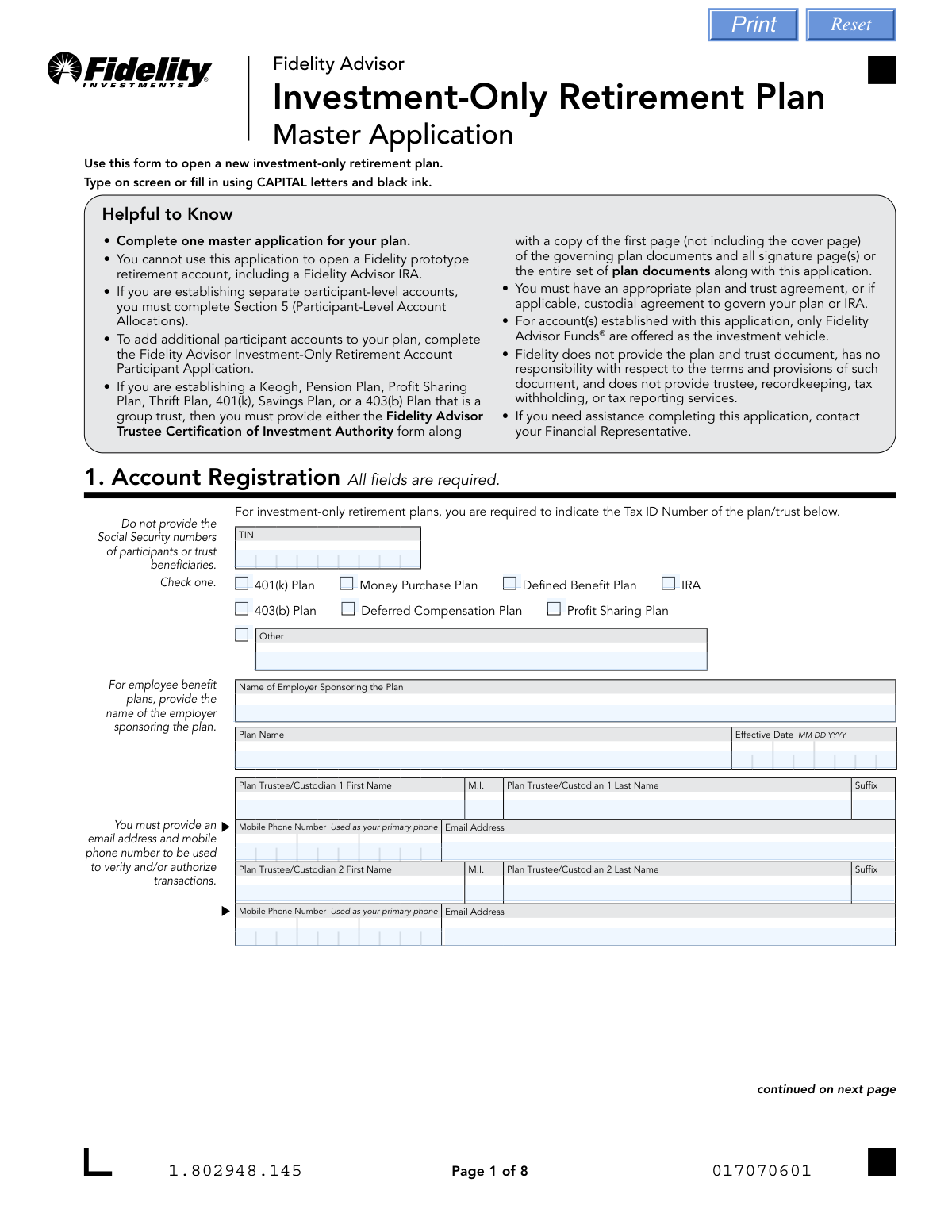
This form is the master application used to establish a new investment-only retirement plan with Fidelity Advisor Funds. It is essential for employers and plan trustees to provide all necessary details about the plan, trustees, financial representatives, and investment allocations. The application allows for setting up either a single plan-level (omnibus) account or separate participant-level accounts. Today, this form can be filled out quickly and accurately using AI-powered services like Instafill.ai, which can also convert non-fillable PDF versions into interactive fillable forms.
Our AI automatically handles information lookup, data retrieval, formatting, and form filling.
It takes less than a minute to fill out Fidelity Investment-Only Retirement Plan Application using our AI form filling.
Securely upload your data. Information is encrypted in transit and deleted immediately after the form is filled out.

Form specifications

Form name: Fidelity Advisor Investment-Only Retirement Plan Master Application
Number of pages: 1
Language: English
Categories: retirement forms, investment forms, retirement plan forms, Fidelity forms
main-image

Instafill Demo: How to fill out PDF forms in seconds with AI

How to Fill Out Fidelity Investment-Only Retirement Plan Application Online for Free in 2026

Are you looking to fill out a FIDELITY INVESTMENT-ONLY RETIREMENT PLAN APPLICATION form online quickly and accurately? Instafill.ai offers the #1 AI-powered PDF filling software of 2026, allowing you to complete your FIDELITY INVESTMENT-ONLY RETIREMENT PLAN APPLICATION form in just 37 seconds or less.
Follow these steps to fill out your FIDELITY INVESTMENT-ONLY RETIREMENT PLAN APPLICATION form online using Instafill.ai:
  1. 1 Navigate to Instafill.ai and upload or select the Fidelity Advisor Investment-Only Retirement Plan Master Application.
  2. 2 Complete Section 1 with the plan's registration details, including the plan type (e.g., 401(k)), TIN, plan name, and information for all trustees.
  3. 3 Provide the form to your Financial Representative to complete their required information in Section 2.
  4. 4 Indicate your investment choices, and fill out either Section 4 for a single plan-level account or Section 5 for separate participant-level accounts with initial investment allocations.
  5. 5 In Section 6, specify any individuals who are authorized to transact on behalf of the plan and their level of authority.
  6. 6 Carefully review all provided information, then have all trustees sign and date the form in Section 8 to certify the application.
  7. 7 Download the completed, signed form and submit it to Fidelity along with any required supporting documents, such as the Trustee Certification of Investment Authority form.

Our AI-powered system ensures each field is filled out correctly, reducing errors and saving you time.

Why Choose Instafill.ai for Your Fillable Fidelity Investment-Only Retirement Plan Application Form?

Speed

Complete your Fidelity Investment-Only Retirement Plan Application in as little as 37 seconds.

Up-to-Date

Always use the latest 2026 Fidelity Investment-Only Retirement Plan Application form version.

Cost-effective

No need to hire expensive lawyers.

Accuracy

Our AI performs 10 compliance checks to ensure your form is error-free.

Security

Your personal information is protected with bank-level encryption.

Frequently Asked Questions About Form Fidelity Investment-Only Retirement Plan Application

This form is used to open a new investment-only retirement plan, such as a 401(k) or Profit Sharing Plan, that will invest exclusively in Fidelity Advisor Funds. It serves as the master application for the entire plan.

You should not use this application if you are trying to open a Fidelity prototype retirement account or a Fidelity Advisor IRA. This form is specifically for non-prototype, investment-only retirement plans.

Complete Section 4 to open a single 'Omnibus' account for the entire plan, where you or a TPA tracks each participant's share. Complete Section 5 if you want Fidelity to set up separate, individual accounts for each plan participant.

For plans like a 401(k), Keogh, or Profit Sharing Plan, you must also submit either the 'Trustee Certification of Investment Authority' form with the first and signature pages of your plan documents, or the entire set of plan documents.

You must provide the Tax Identification Number (TIN) of the plan or trust itself. Do not enter the Social Security Numbers of individual participants or beneficiaries in this section.

No, Fidelity does not provide trustee, recordkeeping, tax withholding, or tax reporting services for accounts established with this application. The plan trustee is responsible for these duties.

To add new participants after the initial setup, you must complete and submit the 'Fidelity Advisor Investment-Only Retirement Account Participant Application' for each new account.

All plan trustees or authorized custodians listed in Section 1 must sign and date the form in Section 8. The application cannot be processed without the required signatures.

You can submit the form by uploading it online through the Fidelity portal, faxing it, or mailing it. Note that if any attached documents require an original signature guarantee or notary, the entire package must be mailed.

This is a separate form used to certify the identity and authority of the trustees acting on behalf of a trust. It is required for certain plan types and must be submitted with specific pages from the trust agreement.

If you submit a check for a purchase without specifying which funds to invest in, the money will automatically be invested in the Fidelity Government Money Market Fund, Daily Money Class.

Yes, services like Instafill.ai use AI to auto-fill form fields accurately and save time. This can help you complete the application more efficiently and with fewer errors.

You can use a service like Instafill.ai to upload the PDF and fill it out directly on your computer. The platform allows you to easily type in your information, add signatures, and download the completed form for submission.

If your PDF is a flat, non-fillable file, you can use a tool like Instafill.ai. It can convert the document into an interactive, fillable form that you can complete and sign electronically.

Compliance Fidelity Investment-Only Retirement Plan Application
Validation Checks by Instafill.ai

1
Verifies TIN is Present and Correctly Formatted
This check ensures the Tax ID Number (TIN) in Section 1 is provided and follows the standard XX-XXXXXXX format for an Employer Identification Number (EIN). This number is critical for tax reporting and uniquely identifying the plan entity. A missing or malformed TIN will prevent the account from being opened and may lead to tax compliance issues.
2
Ensures All Required Account Registration Fields are Complete
Section 1 explicitly states 'All fields are required.' This validation confirms that the Plan Type, Name of Employer, Plan Name, Effective Date, and all details for at least one Plan Trustee/Custodian (Name, Mobile Phone, Email) are filled out. Incomplete information in this section will halt the application process, as it forms the fundamental identity of the account.
3
Validates Mutual Exclusivity of Investment Allocation Sections
The application requires investment instructions for either a single plan-level account (Section 4) or separate participant-level accounts (Section 5), but not both. This check verifies that data has been entered in only one of these two sections. Submitting both sections creates ambiguity in how funds should be allocated, leading to processing delays or incorrect account setup.
4
Confirms Participant Allocation Percentages Sum to 100%
For each participant listed in Section 5, if investment allocations are specified as percentages, this rule validates that the percentages for all chosen funds sum to exactly 100%. This is crucial to ensure the participant's entire contribution is allocated without any remainder or deficit. A mismatch would result in an unprocessable instruction and require correction from the applicant.
5
Matches Trustee Signatures to Listed Trustees
This check verifies that the number of signatures in Section 8 matches the number of trustees/custodians listed in Section 1. It also ensures the names associated with the signatures correspond to the names listed. Missing signatures from any required trustee invalidates the application, as it signifies incomplete authorization to open and manage the account.
6
Validates Date Format and Plausibility
This rule ensures that all date fields, such as the 'Plan Effective Date' in Section 1 and signature dates in Section 8, are entered in a valid MM DD YYYY format and represent a plausible date. For example, the effective date should not be in the distant future or an impossible date like '02 30 2023'. Incorrect or invalid dates can cause legal, compliance, and record-keeping problems, and will cause the form to be rejected.
7
Enforces U.S. Permanent Address Requirement for P.O. Box Users
The form states that if a P.O. Box is used for the mailing address in Section 1, a physical U.S. Permanent Address must also be provided. This validation checks if the mailing address contains 'P.O. Box' and, if so, confirms the U.S. Permanent Address section is filled and is not also a P.O. Box. This is a federal requirement for financial institutions to know the customer's physical location.
8
Checks for Required Accompanying Documentation for Specific Plan Types
The form requires that certain plan types (e.g., Keogh, Pension, 401(k)) must be submitted with either the 'Trustee Certification of Investment Authority' form or the entire set of plan documents. This validation flags applications for these plan types to ensure the required supporting documentation is present. Failure to include these documents will result in an incomplete application that cannot be processed.
9
Verifies Singular Plan Type Selection
In Section 1, the applicant must select exactly one plan type from the provided checkboxes. This check ensures that one, and only one, box is checked. If the 'Other' box is selected, the corresponding text field must be populated to specify the plan type, otherwise the selection is incomplete.
10
Restricts Class C Shares for Omnibus Accounts
A note in Section 4 states that plan-level (Omnibus) accounts are restricted from investing in Class C shares. This validation cross-references the Fund Numbers entered in Section 4 against a master list of Fidelity funds. If any fund number corresponds to a Class C share, the application is flagged for correction, as this would violate the product's investment rules.
11
Confirms Completeness of Financial Representative Information
Section 2, which must be completed by the Financial Representative, is essential for establishing the authorized agent on the account. This check verifies that all fields, including Firm Number, Representative Name, Branch Mailing Address, and contact details, are fully populated. Missing information prevents Fidelity from properly associating the account with the correct representative and firm.
12
Ensures Valid Authority Level is Selected for Authorized Persons
For each individual listed in Section 6 (Authorized Person), the form requires selecting one level of authority: Inquiry Only (I), Limited Trading (L), or All (A). This check confirms that one and only one of these options is chosen for each person listed. If no selection is made, the form defaults to 'Inquiry Only,' but an explicit choice is preferred to avoid ambiguity.
13
Validates Presence of Trustee SSN on Certification Form
On the separate 'Trustee Certification of Investment Authority' form, the Social Security Number (SSN) for each trustee is a required field. This check verifies that the SSN field is populated and follows the XXX-XX-XXXX format. This is a critical piece of personally identifiable information required for identity verification under federal law.
14
Verifies Signature Guarantee for Resigning Trustee
When a trustee resigns using Section 3B of the 'Trustee Certification of Investment Authority' form, their signature must be accompanied by a Signature Guarantee stamp. This validation confirms the presence of both the signature and a valid stamp from an eligible guarantor institution. A missing or invalid guarantee makes the resignation legally non-binding and will prevent the trustee change from being processed.

Common Mistakes in Completing Fidelity Investment-Only Retirement Plan Application

Incorrectly Choosing Between Omnibus and Participant-Level Accounts

Applicants often get confused and fill out both Section 4 (Omnibus/Plan-Level) and Section 5 (Participant-Level), or they select the wrong one for their plan's needs. This happens due to a misunderstanding of how the plan's assets will be tracked. This error will halt the application process, as Fidelity cannot determine how to structure the account, requiring clarification and resubmission. To avoid this, carefully decide if you will track participant shares yourself (choose Section 4) or if you need Fidelity to set up separate sub-accounts for each participant (choose Section 5), and complete only the corresponding section.

Missing Required Supporting Documentation

The application states that for certain plan types like 401(k)s, Profit Sharing, or Keoghs, the 'Trustee Certification of Investment Authority' form and pages from the governing plan documents are mandatory. People frequently overlook this and submit the main application alone. This results in an incomplete submission, delaying account opening until all required paperwork is received. Always review the 'Helpful to Know' section and create a checklist of all required documents before submission.

Incorrect Signature Validation (Notary vs. Signature Guarantee)

The 'Trustee Certification' form has very specific requirements for signature validation that are often confused. For instance, a resigning trustee (Section 3B) requires a Medallion Signature Guarantee, not a notary stamp. Submitting the wrong type of validation will cause the form to be rejected, as it fails to meet the legal and security standards for the transaction. Carefully read the instructions in each section to determine if a notary or the more stringent Signature Guarantee is required, and obtain it from an eligible financial institution.

Incomplete or Inaccurate Participant Allocation Percentages

When filling out Section 5 for participant-level accounts, the investment allocations for each individual participant must total exactly 100%. It is common for applicants to make calculation errors, resulting in totals that are over or under 100%. This prevents the funds from being allocated, and the application will be returned for correction. To prevent this, double-check the math for each participant's allocation before submitting the form.

Using a Personal SSN Instead of the Plan's TIN

In Section 1, the form asks for the Tax ID Number (TIN) of the plan or trust, explicitly stating not to provide Social Security Numbers of participants. However, applicants sometimes mistakenly enter their personal SSN out of habit. This leads to a fundamental mismatch in account registration, as the account must be tied to the legal entity of the plan, not an individual. This error requires a full correction and can delay the entire setup process.

Forgetting Signatures for All Listed Trustees

Section 8 requires signatures from all trustees named in Section 1. If a plan has two trustees listed on the application, but only one signs the signature page, the form is considered incomplete and cannot be processed. This often happens due to simple oversight or coordination issues between trustees. To avoid this, ensure that every individual listed as a trustee in Section 1 has signed and dated the form in Section 8 before it is submitted.

Unintentionally Defaulting to 'Inquiry Only' Authority

In Section 6, when designating an Authorized Person, applicants must check a box to specify their level of authority (Inquiry, Limited Trading, or All). If no box is checked, the authority defaults to 'Inquiry Only.' This means the designated person can only view account information and cannot execute trades or transactions as may have been intended, leading to significant operational issues later. Always explicitly select the intended authority level for each authorized individual.

Using a P.O. Box Without Providing a Permanent Address

The form allows for a P.O. Box in the 'Mailing Address' field but explicitly requires the 'U.S. Permanent Address' section to be completed in that case. Applicants often provide the P.O. Box but then leave the permanent physical address section blank. Federal regulations require a physical address of record, so this omission will cause the application to be flagged as incomplete, delaying the account opening. If you use a P.O. Box for mail, always fill out the permanent street address section as well.

Submitting an Illegible or Incorrectly Formatted Application

The instructions specify using 'CAPITAL letters and black ink' for manual completion. Applicants may use lowercase letters, colored ink, or have illegible handwriting, which can lead to data entry errors by Fidelity's processing team. Since this is a non-fillable PDF, these manual errors are common. To avoid this, use a tool like Instafill.ai, which can convert the flat PDF into a fillable form, allowing you to type entries clearly and ensure they meet formatting requirements before printing.

Failing to Submit the Correct Form for the Account Type

The application explicitly states it cannot be used to open a Fidelity prototype retirement account, such as a Fidelity Advisor IRA. Applicants who are not familiar with the distinction may mistakenly use this 'Investment-Only' form for a standard IRA. This results in an immediate rejection and requires the applicant to start over with the correct application, wasting significant time. Always confirm with your financial representative that you are using the correct application for your specific retirement plan type.
Saved over 80 hours a year

“I was never sure if my IRS forms like W-9 were filled correctly. Now, I can complete the forms accurately without any external help.”

Kevin Martin Green

Your data stays secure with advanced protection from Instafill and our subprocessors

Robust compliance program

Transparent business model

You’re not the product. You always know where your data is and what it is processed for.

ISO 27001, HIPAA, and GDPR

Our subprocesses adhere to multiple compliance standards, including but not limited to ISO 27001, HIPAA, and GDPR.

Security & privacy by design

We consider security and privacy from the initial design phase of any new service or functionality. It’s not an afterthought, it’s built-in, including support for two-factor authentication (2FA) to further protect your account.

Fill out Fidelity Investment-Only Retirement Plan Application with Instafill.ai

Worried about filling PDFs wrong? Instafill securely fills fidelity-advisor-investment-only-retirement-plan-master-application forms, ensuring each field is accurate.