Yes! You can use AI to fill out Fidelity Advisor IRA Minimum Required Distribution
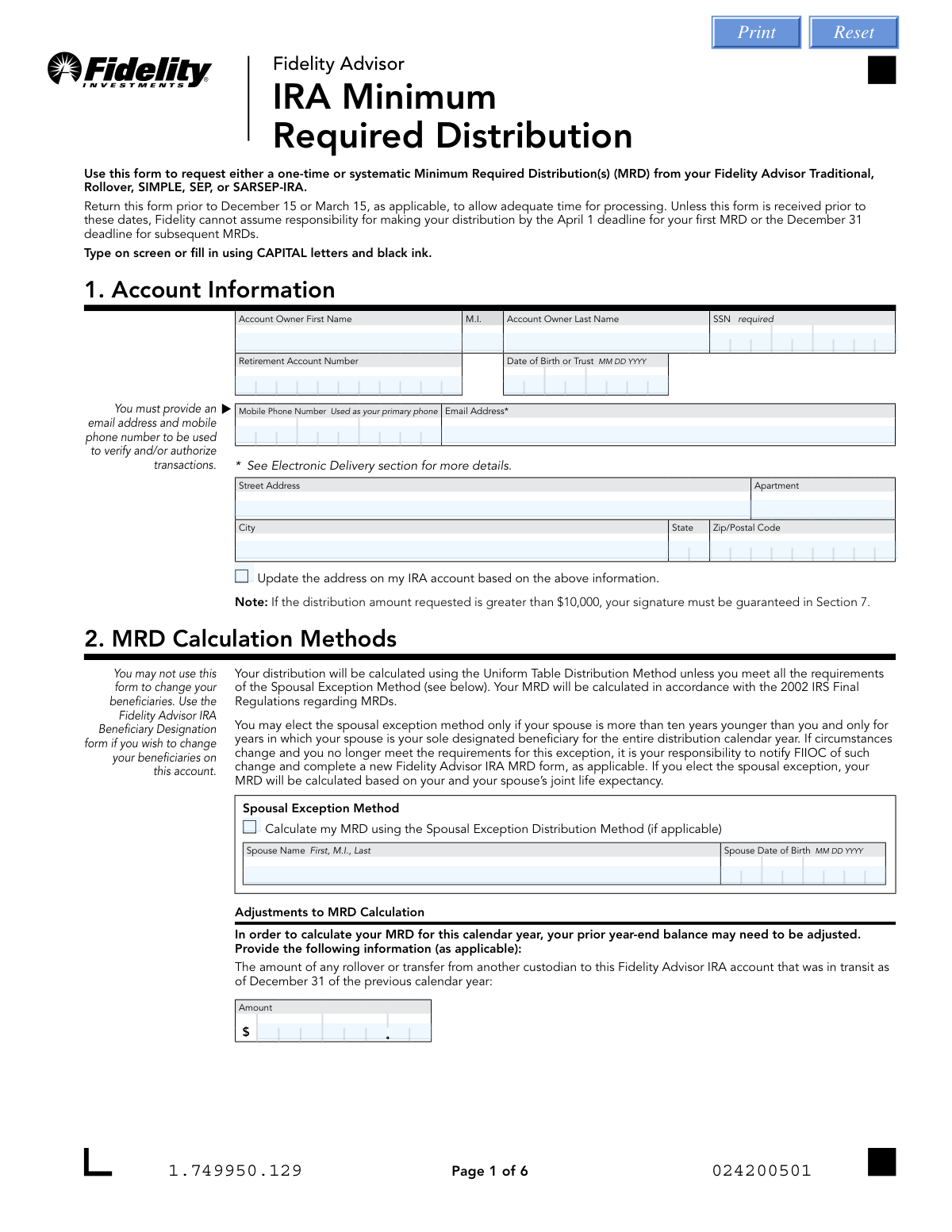
This form allows Fidelity Advisor IRA holders to request Minimum Required Distributions (MRDs) from their Traditional, Rollover, SIMPLE, SEP, or SARSEP-IRA accounts. It is crucial for account holders who have reached the mandatory age to take these distributions annually to avoid significant tax penalties from the IRS. Today, this form can be filled out quickly and accurately using AI-powered services like Instafill.ai, which can also convert non-fillable PDF versions into interactive fillable forms.
Our AI automatically handles information lookup, data retrieval, formatting, and form filling.
It takes less than a minute to fill out IRA Minimum Required Distribution using our AI form filling.
Securely upload your data. Information is encrypted in transit and deleted immediately after the form is filled out.
Form specifications
| Form name: | Fidelity Advisor IRA Minimum Required Distribution |
| Number of pages: | 1 |
| Language: | English |
| Categories: | IRA forms, Fidelity forms, distribution forms |
Instafill Demo: How to fill out PDF forms in seconds with AI
How to Fill Out IRA Minimum Required Distribution Online for Free in 2026
Are you looking to fill out a IRA MINIMUM REQUIRED DISTRIBUTION form online quickly and accurately? Instafill.ai offers the #1 AI-powered PDF filling software of 2026, allowing you to complete your IRA MINIMUM REQUIRED DISTRIBUTION form in just 37 seconds or less.
Follow these steps to fill out your IRA MINIMUM REQUIRED DISTRIBUTION form online using Instafill.ai:
- 1 Navigate to Instafill.ai and upload the Fidelity Advisor IRA Minimum Required Distribution form or select it from the template library.
- 2 Provide your personal and account details in Section 1. The AI can assist by pre-filling information from your profile.
- 3 In Section 2, choose your MRD calculation method, either the standard Uniform Table or the Spousal Exception Method if applicable.
- 4 Complete Section 4 by selecting your MRD option, whether a one-time payment, ongoing systematic payments, or both, and specify the distribution method.
- 5 In Section 5, provide your distribution instructions, detailing how you want to receive the funds (e.g., check, electronic transfer to a bank, or deposit to another Fidelity account).
- 6 Make your federal and state income tax withholding elections in Section 7, specifying if you want taxes withheld and at what rate.
- 7 Review all entered information for accuracy, then follow the AI's guidance to sign the form in Section 8 and submit it to Fidelity via the appropriate method (upload, mail, or fax).
Our AI-powered system ensures each field is filled out correctly, reducing errors and saving you time.
Why Choose Instafill.ai for Your Fillable IRA Minimum Required Distribution Form?
Speed
Complete your IRA Minimum Required Distribution in as little as 37 seconds.
Up-to-Date
Always use the latest 2026 IRA Minimum Required Distribution form version.
Cost-effective
No need to hire expensive lawyers.
Accuracy
Our AI performs 10 compliance checks to ensure your form is error-free.
Security
Your personal information is protected with bank-level encryption.
Frequently Asked Questions About Form IRA Minimum Required Distribution
This form is used to request a one-time or systematic Minimum Required Distribution (MRD) from your Fidelity Advisor Traditional, Rollover, SIMPLE, SEP, or SARSEP-IRA.
You need to fill out this form if you are an IRA owner who has reached the applicable age to begin taking MRDs, which is currently age 73.
Yes, to ensure timely processing, you should return the form before March 15 for your first MRD or before December 15 for all subsequent year-end MRDs.
Yes, Section 4 allows you to select a one-time MRD payment, set up ongoing systematic payments for future years, or both.
You have several options listed in Section 5, including receiving a check by mail, depositing it into a nonretirement Fidelity account, or having it sent electronically to your bank account via ACH or wire transfer.
No, it's optional. However, if you make no election in Section 7, Fidelity is required to withhold 10% for federal income tax, and state tax withholding rules may also apply.
Failure to meet the MRD requirements could result in substantial tax penalties from the IRS, so it is crucial to take your distribution by the deadline.
A signature guarantee is required in specific situations, such as requesting a distribution over $100,000, sending a check to an alternate payee, or setting up a new bank wire transfer.
To establish electronic payments to a new bank account, you must complete the bank information in Section 6 and attach a voided check.
No, you must complete a separate MRD form for each Fidelity Advisor IRA from which you need to take a distribution.
No, this form is not for Roth IRAs, as they do not have minimum distribution requirements during the owner's lifetime. A separate form exists for Beneficiary Distribution Accounts (BDAs), including Roth IRA BDAs.
Yes, services like Instafill.ai use AI to accurately auto-fill form fields with your personal information, which can save you time and help prevent errors.
You can use a service like Instafill.ai by uploading the PDF to their platform. The AI will fill in your information, and you can then review, sign, and download the completed form for submission.
If your PDF is not interactive, you can use a tool like Instafill.ai. It can convert flat, non-fillable PDFs into fillable forms, allowing you to easily type your information directly onto the document.
Compliance IRA Minimum Required Distribution
Validation Checks by Instafill.ai
1
Account Information Completeness
This check verifies that all fields in Section 1 (Account Information), including name, SSN, account number, date of birth, phone, and email, are filled out. This section is marked as 'Must be completed in full' and is essential for identifying the correct account and owner. A failure to provide complete information will prevent the form from being processed.
2
Social Security Number (SSN) Format
Validates that the Social Security Number provided in Section 1 is a valid 9-digit number, potentially allowing for formats with or without hyphens. A valid SSN is required for tax reporting purposes (Form 1099-R). An invalid format will result in rejection of the form, as it prevents correct IRS reporting.
3
Account Owner Age Eligibility for MRD
This check cross-references the 'Date of Birth' in Section 1 with the current date to confirm the account owner has reached the applicable Minimum Required Distribution (MRD) age (e.g., 73). This is a logical check to prevent requests from individuals who are not yet required to take distributions. If the owner is too young, the request is invalid and should be rejected with an explanation.
4
Spousal Exception Age Requirement
If the 'Spousal Exception Method' is selected in Section 2, this validation confirms that the spouse's date of birth is more than ten years after the account owner's date of birth. This rule is an explicit IRS requirement for using this calculation method. If the age difference is not met, the calculation method is invalid, and the form cannot be processed with this election.
5
MRD Option Selection Requirement
Ensures that in Section 4 (MRD Options), the user has selected at least one primary option: 'One-Time MRD Payment' or 'Ongoing MRD Payments'. The form requires a clear instruction on what type of distribution is being requested. If neither option is selected, the core purpose of the form is undefined, and it must be returned for completion.
6
One-Time Distribution Allocation Total
If the 'Distribution Allocation by Percentage' method is chosen in Section 4 for a one-time MRD, this check verifies that the sum of all entered percentages equals exactly 100%. This ensures the entire distribution is allocated correctly across the specified funds. A sum not equal to 100% would lead to an ambiguous or incomplete distribution instruction.
7
Ongoing Payment Parameter Validity
When 'Ongoing MRD Payments' is selected in Section 4, this validation ensures that a valid 'Start Date' and 'Frequency' are provided. The start date must be a valid date in the future, and the frequency must be one of the allowed options (Monthly, Quarterly, Semiannually, Annually). Missing or invalid parameters would make it impossible to set up the systematic payment plan.
8
Exclusive Distribution Instruction Selection
This check verifies that exactly one distribution instruction (options A through G) is selected in Section 5. Selecting multiple options creates conflicting instructions on where to send the funds. The form must be rejected if zero or more than one option is chosen to ensure the distribution is sent to the correct destination.
9
Bank Information for Electronic Payments
Validates that Section 6 (Bank Information) is fully completed if the user selects an electronic payment option that requires new bank setup (Option D or F in Section 5). This includes providing a bank name, ABA routing number, and account number. Failure to provide this information when required will prevent the electronic transfer from being established, causing the distribution to default to a check.
10
Bank Account Ownership Verification
If bank information is provided in Section 6, this check confirms that at least one of the bank account owner names matches the IRA account owner's name from Section 1. This is a critical security measure to prevent fraudulent transfers to third-party accounts. A mismatch will cause the electronic setup to fail and may trigger a security review.
11
Federal Tax Withholding Logic
In Section 7, this validation ensures the federal tax withholding elections are logical. It checks that the user has not selected both 'elect NOT to have' and 'I want to withhold'. It also confirms that if withholding is elected, a whole number percentage between 1% and 100% is specified. Contradictory or incomplete selections will prevent the system from correctly calculating tax withholding.
12
State Tax Withholding Rules Compliance
This validation checks the state tax withholding election in Section 7 against the rules defined by the account owner's state of residence (from Section 1). For example, it would prevent a resident of a 'Not Allowed' state (like FL or TX) from electing withholding. This ensures compliance with state-specific tax laws and prevents processing errors.
13
Mandatory Signature and Date
Confirms that the form has been signed and dated by the account owner or authorized signer in Section 8. The signature provides legal authorization for the transaction, and the date establishes when the request was made. A form lacking a signature or date is not legally executable and must be rejected.
14
Signature Guarantee Requirement Check
This check identifies transactions that require a signature guarantee based on the form's rules (e.g., distribution over $100k, new bank wire setup, payment to an alternate payee). It flags submissions that meet these criteria but are missing the required guarantee stamp in Section 8. Processing such a request without the guarantee would violate security protocols and expose the firm to risk.
Common Mistakes in Completing IRA Minimum Required Distribution
People often skip Section 7, assuming no action is needed or that taxes are handled separately. However, the form states that if no federal election is made, Fidelity is required to withhold a default 10% from the distribution. This results in a smaller-than-expected payment and can complicate tax planning. To avoid this, carefully review Section 7 and explicitly choose whether to have taxes withheld or not, and specify a percentage if desired.
Many users miss the specific conditions in Section 8 that require a signature guarantee, such as distributions over $100,000, setting up a new bank wire, or sending a check to a third party. They may submit the form without it or mistakenly get a notarization, which is not accepted. This is a critical error that will cause the form to be rejected and returned, delaying the distribution and potentially causing a missed MRD deadline.
In Section 4, individuals may select 'One-Time MRD Payment' intending only to set up the current year's distribution, without realizing this choice does not establish automatic payments for future years. This misunderstanding can lead to failing to take subsequent MRDs, resulting in substantial tax penalties. To prevent this, carefully decide if you want a single payment for this year only or want to establish recurring, automatic MRD payments for all subsequent years.
When setting up a new electronic transfer in Section 6, it's common to forget to attach the required voided check or to mistype the bank routing or account number. These errors will cause the electronic payment setup to fail. As a result, Fidelity will default to mailing a physical check to the address on record, delaying access to funds and negating the convenience of an electronic transfer.
Applicants sometimes forget to enter their full Social Security Number (SSN) or their specific Retirement Account Number in Section 1. These numbers are the primary identifiers for the account and are essential for processing. Leaving these fields blank or providing an incorrect number will immediately halt the request, requiring Fidelity to contact you for clarification and significantly delaying your distribution.
When selecting a one-time payment in Section 4, a user might check the box for Fidelity to 'Calculate my MRD' but then fail to specify whether it is for the 'Current year' or 'Prior year'. This ambiguity forces the processing agent to stop and seek clarification, delaying the payment. It is crucial to check one of the year boxes to ensure the request is processed promptly and for the correct tax year.
In Section 4, when choosing to take distributions from specific funds, users may enter percentages that do not add up to exactly 100%. This mathematical error makes the instructions impossible to follow as written. The form states that if no valid method is selected, the distribution will default to the 'Pro-Rata Method', which may not align with the account holder's investment strategy. AI-powered tools like Instafill.ai can help prevent this by performing calculations to validate that percentages sum correctly before submission.
A frequent mistake is selecting an electronic payment option in Section 5 (like ACH or Wire) for which the feature is not yet established on the account. The user then fails to complete the required additional steps, such as filling out Section 6 for a new ACH or getting a signature guarantee for a new wire. The form's default action is to mail a check, which can be an inconvenient surprise for someone expecting a fast electronic deposit.
It is a surprisingly common and fundamental error to submit the form without a signature and date in Section 8. An unsigned form is legally invalid and cannot be processed under any circumstances. This oversight guarantees the form will be rejected, forcing the user to restart the entire process and risk missing important distribution deadlines. Since this form is a non-fillable PDF, using a tool like Instafill.ai can convert it to a fillable version and provide clear prompts to ensure no signature fields are missed.
The state tax withholding rules detailed in the 'Notice of Withholding' are complex and vary significantly by state of residence. For example, a resident of a 'Mandatory' withholding state might incorrectly elect not to have state taxes withheld, causing a processing exception. This leads to delays while Fidelity clarifies the correct withholding, or results in an incorrect tax amount being withheld. It is vital to read the state-specific rules that apply to you before making an election in Section 7.
Saved over 80 hours a year
“I was never sure if my IRS forms like W-9 were filled correctly. Now, I can complete the forms accurately without any external help.”
Kevin Martin Green
Your data stays secure with advanced protection from Instafill and our subprocessors

Robust compliance program
Transparent business model
You’re not the product. You always know where your data is and what it is processed for.
ISO 27001, HIPAA, and GDPR
Our subprocesses adhere to multiple compliance standards, including but not limited to ISO 27001, HIPAA, and GDPR.
Security & privacy by design
We consider security and privacy from the initial design phase of any new service or functionality. It’s not an afterthought, it’s built-in, including support for two-factor authentication (2FA) to further protect your account.
Fill out IRA Minimum Required Distribution with Instafill.ai
Worried about filling PDFs wrong? Instafill securely fills fidelity-advisor-ira-minimum-required-distribution forms, ensuring each field is accurate.