
Yes! You can use AI to fill out Fidelity Charitable Contribution Form
Don't type 130 fields by hand. Tell our AI about yourself, or upload a document you already have, and it fills every field in seconds. You check it, then download, print or sign.
The AI does the filling. You just check it.
No typing into boxes, nothing to install.
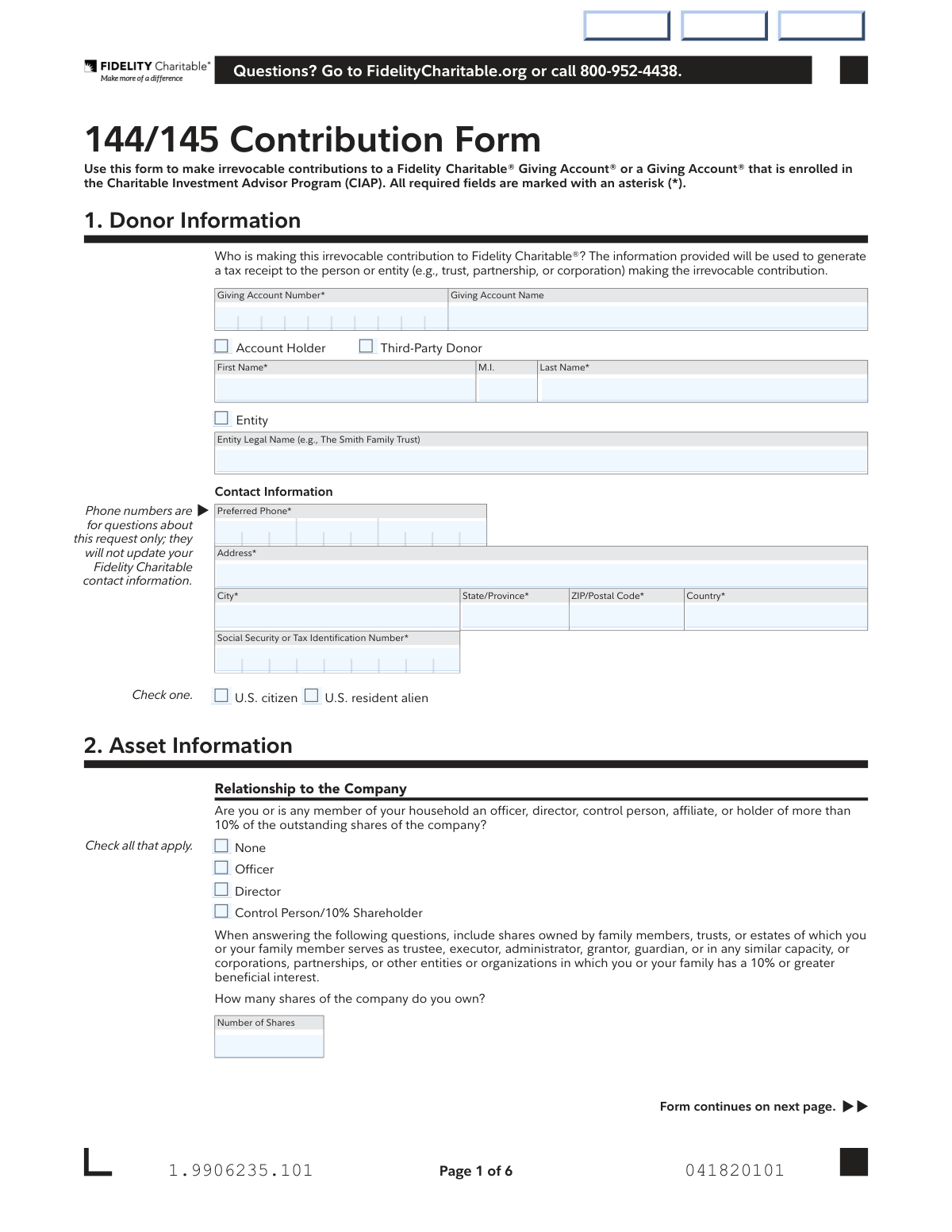
What this form asks for
The AI fills all of it, from your answers or your documents.
The AI checks your answers before you download
13 checks built for this form, so a wrong date or a missing answer is caught before anyone else sees it.
This check validates that if the 'Entity' checkbox is selected, the 'Entity Legal Name' field is populated. Conversely, if 'Account Holder' or 'Third-Party Donor' is selected, the 'First Name' and 'Last Name' fields must be populated. This is important for generating an accurate tax receipt and preventing contradictory information. If validation fails, the user will be prompted to complete the appropriate name fields based on their donor type selection.
This check ensures the 'Social Security or Tax Identification Number' field contains a valid, 9-digit numeric value. This number is critical for tax reporting purposes and for complying with anti-money laundering regulations. A failure in this validation would prevent form submission until a correctly formatted number is entered.
This validation confirms that if the user chooses to manually allocate their contribution in Section 5B, the sum of all percentages entered across the various investment pools equals exactly 100%. This is crucial to ensure the entire contribution is allocated according to the donor's explicit instructions without ambiguity. If the total is not 100%, an error message will be displayed, and the form cannot be submitted.
This check verifies that the primary 'Signature' and 'Date' fields in Section 6 are not empty. The signature legally authorizes the irrevocable contribution and the terms outlined in the form. A missing signature or date renders the entire document invalid, and the transaction cannot be processed.
This validation compares the numeric value entered for 'Number of Shares' in Section 6 with the spelled-out version in the 'Write out the number of shares' field. This serves as a critical double-check to prevent data entry errors regarding the quantity of shares being donated. A mismatch would trigger an alert, requiring the user to correct the discrepancy before proceeding.
This check is a conditional validation on the 'Details' field in Section 2. If the user selects 'Yes' to indicate that agreements or restrictions exist on the securities, the 'Details' text box must be filled out. This ensures Fidelity Charitable is aware of any potential complications or special handling required for the donated assets. Failure to provide details will block submission.
And 7 more checks
- Enforces Mutually Exclusive Investment Selections
- Validates Completeness of External Firm Information
- Verifies All Date Fields Follow MM DD YYYY Format
- Ensures All Required Contact Information is Provided
- Validates Citizenship Status Selection
- Requires Selection for Relationship to Company
- Checks for Fidelity Account Number in Section 3A
Let AI fill out your 144/145 Contribution Form
No typing. Every field filled in seconds, checked, ready to sign.
How to Fill Out 144/145 Contribution Form Online for Free in 2026
What the AI walks you through.
- Navigate to Instafill.ai and upload the Fidelity Charitable Contribution Form or select it from their template library.
- Provide your donor information in Section 1, including your Giving Account number, name, contact details, and tax identification number.
- Complete Section 2 with detailed information about the assets you are contributing, including your relationship to the company and how the securities were acquired.
- In Section 3, specify the details of your irrevocable contribution, indicating whether the assets are held at Fidelity or another financial institution.
- Use Section 5 to recommend how your contribution should be allocated among the available investment pools or a managed account.
- Carefully review all entered information for accuracy, then proceed to Section 6 to electronically sign and date the form with the guidance of the AI assistant.
- Download the completed form and submit it to Fidelity Charitable via mail or fax as per the instructions provided on the document.
Common Mistakes in Completing 144/145 Contribution Form
The ones the AI is built to catch.
Incorrect Donor or Account Information
Misinterpreting 'Relationship to the Company'
Omitting Specific Share Lot Information
Incorrect Investment Pool Allocation Percentages
Missing Signatures or Medallion Guarantee
Conflicting Share Contribution Amounts
Choosing the Wrong Transfer Option for Outside Assets
Incomplete Delivering Firm Information
Mixing Individual and Entity Donor Information
Failure to Disclose Stock Restrictions
Frequently Asked Questions About 144/145 Contribution Form
Is it really free for 7 days?
Can I fill other forms too?
How do I cancel?
How does the AI fill out 144/145 Contribution Form?
What happens to my information?
How complex is 144/145 Contribution Form to fill out?
What is the purpose of the Fidelity Charitable 144/145 Contribution Form?
Who needs to fill out this form?
What information is required to complete this form?
I am contributing to someone else's Giving Account. What do I need to know?
How do I contribute restricted stock?
What happens if I don't select any investment pools in Section 5?
How do I submit the completed form?
Can I get my contribution back after I submit the form?
When is a Medallion Signature Guarantee required?
How do I transfer securities from a financial institution other than Fidelity?
Can I use an AI tool to help me fill out this form?
How can I fill out this Fidelity Charitable form online?
The PDF I downloaded isn't fillable. What can I do?
Can I specify which tax lots of a stock to donate?
Get your 144/145 Contribution Form filled out by AI
$0 today. Cancel before Nov 2 and you pay nothing.
Other forms like this one
charitable forms: Contribute to a Charitable Gift Account, Form 8283, Noncash Charitable Contributions, Form 501A, Fantasy Contest Operator Personal Information Form (Commonwealth of Virginia, VDACS Office of Charitable & Regulatory Programs), Fidelity Charitable 144/145 Contribution Form, Fidelity Charitable Letter of Authorization, Transfer of Assets Out - Partial Account or Charitable Gift Transfers, Schwab Charitable Fund Transfer of Assets, Charles Schwab Charitable Gift Donation - Letter Of Authorization for DTC Transfer, Sample IRA Distribution Letter for a Qualified Charitable Distribution (QCD), Charles Schwab Charitable Gift Transfer Letter of Authorization, Make a contribution - Vanguard Charitable, IRA Distribution to Charitable Beneficiary, IRA Distribution to Charitable Beneficiary, Fidelity Charitable Irrevocable Contribution Form and Letter of Instruction, Request for a Qualified Charitable Distribution (QCD) from a Brokerage Individual Retirement Account (IRA), Request for qualified charitable distribution from individual retirement account, Request for a Charitable Distribution from an Individual Retirement Account (IRA), Merrill Lynch One-Time Qualified Charitable Distribution, Individual Retirement Account (IRA) — Qualified Charitable Distribution Form, Fidelity Charitable Investment Advisor Program Application
Fidelity Charitable forms: Fidelity Charitable 144/145 Contribution Form, Fidelity Charitable Letter of Authorization, Fidelity Charitable Irrevocable Contribution Form and Letter of Instruction, Fidelity Charitable Investment Advisor Program Application, Irrevocable Contribution Form and Letter of Instruction
charitable contribution forms: Fidelity Charitable 144/145 Contribution Form, Form 8283, Noncash Charitable Contributions, Make a contribution - Vanguard Charitable, Fidelity Charitable Irrevocable Contribution Form and Letter of Instruction, Irrevocable Contribution Form and Letter of Instruction
Let AI fill out your 144/145 Contribution Form
Your trial starts once a card is added. You pay nothing before Nov 2.
Our AI already knows this form, all 130 fields of it. Skip the typing: tell it about yourself, or upload what you have, and it fills the whole form in seconds.
- AI fills every field on all 5 pages, checkboxes included
- No typing into boxes: answer a few questions, or upload a document you already have, an old copy of this form, a photo of a document
- The AI checks the answers; you review and change anything before you download
- Download the finished PDF, print it, or sign it online
- Encrypted, and never used to train AI
Cancel before Nov 2 and you pay nothing.
A card is needed to start the trial. Cancel in two clicks from your account.
Terms · Privacy