Yes! You can use AI to fill out Fidelity Charitable Irrevocable Contribution Form and Letter of Instruction
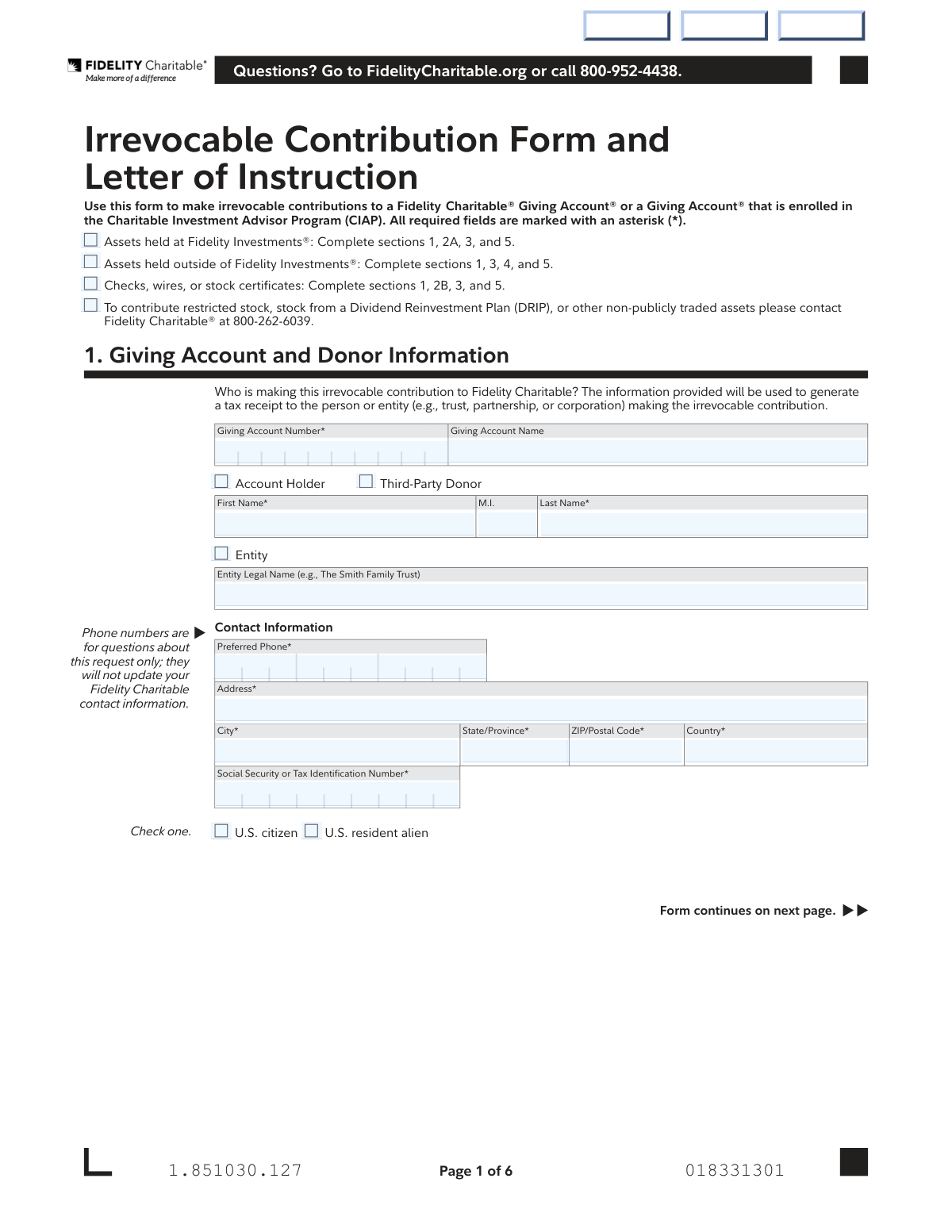
This form is a legal document for donors to make irrevocable contributions to their Fidelity Charitable® Giving Account®. It allows donors to specify the type of asset being contributed—such as cash, stocks, or mutual funds—and from which financial institution they are being transferred. The form also serves as a letter of instruction for how the contributed assets should be allocated among various investment pools. Today, this form can be filled out quickly and accurately using AI-powered services like Instafill.ai, which can also convert non-fillable PDF versions into interactive fillable forms.
Our AI automatically handles information lookup, data retrieval, formatting, and form filling.
It takes less than a minute to fill out Fidelity Charitable Contribution Form using our AI form filling.
Securely upload your data. Information is encrypted in transit and deleted immediately after the form is filled out.
Form specifications
| Form name: | Fidelity Charitable Irrevocable Contribution Form and Letter of Instruction |
| Number of pages: | 5 |
| Language: | English |
Instafill Demo: How to fill out PDF forms in seconds with AI
How to Fill Out Fidelity Charitable Contribution Form Online for Free in 2026
Are you looking to fill out a FIDELITY CHARITABLE CONTRIBUTION FORM form online quickly and accurately? Instafill.ai offers the #1 AI-powered PDF filling software of 2026, allowing you to complete your FIDELITY CHARITABLE CONTRIBUTION FORM form in just 37 seconds or less.
Follow these steps to fill out your FIDELITY CHARITABLE CONTRIBUTION FORM form online using Instafill.ai:
- 1 Navigate to Instafill.ai and upload the Fidelity Charitable Irrevocable Contribution Form.
- 2 Provide your Giving Account number and donor information in Section 1, specifying whether you are the account holder or a third-party donor.
- 3 Complete the relevant sections (2A, 2B, or 4) to detail the assets you are contributing, whether they are from a Fidelity account, an outside institution, or via check/wire.
- 4 In Section 3, recommend how your contribution should be allocated by selecting from the available investment pools or managed account options.
- 5 Carefully review all entered information, including asset details, account numbers, and investment allocation percentages, to ensure accuracy.
- 6 Electronically sign and date the form in Section 5 to certify the information and authorize the irrevocable contribution.
- 7 Download the completed form and follow the submission instructions on the last page to mail or fax it to Fidelity Charitable.
Our AI-powered system ensures each field is filled out correctly, reducing errors and saving you time.
Why Choose Instafill.ai for Your Fillable Fidelity Charitable Contribution Form Form?
Speed
Complete your Fidelity Charitable Contribution Form in as little as 37 seconds.
Up-to-Date
Always use the latest 2026 Fidelity Charitable Contribution Form form version.
Cost-effective
No need to hire expensive lawyers.
Accuracy
Our AI performs 10 compliance checks to ensure your form is error-free.
Security
Your personal information is protected with bank-level encryption.
Frequently Asked Questions About Form Fidelity Charitable Contribution Form
This form is used to make a permanent, non-refundable contribution of assets like cash, stocks, or mutual funds to a Fidelity Charitable Giving Account.
This form should be used by Giving Account holders or third-party donors who wish to contribute assets to a Fidelity Charitable Giving Account. It covers contributions from various sources, including Fidelity accounts, other financial institutions, and checks.
You will need your Giving Account number, personal contact information, and details about the assets you're contributing, such as the financial account number, number of shares, or check amount. For transfers from an outside firm, a recent account statement is also required.
If your assets are held at Fidelity Investments, you only need to complete sections 1, 2A, 3, and 5. Section 2A is specifically designed for contributions of cash or securities held within a Fidelity account.
For assets held at a financial institution other than Fidelity, you must complete sections 1, 3, 4, and 5. Section 4 serves as a Letter of Instruction to authorize the transfer from your other institution.
No, you cannot contribute directly from an IRA using this form. You must first take a distribution from your IRA to a non-retirement account and then contribute those funds to your Giving Account.
If you do not specify an investment allocation, your contribution will automatically be allocated to match your Giving Account's current investment mix. If the account is new and unfunded, it will default to the Asset Allocation 20% Equity Pool.
Transfers of mutual funds from an outside institution must be initiated by Fidelity Charitable and typically take three to six weeks to complete. You must select Option 2 in Section 4 and include a recent account statement.
You can mail the form to the address provided on page 6 or fax it to 877-665-4274. If your transfer requires an original signature, you must mail the form, as an original signature cannot be accepted via fax.
An irrevocable contribution is a permanent gift that, once accepted by Fidelity Charitable, cannot be refunded or returned to the donor. Your signature on the form confirms your understanding of this condition.
This form cannot be used for restricted stock, stock from a Dividend Reinvestment Plan (DRIP), or other non-publicly traded assets. You must contact Fidelity Charitable directly at 800-262-6039 for special handling instructions.
Yes, services like Instafill.ai use AI to accurately auto-fill form fields, which can save you time and help reduce errors. This is especially useful for forms with repetitive information.
Simply upload the Irrevocable Contribution Form PDF to the Instafill.ai platform. The AI will identify the fields, allowing you to fill them out interactively online and securely save your information for future use.
If you have a non-fillable or 'flat' PDF, you can use a service like Instafill.ai. It can convert the static PDF into an interactive, fillable form that you can easily complete on your computer.
Compliance Fidelity Charitable Contribution Form
Validation Checks by Instafill.ai
1
Investment Pool Allocation Total
This check verifies that if the user opts to manually allocate their contribution in Section 3B, the sum of all specified percentages across all selected investment pools equals exactly 100%. This is critical to ensure the full contribution is allocated according to the donor's wishes without ambiguity. If the total is not 100%, the form submission will be blocked with an error message prompting the user to adjust the percentages.
2
Conditional Donor Information Requirement
Validates that if the donor is an individual ('Account Holder' or 'Third-Party Donor' is checked), the 'First Name' and 'Last Name' fields are completed. Conversely, if 'Entity' is checked, the 'Entity Legal Name' field must be completed. This ensures that the tax receipt is generated for the correct contributing party and prevents submission with incomplete donor identification.
3
Contribution Source Completeness
Ensures that at least one contribution method and its corresponding required fields are filled out across Section 2A, 2B, or 4. The form is useless without a defined contribution, so this check prevents the submission of an empty or incomplete contribution request. A failure would result in an error message indicating that the user must specify the assets they wish to contribute.
4
SSN/TIN Format Validation
This check confirms that the 'Social Security or Tax Identification Number' field in Section 1 contains a valid, correctly formatted 9-digit number. It should match standard SSN (NNN-NN-NNNN) or TIN/EIN (NN-NNNNNNN) patterns. Correct identification is essential for tax reporting and anti-money laundering compliance, and an invalid format will prevent form submission.
5
Conditional Section Completion Logic
Verifies that the user completes the correct sections based on their initial selection for asset location. For example, if 'Assets held at Fidelity Investments' is checked, Section 2A must be completed. This logic guides the user through the form correctly and ensures the right information is captured for the specified contribution type, preventing processing errors.
6
Mutual Fund Transfer Method
If a user is contributing assets from an external institution (Section 4) and the 'Description of Assets/Name of Security' indicates a mutual fund, this validation ensures that 'Option 2: I authorize Fidelity Charitable to initiate the transfer' is selected. The form explicitly states this is required for mutual funds, and this check enforces that rule to prevent transfer failures and delays.
7
Date Field Format and Plausibility
Validates that all date fields ('Lot Acquisition Date', 'Date' in Section 5) are entered in the specified MM DD YYYY format and represent a valid calendar date. It also checks that any 'Lot Acquisition Date' is a date in the past, not the future. This ensures data integrity and prevents errors in record-keeping and tax lot identification.
8
Signature and Date Requirement
Confirms that the primary signature block in Section 5 is fully completed, including the 'Donor or Authorized Party Name', a valid 'Date', and the 'Signature' itself (which would be a captured digital signature or a mandatory checkbox in an online form). This is a legal requirement to authorize the irrevocable contribution, and the form cannot be processed without it.
9
Numeric Fields Positivity and Format
This check ensures that all fields representing a monetary amount ('Cash Transfer Amount', 'Check Amount', 'Wire Amount') or a quantity ('Number of Shares') contain only positive, numeric values. This prevents invalid entries like negative numbers or text, which would cause transaction failures. The system should reject any non-compliant characters or values.
10
Investment Selection Exclusivity
In Section 3, this validation ensures a user selects either the 'Managed Account' option or the 'Investment Pool Selection' option, but not both. Furthermore, if 'Investment Pool Selection' is chosen, it verifies that either 'Allocate... as my current' or 'Allocate... as follows' is selected, but not both. This prevents contradictory instructions for how the contribution should be invested.
11
Required Contact Information Completeness
Verifies that all required fields in the 'Contact Information' block of Section 1 are filled, including 'Preferred Phone', 'Address', 'City', 'State/Province', 'ZIP/Postal Code', and 'Country'. This information is essential for communication regarding the contribution and for mailing the tax receipt. An incomplete address would cause processing delays and potential compliance issues.
12
Phone Number Format Validation
This check validates that the 'Preferred Phone' number in Section 1 and Section 4 adheres to a standard North American or international phone number format. It ensures the data is clean and that Fidelity Charitable can successfully contact the donor or delivering firm if questions arise about the request. An invalid number would be flagged for correction before submission.
13
Security Contribution Grouping
For each security being contributed in Section 2A or Section 4, this check ensures that if any one field for that security is filled (e.g., 'Symbol'), then all other required fields for that same security ('Description of Assets', 'Number of Shares', 'Fidelity Account Number') are also completed. This prevents partial, unusable information about a security from being submitted, ensuring each asset transfer is fully defined.
14
Citizenship Status Selection
Validates that one of the two citizenship options ('U.S. citizen' or 'U.S. resident alien') has been selected in Section 1. This information is required for regulatory and compliance purposes, including identity verification. The form submission will be blocked until a selection is made.
Common Mistakes in Completing Fidelity Charitable Contribution Form
The form's first page directs users to different sections based on whether assets are held at Fidelity (2A) or elsewhere (4). Donors frequently get confused and fill out the wrong sections, providing information that doesn't match their contribution source. This error causes immediate processing delays or rejection, requiring the donor to submit a new, corrected form. To prevent this, carefully read the instructions at the top of page 1 and only complete the sections listed for your specific situation.
In Section 3B, donors must specify how to allocate their contribution across various investment pools, and the percentages must add up to exactly 100%. It's a common arithmetic error to be slightly over or under this total, which makes the instruction invalid. An incorrect total will halt the processing of the contribution until the form is corrected and resubmitted. Always double-check your math before signing; AI-powered form filling tools like Instafill.ai can automatically validate these calculations to prevent errors.
A prominent warning on page 2 states that direct contributions from IRA accounts are not permitted with this form. Donors sometimes miss this and list their IRA as the source account, which will be rejected. The correct procedure involves first taking a distribution from the IRA to a non-retirement account, and only then contributing the settled funds. Failing to follow this required two-step process will cause the transaction to fail and lead to significant delays.
When contributing mutual funds from an external institution (Section 4), the form explicitly requires selecting Option 2, which authorizes Fidelity Charitable to initiate the transfer. Many donors mistakenly select Option 1, assuming they can initiate it themselves, which is not possible for mutual funds. This error will cause the transfer to fail and require a new, corrected form, significantly delaying the contribution.
Section 1 requires specifying whether the contribution is from the 'Account Holder,' a 'Third-Party Donor,' or an 'Entity' like a trust, as this determines who receives the tax receipt. Donors may fill in their personal name when the funds are legally coming from their family trust or business. This mistake can lead to incorrect tax documentation and potential issues with the IRS, so it is crucial to identify the legal owner of the assets being contributed.
Several sections require additional paperwork, such as a recent account statement when authorizing a transfer from an external firm (Section 4) or employer matching gift forms (Section 2). Forgetting to include these documents is a frequent oversight that brings the process to a halt. Fidelity Charitable will have to contact the donor for the missing items, delaying the contribution until all required paperwork is received.
When contributing stock from a Fidelity account (Section 2A), the form states that only whole shares are transacted and partial shares will be rounded down. Donors often enter a fractional amount like '50.75 shares,' not realizing that only 50 shares will be contributed, resulting in a smaller donation than intended. To avoid this, always enter whole share numbers for stock contributions to ensure the correct amount is transferred.
For contributions of physical stock certificates (Section 2B), a Medallion Signature Guarantee is mandatory but often missed because it's an unfamiliar requirement. This is a special stamp from a financial institution that guarantees the signature's authenticity and is different from a notary. Submitting certificates without this guarantee will result in immediate rejection of the contribution, as it is a legal necessity for the transfer.
The form explicitly prohibits contributions via cashier’s checks, money orders, bank drafts, and other similar instruments, likely for compliance reasons. Donors may assume these are acceptable forms of payment and submit them, only to have the contribution rejected and returned. To ensure acceptance, contributions by check must be made using a personal or business check payable directly to Fidelity Charitable as instructed.
The signature and date in Section 5 are required to authorize the irrevocable contribution. It is common for donors to forget to sign, leave the date blank, or miss a required second signature if the account requires it. An incomplete signature block renders the entire form invalid, halting the transaction until a fully executed form is mailed or faxed. If the form is a non-fillable PDF, tools like Instafill.ai can convert it to a fillable version where you can easily add a digital signature and date.
Saved over 80 hours a year
“I was never sure if my IRS forms like W-9 were filled correctly. Now, I can complete the forms accurately without any external help.”
Kevin Martin Green
Your data stays secure with advanced protection from Instafill and our subprocessors

Robust compliance program
Transparent business model
You’re not the product. You always know where your data is and what it is processed for.
ISO 27001, HIPAA, and GDPR
Our subprocesses adhere to multiple compliance standards, including but not limited to ISO 27001, HIPAA, and GDPR.
Security & privacy by design
We consider security and privacy from the initial design phase of any new service or functionality. It’s not an afterthought, it’s built-in, including support for two-factor authentication (2FA) to further protect your account.
Fill out Fidelity Charitable Contribution Form with Instafill.ai
Worried about filling PDFs wrong? Instafill securely fills fidelity-charitable-irrevocable-contribution-form-and-letter-of-instruction-1 forms, ensuring each field is accurate.